VMware Support Severity Definitions

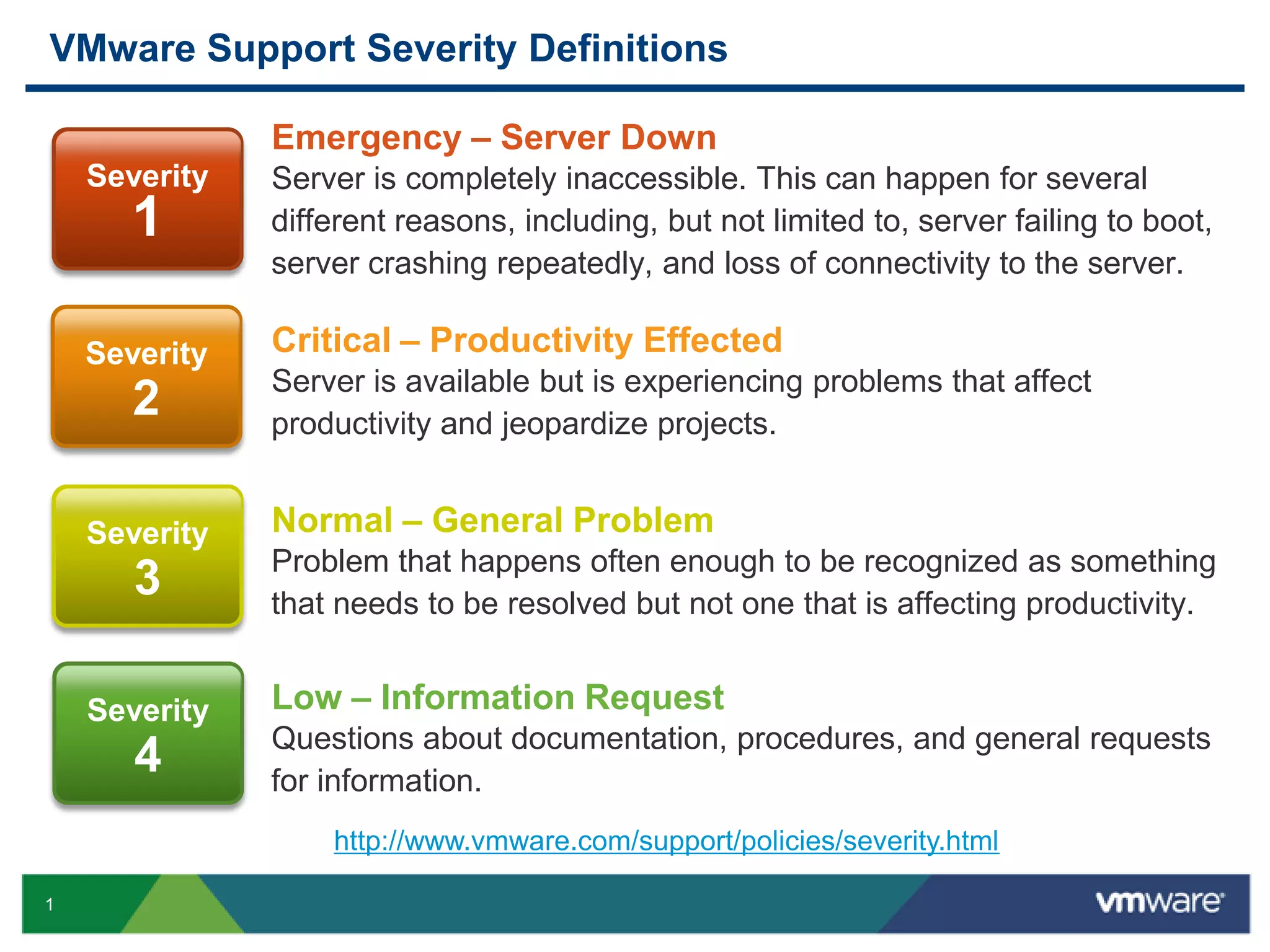
               Emergency – Server Down
    Severity   Server is completely inaccessible. This can happen for several
       1       different reasons, including, but not limited to, server failing to boot,
               server crashing repeatedly, and loss of connectivity to the server.

           1
    Severity   Critical – Productivity Effected
               Server is available but is experiencing problems that affect
       2       productivity and jeopardize projects.


    Severity   Normal – General Problem
               Problem that happens often enough to be recognized as something
       3       that needs to be resolved but not one that is affecting productivity.


    Severity   Low – Information Request
               Questions about documentation, procedures, and general requests
       4       for information.
                   http://www.vmware.com/support/policies/severity.html

1
VMware Support Offerings


                                                                              MISSION
                                                           BUSINESS           CRITICAL
                                        PRODUCTION         CRITICAL           SUPPORT
                     BASIC SUPPORT       SUPPORT           SUPPORT
                                                                           Assigned Account
    SELF HELP          Subscription                                        Management
    Knowledgebase                       Faster Target     Shared Account
                       Web Support      Response Times    Management       Senior TSE Team
    Communities        Unlimited SRs                                       Enhanced
                                        After Hours       Designated TSE
    Documentation      Basic Target     Support (Sev 1)   Team             Response Targets
    Social Support     Response Times                                      Onsite Support
                       Phone Support                                       Priority Queuing


2
VMware Support Offering Matrix
                                   Feature                  Mission Critical      Business Critical     Production            Basic

      Help      Knowledgebase, Documentation, Communities          YES                   YES                 YES                YES

Subscription    Upgrades & Updates                                 YES                   YES                 YES                YES

                Support Requests                                 Unlimited            Unlimited           Unlimited          Unlimited

                Support Channels                                Live & Web            Live & Web          Live & Web       Callback & Web

                Response Targets                                MCS (24x7)         Production (24x7)   Production (24x7)    Basic (12x5)

                24 x 7 Response – Sev 1                        YES (30 min)          YES (30 min)        YES (30 min)            -

                Weekend Response – Sev 2                      YES (2 hr--12x7)             -                   -                 -
    Reactive
                Priority Queue                                     YES                     -                   -                 -
    Support
                Senior Support Team                                YES                   YES                   -                 -

                # of Support Administrators                     Unlimited*                6                   6                  4

                Coverage                                    Geography or Global    Data Center Team            -                 -

                Root Cause Analysis                                YES                   YES                   -                 -

                Onsite Escalation Support                          YES                     -                   -                 -

                Support Account Manager                            YES             Provided by TSE             -                 -

                Customized Support Plan                            YES                   YES                   -                 -

                Regular Support Meetings                           YES                   YES                   -                 -

                Support Request Reporting                          YES                     -                   -                 -

                Support Trend Analysis                             YES                     -                   -                 -
    Proactive
     Support    Quarterly Business Reviews                         YES                     -                   -                 -

                Environment Best Practices                     Discussions           Discussions               -                 -

                Proactive Onsite                                   YES                     -                   -                 -

                Environment Inventory                              YES                     -                   -                 -

                Product Updates, Features                      Discussions                 -                   -                 -


3
Core Support Service Levels


                                    Production                   Basic

                              Sev 1: 30 minutes         Sev 1: 4 business hrs.
                              Sev 2: 4 business hrs.    Sev 2: 8 business hrs.
      Response Time           Sev 3: 8 business hrs.    Sev 3: 12 business hrs.
                              Sev 4: 12 business hrs.   Sev 4: 12 business hrs.

      Access                       Web and phone             Web and phone

                                        7x24                    Mon – Fri
      Hours                          (Sev 1 only)              6 am – 6 pm

      Maximum # or requests           Unlimited                 Unlimited


      Products                   All VMware products       All VMware products

                                   Product updates           Product updates
      Software maintenance          and upgrades              and upgrades

      Named contacts                       6                         4


4
Mission Critical Support Key Features/Benefits

    Designed for large, global customers with requirements for fast, senior-level
          technical response, and proactive account management services.

                                                               Reactive Support             Support Response
            Coverage              Support Administrators
                                                                  Coverage                      Targets

      Geography(Americas,             Unlimited Support     Severity 1: 24 x 7 Global    Severity 1: 30 min
       EMEA or APAC)                   Administrators per     Team routing                 Severity 2:
      Global (Americas,               contracted region     Severity 2: 12 x 7 Local      2 business hours (12 x 7)
       EMEA and APAC)                                         Team routing – Weekend       Severity 3:
                                                              Business Hours                4 business hours (12 x 5)
                                                             Severity 3 & 4 : 12 x 5 –
                                                                                           Severity 4:
                                                              Local Team Routing
                                                                                            8 business hours (12 x 5)


                                       Senior-level
        Priority Queuing                                    Account Management                Onsite Support
                                     Support Routing

     Priority treatment in case    Senior team of TSEs      Shared or Dedicated          SAM Proactive Onsite
     management and phone          All products (except      Support Account               Service and/or Escalation
        support queues to           SpringSource, Zimbra,     Manager (SAM: 1 or 4          Support
    help ensure rapid response      Workstation, Fusion,      slices – 5 Slices Total)     5 per days Region MCS
                                    Player)                  Remote Account                contract up to 15 days
                                                              Management Services           per Global MCS contract
                                                             Proactive planning,
                                                              coordination and
                                                              communications


5
Self Service Tools

              Knowledge base articles
               kb.vmware.com

              Access to patches and downloads
               www.vmware.com/downloads

              Documentation, release notes and white papers
               www.vmware.com/support/pubs

              Discussion forums
               www.vmware.com/community
              Account, license and contract management portals
               www.vmware.com/account

              RSS feeds
               vmware.simplefeed.net/subscription

              KBTV technical support videos
               http://blogs.vmware.com/kbtv

              Request technical support –
               http://www.vmware.com/support/contacts/file-sr.html


6
Important Links


7

Hdr

  • 1.
    VMware Support SeverityDefinitions Emergency – Server Down Severity Server is completely inaccessible. This can happen for several 1 different reasons, including, but not limited to, server failing to boot, server crashing repeatedly, and loss of connectivity to the server. 1 Severity Critical – Productivity Effected Server is available but is experiencing problems that affect 2 productivity and jeopardize projects. Severity Normal – General Problem Problem that happens often enough to be recognized as something 3 that needs to be resolved but not one that is affecting productivity. Severity Low – Information Request Questions about documentation, procedures, and general requests 4 for information. http://www.vmware.com/support/policies/severity.html 1
  • 2.
    VMware Support Offerings MISSION BUSINESS CRITICAL PRODUCTION CRITICAL SUPPORT BASIC SUPPORT SUPPORT SUPPORT Assigned Account SELF HELP Subscription Management Knowledgebase Faster Target Shared Account Web Support Response Times Management Senior TSE Team Communities Unlimited SRs Enhanced After Hours Designated TSE Documentation Basic Target Support (Sev 1) Team Response Targets Social Support Response Times Onsite Support Phone Support Priority Queuing 2
  • 3.
    VMware Support OfferingMatrix Feature Mission Critical Business Critical Production Basic Help Knowledgebase, Documentation, Communities YES YES YES YES Subscription Upgrades & Updates YES YES YES YES Support Requests Unlimited Unlimited Unlimited Unlimited Support Channels Live & Web Live & Web Live & Web Callback & Web Response Targets MCS (24x7) Production (24x7) Production (24x7) Basic (12x5) 24 x 7 Response – Sev 1 YES (30 min) YES (30 min) YES (30 min) - Weekend Response – Sev 2 YES (2 hr--12x7) - - - Reactive Priority Queue YES - - - Support Senior Support Team YES YES - - # of Support Administrators Unlimited* 6 6 4 Coverage Geography or Global Data Center Team - - Root Cause Analysis YES YES - - Onsite Escalation Support YES - - - Support Account Manager YES Provided by TSE - - Customized Support Plan YES YES - - Regular Support Meetings YES YES - - Support Request Reporting YES - - - Support Trend Analysis YES - - - Proactive Support Quarterly Business Reviews YES - - - Environment Best Practices Discussions Discussions - - Proactive Onsite YES - - - Environment Inventory YES - - - Product Updates, Features Discussions - - - 3
  • 4.
    Core Support ServiceLevels Production Basic Sev 1: 30 minutes Sev 1: 4 business hrs. Sev 2: 4 business hrs. Sev 2: 8 business hrs. Response Time Sev 3: 8 business hrs. Sev 3: 12 business hrs. Sev 4: 12 business hrs. Sev 4: 12 business hrs. Access Web and phone Web and phone 7x24 Mon – Fri Hours (Sev 1 only) 6 am – 6 pm Maximum # or requests Unlimited Unlimited Products All VMware products All VMware products Product updates Product updates Software maintenance and upgrades and upgrades Named contacts 6 4 4
  • 5.
    Mission Critical SupportKey Features/Benefits Designed for large, global customers with requirements for fast, senior-level technical response, and proactive account management services. Reactive Support Support Response Coverage Support Administrators Coverage Targets  Geography(Americas, Unlimited Support  Severity 1: 24 x 7 Global  Severity 1: 30 min EMEA or APAC) Administrators per Team routing  Severity 2:  Global (Americas, contracted region  Severity 2: 12 x 7 Local 2 business hours (12 x 7) EMEA and APAC) Team routing – Weekend  Severity 3: Business Hours 4 business hours (12 x 5)  Severity 3 & 4 : 12 x 5 –  Severity 4: Local Team Routing 8 business hours (12 x 5) Senior-level Priority Queuing Account Management Onsite Support Support Routing Priority treatment in case  Senior team of TSEs  Shared or Dedicated  SAM Proactive Onsite management and phone  All products (except Support Account Service and/or Escalation support queues to SpringSource, Zimbra, Manager (SAM: 1 or 4 Support help ensure rapid response Workstation, Fusion, slices – 5 Slices Total)  5 per days Region MCS Player)  Remote Account contract up to 15 days Management Services per Global MCS contract  Proactive planning, coordination and communications 5
  • 6.
    Self Service Tools  Knowledge base articles kb.vmware.com  Access to patches and downloads www.vmware.com/downloads  Documentation, release notes and white papers www.vmware.com/support/pubs  Discussion forums www.vmware.com/community  Account, license and contract management portals www.vmware.com/account  RSS feeds vmware.simplefeed.net/subscription  KBTV technical support videos http://blogs.vmware.com/kbtv  Request technical support – http://www.vmware.com/support/contacts/file-sr.html 6
  • 7.

Editor's Notes

  • #2 We have 4 support severity levels at VMware.
  • #4 We offer a variety of support programs to meet the varied needs of our customers. If you think about it for a moment, we have an incredibly broad product line, with a diverse user population – all the way from individual consumers using VMware Fusion on their Mac to developers who are using VMware Workstation to test out various editions of their code, to such mission-critical customers like AstraZeneca using VMware products in their production environment. On the consumer and single user end, we provide per incident and self help support for products like Fusion, VMware Server and VMware Workstation.As you move up the continuum from development to production environments, we offer Basic Support for development and non-production environments. This program provides business day support as well as updates and upgrades.Once you get into production environments, VMware Production Support provides 24x7 Support and faster target response time as well as updates and upgrades. And when you have business-critical applications using VMware, we recommend VMware Business Critical Support, which provides personalized, proactive customer support. VMwareMission Critical Support is designed for customers who need access to senior-level, proactive support staff to keep their virtual infrastructures up and running 24x7.And our Professional Services organization can help with your training and consulting needs, including a Technical Account Manager to help with your future planning of VMware products. When you get into the large-scale deployments, we recommendMission Critical Support, which I’d like to tell you more about.
  • #5 Just to give you a quick reference as to the differences between the core support offerings, here’s a comparison chart.Remember, BCS and MCS are add-ons to Production Support.Production Support is our production environment offering that provides 24x7 support for severity 1 issues, as well as quick response times.Basic Support is our development/lab/test environment offering, providing business day support for all severities and a target response time that is not as aggressive as Production Support.Basic Support is available Monday-Friday from 6am to 6pm: local time in North America and Latin America, PST/PDT in Alaska and Hawaii, and EST/EDT in South America. In addition, Basic Support is provided in:Europe, Middle East, Africa (EMEA) from 7 a.m. to 7 p.m. (GMT/GMT+1)Asia, Pacific Rim, Japan (APJ) from 8:30 a.m. to 8:30 p.m. (Singapore Time)Australia/New Zealand from 7 a.m. to 7 p.m. (Sydney AET)We also offer the SDK Support Program for vSphere.
  • #6 Key Mission Critical benefits include: Priority Access to senior-level Technical Support Engineers provides expert assistance and speeds issue resolution. Proactive account management helps identify trends, streamline escalations, and coordinate third-party relationships. Aggressive target response times help minimize downtime. Global, 24x7 support for Severity 1 issues provides around-the-clock help. Additional business-hours weekend coverage to address Severity 2 issues.
  • #8 Now let’s open it up for questions…