A Project Report On
HDFC BANK
Case Study submitted in partial fulfilment of the requirements for the degree
Of
BACHELORS OF TECHNOLOGY
In
COMPUTER SCIENCE AND ENGINEERING
Submitted by
NAVJEET KAJAL (11701536)
K17CF
Under the esteemed guidance of
Mr. Sudhanshu Prakash Tiwari
School of Computer Science and Engineering
Lovely Professional University
Phagwara, Punjab (India)
October 2018
DECLARATION STATEMENT
I hereby declare that the work reported in the case study entitled “HDFC BANK” in
partial fulfilment of the requirement for the award of Degree for Bachelors of Technology in
Computer Science and Engineering at Lovely Professional University, Phagwara, Punjab is an
authentic work carried out under the guidance of Mr. Sudhanshu Prakash Tiwari Singh.
PLACE: Lovely Professional NAME OF STUDENTS (REG NO):
University, Phagwara Navjeet Kajal (11701536)
DATE: October 2018 ROLL NO- 07
ACKNOWLEDGEMENT
At the outset, we thank God almighty for making our endeavour a success.
I would like to express my gratitude to all those who gave me the possibility to complete this
project. I want to thank the Department of Computer Science and Engineering for giving me
such a golden opportunity to commence this project in the first instance. I express my sincere
gratitude to the “Mr. Sudhanshu Prakash Tiwari” for his support without which the successful
completion of this term paper would not have been possible and who encouraged us to go ahead
with our project.
Our seniors from the Computer Science and Engineering Department supported me in my project
work. I want to thank them for all their help, support, interest and valuable hints, who looked
closely at the final version of the report for English style and grammar, correcting both and
offering suggestions for improvement.
Especially, I would like to give my special thanks to my parents whose patience , love enabled
me to complete this work. And at last but not the least i would like to thank God for the
successful completion of my project.
TABLE OF CONTENT
1. INTRODUCTION.........................................................................................
1.1 PURPOSE............................................................................................
1.2 SCOPE.................................................................................................
1.3 OVERVIEW.......................................................................................
1.4 ADDITIONAL INFORMATION...........................................................................................
2. GENERAL DESCRIPTION...............................................................
3. FUNCTIONAL SPECIFICATIONS....................................................
3.1 LOGIN.....................................................
3.2 VALIDATION................................
3.3 PAYMENT OF MONEY............................................................
3.4 TRANSFER OF MONEY.......................................................
3.5 TRANSACTION OF REPORT..........................................................
4. INTERFACE REQUIREMENTS.................................................................
4.1 GUI.........................................................
4.2 HARDWARE INTERFACE.............................................
4.3 SOFTWARE INTERFACE.........................................
5. PERFORMANCE REQUIREMNETS...............................................
6. CONSTRAINTS.......................................................
7. PERFORMANCE...........................................
7.1 SECURITY.....................................................................................
7.2 RELIABILITY.................................................................................
7.3 AVAILABILITY........................................................................
7.4 MAINTAINABILITY...................................................................
7.5 PORTABILITY...................................................................
8. DEFINITIONS........................................................
9. DATA FLOW DIAGRAM............................................................................
10. USE CASE DIAGRAM...................................................................................
11. TEST CASES....................................................................................................
1. INTRODUCTON:-
The Housing Development Finance Corporation Limited (HDFC) was amongst the first to
receive an 'in principle' approval from the Reserve Bank of India (RBI) to set up a
bank in the private sector, as a part of the RBI’s liberation of the Indian Banking
Industry in 1994. The bank was incorporated in August 1994 in the name of 'HDFC
Bank Limited', with its registered office in Mumbai, India. HDFC Bank commenced operations
as a Scheduled Commercial Bank in January 1995.
This document gives detailed functional and non-functional requirements for the HDFC-bank
management system. This product will support online banking transaction. The purpose of this
document is that the requirements mentioned in it should be utilized by software developer to
implement the system.
1.1 PURPOSE:-
HDFC-Online banking system provides is specifically developed for internet banking for
Balance Enquiry, Funds Transfer to another account in the same bank, Request for cheque
book/change of address/stop payment of cheques, Mini statements (Viewing Monthly and annual
statements).
The Traditional way of maintaining details of a user in a bank was to enter the details and record
them. Every time the user need to perform some transactions he has to go to bank and perform
the necessary actions, which may not be so feasible all the time. It may be a hard-hitting task for
the users and the bankers too. The project gives real life understanding of Internet banking and
activities performed by various roles in the supply chain. Here, we (HDFC) provide an
automation for banking system through Internet. Internet banking system project captures.
Activities performed by different roles in real life banking which provides enhanced techniques
for maintaining the required in- formation up-to-date, which results in efficiency. The project
gives real life understanding of Internet banking and activities performed by various roles in the
supply chain.
1.2 SCOPE:-
This Product will automate of banking transaction process. This Project investigates the entry
threshold for providing a new transaction service channel via the real options approach,
where the entry threshold is established by using an Internet banking system designed for the
use of normal users(individuals), Industrialists, Entrepreneurs, Educational Institutions(Financial
sections), Organizations and Academicians under transaction rate uncertainty.
1.3 OVERVIEW:-
The system provides easy solution to banks.
Overview: The SRS will include two sections, namely:
Overall Description: This section will describe major components of the system,
interconnections, and external interfaces.
Specific Requirements: This section will describe the functions of actors, their roles in the
system and the constraints faced by sys- tem.
2. GENERAL DESCRIPTION:-
2.1 PRODUCT PERSPECTION:-
The client will have client interface in which he can interact with the banking system. It is a web
based interface which will be the web page of the banking application. Starting a page is
displayed asking the type of customer he is whether ordinary or a corporate customer. Then
the page is redirected to login page where the user can enter the login details. If the login
particulars are valid then the user is taken to a home page where he has the entire transaction list
that he can perform with the bank. All the above activities come under the client interface.
The administrator will have an administrative interface which is a GUI so that he can view
the entire system. He will also have a login page where he can enter the login particulars so
that he can perform all his actions. This administrative interface provides different
environment such that he can maintain data- base & provide backups for the information in the
database. He can register the users by providing them with username, password & by creating
account in the database. He can view the cheque book request & perform action to issue the
cheque books to the clients.
2.2 SOFTWARE INERFACE:-
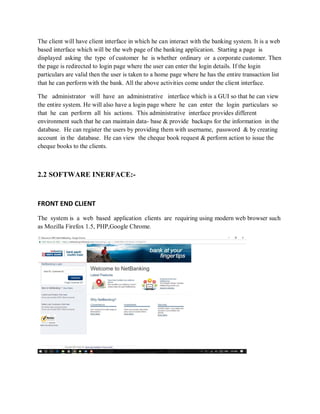
FRONT END CLIENT
The system is a web based application clients are requiring using modern web browser such
as Mozilla Firefox 1.5, PHP,Google Chrome.
* WEB SERVER:
The web application will be hosted on one of the apache server.
* BACK END:
We use backend as MY SQL.
3. FUNCTIONAL SPECIFICATION:-
This section provides the functional overview of the product. The project will require the PHP as
a front end and at the back end the database MYSQL will be running. Various functional
modules that can be implemented by the product will be
1. Login
2. Validation
3. Get balance information
4. Withdrawal of money
5. Transfer Money
6. Customer info.
3.1 Login:
Customer logins by entering a valid user-id & a password for net banking.
3.2 Validation:
When a customer enters the ATM card, its validity must be ensured. Then customer is allowed to
enter the valid PIN. The validation can be for following conditions
Validation for lost or stolen card
When card is already reported as lost or stolen then the message “Lost/Stolen card!!!”.
Validation for card’s expiry date
If the card inserted by the customer has crossed the expiry date then the system will prompt
“Expired Card”.
Validation for PIN :
After validating the card, the validity of PIN must be ensured. If he/she fails to enter valid code
for three times then the card will not be returned to him. That means the account can be locked.
The counter for number of logins must be maintained
Get balance information:
This system must be networked to the bank’s computer. The updated
database of every customer is maintained with bank. Hence the balance information of every
account is available in the database and can be displayed to the customer.
3.3 Payment of Money:
A customer is allowed to enter the amount which he/she wishes to withdraw. If the entered
amount is less than the available balance and if after withdraw if the minimum required balance
is maintained then allow the transaction.
3.4 Transfer of Money:
The customer can deposit or transfer the desired amount of money.
3.5 Transaction Report:
The bank statement showing credit and debit information of corresponding account must be
printed by the machine.
3.6 Technical Issues
This product will work on client-server architecture. It will require an internet server and which
will be able to run PHP applications. The product should support some commonly used browsers
such as Internet Explorer, Mozilla Firefox.
4. Interface Requirements
4.1 GUI
This is interface must be highly intuitive or interactive because there will not be an assistance for
the user who is operating the System. At most of the places help desk should be provided for
users convenience. The screens appearing should be designed in such a manner that it can draw
User attaraction towards the new plans for the customers.
Also the pin and password confidentiality should be maintained,
This can be done by using asterisks at the password panel.
Proper security messages should be displayed at most of the places.
4.2 Hardware Interface
Various interfaces for the product could be
1. Touch screen/Monitor
2. Keypad
3. Continuous battery backup
4. Printer which can produce the hard copy.
5. Interface that connects the device to bank’s computer.
6. An interface that can count currency notes.
4.3 Software Interface
1. Any windows and mac operating system.
2. The PHP must be installed. For the database handling MYSQL must be installed. These
products are open source products.
3. The final application must be packaged in a set up program, so that the products can be easily
installed on machines. This application must be networked to corresponding banks.
5. PERFORMANCE REQUIREMENTS:-
The system should be compatible enough to hold the general traffic .
It should not get hang or show some other problems arising out due to large no of concurrent
users . The system should be fast enough to meet the customer The high and low temperature
should not affect the performance of the device. An uninterrupted transaction must be performed.
6. CONSTRAINTS:-
* The information of all the users must be stored in a database that is accessible by the Online
Banking System.
* The Online Banking System is connected to the computer and is running all 24hours a day.
* The users access the Online Banking System from any computer that has Internet
browsing capabilities and an Internet connection.
*The users must have their correct usernames and passwords to enter into the Online Banking
System.
Design Constraints:
* Software Language Used
The languages that shall be used for coding Online Banking System are c , c++ , java , and
HTML. For working on the coding phase of the Online job portal System Web Sphere
Application Server/WebSphere Application Server CE Server needs to be installed.
*Database design
In our HDFC BANK database design, we give names to data flows, processes and data stores.
Although the names are descriptive of data, they do not give details .So following DFD, our
interest is to build some details of the contents of data flows, processes and data store. A data
dictionary is a structured repository of data about data .It is a set of rigorous definitions of all
DFD data elements and data structures .
7. PERFORMANCE
7.1 Security
The banking system must be fully accessible to only authentic user.
It should require pin for entry to a new environment.
7.2 Reliability
The application should be highly reliable and it should generate all the updated information in
correct order.
7.3 Availability
Any information about the account should be quickly available from any computer to the
authorized user. The previously visited customer’s data must not be cleared.
7.4 Maintainability
The application should be maintainable in such a manner that if any new requirement occurs then
it should be easily incorporated in an individual module.
7.5 Portability
The application should be portable on any windows based system. It should not be machine
specific.
8. DEFINITIONS:-
 Account
A single account in a bank against which transactions can be applied. Accounts may be of various types
with at least checking and savings. A customer can hold more than one account.
 ATM
A station that allows customers to enter their own transactions using cash cards as identification. The
ATM interacts with the customer to gather transaction information, sends the transaction information to
the central computer for validation and processing, and dispenses cash to the customer. We assume that
an ATM need not operate independently of the network.
 Bank
A financial institution that holds accounts for customers and that issues cash cards authorizing access to
accounts over the ATM network.
 Bank computer
The computer owned by a bank that interfaces with the ATM network and the bank’s own cashier
stations. A bank may actually have its own internal network of computers to process accounts, but we are
only concerned with the one that interacts with the network.
 Cash Card
A card assigned to a bank customer that authorizes access to accounts using an ATM Machine. Each card
contains a bank code and a card number, coded in accordance with national standards on credit cards and
cash cards. The bank code uniquely identifies the bank within the consortium. The card number
determines the accounts that the card can access. A card does not necessarily access all of a customer’s
accounts. Each cash card is owned by a single customer, but multiple copies of it may exist, so the
possibility of simultaneous use of the same card from different machines must be considered.
 Customer
The holder of one or more accounts in a bank. A customer can consist of one or more persons or
corporations, the correspondence is not relevant to this problem. The same person holding an account at a
different bank is considered a different customer.
 Transaction
A single integral request for operations on the accounts of a single customer. We only specified that
ATMs must dispense cash, but we should not preclude the possibility of printing checks or accepting cash
or checks. We may also want to provide the flexibility to operate on accounts of different customers,
although it is not required yet. The different operations must balance properly.
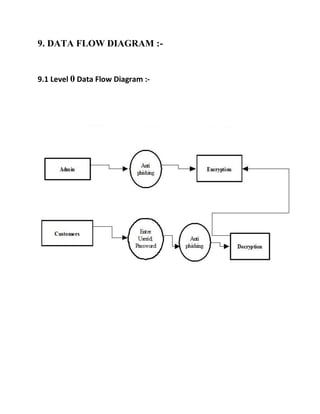
9. DATA FLOW DIAGRAM :-
9.1 Level 0 Data Flow Diagram :-
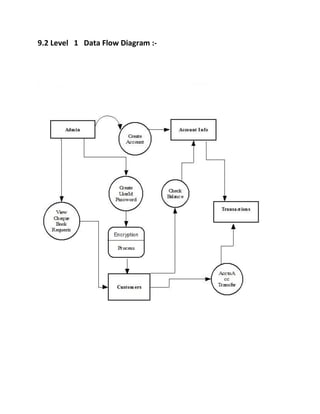
9.2 Level 1 Data Flow Diagram :-
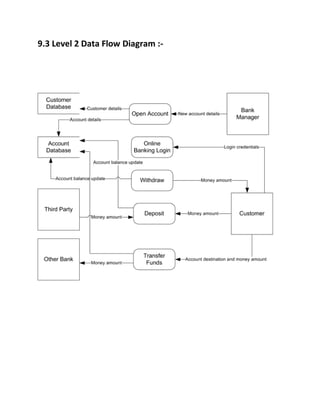
9.3 Level 2 Data Flow Diagram :-
10. USE CASE DIAGRAM :-
10.1 Customer and Manager Use Case Diagram
10.2 Admin and User Use Case Diagram
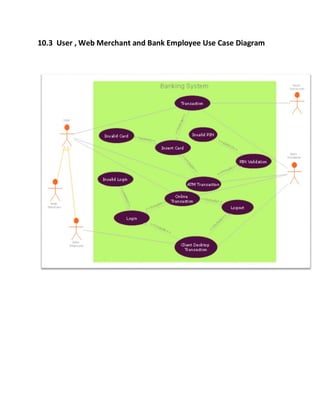
10.3 User , Web Merchant and Bank Employee Use Case Diagram
Class Diagram of HDFC Banking System
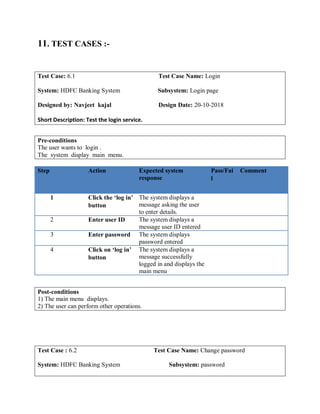
11. TEST CASES :-
Test Case: 6.1 Test Case Name: Login
System: HDFC Banking System Subsystem: Login page
Designed by: Navjeet kajal Design Date: 20-10-2018
Short Description: Test the login service.
Pre-conditions
The user wants to login .
The system display main menu.
Step Action Expected system
response
Pass/Fai
l
Comment
1 Click the ‘log in’
button
The system displays a
message asking the user
to enter details.
2 Enter user ID The system displays a
message user ID entered
3 Enter password The system displays
password entered
4 Click on ‘log in’
button
The system displays a
message successfully
logged in and displays the
main menu
Post-conditions
1) The main menu displays.
2) The user can perform other operations.
Test Case : 6.2 Test Case Name: Change password
System: HDFC Banking System Subsystem: password
Designed by: Navjeet kajal Design Date: 20-10-2018
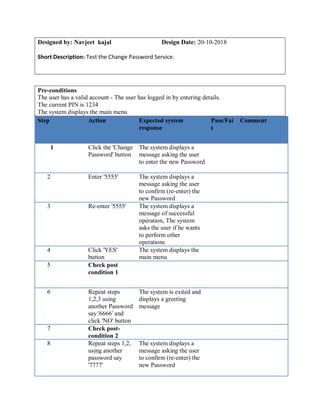
Short Description: Test the Change Password Service.
Pre-conditions
The user has a valid account - The user has logged in by entering details.
The current PIN is 1234
The system displays the main menu
Step Action Expected system
response
Pass/Fai
l
Comment
1 Click the 'Change
Password' button
The system displays a
message asking the user
to enter the new Password
2 Enter '5555' The system displays a
message asking the user
to confirm (re-enter) the
new Password
3 Re-enter '5555' The system displays a
message of successful
operation, The system
asks the user if he wants
to perform other
operations
4 Click 'YES'
button
The system displays the
main menu
5 Check post
condition 1
6 Repeat steps
1,2,3 using
another Password
say '6666' and
click 'NO' button
The system is exited and
displays a greeting
message
7 Check post-
condition 2
8 Repeat steps 1,2,
using another
password say
'7777'
The system displays a
message asking the user
to confirm (re-enter) the
new Password
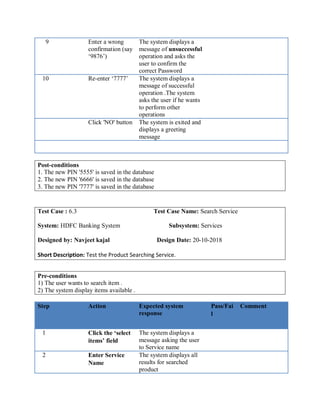
9 Enter a wrong
confirmation (say
‘9876’)
The system displays a
message of unsuccessful
operation and asks the
user to confirm the
correct Password
10 Re-enter ‘7777’ The system displays a
message of successful
operation .The system
asks the user if he wants
to perform other
operations
Click 'NO' button The system is exited and
displays a greeting
message
Post-conditions
1. The new PIN '5555' is saved in the database
2. The new PIN '6666' is saved in the database
3. The new PIN '7777' is saved in the database
Test Case : 6.3 Test Case Name: Search Service
System: HDFC Banking System Subsystem: Services
Designed by: Navjeet kajal Design Date: 20-10-2018
Short Description: Test the Product Searching Service.
Pre-conditions
1) The user wants to search item .
2) The system display items available .
Step Action Expected system
response
Pass/Fai
l
Comment
1 Click the ‘select
items’ field
The system displays a
message asking the user
to Service name
2 Enter Service
Name
The system displays all
results for searched
product
3 Select the
Service
The system displays a
message item selected.
Post-condition
1) The user select service.
2) The selected service displays on screen.
Test Case : 6.4 Test Case Name: verify details
System: HDFC Banking System Subsystem: details
Designed by: Navjeet kajal Design Date: 20-10-2018
Short Description: Test the detail verifying Service.
Pre-conditions
1) The user wants to search services.
2) The system display services available.
Step Action Expected system
response
Pass/Fai
l
Comment
1 Enter account
holder’s name
The system displays a
message name entered
and ask users to enter
Account number
2 Enter card
number=012234
777
The system displays a
message card number
entered and ask users to
enter password
3 Enter
Password=1234
The system displays a
message password
entered and enter amount.
4 Repeat step
1,2,3 using
invalid account
number or
password
The system display a
message that account
number or password is
incorrect , try again.
Post-condition
1) The user’s account number is 012234777
2) The user’s password is 1234
Test Case : 6.5 Test Case Name: Loan Service
System: HDFC Banking System Subsystem: Service
Designed by: Navjeet kajal Design Date: 20-10-2018
Short Description: Test the Loan Service
Pre-conditions
The Customer want to keep a check on items detail
The system will display options regarding Loan
Step Action Expected system
response
Pass/Fai
l
Comment
1 Click the ‘Loan’
button
The system displays a
message asking the user
to select option
2 Select ‘Pesonal
loan’ option
The system displays a
Procedure of personal
loan
3 Click ‘Time
Duration’
button
The system displays the
customer details of the
Time duration he can get
4 Click ‘2 Yrs’
option
The system displays the
interest.
5 Click ‘Get
Loan’ option
The system display that
you got personal loan for
2 yrs.
Post-Condition
1) The number of Loans Get is 1.
2) The time duration of loan is 2 yrs.
Test Case : 6.6 Test Case Name: logout account
System: HDFC Banking System Subsystem: Logout
Designed by: Navjeet kajal Design Date: 20-10-2018
Short Description: Test the logout service
Pre-conditions
The user got the loan and want to logout
The system will display logout option
Step Action Expected system
response
Pass/Fai
l
Comment
1 Click the
‘Account ‘
button
The system displays a
message asking the user
to select option
2 Select logout
option
The system displays a
message that user want to
logout or not’
3 Click ‘yes’
button
The system displays a
message ‘you have
successfully logout
Post-conditions
1. The Customer have successfully logout.
Overview of HDFCBANK.COM

HDFC banking system SRS Document

  • 1.
    A Project ReportOn HDFC BANK Case Study submitted in partial fulfilment of the requirements for the degree Of BACHELORS OF TECHNOLOGY In COMPUTER SCIENCE AND ENGINEERING Submitted by NAVJEET KAJAL (11701536) K17CF Under the esteemed guidance of Mr. Sudhanshu Prakash Tiwari School of Computer Science and Engineering Lovely Professional University Phagwara, Punjab (India) October 2018
  • 2.
    DECLARATION STATEMENT I herebydeclare that the work reported in the case study entitled “HDFC BANK” in partial fulfilment of the requirement for the award of Degree for Bachelors of Technology in Computer Science and Engineering at Lovely Professional University, Phagwara, Punjab is an authentic work carried out under the guidance of Mr. Sudhanshu Prakash Tiwari Singh. PLACE: Lovely Professional NAME OF STUDENTS (REG NO): University, Phagwara Navjeet Kajal (11701536) DATE: October 2018 ROLL NO- 07
  • 3.
    ACKNOWLEDGEMENT At the outset,we thank God almighty for making our endeavour a success. I would like to express my gratitude to all those who gave me the possibility to complete this project. I want to thank the Department of Computer Science and Engineering for giving me such a golden opportunity to commence this project in the first instance. I express my sincere gratitude to the “Mr. Sudhanshu Prakash Tiwari” for his support without which the successful completion of this term paper would not have been possible and who encouraged us to go ahead with our project. Our seniors from the Computer Science and Engineering Department supported me in my project work. I want to thank them for all their help, support, interest and valuable hints, who looked closely at the final version of the report for English style and grammar, correcting both and offering suggestions for improvement. Especially, I would like to give my special thanks to my parents whose patience , love enabled me to complete this work. And at last but not the least i would like to thank God for the successful completion of my project.
  • 4.
    TABLE OF CONTENT 1.INTRODUCTION......................................................................................... 1.1 PURPOSE............................................................................................ 1.2 SCOPE................................................................................................. 1.3 OVERVIEW....................................................................................... 1.4 ADDITIONAL INFORMATION........................................................................................... 2. GENERAL DESCRIPTION............................................................... 3. FUNCTIONAL SPECIFICATIONS.................................................... 3.1 LOGIN..................................................... 3.2 VALIDATION................................ 3.3 PAYMENT OF MONEY............................................................ 3.4 TRANSFER OF MONEY....................................................... 3.5 TRANSACTION OF REPORT.......................................................... 4. INTERFACE REQUIREMENTS................................................................. 4.1 GUI......................................................... 4.2 HARDWARE INTERFACE............................................. 4.3 SOFTWARE INTERFACE......................................... 5. PERFORMANCE REQUIREMNETS............................................... 6. CONSTRAINTS.......................................................
  • 5.
    7. PERFORMANCE........................................... 7.1 SECURITY..................................................................................... 7.2RELIABILITY................................................................................. 7.3 AVAILABILITY........................................................................ 7.4 MAINTAINABILITY................................................................... 7.5 PORTABILITY................................................................... 8. DEFINITIONS........................................................ 9. DATA FLOW DIAGRAM............................................................................ 10. USE CASE DIAGRAM................................................................................... 11. TEST CASES....................................................................................................
  • 6.
    1. INTRODUCTON:- The HousingDevelopment Finance Corporation Limited (HDFC) was amongst the first to receive an 'in principle' approval from the Reserve Bank of India (RBI) to set up a bank in the private sector, as a part of the RBI’s liberation of the Indian Banking Industry in 1994. The bank was incorporated in August 1994 in the name of 'HDFC Bank Limited', with its registered office in Mumbai, India. HDFC Bank commenced operations as a Scheduled Commercial Bank in January 1995. This document gives detailed functional and non-functional requirements for the HDFC-bank management system. This product will support online banking transaction. The purpose of this document is that the requirements mentioned in it should be utilized by software developer to implement the system. 1.1 PURPOSE:- HDFC-Online banking system provides is specifically developed for internet banking for Balance Enquiry, Funds Transfer to another account in the same bank, Request for cheque book/change of address/stop payment of cheques, Mini statements (Viewing Monthly and annual statements). The Traditional way of maintaining details of a user in a bank was to enter the details and record them. Every time the user need to perform some transactions he has to go to bank and perform the necessary actions, which may not be so feasible all the time. It may be a hard-hitting task for the users and the bankers too. The project gives real life understanding of Internet banking and activities performed by various roles in the supply chain. Here, we (HDFC) provide an automation for banking system through Internet. Internet banking system project captures. Activities performed by different roles in real life banking which provides enhanced techniques for maintaining the required in- formation up-to-date, which results in efficiency. The project gives real life understanding of Internet banking and activities performed by various roles in the supply chain.
  • 7.
    1.2 SCOPE:- This Productwill automate of banking transaction process. This Project investigates the entry threshold for providing a new transaction service channel via the real options approach, where the entry threshold is established by using an Internet banking system designed for the use of normal users(individuals), Industrialists, Entrepreneurs, Educational Institutions(Financial sections), Organizations and Academicians under transaction rate uncertainty. 1.3 OVERVIEW:- The system provides easy solution to banks. Overview: The SRS will include two sections, namely: Overall Description: This section will describe major components of the system, interconnections, and external interfaces. Specific Requirements: This section will describe the functions of actors, their roles in the system and the constraints faced by sys- tem. 2. GENERAL DESCRIPTION:- 2.1 PRODUCT PERSPECTION:-
  • 8.
    The client willhave client interface in which he can interact with the banking system. It is a web based interface which will be the web page of the banking application. Starting a page is displayed asking the type of customer he is whether ordinary or a corporate customer. Then the page is redirected to login page where the user can enter the login details. If the login particulars are valid then the user is taken to a home page where he has the entire transaction list that he can perform with the bank. All the above activities come under the client interface. The administrator will have an administrative interface which is a GUI so that he can view the entire system. He will also have a login page where he can enter the login particulars so that he can perform all his actions. This administrative interface provides different environment such that he can maintain data- base & provide backups for the information in the database. He can register the users by providing them with username, password & by creating account in the database. He can view the cheque book request & perform action to issue the cheque books to the clients. 2.2 SOFTWARE INERFACE:- FRONT END CLIENT The system is a web based application clients are requiring using modern web browser such as Mozilla Firefox 1.5, PHP,Google Chrome.
  • 9.
    * WEB SERVER: Theweb application will be hosted on one of the apache server. * BACK END: We use backend as MY SQL. 3. FUNCTIONAL SPECIFICATION:- This section provides the functional overview of the product. The project will require the PHP as a front end and at the back end the database MYSQL will be running. Various functional modules that can be implemented by the product will be 1. Login 2. Validation 3. Get balance information 4. Withdrawal of money 5. Transfer Money
  • 10.
    6. Customer info. 3.1Login: Customer logins by entering a valid user-id & a password for net banking. 3.2 Validation:
  • 11.
    When a customerenters the ATM card, its validity must be ensured. Then customer is allowed to enter the valid PIN. The validation can be for following conditions Validation for lost or stolen card When card is already reported as lost or stolen then the message “Lost/Stolen card!!!”. Validation for card’s expiry date If the card inserted by the customer has crossed the expiry date then the system will prompt “Expired Card”. Validation for PIN : After validating the card, the validity of PIN must be ensured. If he/she fails to enter valid code for three times then the card will not be returned to him. That means the account can be locked. The counter for number of logins must be maintained Get balance information: This system must be networked to the bank’s computer. The updated database of every customer is maintained with bank. Hence the balance information of every account is available in the database and can be displayed to the customer. 3.3 Payment of Money: A customer is allowed to enter the amount which he/she wishes to withdraw. If the entered amount is less than the available balance and if after withdraw if the minimum required balance is maintained then allow the transaction.
  • 12.
    3.4 Transfer ofMoney: The customer can deposit or transfer the desired amount of money. 3.5 Transaction Report: The bank statement showing credit and debit information of corresponding account must be printed by the machine. 3.6 Technical Issues This product will work on client-server architecture. It will require an internet server and which will be able to run PHP applications. The product should support some commonly used browsers such as Internet Explorer, Mozilla Firefox. 4. Interface Requirements 4.1 GUI This is interface must be highly intuitive or interactive because there will not be an assistance for the user who is operating the System. At most of the places help desk should be provided for users convenience. The screens appearing should be designed in such a manner that it can draw User attaraction towards the new plans for the customers.
  • 13.
    Also the pinand password confidentiality should be maintained, This can be done by using asterisks at the password panel. Proper security messages should be displayed at most of the places. 4.2 Hardware Interface Various interfaces for the product could be 1. Touch screen/Monitor 2. Keypad 3. Continuous battery backup 4. Printer which can produce the hard copy. 5. Interface that connects the device to bank’s computer. 6. An interface that can count currency notes. 4.3 Software Interface 1. Any windows and mac operating system. 2. The PHP must be installed. For the database handling MYSQL must be installed. These products are open source products. 3. The final application must be packaged in a set up program, so that the products can be easily installed on machines. This application must be networked to corresponding banks.
  • 14.
    5. PERFORMANCE REQUIREMENTS:- Thesystem should be compatible enough to hold the general traffic . It should not get hang or show some other problems arising out due to large no of concurrent users . The system should be fast enough to meet the customer The high and low temperature should not affect the performance of the device. An uninterrupted transaction must be performed. 6. CONSTRAINTS:- * The information of all the users must be stored in a database that is accessible by the Online Banking System. * The Online Banking System is connected to the computer and is running all 24hours a day. * The users access the Online Banking System from any computer that has Internet browsing capabilities and an Internet connection. *The users must have their correct usernames and passwords to enter into the Online Banking System.
  • 15.
    Design Constraints: * SoftwareLanguage Used The languages that shall be used for coding Online Banking System are c , c++ , java , and HTML. For working on the coding phase of the Online job portal System Web Sphere Application Server/WebSphere Application Server CE Server needs to be installed. *Database design In our HDFC BANK database design, we give names to data flows, processes and data stores. Although the names are descriptive of data, they do not give details .So following DFD, our interest is to build some details of the contents of data flows, processes and data store. A data dictionary is a structured repository of data about data .It is a set of rigorous definitions of all DFD data elements and data structures . 7. PERFORMANCE 7.1 Security The banking system must be fully accessible to only authentic user. It should require pin for entry to a new environment.
  • 16.
    7.2 Reliability The applicationshould be highly reliable and it should generate all the updated information in correct order. 7.3 Availability Any information about the account should be quickly available from any computer to the authorized user. The previously visited customer’s data must not be cleared. 7.4 Maintainability The application should be maintainable in such a manner that if any new requirement occurs then it should be easily incorporated in an individual module. 7.5 Portability The application should be portable on any windows based system. It should not be machine specific. 8. DEFINITIONS:-  Account A single account in a bank against which transactions can be applied. Accounts may be of various types with at least checking and savings. A customer can hold more than one account.  ATM
  • 17.
    A station thatallows customers to enter their own transactions using cash cards as identification. The ATM interacts with the customer to gather transaction information, sends the transaction information to the central computer for validation and processing, and dispenses cash to the customer. We assume that an ATM need not operate independently of the network.  Bank A financial institution that holds accounts for customers and that issues cash cards authorizing access to accounts over the ATM network.  Bank computer The computer owned by a bank that interfaces with the ATM network and the bank’s own cashier stations. A bank may actually have its own internal network of computers to process accounts, but we are only concerned with the one that interacts with the network.  Cash Card A card assigned to a bank customer that authorizes access to accounts using an ATM Machine. Each card contains a bank code and a card number, coded in accordance with national standards on credit cards and cash cards. The bank code uniquely identifies the bank within the consortium. The card number determines the accounts that the card can access. A card does not necessarily access all of a customer’s accounts. Each cash card is owned by a single customer, but multiple copies of it may exist, so the possibility of simultaneous use of the same card from different machines must be considered.  Customer The holder of one or more accounts in a bank. A customer can consist of one or more persons or corporations, the correspondence is not relevant to this problem. The same person holding an account at a different bank is considered a different customer.  Transaction A single integral request for operations on the accounts of a single customer. We only specified that ATMs must dispense cash, but we should not preclude the possibility of printing checks or accepting cash or checks. We may also want to provide the flexibility to operate on accounts of different customers, although it is not required yet. The different operations must balance properly.
  • 18.
    9. DATA FLOWDIAGRAM :- 9.1 Level 0 Data Flow Diagram :-
  • 19.
    9.2 Level 1Data Flow Diagram :-
  • 20.
    9.3 Level 2Data Flow Diagram :-
  • 21.
    10. USE CASEDIAGRAM :- 10.1 Customer and Manager Use Case Diagram
  • 22.
    10.2 Admin andUser Use Case Diagram
  • 23.
    10.3 User ,Web Merchant and Bank Employee Use Case Diagram
  • 24.
    Class Diagram ofHDFC Banking System
  • 25.
    11. TEST CASES:- Test Case: 6.1 Test Case Name: Login System: HDFC Banking System Subsystem: Login page Designed by: Navjeet kajal Design Date: 20-10-2018 Short Description: Test the login service. Pre-conditions The user wants to login . The system display main menu. Step Action Expected system response Pass/Fai l Comment 1 Click the ‘log in’ button The system displays a message asking the user to enter details. 2 Enter user ID The system displays a message user ID entered 3 Enter password The system displays password entered 4 Click on ‘log in’ button The system displays a message successfully logged in and displays the main menu Post-conditions 1) The main menu displays. 2) The user can perform other operations. Test Case : 6.2 Test Case Name: Change password System: HDFC Banking System Subsystem: password
  • 26.
    Designed by: Navjeetkajal Design Date: 20-10-2018 Short Description: Test the Change Password Service. Pre-conditions The user has a valid account - The user has logged in by entering details. The current PIN is 1234 The system displays the main menu Step Action Expected system response Pass/Fai l Comment 1 Click the 'Change Password' button The system displays a message asking the user to enter the new Password 2 Enter '5555' The system displays a message asking the user to confirm (re-enter) the new Password 3 Re-enter '5555' The system displays a message of successful operation, The system asks the user if he wants to perform other operations 4 Click 'YES' button The system displays the main menu 5 Check post condition 1 6 Repeat steps 1,2,3 using another Password say '6666' and click 'NO' button The system is exited and displays a greeting message 7 Check post- condition 2 8 Repeat steps 1,2, using another password say '7777' The system displays a message asking the user to confirm (re-enter) the new Password
  • 27.
    9 Enter awrong confirmation (say ‘9876’) The system displays a message of unsuccessful operation and asks the user to confirm the correct Password 10 Re-enter ‘7777’ The system displays a message of successful operation .The system asks the user if he wants to perform other operations Click 'NO' button The system is exited and displays a greeting message Post-conditions 1. The new PIN '5555' is saved in the database 2. The new PIN '6666' is saved in the database 3. The new PIN '7777' is saved in the database Test Case : 6.3 Test Case Name: Search Service System: HDFC Banking System Subsystem: Services Designed by: Navjeet kajal Design Date: 20-10-2018 Short Description: Test the Product Searching Service. Pre-conditions 1) The user wants to search item . 2) The system display items available . Step Action Expected system response Pass/Fai l Comment 1 Click the ‘select items’ field The system displays a message asking the user to Service name 2 Enter Service Name The system displays all results for searched product
  • 28.
    3 Select the Service Thesystem displays a message item selected. Post-condition 1) The user select service. 2) The selected service displays on screen. Test Case : 6.4 Test Case Name: verify details System: HDFC Banking System Subsystem: details Designed by: Navjeet kajal Design Date: 20-10-2018 Short Description: Test the detail verifying Service. Pre-conditions 1) The user wants to search services. 2) The system display services available. Step Action Expected system response Pass/Fai l Comment 1 Enter account holder’s name The system displays a message name entered and ask users to enter Account number 2 Enter card number=012234 777 The system displays a message card number entered and ask users to enter password 3 Enter Password=1234 The system displays a message password entered and enter amount. 4 Repeat step 1,2,3 using invalid account number or password The system display a message that account number or password is incorrect , try again.
  • 29.
    Post-condition 1) The user’saccount number is 012234777 2) The user’s password is 1234 Test Case : 6.5 Test Case Name: Loan Service System: HDFC Banking System Subsystem: Service Designed by: Navjeet kajal Design Date: 20-10-2018 Short Description: Test the Loan Service Pre-conditions The Customer want to keep a check on items detail The system will display options regarding Loan Step Action Expected system response Pass/Fai l Comment 1 Click the ‘Loan’ button The system displays a message asking the user to select option 2 Select ‘Pesonal loan’ option The system displays a Procedure of personal loan 3 Click ‘Time Duration’ button The system displays the customer details of the Time duration he can get 4 Click ‘2 Yrs’ option The system displays the interest. 5 Click ‘Get Loan’ option The system display that you got personal loan for 2 yrs. Post-Condition
  • 30.
    1) The numberof Loans Get is 1. 2) The time duration of loan is 2 yrs. Test Case : 6.6 Test Case Name: logout account System: HDFC Banking System Subsystem: Logout Designed by: Navjeet kajal Design Date: 20-10-2018 Short Description: Test the logout service Pre-conditions The user got the loan and want to logout The system will display logout option Step Action Expected system response Pass/Fai l Comment 1 Click the ‘Account ‘ button The system displays a message asking the user to select option 2 Select logout option The system displays a message that user want to logout or not’ 3 Click ‘yes’ button The system displays a message ‘you have successfully logout Post-conditions 1. The Customer have successfully logout.
  • 31.