CS8079 - Human
Computer Interaction
UNIT - II
DESIGN & SOFTWARE PROCESS
Year: IV
Semester: VII
Date: 14-09-2020
Prepared by,
Mrs.T. SUGANYA, M.E.,
Topics
 HCI in Software Process
◦ Software Life Cycle
◦ Prototyping in Practice
◦ Design Rationale
◦ Usability Engineering
SDLC – Waterfall Model
 Waterfall Model provides a good starting
point for discussing the logical flow of
activity
1. Activities in the life cycle
2. Validation &Verification
3. Management & Contractual Issues
4. Interactive Systems & Software Life Cycle
SDLC – Waterfall Model
1. Activities in the life cycle
 Requirement Specification:
 What the system is supposed to do?
 Customer and designer involved
 Capture the description
 Elicit the information about the
Environment - in which it will function
 Formulate requirements in Language
suitable for development
SDLC – Waterfall Model
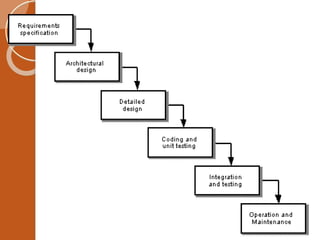
 Architectural Design:
◦ How the System Provides services?
◦ Decompose the system into components
◦ Determine which component for which service
 Detailed Design:
◦ Refinement of the component
◦ Choosing best refinement(optimization)
 Try to satisfy many of the non functional requirements
 Coding & UnitTesting
◦ Implement – Programming Language
◦ Test the components - Units
SDLC – Waterfall Model
 Integration &Testing
◦ Integrate the components described in
architectural design & test it
◦ AcceptanceTesting – Customer
◦ After acceptance, release the product
◦ Certify the final system
 Maintenance
◦ Correction of errors discovered after release
◦ Revise the requirements
SDLC – Waterfall Model
2.Verification &Validation
 Verification
 process of checking that a software achieves its
goal without any bugs.
 product that is developed is right or not
 Are we building the product right?
 Validation
 it satisfies all the customer's stated and implied
needs
 Are we building the right product?
SDLC – Waterfall Model
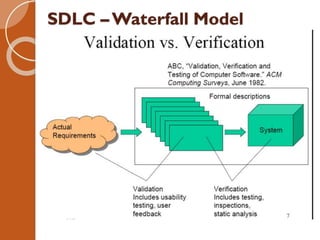
 Gap Analysis
◦ Need Abstract Model to bridge the gap
SDLC –Waterfall Model
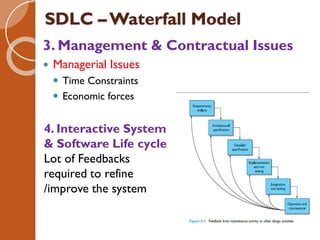
3. Management & Contractual Issues
 Managerial Issues
 Time Constraints
 Economic forces
4. Interactive System
& Software Life cycle
Lot of Feedbacks
required to refine
/improve the system
Prototyping in Practice
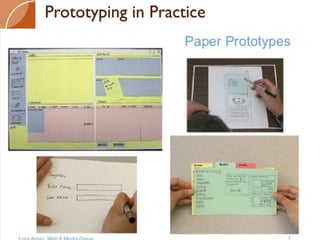
 Prototype Mock up or Model or draft version
 Iterative Design
◦ Overcomes the problem of incomplete
requirements specifications
◦ Process of designing a product in which the
product is tested and evaluated
repeatedly at different stages of design
◦ Incrementally improves final product
◦ Described by prototype
 3 Approaches
◦ Throw away
◦ Incremental
◦ Evolutionary
Prototyping in Practice
The process of prototyping involves the following steps
Identify basic requirements
• Determine basic requirements including the input and
output information desired. Details, such as security, can
typically be ignored.
2.Develop initial prototype
• The initial prototype is developed that includes only user
interfaces.
3. Review
• The customers, including end-users, examine the
prototype and provide feedback on potential additions
or changes.
4.Revise and enhance the prototype
• Using the feedback both the specifications and the
prototype can be improved.
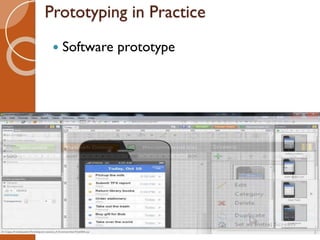
Prototyping in Practice
 Software prototype
Prototyping Approaches
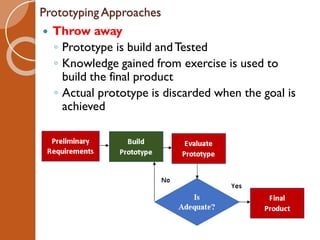
 Throw away
◦ Prototype is build andTested
◦ Knowledge gained from exercise is used to
build the final product
◦ Actual prototype is discarded when the goal is
achieved
Steps:
 Write preliminary requirements
 Design the prototype
 User experiences/uses the prototype,
specifies new requirements
 Repeat if necessary
 Write the final requirements
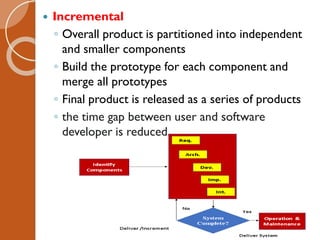
 Incremental
◦ Overall product is partitioned into independent
and smaller components
◦ Build the prototype for each component and
merge all prototypes
◦ Final product is released as a series of products
◦ the time gap between user and software
developer is reduced.
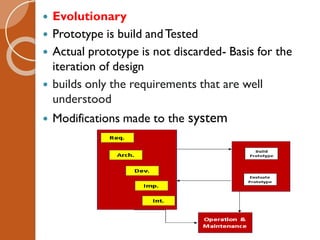
 Evolutionary
 Prototype is build andTested
 Actual prototype is not discarded- Basis for the
iteration of design
 builds only the requirements that are well
understood
 Modifications made to the system
Techniques &Tools for Prototyping
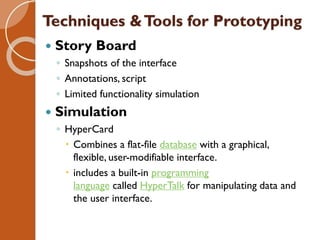
 Story Board
◦ Snapshots of the interface
◦ Annotations, script
◦ Limited functionality simulation
 Simulation
◦ HyperCard
 Combines a flat-file database with a graphical,
flexible, user-modifiable interface.
 includes a built-in programming
language called HyperTalk for manipulating data and
the user interface.
Design Rationale
 What?
◦ Information describes
 Structure of a system
 Functionality/Behavior of a system
 Types of DR:
◦ Process-oriented
 preserves order of deliberation and decision-
making
◦ Structure-oriented
 emphasizes post hoc structuring of considered
design alternatives
 Two examples:
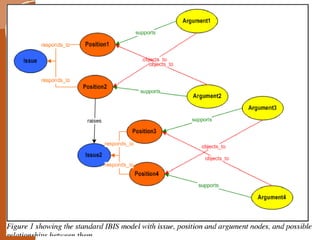
◦ Issue-based information system (IBIS)
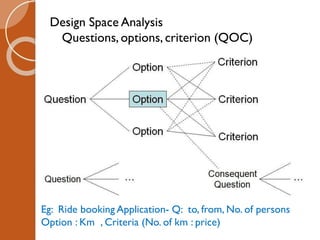
◦ Design space analysis
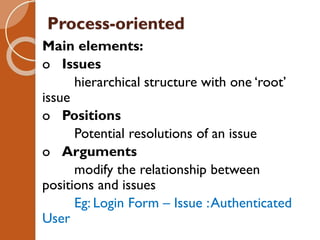
Process-oriented
Main elements:
o Issues
hierarchical structure with one ‘root’
issue
o Positions
Potential resolutions of an issue
o Arguments
modify the relationship between
positions and issues
Eg: Login Form – Issue :Authenticated
User
Design Space Analysis
Questions, options, criterion (QOC)
Eg: Ride booking Application- Q: to, from, No. of persons
Option : Km , Criteria (No. of km : price)
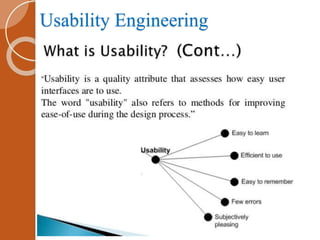
Usability Engineering
 What?
◦ is a professional discipline
◦ focuses on improving the usability of
interactive systems
◦ Usability
◦ capacity of a system to provide a condition for
its users to perform the tasks safely, effectively,
and efficiently
Usability Engineering
HCI U-II HCI software Process (1).pdf

HCI U-II HCI software Process (1).pdf

  • 1.
    CS8079 - Human ComputerInteraction UNIT - II DESIGN & SOFTWARE PROCESS Year: IV Semester: VII Date: 14-09-2020 Prepared by, Mrs.T. SUGANYA, M.E.,
  • 2.
    Topics  HCI inSoftware Process ◦ Software Life Cycle ◦ Prototyping in Practice ◦ Design Rationale ◦ Usability Engineering
  • 3.
    SDLC – WaterfallModel  Waterfall Model provides a good starting point for discussing the logical flow of activity 1. Activities in the life cycle 2. Validation &Verification 3. Management & Contractual Issues 4. Interactive Systems & Software Life Cycle
  • 4.
    SDLC – WaterfallModel 1. Activities in the life cycle  Requirement Specification:  What the system is supposed to do?  Customer and designer involved  Capture the description  Elicit the information about the Environment - in which it will function  Formulate requirements in Language suitable for development
  • 6.
    SDLC – WaterfallModel  Architectural Design: ◦ How the System Provides services? ◦ Decompose the system into components ◦ Determine which component for which service  Detailed Design: ◦ Refinement of the component ◦ Choosing best refinement(optimization)  Try to satisfy many of the non functional requirements  Coding & UnitTesting ◦ Implement – Programming Language ◦ Test the components - Units
  • 7.
    SDLC – WaterfallModel  Integration &Testing ◦ Integrate the components described in architectural design & test it ◦ AcceptanceTesting – Customer ◦ After acceptance, release the product ◦ Certify the final system  Maintenance ◦ Correction of errors discovered after release ◦ Revise the requirements
  • 8.
    SDLC – WaterfallModel 2.Verification &Validation  Verification  process of checking that a software achieves its goal without any bugs.  product that is developed is right or not  Are we building the product right?  Validation  it satisfies all the customer's stated and implied needs  Are we building the right product?
  • 9.
  • 10.
    SDLC – WaterfallModel  Gap Analysis ◦ Need Abstract Model to bridge the gap
  • 11.
    SDLC –Waterfall Model 3.Management & Contractual Issues  Managerial Issues  Time Constraints  Economic forces 4. Interactive System & Software Life cycle Lot of Feedbacks required to refine /improve the system
  • 12.
    Prototyping in Practice Prototype Mock up or Model or draft version  Iterative Design ◦ Overcomes the problem of incomplete requirements specifications ◦ Process of designing a product in which the product is tested and evaluated repeatedly at different stages of design ◦ Incrementally improves final product ◦ Described by prototype  3 Approaches ◦ Throw away ◦ Incremental ◦ Evolutionary
  • 13.
    Prototyping in Practice Theprocess of prototyping involves the following steps Identify basic requirements • Determine basic requirements including the input and output information desired. Details, such as security, can typically be ignored. 2.Develop initial prototype • The initial prototype is developed that includes only user interfaces. 3. Review • The customers, including end-users, examine the prototype and provide feedback on potential additions or changes. 4.Revise and enhance the prototype • Using the feedback both the specifications and the prototype can be improved.
  • 14.
  • 15.
    Prototyping in Practice Software prototype
  • 16.
    Prototyping Approaches  Throwaway ◦ Prototype is build andTested ◦ Knowledge gained from exercise is used to build the final product ◦ Actual prototype is discarded when the goal is achieved
  • 17.
    Steps:  Write preliminaryrequirements  Design the prototype  User experiences/uses the prototype, specifies new requirements  Repeat if necessary  Write the final requirements
  • 18.
     Incremental ◦ Overallproduct is partitioned into independent and smaller components ◦ Build the prototype for each component and merge all prototypes ◦ Final product is released as a series of products ◦ the time gap between user and software developer is reduced.
  • 19.
     Evolutionary  Prototypeis build andTested  Actual prototype is not discarded- Basis for the iteration of design  builds only the requirements that are well understood  Modifications made to the system
  • 20.
    Techniques &Tools forPrototyping  Story Board ◦ Snapshots of the interface ◦ Annotations, script ◦ Limited functionality simulation  Simulation ◦ HyperCard  Combines a flat-file database with a graphical, flexible, user-modifiable interface.  includes a built-in programming language called HyperTalk for manipulating data and the user interface.
  • 21.
    Design Rationale  What? ◦Information describes  Structure of a system  Functionality/Behavior of a system  Types of DR: ◦ Process-oriented  preserves order of deliberation and decision- making ◦ Structure-oriented  emphasizes post hoc structuring of considered design alternatives  Two examples: ◦ Issue-based information system (IBIS) ◦ Design space analysis
  • 22.
    Process-oriented Main elements: o Issues hierarchicalstructure with one ‘root’ issue o Positions Potential resolutions of an issue o Arguments modify the relationship between positions and issues Eg: Login Form – Issue :Authenticated User
  • 24.
    Design Space Analysis Questions,options, criterion (QOC) Eg: Ride booking Application- Q: to, from, No. of persons Option : Km , Criteria (No. of km : price)
  • 25.
    Usability Engineering  What? ◦is a professional discipline ◦ focuses on improving the usability of interactive systems ◦ Usability ◦ capacity of a system to provide a condition for its users to perform the tasks safely, effectively, and efficiently
  • 26.