Human Computer Interaction
Lecture 2
The Human
The Human
• Think of human as an information processing
system, which contains input/output, stores
information and processes information
• We will therefore consider three components
of this system: input-output, memory and
processing
The Eye - physical reception
• mechanism for receiving light and
transforming it into electrical energy
• light is reflected from objects
• images are focused upside-down on retina
• retina contains rods for low light vision. Rods
are responsible for vision in darkness.
Approximately 120 million rods.
The Eye - physical reception
• Retina also contains cones for colour vision.
They are responsible for vision in light.
• Cones are concentrated on fovea and rods are
concentrated on retina
• Blind spot contains neither rods nor cones.
• Ganglion cells (brain!) detect pattern and
movement
Design Focus
• A user concentrating on the middle of the
screen cannot be expected to read help text
on the bottom line.
• So if an error message is to be shown to user,
what to do???
• Better use flashing error message
• What about clever moving icons.
Interpreting the signal
• Brightness
– subjective reaction to levels of light
– affected by luminance of object, which is the
amount of light emitted by an object
– Contrast is luminance of object and luminance of
its background
– visual acuity increases with luminance as does
flicker.
– High display luminance systems are seen to flicker
even above 50 Hz.
Interpreting the signal (cont)
• Colour
– made up of hue, intensity, saturation
• Hue is determined by the spectral wavelength of the light
– Approximately 150 different hues can be discriminated by the average person
• Intensity is the brightness of color
• Saturation is the amount of whiteness in color
– Cones are sensitive to colour wavelengths. Three
types of cones (red, green and blue)
– blue acuity is lowest, because only 3-4% of the
fovea is occupied by cones which are sensitive to
blue light
– 8% males and 1% females colour blind
Interpreting the signal (cont)
• Our expectations affect the way an image is
perceived.
• Context is used to resolve ambiguity
• However, Optical illusions sometimes occur
due to above factors
Optical Illusions
the Ponzo illusion
the Muller Lyer illusion
Reading
• Several stages:
– visual pattern perceived
– decoded using internal representation of language
– interpreted using knowledge of syntax and semantics
• Reading involves saccades(jerky movements) and
fixations
• Perception occurs during fixations
• Word shape is important to recognition
• Negative contrast (dark character on a light
screen) improves reading from computer screen
Design Focus
• Standard font sizes of 9 to 12 are equally legible,
given proportional spacing between lines.
• Similarly line lengths of between 2.3 and 5.2
inches (58 and 132 mm) are equally legible.
• Nevertheless, reading from a computer screen is
slower than from a book. However, this fact can
be controlled by careful design of textual
interfaces.
Hearing
• Sound can convey a remarkable amount of information
• Provides information about environment:
distances, directions, objects etc.
• Physical apparatus:
– outer ear – protects inner and amplifies sound
– middle ear – transmits sound waves as
vibrations to inner ear
– inner ear – chemical transmitters are released
and cause impulses in auditory nerve
• Sound
– pitch – sound frequency
– loudness – amplitude
– timbre – type or quality
Hearing (cont)
• Humans can hear frequencies from 20Hz to 15kHz
– less accurate distinguishing high frequencies than low.
• Auditory system filters sounds
– can attend to sounds over background noise.
– for example, the cocktail party phenomenon.
• Sound could be used extensively in interface design to
convey information about the system state
Touch
• Provides important feedback about environment.
• May be key sense for someone who is visually impaired.
• Stimulus received via receptors in the skin:
– thermoreceptors – heat and cold
– nociceptors – pain
– mechanoreceptors – pressure
• Some areas more sensitive than others e.g. Fingers and hair
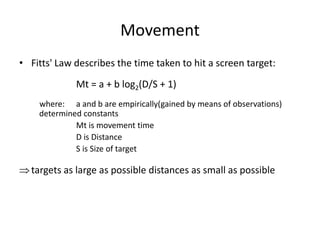
Movement
• Fitts' Law describes the time taken to hit a screen target:
Mt = a + b log2(D/S + 1)
where: a and b are empirically(gained by means of observations)
determined constants
Mt is movement time
D is Distance
S is Size of target
targets as large as possible distances as small as possible
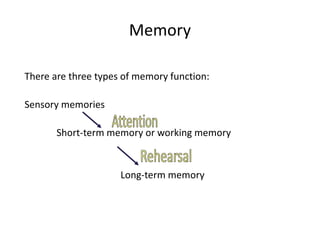
Memory
There are three types of memory function:
Sensory memories
Short-term memory or working memory
Long-term memory
Sensory Memory
• Buffers for stimuli received through senses
– iconic memory: visual stimuli
– echoic memory: aural stimuli
– haptic memory: touch stimuli
• Examples: Move your finger fastly before
you, “sparkler” trail Continuously
overwritten
• Information is passed to STM by attention
Short-term memory (STM)
• What is the result of 35 * 6???
• Scratch-pad for temporary recall
– rapid access
– rapid decay
– limited capacity - 7± 2 Principle
Examples
21234827849320245456
21234 482784 932024 5456
03323583302
0332-35-83-302
ATM Card example

HCI lecture02

  • 1.
  • 2.
    The Human • Thinkof human as an information processing system, which contains input/output, stores information and processes information • We will therefore consider three components of this system: input-output, memory and processing
  • 3.
    The Eye -physical reception • mechanism for receiving light and transforming it into electrical energy • light is reflected from objects • images are focused upside-down on retina • retina contains rods for low light vision. Rods are responsible for vision in darkness. Approximately 120 million rods.
  • 4.
    The Eye -physical reception • Retina also contains cones for colour vision. They are responsible for vision in light. • Cones are concentrated on fovea and rods are concentrated on retina • Blind spot contains neither rods nor cones. • Ganglion cells (brain!) detect pattern and movement
  • 5.
    Design Focus • Auser concentrating on the middle of the screen cannot be expected to read help text on the bottom line. • So if an error message is to be shown to user, what to do??? • Better use flashing error message • What about clever moving icons.
  • 6.
    Interpreting the signal •Brightness – subjective reaction to levels of light – affected by luminance of object, which is the amount of light emitted by an object – Contrast is luminance of object and luminance of its background – visual acuity increases with luminance as does flicker. – High display luminance systems are seen to flicker even above 50 Hz.
  • 7.
    Interpreting the signal(cont) • Colour – made up of hue, intensity, saturation • Hue is determined by the spectral wavelength of the light – Approximately 150 different hues can be discriminated by the average person • Intensity is the brightness of color • Saturation is the amount of whiteness in color – Cones are sensitive to colour wavelengths. Three types of cones (red, green and blue) – blue acuity is lowest, because only 3-4% of the fovea is occupied by cones which are sensitive to blue light – 8% males and 1% females colour blind
  • 8.
    Interpreting the signal(cont) • Our expectations affect the way an image is perceived. • Context is used to resolve ambiguity • However, Optical illusions sometimes occur due to above factors
  • 9.
    Optical Illusions the Ponzoillusion the Muller Lyer illusion
  • 10.
    Reading • Several stages: –visual pattern perceived – decoded using internal representation of language – interpreted using knowledge of syntax and semantics • Reading involves saccades(jerky movements) and fixations • Perception occurs during fixations • Word shape is important to recognition • Negative contrast (dark character on a light screen) improves reading from computer screen
  • 11.
    Design Focus • Standardfont sizes of 9 to 12 are equally legible, given proportional spacing between lines. • Similarly line lengths of between 2.3 and 5.2 inches (58 and 132 mm) are equally legible. • Nevertheless, reading from a computer screen is slower than from a book. However, this fact can be controlled by careful design of textual interfaces.
  • 12.
    Hearing • Sound canconvey a remarkable amount of information • Provides information about environment: distances, directions, objects etc. • Physical apparatus: – outer ear – protects inner and amplifies sound – middle ear – transmits sound waves as vibrations to inner ear – inner ear – chemical transmitters are released and cause impulses in auditory nerve • Sound – pitch – sound frequency – loudness – amplitude – timbre – type or quality
  • 13.
    Hearing (cont) • Humanscan hear frequencies from 20Hz to 15kHz – less accurate distinguishing high frequencies than low. • Auditory system filters sounds – can attend to sounds over background noise. – for example, the cocktail party phenomenon. • Sound could be used extensively in interface design to convey information about the system state
  • 14.
    Touch • Provides importantfeedback about environment. • May be key sense for someone who is visually impaired. • Stimulus received via receptors in the skin: – thermoreceptors – heat and cold – nociceptors – pain – mechanoreceptors – pressure • Some areas more sensitive than others e.g. Fingers and hair
  • 15.
    Movement • Fitts' Lawdescribes the time taken to hit a screen target: Mt = a + b log2(D/S + 1) where: a and b are empirically(gained by means of observations) determined constants Mt is movement time D is Distance S is Size of target targets as large as possible distances as small as possible
  • 16.
    Memory There are threetypes of memory function: Sensory memories Short-term memory or working memory Long-term memory
  • 17.
    Sensory Memory • Buffersfor stimuli received through senses – iconic memory: visual stimuli – echoic memory: aural stimuli – haptic memory: touch stimuli • Examples: Move your finger fastly before you, “sparkler” trail Continuously overwritten • Information is passed to STM by attention
  • 18.
    Short-term memory (STM) •What is the result of 35 * 6??? • Scratch-pad for temporary recall – rapid access – rapid decay – limited capacity - 7± 2 Principle
  • 19.
    Examples 21234827849320245456 21234 482784 9320245456 03323583302 0332-35-83-302 ATM Card example