SUBMITED BY
Hardik Jadam
Bachelors of Computer Application III YEAR
Dezyne E´cole College
www.dezyneecole.com
INFORMATION TECHNOLOGY
PROJECT REPORT
VISUAL BASIC
PROGRAMMING
COLOR PALATE
TOPIC
VISUAL BASIC
Project Report
On
Visual Basic Program
At
Dezyne E´cole College
Ajmer
Submitted to
Dezyne E ´cole College
Towards the
Partial Fulfillment on
Bachelors of Computer Application
By
Hardik Jadam
Dezyne E´cole College
106/10 Civil Line, Ajmer
Tel – 0145-2624679
Www.dezyneecole.com
2017
Acknowledgement
I Hardik Jadam, Student On Dezyne E´cole College , An Extremely
Grateful To Each And Every Individual. Who Has Contributed In
Successful Completion Of My Project. I Express My Gratitude Towards
Dezyne E ´cole College For Their Guidance and Contrast Supervision As
Well As For Providing The Necessary Information And Support
Regarding The Completion Of Project.
Thank You
1 | P a g e
Synopsis
This Project Is A Minor Project Made, Based On The Practical Concept
Of Visual Basic This Project Has Made Our Basic Practical Concepts On
Visual Basic Stronger.
2 | P a g e
Source Code:
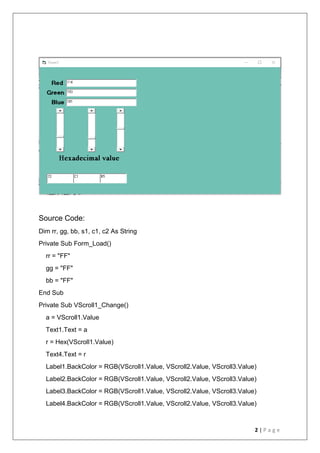
Dim rr, gg, bb, s1, c1, c2 As String
Private Sub Form_Load()
rr = "FF"
gg = "FF"
bb = "FF"
End Sub
Private Sub VScroll1_Change()
a = VScroll1.Value
Text1.Text = a
r = Hex(VScroll1.Value)
Text4.Text = r
Label1.BackColor = RGB(VScroll1.Value, VScroll2.Value, VScroll3.Value)
Label2.BackColor = RGB(VScroll1.Value, VScroll2.Value, VScroll3.Value)
Label3.BackColor = RGB(VScroll1.Value, VScroll2.Value, VScroll3.Value)
Label4.BackColor = RGB(VScroll1.Value, VScroll2.Value, VScroll3.Value)
3 | P a g e
Label5.BackColor = RGB(VScroll1.Value, VScroll2.Value, VScroll3.Value)
Label6.BackColor = RGB(VScroll1.Value, VScroll2.Value, VScroll3.Value)
End Sub
Private Sub VScroll2_Change()
b = VScroll2.Value
Text2.Text = b
g = Hex(VScroll2.Value)
Text5.Text = g
End Sub
Private Sub VScroll3_Change()
c = VScroll3.Value
Text3.Text = c
b = Hex(VScroll3.Value)
Text6.Text = b
End Sub
Private Sub VScroll1_scroll()
a = VScroll1.Value
Text1.Text = a
r = Hex(VScroll1.Value)
r = check(a)
Text4.Text = r
Form1.BackColor = RGB(VScroll1.Value, VScroll2.Value, VScroll3.Value)
Label1.BackColor = RGB(VScroll1.Value, VScroll2.Value, VScroll3.Value)
Label2.BackColor = RGB(VScroll1.Value, VScroll2.Value, VScroll3.Value)
Label3.BackColor = RGB(VScroll1.Value, VScroll2.Value, VScroll3.Value)
Label4.BackColor = RGB(VScroll1.Value, VScroll2.Value, VScroll3.Value)
Label5.BackColor = RGB(VScroll1.Value, VScroll2.Value, VScroll3.Value)
4 | P a g e
Label6.BackColor = RGB(VScroll1.Value, VScroll2.Value, VScroll3.Value)
End Sub
Private Sub VScroll2_scroll()
b = VScroll2.Value
Text2.Text = b
'g = Hex(VScroll2.Value)
g = check(b)
Text5.Text = g
Form1.BackColor = RGB(VScroll1.Value, VScroll2.Value, VScroll3.Value)
Label1.BackColor = RGB(VScroll1.Value, VScroll2.Value, VScroll3.Value)
Label2.BackColor = RGB(VScroll1.Value, VScroll2.Value, VScroll3.Value)
Label3.BackColor = RGB(VScroll1.Value, VScroll2.Value, VScroll3.Value)
Label4.BackColor = RGB(VScroll1.Value, VScroll2.Value, VScroll3.Value)
Label5.BackColor = RGB(VScroll1.Value, VScroll2.Value, VScroll3.Value)
Label6.BackColor = RGB(VScroll1.Value, VScroll2.Value, VScroll3.Value)
Label7.BackColor = RGB(VScroll1.Value, VScroll2.Value, VScroll3.Value)
Label8.BackColor = RGB(VScroll1.Value, VScroll2.Value, VScroll3.Value)
Label9.BackColor = RGB(VScroll1.Value, VScroll2.Value, VScroll3.Value)
End Sub
Private Sub VScroll3_scroll()
c = VScroll3.Value
Text3.Text = c
'b = Hex(VScroll3.Value)
b = check(c)
Text6.Text = b
Form1.BackColor = RGB(VScroll1.Value, VScroll2.Value, VScroll3.Value)
Label1.BackColor = RGB(VScroll1.Value, VScroll2.Value, VScroll3.Value)
Label2.BackColor = RGB(VScroll1.Value, VScroll2.Value, VScroll3.Value)
Label3.BackColor = RGB(VScroll1.Value, VScroll2.Value, VScroll3.Value)
5 | P a g e
Label4.BackColor = RGB(VScroll1.Value, VScroll2.Value, VScroll3.Value)
Label5.BackColor = RGB(VScroll1.Value, VScroll2.Value, VScroll3.Value)
Label6.BackColor = RGB(VScroll1.Value, VScroll2.Value, VScroll3.Value)
End Sub
Function check(ByVal a As Integer)
c1 = a Mod 16
c2 = a  16
If c1 = 10 Then
c1 = "A"
ElseIf c1 = 11 Then
c1 = "B"
ElseIf c1 = 12 Then
c1 = "C"
ElseIf c1 = 13 Then
c1 = "D"
ElseIf c1 = 14 Then
c1 = "E"
ElseIf c1 = 15 Then
c1 = "F"
Else
s1 = Str(c1)
End If
If c2 = 10 Then
c2 = "A"
ElseIf c2 = 11 Then
c2 = "B"
ElseIf c2 = 12 Then
c2 = "C"
ElseIf c2 = 13 Then
c2 = "D"
6 | P a g e
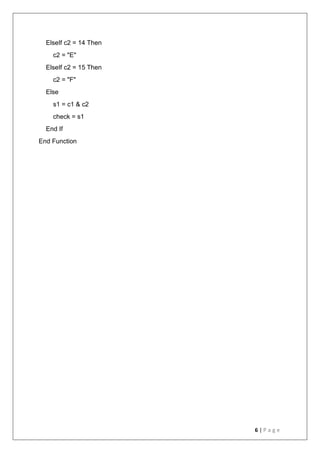
ElseIf c2 = 14 Then
c2 = "E"
ElseIf c2 = 15 Then
c2 = "F"
Else
s1 = c1 & c2
check = s1
End If
End Function
7 | P a g e
THANK YOU

Hardik Jadam , BCA Third Year

  • 1.
    SUBMITED BY Hardik Jadam Bachelorsof Computer Application III YEAR Dezyne E´cole College www.dezyneecole.com INFORMATION TECHNOLOGY PROJECT REPORT VISUAL BASIC PROGRAMMING COLOR PALATE TOPIC VISUAL BASIC
  • 2.
    Project Report On Visual BasicProgram At Dezyne E´cole College Ajmer Submitted to Dezyne E ´cole College Towards the Partial Fulfillment on Bachelors of Computer Application By Hardik Jadam Dezyne E´cole College 106/10 Civil Line, Ajmer Tel – 0145-2624679 Www.dezyneecole.com 2017
  • 3.
    Acknowledgement I Hardik Jadam,Student On Dezyne E´cole College , An Extremely Grateful To Each And Every Individual. Who Has Contributed In Successful Completion Of My Project. I Express My Gratitude Towards Dezyne E ´cole College For Their Guidance and Contrast Supervision As Well As For Providing The Necessary Information And Support Regarding The Completion Of Project. Thank You
  • 4.
    1 | Pa g e Synopsis This Project Is A Minor Project Made, Based On The Practical Concept Of Visual Basic This Project Has Made Our Basic Practical Concepts On Visual Basic Stronger.
  • 5.
    2 | Pa g e Source Code: Dim rr, gg, bb, s1, c1, c2 As String Private Sub Form_Load() rr = "FF" gg = "FF" bb = "FF" End Sub Private Sub VScroll1_Change() a = VScroll1.Value Text1.Text = a r = Hex(VScroll1.Value) Text4.Text = r Label1.BackColor = RGB(VScroll1.Value, VScroll2.Value, VScroll3.Value) Label2.BackColor = RGB(VScroll1.Value, VScroll2.Value, VScroll3.Value) Label3.BackColor = RGB(VScroll1.Value, VScroll2.Value, VScroll3.Value) Label4.BackColor = RGB(VScroll1.Value, VScroll2.Value, VScroll3.Value)
  • 6.
    3 | Pa g e Label5.BackColor = RGB(VScroll1.Value, VScroll2.Value, VScroll3.Value) Label6.BackColor = RGB(VScroll1.Value, VScroll2.Value, VScroll3.Value) End Sub Private Sub VScroll2_Change() b = VScroll2.Value Text2.Text = b g = Hex(VScroll2.Value) Text5.Text = g End Sub Private Sub VScroll3_Change() c = VScroll3.Value Text3.Text = c b = Hex(VScroll3.Value) Text6.Text = b End Sub Private Sub VScroll1_scroll() a = VScroll1.Value Text1.Text = a r = Hex(VScroll1.Value) r = check(a) Text4.Text = r Form1.BackColor = RGB(VScroll1.Value, VScroll2.Value, VScroll3.Value) Label1.BackColor = RGB(VScroll1.Value, VScroll2.Value, VScroll3.Value) Label2.BackColor = RGB(VScroll1.Value, VScroll2.Value, VScroll3.Value) Label3.BackColor = RGB(VScroll1.Value, VScroll2.Value, VScroll3.Value) Label4.BackColor = RGB(VScroll1.Value, VScroll2.Value, VScroll3.Value) Label5.BackColor = RGB(VScroll1.Value, VScroll2.Value, VScroll3.Value)
  • 7.
    4 | Pa g e Label6.BackColor = RGB(VScroll1.Value, VScroll2.Value, VScroll3.Value) End Sub Private Sub VScroll2_scroll() b = VScroll2.Value Text2.Text = b 'g = Hex(VScroll2.Value) g = check(b) Text5.Text = g Form1.BackColor = RGB(VScroll1.Value, VScroll2.Value, VScroll3.Value) Label1.BackColor = RGB(VScroll1.Value, VScroll2.Value, VScroll3.Value) Label2.BackColor = RGB(VScroll1.Value, VScroll2.Value, VScroll3.Value) Label3.BackColor = RGB(VScroll1.Value, VScroll2.Value, VScroll3.Value) Label4.BackColor = RGB(VScroll1.Value, VScroll2.Value, VScroll3.Value) Label5.BackColor = RGB(VScroll1.Value, VScroll2.Value, VScroll3.Value) Label6.BackColor = RGB(VScroll1.Value, VScroll2.Value, VScroll3.Value) Label7.BackColor = RGB(VScroll1.Value, VScroll2.Value, VScroll3.Value) Label8.BackColor = RGB(VScroll1.Value, VScroll2.Value, VScroll3.Value) Label9.BackColor = RGB(VScroll1.Value, VScroll2.Value, VScroll3.Value) End Sub Private Sub VScroll3_scroll() c = VScroll3.Value Text3.Text = c 'b = Hex(VScroll3.Value) b = check(c) Text6.Text = b Form1.BackColor = RGB(VScroll1.Value, VScroll2.Value, VScroll3.Value) Label1.BackColor = RGB(VScroll1.Value, VScroll2.Value, VScroll3.Value) Label2.BackColor = RGB(VScroll1.Value, VScroll2.Value, VScroll3.Value) Label3.BackColor = RGB(VScroll1.Value, VScroll2.Value, VScroll3.Value)
  • 8.
    5 | Pa g e Label4.BackColor = RGB(VScroll1.Value, VScroll2.Value, VScroll3.Value) Label5.BackColor = RGB(VScroll1.Value, VScroll2.Value, VScroll3.Value) Label6.BackColor = RGB(VScroll1.Value, VScroll2.Value, VScroll3.Value) End Sub Function check(ByVal a As Integer) c1 = a Mod 16 c2 = a 16 If c1 = 10 Then c1 = "A" ElseIf c1 = 11 Then c1 = "B" ElseIf c1 = 12 Then c1 = "C" ElseIf c1 = 13 Then c1 = "D" ElseIf c1 = 14 Then c1 = "E" ElseIf c1 = 15 Then c1 = "F" Else s1 = Str(c1) End If If c2 = 10 Then c2 = "A" ElseIf c2 = 11 Then c2 = "B" ElseIf c2 = 12 Then c2 = "C" ElseIf c2 = 13 Then c2 = "D"
  • 9.
    6 | Pa g e ElseIf c2 = 14 Then c2 = "E" ElseIf c2 = 15 Then c2 = "F" Else s1 = c1 & c2 check = s1 End If End Function
  • 10.
    7 | Pa g e THANK YOU