MD
Full-day Tutorials
5/5/2014 8:30:00 AM
Hands On with Selenium
and WebDriver
Presented by:
Alan Richardson
Compendium Developments
Brought to you by:
340 Corporate Way, Suite 300, Orange Park, FL 32073
888-268-8770 ∙ 904-278-0524 ∙ sqeinfo@sqe.com ∙ www.sqe.com
Alan Richardson
Compendium Developments
Alan Richardson has more than twenty years of professional IT experience, working as a
programmer and at every level of the testing hierarchy from tester through head of testing. Author of
the books Selenium Simplified and Java For Testers, Alan also has created online training courses
to help people learn technical web testing and Selenium WebDriver with Java. He now works as an
independent consultant, helping companies improve their use of automation, agile, and exploratory
technical testing. Alan posts his writing and training videos
on SeleniumSimplified.com, EvilTester.com, JavaForTesters.com, and CompendiumDev.co.uk.
© Compendium Developments, 2014, CompendiumDev.co.uk
Hands On WebDriver: Training
Exercises For One Day
Alan Richardson
@eviltester
alan@compendiumdev.co.uk
www.SeleniumSimplified.com
www.EvilTester.com
www.CompendiumDev.co.uk
www.JavaForTesters.com
© Compendium Developments, 2014, CompendiumDev.co.uk
Blogs and Websites
●
CompendiumDev.co.uk
●
SeleniumSimplified.com
●
EvilTester.com
●
JavaForTesters.com
●
Twitter: @eviltester
Online Training Courses
●
Technical Web Testing 101
Unow.be/at/udemy101
●
Intro to Selenium
Unow.be/at/udemystart
●
Selenium 2 WebDriver API
Unow.be/at/udemyapi
Videos
youtube.com/user/EviltesterVideos
Books
Selenium Simplified
Unow.be/rc/selsimp
Java For Testers
leanpub.com/javaForTesters
Alan Richardson
uk.linkedin.com/in/eviltester
Independent Test Consultant
& Custom Training
Contact Alan
http://compendiumdev.co.uk/contact
© Compendium Developments, 2014, CompendiumDev.co.uk
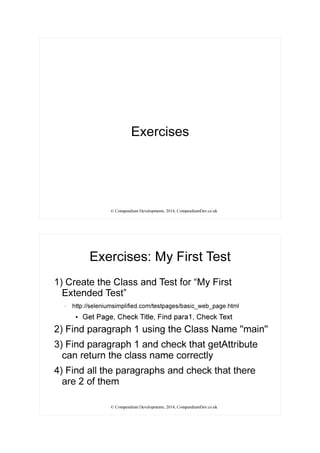
Exercises
© Compendium Developments, 2014, CompendiumDev.co.uk
Exercises: My First Test
1) Create the Class and Test for “My First
Extended Test”
– http://seleniumsimplified.com/testpages/basic_web_page.html
●
Get Page, Check Title, Find para1, Check Text
2) Find paragraph 1 using the Class Name "main"
3) Find paragraph 1 and check that getAttribute
can return the class name correctly
4) Find all the paragraphs and check that there
are 2 of them
© Compendium Developments, 2014, CompendiumDev.co.uk
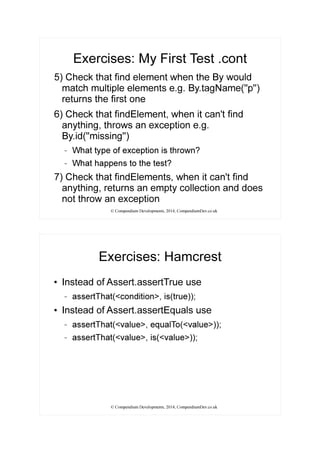
Exercises: My First Test .cont
5) Check that find element when the By would
match multiple elements e.g. By.tagName("p")
returns the first one
6) Check that findElement, when it can't find
anything, throws an exception e.g.
By.id("missing")
– What type of exception is thrown?
– What happens to the test?
7) Check that findElements, when it can't find
anything, returns an empty collection and does
not throw an exception
© Compendium Developments, 2014, CompendiumDev.co.uk
Exercises: Hamcrest
●
Instead of Assert.assertTrue use
– assertThat(<condition>, is(true));
●
Instead of Assert.assertEquals use
– assertThat(<value>, equalTo(<value>));
– assertThat(<value>, is(<value>));
© Compendium Developments, 2014, CompendiumDev.co.uk
Exercises: JUnit
●
Move the driver creation and quit into
@BeforeClass and @AfterClass
●
Move the driver.get into @Before, and
driver.close into @After
●
What happens to the tests now?
●
What happens when a test throws an exception
now?
© Compendium Developments, 2014, CompendiumDev.co.uk
Exercises: Navigation
●
Use the URLs in the table
– navigate() .to(), .forward(), back(), .refresh()
– Assert on titles to check navigation worked
●
http://seleniumsimplified.com/testpages
File Path Title
/ "Selenium Test Pages"
/search.php "Selenium Simplified Search Engine"
/basic_html_form.html "HTML Form Elements"
/basic_web_page.html "Basic Web Page Title"
/refresh.php "Refreshed Page on ([0-9]{10})"
© Compendium Developments, 2014, CompendiumDev.co.uk
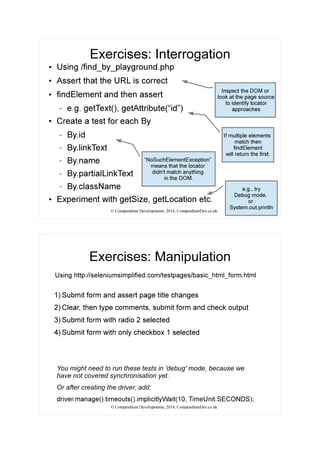
Exercises: Interrogation
●
Using /find_by_playground.php
●
Assert that the URL is correct
●
findElement and then assert
– e.g. getText(), getAttribute(“id”)
●
Create a test for each By
– By.id
– By.linkText
– By.name
– By.partialLinkText
– By.className
●
Experiment with getSize, getLocation etc.
“NoSuchElementException”
means that the locator
didn't match anything
in the DOM.
Inspect the DOM or
look at the page source
to identify locator
approaches
If multiple elements
match then
findElement
will return the first.
e.g., try
Debug mode,
or
System.out.println
© Compendium Developments, 2014, CompendiumDev.co.uk
Exercises: Manipulation
1) Submit form and assert page title changes
2) Clear, then type comments, submit form and check output
3) Submit form with radio 2 selected
4) Submit form with only checkbox 1 selected
Using http://seleniumsimplified.com/testpages/basic_html_form.html
You might need to run these tests in 'debug' mode, because we
have not covered synchronisation yet.
Or after creating the driver, add:
driver.manage().timeouts().implicitlyWait(10, TimeUnit.SECONDS);
© Compendium Developments, 2014, CompendiumDev.co.uk
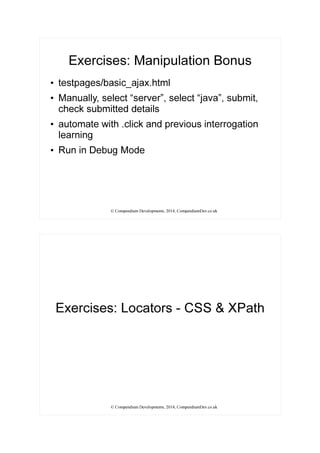
Exercises: Manipulation Bonus
●
testpages/basic_ajax.html
●
Manually, select “server”, select “java”, submit,
check submitted details
●
automate with .click and previous interrogation
learning
●
Run in Debug Mode
© Compendium Developments, 2014, CompendiumDev.co.uk
Exercises: Locators - CSS & XPath
© Compendium Developments, 2014, CompendiumDev.co.uk
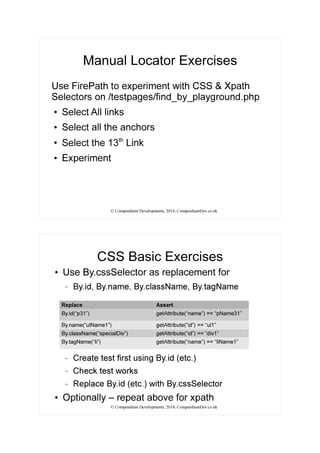
Manual Locator Exercises
Use FirePath to experiment with CSS & Xpath
Selectors on /testpages/find_by_playground.php
●
Select All links
●
Select all the anchors
●
Select the 13th
Link
●
Experiment
© Compendium Developments, 2014, CompendiumDev.co.uk
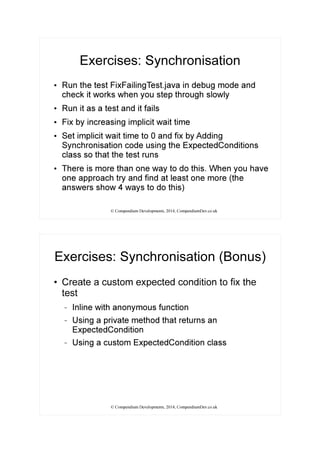
CSS Basic Exercises
●
Use By.cssSelector as replacement for
– By.id, By.name, By.className, By.tagName
– Create test first using By.id (etc.)
– Check test works
– Replace By.id (etc.) with By.cssSelector
●
Optionally – repeat above for xpath
Replace Assert
By.id(“p31”) getAttribute(“name”) == “pName31”
By.name(“ulName1”) getAttribute(“id”) == “ul1”
By.className(“specialDiv”) getAttribute(“id”) == “div1”
By.tagName(“li”) getAttribute(“name”) == “liName1”
© Compendium Developments, 2014, CompendiumDev.co.uk
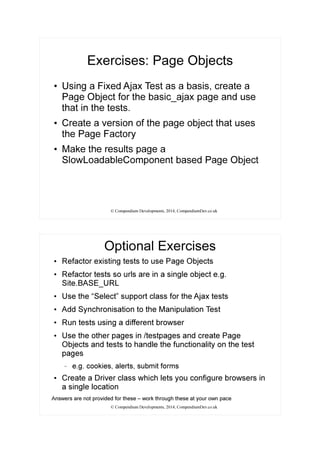
Exercises: Synchronisation
●
Run the test FixFailingTest.java in debug mode and
check it works when you step through slowly
●
Run it as a test and it fails
●
Fix by increasing implicit wait time
●
Set implicit wait time to 0 and fix by Adding
Synchronisation code using the ExpectedConditions
class so that the test runs
●
There is more than one way to do this. When you have
one approach try and find at least one more (the
answers show 4 ways to do this)
© Compendium Developments, 2014, CompendiumDev.co.uk
Exercises: Synchronisation (Bonus)
●
Create a custom expected condition to fix the
test
– Inline with anonymous function
– Using a private method that returns an
ExpectedCondition
– Using a custom ExpectedCondition class
© Compendium Developments, 2014, CompendiumDev.co.uk
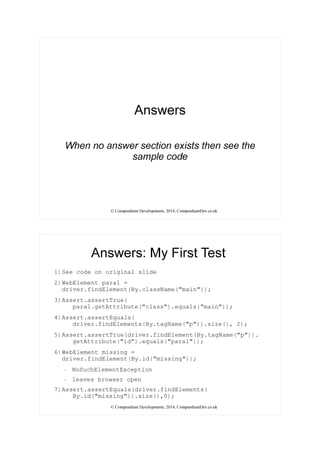
Exercises: Page Objects
●
Using a Fixed Ajax Test as a basis, create a
Page Object for the basic_ajax page and use
that in the tests.
●
Create a version of the page object that uses
the Page Factory
●
Make the results page a
SlowLoadableComponent based Page Object
© Compendium Developments, 2014, CompendiumDev.co.uk
Optional Exercises
●
Refactor existing tests to use Page Objects
●
Refactor tests so urls are in a single object e.g.
Site.BASE_URL
●
Use the “Select” support class for the Ajax tests
●
Add Synchronisation to the Manipulation Test
●
Run tests using a different browser
●
Use the other pages in /testpages and create Page
Objects and tests to handle the functionality on the test
pages
– e.g. cookies, alerts, submit forms
●
Create a Driver class which lets you configure browsers in
a single location
Answers are not provided for these – work through these at your own pace
© Compendium Developments, 2014, CompendiumDev.co.uk
Answers
When no answer section exists then see the
sample code
© Compendium Developments, 2014, CompendiumDev.co.uk
Answers: My First Test
1)See code on original slide
2)WebElement para1 =
driver.findElement(By.className("main"));
3)Assert.assertTrue(
para1.getAttribute("class").equals("main"));
4)Assert.assertEquals(
driver.findElements(By.tagName("p")).size(), 2);
5)Assert.assertTrue(driver.findElement(By.tagName("p")).
getAttribute("id").equals("para1"));
6)WebElement missing =
driver.findElement(By.id("missing"));
– NoSuchElementException
– leaves browser open
7)Assert.assertEquals(driver.findElements(
By.id("missing")).size(),0);
© Compendium Developments, 2014, CompendiumDev.co.uk
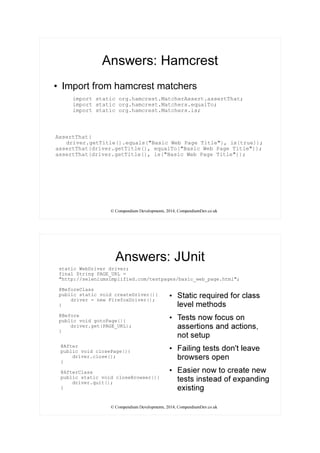
Answers: Hamcrest
●
Import from hamcrest matchers
import static org.hamcrest.MatcherAssert.assertThat;
import static org.hamcrest.Matchers.equalTo;
import static org.hamcrest.Matchers.is;
AssertThat(
driver.getTitle().equals("Basic Web Page Title"), is(true));
assertThat(driver.getTitle(), equalTo("Basic Web Page Title"));
assertThat(driver.getTitle(), is("Basic Web Page Title"));
© Compendium Developments, 2014, CompendiumDev.co.uk
Answers: JUnit
●
Static required for class
level methods
●
Tests now focus on
assertions and actions,
not setup
●
Failing tests don't leave
browsers open
●
Easier now to create new
tests instead of expanding
existing
static WebDriver driver;
final String PAGE_URL =
"http://seleniumsimplified.com/testpages/basic_web_page.html";
@BeforeClass
public static void createDriver(){
driver = new FirefoxDriver();
}
@Before
public void gotoPage(){
driver.get(PAGE_URL);
}
@After
public void closePage(){
driver.close();
}
@AfterClass
public static void closeBrowser(){
driver.quit();
}
© Compendium Developments, 2014, CompendiumDev.co.uk
Answers: Manual CSS Selectors
●
a[href]
●
a[name^="p"]
●
#div18 ul li:nth-child(13) a
© Compendium Developments, 2014, CompendiumDev.co.uk
Answers: Manual XPath Selectors
●
//a[@href]
●
//a[not(@href)]
– Or
– //a[starts-with(@name,"p")]
●
(//a[@href])[13]
© Compendium Developments, 2014, CompendiumDev.co.uk
Answers: CSS Basic Exercises
●
I have two sets of sample answers because
there are so many ways of fulfilling the result
– FindByCSSSelectorBasicExercisesTest
– FindByCSSSelectorBasicExercisesFullAnswersTest
© Compendium Developments, 2014, CompendiumDev.co.uk
Answers: Synchronisation
●
Full answers in the code. Hint: prior to 2nd
select
●
And you might need to wait for the results to be ready
new WebDriverWait(driver,10).until(
ExpectedConditions.invisibilityOfElementLocated(
By.id("ajaxBusy")));
new WebDriverWait(driver,10).until(
ExpectedConditions.presenceOfElementLocated(
By.cssSelector("option[value='23']")));
new WebDriverWait(driver,10).until(
ExpectedConditions.visibilityOfElementLocated(
By.cssSelector("option[value='23']")));
new WebDriverWait(driver,10).until(
ExpectedConditions.elementToBeClickable(
By.cssSelector("option[value='23']")));
© Compendium Developments, 2014, CompendiumDev.co.uk
Blogs and Websites
●
CompendiumDev.co.uk
●
SeleniumSimplified.com
●
EvilTester.com
●
JavaForTesters.com
●
Twitter: @eviltester
Online Training Courses
●
Technical Web Testing 101
Unow.be/at/udemy101
●
Intro to Selenium
Unow.be/at/udemystart
●
Selenium 2 WebDriver API
Unow.be/at/udemyapi
Videos
youtube.com/user/EviltesterVideos
Books
Selenium Simplified
Unow.be/rc/selsimp
Java For Testers
leanpub.com/javaForTesters
Alan Richardson
uk.linkedin.com/in/eviltester
Independent Test Consultant
& Custom Training
Contact Alan
http://compendiumdev.co.uk/contact

Hands On with Selenium and WebDriver

  • 1.
    MD Full-day Tutorials 5/5/2014 8:30:00AM Hands On with Selenium and WebDriver Presented by: Alan Richardson Compendium Developments Brought to you by: 340 Corporate Way, Suite 300, Orange Park, FL 32073 888-268-8770 ∙ 904-278-0524 ∙ sqeinfo@sqe.com ∙ www.sqe.com
  • 2.
    Alan Richardson Compendium Developments AlanRichardson has more than twenty years of professional IT experience, working as a programmer and at every level of the testing hierarchy from tester through head of testing. Author of the books Selenium Simplified and Java For Testers, Alan also has created online training courses to help people learn technical web testing and Selenium WebDriver with Java. He now works as an independent consultant, helping companies improve their use of automation, agile, and exploratory technical testing. Alan posts his writing and training videos on SeleniumSimplified.com, EvilTester.com, JavaForTesters.com, and CompendiumDev.co.uk.
  • 3.
    © Compendium Developments,2014, CompendiumDev.co.uk Hands On WebDriver: Training Exercises For One Day Alan Richardson @eviltester alan@compendiumdev.co.uk www.SeleniumSimplified.com www.EvilTester.com www.CompendiumDev.co.uk www.JavaForTesters.com © Compendium Developments, 2014, CompendiumDev.co.uk Blogs and Websites ● CompendiumDev.co.uk ● SeleniumSimplified.com ● EvilTester.com ● JavaForTesters.com ● Twitter: @eviltester Online Training Courses ● Technical Web Testing 101 Unow.be/at/udemy101 ● Intro to Selenium Unow.be/at/udemystart ● Selenium 2 WebDriver API Unow.be/at/udemyapi Videos youtube.com/user/EviltesterVideos Books Selenium Simplified Unow.be/rc/selsimp Java For Testers leanpub.com/javaForTesters Alan Richardson uk.linkedin.com/in/eviltester Independent Test Consultant & Custom Training Contact Alan http://compendiumdev.co.uk/contact
  • 4.
    © Compendium Developments,2014, CompendiumDev.co.uk Exercises © Compendium Developments, 2014, CompendiumDev.co.uk Exercises: My First Test 1) Create the Class and Test for “My First Extended Test” – http://seleniumsimplified.com/testpages/basic_web_page.html ● Get Page, Check Title, Find para1, Check Text 2) Find paragraph 1 using the Class Name "main" 3) Find paragraph 1 and check that getAttribute can return the class name correctly 4) Find all the paragraphs and check that there are 2 of them
  • 5.
    © Compendium Developments,2014, CompendiumDev.co.uk Exercises: My First Test .cont 5) Check that find element when the By would match multiple elements e.g. By.tagName("p") returns the first one 6) Check that findElement, when it can't find anything, throws an exception e.g. By.id("missing") – What type of exception is thrown? – What happens to the test? 7) Check that findElements, when it can't find anything, returns an empty collection and does not throw an exception © Compendium Developments, 2014, CompendiumDev.co.uk Exercises: Hamcrest ● Instead of Assert.assertTrue use – assertThat(<condition>, is(true)); ● Instead of Assert.assertEquals use – assertThat(<value>, equalTo(<value>)); – assertThat(<value>, is(<value>));
  • 6.
    © Compendium Developments,2014, CompendiumDev.co.uk Exercises: JUnit ● Move the driver creation and quit into @BeforeClass and @AfterClass ● Move the driver.get into @Before, and driver.close into @After ● What happens to the tests now? ● What happens when a test throws an exception now? © Compendium Developments, 2014, CompendiumDev.co.uk Exercises: Navigation ● Use the URLs in the table – navigate() .to(), .forward(), back(), .refresh() – Assert on titles to check navigation worked ● http://seleniumsimplified.com/testpages File Path Title / "Selenium Test Pages" /search.php "Selenium Simplified Search Engine" /basic_html_form.html "HTML Form Elements" /basic_web_page.html "Basic Web Page Title" /refresh.php "Refreshed Page on ([0-9]{10})"
  • 7.
    © Compendium Developments,2014, CompendiumDev.co.uk Exercises: Interrogation ● Using /find_by_playground.php ● Assert that the URL is correct ● findElement and then assert – e.g. getText(), getAttribute(“id”) ● Create a test for each By – By.id – By.linkText – By.name – By.partialLinkText – By.className ● Experiment with getSize, getLocation etc. “NoSuchElementException” means that the locator didn't match anything in the DOM. Inspect the DOM or look at the page source to identify locator approaches If multiple elements match then findElement will return the first. e.g., try Debug mode, or System.out.println © Compendium Developments, 2014, CompendiumDev.co.uk Exercises: Manipulation 1) Submit form and assert page title changes 2) Clear, then type comments, submit form and check output 3) Submit form with radio 2 selected 4) Submit form with only checkbox 1 selected Using http://seleniumsimplified.com/testpages/basic_html_form.html You might need to run these tests in 'debug' mode, because we have not covered synchronisation yet. Or after creating the driver, add: driver.manage().timeouts().implicitlyWait(10, TimeUnit.SECONDS);
  • 8.
    © Compendium Developments,2014, CompendiumDev.co.uk Exercises: Manipulation Bonus ● testpages/basic_ajax.html ● Manually, select “server”, select “java”, submit, check submitted details ● automate with .click and previous interrogation learning ● Run in Debug Mode © Compendium Developments, 2014, CompendiumDev.co.uk Exercises: Locators - CSS & XPath
  • 9.
    © Compendium Developments,2014, CompendiumDev.co.uk Manual Locator Exercises Use FirePath to experiment with CSS & Xpath Selectors on /testpages/find_by_playground.php ● Select All links ● Select all the anchors ● Select the 13th Link ● Experiment © Compendium Developments, 2014, CompendiumDev.co.uk CSS Basic Exercises ● Use By.cssSelector as replacement for – By.id, By.name, By.className, By.tagName – Create test first using By.id (etc.) – Check test works – Replace By.id (etc.) with By.cssSelector ● Optionally – repeat above for xpath Replace Assert By.id(“p31”) getAttribute(“name”) == “pName31” By.name(“ulName1”) getAttribute(“id”) == “ul1” By.className(“specialDiv”) getAttribute(“id”) == “div1” By.tagName(“li”) getAttribute(“name”) == “liName1”
  • 10.
    © Compendium Developments,2014, CompendiumDev.co.uk Exercises: Synchronisation ● Run the test FixFailingTest.java in debug mode and check it works when you step through slowly ● Run it as a test and it fails ● Fix by increasing implicit wait time ● Set implicit wait time to 0 and fix by Adding Synchronisation code using the ExpectedConditions class so that the test runs ● There is more than one way to do this. When you have one approach try and find at least one more (the answers show 4 ways to do this) © Compendium Developments, 2014, CompendiumDev.co.uk Exercises: Synchronisation (Bonus) ● Create a custom expected condition to fix the test – Inline with anonymous function – Using a private method that returns an ExpectedCondition – Using a custom ExpectedCondition class
  • 11.
    © Compendium Developments,2014, CompendiumDev.co.uk Exercises: Page Objects ● Using a Fixed Ajax Test as a basis, create a Page Object for the basic_ajax page and use that in the tests. ● Create a version of the page object that uses the Page Factory ● Make the results page a SlowLoadableComponent based Page Object © Compendium Developments, 2014, CompendiumDev.co.uk Optional Exercises ● Refactor existing tests to use Page Objects ● Refactor tests so urls are in a single object e.g. Site.BASE_URL ● Use the “Select” support class for the Ajax tests ● Add Synchronisation to the Manipulation Test ● Run tests using a different browser ● Use the other pages in /testpages and create Page Objects and tests to handle the functionality on the test pages – e.g. cookies, alerts, submit forms ● Create a Driver class which lets you configure browsers in a single location Answers are not provided for these – work through these at your own pace
  • 12.
    © Compendium Developments,2014, CompendiumDev.co.uk Answers When no answer section exists then see the sample code © Compendium Developments, 2014, CompendiumDev.co.uk Answers: My First Test 1)See code on original slide 2)WebElement para1 = driver.findElement(By.className("main")); 3)Assert.assertTrue( para1.getAttribute("class").equals("main")); 4)Assert.assertEquals( driver.findElements(By.tagName("p")).size(), 2); 5)Assert.assertTrue(driver.findElement(By.tagName("p")). getAttribute("id").equals("para1")); 6)WebElement missing = driver.findElement(By.id("missing")); – NoSuchElementException – leaves browser open 7)Assert.assertEquals(driver.findElements( By.id("missing")).size(),0);
  • 13.
    © Compendium Developments,2014, CompendiumDev.co.uk Answers: Hamcrest ● Import from hamcrest matchers import static org.hamcrest.MatcherAssert.assertThat; import static org.hamcrest.Matchers.equalTo; import static org.hamcrest.Matchers.is; AssertThat( driver.getTitle().equals("Basic Web Page Title"), is(true)); assertThat(driver.getTitle(), equalTo("Basic Web Page Title")); assertThat(driver.getTitle(), is("Basic Web Page Title")); © Compendium Developments, 2014, CompendiumDev.co.uk Answers: JUnit ● Static required for class level methods ● Tests now focus on assertions and actions, not setup ● Failing tests don't leave browsers open ● Easier now to create new tests instead of expanding existing static WebDriver driver; final String PAGE_URL = "http://seleniumsimplified.com/testpages/basic_web_page.html"; @BeforeClass public static void createDriver(){ driver = new FirefoxDriver(); } @Before public void gotoPage(){ driver.get(PAGE_URL); } @After public void closePage(){ driver.close(); } @AfterClass public static void closeBrowser(){ driver.quit(); }
  • 14.
    © Compendium Developments,2014, CompendiumDev.co.uk Answers: Manual CSS Selectors ● a[href] ● a[name^="p"] ● #div18 ul li:nth-child(13) a © Compendium Developments, 2014, CompendiumDev.co.uk Answers: Manual XPath Selectors ● //a[@href] ● //a[not(@href)] – Or – //a[starts-with(@name,"p")] ● (//a[@href])[13]
  • 15.
    © Compendium Developments,2014, CompendiumDev.co.uk Answers: CSS Basic Exercises ● I have two sets of sample answers because there are so many ways of fulfilling the result – FindByCSSSelectorBasicExercisesTest – FindByCSSSelectorBasicExercisesFullAnswersTest © Compendium Developments, 2014, CompendiumDev.co.uk Answers: Synchronisation ● Full answers in the code. Hint: prior to 2nd select ● And you might need to wait for the results to be ready new WebDriverWait(driver,10).until( ExpectedConditions.invisibilityOfElementLocated( By.id("ajaxBusy"))); new WebDriverWait(driver,10).until( ExpectedConditions.presenceOfElementLocated( By.cssSelector("option[value='23']"))); new WebDriverWait(driver,10).until( ExpectedConditions.visibilityOfElementLocated( By.cssSelector("option[value='23']"))); new WebDriverWait(driver,10).until( ExpectedConditions.elementToBeClickable( By.cssSelector("option[value='23']")));
  • 16.
    © Compendium Developments,2014, CompendiumDev.co.uk Blogs and Websites ● CompendiumDev.co.uk ● SeleniumSimplified.com ● EvilTester.com ● JavaForTesters.com ● Twitter: @eviltester Online Training Courses ● Technical Web Testing 101 Unow.be/at/udemy101 ● Intro to Selenium Unow.be/at/udemystart ● Selenium 2 WebDriver API Unow.be/at/udemyapi Videos youtube.com/user/EviltesterVideos Books Selenium Simplified Unow.be/rc/selsimp Java For Testers leanpub.com/javaForTesters Alan Richardson uk.linkedin.com/in/eviltester Independent Test Consultant & Custom Training Contact Alan http://compendiumdev.co.uk/contact