Hack!
     with!
     YUI

      Sumana H
Frontend Engineer, UDA
“The browser is the most futile
  deployment environment…”

                - Douglas Crockford
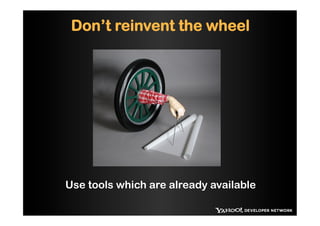
Don’t reinvent the wheel


Use tools which are already available
A comprehensive suite of tools to help
        you code like a pro!!
       http://yuilibrary.com/
•  YUI Library is a set of utilities and controls,
   written with JS and CSS , for building rich
   interactive web applications.

•  Free for all users

•  Scalable, Fast and Robust

•  Most popular, best documented, more
   examples.
YUI Library
•  Low level DOM utilities to high level user
   Interface widgets

•  Core – Global Object, Node, Events

•  Utilities – Animation, drag Drop, get Utility – to
   get js/css dynamically.

•  Widgets – Autocomplete, calendar, carousel,
   Overlay…
•  CSS
   http://yuilibrary.com/yui/docs/guides/
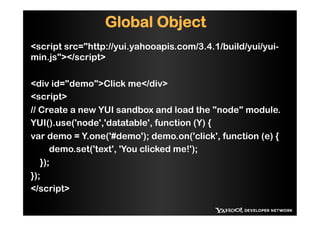
Global Object
<script src="http://yui.yahooapis.com/3.4.1/build/yui/yui-
min.js"></script>

<div id="demo">Click me</div>
<script>
// Create a new YUI sandbox and load the "node" module.
YUI().use('node','datatable', function (Y) {
var demo = Y.one('#demo'); demo.on('click', function (e) {
      demo.set('text', 'You clicked me!');
   });
});
</script>
Node
Getting a Node

<div id="main" class="mainclass"/>
 // Use Y.one( [css selector string] )
 var node = Y.one('#main');
 var node = Y.one(.mainclass);

  // Or pass an HTML element
  var bodyNode = Y.one(document.body);
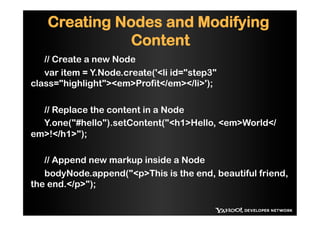
Creating Nodes and Modifying
              Content
   // Create a new Node
   var item = Y.Node.create('<li id="step3"
class="highlight"><em>Profit</em></li>');

  // Replace the content in a Node
  Y.one("#hello").setContent("<h1>Hello, <em>World</
em>!</h1>");

   // Append new markup inside a Node
   bodyNode.append("<p>This is the end, beautiful friend,
the end.</p>");
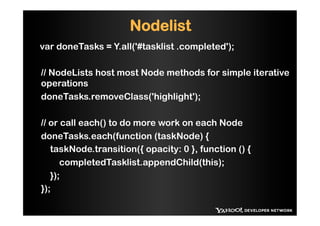
Nodelist
var doneTasks = Y.all('#tasklist .completed');

// NodeLists host most Node methods for simple iterative
operations
doneTasks.removeClass('highlight');

// or call each() to do more work on each Node
doneTasks.each(function (taskNode) {
   taskNode.transition({ opacity: 0 }, function () {
      completedTasklist.appendChild(this);
   });
});
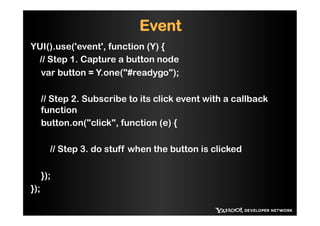
Event
YUI().use('event', function (Y) {
 // Step 1. Capture a button node
  var button = Y.one("#readygo");

      // Step 2. Subscribe to its click event with a callback
      function
      button.on("click", function (e) {

        // Step 3. do stuff when the button is clicked

      });
});
Examples
- Factorial example
- Widget - Carousel
- YQL in YUI


Gallery – http://github.com/yahoo
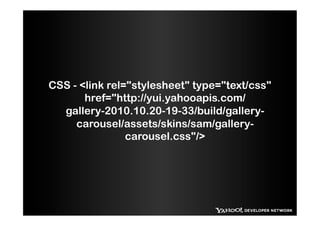
CSS - <link rel="stylesheet" type="text/css"
       href="http://yui.yahooapis.com/
  gallery-2010.10.20-19-33/build/gallery-
     carousel/assets/skins/sam/gallery-
                carousel.css"/>
THANK YOU

Hack U - YUI - 2012 IIT Kharagpur

  • 1.
    Hack! with! YUI Sumana H Frontend Engineer, UDA
  • 2.
    “The browser isthe most futile deployment environment…” - Douglas Crockford
  • 3.
    Don’t reinvent thewheel Use tools which are already available
  • 4.
    A comprehensive suiteof tools to help you code like a pro!! http://yuilibrary.com/
  • 5.
    •  YUI Libraryis a set of utilities and controls, written with JS and CSS , for building rich interactive web applications. •  Free for all users •  Scalable, Fast and Robust •  Most popular, best documented, more examples.
  • 6.
    YUI Library •  Lowlevel DOM utilities to high level user Interface widgets •  Core – Global Object, Node, Events •  Utilities – Animation, drag Drop, get Utility – to get js/css dynamically. •  Widgets – Autocomplete, calendar, carousel, Overlay… •  CSS http://yuilibrary.com/yui/docs/guides/
  • 7.
    Global Object <script src="http://yui.yahooapis.com/3.4.1/build/yui/yui- min.js"></script> <divid="demo">Click me</div> <script> // Create a new YUI sandbox and load the "node" module. YUI().use('node','datatable', function (Y) { var demo = Y.one('#demo'); demo.on('click', function (e) { demo.set('text', 'You clicked me!'); }); }); </script>
  • 8.
    Node Getting a Node <divid="main" class="mainclass"/> // Use Y.one( [css selector string] ) var node = Y.one('#main'); var node = Y.one(.mainclass); // Or pass an HTML element var bodyNode = Y.one(document.body);
  • 9.
    Creating Nodes andModifying Content // Create a new Node var item = Y.Node.create('<li id="step3" class="highlight"><em>Profit</em></li>'); // Replace the content in a Node Y.one("#hello").setContent("<h1>Hello, <em>World</ em>!</h1>"); // Append new markup inside a Node bodyNode.append("<p>This is the end, beautiful friend, the end.</p>");
  • 10.
    Nodelist var doneTasks =Y.all('#tasklist .completed'); // NodeLists host most Node methods for simple iterative operations doneTasks.removeClass('highlight'); // or call each() to do more work on each Node doneTasks.each(function (taskNode) { taskNode.transition({ opacity: 0 }, function () { completedTasklist.appendChild(this); }); });
  • 11.
    Event YUI().use('event', function (Y){ // Step 1. Capture a button node var button = Y.one("#readygo"); // Step 2. Subscribe to its click event with a callback function button.on("click", function (e) { // Step 3. do stuff when the button is clicked }); });
  • 12.
    Examples - Factorial example -Widget - Carousel - YQL in YUI Gallery – http://github.com/yahoo
  • 13.
    CSS - <linkrel="stylesheet" type="text/css" href="http://yui.yahooapis.com/ gallery-2010.10.20-19-33/build/gallery- carousel/assets/skins/sam/gallery- carousel.css"/>
  • 14.