Quick Review
Release H1 2021
Pradeep Parakala, Deloitte Germany, 04/22/2021
SAP SuccessFactors Onboarding
2021 Deloitte 2
General Dates, Facts and Files (click on the links to be redirected to the source)
Release Information Sources
Release Schedule
Release Preview Production
Q1 2019 (1902) March 8th April 5th
Q2 2019 (1905) May 10th June 7th
Q3 2019 (1908) August 9th September 6th
Q4 2019 (1911) November 8th December 6th
2019
 What’s New Viewer for Release Summary H1 2021 (S-User required)
 First Half 2021 Release Q&A Series - Registration Platform
 Product Release & Roadmap Info at the SuccessFactors Community Site
 SAP Roadmap Explorer (S-User required)
 Known Issues for the 1H 2021 Release
 Notable Fixed Issues 1H 2021
Release Preview Production
First Half 2020
April 10th,
April 11th
(DC18, 22 & 23)
June 5th
Second Half 2020 October 16th November 20th
2020
Useful Knowledge Base Articles
 ONB 1.0 New Experience for the Home Page
 Filters in the Onboarding 2.0 Dashboard (New)
 Configuring Onboarding Cards in Latest Home Page
 External User Visibility tool error & work around
Release Preview Production
First Half 2021 April 16th May 21st
Second Half 2021 October 15th November 19th
2021
2021 Deloitte 3
Read Access, Terminology Updates, Latest Home Page
H1 2021 Quick Review – Onboarding 1.0 H igh M edium L ow
Impact / Importance
Title Description Config Type Impact
Enhanced Read
Access logging in
Onboarding 1.0
You can now configure sensitive personal data fields centrally in Onboarding 1.0 using Manage Audit
Configuration. Universal
Onboarding
Terminology
Updates
The Onboarding product version available prior to Q4 2019, referred to as Onboarding in existing documentation,
will be referred to as Onboarding 1.0 going forward. The Onboarding product version that was generally available
in Q4 2019, referred to as Onboarding 2.0 in existing documentation, will be referred to as Onboarding going
forward. These changes are also replicated in the system to distinguish between the two versions.
Universal
Onboarding 1.0 New
Hire Tasks
Accessible on the
Latest Home Page
You can now create a custom card for Onboarding 1.0 new hire tasks to make them available on the latest Home
Page experience. If you upgrade to the latest Home Page, you must configure a custom card to make the
Onboarding 1.0 tasks accessible to new hires.
SAP enhanced this feature so that customers could create a custom Home Page card with a deep link to the
following Onboarding 1.0 tasks:
• Welcome Message
• Where to Go
• People to Meet
• My Links
• Meetings for New Hires
• My Peers
• My Profile
• Prepare for Day One
Once configured, the custom card appears in a separate Onboarding section on the latest home page.
Admin
Opt-In
H
L
L
2021 Deloitte 4
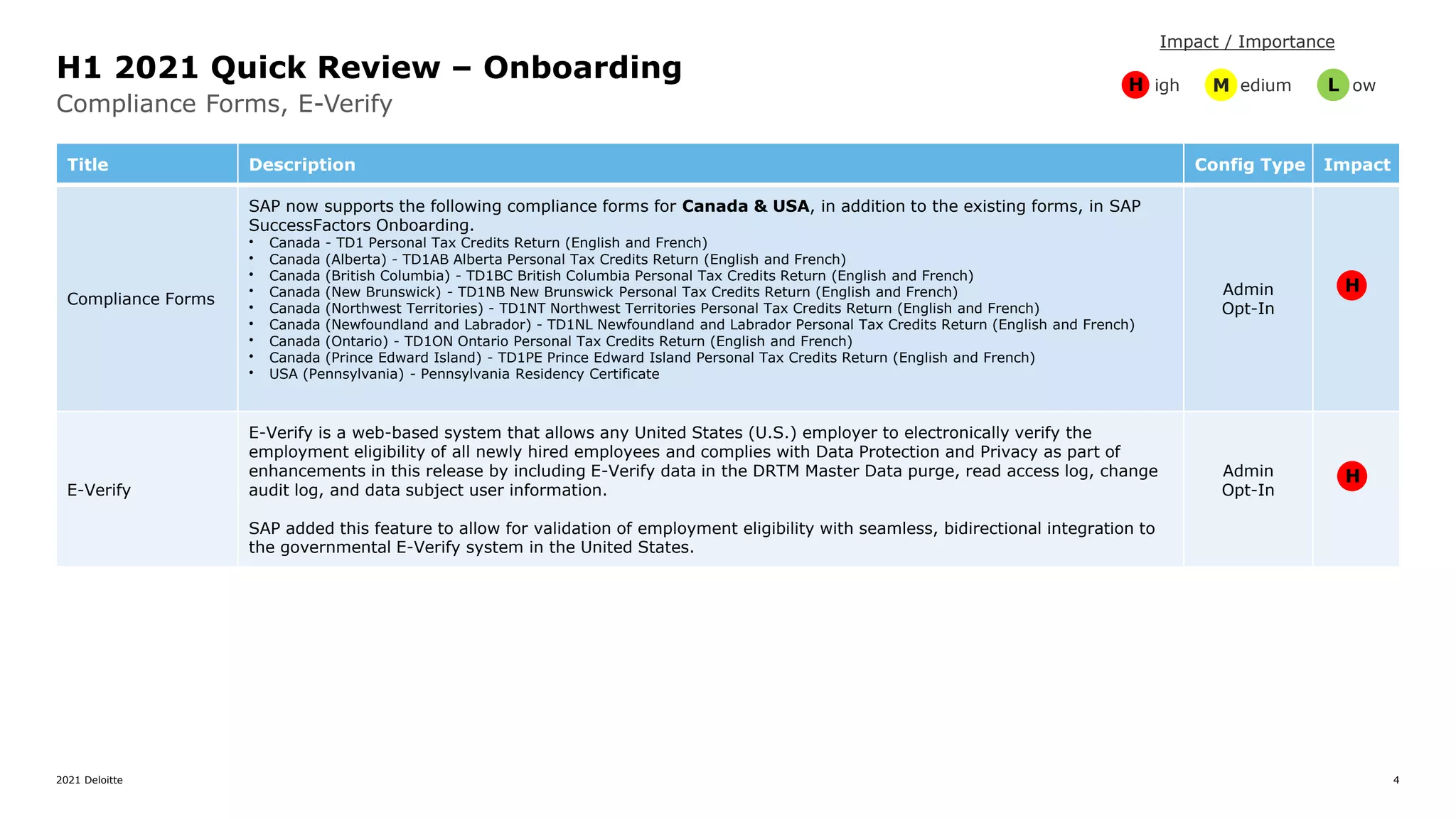
Compliance Forms, E-Verify
H1 2021 Quick Review – Onboarding H igh M edium L ow
Impact / Importance
Title Description Config Type Impact
Compliance Forms
SAP now supports the following compliance forms for Canada & USA, in addition to the existing forms, in SAP
SuccessFactors Onboarding.
• Canada - TD1 Personal Tax Credits Return (English and French)
• Canada (Alberta) - TD1AB Alberta Personal Tax Credits Return (English and French)
• Canada (British Columbia) - TD1BC British Columbia Personal Tax Credits Return (English and French)
• Canada (New Brunswick) - TD1NB New Brunswick Personal Tax Credits Return (English and French)
• Canada (Northwest Territories) - TD1NT Northwest Territories Personal Tax Credits Return (English and French)
• Canada (Newfoundland and Labrador) - TD1NL Newfoundland and Labrador Personal Tax Credits Return (English and French)
• Canada (Ontario) - TD1ON Ontario Personal Tax Credits Return (English and French)
• Canada (Prince Edward Island) - TD1PE Prince Edward Island Personal Tax Credits Return (English and French)
• USA (Pennsylvania) - Pennsylvania Residency Certificate
Admin
Opt-In
E-Verify
E-Verify is a web-based system that allows any United States (U.S.) employer to electronically verify the
employment eligibility of all newly hired employees and complies with Data Protection and Privacy as part of
enhancements in this release by including E-Verify data in the DRTM Master Data purge, read access log, change
audit log, and data subject user information.
SAP added this feature to allow for validation of employment eligibility with seamless, bidirectional integration to
the governmental E-Verify system in the United States.
Admin
Opt-In
H
H
2021 Deloitte 5
People Analytics, USICS Form I-9
H1 2021 Quick Review – Onboarding H igh M edium L ow
Impact / Importance
Title Description Config Type Impact
Reports Containing
USCIS Form I-9
and E-Verify
Information for
Audit Purposes
Using Stories in
People Analytics
We can now leverage Stories in People Analytics to generate reports containing Form I-9 and E-Verify related
information for audit purposes.
Some of the Form I-9 details that can be reported include
• Legal Entity
• Social Security Number
• Form I-9 Document Type
• Form I-9 Document Expiration Date
• Start date, end date, and due date of various steps executed for Form I-9
• Form I-9 Reverification details
• Form I-9 Section 1 and Section 2 correction details
Some of the E-Verify details that can be reported include:
• Legal Entity
• Social Security Number
• E-Verify Status
• E-Verify Case Result Status
• E-Verify Case Verification Number
• E-Verify Case Closure Date
• Number of new hires/employees who went through E-Verify process.
We can also generate and create reports containing Form I-9 and E-Verify information using Stories in People
Analytics that can be shared during audits.
Admin
Opt-In
USCIS Form I-9
Data Correction
Administrators & Responsible users can now initiate data correction for Section 1 and Section 2 of Form I-9, as
this enhancement helps us in ensuring Form I-9 is up to date and completed with the correct information. Also,
both the new hire and the responsible users are notified by email when correction is initiated for Form I-9
section1. And for section 2 only the responsible users are notified by email when correction is initiated.
Admin
Opt-In
H
M
2021 Deloitte 6
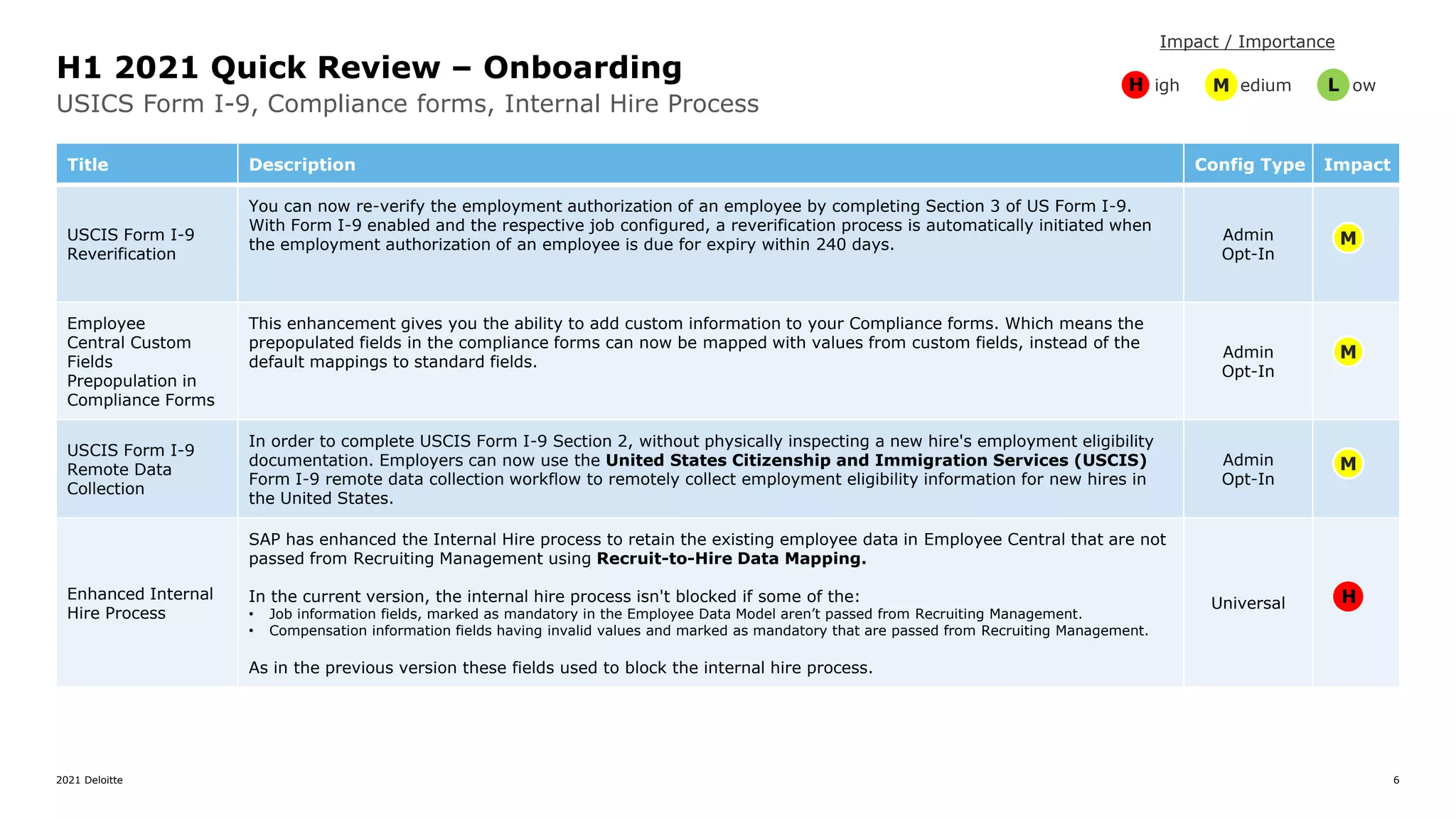
USICS Form I-9, Compliance forms, Internal Hire Process
H1 2021 Quick Review – Onboarding H igh M edium L ow
Impact / Importance
Title Description Config Type Impact
USCIS Form I-9
Reverification
You can now re-verify the employment authorization of an employee by completing Section 3 of US Form I-9.
With Form I-9 enabled and the respective job configured, a reverification process is automatically initiated when
the employment authorization of an employee is due for expiry within 240 days.
Admin
Opt-In
Employee
Central Custom
Fields
Prepopulation in
Compliance Forms
This enhancement gives you the ability to add custom information to your Compliance forms. Which means the
prepopulated fields in the compliance forms can now be mapped with values from custom fields, instead of the
default mappings to standard fields.
Admin
Opt-In
USCIS Form I-9
Remote Data
Collection
In order to complete USCIS Form I-9 Section 2, without physically inspecting a new hire's employment eligibility
documentation. Employers can now use the United States Citizenship and Immigration Services (USCIS)
Form I-9 remote data collection workflow to remotely collect employment eligibility information for new hires in
the United States.
Admin
Opt-In
Enhanced Internal
Hire Process
SAP has enhanced the Internal Hire process to retain the existing employee data in Employee Central that are not
passed from Recruiting Management using Recruit-to-Hire Data Mapping.
In the current version, the internal hire process isn't blocked if some of the:
• Job information fields, marked as mandatory in the Employee Data Model aren’t passed from Recruiting Management.
• Compensation information fields having invalid values and marked as mandatory that are passed from Recruiting Management.
As in the previous version these fields used to block the internal hire process.
Universal H
M
M
M
2021 Deloitte 7
Russian New Hires PII Data, Home page, New Hire Locale, Qualtrics Email Surveys
H1 2021 Quick Review – Onboarding
H igh M edium L ow
Impact / Importance
Title Description Config Type Impact
Russia Data
Residency Solution
The Initiate Onboarding, New Hire Data Review, Personal Data Collection, and Manage Pending
Hire process steps in Onboarding will save the new hire's Personally Identifiable Information (PII) data from Day
1 onwards in the Russian Data Center.
Note: Custom scenarios including Custom Data Collection, Custom Compliance, and Document Flow are not
supported.
Universal
Access to
Onboarding and
Offboarding
Dashboards from the
Global Navigation
Menu in the latest
home page
You can now use the Global Navigation Menu to access the Onboarding (New) and Offboarding Dashboards
in the latest home page.
Note: For Onboarding customers, we recommend that you explore this latest home page in Preview or Test
instances only.
Admin
Opt-In
Set Locale for
External New Hires
This feature allows the external new hires to see Onboarding user interfaces in the locale provided in Recruiting
Management, or the locale value set through External ATS, or the Admin page Add New Hire to Onboarding . If no
locale is set, the application picks the default locale value that is set in Provisioning. You specify the default locale
in the Default Language field of Company Settings.
Universal
Qualtrics Email
Surveys for
Offboarding
You can use Intelligent Services events to send employee offboarding payload information to Qualtrics through the
Integration Center, so that you can send a Qualtrics survey via email to them when the offboarding process is
initiated.
Admin
Opt-In
H
H
L
M
2021 Deloitte 8
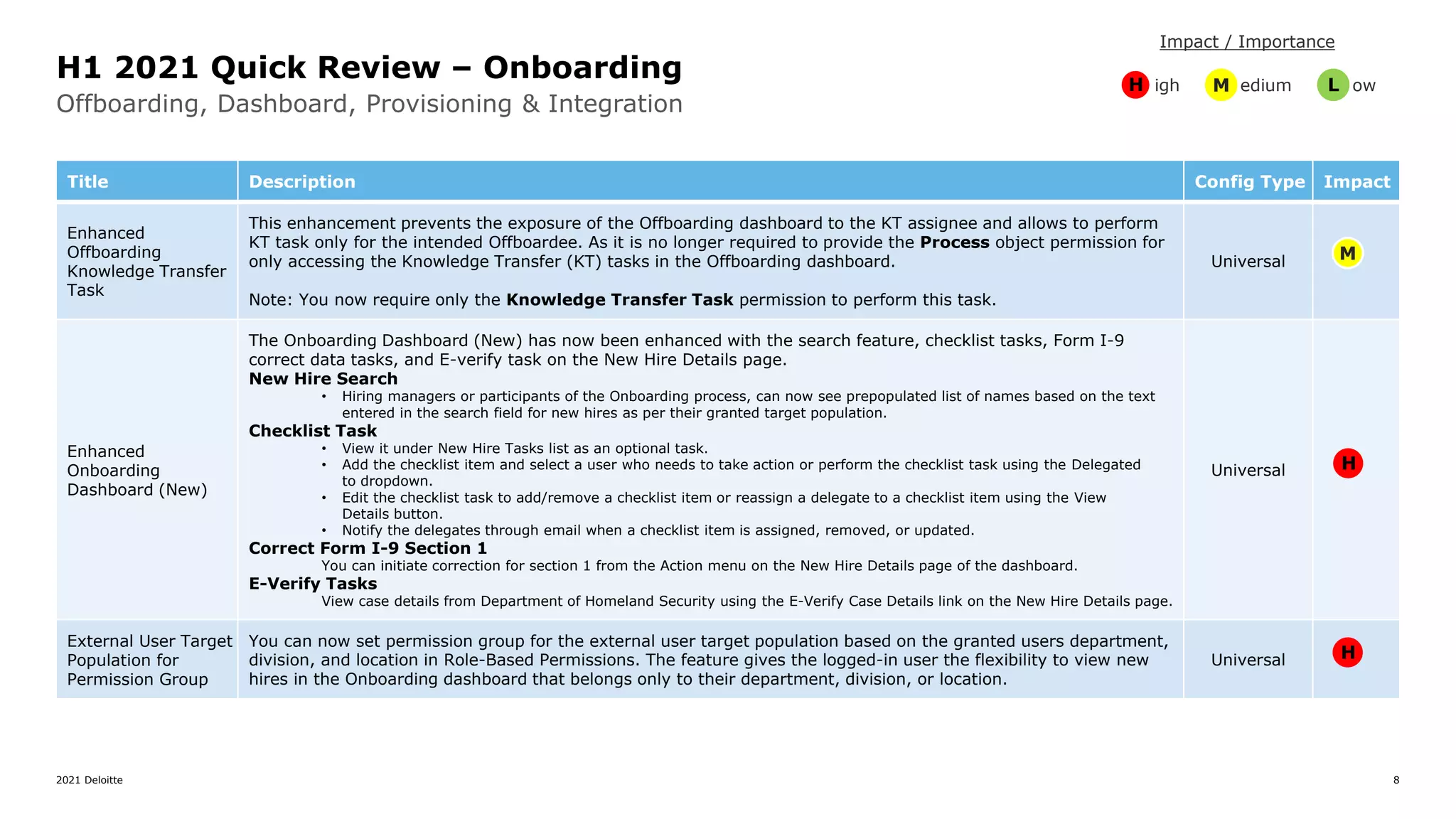
Offboarding, Dashboard, Provisioning & Integration
H1 2021 Quick Review – Onboarding H igh M edium L ow
Impact / Importance
Title Description Config Type Impact
Enhanced
Offboarding
Knowledge Transfer
Task
This enhancement prevents the exposure of the Offboarding dashboard to the KT assignee and allows to perform
KT task only for the intended Offboardee. As it is no longer required to provide the Process object permission for
only accessing the Knowledge Transfer (KT) tasks in the Offboarding dashboard.
Note: You now require only the Knowledge Transfer Task permission to perform this task.
Universal
Enhanced
Onboarding
Dashboard (New)
The Onboarding Dashboard (New) has now been enhanced with the search feature, checklist tasks, Form I-9
correct data tasks, and E-verify task on the New Hire Details page.
New Hire Search
• Hiring managers or participants of the Onboarding process, can now see prepopulated list of names based on the text
entered in the search field for new hires as per their granted target population.
Checklist Task
• View it under New Hire Tasks list as an optional task.
• Add the checklist item and select a user who needs to take action or perform the checklist task using the Delegated
to dropdown.
• Edit the checklist task to add/remove a checklist item or reassign a delegate to a checklist item using the View
Details button.
• Notify the delegates through email when a checklist item is assigned, removed, or updated.
Correct Form I-9 Section 1
You can initiate correction for section 1 from the Action menu on the New Hire Details page of the dashboard.
E-Verify Tasks
View case details from Department of Homeland Security using the E-Verify Case Details link on the New Hire Details page.
Universal
External User Target
Population for
Permission Group
You can now set permission group for the external user target population based on the granted users department,
division, and location in Role-Based Permissions. The feature gives the logged-in user the flexibility to view new
hires in the Onboarding dashboard that belongs only to their department, division, or location.
Universal
H
H
M
2021 Deloitte 9
Paperwork, Read Audit
H1 2021 Quick Review – Onboarding H igh M edium L ow
Impact / Importance
Title Description Config Type Impact
External User
Visibility Tool
This feature provides you with the flexibility of managing object visibility for new hires. Using the External User
Visibility tool, you can now make certain objects visible to the new hires without contacting SAP Cloud Support.
After the basic Onboarding setup, you can use this tool to display the objects to new hires during the Personal Data
Collection step.
Following are the objects that can be made visible to the new hires:
• CountrySpecificValidationConfiguration
• CustomPayType
• emailInfo_dependent
• globalInfo_dependent
• homeAddress_dependent
• MessageDefinition
• nationalIdCard_dependent
• personalInfo_dependent
• personInfo_dependent
• phoneInfo_dependent
• PickList
Universal
Enhanced Read
Access Logging
in Onboarding
This enhancement helps Data Protection Officers to understand the reason and legitimacy for accessing sensitive
personal data fields and take the required action. The read access log now includes the context and reason for
sensitive personal data fields in SAP SuccessFactors Onboarding and are read from:
• UI
• API (accessing from API)
• File Name (documents downloaded and sent through email as an attachment)
• Reports
Universal M
M
2021 Deloitte 10
Pradeep Parakala
Senior Consultant
Human Capital | SuccessFactors
Germany
pparakala@deloitte.de
+49 (0) 151 58077218
MY CONTACT DETAILS
Deloitte refers to one or more of Deloitte Touche Tohmatsu Limited (“DTTL”), its global network of member firms, and their related entities (collectively, the “Deloitte
organization”). DTTL (also referred to as “Deloitte Global”) and each of its member firms and related entities are legally separate and independent entities, which
cannot obligate or bind each other in respect of third parties. DTTL and each DTTL member firm and related entity is liable only for its own acts and omissions, and
not those of each other. DTTL does not provide services to clients. Please see www.deloitte.com/de/UeberUns to learn more.
Deloitte is a leading global provider of audit and assurance, consulting, financial advisory, risk advisory, tax and related services; legal advisory services in Germany
are provided by Deloitte Legal. Our global network of member firms and related entities in more than 150 countries and territories (collectively, the “Deloitte
organization”) serves four out of five Fortune Global 500® companies. Learn how Deloitte’s approximately 330,000 people make an impact that matters at
www.deloitte.com/de.
This communication contains general information only, and none of Deloitte Consulting GmbH or Deloitte Touche Tohmatsu Limited (“DTTL”), its global network of
member firms or their related entities (collectively, the “Deloitte organization”) is, by means of this communication, rendering professional advice or services. Before
making any decision or taking any action that may affect your finances or your business, you should consult a qualified professional adviser.
No representations, warranties or undertakings (express or implied) are given as to the accuracy or completeness of the information in this communication, and
none of DTTL, its member firms, related entities, employees or agents shall be liable or responsible for any loss or damage whatsoever arising directly or indirectly in
connection with any person relying on this communication. DTTL and each of its member firms, and their related entities, are legally separate and independent
entities.

H1 2021 Onboarding-quick-review by deloitte germany

  • 1.
    Quick Review Release H12021 Pradeep Parakala, Deloitte Germany, 04/22/2021 SAP SuccessFactors Onboarding
  • 2.
    2021 Deloitte 2 GeneralDates, Facts and Files (click on the links to be redirected to the source) Release Information Sources Release Schedule Release Preview Production Q1 2019 (1902) March 8th April 5th Q2 2019 (1905) May 10th June 7th Q3 2019 (1908) August 9th September 6th Q4 2019 (1911) November 8th December 6th 2019  What’s New Viewer for Release Summary H1 2021 (S-User required)  First Half 2021 Release Q&A Series - Registration Platform  Product Release & Roadmap Info at the SuccessFactors Community Site  SAP Roadmap Explorer (S-User required)  Known Issues for the 1H 2021 Release  Notable Fixed Issues 1H 2021 Release Preview Production First Half 2020 April 10th, April 11th (DC18, 22 & 23) June 5th Second Half 2020 October 16th November 20th 2020 Useful Knowledge Base Articles  ONB 1.0 New Experience for the Home Page  Filters in the Onboarding 2.0 Dashboard (New)  Configuring Onboarding Cards in Latest Home Page  External User Visibility tool error & work around Release Preview Production First Half 2021 April 16th May 21st Second Half 2021 October 15th November 19th 2021
  • 3.
    2021 Deloitte 3 ReadAccess, Terminology Updates, Latest Home Page H1 2021 Quick Review – Onboarding 1.0 H igh M edium L ow Impact / Importance Title Description Config Type Impact Enhanced Read Access logging in Onboarding 1.0 You can now configure sensitive personal data fields centrally in Onboarding 1.0 using Manage Audit Configuration. Universal Onboarding Terminology Updates The Onboarding product version available prior to Q4 2019, referred to as Onboarding in existing documentation, will be referred to as Onboarding 1.0 going forward. The Onboarding product version that was generally available in Q4 2019, referred to as Onboarding 2.0 in existing documentation, will be referred to as Onboarding going forward. These changes are also replicated in the system to distinguish between the two versions. Universal Onboarding 1.0 New Hire Tasks Accessible on the Latest Home Page You can now create a custom card for Onboarding 1.0 new hire tasks to make them available on the latest Home Page experience. If you upgrade to the latest Home Page, you must configure a custom card to make the Onboarding 1.0 tasks accessible to new hires. SAP enhanced this feature so that customers could create a custom Home Page card with a deep link to the following Onboarding 1.0 tasks: • Welcome Message • Where to Go • People to Meet • My Links • Meetings for New Hires • My Peers • My Profile • Prepare for Day One Once configured, the custom card appears in a separate Onboarding section on the latest home page. Admin Opt-In H L L
  • 4.
    2021 Deloitte 4 ComplianceForms, E-Verify H1 2021 Quick Review – Onboarding H igh M edium L ow Impact / Importance Title Description Config Type Impact Compliance Forms SAP now supports the following compliance forms for Canada & USA, in addition to the existing forms, in SAP SuccessFactors Onboarding. • Canada - TD1 Personal Tax Credits Return (English and French) • Canada (Alberta) - TD1AB Alberta Personal Tax Credits Return (English and French) • Canada (British Columbia) - TD1BC British Columbia Personal Tax Credits Return (English and French) • Canada (New Brunswick) - TD1NB New Brunswick Personal Tax Credits Return (English and French) • Canada (Northwest Territories) - TD1NT Northwest Territories Personal Tax Credits Return (English and French) • Canada (Newfoundland and Labrador) - TD1NL Newfoundland and Labrador Personal Tax Credits Return (English and French) • Canada (Ontario) - TD1ON Ontario Personal Tax Credits Return (English and French) • Canada (Prince Edward Island) - TD1PE Prince Edward Island Personal Tax Credits Return (English and French) • USA (Pennsylvania) - Pennsylvania Residency Certificate Admin Opt-In E-Verify E-Verify is a web-based system that allows any United States (U.S.) employer to electronically verify the employment eligibility of all newly hired employees and complies with Data Protection and Privacy as part of enhancements in this release by including E-Verify data in the DRTM Master Data purge, read access log, change audit log, and data subject user information. SAP added this feature to allow for validation of employment eligibility with seamless, bidirectional integration to the governmental E-Verify system in the United States. Admin Opt-In H H
  • 5.
    2021 Deloitte 5 PeopleAnalytics, USICS Form I-9 H1 2021 Quick Review – Onboarding H igh M edium L ow Impact / Importance Title Description Config Type Impact Reports Containing USCIS Form I-9 and E-Verify Information for Audit Purposes Using Stories in People Analytics We can now leverage Stories in People Analytics to generate reports containing Form I-9 and E-Verify related information for audit purposes. Some of the Form I-9 details that can be reported include • Legal Entity • Social Security Number • Form I-9 Document Type • Form I-9 Document Expiration Date • Start date, end date, and due date of various steps executed for Form I-9 • Form I-9 Reverification details • Form I-9 Section 1 and Section 2 correction details Some of the E-Verify details that can be reported include: • Legal Entity • Social Security Number • E-Verify Status • E-Verify Case Result Status • E-Verify Case Verification Number • E-Verify Case Closure Date • Number of new hires/employees who went through E-Verify process. We can also generate and create reports containing Form I-9 and E-Verify information using Stories in People Analytics that can be shared during audits. Admin Opt-In USCIS Form I-9 Data Correction Administrators & Responsible users can now initiate data correction for Section 1 and Section 2 of Form I-9, as this enhancement helps us in ensuring Form I-9 is up to date and completed with the correct information. Also, both the new hire and the responsible users are notified by email when correction is initiated for Form I-9 section1. And for section 2 only the responsible users are notified by email when correction is initiated. Admin Opt-In H M
  • 6.
    2021 Deloitte 6 USICSForm I-9, Compliance forms, Internal Hire Process H1 2021 Quick Review – Onboarding H igh M edium L ow Impact / Importance Title Description Config Type Impact USCIS Form I-9 Reverification You can now re-verify the employment authorization of an employee by completing Section 3 of US Form I-9. With Form I-9 enabled and the respective job configured, a reverification process is automatically initiated when the employment authorization of an employee is due for expiry within 240 days. Admin Opt-In Employee Central Custom Fields Prepopulation in Compliance Forms This enhancement gives you the ability to add custom information to your Compliance forms. Which means the prepopulated fields in the compliance forms can now be mapped with values from custom fields, instead of the default mappings to standard fields. Admin Opt-In USCIS Form I-9 Remote Data Collection In order to complete USCIS Form I-9 Section 2, without physically inspecting a new hire's employment eligibility documentation. Employers can now use the United States Citizenship and Immigration Services (USCIS) Form I-9 remote data collection workflow to remotely collect employment eligibility information for new hires in the United States. Admin Opt-In Enhanced Internal Hire Process SAP has enhanced the Internal Hire process to retain the existing employee data in Employee Central that are not passed from Recruiting Management using Recruit-to-Hire Data Mapping. In the current version, the internal hire process isn't blocked if some of the: • Job information fields, marked as mandatory in the Employee Data Model aren’t passed from Recruiting Management. • Compensation information fields having invalid values and marked as mandatory that are passed from Recruiting Management. As in the previous version these fields used to block the internal hire process. Universal H M M M
  • 7.
    2021 Deloitte 7 RussianNew Hires PII Data, Home page, New Hire Locale, Qualtrics Email Surveys H1 2021 Quick Review – Onboarding H igh M edium L ow Impact / Importance Title Description Config Type Impact Russia Data Residency Solution The Initiate Onboarding, New Hire Data Review, Personal Data Collection, and Manage Pending Hire process steps in Onboarding will save the new hire's Personally Identifiable Information (PII) data from Day 1 onwards in the Russian Data Center. Note: Custom scenarios including Custom Data Collection, Custom Compliance, and Document Flow are not supported. Universal Access to Onboarding and Offboarding Dashboards from the Global Navigation Menu in the latest home page You can now use the Global Navigation Menu to access the Onboarding (New) and Offboarding Dashboards in the latest home page. Note: For Onboarding customers, we recommend that you explore this latest home page in Preview or Test instances only. Admin Opt-In Set Locale for External New Hires This feature allows the external new hires to see Onboarding user interfaces in the locale provided in Recruiting Management, or the locale value set through External ATS, or the Admin page Add New Hire to Onboarding . If no locale is set, the application picks the default locale value that is set in Provisioning. You specify the default locale in the Default Language field of Company Settings. Universal Qualtrics Email Surveys for Offboarding You can use Intelligent Services events to send employee offboarding payload information to Qualtrics through the Integration Center, so that you can send a Qualtrics survey via email to them when the offboarding process is initiated. Admin Opt-In H H L M
  • 8.
    2021 Deloitte 8 Offboarding,Dashboard, Provisioning & Integration H1 2021 Quick Review – Onboarding H igh M edium L ow Impact / Importance Title Description Config Type Impact Enhanced Offboarding Knowledge Transfer Task This enhancement prevents the exposure of the Offboarding dashboard to the KT assignee and allows to perform KT task only for the intended Offboardee. As it is no longer required to provide the Process object permission for only accessing the Knowledge Transfer (KT) tasks in the Offboarding dashboard. Note: You now require only the Knowledge Transfer Task permission to perform this task. Universal Enhanced Onboarding Dashboard (New) The Onboarding Dashboard (New) has now been enhanced with the search feature, checklist tasks, Form I-9 correct data tasks, and E-verify task on the New Hire Details page. New Hire Search • Hiring managers or participants of the Onboarding process, can now see prepopulated list of names based on the text entered in the search field for new hires as per their granted target population. Checklist Task • View it under New Hire Tasks list as an optional task. • Add the checklist item and select a user who needs to take action or perform the checklist task using the Delegated to dropdown. • Edit the checklist task to add/remove a checklist item or reassign a delegate to a checklist item using the View Details button. • Notify the delegates through email when a checklist item is assigned, removed, or updated. Correct Form I-9 Section 1 You can initiate correction for section 1 from the Action menu on the New Hire Details page of the dashboard. E-Verify Tasks View case details from Department of Homeland Security using the E-Verify Case Details link on the New Hire Details page. Universal External User Target Population for Permission Group You can now set permission group for the external user target population based on the granted users department, division, and location in Role-Based Permissions. The feature gives the logged-in user the flexibility to view new hires in the Onboarding dashboard that belongs only to their department, division, or location. Universal H H M
  • 9.
    2021 Deloitte 9 Paperwork,Read Audit H1 2021 Quick Review – Onboarding H igh M edium L ow Impact / Importance Title Description Config Type Impact External User Visibility Tool This feature provides you with the flexibility of managing object visibility for new hires. Using the External User Visibility tool, you can now make certain objects visible to the new hires without contacting SAP Cloud Support. After the basic Onboarding setup, you can use this tool to display the objects to new hires during the Personal Data Collection step. Following are the objects that can be made visible to the new hires: • CountrySpecificValidationConfiguration • CustomPayType • emailInfo_dependent • globalInfo_dependent • homeAddress_dependent • MessageDefinition • nationalIdCard_dependent • personalInfo_dependent • personInfo_dependent • phoneInfo_dependent • PickList Universal Enhanced Read Access Logging in Onboarding This enhancement helps Data Protection Officers to understand the reason and legitimacy for accessing sensitive personal data fields and take the required action. The read access log now includes the context and reason for sensitive personal data fields in SAP SuccessFactors Onboarding and are read from: • UI • API (accessing from API) • File Name (documents downloaded and sent through email as an attachment) • Reports Universal M M
  • 10.
    2021 Deloitte 10 PradeepParakala Senior Consultant Human Capital | SuccessFactors Germany pparakala@deloitte.de +49 (0) 151 58077218 MY CONTACT DETAILS
  • 11.
    Deloitte refers toone or more of Deloitte Touche Tohmatsu Limited (“DTTL”), its global network of member firms, and their related entities (collectively, the “Deloitte organization”). DTTL (also referred to as “Deloitte Global”) and each of its member firms and related entities are legally separate and independent entities, which cannot obligate or bind each other in respect of third parties. DTTL and each DTTL member firm and related entity is liable only for its own acts and omissions, and not those of each other. DTTL does not provide services to clients. Please see www.deloitte.com/de/UeberUns to learn more. Deloitte is a leading global provider of audit and assurance, consulting, financial advisory, risk advisory, tax and related services; legal advisory services in Germany are provided by Deloitte Legal. Our global network of member firms and related entities in more than 150 countries and territories (collectively, the “Deloitte organization”) serves four out of five Fortune Global 500® companies. Learn how Deloitte’s approximately 330,000 people make an impact that matters at www.deloitte.com/de. This communication contains general information only, and none of Deloitte Consulting GmbH or Deloitte Touche Tohmatsu Limited (“DTTL”), its global network of member firms or their related entities (collectively, the “Deloitte organization”) is, by means of this communication, rendering professional advice or services. Before making any decision or taking any action that may affect your finances or your business, you should consult a qualified professional adviser. No representations, warranties or undertakings (express or implied) are given as to the accuracy or completeness of the information in this communication, and none of DTTL, its member firms, related entities, employees or agents shall be liable or responsible for any loss or damage whatsoever arising directly or indirectly in connection with any person relying on this communication. DTTL and each of its member firms, and their related entities, are legally separate and independent entities.