© 2023 All Rights Reserved
YugabyteDB
Advanced level unlocked
1
Gwenn Etourneau
Principal, Solution Architect
© 2023 All Rights Reserved
● Quick reminder
● Under the hood
○ Tablet Splitting
■ Manual splitting
■ Pre-splitting
■ Automatic splitting
○ Replication
■ Raft
■ Read - Write path
■ Transaction Read-Write path
2
Agenda
© 2023 All Rights Reserved 3
About Me
https://github.com/shinji62
https://twitter.com/the_shinji62
Woven by Toyota
Pivotal (ac. By VMware)
Rakuten
IBM …
Etourneau Gwenn
Principal Solution Architect
© 2023 All Rights Reserved
Quick reminder
4
© 2023 All Rights Reserved
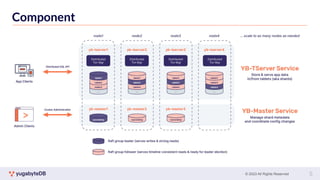
Component
5
© 2023 All Rights Reserved
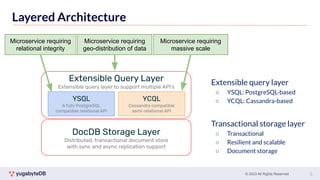
Layered Architecture
DocDB Storage Layer
Distributed, transactional document store
with sync and async replication support
YSQL
A fully PostgreSQL
compatible relational API
YCQL
Cassandra compatible
semi-relational API
Extensible Query Layer
Extensible query layer to support multiple API’s
Microservice requiring
relational integrity
Microservice requiring
massive scale
Microservice requiring
geo-distribution of data
Extensible query layer
○ YSQL: PostgreSQL-based
○ YCQL: Cassandra-based
Transactional storage layer
○ Transactional
○ Resilient and scalable
○ Document storage
6
© 2023 All Rights Reserved
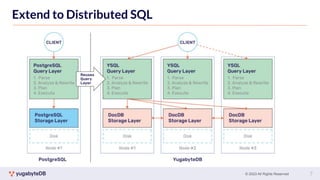
Extend to Distributed SQL
7
© 2023 All Rights Reserved
Under the hood
Table sharding
8
© 2023 All Rights Reserved
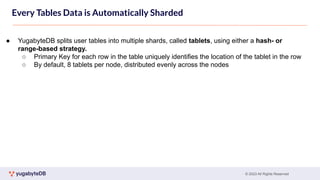
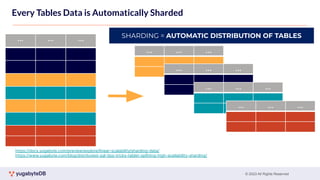
● YugabyteDB splits user tables into multiple shards, called tablets, using either a hash- or
range-based strategy.
○ Primary Key for each row in the table uniquely identifies the location of the tablet in the row
○ By default, 8 tablets per node, distributed evenly across the nodes
Every Tables Data is Automatically Sharded
© 2023 All Rights Reserved
Every Tables Data is Automatically Sharded
tablet 1’
… … …
… … …
… … …
… … …
… … …
SHARDING = AUTOMATIC DISTRIBUTION OF TABLES
https://docs.yugabyte.com/preview/explore/linear-scalability/sharding-data/
https://www.yugabyte.com/blog/distributed-sql-tips-tricks-tablet-splitting-high-availability-sharding/
© 2023 All Rights Reserved
● YugabyteDB allows data resharding by splitting tablets using the following 3 mechanisms:
● Presplitting tablets
○ All tables created in DocDB can be split into the desired number of tablets at creation time.
● Manual tablet splitting
○ The tablets in a running cluster can be split manually at runtime by you.
● Automatic tablet splitting
○ The tablets in a running cluster are automatically split according to some policy by the
database.
Every Tables Data is Automatically Sharded
© 2023 All Rights Reserved
1. Presplitting tablets
● At creation time, presplit a table into the desired number of tablets
○ YSQL tables - Supports both range-sharded and hash-sharded
○ YCQL tables - Support hash-sharded YCQL tables
● Hash-sharded tables
● Max 65536(64k) tablets/shard
● 2-byte range from 0x0000 to 0xFFFF
CREATE TABLE customers (
customer_id bpchar NOT NULL,
cname character varying(40),
contact_name character varying(30),
contact_title character varying(30),
PRIMARY KEY (customer_id HASH)
) SPLIT INTO 16 TABLETS;
● e.g. table with 16 tablets the overall hash space [0x0000
to 0xFFFF) is divided into 16 subranges, one for each
tablet: [0x0000, 0x1000), [0x1000, 0x2000), … , [0xF000,
0xFFFF]
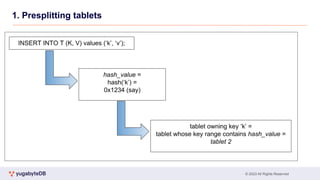
● Read/write operations are processed by converting the
primary key into an internal key and its hash value, and
determining to which tablet the operation should be routed
© 2023 All Rights Reserved
1. Presplitting tablets
© 2023 All Rights Reserved
1. Presplitting tablets
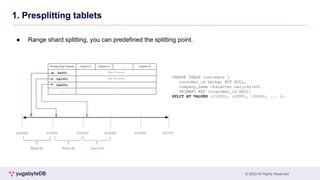
● Range shard splitting, you can predefined the splitting point.
CREATE TABLE customers (
customer_id bpchar NOT NULL,
company_name character varying(40)
PRIMARY KEY (customer_id ASC))
SPLIT AT VALUES ((1000), (2000), (3000), ... );
© 2023 All Rights Reserved
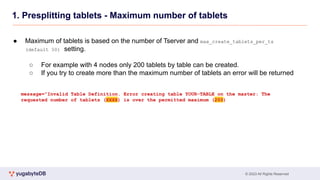
1. Presplitting tablets - Maximum number of tablets
● Maximum of tablets is based on the number of Tserver and max_create_tablets_per_ts
(default 50) setting.
○ For example with 4 nodes only 200 tablets by table can be created.
○ If you try to create more than the maximum number of tablets an error will be returned
message="Invalid Table Definition. Error creating table YOUR-TABLE on the master: The
requested number of tablets (XXXX) is over the permitted maximum (200)
© 2023 All Rights Reserved
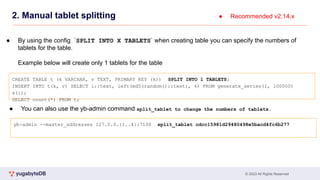
2. Manual tablet splitting
CREATE TABLE t (k VARCHAR, v TEXT, PRIMARY KEY (k)) SPLIT INTO 1 TABLETS;
INSERT INTO t(k, v) SELECT i::text, left(md5(random()::text), 4) FROM generate_series(1, 100000)
s(i);
SELECT count(*) FROM t;
● Recommended v2.14.x
● By using the config `SPLIT INTO X TABLETS` when creating table you can specify the numbers of
tablets for the table.
Example below will create only 1 tablets for the table
yb-admin --master_addresses 127.0.0.{1..4}:7100 split_tablet cdcc15981d29480498e5bacd4fc6b277
● You can also use the yb-admin command split_tablet to change the numbers of tablets.
© 2023 All Rights Reserved
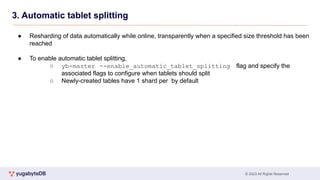
3. Automatic tablet splitting
● Resharding of data automatically while online, transparently when a specified size threshold has been
reached
● To enable automatic tablet splitting,
○ yb-master --enable_automatic_tablet_splitting flag and specify the
associated flags to configure when tablets should split
○ Newly-created tables have 1 shard per by default
© 2023 All Rights Reserved
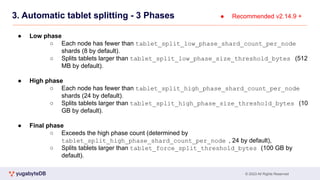
3. Automatic tablet splitting - 3 Phases
● Low phase
○ Each node has fewer than tablet_split_low_phase_shard_count_per_node
shards (8 by default).
○ Splits tablets larger than tablet_split_low_phase_size_threshold_bytes (512
MB by default).
● High phase
○ Each node has fewer than tablet_split_high_phase_shard_count_per_node
shards (24 by default).
○ Splits tablets larger than tablet_split_high_phase_size_threshold_bytes (10
GB by default).
● Final phase
○ Exceeds the high phase count (determined by
tablet_split_high_phase_shard_count_per_node , 24 by default),
○ Splits tablets larger than tablet_force_split_threshold_bytes (100 GB by
default).
● Recommended v2.14.9 +
© 2023 All Rights Reserved
3. Automatic tablet splitting - Others.
● Post-split compactions
○ When a tablet is split, the two tablets need to have a full compaction to remove
unnecessary data and free disk space.
○ This may increase CPU overhead, but you can control this behavior with some gflags
© 2023 All Rights Reserved
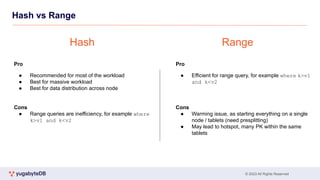
Hash vs Range
Pro
● Recommended for most of the workload
● Best for massive workload
● Best for data distribution across node
Cons
● Range queries are inefficiency, for example where
k>v1 and k<v2
Pro
● Efficient for range query, for example where k>v1
and k<v2
Cons
● Warming issue, as starting everything on a single
node / tablets (need presplitting)
● May lead to hotspot, many PK within the same
tablets
Hash Range
© 2023 All Rights Reserved
Under the hood
Replication
21
© 2023 All Rights Reserved
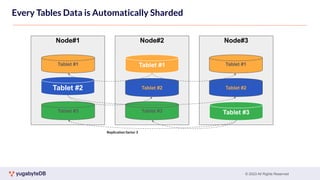
Replication factor 3
Node#1 Node#2 Node#3
Tablet #1
Tablet #2
Tablet #3
Tablet #1 Tablet #1
Tablet #2 Tablet #2
Tablet #3
Tablet #3
Every Tables Data is Automatically Sharded
© 2023 All Rights Reserved
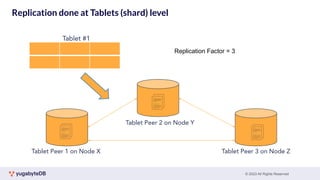
Replication done at Tablets (shard) level
tablet 1’
Tablet Peer 1 on Node X
Tablet #1
Tablet Peer 2 on Node Y
Tablet Peer 3 on Node Z
Replication Factor = 3
© 2023 All Rights Reserved
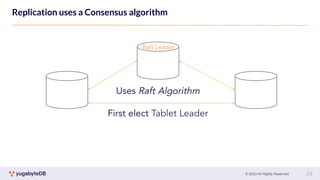
Replication uses a Consensus algorithm
tablet 1’
Raft Leader
Uses Raft Algorithm
First elect Tablet Leader
24
© 2023 All Rights Reserved
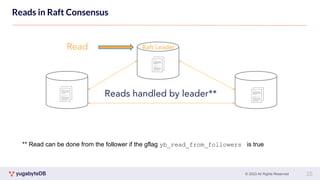
Reads in Raft Consensus
tablet 1’
Raft Leader
Reads handled by leader**
Read
25
** Read can be done from the follower if the gflag yb_read_from_followers is true
© 2023 All Rights Reserved
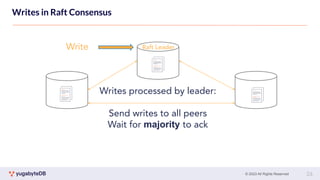
Writes in Raft Consensus
tablet 1’
Raft Leader
Writes processed by leader:
Send writes to all peers
Wait for majority to ack
Write
26
© 2023 All Rights Reserved
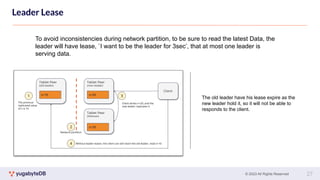
Leader Lease
tablet 1’
27
To avoid inconsistencies during network partition, to be sure to read the latest Data, the
leader will have lease, `I want to be the leader for 3sec’, that at most one leader is
serving data.
The old leader have his lease expire as the
new leader hold it, so it will not be able to
responds to the client.
© 2023 All Rights Reserved
Under the hood
IO Path
28
© 2023 All Rights Reserved
Read path
29
© 2023 All Rights Reserved
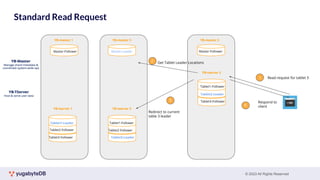
Standard Read Request
Tablet1-Follower
Tablet2-Follower
Tablet3-Leader
YB-tserver 3
Tablet1-Leader
Tablet2-Follower
Tablet3-Follower
YB-tserver 1
Read request for tablet 3
1
Tablet1-Follower
Tablet2-Leader
Tablet3-Follower
YB-tserver 2
Get Tablet Leader Locations
2
Redirect to current
table 3 leader
3 Respond to
client
4
Master-Follower
YB-master 1
Master-Leader
YB-master 3
Master-Follower
YB-master 2
© 2023 All Rights Reserved
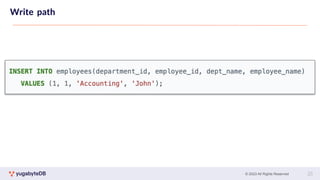
Write path
31
© 2023 All Rights Reserved
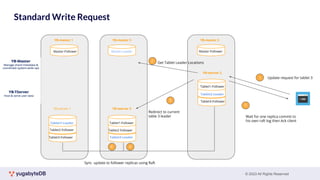
Standard Write Request
Tablet1-Follower
Tablet2-Follower
Tablet3-Leader
YB-tserver 3
Tablet1-Leader
Tablet2-Follower
Tablet3-Follower
YB-tserver 1
Update request for tablet 3
1
Tablet1-Follower
Tablet2-Leader
Tablet3-Follower
YB-tserver 2
Get Tablet Leader Locations
2
Redirect to current
table 3 leader
3
Wait for one replica commit to
his own raft log then Ack client
5
Master-Follower
YB-master 1
Master-Leader
YB-master 3
Master-Follower
YB-master 2
4
4
Sync update to follower replicas using Raft
© 2023 All Rights Reserved
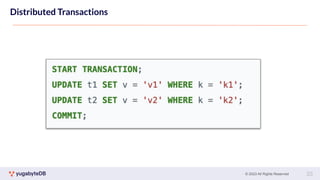
Distributed Transactions
33
© 2023 All Rights Reserved
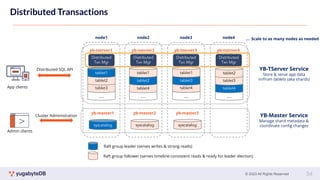
Distributed Transactions
node1 node2 node3 node4 … Scale to as many nodes as needed
Raft group leader (serves writes & strong reads)
Raft group follower (serves timeline-consistent reads & ready for leader election)
syscatalog
yb-master1
YB-Master Service
Manage shard metadata &
coordinate config changes
syscatalog
yb-master2
syscatalog
yb-master3
Cluster Administration
Admin clients
…
yb-tserver1
tablet3
tablet2
tablet1
YB-TServer Service
Store & serve app data
in/from tablets (aka shards)
yb-tserver2 yb-tserver3 yb-tserver4
…
tablet4
tablet2
tablet1
…
tablet4
tablet3
tablet1
…
tablet4
tablet3
tablet2
App clients
Distributed SQL API
Distributed
Txn Mgr
Distributed
Txn Mgr
Distributed
Txn Mgr
Distributed
Txn Mgr
34
© 2023 All Rights Reserved
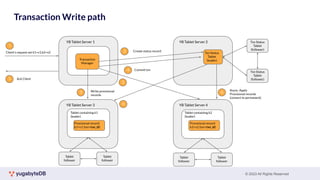
Transaction Write path
YB Tablet Server 1 YB Tablet Server 2
YB Tablet Server 4
YB Tablet Server 3
Txn Status
Tablet
(leader)
Tablet containing k1
(leader)
Tablet containing k2
(leader)
Provisional record:
k1=v1 (txn=txn_id)
Provisional record:
k2=v2 (txn=txn_id)
Txn Status
Tablet
(follower)
Txn Status
Tablet
(follower)
Tablet
follower
Tablet
follower
Tablet
follower
Tablet
follower
Transaction
Manager
1
Client’s request set k1=v1,k2=v2
5 Ack Client
2 Create status record
3 Write provisional
records
3
4 Commit txn
6
6
Async. Apply
Provisional records
(convert to permanent)
© 2023 All Rights Reserved
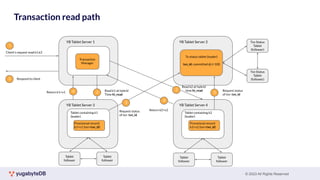
Transaction read path
YB Tablet Server 1 YB Tablet Server 2
YB Tablet Server 4
YB Tablet Server 3
Tx status tablet (leader)
txn_id: committed @ t=100
Tablet containing k1
(leader)
Tablet containing k2
(leader)
Provisional record:
k1=v1 (txn=txn_id)
Provisional record:
k2=v2 (txn=txn_id)
Txn Status
Tablet
(follower)
Txn Status
Tablet
(follower)
Tablet
follower
Tablet
follower
Tablet
follower
Tablet
follower
Transaction
Manager
1
Client’s request read k1,k2
5 Respond to client
4
4
Return k1=v1
Return k2=v2
2
2
Read k1 at hybrid
Time ht_read
Read k2 at hybrid
time ht_read
3
3
Request status
of txn txn_id
Request status
of txn txn_id
© 2023 All Rights Reserved 37
Thank You
Join us on Slack:
www.yugabyte.com/slack
Star us on GitHub:
github.com/yugabyte/yugabyte-db
37

Gwenn - Advanced level unlocked_.pdf

  • 1.
    © 2023 AllRights Reserved YugabyteDB Advanced level unlocked 1 Gwenn Etourneau Principal, Solution Architect
  • 2.
    © 2023 AllRights Reserved ● Quick reminder ● Under the hood ○ Tablet Splitting ■ Manual splitting ■ Pre-splitting ■ Automatic splitting ○ Replication ■ Raft ■ Read - Write path ■ Transaction Read-Write path 2 Agenda
  • 3.
    © 2023 AllRights Reserved 3 About Me https://github.com/shinji62 https://twitter.com/the_shinji62 Woven by Toyota Pivotal (ac. By VMware) Rakuten IBM … Etourneau Gwenn Principal Solution Architect
  • 4.
    © 2023 AllRights Reserved Quick reminder 4
  • 5.
    © 2023 AllRights Reserved Component 5
  • 6.
    © 2023 AllRights Reserved Layered Architecture DocDB Storage Layer Distributed, transactional document store with sync and async replication support YSQL A fully PostgreSQL compatible relational API YCQL Cassandra compatible semi-relational API Extensible Query Layer Extensible query layer to support multiple API’s Microservice requiring relational integrity Microservice requiring massive scale Microservice requiring geo-distribution of data Extensible query layer ○ YSQL: PostgreSQL-based ○ YCQL: Cassandra-based Transactional storage layer ○ Transactional ○ Resilient and scalable ○ Document storage 6
  • 7.
    © 2023 AllRights Reserved Extend to Distributed SQL 7
  • 8.
    © 2023 AllRights Reserved Under the hood Table sharding 8
  • 9.
    © 2023 AllRights Reserved ● YugabyteDB splits user tables into multiple shards, called tablets, using either a hash- or range-based strategy. ○ Primary Key for each row in the table uniquely identifies the location of the tablet in the row ○ By default, 8 tablets per node, distributed evenly across the nodes Every Tables Data is Automatically Sharded
  • 10.
    © 2023 AllRights Reserved Every Tables Data is Automatically Sharded tablet 1’ … … … … … … … … … … … … … … … SHARDING = AUTOMATIC DISTRIBUTION OF TABLES https://docs.yugabyte.com/preview/explore/linear-scalability/sharding-data/ https://www.yugabyte.com/blog/distributed-sql-tips-tricks-tablet-splitting-high-availability-sharding/
  • 11.
    © 2023 AllRights Reserved ● YugabyteDB allows data resharding by splitting tablets using the following 3 mechanisms: ● Presplitting tablets ○ All tables created in DocDB can be split into the desired number of tablets at creation time. ● Manual tablet splitting ○ The tablets in a running cluster can be split manually at runtime by you. ● Automatic tablet splitting ○ The tablets in a running cluster are automatically split according to some policy by the database. Every Tables Data is Automatically Sharded
  • 12.
    © 2023 AllRights Reserved 1. Presplitting tablets ● At creation time, presplit a table into the desired number of tablets ○ YSQL tables - Supports both range-sharded and hash-sharded ○ YCQL tables - Support hash-sharded YCQL tables ● Hash-sharded tables ● Max 65536(64k) tablets/shard ● 2-byte range from 0x0000 to 0xFFFF CREATE TABLE customers ( customer_id bpchar NOT NULL, cname character varying(40), contact_name character varying(30), contact_title character varying(30), PRIMARY KEY (customer_id HASH) ) SPLIT INTO 16 TABLETS; ● e.g. table with 16 tablets the overall hash space [0x0000 to 0xFFFF) is divided into 16 subranges, one for each tablet: [0x0000, 0x1000), [0x1000, 0x2000), … , [0xF000, 0xFFFF] ● Read/write operations are processed by converting the primary key into an internal key and its hash value, and determining to which tablet the operation should be routed
  • 13.
    © 2023 AllRights Reserved 1. Presplitting tablets
  • 14.
    © 2023 AllRights Reserved 1. Presplitting tablets ● Range shard splitting, you can predefined the splitting point. CREATE TABLE customers ( customer_id bpchar NOT NULL, company_name character varying(40) PRIMARY KEY (customer_id ASC)) SPLIT AT VALUES ((1000), (2000), (3000), ... );
  • 15.
    © 2023 AllRights Reserved 1. Presplitting tablets - Maximum number of tablets ● Maximum of tablets is based on the number of Tserver and max_create_tablets_per_ts (default 50) setting. ○ For example with 4 nodes only 200 tablets by table can be created. ○ If you try to create more than the maximum number of tablets an error will be returned message="Invalid Table Definition. Error creating table YOUR-TABLE on the master: The requested number of tablets (XXXX) is over the permitted maximum (200)
  • 16.
    © 2023 AllRights Reserved 2. Manual tablet splitting CREATE TABLE t (k VARCHAR, v TEXT, PRIMARY KEY (k)) SPLIT INTO 1 TABLETS; INSERT INTO t(k, v) SELECT i::text, left(md5(random()::text), 4) FROM generate_series(1, 100000) s(i); SELECT count(*) FROM t; ● Recommended v2.14.x ● By using the config `SPLIT INTO X TABLETS` when creating table you can specify the numbers of tablets for the table. Example below will create only 1 tablets for the table yb-admin --master_addresses 127.0.0.{1..4}:7100 split_tablet cdcc15981d29480498e5bacd4fc6b277 ● You can also use the yb-admin command split_tablet to change the numbers of tablets.
  • 17.
    © 2023 AllRights Reserved 3. Automatic tablet splitting ● Resharding of data automatically while online, transparently when a specified size threshold has been reached ● To enable automatic tablet splitting, ○ yb-master --enable_automatic_tablet_splitting flag and specify the associated flags to configure when tablets should split ○ Newly-created tables have 1 shard per by default
  • 18.
    © 2023 AllRights Reserved 3. Automatic tablet splitting - 3 Phases ● Low phase ○ Each node has fewer than tablet_split_low_phase_shard_count_per_node shards (8 by default). ○ Splits tablets larger than tablet_split_low_phase_size_threshold_bytes (512 MB by default). ● High phase ○ Each node has fewer than tablet_split_high_phase_shard_count_per_node shards (24 by default). ○ Splits tablets larger than tablet_split_high_phase_size_threshold_bytes (10 GB by default). ● Final phase ○ Exceeds the high phase count (determined by tablet_split_high_phase_shard_count_per_node , 24 by default), ○ Splits tablets larger than tablet_force_split_threshold_bytes (100 GB by default). ● Recommended v2.14.9 +
  • 19.
    © 2023 AllRights Reserved 3. Automatic tablet splitting - Others. ● Post-split compactions ○ When a tablet is split, the two tablets need to have a full compaction to remove unnecessary data and free disk space. ○ This may increase CPU overhead, but you can control this behavior with some gflags
  • 20.
    © 2023 AllRights Reserved Hash vs Range Pro ● Recommended for most of the workload ● Best for massive workload ● Best for data distribution across node Cons ● Range queries are inefficiency, for example where k>v1 and k<v2 Pro ● Efficient for range query, for example where k>v1 and k<v2 Cons ● Warming issue, as starting everything on a single node / tablets (need presplitting) ● May lead to hotspot, many PK within the same tablets Hash Range
  • 21.
    © 2023 AllRights Reserved Under the hood Replication 21
  • 22.
    © 2023 AllRights Reserved Replication factor 3 Node#1 Node#2 Node#3 Tablet #1 Tablet #2 Tablet #3 Tablet #1 Tablet #1 Tablet #2 Tablet #2 Tablet #3 Tablet #3 Every Tables Data is Automatically Sharded
  • 23.
    © 2023 AllRights Reserved Replication done at Tablets (shard) level tablet 1’ Tablet Peer 1 on Node X Tablet #1 Tablet Peer 2 on Node Y Tablet Peer 3 on Node Z Replication Factor = 3
  • 24.
    © 2023 AllRights Reserved Replication uses a Consensus algorithm tablet 1’ Raft Leader Uses Raft Algorithm First elect Tablet Leader 24
  • 25.
    © 2023 AllRights Reserved Reads in Raft Consensus tablet 1’ Raft Leader Reads handled by leader** Read 25 ** Read can be done from the follower if the gflag yb_read_from_followers is true
  • 26.
    © 2023 AllRights Reserved Writes in Raft Consensus tablet 1’ Raft Leader Writes processed by leader: Send writes to all peers Wait for majority to ack Write 26
  • 27.
    © 2023 AllRights Reserved Leader Lease tablet 1’ 27 To avoid inconsistencies during network partition, to be sure to read the latest Data, the leader will have lease, `I want to be the leader for 3sec’, that at most one leader is serving data. The old leader have his lease expire as the new leader hold it, so it will not be able to responds to the client.
  • 28.
    © 2023 AllRights Reserved Under the hood IO Path 28
  • 29.
    © 2023 AllRights Reserved Read path 29
  • 30.
    © 2023 AllRights Reserved Standard Read Request Tablet1-Follower Tablet2-Follower Tablet3-Leader YB-tserver 3 Tablet1-Leader Tablet2-Follower Tablet3-Follower YB-tserver 1 Read request for tablet 3 1 Tablet1-Follower Tablet2-Leader Tablet3-Follower YB-tserver 2 Get Tablet Leader Locations 2 Redirect to current table 3 leader 3 Respond to client 4 Master-Follower YB-master 1 Master-Leader YB-master 3 Master-Follower YB-master 2
  • 31.
    © 2023 AllRights Reserved Write path 31
  • 32.
    © 2023 AllRights Reserved Standard Write Request Tablet1-Follower Tablet2-Follower Tablet3-Leader YB-tserver 3 Tablet1-Leader Tablet2-Follower Tablet3-Follower YB-tserver 1 Update request for tablet 3 1 Tablet1-Follower Tablet2-Leader Tablet3-Follower YB-tserver 2 Get Tablet Leader Locations 2 Redirect to current table 3 leader 3 Wait for one replica commit to his own raft log then Ack client 5 Master-Follower YB-master 1 Master-Leader YB-master 3 Master-Follower YB-master 2 4 4 Sync update to follower replicas using Raft
  • 33.
    © 2023 AllRights Reserved Distributed Transactions 33
  • 34.
    © 2023 AllRights Reserved Distributed Transactions node1 node2 node3 node4 … Scale to as many nodes as needed Raft group leader (serves writes & strong reads) Raft group follower (serves timeline-consistent reads & ready for leader election) syscatalog yb-master1 YB-Master Service Manage shard metadata & coordinate config changes syscatalog yb-master2 syscatalog yb-master3 Cluster Administration Admin clients … yb-tserver1 tablet3 tablet2 tablet1 YB-TServer Service Store & serve app data in/from tablets (aka shards) yb-tserver2 yb-tserver3 yb-tserver4 … tablet4 tablet2 tablet1 … tablet4 tablet3 tablet1 … tablet4 tablet3 tablet2 App clients Distributed SQL API Distributed Txn Mgr Distributed Txn Mgr Distributed Txn Mgr Distributed Txn Mgr 34
  • 35.
    © 2023 AllRights Reserved Transaction Write path YB Tablet Server 1 YB Tablet Server 2 YB Tablet Server 4 YB Tablet Server 3 Txn Status Tablet (leader) Tablet containing k1 (leader) Tablet containing k2 (leader) Provisional record: k1=v1 (txn=txn_id) Provisional record: k2=v2 (txn=txn_id) Txn Status Tablet (follower) Txn Status Tablet (follower) Tablet follower Tablet follower Tablet follower Tablet follower Transaction Manager 1 Client’s request set k1=v1,k2=v2 5 Ack Client 2 Create status record 3 Write provisional records 3 4 Commit txn 6 6 Async. Apply Provisional records (convert to permanent)
  • 36.
    © 2023 AllRights Reserved Transaction read path YB Tablet Server 1 YB Tablet Server 2 YB Tablet Server 4 YB Tablet Server 3 Tx status tablet (leader) txn_id: committed @ t=100 Tablet containing k1 (leader) Tablet containing k2 (leader) Provisional record: k1=v1 (txn=txn_id) Provisional record: k2=v2 (txn=txn_id) Txn Status Tablet (follower) Txn Status Tablet (follower) Tablet follower Tablet follower Tablet follower Tablet follower Transaction Manager 1 Client’s request read k1,k2 5 Respond to client 4 4 Return k1=v1 Return k2=v2 2 2 Read k1 at hybrid Time ht_read Read k2 at hybrid time ht_read 3 3 Request status of txn txn_id Request status of txn txn_id
  • 37.
    © 2023 AllRights Reserved 37 Thank You Join us on Slack: www.yugabyte.com/slack Star us on GitHub: github.com/yugabyte/yugabyte-db 37