@design4context Guiding Users Towards Action UXPA2021 1
Guiding Users Towards Action:
Empowering Decisions
Through Effective Data Design
UXPA 2021 • September 1, 2021
! #UXPA2021 @design4context
slides will be posted at: www.designforcontext.com/insights
Lisa Battle
President & Principal Consultant
lisa@designforcontext.com
Laura Chessman
Senior UX Designer
laura@designforcontext.com
@design4context Guiding Users Towards Action UXPA2021 2
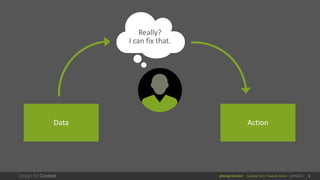
Really?
I can fix that.
Data Action
@design4context Guiding Users Towards Action UXPA2021 3
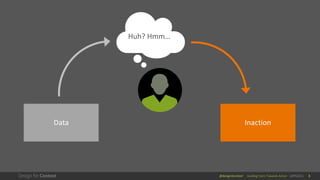
Huh? Hmm…
Data Inaction
@design4context Guiding Users Towards Action UXPA2021 4
As UX designers,
what can we do to make
data actionable?
@design4context Guiding Users Towards Action UXPA2021 5
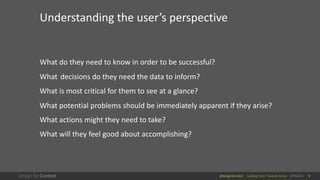
What do they need to know in order to be successful?
What decisions do they need the data to inform?
What is most critical for them to see at a glance?
What potential problems should be immediately apparent if they arise?
What actions might they need to take?
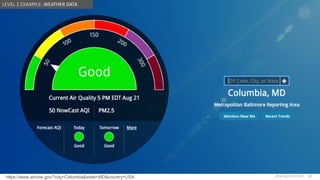
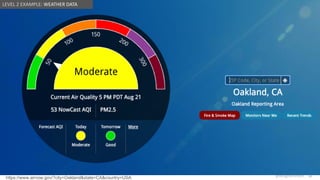
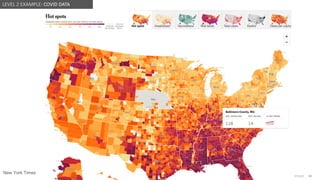
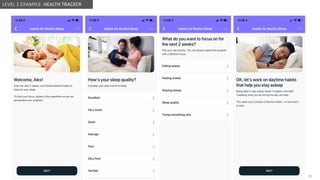
What will they feel good about accomplishing?
Understanding the user’s perspective
@design4context Guiding Users Towards Action UXPA2021 6
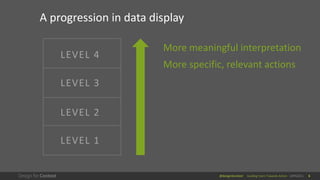
LEVEL 4
LEVEL 3
LEVEL 2
LEVEL 1
A progression in data display
More meaningful interpretation
More specific, relevant actions
@design4context Guiding Users Towards Action UXPA2021 7
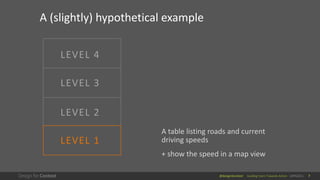
LEVEL 4
LEVEL 3
LEVEL 2
LEVEL 1
A (slightly) hypothetical example
A table listing roads and current
driving speeds
+ show the speed in a map view
@design4context Guiding Users Towards Action UXPA2021 8
LEVEL 4
LEVEL 3
LEVEL 1
A (slightly) hypothetical example
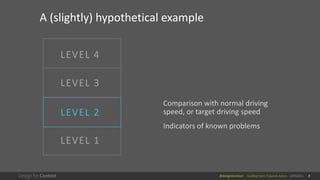
Comparison with normal driving
speed, or target driving speed
Indicators of known problems
LEVEL 2
@design4context Guiding Users Towards Action UXPA2021 9
LEVEL 4
LEVEL 1
A (slightly) hypothetical example
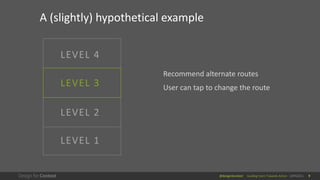
Recommend alternate routes
User can tap to change the route
LEVEL 2
LEVEL 3
@design4context Guiding Users Towards Action UXPA2021 10
LEVEL 1
A (slightly) hypothetical example
LEVEL 2
LEVEL 3
LEVEL 4
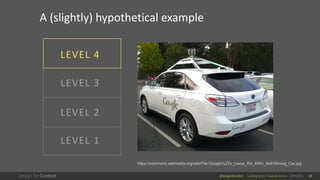
https://commons.wikimedia.org/wiki/File:Google%27s_Lexus_RX_450h_Self-Driving_Car.jpg
@design4context Guiding Users Towards Action UXPA2021 11
LEVEL 4
LEVEL 3
LEVEL 2
LEVEL 1
What are the best practices for my
current level?
Are there opportunities to move to the
next level?
@design4context Guiding Users Towards Action UXPA2021 12
LEVEL 4
LEVEL 3
LEVEL 2
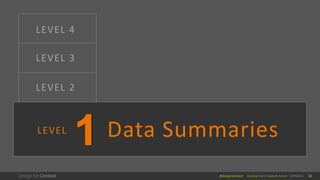
Data Summaries
LEVEL
@design4context Guiding Users Towards Action UXPA2021 13
Just the data, and basic tools to analyze it
13
@design4context Guiding Users Towards Action UXPA2021
@design4context 14
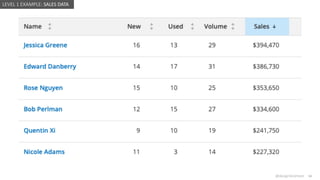
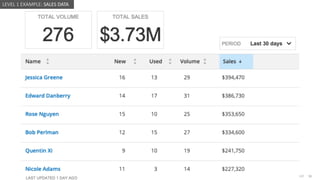
LEVEL 1 EXAMPLE: SALES DATA
@design4context Guiding Users Towards Action UXPA2021
@design4context 15
LEVEL 1 EXAMPLE: SALES DATA
@design4context Guiding Users Towards Action UXPA2021
@design4context 16
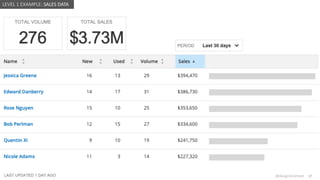
LEVEL 1 EXAMPLE: SALES DATA
@design4context Guiding Users Towards Action UXPA2021
@design4context 17
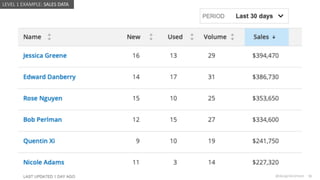
LEVEL 1 EXAMPLE: SALES DATA
@design4context Guiding Users Towards Action UXPA2021
@design4context 18
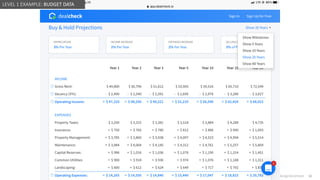
LEVEL 1 EXAMPLE: BUDGET DATA
@design4context Guiding Users Towards Action UXPA2021
@design4context 19
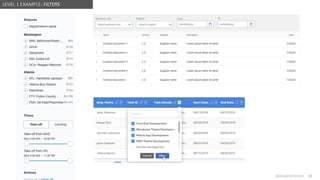
LEVEL 1 EXAMPLE: FILTERS
@design4context Guiding Users Towards Action UXPA2021
@design4context 20
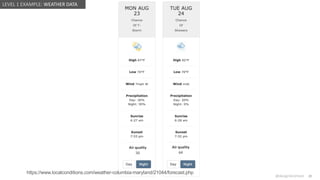
https://www.localconditions.com/weather-columbia-maryland/21044/forecast.php
LEVEL 1 EXAMPLE: WEATHER DATA
Air quality
50
Air quality
64
@design4context Guiding Users Towards Action UXPA2021
@design4context 21
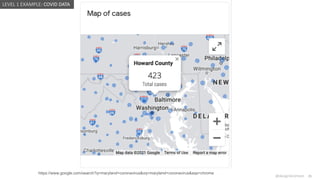
https://www.google.com/search?q=maryland+coronavirus&oq=maryland+coronavirus&aqs=chrome
LEVEL 1 EXAMPLE: COVID DATA
@design4context Guiding Users Towards Action UXPA2021
@design4context 22
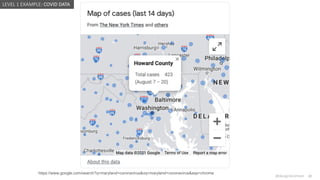
https://www.google.com/search?q=maryland+coronavirus&oq=maryland+coronavirus&aqs=chrome
LEVEL 1 EXAMPLE: COVID DATA
@design4context Guiding Users Towards Action UXPA2021
@design4context 23
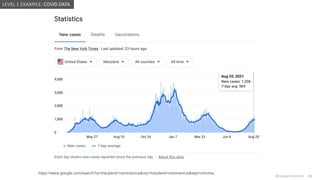
https://www.google.com/search?q=maryland+coronavirus&oq=maryland+coronavirus&aqs=chrome
LEVEL 1 EXAMPLE: COVID DATA
@design4context Guiding Users Towards Action UXPA2021
@design4context 24
Anonymized
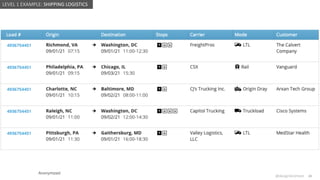
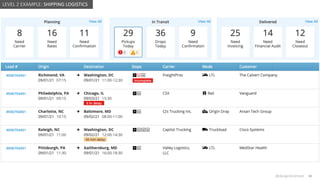
LEVEL 1 EXAMPLE: SHIPPING LOGISTICS
@design4context Guiding Users Towards Action UXPA2021
@design4context 25
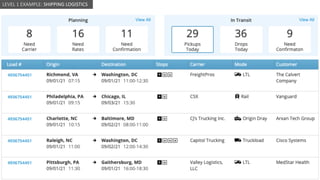
LEVEL 1 EXAMPLE: SHIPPING LOGISTICS
@design4context Guiding Users Towards Action UXPA2021
@design4context 26
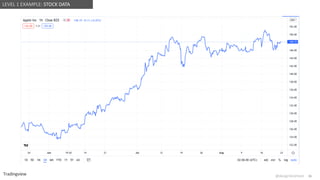
LEVEL 1 EXAMPLE: STOCK DATA
Tradingview
@design4context Guiding Users Towards Action UXPA2021
@design4context 27
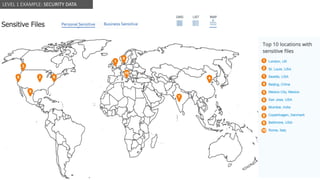
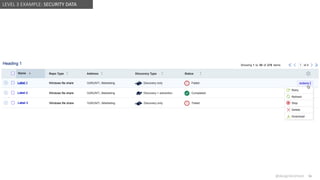
LEVEL 1 EXAMPLE: SECURITY DATA
@design4context Guiding Users Towards Action UXPA2021
@design4context
UX DESIGN CONSIDERATIONS
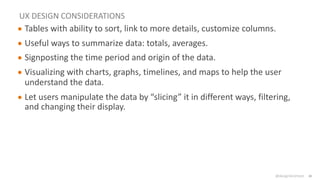
● Tables with ability to sort, link to more details, customize columns.
● Useful ways to summarize data: totals, averages.
● Signposting the time period and origin of the data.
● Visualizing with charts, graphs, timelines, and maps to help the user
understand the data.
● Let users manipulate the data by “slicing” it in different ways, filtering,
and changing their display.
28
@design4context Guiding Users Towards Action UXPA2021 29
LEVEL 4
LEVEL 3
LEVEL 1
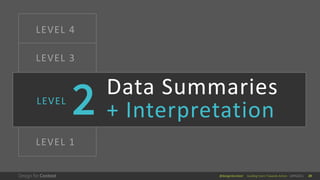
Data Summaries
+ Interpretation
LEVEL
@design4context Guiding Users Towards Action UXPA2021 30
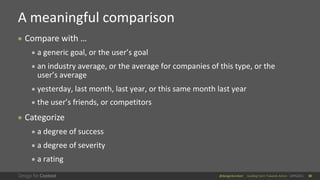
● Compare with …
● a generic goal, or the user’s goal
● an industry average, or the average for companies of this type, or the
user’s average
● yesterday, last month, last year, or this same month last year
● the user’s friends, or competitors
● Categorize
● a degree of success
● a degree of severity
● a rating
A meaningful comparison
30
@design4context Guiding Users Towards Action UXPA2021
@design4context 31
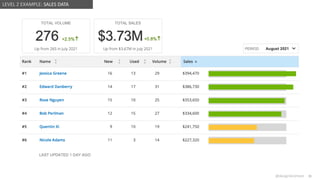
LEVEL 2 EXAMPLE: SALES DATA
@design4context Guiding Users Towards Action UXPA2021
@design4context
https://www.airnow.gov/?city=Columbia&state=MD&country=USA 32
LEVEL 2 EXAMPLE: WEATHER DATA
@design4context Guiding Users Towards Action UXPA2021
@design4context
https://www.airnow.gov/?city=Oakland&state=CA&country=USA 33
LEVEL 2 EXAMPLE: WEATHER DATA
@design4context Guiding Users Towards Action UXPA2021
@design4context 34
New York Times
LEVEL 2 EXAMPLE: COVID DATA
@design4context Guiding Users Towards Action UXPA2021
@design4context 35
LEVEL 2 EXAMPLE: HEALTH TRACKER
@design4context Guiding Users Towards Action UXPA2021
@design4context 36
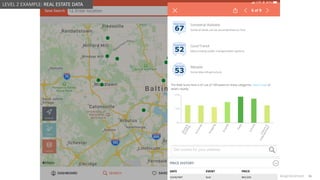
LEVEL 2 EXAMPLE: REAL ESTATE DATA
@design4context Guiding Users Towards Action UXPA2021
@design4context 37
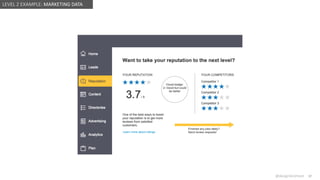
LEVEL 2 EXAMPLE: MARKETING DATA
@design4context Guiding Users Towards Action UXPA2021
@design4context 38
LEVEL 2 EXAMPLE: SHIPPING LOGISTICS
@design4context Guiding Users Towards Action UXPA2021
@design4context 39
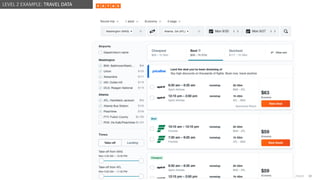
LEVEL 2 EXAMPLE: TRAVEL DATA
@design4context Guiding Users Towards Action UXPA2021
@design4context 40
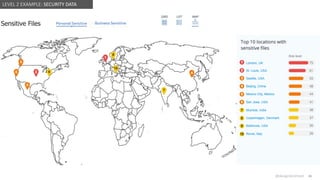
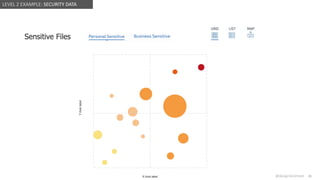
LEVEL 2 EXAMPLE: SECURITY DATA
@design4context Guiding Users Towards Action UXPA2021
@design4context 41
LEVEL 2 EXAMPLE: SECURITY DATA
@design4context Guiding Users Towards Action UXPA2021
@design4context 42
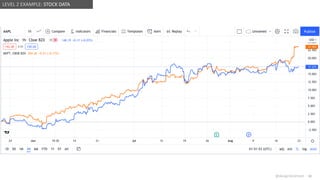
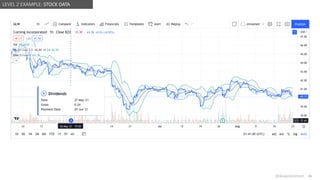
LEVEL 2 EXAMPLE: STOCK DATA
@design4context Guiding Users Towards Action UXPA2021
@design4context 43
LEVEL 2 EXAMPLE: STOCK DATA
@design4context Guiding Users Towards Action UXPA2021
@design4context
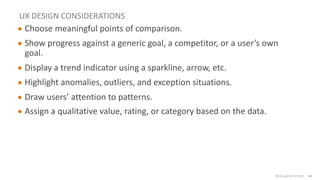
UX DESIGN CONSIDERATIONS
● Choose meaningful points of comparison.
● Show progress against a generic goal, a competitor, or a user’s own
goal.
● Display a trend indicator using a sparkline, arrow, etc.
● Highlight anomalies, outliers, and exception situations.
● Draw users’ attention to patterns.
● Assign a qualitative value, rating, or category based on the data.
44
@design4context Guiding Users Towards Action UXPA2021 45
LEVEL 4
LEVEL 2
LEVEL 1
Data Summaries
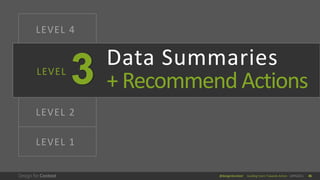
+ Recommend Actions
LEVEL
@design4context Guiding Users Towards Action UXPA2021 46
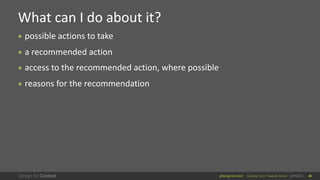
● possible actions to take
● a recommended action
● access to the recommended action, where possible
● reasons for the recommendation
What can I do about it?
46
@design4context Guiding Users Towards Action UXPA2021
@design4context 47
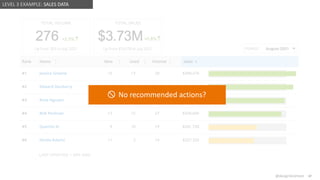
LEVEL 3 EXAMPLE: SALES DATA
No recommended actions?
@design4context Guiding Users Towards Action UXPA2021
@design4context 48
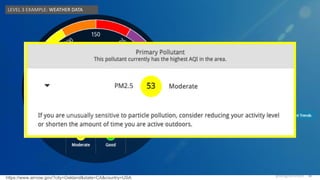
LEVEL 3 EXAMPLE: WEATHER DATA
https://www.airnow.gov/?city=Oakland&state=CA&country=USA
LEVEL 3 EXAMPLE: WEATHER DATA
@design4context Guiding Users Towards Action UXPA2021
@design4context 49
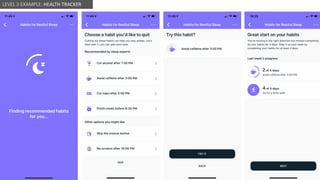
LEVEL 3 EXAMPLE: HEALTH TRACKER
@design4context Guiding Users Towards Action UXPA2021
@design4context 50
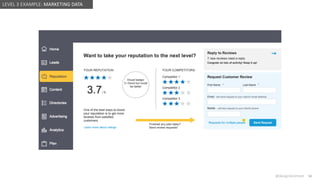
LEVEL 3 EXAMPLE: MARKETING DATA
@design4context Guiding Users Towards Action UXPA2021
@design4context 51
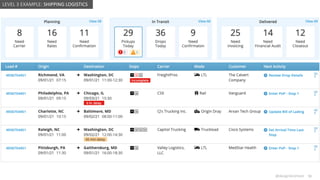
LEVEL 3 EXAMPLE: SHIPPING LOGISTICS
@design4context Guiding Users Towards Action UXPA2021
@design4context 52
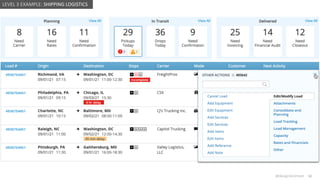
LEVEL 3 EXAMPLE: SHIPPING LOGISTICS
@design4context Guiding Users Towards Action UXPA2021
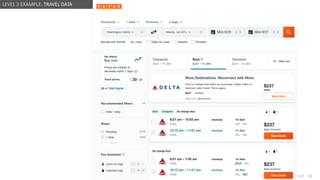
@design4context 53
LEVEL 3 EXAMPLE: TRAVEL DATA
@design4context Guiding Users Towards Action UXPA2021
@design4context 54
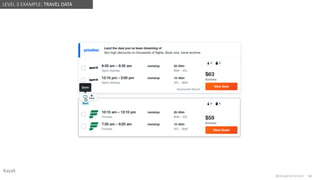
LEVEL 3 EXAMPLE: TRAVEL DATA
Kayak
@design4context Guiding Users Towards Action UXPA2021
@design4context 55
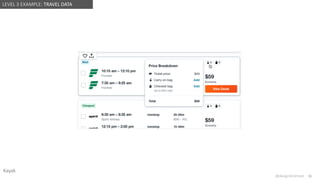
LEVEL 3 EXAMPLE: TRAVEL DATA
Kayak
@design4context Guiding Users Towards Action UXPA2021
@design4context 56
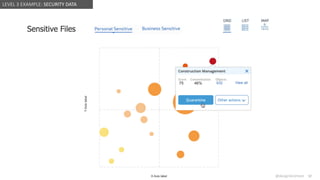
LEVEL 3 EXAMPLE: SECURITY DATA
@design4context Guiding Users Towards Action UXPA2021
@design4context 57
LEVEL 3 EXAMPLE: SECURITY DATA
@design4context Guiding Users Towards Action UXPA2021
@design4context 58
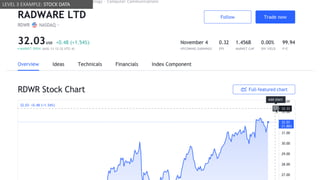
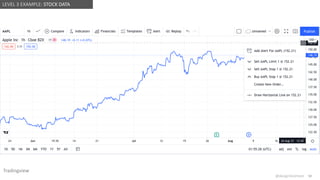
LEVEL 3 EXAMPLE: STOCK DATA
@design4context Guiding Users Towards Action UXPA2021
@design4context 59
LEVEL 3 EXAMPLE: STOCK DATA
Tradingview
@design4context Guiding Users Towards Action UXPA2021
@design4context 60
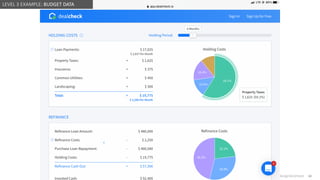
LEVEL 3 EXAMPLE: BUDGET DATA
@design4context Guiding Users Towards Action UXPA2021
@design4context
UX DESIGN CONSIDERATIONS
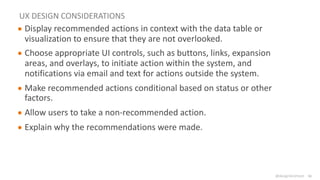
● Display recommended actions in context with the data table or
visualization to ensure that they are not overlooked.
● Choose appropriate UI controls, such as buttons, links, expansion
areas, and overlays, to initiate action within the system, and
notifications via email and text for actions outside the system.
● Make recommended actions conditional based on status or other
factors.
● Allow users to take a non-recommended action.
● Explain why the recommendations were made.
61
@design4context Guiding Users Towards Action UXPA2021 62
LEVEL 3
LEVEL 2
LEVEL 1
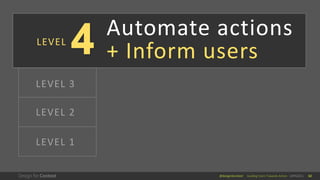
Automate actions
+ Inform users
LEVEL
@design4context Guiding Users Towards Action UXPA2021
@design4context 63
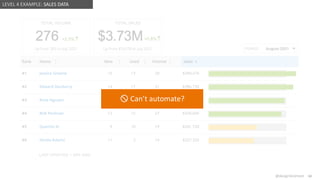
LEVEL 4 EXAMPLE: SALES DATA
Can’t automate?
@design4context Guiding Users Towards Action UXPA2021
@design4context 64
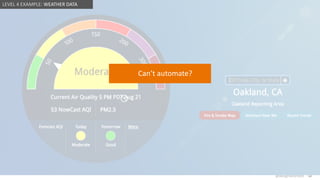
Can’t automate?
LEVEL 4 EXAMPLE: WEATHER DATA
@design4context Guiding Users Towards Action UXPA2021
@design4context
New York Times
65
LEVEL 4 EXAMPLE: COVID DATA
Can’t automate?
@design4context Guiding Users Towards Action UXPA2021
@design4context 66
LEVEL 3 EXAMPLE: HEALTH TRACKER
@design4context Guiding Users Towards Action UXPA2021
@design4context 67
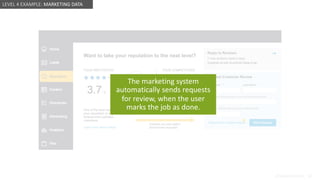
LEVEL 4 EXAMPLE: MARKETING DATA
The marketing system
automatically sends requests
for review, when the user
marks the job as done.
@design4context Guiding Users Towards Action UXPA2021
@design4context 68
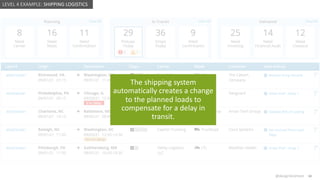
LEVEL 4 EXAMPLE: SHIPPING LOGISTICS
The shipping system
automatically creates a change
to the planned loads to
compensate for a delay in
transit.
@design4context Guiding Users Towards Action UXPA2021
@design4context 69
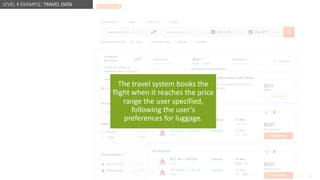
The travel system books the
flight when it reaches the price
range the user specified,
following the user’s
preferences for luggage.
LEVEL 4 EXAMPLE: TRAVEL DATA
@design4context Guiding Users Towards Action UXPA2021
@design4context 70
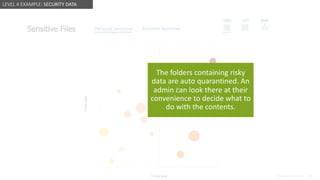
LEVEL 4 EXAMPLE: SECURITY DATA
The folders containing risky
data are auto quarantined. An
admin can look there at their
convenience to decide what to
do with the contents.
@design4context Guiding Users Towards Action UXPA2021
@design4context 71
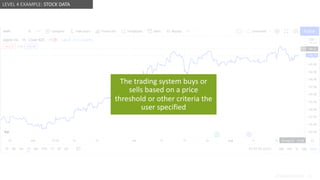
LEVEL 4 EXAMPLE: STOCK DATA
The trading system buys or
sells based on a price
threshold or other criteria the
user specified
@design4context Guiding Users Towards Action UXPA2021
@design4context
UX DESIGN CONSIDERATIONS
● Weigh the risks and benefits of automated actions.
● Allow the user to try what if scenarios.
● Give users an escape hatch.
● Communicate with the user about automated actions.
72
@design4context Guiding Users Towards Action UXPA2021 73
Guiding Users Towards Action:
Empowering Decisions
Through Effective Data Design
UXPA 2021 • September 1, 2021
! #UXPA2021 @design4context
slides will be posted at: www.designforcontext.com/insights
Lisa Battle
President & Principal Consultant
lisa@designforcontext.com
Laura Chessman
Senior UX Designer
laura@designforcontext.com

Guiding Users Towards Action: Empowering Decisions Through Effective Data Design

  • 1.
    @design4context Guiding UsersTowards Action UXPA2021 1 Guiding Users Towards Action: Empowering Decisions Through Effective Data Design UXPA 2021 • September 1, 2021 ! #UXPA2021 @design4context slides will be posted at: www.designforcontext.com/insights Lisa Battle President & Principal Consultant lisa@designforcontext.com Laura Chessman Senior UX Designer laura@designforcontext.com
  • 2.
    @design4context Guiding UsersTowards Action UXPA2021 2 Really? I can fix that. Data Action
  • 3.
    @design4context Guiding UsersTowards Action UXPA2021 3 Huh? Hmm… Data Inaction
  • 4.
    @design4context Guiding UsersTowards Action UXPA2021 4 As UX designers, what can we do to make data actionable?
  • 5.
    @design4context Guiding UsersTowards Action UXPA2021 5 What do they need to know in order to be successful? What decisions do they need the data to inform? What is most critical for them to see at a glance? What potential problems should be immediately apparent if they arise? What actions might they need to take? What will they feel good about accomplishing? Understanding the user’s perspective
  • 6.
    @design4context Guiding UsersTowards Action UXPA2021 6 LEVEL 4 LEVEL 3 LEVEL 2 LEVEL 1 A progression in data display More meaningful interpretation More specific, relevant actions
  • 7.
    @design4context Guiding UsersTowards Action UXPA2021 7 LEVEL 4 LEVEL 3 LEVEL 2 LEVEL 1 A (slightly) hypothetical example A table listing roads and current driving speeds + show the speed in a map view
  • 8.
    @design4context Guiding UsersTowards Action UXPA2021 8 LEVEL 4 LEVEL 3 LEVEL 1 A (slightly) hypothetical example Comparison with normal driving speed, or target driving speed Indicators of known problems LEVEL 2
  • 9.
    @design4context Guiding UsersTowards Action UXPA2021 9 LEVEL 4 LEVEL 1 A (slightly) hypothetical example Recommend alternate routes User can tap to change the route LEVEL 2 LEVEL 3
  • 10.
    @design4context Guiding UsersTowards Action UXPA2021 10 LEVEL 1 A (slightly) hypothetical example LEVEL 2 LEVEL 3 LEVEL 4 https://commons.wikimedia.org/wiki/File:Google%27s_Lexus_RX_450h_Self-Driving_Car.jpg
  • 11.
    @design4context Guiding UsersTowards Action UXPA2021 11 LEVEL 4 LEVEL 3 LEVEL 2 LEVEL 1 What are the best practices for my current level? Are there opportunities to move to the next level?
  • 12.
    @design4context Guiding UsersTowards Action UXPA2021 12 LEVEL 4 LEVEL 3 LEVEL 2 Data Summaries LEVEL
  • 13.
    @design4context Guiding UsersTowards Action UXPA2021 13 Just the data, and basic tools to analyze it 13
  • 14.
    @design4context Guiding UsersTowards Action UXPA2021 @design4context 14 LEVEL 1 EXAMPLE: SALES DATA
  • 15.
    @design4context Guiding UsersTowards Action UXPA2021 @design4context 15 LEVEL 1 EXAMPLE: SALES DATA
  • 16.
    @design4context Guiding UsersTowards Action UXPA2021 @design4context 16 LEVEL 1 EXAMPLE: SALES DATA
  • 17.
    @design4context Guiding UsersTowards Action UXPA2021 @design4context 17 LEVEL 1 EXAMPLE: SALES DATA
  • 18.
    @design4context Guiding UsersTowards Action UXPA2021 @design4context 18 LEVEL 1 EXAMPLE: BUDGET DATA
  • 19.
    @design4context Guiding UsersTowards Action UXPA2021 @design4context 19 LEVEL 1 EXAMPLE: FILTERS
  • 20.
    @design4context Guiding UsersTowards Action UXPA2021 @design4context 20 https://www.localconditions.com/weather-columbia-maryland/21044/forecast.php LEVEL 1 EXAMPLE: WEATHER DATA Air quality 50 Air quality 64
  • 21.
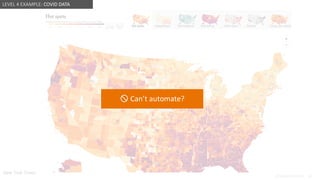
    @design4context Guiding UsersTowards Action UXPA2021 @design4context 21 https://www.google.com/search?q=maryland+coronavirus&oq=maryland+coronavirus&aqs=chrome LEVEL 1 EXAMPLE: COVID DATA
  • 22.
    @design4context Guiding UsersTowards Action UXPA2021 @design4context 22 https://www.google.com/search?q=maryland+coronavirus&oq=maryland+coronavirus&aqs=chrome LEVEL 1 EXAMPLE: COVID DATA
  • 23.
    @design4context Guiding UsersTowards Action UXPA2021 @design4context 23 https://www.google.com/search?q=maryland+coronavirus&oq=maryland+coronavirus&aqs=chrome LEVEL 1 EXAMPLE: COVID DATA
  • 24.
    @design4context Guiding UsersTowards Action UXPA2021 @design4context 24 Anonymized LEVEL 1 EXAMPLE: SHIPPING LOGISTICS
  • 25.
    @design4context Guiding UsersTowards Action UXPA2021 @design4context 25 LEVEL 1 EXAMPLE: SHIPPING LOGISTICS
  • 26.
    @design4context Guiding UsersTowards Action UXPA2021 @design4context 26 LEVEL 1 EXAMPLE: STOCK DATA Tradingview
  • 27.
    @design4context Guiding UsersTowards Action UXPA2021 @design4context 27 LEVEL 1 EXAMPLE: SECURITY DATA
  • 28.
    @design4context Guiding UsersTowards Action UXPA2021 @design4context UX DESIGN CONSIDERATIONS ● Tables with ability to sort, link to more details, customize columns. ● Useful ways to summarize data: totals, averages. ● Signposting the time period and origin of the data. ● Visualizing with charts, graphs, timelines, and maps to help the user understand the data. ● Let users manipulate the data by “slicing” it in different ways, filtering, and changing their display. 28
  • 29.
    @design4context Guiding UsersTowards Action UXPA2021 29 LEVEL 4 LEVEL 3 LEVEL 1 Data Summaries + Interpretation LEVEL
  • 30.
    @design4context Guiding UsersTowards Action UXPA2021 30 ● Compare with … ● a generic goal, or the user’s goal ● an industry average, or the average for companies of this type, or the user’s average ● yesterday, last month, last year, or this same month last year ● the user’s friends, or competitors ● Categorize ● a degree of success ● a degree of severity ● a rating A meaningful comparison 30
  • 31.
    @design4context Guiding UsersTowards Action UXPA2021 @design4context 31 LEVEL 2 EXAMPLE: SALES DATA
  • 32.
    @design4context Guiding UsersTowards Action UXPA2021 @design4context https://www.airnow.gov/?city=Columbia&state=MD&country=USA 32 LEVEL 2 EXAMPLE: WEATHER DATA
  • 33.
    @design4context Guiding UsersTowards Action UXPA2021 @design4context https://www.airnow.gov/?city=Oakland&state=CA&country=USA 33 LEVEL 2 EXAMPLE: WEATHER DATA
  • 34.
    @design4context Guiding UsersTowards Action UXPA2021 @design4context 34 New York Times LEVEL 2 EXAMPLE: COVID DATA
  • 35.
    @design4context Guiding UsersTowards Action UXPA2021 @design4context 35 LEVEL 2 EXAMPLE: HEALTH TRACKER
  • 36.
    @design4context Guiding UsersTowards Action UXPA2021 @design4context 36 LEVEL 2 EXAMPLE: REAL ESTATE DATA
  • 37.
    @design4context Guiding UsersTowards Action UXPA2021 @design4context 37 LEVEL 2 EXAMPLE: MARKETING DATA
  • 38.
    @design4context Guiding UsersTowards Action UXPA2021 @design4context 38 LEVEL 2 EXAMPLE: SHIPPING LOGISTICS
  • 39.
    @design4context Guiding UsersTowards Action UXPA2021 @design4context 39 LEVEL 2 EXAMPLE: TRAVEL DATA
  • 40.
    @design4context Guiding UsersTowards Action UXPA2021 @design4context 40 LEVEL 2 EXAMPLE: SECURITY DATA
  • 41.
    @design4context Guiding UsersTowards Action UXPA2021 @design4context 41 LEVEL 2 EXAMPLE: SECURITY DATA
  • 42.
    @design4context Guiding UsersTowards Action UXPA2021 @design4context 42 LEVEL 2 EXAMPLE: STOCK DATA
  • 43.
    @design4context Guiding UsersTowards Action UXPA2021 @design4context 43 LEVEL 2 EXAMPLE: STOCK DATA
  • 44.
    @design4context Guiding UsersTowards Action UXPA2021 @design4context UX DESIGN CONSIDERATIONS ● Choose meaningful points of comparison. ● Show progress against a generic goal, a competitor, or a user’s own goal. ● Display a trend indicator using a sparkline, arrow, etc. ● Highlight anomalies, outliers, and exception situations. ● Draw users’ attention to patterns. ● Assign a qualitative value, rating, or category based on the data. 44
  • 45.
    @design4context Guiding UsersTowards Action UXPA2021 45 LEVEL 4 LEVEL 2 LEVEL 1 Data Summaries + Recommend Actions LEVEL
  • 46.
    @design4context Guiding UsersTowards Action UXPA2021 46 ● possible actions to take ● a recommended action ● access to the recommended action, where possible ● reasons for the recommendation What can I do about it? 46
  • 47.
    @design4context Guiding UsersTowards Action UXPA2021 @design4context 47 LEVEL 3 EXAMPLE: SALES DATA No recommended actions?
  • 48.
    @design4context Guiding UsersTowards Action UXPA2021 @design4context 48 LEVEL 3 EXAMPLE: WEATHER DATA https://www.airnow.gov/?city=Oakland&state=CA&country=USA LEVEL 3 EXAMPLE: WEATHER DATA
  • 49.
    @design4context Guiding UsersTowards Action UXPA2021 @design4context 49 LEVEL 3 EXAMPLE: HEALTH TRACKER
  • 50.
    @design4context Guiding UsersTowards Action UXPA2021 @design4context 50 LEVEL 3 EXAMPLE: MARKETING DATA
  • 51.
    @design4context Guiding UsersTowards Action UXPA2021 @design4context 51 LEVEL 3 EXAMPLE: SHIPPING LOGISTICS
  • 52.
    @design4context Guiding UsersTowards Action UXPA2021 @design4context 52 LEVEL 3 EXAMPLE: SHIPPING LOGISTICS
  • 53.
    @design4context Guiding UsersTowards Action UXPA2021 @design4context 53 LEVEL 3 EXAMPLE: TRAVEL DATA
  • 54.
    @design4context Guiding UsersTowards Action UXPA2021 @design4context 54 LEVEL 3 EXAMPLE: TRAVEL DATA Kayak
  • 55.
    @design4context Guiding UsersTowards Action UXPA2021 @design4context 55 LEVEL 3 EXAMPLE: TRAVEL DATA Kayak
  • 56.
    @design4context Guiding UsersTowards Action UXPA2021 @design4context 56 LEVEL 3 EXAMPLE: SECURITY DATA
  • 57.
    @design4context Guiding UsersTowards Action UXPA2021 @design4context 57 LEVEL 3 EXAMPLE: SECURITY DATA
  • 58.
    @design4context Guiding UsersTowards Action UXPA2021 @design4context 58 LEVEL 3 EXAMPLE: STOCK DATA
  • 59.
    @design4context Guiding UsersTowards Action UXPA2021 @design4context 59 LEVEL 3 EXAMPLE: STOCK DATA Tradingview
  • 60.
    @design4context Guiding UsersTowards Action UXPA2021 @design4context 60 LEVEL 3 EXAMPLE: BUDGET DATA
  • 61.
    @design4context Guiding UsersTowards Action UXPA2021 @design4context UX DESIGN CONSIDERATIONS ● Display recommended actions in context with the data table or visualization to ensure that they are not overlooked. ● Choose appropriate UI controls, such as buttons, links, expansion areas, and overlays, to initiate action within the system, and notifications via email and text for actions outside the system. ● Make recommended actions conditional based on status or other factors. ● Allow users to take a non-recommended action. ● Explain why the recommendations were made. 61
  • 62.
    @design4context Guiding UsersTowards Action UXPA2021 62 LEVEL 3 LEVEL 2 LEVEL 1 Automate actions + Inform users LEVEL
  • 63.
    @design4context Guiding UsersTowards Action UXPA2021 @design4context 63 LEVEL 4 EXAMPLE: SALES DATA Can’t automate?
  • 64.
    @design4context Guiding UsersTowards Action UXPA2021 @design4context 64 Can’t automate? LEVEL 4 EXAMPLE: WEATHER DATA
  • 65.
    @design4context Guiding UsersTowards Action UXPA2021 @design4context New York Times 65 LEVEL 4 EXAMPLE: COVID DATA Can’t automate?
  • 66.
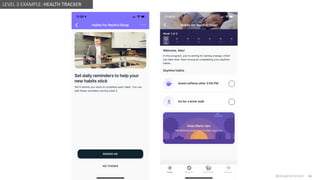
    @design4context Guiding UsersTowards Action UXPA2021 @design4context 66 LEVEL 3 EXAMPLE: HEALTH TRACKER
  • 67.
    @design4context Guiding UsersTowards Action UXPA2021 @design4context 67 LEVEL 4 EXAMPLE: MARKETING DATA The marketing system automatically sends requests for review, when the user marks the job as done.
  • 68.
    @design4context Guiding UsersTowards Action UXPA2021 @design4context 68 LEVEL 4 EXAMPLE: SHIPPING LOGISTICS The shipping system automatically creates a change to the planned loads to compensate for a delay in transit.
  • 69.
    @design4context Guiding UsersTowards Action UXPA2021 @design4context 69 The travel system books the flight when it reaches the price range the user specified, following the user’s preferences for luggage. LEVEL 4 EXAMPLE: TRAVEL DATA
  • 70.
    @design4context Guiding UsersTowards Action UXPA2021 @design4context 70 LEVEL 4 EXAMPLE: SECURITY DATA The folders containing risky data are auto quarantined. An admin can look there at their convenience to decide what to do with the contents.
  • 71.
    @design4context Guiding UsersTowards Action UXPA2021 @design4context 71 LEVEL 4 EXAMPLE: STOCK DATA The trading system buys or sells based on a price threshold or other criteria the user specified
  • 72.
    @design4context Guiding UsersTowards Action UXPA2021 @design4context UX DESIGN CONSIDERATIONS ● Weigh the risks and benefits of automated actions. ● Allow the user to try what if scenarios. ● Give users an escape hatch. ● Communicate with the user about automated actions. 72
  • 73.
    @design4context Guiding UsersTowards Action UXPA2021 73 Guiding Users Towards Action: Empowering Decisions Through Effective Data Design UXPA 2021 • September 1, 2021 ! #UXPA2021 @design4context slides will be posted at: www.designforcontext.com/insights Lisa Battle President & Principal Consultant lisa@designforcontext.com Laura Chessman Senior UX Designer laura@designforcontext.com