Michael	Owens
User	Experience	Designer
michael@designforcontext.com
@design4context
Lesley	Humphreys
User	Experience	Designer
lesleyh4@gmail.com	
@leslo
Accessibility	101
Baltimore	UX	Meetup•	May	9,	2017
@design4context			Accessibility	101	 Baltimore	UX	Meetup,	May	9,	2017
The	evolution	of	accessibility
● 1986	– Section	508	added	as	an	amendment	added	to	the	Rehabilitation	Act	of	
1973
● 1990	– The	Americans	with	Disabilities	Act,	Title	III	“Public	Accommodation”
● 1997	– Web	Accessibility	Initiative	(WAI)	formed	by	the	World	Wide	Web	
Consortium	(W3C)
● 1998	– Section	508	updated	with	teeth	for	federally	funded	projects
● 1999	– Web	Content	Accessibility	Guidelines	(WCAG)	1.0
@design4context			Accessibility	101	 Baltimore	UX	Meetup,	May	9,	2017
WCAG	2.0	(2008)
● Perceivable
● Operable
● Understandable
● Robust
@design4context			Accessibility	101	 Baltimore	UX	Meetup,	May	9,	2017
WCAG	2.0
Perceivable	- Information	and	user	interface	
components	must	be	presentable	to	users	in	ways	they	
can	perceive.
● This	means	that	users	must	be	able	to	perceive	the	information	being	
presented	(it	can't	be	invisible	to	all	of	their	senses)
● There	should	be	text	equivalents	to	all	content
● All	information	should	be	available	via	Assistive	Technology	such	as	
screen	readers
● Video	and	audio	should	have	captioning	and/or	transcripts
4
@design4context			Accessibility	101	 Baltimore	UX	Meetup,	May	9,	2017
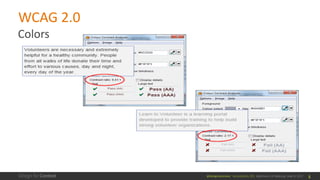
WCAG	2.0
5
Colors
@design4context			Accessibility	101	 Baltimore	UX	Meetup,	May	9,	2017
WCAG	2.0
Operable	- User	interface	components	and	navigation	
must	be	operable.
● This	means	that	users	must	be	able	to	operate	the	interface	(the	
interface	cannot	require	interaction	that	a	user	cannot	perform)	
● Users	should	be	able	to	navigate	the	site	without	a	mouse	(via	
keyboard	interaction)
● Eliminate	time-outs
● Eliminate	re-directs
● Provide	site	maps
6
@design4context			Accessibility	101	 Baltimore	UX	Meetup,	May	9,	2017
WCAG	2.0
Understandable	- Information	and	the	operation	of	user	
interface	must	be	understandable.
● The	use	of	glossaries,	indexes,	etc.	to	clarify	content.
● Consistent	presentation	and	functionality	across	pages
● Clear	input	requirements	and	error	messaging
7
@design4context			Accessibility	101	 Baltimore	UX	Meetup,	May	9,	2017
WCAG	2.0
Robust	- Content	must	be	robust	enough	that	it	can	be	
interpreted	reliably	by	a	wide	variety	of	user	agents,	
including	assistive	technologies.
● Support	for	plug-ins,	scripts,	applets	etc.	as	technologies	evolve
● Accessible	PDFs	and	other	file	types
8
@design4context			Accessibility	101	 Baltimore	UX	Meetup,	May	9,	2017
Accessible	Rich	Internet	Applications	
(WAI-ARIA	2014)
● Roles	to	describe	the	type	of	widget	presented,	such	as	"menu",	"treeitem",	"slider",	
and	"progressmeter"
● Roles	to	describe	the	structure	of	the	Web	page,	such	as	headings,	regions,	and	
tables	(grids)
● Properties	to	describe	the	state	widgets	are	in,	such	as	"checked"	for	a	check	box,	or	
"haspopup"	for	a	menu.
● Properties	for	drag-and-drop	that	describe	drag	sources	and	drop	targets
● A	way	to	provide	keyboard	navigation	for	the	Web	objects	and	events,	such	as	those	
mentioned	above
9
@design4context			Accessibility	101	 Baltimore	UX	Meetup,	May	9,	2017
WAI-ARIA
Properties	to	define	live	regions	of	a	page	that	are	likely	to	get	updates	
(such	as	stock	quotes),	as	well	as	an	interruption	policy	for	those	
updates—for	example,	critical	updates	may	be	presented	in	an	alert	
dialog	box,	and	incidental	updates	occur	within	the	page.
Information	on	how	Assistive	Technologies	should	interact	with	those	
live	regions.
10
@design4context			Accessibility	101	 Baltimore	UX	Meetup,	May	9,	2017
● live=POLITENESS_SETTING
● atomic=BOOLEAN
● relevant=[LIST_OF_CHANGES]
● controls=[IDLIST]
● labelledby=[IDLIST]
● describedby=[IDLIST]
WAI-ARIA
@design4context			Accessibility	101	 Baltimore	UX	Meetup,	May	9,	2017
Live	Region	Markup	– Politeness	
● off	(default)
● Do	not	speak	this	region
● polite
● Speak	this	region	when	the	user	is	idle
● assertive
● Speak	this	region	as	soon	as	possible
● rude
● Speak	this	region	RIGHT	NOW
WAI-ARIA
@design4context			Accessibility	101	 Baltimore	UX	Meetup,	May	9,	2017
Live	Region	Markup	– Atomic
● true
● This	whole	region	must	be	spoken	when	any	of	its	nodes	are	changed;	
the	individual	changes	cannot	stand	on	their	own
● false	(default)
● Speak	only	the	node	that	changes;	there	is	enough	context	for	the	
individual	changes	to	make	sense
WAI-ARIA
@design4context			Accessibility	101	 Baltimore	UX	Meetup,	May	9,	2017
Live	Region	Markup	– Relevant
● additions	(default) - Nodes	added	to	the	region	are	important	and	
should	be	spoken
● removals	- Nodes	removed	from	the	region	are	important	and	should	
be	spoken
● text	(default) - Nodes	changed	in	the	region	are	important	and	should	
be	spoken
WAI-ARIA
@design4context			Accessibility	101	 Baltimore	UX	Meetup,	May	9,	2017
Over	the	years	since	2008,	when	WCAG	2.0	was	introduced:
● Certain	technologies	have	become	more	important
● Technology	features	now	exist	to	support	some	user	needs
● Appropriate	guidance	for	users	is	now	better	understood
Therefore	need	for	guidelines	that	build	on	WCAG	2.0.
WCAG	2.1	(now!)
@design4context			Accessibility	101	 Baltimore	UX	Meetup,	May	9,	2017
● 3	new	success	criteria,	formally	accepted	by	the	WCAG	Working	
Group
● and	25	proposed	(under	review).
● These	SCs	are	being	added	to	2.0,	which	is	causing	some	
controversy	&	confusion.
The	three	new	criteria	are	about:
● Small- and	touch-screen	mobile	devices
● Users	with	low	vision
● Users	with	cognitive	or	learning	disabilities
WCAG	2.1	=
@design4context			Accessibility	101	 Baltimore	UX	Meetup,	May	9,	2017
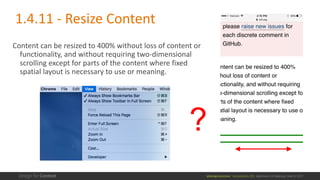
Content	can	be	resized	to	400%	without	loss	of	content	or	
functionality,	and	without	requiring	two-dimensional	
scrolling	except	for	parts	of	the	content	where	fixed	
spatial	layout	is	necessary	to	use	or	meaning.
?
1.4.11	- Resize	Content
@design4context			Accessibility	101	 Baltimore	UX	Meetup,	May	9,	2017
Follow	the	conversation	at	
https://github.com/w3c/wcag21/issues/77
Resize	Content
@design4context			Accessibility	101	 Baltimore	UX	Meetup,	May	9,	2017
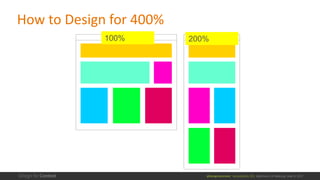
How	to	Design	for	400%
100% 200%
@design4context			Accessibility	101	 Baltimore	UX	Meetup,	May	9,	2017
WebAIM feedback	on	WCAG	2.1	draft
WebAIM =	a	non-profit	organization	based	at	the	Center	for	Persons	with	Disabilities	at	
Utah	State	University.		http://webaim.org/
A	primary	concern	is	that	this	Level	A	success	criterion	(1.4.11) requires	400%	text	sizing	
which	would	invalidate	the	existing	1.4.4	Level	AA	success	criterion	which	requires	
200%	text	sizing.	This	would	cause	confusion	as	to	why	a	Level	AA	SC	requires	a	lower	
threshold	for	sizing	than	a	new	Level	A	SC.
Meeting	this	SC	will	require	significant	effort	by	many	web	authors.	Few	popular	sites	
tested	come	close	to	meeting	the	400%	sizing	threshold.
@design4context			Accessibility	101	 Baltimore	UX	Meetup,	May	9,	2017
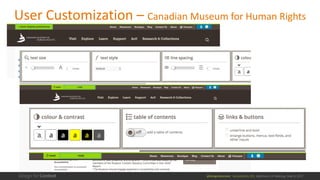
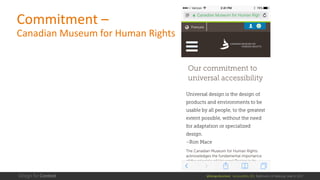
User	Customization	– Canadian	Museum	for	Human	Rights
@design4context			Accessibility	101	 Baltimore	UX	Meetup,	May	9,	2017
Commitment	–
Canadian	Museum	for	Human	Rights
@design4context			Accessibility	101	 Baltimore	UX	Meetup,	May	9,	2017
The	visual	presentation	of	graphical	objects	that	are	essential	for	understanding	the	
content	or	functionality	have	a	contrast	ratio	of	at	least	4.5:1	against	the	adjacent	
color(s),	except	for	the	following:
● Thicker
For	graphical	objects	with	a	minimum	width	and	height	of	at	least	3	CSS	pixels,	the	graphic	has	a	
contrast	ratio	of	at	least	3:1.
● Sensory
Non-text	content	that	is	primarily	intended	to	create	a	visual	sensory	experience	has	no	contrast	
requirement;
● Logotypes
Graphics	that	are	part	of	a	logo	or	brand	name	have	no	minimum	contrast	requirement.
● Essential
A	particular	presentation	of	the	graphical	is	essential	to	the	information	being	conveyed.
1.4.12	- Graphics	Contrast
@design4context			Accessibility	101	 Baltimore	UX	Meetup,	May	9,	2017
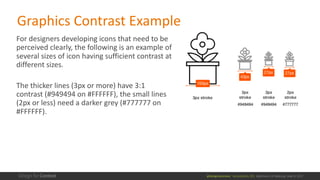
For	designers	developing	icons	that	need	to	be	
perceived	clearly,	the	following	is	an	example	of	
several	sizes	of	icon	having	sufficient	contrast	at	
different	sizes.
The	thicker	lines	(3px	or	more)	have	3:1	
contrast	(#949494	on	#FFFFFF),	the	small	lines	
(2px	or	less)	need	a	darker	grey	(#777777	on	
#FFFFFF).
Graphics	Contrast Example
@design4context			Accessibility	101	 Baltimore	UX	Meetup,	May	9,	2017
2.2.8	Interruptions	(minimum)
There	is	an	easily	available	mechanism	to	postpone	and	suppress	interruptions	and	
changes	in	content	unless	they	are	initiated	by	the	user	or	involve	an	emergency.
From	GitHub	Issue	description:
The	intent	of	this	Success	Criterion	is	that	people	with	impaired	attention	and	memory	
can	complete	a	task.	When	users	are	interrupted,	they	may	forget	what	they	are	doing	
and	abandon	the	task.	This	can	happen	even	when	the	original	task	is	extremely	
important.	For	example,	a	user	is	making	a	doctor's	appointment,	but	interruptions	
cause	the	user	to	forget	what	they	were	doing	and	the	critical	appointment	is	not	
made.
@design4context			Accessibility	101	 Baltimore	UX	Meetup,	May	9,	2017
2.2.8	Interruptions	(minimum)
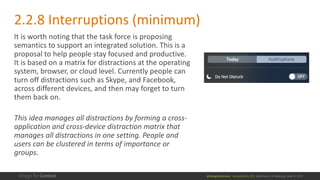
It	is	worth	noting	that	the	task	force	is	proposing	
semantics	to	support	an	integrated	solution.	This	is	a	
proposal	to	help	people	stay	focused	and	productive.	
It	is	based	on	a	matrix	for	distractions	at	the	operating	
system,	browser,	or	cloud	level.	Currently	people	can	
turn	off	distractions	such	as	Skype,	and	Facebook,	
across	different	devices,	and	then	may	forget	to	turn	
them	back	on.	
This	idea	manages	all	distractions	by	forming	a	cross-
application	and	cross-device	distraction	matrix	that	
manages	all	distractions	in	one	setting.	People	and	
users	can	be	clustered	in	terms	of	importance	or	
groups.
@design4context			Accessibility	101	 Baltimore	UX	Meetup,	May	9,	2017
WebAIM feedback	on	WCAG	2.1	draft
This	success	criterion	is	at	odds	with	2.2.1	and	2.2.6	which	
prescribe	pop-ups	and	notifications	to	inform	of	time-outs.	It	also	
conflicts	with	the	new	SC	3.2.8	(Change	of	Content)	which	requires	
that	users	be	notified	of	content	changes.	
How	can	authors	inform	users	of	a	time-out	or	content	change	to	
meet	one	success	criterion	when	such	notifications	are	disallowed	
by	another?
@design4context			Accessibility	101	 Baltimore	UX	Meetup,	May	9,	2017
WebAIM feedback	on	WCAG	2.2.8
Until	standard	mechanisms	are	available	for	client-side	control	over	
such	interruptions,	the	only	mechanism	for	meeting	this	success	
criterion	is	via	a	user	control,	which	itself	introduces	cognitive	load	
and	comes	at	notable	author	effort.	This	would	be	at	odds	with	
important	and	critical	messaging	systems	in	modern	web	
applications.
WebAIM would	support	adoption	of	this	SC,	but	only	at	Level	AAA.
@design4context			Accessibility	101	 Baltimore	UX	Meetup,	May	9,	2017
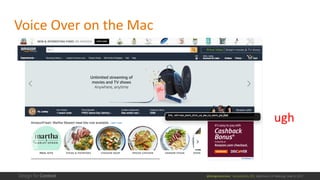
Voice	Over	on	the	Mac
ugh
@design4context			Accessibility	101	 Baltimore	UX	Meetup,	May	9,	2017
Resources
WCAG:	https://www.w3.org/TR/WCAG20/
Github Issues:	https://github.com/w3c/wcag21/issues/
webAIM:	http://webaim.org/
A	Web	for	Everyone:	http://rosenfeldmedia.com/books/a-web-for-
everyone/
Inclusive	Design	Patterns:	
https://shop.smashingmagazine.com/products/inclusive-design-patterns
Michael	Owens
User	Experience	Designer
michael@designforcontext.com
@design4context
Lesley	Humphreys
User	Experience	Designer
lesleyh4@gmail.com	
@leslo
©	Copyright	Design	for	Content	– add	copyright	statement	unless	it’s	not	appropriate
Presentation	is	on	Slideshare	– Go	to	www.designforcontext.com/insights
Accessibility	101
Baltimore	UX	Meetup•	May	9,	2017

Accessibility 101