Group No.2
Khadjia
Maria shabeer
Sadaf
Shazia
Subject Teacher
• Sir Zohaib Ashraf
Presentation Topic
•CPU
Cpu
• CPU stand for central processing unit.
• It is the brain of the computer.
• It is the most important component of computer.
• Computer cannot work without CPU.
• All computer must have a central processing unit.
Location of Cpu
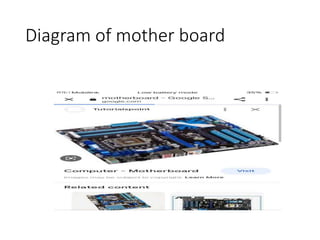
• CPU located on the motherboard.
• It carries most of the work of a computer.
• CPU performs all operations on data according to
the given instructions.
• It executes instruction and tells other parts of
computer what to do.
• Most of the work consist of calculation and data
transfer.
Diagram of mother board
Components of cpu
• CPU consists of three main components known as
• ALU,(arithmetic & logical unit).
• Cu(control unit).
• Registers
Control unit
• A control unit is an important component of CPU
• It act like a supervisor of the computer
• It controls all activities of computer systen.
• CPUs and GPUs are examples of devices that use
control units.
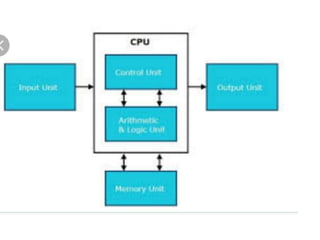
Structure of cpu
Operations of Cu
• It fetches instruction from main memory.
• It interprets the instructions to find what operation
is to performed.
• It controls the execution of instructions.
Arithmetical unit
• It perform basic arithmetic operations such as
addition, subtraction, multiplication and division.
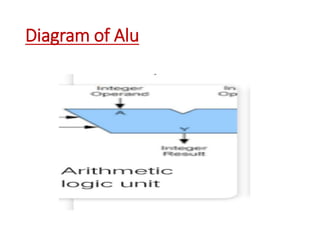
Diagram of Alu
Logical unit
• Lu unit preform logical operations like comparing
two data items to find which data item is greater
than, equal to, or less than the other
• Examples
• + ,-, *, etc
Registers
• Registers is a small high speed memory inside CPU
• It is used to store data temporary
• Data is stored in registers from main memory for
execution
• CPU contain a number of registers
• Bigger size of register increases the performance of
CPU.
Special purpose Registers
• PC
• IR
• MAR
• MBF
• SPR
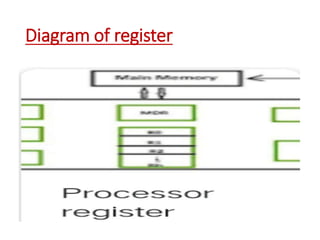
Diagram of register
Cache
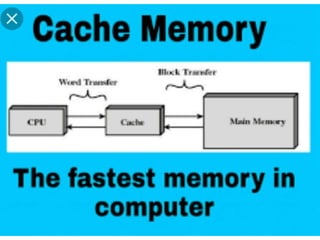
• A cache is a small and very fast memory
• It is designed to speed up the transfer of data and
instruction
• The data and instructions that are used by
computer are stored in cache memory
• It speed up the working of Cpu
Cache
• It acts as a temporary storage area that the
computer's processor can retrieve data from easily.
Cache memory
• · Cache memory is an extremely fast memory type
that acts as a buffer between RAM and the CPU.
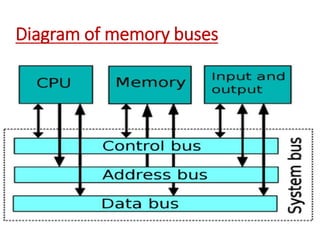
Buses
• System bus is used to connect the main
components of computer such as CPU and main
memory
• Buses are the part of keyboard
• Computer normally have system buses of 70 -100
lines
Diagram of memory buses
Input /output unit
• I/o unites controls processor, s communication with
peripheral devices such as mounted , disk drive and
printer connected to the computer system.
• I/o putis used to avoid all difficulties related to
connected to devices
• It works as an interface between CPU and I/o
devices
Main memory
• Main memory is an important component of the
computer system.
• It is used to store program and data that are being
executed.
• It is also known as working area of a computer.

Group No.2-WPS Office.pptx

  • 1.
  • 2.
  • 3.
  • 4.
    Cpu • CPU standfor central processing unit. • It is the brain of the computer. • It is the most important component of computer. • Computer cannot work without CPU. • All computer must have a central processing unit.
  • 5.
    Location of Cpu •CPU located on the motherboard. • It carries most of the work of a computer. • CPU performs all operations on data according to the given instructions. • It executes instruction and tells other parts of computer what to do. • Most of the work consist of calculation and data transfer.
  • 6.
  • 7.
    Components of cpu •CPU consists of three main components known as • ALU,(arithmetic & logical unit). • Cu(control unit). • Registers
  • 8.
    Control unit • Acontrol unit is an important component of CPU • It act like a supervisor of the computer • It controls all activities of computer systen. • CPUs and GPUs are examples of devices that use control units.
  • 9.
  • 10.
    Operations of Cu •It fetches instruction from main memory. • It interprets the instructions to find what operation is to performed. • It controls the execution of instructions.
  • 11.
    Arithmetical unit • Itperform basic arithmetic operations such as addition, subtraction, multiplication and division.
  • 12.
  • 13.
    Logical unit • Luunit preform logical operations like comparing two data items to find which data item is greater than, equal to, or less than the other • Examples • + ,-, *, etc
  • 14.
    Registers • Registers isa small high speed memory inside CPU • It is used to store data temporary • Data is stored in registers from main memory for execution • CPU contain a number of registers • Bigger size of register increases the performance of CPU.
  • 15.
    Special purpose Registers •PC • IR • MAR • MBF • SPR
  • 16.
  • 17.
    Cache • A cacheis a small and very fast memory • It is designed to speed up the transfer of data and instruction • The data and instructions that are used by computer are stored in cache memory • It speed up the working of Cpu
  • 18.
    Cache • It actsas a temporary storage area that the computer's processor can retrieve data from easily.
  • 19.
    Cache memory • ·Cache memory is an extremely fast memory type that acts as a buffer between RAM and the CPU.
  • 20.
    Buses • System busis used to connect the main components of computer such as CPU and main memory • Buses are the part of keyboard • Computer normally have system buses of 70 -100 lines
  • 21.
  • 22.
    Input /output unit •I/o unites controls processor, s communication with peripheral devices such as mounted , disk drive and printer connected to the computer system. • I/o putis used to avoid all difficulties related to connected to devices • It works as an interface between CPU and I/o devices
  • 23.
    Main memory • Mainmemory is an important component of the computer system. • It is used to store program and data that are being executed. • It is also known as working area of a computer.