Outlook manual: How to import ‘Groups’to outlook
Quick access bar
The quickaccess bar is an importantpartof yourOutlookexperience.Andit'saneasyway foryou to
move amongthe top Outlookfeatures—Mail,Calendar,People,andTasks.The bar is in additiontothe
standardtabs and ribbonsthatprovide youwithanassortmentof toolsand optionstohelpyouuse and
manage Outlook.
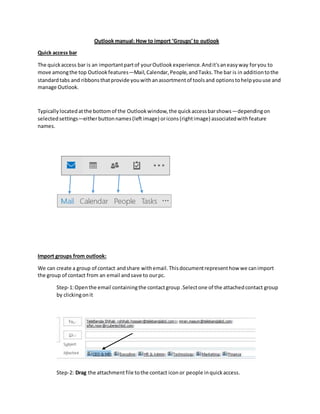
Typicallylocatedatthe bottomof the Outlookwindow,the quickaccessbarshows—dependingon
selectedsettings—eitherbuttonnames(leftimage) oricons(rightimage) associatedwithfeature
names.
Import groups from outlook:
We can create a group of contact andshare withemail.Thisdocumentrepresenthow we canimport
the group of contact from an email andsave to ourpc.
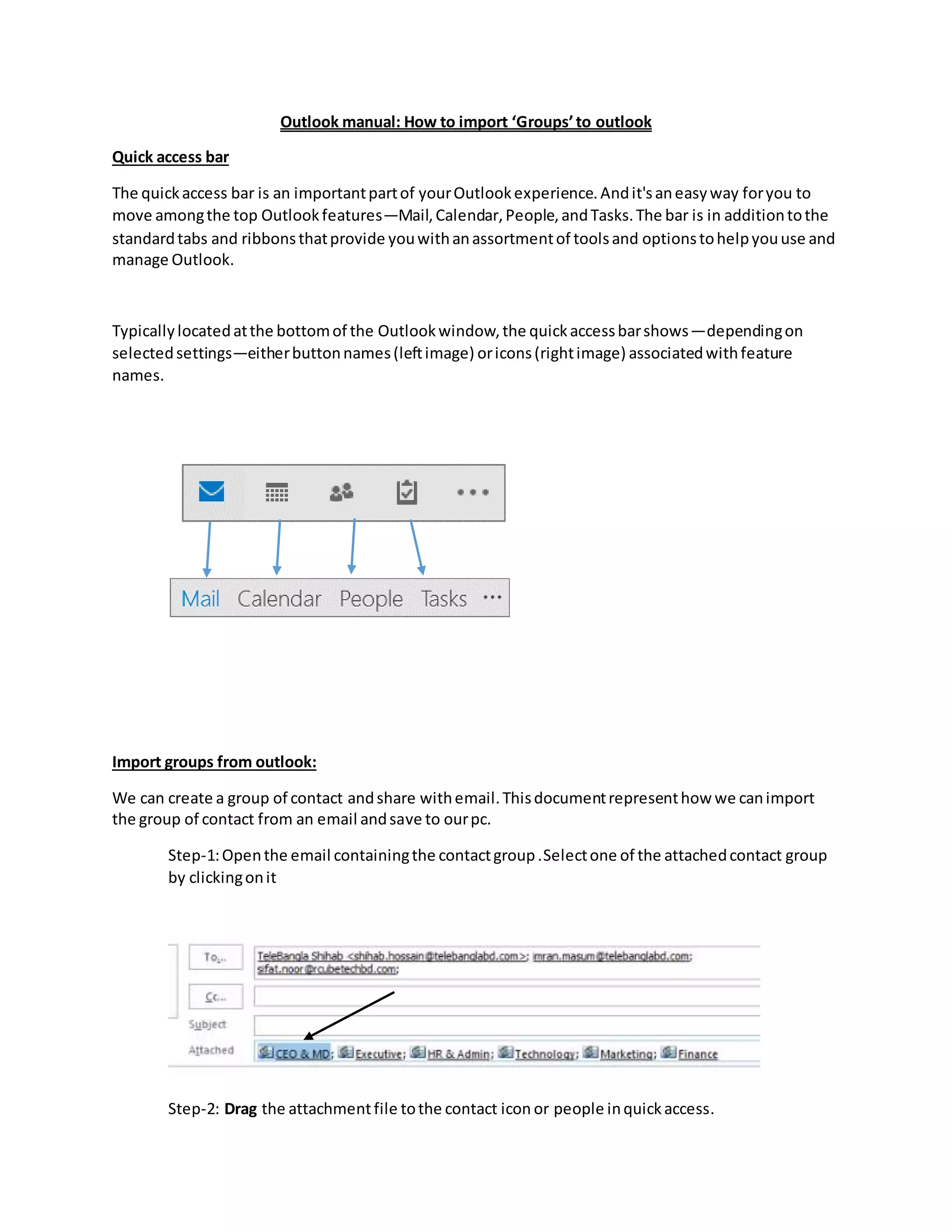
Step-1:Openthe email containingthe contactgroup.Selectone of the attachedcontact group
by clickingonit
Step-2: Drag the attachmentfile tothe contact icon or people inquickaccess.
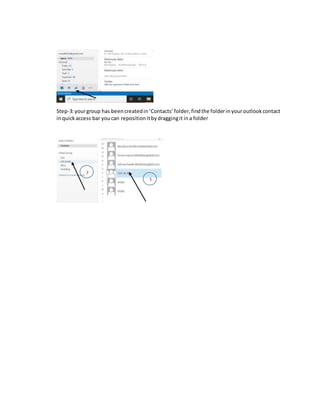
Step-3:yourgroup has beencreatedin‘Contacts’folder, findthe folderin youroutlook contact
inquick access bar youcan repositionitbydraggingit ina folder
1
2

Group import manual.docx

  • 1.
    Outlook manual: Howto import ‘Groups’to outlook Quick access bar The quickaccess bar is an importantpartof yourOutlookexperience.Andit'saneasyway foryou to move amongthe top Outlookfeatures—Mail,Calendar,People,andTasks.The bar is in additiontothe standardtabs and ribbonsthatprovide youwithanassortmentof toolsand optionstohelpyouuse and manage Outlook. Typicallylocatedatthe bottomof the Outlookwindow,the quickaccessbarshows—dependingon selectedsettings—eitherbuttonnames(leftimage) oricons(rightimage) associatedwithfeature names. Import groups from outlook: We can create a group of contact andshare withemail.Thisdocumentrepresenthow we canimport the group of contact from an email andsave to ourpc. Step-1:Openthe email containingthe contactgroup.Selectone of the attachedcontact group by clickingonit Step-2: Drag the attachmentfile tothe contact icon or people inquickaccess.
  • 2.
    Step-3:yourgroup has beencreatedin‘Contacts’folder,findthe folderin youroutlook contact inquick access bar youcan repositionitbydraggingit ina folder 1 2