Asslam-o-Alaikum!
1
Group Members
Name Roll No:
Jawad Altaf 19011519-004
Bilal Ahmed 19011519-007
Faizan Ahmed 19011519-009
Saddam Khalid 19011519-029
Nouman Ahmed 19011519-140
Objectives
 Process-to-Process Communication:
 Transport Layer.
 Addressing at Transport Layer.
 Connection Oriented Vs Connectionless
Service.
 Reliable Vs Unreliable.
 User Datagram Protocol(UDP)
 Transmission Control Protocol(TCP)
Transport Layer
1
 Process-to-process delivery of message.
 Process is an application program running on a
host.
 Ensure that the whole message arrives intact
and in order.
 Service Point Address.
 Error control and flow control.
2
Transport Layer
 Types of delivery:-
 Node-to-Node delivery
 Host-to-Host delivery
 Process-to-Process delivery
 Way to achieve process-to-process
communication
 Client/Server Paradigm
3
Process-to-Process Delivery
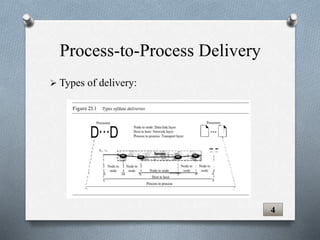
 Types of delivery:
4
Process-to-Process Delivery
 We need to deliver something to one specific
destination among many, we need an address.
 MAC address require at data link layer.
 IP address require at network layer.
 Port number require at transport layer.
5
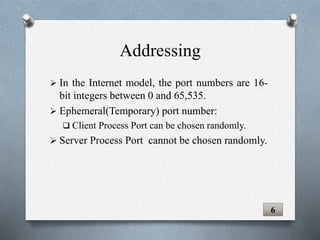
Addressing
 In the Internet model, the port numbers are 16-
bit integers between 0 and 65,535.
 Ephemeral(Temporary) port number:
 Client Process Port can be chosen randomly.
 Server Process Port cannot be chosen randomly.
6
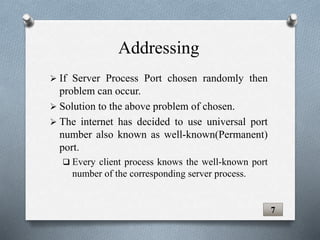
Addressing
 If Server Process Port chosen randomly then
problem can occur.
 Solution to the above problem of chosen.
 The internet has decided to use universal port
number also known as well-known(Permanent)
port.
 Every client process knows the well-known port
number of the corresponding server process.
7
Addressing
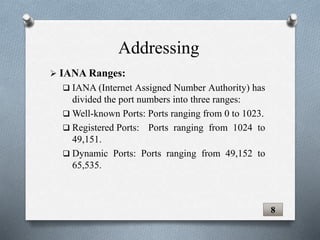
 IANA Ranges:
 IANA (Internet Assigned Number Authority) has
divided the port numbers into three ranges:
 Well-known Ports: Ports ranging from 0 to 1023.
 Registered Ports: Ports ranging from 1024 to
49,151.
 Dynamic Ports: Ports ranging from 49,152 to
65,535.
8
Addressing
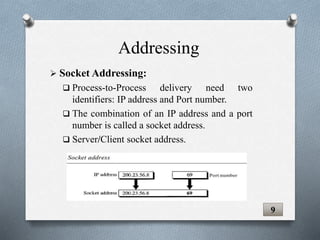
 Socket Addressing:
 Process-to-Process delivery need two
identifiers: IP address and Port number.
 The combination of an IP address and a port
number is called a socket address.
 Server/Client socket address.
9
Addressing
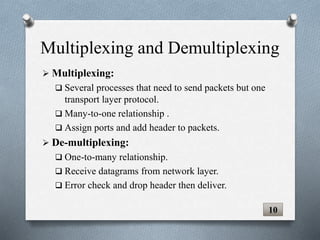
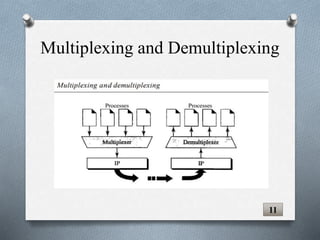
 Multiplexing:
 Several processes that need to send packets but one
transport layer protocol.
 Many-to-one relationship .
 Assign ports and add header to packets.
 De-multiplexing:
 One-to-many relationship.
 Receive datagrams from network layer.
 Error check and drop header then deliver.
10
Multiplexing and Demultiplexing
11
Multiplexing and Demultiplexing
Connection Oriented Vs
Connectionless Service
12
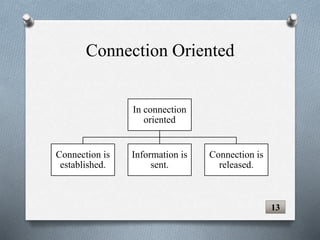
Connection Oriented
In connection
oriented
Connection is
established.
Information is
sent.
Connection is
released.
13
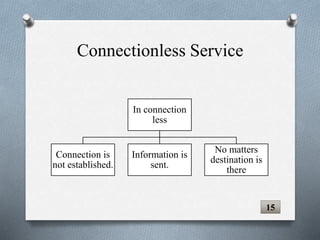
Connectionless Service
15
In connection
less
Connection is
not established.
Information is
sent.
No matters
destination is
there
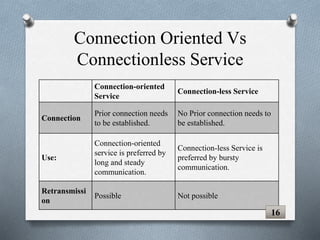
Connection Oriented Vs
Connectionless Service
Connection-oriented
Service
Connection-less Service
Connection
Prior connection needs
to be established.
No Prior connection needs to
be established.
Use:
Connection-oriented
service is preferred by
long and steady
communication.
Connection-less Service is
preferred by bursty
communication.
Retransmissi
on
Possible Not possible
16
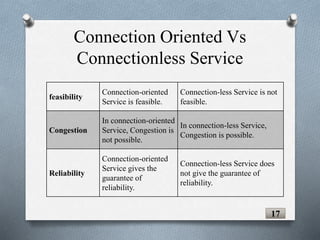
Connection Oriented Vs
Connectionless Service
feasibility
Connection-oriented
Service is feasible.
Connection-less Service is not
feasible.
Congestion
In connection-oriented
Service, Congestion is
not possible.
In connection-less Service,
Congestion is possible.
Reliability
Connection-oriented
Service gives the
guarantee of
reliability.
Connection-less Service does
not give the guarantee of
reliability.
17
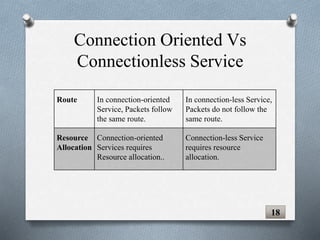
Connection Oriented Vs
Connectionless Service
Route In connection-oriented
Service, Packets follow
the same route.
In connection-less Service,
Packets do not follow the
same route.
Resource
Allocation
Connection-oriented
Services requires
Resource allocation..
Connection-less Service
requires resource
allocation.
18
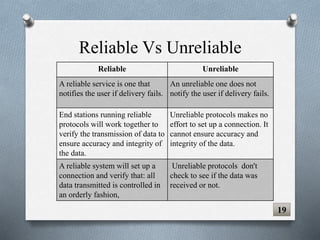
Reliable Vs Unreliable
Reliable Unreliable
A reliable service is one that
notifies the user if delivery fails.
An unreliable one does not
notify the user if delivery fails.
End stations running reliable
protocols will work together to
verify the transmission of data to
ensure accuracy and integrity of
the data.
Unreliable protocols makes no
effort to set up a connection. It
cannot ensure accuracy and
integrity of the data.
A reliable system will set up a
connection and verify that: all
data transmitted is controlled in
an orderly fashion,
Unreliable protocols don't
check to see if the data was
received or not.
19
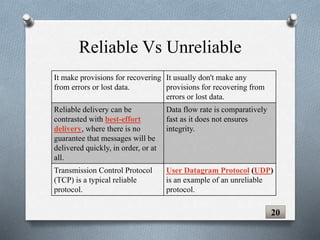
Reliable Vs Unreliable
It make provisions for recovering
from errors or lost data.
It usually don't make any
provisions for recovering from
errors or lost data.
Reliable delivery can be
contrasted with best-effort
delivery, where there is no
guarantee that messages will be
delivered quickly, in order, or at
all.
Data flow rate is comparatively
fast as it does not ensures
integrity.
Transmission Control Protocol
(TCP) is a typical reliable
protocol.
User Datagram Protocol (UDP)
is an example of an unreliable
protocol.
20
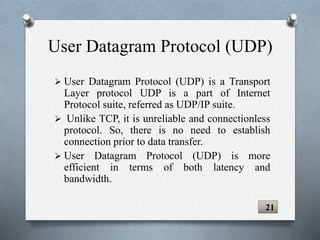
User Datagram Protocol (UDP)
 User Datagram Protocol (UDP) is a Transport
Layer protocol UDP is a part of Internet
Protocol suite, referred as UDP/IP suite.
 Unlike TCP, it is unreliable and connectionless
protocol. So, there is no need to establish
connection prior to data transfer.
 User Datagram Protocol (UDP) is more
efficient in terms of both latency and
bandwidth.
21
UDP Operations
22
 Connectionless service.
 Flow and error control.
 Encapsulation and decapsulation
 Queuing
23
UDP Operations
 User Datagram Protocol (UDP) is
a connectionless protocol.
 UDP sends independent datagram.
 there is no connection establishment and no
connection termination.
24
Connectionless service
 UDP is a very simple
 It is unreliable transport protocol.
 There is no flow control and hence no window
mechanism.
 There is no error control mechanism in UDP
except for the checksum.
25
Flow and Error control
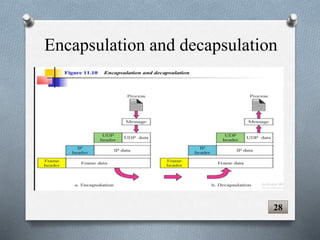
 To send a message from one process to another,
the UDP protocol encapsulates and
decapsulates messages in an IP datagram.
 In Encapsulation, the data moves from upper
layer to the lower layer
 Each layer includes a bundle of information
known as a header along with the actual data.
 It occur on the source computer.
26
Encapsulation and decapsulation
 In decapsulation, the data moves from the
lower layer to the upper layers.
 Each layer unpacks the corresponding headers
to obtain the actual data.
 It occurs on the destination computer.
27
Encapsulation and decapsulation
28
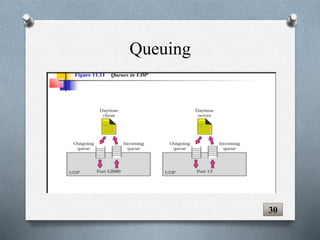
 In UDP queuing is associated with ports.
 UDP process creates incoming and outgoing
queues.
 Queue functions as long as the process is
running.
 When process is terminates, the queue are
destroyed.
29
Queuing
30
Queuing
 Suitable for a process with internal flow and
error control mechanisms such as TFTP
 Suitable for a process that requires simple
request-response communication with little
concern for flow and error control, not suitable
for FrP which sends a bulk of data.
31
Uses of UDP
 Suitable for multicasting. Multicasting is
available in UDP but not in TCP.
 Used for management processes such as
SNMP
 Used for some route updating protocols such
as RIP
32
Uses of UDP
Transmission Control
Protocol
33
TCP
 Process to Process (Program to Program)
protocol.
 Connection Oriented Protocol.
 Virtual connection between two TCPs to send
data.
 Also called connection-oriented, reliable
transport protocol.
 Adds connection-oriented and reliability
features to IP service
34
TCP Services
 Process to Process Communication
 Stream Delivery Service
 Full Duplex Communication
 Connection Oriented Service
 Reliable Service
35
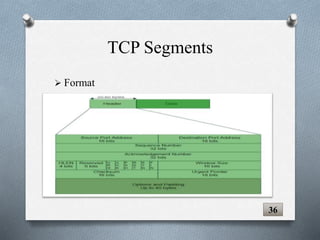
TCP Segments
 Format

36
TCP Segments
 Source Port Address
 Destination Port Address
 Sequence Number
 Acknowledgement Number
37
TCP Connection
 Connection Establishment
 Three way Handshaking
 Data Transfer
 Connection Termination
38
Flow Control
 Uses sliding Window
 Shrinking Window
 Moving right wall to left
 TCP Sliding Window
 Size is lesser of rwnd and cwnd
 No need to send full window’s worth of data
 Window open or closed but not shrunk
 Destination can send acknowledgment at
anytime unless result in shrinking window
 Receiver may shut down window
39
Error Control
 Checksum
 Acknowledgment
 Retransmission
 Out-of-Order Segments
 Some scenarios
40
TCP Features
41
Numbering System
 Byte Number
 Sequence Number
 Acknowledgement Number
 Reliable transfer of data
Flow Control
Error Control
42
TCP Features
 Numbering System: TCP keeps track of the
segments being transmitted or received by assigning
numbers.
 Byte Number: Byte Number assigned to data
bytes to be transferred.
43
TCP Features
 Sequence Number: Sequence number of data
bytes of a segment in a session.
 Acknowledgement Number: When ACK flag is
set, this number contains the next sequence number
of the data byte expected and works as
acknowledgement of the previous data received.
TCP Features
44
 Reliable transfer of data :
 Ordered data transfer - the destination host
rearranges according to sequence number
 Retransmission of lost packets - any cumulative
stream not acknowledged will be retransmitted
 Discarding duplicate packets
 Error-free data transfer
TCP Features
45
46
 Flow control:
 Receiver of the data controls the amount of data that
are to be sent by the sender.
 Numbering system allows TCP to use byte-oriented
flow control.
TCP Features
 Error Control: Error control in TCP is mainly
done through use of three simple techniques :
 Checksum – Every segment contains a checksum
field which is used to find corrupted segment.
 Acknowledgement – TCP has another
mechanism called acknowledgement to affirm that
the data segments have been delivered.
TCP Features
47
Cont.…
 Retransmission – When a segment is missing,
delayed to deliver to receiver, corrupted when it is
checked by receiver then that segment is
retransmitted again.
TCP Features
48

Group 3 Presen.pptx

  • 1.
  • 2.
    Group Members Name RollNo: Jawad Altaf 19011519-004 Bilal Ahmed 19011519-007 Faizan Ahmed 19011519-009 Saddam Khalid 19011519-029 Nouman Ahmed 19011519-140
  • 3.
    Objectives  Process-to-Process Communication: Transport Layer.  Addressing at Transport Layer.  Connection Oriented Vs Connectionless Service.  Reliable Vs Unreliable.  User Datagram Protocol(UDP)  Transmission Control Protocol(TCP)
  • 4.
  • 5.
     Process-to-process deliveryof message.  Process is an application program running on a host.  Ensure that the whole message arrives intact and in order.  Service Point Address.  Error control and flow control. 2 Transport Layer
  • 6.
     Types ofdelivery:-  Node-to-Node delivery  Host-to-Host delivery  Process-to-Process delivery  Way to achieve process-to-process communication  Client/Server Paradigm 3 Process-to-Process Delivery
  • 7.
     Types ofdelivery: 4 Process-to-Process Delivery
  • 8.
     We needto deliver something to one specific destination among many, we need an address.  MAC address require at data link layer.  IP address require at network layer.  Port number require at transport layer. 5 Addressing
  • 9.
     In theInternet model, the port numbers are 16- bit integers between 0 and 65,535.  Ephemeral(Temporary) port number:  Client Process Port can be chosen randomly.  Server Process Port cannot be chosen randomly. 6 Addressing
  • 10.
     If ServerProcess Port chosen randomly then problem can occur.  Solution to the above problem of chosen.  The internet has decided to use universal port number also known as well-known(Permanent) port.  Every client process knows the well-known port number of the corresponding server process. 7 Addressing
  • 11.
     IANA Ranges: IANA (Internet Assigned Number Authority) has divided the port numbers into three ranges:  Well-known Ports: Ports ranging from 0 to 1023.  Registered Ports: Ports ranging from 1024 to 49,151.  Dynamic Ports: Ports ranging from 49,152 to 65,535. 8 Addressing
  • 12.
     Socket Addressing: Process-to-Process delivery need two identifiers: IP address and Port number.  The combination of an IP address and a port number is called a socket address.  Server/Client socket address. 9 Addressing
  • 13.
     Multiplexing:  Severalprocesses that need to send packets but one transport layer protocol.  Many-to-one relationship .  Assign ports and add header to packets.  De-multiplexing:  One-to-many relationship.  Receive datagrams from network layer.  Error check and drop header then deliver. 10 Multiplexing and Demultiplexing
  • 14.
  • 15.
  • 16.
    Connection Oriented In connection oriented Connectionis established. Information is sent. Connection is released. 13
  • 17.
    Connectionless Service 15 In connection less Connectionis not established. Information is sent. No matters destination is there
  • 18.
    Connection Oriented Vs ConnectionlessService Connection-oriented Service Connection-less Service Connection Prior connection needs to be established. No Prior connection needs to be established. Use: Connection-oriented service is preferred by long and steady communication. Connection-less Service is preferred by bursty communication. Retransmissi on Possible Not possible 16
  • 19.
    Connection Oriented Vs ConnectionlessService feasibility Connection-oriented Service is feasible. Connection-less Service is not feasible. Congestion In connection-oriented Service, Congestion is not possible. In connection-less Service, Congestion is possible. Reliability Connection-oriented Service gives the guarantee of reliability. Connection-less Service does not give the guarantee of reliability. 17
  • 20.
    Connection Oriented Vs ConnectionlessService Route In connection-oriented Service, Packets follow the same route. In connection-less Service, Packets do not follow the same route. Resource Allocation Connection-oriented Services requires Resource allocation.. Connection-less Service requires resource allocation. 18
  • 21.
    Reliable Vs Unreliable ReliableUnreliable A reliable service is one that notifies the user if delivery fails. An unreliable one does not notify the user if delivery fails. End stations running reliable protocols will work together to verify the transmission of data to ensure accuracy and integrity of the data. Unreliable protocols makes no effort to set up a connection. It cannot ensure accuracy and integrity of the data. A reliable system will set up a connection and verify that: all data transmitted is controlled in an orderly fashion, Unreliable protocols don't check to see if the data was received or not. 19
  • 22.
    Reliable Vs Unreliable Itmake provisions for recovering from errors or lost data. It usually don't make any provisions for recovering from errors or lost data. Reliable delivery can be contrasted with best-effort delivery, where there is no guarantee that messages will be delivered quickly, in order, or at all. Data flow rate is comparatively fast as it does not ensures integrity. Transmission Control Protocol (TCP) is a typical reliable protocol. User Datagram Protocol (UDP) is an example of an unreliable protocol. 20
  • 23.
    User Datagram Protocol(UDP)  User Datagram Protocol (UDP) is a Transport Layer protocol UDP is a part of Internet Protocol suite, referred as UDP/IP suite.  Unlike TCP, it is unreliable and connectionless protocol. So, there is no need to establish connection prior to data transfer.  User Datagram Protocol (UDP) is more efficient in terms of both latency and bandwidth. 21
  • 24.
  • 25.
     Connectionless service. Flow and error control.  Encapsulation and decapsulation  Queuing 23 UDP Operations
  • 26.
     User DatagramProtocol (UDP) is a connectionless protocol.  UDP sends independent datagram.  there is no connection establishment and no connection termination. 24 Connectionless service
  • 27.
     UDP isa very simple  It is unreliable transport protocol.  There is no flow control and hence no window mechanism.  There is no error control mechanism in UDP except for the checksum. 25 Flow and Error control
  • 28.
     To senda message from one process to another, the UDP protocol encapsulates and decapsulates messages in an IP datagram.  In Encapsulation, the data moves from upper layer to the lower layer  Each layer includes a bundle of information known as a header along with the actual data.  It occur on the source computer. 26 Encapsulation and decapsulation
  • 29.
    Encapsulation and decapsulation In decapsulation, the data moves from the lower layer to the upper layers.  Each layer unpacks the corresponding headers to obtain the actual data.  It occurs on the destination computer. 27
  • 30.
  • 31.
     In UDPqueuing is associated with ports.  UDP process creates incoming and outgoing queues.  Queue functions as long as the process is running.  When process is terminates, the queue are destroyed. 29 Queuing
  • 32.
  • 33.
     Suitable fora process with internal flow and error control mechanisms such as TFTP  Suitable for a process that requires simple request-response communication with little concern for flow and error control, not suitable for FrP which sends a bulk of data. 31 Uses of UDP
  • 34.
     Suitable formulticasting. Multicasting is available in UDP but not in TCP.  Used for management processes such as SNMP  Used for some route updating protocols such as RIP 32 Uses of UDP
  • 35.
  • 36.
    TCP  Process toProcess (Program to Program) protocol.  Connection Oriented Protocol.  Virtual connection between two TCPs to send data.  Also called connection-oriented, reliable transport protocol.  Adds connection-oriented and reliability features to IP service 34
  • 37.
    TCP Services  Processto Process Communication  Stream Delivery Service  Full Duplex Communication  Connection Oriented Service  Reliable Service 35
  • 38.
  • 39.
    TCP Segments  SourcePort Address  Destination Port Address  Sequence Number  Acknowledgement Number 37
  • 40.
    TCP Connection  ConnectionEstablishment  Three way Handshaking  Data Transfer  Connection Termination 38
  • 41.
    Flow Control  Usessliding Window  Shrinking Window  Moving right wall to left  TCP Sliding Window  Size is lesser of rwnd and cwnd  No need to send full window’s worth of data  Window open or closed but not shrunk  Destination can send acknowledgment at anytime unless result in shrinking window  Receiver may shut down window 39
  • 42.
    Error Control  Checksum Acknowledgment  Retransmission  Out-of-Order Segments  Some scenarios 40
  • 43.
  • 44.
    Numbering System  ByteNumber  Sequence Number  Acknowledgement Number  Reliable transfer of data Flow Control Error Control 42 TCP Features
  • 45.
     Numbering System:TCP keeps track of the segments being transmitted or received by assigning numbers.  Byte Number: Byte Number assigned to data bytes to be transferred. 43 TCP Features
  • 46.
     Sequence Number:Sequence number of data bytes of a segment in a session.  Acknowledgement Number: When ACK flag is set, this number contains the next sequence number of the data byte expected and works as acknowledgement of the previous data received. TCP Features 44
  • 47.
     Reliable transferof data :  Ordered data transfer - the destination host rearranges according to sequence number  Retransmission of lost packets - any cumulative stream not acknowledged will be retransmitted  Discarding duplicate packets  Error-free data transfer TCP Features 45
  • 48.
    46  Flow control: Receiver of the data controls the amount of data that are to be sent by the sender.  Numbering system allows TCP to use byte-oriented flow control. TCP Features
  • 49.
     Error Control:Error control in TCP is mainly done through use of three simple techniques :  Checksum – Every segment contains a checksum field which is used to find corrupted segment.  Acknowledgement – TCP has another mechanism called acknowledgement to affirm that the data segments have been delivered. TCP Features 47
  • 50.
    Cont.…  Retransmission –When a segment is missing, delayed to deliver to receiver, corrupted when it is checked by receiver then that segment is retransmitted again. TCP Features 48