GroovyFX	-	Groove	JavaFX_
Alexander	Klein
 
1
About	me
Alexander	Klein
Branchmanager
codecentric	AG
Curiestr.	2
70563	Stuttgart,	Germany
	+49	(0)	172	529	40	20
	alexander.klein@codecentric.de
	www.codecentric.de
	blog.codecentric.de
	@saschaklein
 
2
What	is	GroovyFX
 
3
GroovyFX
library	for	JavaFX	using	Groovy
Groovy	Builder	Pattern
DSL	on	top	of	JavaFX
declarative
simpler	to	write
easier	to	read
more	natural
http://groovyfx.org
https://github.com/groovyfx-project/groovyfx
http://groovy.jmiguel.eu/groovy.codehaus.org/GroovyFX.html
 
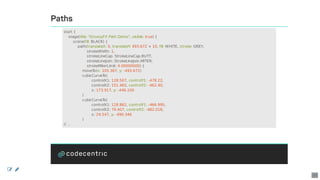
4
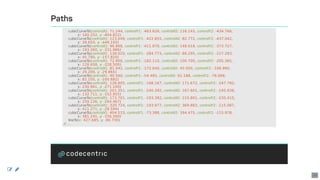
Example
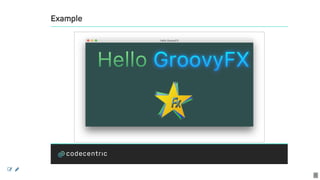
groovyx.javafx.GroovyFX.start	{
				stage(title:	'Hello	GroovyFX',	visible:	true)	{
								scene(fill:	DARKSLATEGREY,	width:	860,	height:	430)	{
												borderPane	{
																top	{
																				hbox(padding:	[20,	60,	20,	60])	{
																								text(text:	'Hello	',	font:	'80pt	sanserif')	{
																												fill	linearGradient(endX:	0,	stops:	[PALEGREEN,	SEAGREEN])
																								}
																								text(text:	'GroovyFX',	font:	'80pt	sanserif')	{
																												fill	linearGradient(endX:	0,	stops:	[CYAN,	DODGERBLUE])
																												effect	dropShadow(color:	DODGERBLUE,	radius:	25,	spread:	0.25)
																								}
																				}
																}
																group(id:	'logo',	scaleX:	2,	scaleY:	2)	{
																				transitions	=	parallelTransition()
																				star	delegate,	12,	[LIGHTGREEN,	GREEN]*.brighter()
																				star	delegate,	6,	[LIGHTBLUE,	BLUE]*.brighter()
																				star	delegate,	0,	[YELLOW,	ORANGE]
																				fxLabel	delegate
																				onMouseClicked	{	transitions.playFromStart()	}
																}
				}			}			}
				transitions.delay	=	Duration.seconds(1)
				transitions.playFromStart()
				transitions.delay	=	Duration.seconds(0)
}
 
5
Example
 
6
Simple	Scene
	
General	contract
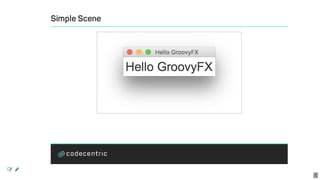
import	static	groovyx.javafx.GroovyFX.start
start	{
				stage(title:	'Hello	GroovyFX',	visible:	true)	{
								scene	{
												stylesheets('groovyfx.css')
												label('Hello	GroovyFX',	styleClass:	'big')
								}
				}
}
[container	name](value?,	attributes*)	{
				[subcontainer	name](value?,	attributes*)	{
								[node	name](value?,	attributes*)
				}
}
 
7
Simple	Scene
 
8
Forms	and	components
 
9
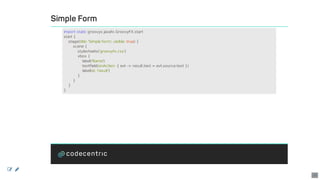
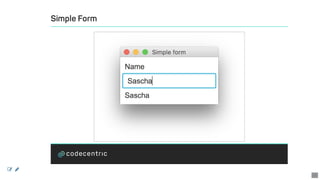
Simple	Form
import	static	groovyx.javafx.GroovyFX.start
start	{
				stage(title:	'Simple	form',	visible:	true)	{
								scene	{
												stylesheets('groovyfx.css')
												vbox	{
																label('Name')
																textField(onAction:	{	evt	->	result.text	=	evt.source.text	})
																label(id:	'result')
												}
								}
				}
}
 
10
Simple	Form
 
11
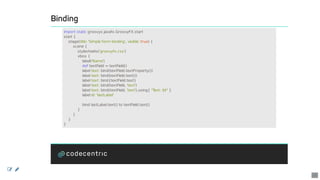
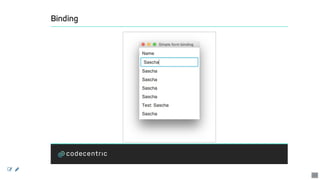
Binding
import	static	groovyx.javafx.GroovyFX.start
start	{
				stage(title:	'Simple	form	binding',	visible:	true)	{
								scene	{
												stylesheets('groovyfx.css')
												vbox	{
																label('Name')
																def	textField	=	textField()
																label	text:	bind(textField.textProperty())
																label	text:	bind(textField.text())
																label	text:	bind{textField.text}
																label	text:	bind(textField,	'text')
																label	text:	bind(textField,	'text').using{	"Text:	$it"	}
																label	id:	'lastLabel'
																bind	lastLabel.text()	to	textField.text()
												}
								}
				}
}
 
12
Binding
 
13
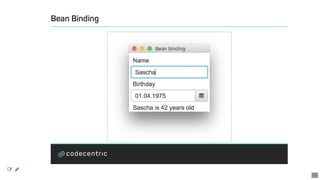
Bean	Binding
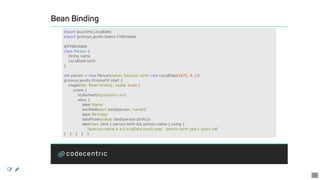
import	java.time.LocalDate
import	groovyx.javafx.beans.FXBindable
@FXBindable
class	Person	{
				String	name
				LocalDate	birth
}
def	person	=	new	Person(name:	'Sascha',	birth:	new	LocalDate(1975,	4,	1))
groovyx.javafx.GroovyFX.start	{
				stage(title:	'Bean	binding',	visible:	true)	{
								scene	{
												stylesheets('groovyfx.css')
												vbox	{
																label	'Name'
																textField(text:	bind(person,	'name'))
																label	'Birthday'
																datePicker(value:	bind(person.birth()))
																label	text:	bind	{	person.birth	&&	person.name	}.using	{
																				"$person.name	is	${LocalDate.now().year	-	person.birth.year}	years	old"
}			}			}			}			}
 
14
Bean	Binding
 
15
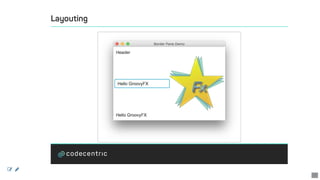
Layouting
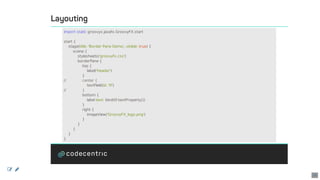
import	static	groovyx.javafx.GroovyFX.start
start	{
				stage(title:	'Border	Pane	Demo',	visible:	true)	{
								scene	{
												stylesheets('groovyfx.css')
												borderPane	{
																top	{
																				label('Header')
																}
//														center	{
																				textField(id:	'tf')
//														}
																bottom	{
																				label	text:	bind(tf.textProperty())
																}
																right	{
																				imageView('GroovyFX_logo.png')
																}
												}
								}
				}
}
 
16
Layouting
 
17
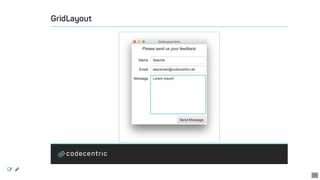
GridLayout
groovyx.javafx.GroovyFX.start	{
				stage(title:	'GridLayout	form',	visible:	true)	{
								scene	{
												stylesheets('groovyfx.css')
												gridPane(hgap:	5,	vgap:	10,	padding:	25,	alignment:	TOP_CENTER)	{
																columnConstraints(minWidth:	50,	halignment:	RIGHT)
																columnConstraints(prefWidth:	250,	hgrow:	'always')
																label("Please	send	us	your	feedback",	style:	"-fx-font-size:	18px;",
																								row:	0,	columnSpan:	2,	halignment:	"center",	margin:	[0,	0,	10])	{
																				onMouseEntered	{	e	->	e.source.parent.gridLinesVisible	=	true	}
																				onMouseExited	{	e	->	e.source.parent.gridLinesVisible	=	false	}
																}
																label("Name",	hgrow:	"never",	row:	1,	column:	0)
																textField(promptText:	"Your	name",	row:	1,	column:	1	)
																label("Email",	row:	2,	column:	0)
																textField(promptText:	"Your	email	address",	row:	2,	column:	1)
																label("Message",	row:	3,	column:	0,	valignment:	"baseline")
																textArea(prefRowCount:	8,	row:	3,	column:	1,	vgrow:	'always')
																button("Send	Message",	row:	4,	column:	1,	halignment:	"right")
}			}			}			}
 
18
GridLayout
 
19
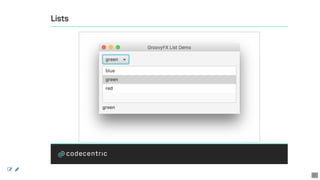
Lists
@FXBindable
class	SelectionHolder	{
				def	selected
}
def	selectionHolder	=	new	SelectionHolder()
def	colors	=	['blue',	'green',	'red']
start	{	primaryStage	->
				stage(title:	"GroovyFX	List	Demo",	width:	400,	height:	200,	visible:	true)	{
								scene(fill:	WHITE)	{
												vbox(padding:	10,	spacing:	5)	{
																choiceBox(value:	bind(selectionHolder.selected()),	items:	colors)
																listView(id:	'myList',	items:	colors)	{
																				onSelect	{	control,	item	->
																								selectionHolder.selected	=	item
																				}
																}
																selectionHolder.selected().onChange	{	source,	oldValue,	newValue	->
																				myList.selectionModel.select(newValue)
																}
																label(text:	bind(selectionHolder.selected()))
}			}			}			}
 
20
Lists
 
21
Colors
start	{	primaryStage	->
				def	colors	=	[
												BLUE,
												GREEN,
												RED,
												hsb(67,	0.8,	0.91),
												rgb(39,	209,	100),
												rgba(20,	100,	150,	0.60),
												delegate."#AA4411"
				]
				stage(title:	"GroovyFX	Table	Demo",	visible:	true)	{
								scene(fill:	WHITE)	{
												vbox(padding:	9,	spacing:	5)	{
//...
 
22
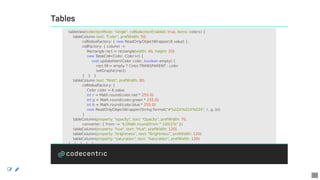
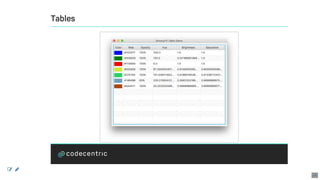
Tables
				tableView(selectionMode:	"single",	cellSelectionEnabled:	true,	items:	colors)	{
								tableColumn	text:	"Color",	prefWidth:	50,
																cellValueFactory:	{	new	ReadOnlyObjectWrapper(it.value)	},
																cellFactory:	{	column	->
																				Rectangle	rect	=	rectangle(width:	40,	height:	20)
																				new	TableCell<Color,	Color>()	{
																								void	updateItem(Color	color,	boolean	empty)	{
																												rect.fill	=	empty	?	Color.TRANSPARENT	:	color
																												setGraphic(rect)
																}			}			}
								tableColumn	text:	"Web",	prefWidth:	80,
																cellValueFactory:	{
																				Color	color	=	it.value
																				int	r	=	Math.round(color.red	*	255.0)
																				int	g	=	Math.round(color.green	*	255.0)
																				int	b	=	Math.round(color.blue	*	255.0)
																				new	ReadOnlyObjectWrapper(String.format("#%02X%02X%02X",	r,	g,	b))
																}
								tableColumn(property:	"opacity",	text:	"Opacity",	prefWidth:	70,
																converter:	{	from	->	"${Math.round(from	*	100)}%"	})
								tableColumn(property:	"hue",	text:	"Hue",	prefWidth:	120)
								tableColumn(property:	"brightness",	text:	"Brightness",	prefWidth:	120)
								tableColumn(property:	"saturation",	text:	"Saturation",	prefWidth:	120)
				}			}			}			}			}
 
23
Tables
 
24
Actions
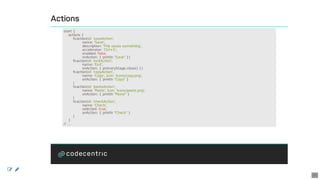
start	{
				actions	{
								fxaction(id:	'saveAction',
																name:	'Save',
																description:	'This	saves	something',
																accelerator:	'Ctrl+S',
																enabled:	false,
																onAction:	{	println	"Save"	})
								fxaction(id:	'exitAction',
																name:	'Exit',
																onAction:	{	primaryStage.close()	})
								fxaction(id:	'copyAction',
																name:	'Copy',	icon:	'icons/copy.png',
																onAction:	{	println	"Copy"	}
								)
								fxaction(id:	'pasteAction',
																name:	'Paste',	icon:	'icons/paste.png',
																onAction:	{	println	"Paste"	}
								)
								fxaction(id:	'checkAction',
																name:	'Check',
																selected:	true,
																onAction:	{	println	"Check"	}
								)
				}
//	...
 
25
Actions
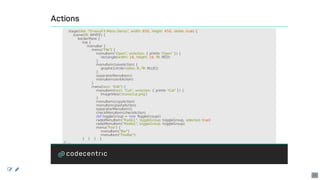
				stage(title:	"GroovyFX	Menu	Demo",	width:	650,	height:	450,	visible:	true)	{
								scene(fill:	WHITE)	{
												borderPane	{
																top	{
																				menuBar	{
																								menu("File")	{
																												menuItem("Open",	onAction:	{	println	"Open"	})	{
																																rectangle(width:	16,	height:	16,	fill:	RED)
																												}
																												menuItem(saveAction)	{
																																graphic(circle(radius:	8,	fill:	BLUE))
																												}
																												separatorMenuItem()
																												menuItem(exitAction)
																								}
																								menu(text:	"Edit")	{
																												menuItem(text:	"Cut",	onAction:	{	println	"Cut"	})	{
																																imageView('/icons/cut.png')
																												}
																												menuItem(copyAction)
																												menuItem(pasteAction)
																												separatorMenuItem()
																												checkMenuItem(checkAction)
																												def	toggleGroup	=	new	ToggleGroup()
																												radioMenuItem("Radio1",	toggleGroup:	toggleGroup,	selected:	true)
																												radioMenuItem("Radio2",	toggleGroup:	toggleGroup)
																												menu("Foo")	{
																																menuItem("Bar")
																																menuItem("FooBar")
																}			}			}			}
//	...
 
26
Actions
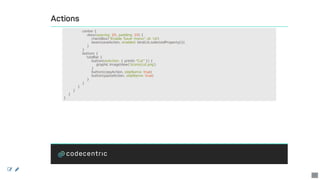
																center	{
																				vbox(spacing:	20,	padding:	10)	{
																								checkBox("Enable	'Save'	menu",	id:	'cb')
																								bean(saveAction,	enabled:	bind(cb.selectedProperty()))
																				}
																}
																bottom	{
																				toolBar	{
																								button(onAction:	{	println	"Cut"	})	{
																												graphic	imageView('/icons/cut.png')
																								}
																								button(copyAction,	skipName:	true)
																								button(pasteAction,	skipName:	true)
																				}
																}
												}
								}
				}
}
 
27
Actions
 
28
Charts
def	pieData	=	FXCollections.observableArrayList([
								new	PieChart.Data("Yours",	42),
								new	PieChart.Data("Mine",	58)
])
start	{
				Map	data	=	[first:	0.25f,	second:	0.25f,	third:	0.25f]
				stage(title:	'Chart	Demo',	visible:	true,	width:	1024,	height:	960)	{
								scene	{
												stylesheets('groovyfx.css')
												stackPane	{
																scrollPane	{
																				tilePane(padding:	10,	prefTileWidth:	480,	prefColumns:	2)	{
																								pieChart(data:	[first:	0.25f,	second:	0.25f,	third:	0.25f])
																								stackPane(alignment:	TOP_RIGHT)	{
																												pieChart(data:	pieData,	animated:	true)
																												button('Add	Slice')	{
																																onAction	{
																																				pieData.add(new	PieChart.Data('Other',	25))
																																}
																												}
																								}
//	...
 
29
Charts
				lineChart(data:	[First:	[0,0.25,0.5,1.5,2,1],	Second:	[0.25,0,0.5,0.5,1.5,0.75]])
				final	yAxis	=	numberAxis(label:	"Y	Axis",	lowerBound:	-1.2,	upperBound:	1.2,
												tickUnit:	0.2,	autoRanging:	false)
				lineChart(xAxis:	categoryAxis(label:	"X	Axis"),	yAxis:	yAxis)	{
								series(name:	'First	Series',	data:	["A",	0,	"B",	1,	"C",	-1])
								series(name:	'Second	Series',	data:	[["A",	0],	["B",	-1],	["C",	1],	["D",	0]])
				}
				areaChart	{
								series(name:	'First	Series',	data:	[0,	0,	0.5,	0.2,	1.5,	0.6,	2,	0.8])
								series(name:	'Second	Series',	data:	[0,	0,	0.25,	0.2,	0.5,	0.6,	2.25,	0.4])
				}
				bubbleChart	{
								series(name:	'First	Series',	data:	[[0,0.2,0.1],	[0.5,0.2,0.25],	[1.5,0.1,0.5]])
								series(name:	'Second	Series',	data:	[[0,	0.1,	0.25],	[0.2,	0.5,	0.2]])
				}
				scatterChart	{
								series(name:	'First	Series',	data:	[0,	0,	0.5,	0.2,	1.5,	0.6,	2,	0.8])
								series(name:	'Second	Series',	data:	[0,	0,	0.25,	0.2,	0.5,	0.6,	2.25,	0.4])
				}
				barChart(barGap:	0,	categoryGap:	0)	{
								series(name:	'2010',	data:	['Q1',	1534,	'Q2',	2698,	'Q3',	1945,	'Q4',	3156])
								series(name:	'2012',	data:	['Q1',	2200,	'Q2',	2750,	'Q3',	2125,	'Q4',	3100])
}			}			}			}			}			}		}
 
30
Charts
DEMO
 
31
Graphics	and	animations
 
32
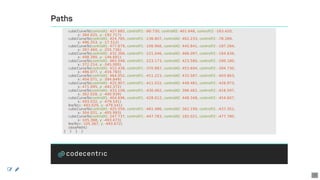
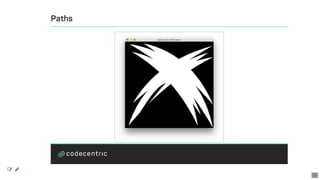
Paths
start	{
				stage(title:	"GroovyFX	Path	Demo",	visible:	true)	{
								scene(fill:	BLACK)	{
												path(translateX:	0,	translateY:	493.672	+	10,	fill:	WHITE,	stroke:	GREY,
																				strokeWidth:	1,
																				strokeLineCap:	StrokeLineCap.BUTT,
																				strokeLineJoin:	StrokeLineJoin.MITER,
																				strokeMiterLimit:	4.00000000)	{
																moveTo(x:	105.367,	y:	-493.672)
																cubicCurveTo(
																								controlX1:	128.507,	controlY1:	-478.22,
																								controlX2:	151.465,	controlY2:	-462.40,
																								x:	173.917,	y:	-446.100
																)
																cubicCurveTo(
																								controlX1:	128.862,	controlY1:	-466.995,
																								controlX2:	79.407,	controlY2:	-482.018,
																								x:	24.547,	y:	-490.346
																)
//	...
 
33
Paths
				cubicCurveTo(controlX1:	71.244,	controlY1:	-463.626,	controlX2:	116.143,	controlY2:	-434.766,
												x:	160.252,	y:	-404.822)
				cubicCurveTo(controlX1:	123.049,	controlY1:	-422.855,	controlX2:	82.772,	controlY2:	-437.042,
												x:	38.650,	y:	-446.192)
				cubicCurveTo(controlX1:	96.868,	controlY1:	-411.870,	controlX2:	148.018,	controlY2:	-373.727,
												x:	193.360,	y:	-331.986)
				cubicCurveTo(controlX1:	136.020,	controlY1:	-284.773,	controlX2:	86.295,	controlY2:	-227.283,
												x:	45.790,	y:	-157.820)
				cubicCurveTo(controlX1:	72.900,	controlY1:	-182.110,	controlX2:	100.700,	controlY2:	-205.365,
												x:	128.658,	y:	-228.500)
				cubicCurveTo(controlX1:	81.942,	controlY1:	-172.640,	controlX2:	45.050,	controlY2:	-106.990,
												x:	20.200,	y:	-29.865)
				cubicCurveTo(controlX1:	40.560,	controlY1:	-54.485,	controlX2:	61.188,	controlY2:	-78.068,
												x:	82.105,	y:	-100.682)
				cubicCurveTo(controlX1:	126.805,	controlY1:	-168.167,	controlX2:	171.672,	controlY2:	-247.792,
												x:	230.961,	y:	-271.100)
				cubicCurveTo(controlX1:	201.351,	controlY1:	-240.392,	controlX2:	167.601,	controlY2:	-195.936,
												x:	132.711,	y:	-152.955)
				cubicCurveTo(controlX1:	173.701,	controlY1:	-193.392,	controlX2:	215.801,	controlY2:	-230.415,
												x:	259.126,	y:	-264.467)
				cubicCurveTo(controlX1:	320.724,	controlY1:	-193.977,	controlX2:	369.883,	controlY2:	-115.087,
												x:	411.271,	y:	-28.594)
				cubicCurveTo(controlX1:	404.533,	controlY1:	-73.388,	controlX2:	394.475,	controlY2:	-115.978,
												x:	381.241,	y:	-156.260)
				lineTo(x:	427.685,	y:	-90.730)
//	...
 
34
Paths
				cubicCurveTo(controlX1:	427.685,	controlY1:	-90.730,	controlX2:	401.648,	controlY2:	-163.420,
												x:	384.025,	y:	-192.717)
				cubicCurveTo(controlX1:	424.785,	controlY1:	-136.807,	controlX2:	462.233,	controlY2:	-78.289,
												x:	496.353,	y:	-17.512)
				cubicCurveTo(controlX1:	477.679,	controlY1:	-106.966,	controlX2:	445.841,	controlY2:	-187.284,
												x:	397.460,	y:	-255.736)
				cubicCurveTo(controlX1:	432.366,	controlY1:	-221.046,	controlX2:	466.097,	controlY2:	-184.636,
												x:	498.390,	y:	-146.691)
				cubicCurveTo(controlX1:	465.048,	controlY1:	-223.173,	controlX2:	423.580,	controlY2:	-290.180,
												x:	372.214,	y:	-345.000)
				cubicCurveTo(controlX1:	412.438,	controlY1:	-370.887,	controlX2:	453.694,	controlY2:	-394.730,
												x:	496.077,	y:	-416.783)
				cubicCurveTo(controlX1:	464.052,	controlY1:	-411.223,	controlX2:	433.587,	controlY2:	-403.863,
												x:	404.071,	y:	-394.849)
				cubicCurveTo(controlX1:	425.907,	controlY1:	-411.022,	controlX2:	448.481,	controlY2:	-426.973,
												x:	471.095,	y:	-442.372)
				cubicCurveTo(controlX1:	433.108,	controlY1:	-430.462,	controlX2:	396.462,	controlY2:	-416.597,
												x:	362.028,	y:	-400.939)
				cubicCurveTo(controlX1:	404.696,	controlY1:	-428.612,	controlX2:	448.348,	controlY2:	-454.607,
												x:	493.032,	y:	-479.541)
				lineTo(x:	493.029,	y:	-479.541)
				cubicCurveTo(controlX1:	425.559,	controlY1:	-461.486,	controlX2:	362.199,	controlY2:	-437.351,
												x:	304.031,	y:	-405.993)
				cubicCurveTo(controlX1:	247.737,	controlY1:	-447.783,	controlX2:	182.021,	controlY2:	-477.780,
												x:	105.368,	y:	-493.673)
				lineTo(x:	105.367,	y:	-493.672)
				closePath()
}			}			}			}
 
35
Paths
 
36
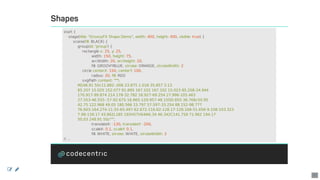
Shapes
start	{
				stage(title:	"GroovyFX	Shape	Demo",	width:	400,	height:	400,	visible:	true)	{
								scene(fill:	BLACK)	{
												group(id:	'group')	{
																rectangle	x:	25,	y:	25,
																								width:	150,	height:	75,
																								arcWidth:	20,	arcHeight:	20,
																								fill:	GROOVYBLUE,	stroke:	ORANGE,	strokeWidth:	2
																circle	centerX:	150,	centerY:	100,
																								radius:	20,	fill:	RED
																svgPath	content:	"""
												M248.91	50c11.882-.006	23.875	1.018	35.857	3.13
												85.207	15.025	152.077	81.895	167.102	167.102	15.023	85.208-24.944
												170.917-99.874	214.178-32.782	18.927-69.254	27.996-105.463
												27.553-46.555-.57-92.675-16.865-129.957-48.15l30.855-36.768c50.95
												42.75	122.968	49.05	180.566	15.797	57.597-33.254	88.152-98.777
												76.603-164.274-11.55-65.497-62.672-116.62-128.17-128.168-51.656-9.108-103.323
												7.98-139.17	43.862L185	192H57V64l46.34	46.342C141.758	71.962	194.17
												50.03	248.91	50z""",
																								translateX:	-130,	translateY:	-200,
																								scaleX:	0.1,	scaleY:	0.1,
																								fill:	WHITE,	stroke:	WHITE,	strokeWidth:	2
//	...
 
37
Shapes	and	Animations
polygon(id:	'triangle',
				points:	[0,	-10,	10,	10,	-10,	10,	0,	-10],
				translateX:	70,	translateY:	60,
				scaleX:	2.0,	scaleY:	2.0,	fill:	BLUE,
				onMousePressed:	{
								if	(rotation.status	==	Animation.Status.RUNNING)
												rotation.pause()
								else
												rotation.play()
				})	{
								rotation	=	rotateTransition	2.s,	tween:	LINEAR,	to:	-360,	cycleCount:	INDEFINITE
				}
parallelTransition(onFinished:	{	println	"parallel	done"	})	{
				translateTransition	3.s,	tween:	EASE_OUT,	to:	100,
												onFinished:	{	println	"translate	done"	}
				scaleTransition	3.s,	interpolator:	EASE_IN,	to:	2.0,
												onFinished:	{	println	"scale	done"	}
}.playFromStart()
}			}			}			}
 
38
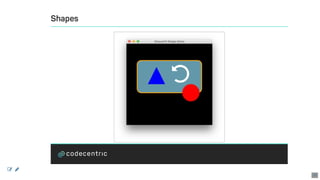
Shapes
 
39
Effects
start	{
				stage(title:	'Animation	Demo',	visible:	true)	{
								scene	{
												rectangle(width:	800,	height:	600,
																				effect:	blend(mode:	"screen")	{
																								topInput	{
																												imageInput(source:	"background-ripples.png",	x:	0,	y:	0)
																								}
																								bottomInput	{
																												color	=	colorInput(
																																				paint:	radialGradient(
																																												center:	[0.7,	0.05],
																																												radius:	0.6,
																																												stops:	["#767A7B",	"#222222"]
																																				).build(),
																																				x:	0,	y:	0,
																																				width:	800,	height:	600
																												)
																								}
																				}
												)
//	...
 
40
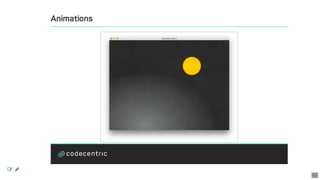
Animated	Objects
												circle	id:	'circle',	radius:	60,
																				fill:	radialGradient(
																												center:	[0.5,	0.5],
																												radius:	0.7,
																												stops:	[ORANGE,	DARKORANGE]
																				),
																				effect:	glow(level:	0.5)
												noparent	{
																path(id:	'thePath',	translateX:	50,	translateY:	5)	{
																				moveTo(x:	100,	y:	100)
																				arcTo(x:	300,	y:	100,	radiusX:	5,	radiusY:	10)
																				lineTo(x:	600,	y:	200)
																				lineTo(x:	300,	y:	500)
																				arcTo(x:	150,	y:	200,	radiusX:	50,	radiusY:	100)
																				closePath()
				}			}			}			}
				pathTransition(10.s,
												delay:	100.ms,
												node:	circle,
												path:	thePath,
												orientation:	PathTransition.OrientationType.ORTHOGONAL_TO_TANGENT
				).play()
//	...
 
41
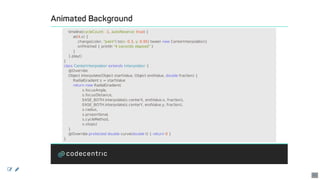
Animated	Background
				timeline(cycleCount:	-1,	autoReverse:	true)	{
								at(4.s)	{
												change(color,	"paint")	to(x:	0.3,	y:	0.95)	tween	new	CenterInterpolator()
												onFinished	{	println	"4	seconds	elapsed"	}
								}
				}.play()
}
class	CenterInterpolator	extends	Interpolator	{
				@Override
				Object	interpolate(Object	startValue,	Object	endValue,	double	fraction)	{
								RadialGradient	s	=	startValue
								return	new	RadialGradient(
																s.focusAngle,
																s.focusDistance,
																EASE_BOTH.interpolate(s.centerX,	endValue.x,	fraction),
																EASE_BOTH.interpolate(s.centerY,	endValue.y,	fraction),
																s.radius,
																s.proportional,
																s.cycleMethod,
																s.stops)
				}
				@Override	protected	double	curve(double	t)	{	return	0	}
}
 
42
Animations
 
43
Animations
DEMO
 
44
Enhancing	GroovyFX
 
45
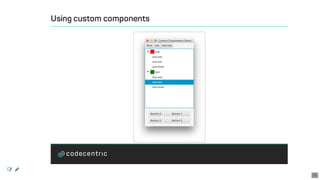
Using	custom	components
start	{
				def	colors	=	[BLUE,	GREEN,	RED,	hsb(67,	0.8,	0.91),
																		rgb(39,	209,	100),	rgba(20,	100,	150,	0.60),
																		delegate."#AA4411"]	as	ObservableList
				stage(title:	'Custom	Components	Demo',	visible:	true)	{
								scene()	{
												borderPane	{
																treeView(id:	'tree',	showRoot:	false,	prefHeight:	300)	{
																				treeItem(expanded:	true,	value:	"Root")	{
																								treeItem(value:	"one")	{
																												treeItem(value:	"one.one")
																												treeItem(value:	"one.two")
																												treeItem(value:	"one.three")
																												graphic	{	rectangle(width:	20,	height:	20,	fill:	RED)	}
																								}
																								treeItem(value:	"two")	{
																												treeItem(value:	"two.one")
																												treeItem(value:	"two.two")
																												treeItem(value:	"two.three")
																												graphic	{	rectangle(width:	20,	height:	20,	fill:	GREEN)	}
																}			}			}
//	...
 
46
Using	custom	components
																tree.selectionModel.selectionMode	=	SelectionMode.SINGLE
																top	{
																				node	new	BreadCrumbBar(tree.root),
																												selectedCrumb:	bind(tree.selectionModel,	'selectedItem'),
																												prefHeight:	30
																}
																bottom	{
																				container	new	MigPane("wrap	2",	"20[]5[fill,	grow]20",	""),	{
																								4.times	{
																												button("Button	$it")
																								}
																				}
																}
												}
								}
				}
}
 
47
Using	custom	components
 
48
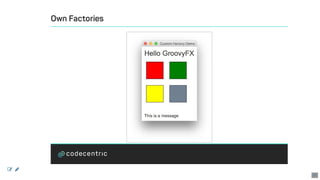
Own	Factories
import	groovyfx.javafx.factory.MessageFactory
import	org.controlsfx.control.GridView
import	org.controlsfx.control.cell.ColorGridCell
groovyx.javafx.GroovyFX.start	{
				delegate.registerBeanFactory('gridView',	GridView)
				delegate.registerFactory('message',	new	MessageFactory())
				stage(title:	'Custom	Factory	Demo',	visible:	true)	{
								scene	{
												stylesheets('groovyfx.css')
												vbox	{
																label('Hello	GroovyFX',	styleClass:	'big')
																gridView(items:	[RED,	GREEN,	YELLOW,	SLATEGREY],
																								prefHeight:	200,
																								cellFactory:	{	new	ColorGridCell()	}
																)
																message(message:	'This	is	a	message')
												}
								}
				}
}
 
49
Own	Factories
 
50
Think	Big
Application	Framework
Java,	Groovy	and	Kotlin
JavaFX,	Swing,	Pivot,	Lanterna
MVC,	MVVC,	PresentationModel
a	lot	of	usefull	stuff
http://griffon-framework.org
 
51
Questions?
Alexander	Klein
Branchmanager
codecentric	AG
Curiestr.	2
70563	Stuttgart,	Germany
	+49	(0)	172	529	40	20
	alexander.klein@codecentric.de
	www.codecentric.de
	blog.codecentric.de
	@saschaklein
 
52

GroovyFX - Groove JavaFX