Graphic design
and UI efficiency
Andrei Balkanskii, Artem Smolin PhD, Yury Solonitsyn
ITMO University, Saint Petersburg
UXCampEurope 16, Berlin
2016
Authors
ITMO University, Saint Petersburg:
• Andrei Balkanskii — senior teacher, Chair of Graphic Technologies;
• Artem Smolin, PhD — Head of the Chair of Graphic Technologies;
• Yury Solonitsyn — practicing interaction designer with background in
graphic design, technical writing and web development … a master
student of the Chair of Graphic Technologies ;)
Problem to be investigated
• Now “Flat UI” style is popular;
• But some well-known industry experts (e.g. Nielsen Norman) say,
that such graphic decoration reduces UI efficiency [1, 2];
• UI efficiency is critical. Especially in enterprise systems, financial
solutions, medicine and transportation [3, 4].
Some examples
UI fragment, decorated in “traditional” style
(“Heroes of Might and Magic III – HD Edition”, 3DO/UbiSoft, 1999)
UI fragment, “Flat UI” style
(Windows Phone Maps, HERE/Microsoft corp., 2016)
Flat UI — More examples
Piotr Kubicki, Szczecin Airport | redesign concept,
https://www.behance.net/gallery/37478667/Szczecin
-Airport-redesign-concept
David Perger, FADE APP UI KIT | FREEBIE,
https://www.behance.net/gallery/36367535/FAD
E-APP-UI-KIT-FREEBIE-
Roma Smirnov, Yandex.Electrichki
https://www.behance.net/gallery/36
466693/jandekselektrichki
Why should we care about?
• UI efficiency depends on both UI logic (structure) & UI graphics;
• UI efficiency = Time;
• Time = Money.
$$$ :)
Just one example … of many
Tickets terminal, S-Bahn station, Schonefeld Airport …
more than 20 minutes in line.
Pressing all and anything
on the screen, trying to
figure out, how to deal
with it.
Boring academic stuff — Definitions
• Cognitive load — the phenomenon, causing progressive growth of
mental efforts spent by user to operate the UI [3];
• NASA HCI research group consider the cognitive load as one of the
serious threats for the adequate human-to-machine interaction and
for the mission success [3];
• Information load — amount of data or factors user is to process to
complete the given task;
• The combined effect of cognitive and informational load leads to
decreased work efficiency [1, 2, 3, 4].
Boring academic stuff — Analogues
• Publications: Burmistrov et al [5], Fabio et al [6];
• Burmistrov et al:
• detailed review of the research method and results;
• but the test tasks have an artificial nature.
• Fabio et al:
• detailed methodology, information load measured;
• but results are mostly fundamental.
• Both projects — incorporated limited amount of respondents
(about 20 persons each, all university students).
Analogues — Examples
Burmistrov et al [5]: Fabio et al [6]:
Our approach to the experiment
• Involve as much users as possible via special experimental web-site;
• Ensure maximum compatibility of this web site;
• Use social networks to spread a link to the site;
• Metrics of the HCI effectiveness:
• type I () errors — amount of “inactive objects” considered to be an active
element … or just “tries”;
• type II () errors — amount of “active element not found” errors;
• task completion time.
Results — Respondents
0
50
100
150
200
250
Russia
Ukraine
Germany
Belarus
Austria
Estonia
Israel
USA
Australia
Bulgaria
Sweden
Thailand
TheNetherlands
Afghanistan
Azerbaijan
CzechRepublic
Finland
France
Honduras
Hungary
Ireland
Japan
Lithuania
Montenegro
Switzerland
UK
0
20
40
60
80
100
120
140
160
180
200
12-14 15-18 18-25 25-35 35-45 45-65 More
than 65
Total respondents: 571;
Complete records: 356.
Survey: 20 May — 19 June 2016.
Please, notice:
These are preliminary results, based on raw data.
Our project will continue with data processing and interpretation.
If you are running an academic project, we can share the raw data with
you. We are also interested in exchanging results with teams, running
similar researches.
Contact address: Yury Solonitsyn, solonitsyn.yury@adesignlab.ru
Results — “Select a button” task
0
50
100
150
200
250
300
0
2
4
6
8
10
Style:
Button selected,
times:
Average time, s:
Results — “Find a given button” task
0
0.1
0.2
0.3
0.4
0
2
4
6
Average errors:
Average time, s:
Style:
“Buttons vs distractions” & “ Digits” tasks
Results — “Buttons vs distractions”, “Digits”
0
0.1
0.2
0.3
0.4
0.5
0.6
0
1
2
3
4
5
6
7
3x3 5x5 7x7
Average errors:
Matrix size:
Average time, s:
Respondents:
Buttons:
• 3x3: 397 (128/140/129);
• 5x5: 389 (119/144/126);
• 7x7: 382 (127/130/125);
Digits:
• 3x3: 380;
• 5x5: 378;
• 7x7: 373.
Style:
Style:
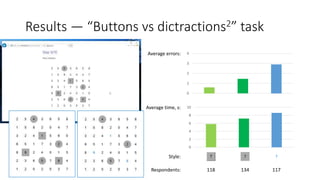
Results — “Buttons vs dictractions2” task
0
1
2
3
4
0
2
4
6
8
10
Average errors:
Average time, s:
Respondents: 118 134 117
Thank you!
Any questions?
Andrei Balkanskii abalkanskij@yandex.ru
Artem Smolin, PhD artikus@inbox.ru
Yury Solonitsyn solonitsyn.yury@adesignlab.ru
ITMO University
Saint Petersburg, Russia
References
1. J. Nielsen. Windows 8 – Disappointing Usability for Both Novice
and Power Users. Nielsen Norman Group. Published on:
19 November 2012. Accessed on: 05 December 2015. Web:
http://www.nngroup.com/articles/windows-8-disappointing-
usability/.
2. K. Whitenton. Minimize Cognitive Load to Maximize Usability.
Nielsen Norman Group. Published on: 22 December 2013.
Accessed on: 17 November 2015. Web:
http://www.nngroup.com/articles/minimize-cognitive-load/.
3. K. Holden, N. Ezer, G. Vos. Risk of Inadequate Human-Computer
Interaction. NASA Johnson Space Center. Published on:
26 December 2013. Accessed on: 16 November 2015.Web:
https://humanresearchwiki.jsc.nasa.gov/index.php?title=Risk_of_In
adequate_Human-Computer_Interaction.
4. The human-machine interface as an emerging risk. European
Agency for Safety and Health at Work. Published in ~2006.
Accessed on: 16 November 2015. Web:
https://osha.europa.eu/en/tools-and-
publications/publications/literature_reviews/HMI_emerging_risk.
5. I. Burmistrov, T. Zlokazova, A. Izmalkova, A. Leonova (Laboratory
of Work Psychology, Lomonosov Moscow State University,
Moscow, Russia; InterUX Usability Engineering Studio, Tallinn,
Estonia). “Flat Design vs Traditional Design. Comparative
Experimental Study”, IFIP International Federation for Information
Processing 2015; J. Abascal et al. (Eds.): INTERACT 2015, Part II,
LNCS 9297, pp. 106-114, 2015.
6. A. Errante, R. A. Fabio, C. Incorpora, N. Mohammadhasni,
T. Caprì, C. Carrozza, A. Falzone. :The Influence of Cognitive
Load and Amount of Stimuli on Entropy through Eye tracking
measures”, EuroAsian Joint Conference on Cognitive Science.
September 25-27, 2015. Torino, Italy.

Graphic design and UI efficiency

  • 1.
    Graphic design and UIefficiency Andrei Balkanskii, Artem Smolin PhD, Yury Solonitsyn ITMO University, Saint Petersburg UXCampEurope 16, Berlin 2016
  • 2.
    Authors ITMO University, SaintPetersburg: • Andrei Balkanskii — senior teacher, Chair of Graphic Technologies; • Artem Smolin, PhD — Head of the Chair of Graphic Technologies; • Yury Solonitsyn — practicing interaction designer with background in graphic design, technical writing and web development … a master student of the Chair of Graphic Technologies ;)
  • 3.
    Problem to beinvestigated • Now “Flat UI” style is popular; • But some well-known industry experts (e.g. Nielsen Norman) say, that such graphic decoration reduces UI efficiency [1, 2]; • UI efficiency is critical. Especially in enterprise systems, financial solutions, medicine and transportation [3, 4].
  • 4.
    Some examples UI fragment,decorated in “traditional” style (“Heroes of Might and Magic III – HD Edition”, 3DO/UbiSoft, 1999) UI fragment, “Flat UI” style (Windows Phone Maps, HERE/Microsoft corp., 2016)
  • 5.
    Flat UI —More examples Piotr Kubicki, Szczecin Airport | redesign concept, https://www.behance.net/gallery/37478667/Szczecin -Airport-redesign-concept David Perger, FADE APP UI KIT | FREEBIE, https://www.behance.net/gallery/36367535/FAD E-APP-UI-KIT-FREEBIE- Roma Smirnov, Yandex.Electrichki https://www.behance.net/gallery/36 466693/jandekselektrichki
  • 6.
    Why should wecare about? • UI efficiency depends on both UI logic (structure) & UI graphics; • UI efficiency = Time; • Time = Money. $$$ :)
  • 7.
    Just one example… of many Tickets terminal, S-Bahn station, Schonefeld Airport … more than 20 minutes in line. Pressing all and anything on the screen, trying to figure out, how to deal with it.
  • 8.
    Boring academic stuff— Definitions • Cognitive load — the phenomenon, causing progressive growth of mental efforts spent by user to operate the UI [3]; • NASA HCI research group consider the cognitive load as one of the serious threats for the adequate human-to-machine interaction and for the mission success [3]; • Information load — amount of data or factors user is to process to complete the given task; • The combined effect of cognitive and informational load leads to decreased work efficiency [1, 2, 3, 4].
  • 9.
    Boring academic stuff— Analogues • Publications: Burmistrov et al [5], Fabio et al [6]; • Burmistrov et al: • detailed review of the research method and results; • but the test tasks have an artificial nature. • Fabio et al: • detailed methodology, information load measured; • but results are mostly fundamental. • Both projects — incorporated limited amount of respondents (about 20 persons each, all university students).
  • 10.
    Analogues — Examples Burmistrovet al [5]: Fabio et al [6]:
  • 11.
    Our approach tothe experiment • Involve as much users as possible via special experimental web-site; • Ensure maximum compatibility of this web site; • Use social networks to spread a link to the site; • Metrics of the HCI effectiveness: • type I () errors — amount of “inactive objects” considered to be an active element … or just “tries”; • type II () errors — amount of “active element not found” errors; • task completion time.
  • 12.
  • 13.
    Please, notice: These arepreliminary results, based on raw data. Our project will continue with data processing and interpretation. If you are running an academic project, we can share the raw data with you. We are also interested in exchanging results with teams, running similar researches. Contact address: Yury Solonitsyn, solonitsyn.yury@adesignlab.ru
  • 14.
    Results — “Selecta button” task 0 50 100 150 200 250 300 0 2 4 6 8 10 Style: Button selected, times: Average time, s:
  • 15.
    Results — “Finda given button” task 0 0.1 0.2 0.3 0.4 0 2 4 6 Average errors: Average time, s: Style:
  • 16.
    “Buttons vs distractions”& “ Digits” tasks
  • 17.
    Results — “Buttonsvs distractions”, “Digits” 0 0.1 0.2 0.3 0.4 0.5 0.6 0 1 2 3 4 5 6 7 3x3 5x5 7x7 Average errors: Matrix size: Average time, s: Respondents: Buttons: • 3x3: 397 (128/140/129); • 5x5: 389 (119/144/126); • 7x7: 382 (127/130/125); Digits: • 3x3: 380; • 5x5: 378; • 7x7: 373. Style:
  • 18.
    Style: Results — “Buttonsvs dictractions2” task 0 1 2 3 4 0 2 4 6 8 10 Average errors: Average time, s: Respondents: 118 134 117
  • 19.
    Thank you! Any questions? AndreiBalkanskii abalkanskij@yandex.ru Artem Smolin, PhD artikus@inbox.ru Yury Solonitsyn solonitsyn.yury@adesignlab.ru ITMO University Saint Petersburg, Russia
  • 20.
    References 1. J. Nielsen.Windows 8 – Disappointing Usability for Both Novice and Power Users. Nielsen Norman Group. Published on: 19 November 2012. Accessed on: 05 December 2015. Web: http://www.nngroup.com/articles/windows-8-disappointing- usability/. 2. K. Whitenton. Minimize Cognitive Load to Maximize Usability. Nielsen Norman Group. Published on: 22 December 2013. Accessed on: 17 November 2015. Web: http://www.nngroup.com/articles/minimize-cognitive-load/. 3. K. Holden, N. Ezer, G. Vos. Risk of Inadequate Human-Computer Interaction. NASA Johnson Space Center. Published on: 26 December 2013. Accessed on: 16 November 2015.Web: https://humanresearchwiki.jsc.nasa.gov/index.php?title=Risk_of_In adequate_Human-Computer_Interaction. 4. The human-machine interface as an emerging risk. European Agency for Safety and Health at Work. Published in ~2006. Accessed on: 16 November 2015. Web: https://osha.europa.eu/en/tools-and- publications/publications/literature_reviews/HMI_emerging_risk. 5. I. Burmistrov, T. Zlokazova, A. Izmalkova, A. Leonova (Laboratory of Work Psychology, Lomonosov Moscow State University, Moscow, Russia; InterUX Usability Engineering Studio, Tallinn, Estonia). “Flat Design vs Traditional Design. Comparative Experimental Study”, IFIP International Federation for Information Processing 2015; J. Abascal et al. (Eds.): INTERACT 2015, Part II, LNCS 9297, pp. 106-114, 2015. 6. A. Errante, R. A. Fabio, C. Incorpora, N. Mohammadhasni, T. Caprì, C. Carrozza, A. Falzone. :The Influence of Cognitive Load and Amount of Stimuli on Entropy through Eye tracking measures”, EuroAsian Joint Conference on Cognitive Science. September 25-27, 2015. Torino, Italy.