By: Kim Reynolds
           2012
How can your student learn to spot a
phony, biased, or outdated website?
Here are activities, as well as tips for
your student to sharpen his or her
research skills.
Younger students under grade six may
not be ready to surf the vast “open
Web.” They do not have the
knowledge base to know if what they
are finding is reliable, authoritative,
and may not understand what bias is
all about. Research and provide links
to sites you know are accurate.
Take a peek at www.allaboutexplorers.com,
an intentionally fake research site in which
the biographies of explorers are riddled
with factual errors. Browse the stories at
the mock site www.theonion.com and
figure out which pieces of an article aren’t
true.
One way to approach bias is to teach
about advertisements and persuasion.
To demonstrate to students, Create a
Web page about a topic you know
well, and then use it to persuade
others.
Always ask the question: “Who wrote
this?” Click on the “About Us” page
for more information. Find a “byline,”
or the line attributing an article to an
author. Scan the bottom of a website
for a person or organization’s
name, and then Google it.
Brainstorm proven leaders in the
subject you are researching and take
note of their organization and
affiliations they have. If you’re
writing a report on gorillas, for
instance, find out what organizations
Jane Goodall has worked with. Check
out their websites for further
information and links to even more
resources.
Use     this    free   and     friendly
resource. Our librarian subscribes to
several      great    databases      of
information and students have access
to these from home.
https://godleyisd.follettdestiny.com/
common/servlet/presenthomeform.do
?l2m=Home&tm=Home&l2m=Home
Check the URL and pay attention to fishy
addresses. Always check your spelling for a
typo. It’s not always effective to look at
the domain – .com, .net, .org, .mil, .gov –
as a way to determine bias or authenticity.
Except for mil , .gov and k12.us, anyone
can have any domain. Also, a site that asks
for personal information to access a free,
public site may not be legit.
Most websites, especially frequently
updated ones, display a “last
updated” date or a year the site was
created. If you see a date that’s a
decade old (or more), it's wise to find
a site with more recently written
content (posted within the last
several years).
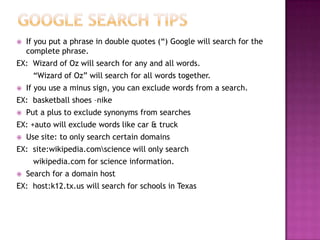
   If you put a phrase in double quotes (“) Google will search for the
    complete phrase.
EX: Wizard of Oz will search for any and all words.
      “Wizard of Oz” will search for all words together.
   If you use a minus sign, you can exclude words from a search.
EX: basketball shoes –nike
   Put a plus to exclude synonyms from searches
EX: +auto will exclude words like car & truck
   Use site: to only search certain domains
EX: site:wikipedia.comscience will only search
      wikipedia.com for science information.
   Search for a domain host
EX: host:k12.tx.us will search for schools in Texas
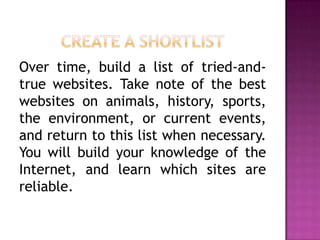
Over time, build a list of tried-and-
true websites. Take note of the best
websites on animals, history, sports,
the environment, or current events,
and return to this list when necessary.
You will build your knowledge of the
Internet, and learn which sites are
reliable.

Evaluating Internet Information

  • 1.
  • 2.
    How can yourstudent learn to spot a phony, biased, or outdated website? Here are activities, as well as tips for your student to sharpen his or her research skills.
  • 3.
    Younger students undergrade six may not be ready to surf the vast “open Web.” They do not have the knowledge base to know if what they are finding is reliable, authoritative, and may not understand what bias is all about. Research and provide links to sites you know are accurate.
  • 4.
    Take a peekat www.allaboutexplorers.com, an intentionally fake research site in which the biographies of explorers are riddled with factual errors. Browse the stories at the mock site www.theonion.com and figure out which pieces of an article aren’t true.
  • 5.
    One way toapproach bias is to teach about advertisements and persuasion. To demonstrate to students, Create a Web page about a topic you know well, and then use it to persuade others.
  • 6.
    Always ask thequestion: “Who wrote this?” Click on the “About Us” page for more information. Find a “byline,” or the line attributing an article to an author. Scan the bottom of a website for a person or organization’s name, and then Google it.
  • 7.
    Brainstorm proven leadersin the subject you are researching and take note of their organization and affiliations they have. If you’re writing a report on gorillas, for instance, find out what organizations Jane Goodall has worked with. Check out their websites for further information and links to even more resources.
  • 8.
    Use this free and friendly resource. Our librarian subscribes to several great databases of information and students have access to these from home. https://godleyisd.follettdestiny.com/ common/servlet/presenthomeform.do ?l2m=Home&tm=Home&l2m=Home
  • 9.
    Check the URLand pay attention to fishy addresses. Always check your spelling for a typo. It’s not always effective to look at the domain – .com, .net, .org, .mil, .gov – as a way to determine bias or authenticity. Except for mil , .gov and k12.us, anyone can have any domain. Also, a site that asks for personal information to access a free, public site may not be legit.
  • 10.
    Most websites, especiallyfrequently updated ones, display a “last updated” date or a year the site was created. If you see a date that’s a decade old (or more), it's wise to find a site with more recently written content (posted within the last several years).
  • 11.
    If you put a phrase in double quotes (“) Google will search for the complete phrase. EX: Wizard of Oz will search for any and all words. “Wizard of Oz” will search for all words together.  If you use a minus sign, you can exclude words from a search. EX: basketball shoes –nike  Put a plus to exclude synonyms from searches EX: +auto will exclude words like car & truck  Use site: to only search certain domains EX: site:wikipedia.comscience will only search wikipedia.com for science information.  Search for a domain host EX: host:k12.tx.us will search for schools in Texas
  • 12.
    Over time, builda list of tried-and- true websites. Take note of the best websites on animals, history, sports, the environment, or current events, and return to this list when necessary. You will build your knowledge of the Internet, and learn which sites are reliable.