Chat & Video Call
  Video Chat is really handy. Something can communicate face to face,you can see expressions, gestures and when ever you travel you can communicate with your co-workers and family.   Gmail voice and video chat is integrated right into gmail so its very easy to use.  
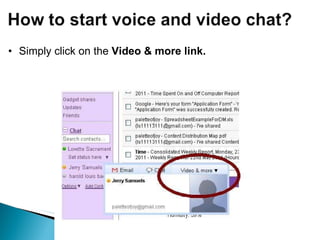
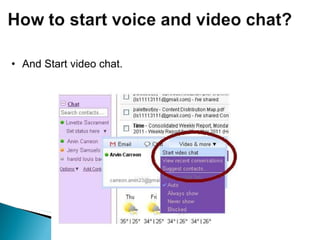
Simply click on the  Video & more link.
And Start video chat.
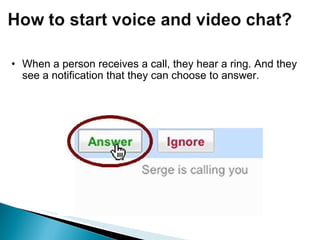
When a person receives a call, they hear a ring. And they see a notification that they can choose to answer.  
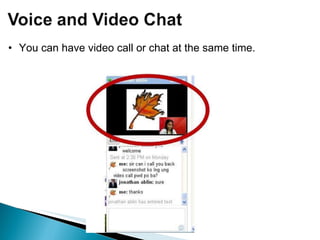
You can have video call or chat at the same time.
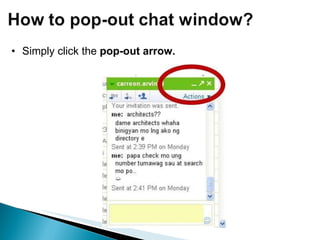
Simply click the  pop-out arrow.  
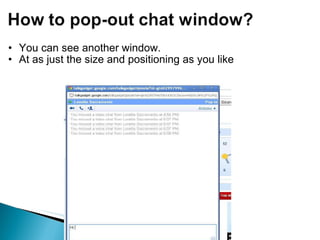
You can see another window. At as just the size and positioning as you like
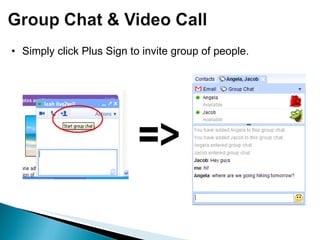
Simply click Plus Sign to invite group of people.
You can even make go full screen through single click its free and easy to use.  Please visit  gmail.com/videochat  or  http://www.google.com/talk/  to get started. Or watch this video about Gmail voice and video chat. Just copy this link.  http://www.youtube.com/watch?v=JFGJRfoK9xQ&feature=relmfu.

Google talk image_instructions

  • 1.
  • 2.
      Video Chatis really handy. Something can communicate face to face,you can see expressions, gestures and when ever you travel you can communicate with your co-workers and family.   Gmail voice and video chat is integrated right into gmail so its very easy to use.  
  • 3.
    Simply click onthe Video & more link.
  • 4.
  • 5.
    When a personreceives a call, they hear a ring. And they see a notification that they can choose to answer.  
  • 6.
    You can havevideo call or chat at the same time.
  • 7.
    Simply click the pop-out arrow.  
  • 8.
    You can seeanother window. At as just the size and positioning as you like
  • 9.
    Simply click PlusSign to invite group of people.
  • 10.
    You can evenmake go full screen through single click its free and easy to use.  Please visit gmail.com/videochat or http://www.google.com/talk/ to get started. Or watch this video about Gmail voice and video chat. Just copy this link.  http://www.youtube.com/watch?v=JFGJRfoK9xQ&feature=relmfu.