Google Colab
First Notebook
Saravanakumar, AP/CSE 2
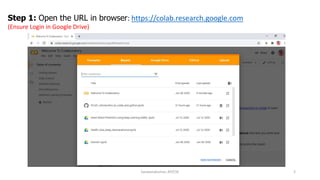
Step 1: Open the URL in browser: https://colab.research.google.com
(Ensure Login in Google Drive)
Saravanakumar, AP/CSE 3
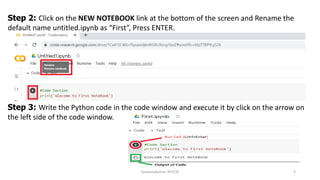
Step 2: Click on the NEW NOTEBOOK link at the bottom of the screen and Rename the
default name untitled.ipynb as “First”, Press ENTER.
Step 3: Write the Python code in the code window and execute it by click on the arrow on
the left side of the code window.
Saravanakumar, AP/CSE 4
Other Operation:
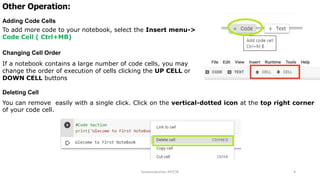
Adding Code Cells
To add more code to your notebook, select the Insert menu->
Code Cell ( Ctrl+MB)
Changing Cell Order
If a notebook contains a large number of code cells, you may
change the order of execution of cells clicking the UP CELL or
DOWN CELL buttons
Deleting Cell
You can remove easily with a single click. Click on the vertical-dotted icon at the top right corner
of your code cell.
Saravanakumar, AP/CSE 5

Google colab get started

  • 1.
  • 2.
    Saravanakumar, AP/CSE 2 Step1: Open the URL in browser: https://colab.research.google.com (Ensure Login in Google Drive)
  • 3.
    Saravanakumar, AP/CSE 3 Step2: Click on the NEW NOTEBOOK link at the bottom of the screen and Rename the default name untitled.ipynb as “First”, Press ENTER. Step 3: Write the Python code in the code window and execute it by click on the arrow on the left side of the code window.
  • 4.
    Saravanakumar, AP/CSE 4 OtherOperation: Adding Code Cells To add more code to your notebook, select the Insert menu-> Code Cell ( Ctrl+MB) Changing Cell Order If a notebook contains a large number of code cells, you may change the order of execution of cells clicking the UP CELL or DOWN CELL buttons Deleting Cell You can remove easily with a single click. Click on the vertical-dotted icon at the top right corner of your code cell.
  • 5.