BROWSER CLEAN UP GETTING RID OF UNWANTED FILES THAT SLOW DOWN YOUR PC THE MORE YOU CAN DELETE THE BETTER YOUR PC WILL RUN
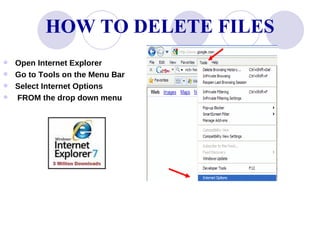
HOW TO DELETE FILES Open Internet Explorer Go to Tools on the Menu Bar Select Internet Options FROM the drop down menu
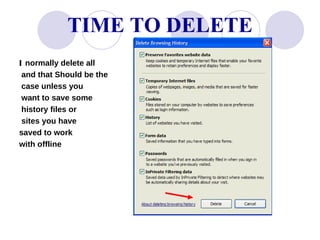
INTERNET OPTIONS WINDOW IN IE 7 After you chose Internet Options This Internet Options  Window will appear. Select Delete .
TIME TO DELETE I  normally delete all and that Should be the case unless you want to save some history files or sites you have  saved to work with offline
MORE TO COME ON PC UPKEEP Most Browsers Are fairly close in the way you delete temporary files. Just keep clicking around in the menu bar & you will see the feature that deletes these files.   GOOD  LUCK!

Browser Clean Up

  • 1.
    BROWSER CLEAN UPGETTING RID OF UNWANTED FILES THAT SLOW DOWN YOUR PC THE MORE YOU CAN DELETE THE BETTER YOUR PC WILL RUN
  • 2.
    HOW TO DELETEFILES Open Internet Explorer Go to Tools on the Menu Bar Select Internet Options FROM the drop down menu
  • 3.
    INTERNET OPTIONS WINDOWIN IE 7 After you chose Internet Options This Internet Options Window will appear. Select Delete .
  • 4.
    TIME TO DELETEI normally delete all and that Should be the case unless you want to save some history files or sites you have saved to work with offline
  • 5.
    MORE TO COMEON PC UPKEEP Most Browsers Are fairly close in the way you delete temporary files. Just keep clicking around in the menu bar & you will see the feature that deletes these files. GOOD LUCK!