GOOGLE APP ENGINE FOR THE
       ENTERPRISE
         Kayode Odeyemi

         Cloud Camp 2011
            May 28th, 2011
The Cloud

1. Convenience
       Pay for what you use

2. On-Demand network access
       Use as much as you need, whenever you need

3. Minimal management effort
       Don’t have to build your own infrastructure
Cloud Computing – As seen by Gartner
WHAT IS GOOGLE APP ENGINE?


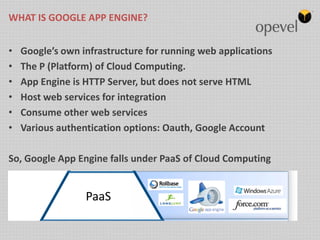
•   Google’s own infrastructure for running web applications
•   The P (Platform) of Cloud Computing.
•   App Engine is HTTP Server, but does not serve HTML
•   Host web services for integration
•   Consume other web services
•   Various authentication options: Oauth, Google Account

So, Google App Engine falls under PaaS of Cloud Computing
WHY GOOGLE APP ENGINE?


• Easy to build

• Easy to maintain

• Easy to Scale
HOW DOES IT WORK?


• Build

• Push

• Never worry about scalability
HOW DOES IT WORK?


• Build

   – Download SDK
   – Of Java, Python or GO Runtime
   – Build with dev tools such as GPE (Eclipse plugin), Netbeans,
     AppLauncher
HOW DOES IT WORK?


• Push

   – Deploy easily with simple commands
      ./appengine-java-sdk/bin/appcfg.sh update myapp/war

   – Administer in Administration console (App Engine
     Dashboard)
HOW DOES IT WORK?


• Scalability

   – Automatic performance improvements as traffic on your
     app increases
      See more in GAE Dashboard

   – Automatic instance creation to handle load as well as
     distribution of resources
      CPU, Bandwidth, Quota, Memory

   – Fault Tolerance
PERFORMANCE & SCALABILITY


• Built with scalability as top priority
• Memcache
   – Distributed RAM cache
   – Heavily dependent on mecache size allocated. The more the merrier
INTEGRATION


  Authenticati                          Google    Google
      on
                 OpenSocial   XMPP
                                         Apps    Data APIs


                 Facebook      GEO     YouTube
    Django                                        AJAX
                    API       (Maps)     API
APPLICATION ENVIRONMENT – BUILDING BLOCKS

• Java Runtime

• Python Runtime

• GO Runtime

• Datastore

• Suite of APIs to do common stuffs

   –   URL Fetch
   –   Mail
   –   Memcache
   –   Image Manipulation
   –   Channel
   –   Blobstore
APPLICATION ENVIRONMENT – BUILDING BLOCKS

JAVA
Same technologies / APIs you are used to
KNOW HOW YOUR APP IS DOING – PLATFORM MANAGEMENT

PYTHON

• Communicates via CGI protocol
• Supports Django
• Supports Python 2.5+


  Datastore   Memcache    URL Fetch          Mail   Blobstore


    CGI          CGI        CGI              CGI      CGI


                         Google App Engine
DATASTORE – OBJECT PERSISTENCE

• Built on BigTable
• Non-relational database management system
• Consistent read and write even in a distributed network


                            Storage 2


      Storage 1                                   Storage 3
ADMINISTERING YOUR APP – The Admin Console

•   Create a new application

•   View request and error logs and analyze traffic

•   Browse your application's datastore and manage indexes

•   Administer your datastore

•   View your application's instances

•   Manage task queues, allowing for viewing, deleting or running individual tasks
    immediately

•   Test new versions of your application and switch the version that your users see
ADMINISTERING YOUR DATASTORE
URL Fetch

• Consume external resources with your app
• Supports HTTP & HTTPS


String message = URLEncoder.encode("my message", "UTF-8");

           try {
               URL url = new
   URL("http://www.example.com/comment");
               HttpURLConnection connection =
   (HttpURLConnection) url.openConnection();
               connection.setDoOutput(true);
               connection.setRequestMethod("POST");
URL Fetch – Write and return response to client

            OutputStreamWriter writer = new
   OutputStreamWriter(connection.getOutputStream());
               writer.write("message=" + message);
               writer.close();

               if (connection.getResponseCode() ==
   HttpURLConnection.HTTP_OK) {
                   // OK
               } else {
                   // Server returned HTTP error code.
               }
           } catch (MalformedURLException e) {
               // ...
           } catch (IOException e) {
               // ...
           }

Note: Not all java.io classes are supported in app engine. Check whitelisted JRE
   classes
Mail

• Send mail using JavaMail or Low level API

try {
               Message msg = new MimeMessage(session);
               msg.setFrom(new
  InternetAddress("admin@example.com", "Example.com Admin"));
               msg.addRecipient(Message.RecipientType.TO,
                                new
  InternetAddress("user@example.com", "Mr. User"));
               msg.setSubject("Your Example.com account has been
  activated");
               msg.setText(msgBody);
               Transport.send(msg);

          } catch (AddressException e) {
              // ...
          } catch (MessagingException e) {
Memcache

• Distributed in-memory data-cache

• Improve performance

• You don’t have to always persist storage in datastore. Some stuffs can be
  stored in-memory


// A reference to the cache service
private final Cache cache = new Cache(MemcacheServiceFactory
    .getMemcacheService());
Channel API

• Communicate between your application and Google Servers
  asynchronously.

• Very useful to chat room apps, collaborative apps
Blobstore

• Serve large data objects
• Insert / Retrieve / Edit, in bulk
• Flexible
    – Direct access to blob data in memory
• Fast access to blob data
    – 5MB in ~ 2s


// Simple servlet to create the actual upload url
String uploadurl =
    blobstoreservice.createUploadUrl(“/Upload”);


// Called after upload
Map<String, Blobkey> blobkeys =
   blobstoreservice.getUploadedBlobs(req);
Google App Engine for Business

• Enterprise Application Management
    – Centralized domain console
• Enterprise reliability and support
    – 99.9% Service Level Agreement
    – Enterprise support
• Hosted SQL
    – Relational SQL database in the cloud
• SSL on your domain
• Extremely secure by default
    – Integrated Single Sign-on
• Pricing that makes sense
    – Apps cost $8 per user, up to $1000 max per month (Pre-IO2011 Pricing)
ONLINE REFERENCES

Get Started with App Engine
http://code.google.com/appengine

Get the SDK and build cool stuffs
http://code.google.com/appengine/downloads.html

Google Apps for Business
http://code.google.com/appengine/business/

BigTable
http://labs.google.com/papers/bigtable.html

Google I/O 2011
http://www.google.com/events/io/2011/index-live.html

Introduction to Google Cloud Platform Technologies by Chris Schalk – Google Developer Advocate
http://goo.gl/zmxvF

Sample projects
http://goo.gl/djgMS
Questions

• Website      - http://opevel.com

• Twitter : @opevel @googledevtools #gwt @charyorde

• Opevel Services

   – Google App Deployment

   – Custom Application Development on Google App Engine

   – Integration services with legacy systems

Google App Engine

  • 1.
    GOOGLE APP ENGINEFOR THE ENTERPRISE Kayode Odeyemi Cloud Camp 2011 May 28th, 2011
  • 2.
    The Cloud 1. Convenience Pay for what you use 2. On-Demand network access Use as much as you need, whenever you need 3. Minimal management effort Don’t have to build your own infrastructure
  • 3.
    Cloud Computing –As seen by Gartner
  • 4.
    WHAT IS GOOGLEAPP ENGINE? • Google’s own infrastructure for running web applications • The P (Platform) of Cloud Computing. • App Engine is HTTP Server, but does not serve HTML • Host web services for integration • Consume other web services • Various authentication options: Oauth, Google Account So, Google App Engine falls under PaaS of Cloud Computing
  • 5.
    WHY GOOGLE APPENGINE? • Easy to build • Easy to maintain • Easy to Scale
  • 6.
    HOW DOES ITWORK? • Build • Push • Never worry about scalability
  • 7.
    HOW DOES ITWORK? • Build – Download SDK – Of Java, Python or GO Runtime – Build with dev tools such as GPE (Eclipse plugin), Netbeans, AppLauncher
  • 8.
    HOW DOES ITWORK? • Push – Deploy easily with simple commands ./appengine-java-sdk/bin/appcfg.sh update myapp/war – Administer in Administration console (App Engine Dashboard)
  • 9.
    HOW DOES ITWORK? • Scalability – Automatic performance improvements as traffic on your app increases See more in GAE Dashboard – Automatic instance creation to handle load as well as distribution of resources CPU, Bandwidth, Quota, Memory – Fault Tolerance
  • 10.
    PERFORMANCE & SCALABILITY •Built with scalability as top priority • Memcache – Distributed RAM cache – Heavily dependent on mecache size allocated. The more the merrier
  • 11.
    INTEGRATION Authenticati Google Google on OpenSocial XMPP Apps Data APIs Facebook GEO YouTube Django AJAX API (Maps) API
  • 12.
    APPLICATION ENVIRONMENT –BUILDING BLOCKS • Java Runtime • Python Runtime • GO Runtime • Datastore • Suite of APIs to do common stuffs – URL Fetch – Mail – Memcache – Image Manipulation – Channel – Blobstore
  • 13.
    APPLICATION ENVIRONMENT –BUILDING BLOCKS JAVA Same technologies / APIs you are used to
  • 14.
    KNOW HOW YOURAPP IS DOING – PLATFORM MANAGEMENT PYTHON • Communicates via CGI protocol • Supports Django • Supports Python 2.5+ Datastore Memcache URL Fetch Mail Blobstore CGI CGI CGI CGI CGI Google App Engine
  • 15.
    DATASTORE – OBJECTPERSISTENCE • Built on BigTable • Non-relational database management system • Consistent read and write even in a distributed network Storage 2 Storage 1 Storage 3
  • 16.
    ADMINISTERING YOUR APP– The Admin Console • Create a new application • View request and error logs and analyze traffic • Browse your application's datastore and manage indexes • Administer your datastore • View your application's instances • Manage task queues, allowing for viewing, deleting or running individual tasks immediately • Test new versions of your application and switch the version that your users see
  • 17.
  • 18.
    URL Fetch • Consumeexternal resources with your app • Supports HTTP & HTTPS String message = URLEncoder.encode("my message", "UTF-8"); try { URL url = new URL("http://www.example.com/comment"); HttpURLConnection connection = (HttpURLConnection) url.openConnection(); connection.setDoOutput(true); connection.setRequestMethod("POST");
  • 19.
    URL Fetch –Write and return response to client OutputStreamWriter writer = new OutputStreamWriter(connection.getOutputStream()); writer.write("message=" + message); writer.close(); if (connection.getResponseCode() == HttpURLConnection.HTTP_OK) { // OK } else { // Server returned HTTP error code. } } catch (MalformedURLException e) { // ... } catch (IOException e) { // ... } Note: Not all java.io classes are supported in app engine. Check whitelisted JRE classes
  • 20.
    Mail • Send mailusing JavaMail or Low level API try { Message msg = new MimeMessage(session); msg.setFrom(new InternetAddress("admin@example.com", "Example.com Admin")); msg.addRecipient(Message.RecipientType.TO, new InternetAddress("user@example.com", "Mr. User")); msg.setSubject("Your Example.com account has been activated"); msg.setText(msgBody); Transport.send(msg); } catch (AddressException e) { // ... } catch (MessagingException e) {
  • 21.
    Memcache • Distributed in-memorydata-cache • Improve performance • You don’t have to always persist storage in datastore. Some stuffs can be stored in-memory // A reference to the cache service private final Cache cache = new Cache(MemcacheServiceFactory .getMemcacheService());
  • 22.
    Channel API • Communicatebetween your application and Google Servers asynchronously. • Very useful to chat room apps, collaborative apps
  • 23.
    Blobstore • Serve largedata objects • Insert / Retrieve / Edit, in bulk • Flexible – Direct access to blob data in memory • Fast access to blob data – 5MB in ~ 2s // Simple servlet to create the actual upload url String uploadurl = blobstoreservice.createUploadUrl(“/Upload”); // Called after upload Map<String, Blobkey> blobkeys = blobstoreservice.getUploadedBlobs(req);
  • 24.
    Google App Enginefor Business • Enterprise Application Management – Centralized domain console • Enterprise reliability and support – 99.9% Service Level Agreement – Enterprise support • Hosted SQL – Relational SQL database in the cloud • SSL on your domain • Extremely secure by default – Integrated Single Sign-on • Pricing that makes sense – Apps cost $8 per user, up to $1000 max per month (Pre-IO2011 Pricing)
  • 25.
    ONLINE REFERENCES Get Startedwith App Engine http://code.google.com/appengine Get the SDK and build cool stuffs http://code.google.com/appengine/downloads.html Google Apps for Business http://code.google.com/appengine/business/ BigTable http://labs.google.com/papers/bigtable.html Google I/O 2011 http://www.google.com/events/io/2011/index-live.html Introduction to Google Cloud Platform Technologies by Chris Schalk – Google Developer Advocate http://goo.gl/zmxvF Sample projects http://goo.gl/djgMS
  • 26.
    Questions • Website - http://opevel.com • Twitter : @opevel @googledevtools #gwt @charyorde • Opevel Services – Google App Deployment – Custom Application Development on Google App Engine – Integration services with legacy systems