Roger Kitain | Oracle America

  Principal Member Technical Staff
 Exploring HTML5 Server Sent
Events With Java Server Faces
Agenda
• Introduction
• Server Side Push
• Server Sent Events
• Server Sent Events And JSF
Introduction
• Web: More dynamic since 1990s
• HTTP
  – request/response model
  – No support for server initiated interactions
• Ajax
  – request/response model
  – Does not push data to client
  – Emulate push with client polling
• Comet
  – Asynchronous data push from server to client
  – Built on HTTP; Tricky: HTTP not designed for push
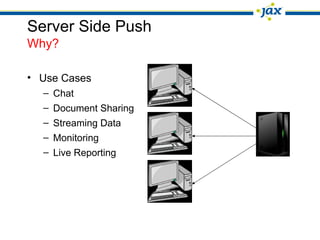
Server Side Push
Why?

• Use Cases
  – Chat
  – Document Sharing
  – Streaming Data
  – Monitoring
  – Live Reporting
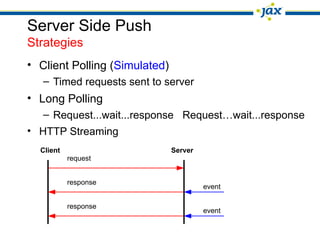
Server Side Push
Strategies
• Client Polling (Simulated)
   – Timed requests sent to server
• Long Polling
   – Request...wait...response Request…wait...response
• HTTP Streaming
  Client                       Server
           request


           response
                                        event

           response
                                        event
Server Sent Events
HTML5 “Streaming”
• API allows web page to subscribe to a stream of
  DOM events from the server
• Unidirectional : events from server to client
• Sent over HTTP
• Use cases:
   – Data does not need to be sent from client
   – Think stock quotes, financial data, …
• Evolved from an April, 2004 proposal:
   – http://ln.hixie.ch/?count=1&start=1083167110
• Now in its own specification:
   – http://www.w3.org/TR/eventsource/
Server Sent Events
 HTML5 “Streaming”

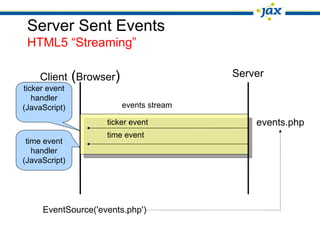
    Client (Browser)                    Server
ticker event
   handler
(JavaScript)            events stream

                    ticker event            events.php
                    time event
 time event
   handler
(JavaScript)


     EventSource('events.php')
Server Sent Events
Client
                                          client-side end point

<html>
 <head>
   <script type='text/javascript'>
    var source = new EventSource('serverevents');
    source.onmessage = function (event) {
    ev = document.getElementById('events');
    ev.innerHTML += "<br>[in] " + event.data;};           event source URL
     </script>
  </head>
  <body>
    <div id="events"></div>
  </body>
</html>
Server Sent Events
Server: Event Stream Response Format
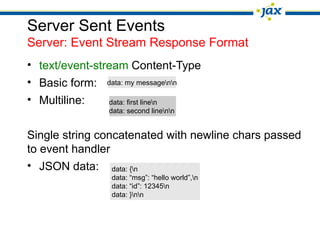
• text/event-stream Content-Type
• Basic form: data: my messagenn
• Multiline:    data: first linen
                data: second linenn


Single string concatenated with newline chars passed
to event handler
• JSON data: data: {n
                data: “msg”: “hello world”,n
                data: “id”: 12345n
                data: }nn
Server Sent Events
Server: Event Stream Response Format
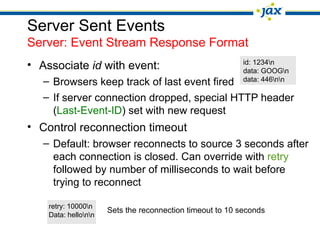
• Associate id with event:                                 id: 1234n
                                                           data: GOOGn
   – Browsers keep track of last event fired               data: 446nn

   – If server connection dropped, special HTTP header
     (Last-Event-ID) set with new request
• Control reconnection timeout
   – Default: browser reconnects to source 3 seconds after
     each connection is closed. Can override with retry
     followed by number of milliseconds to wait before
     trying to reconnect

    retry: 10000n
                      Sets the reconnection timeout to 10 seconds
    Data: hellonn
Server Sent Events
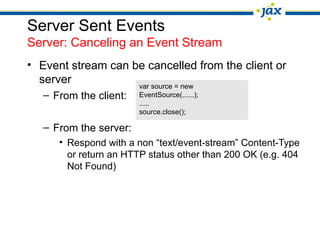
Server: Canceling an Event Stream
• Event stream can be cancelled from the client or
  server            var source = new
   – From the client:   EventSource(......);
                        .....
                        source.close();

   – From the server:
      • Respond with a non “text/event-stream” Content-Type
        or return an HTTP status other than 200 OK (e.g. 404
        Not Found)
Server Sent Events
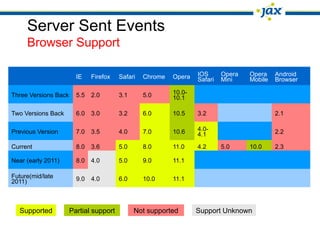
     Browser Support

                        IE    Firefox   Safari   Chrome   Opera   IOS      Opera   Opera    Android
                                                                  Safari   Mini    Mobile   Browser

Three Versions Back     5.5   2.0       3.1      5.0      10.0-
                                                          10.1

Two Versions Back       6.0   3.0       3.2      6.0      10.5    3.2                       2.1

Previous Version        7.0   3.5       4.0      7.0      10.6    4.0-                      2.2
                                                                  4.1
Current                 8.0   3.6       5.0      8.0      11.0    4.2      5.0     10.0     2.3

Near (early 2011)       8.0   4.0       5.0      9.0      11.1

Future(mid/late         9.0   4.0       6.0      10.0     11.1
2011)


  Supported           Partial support         Not supported       Support Unknown
Server Sent Events And JSF
JSF 2.0 Component Model
• Facelets is the foundation:
   – Optimized for JSF
   – XHTML and tags
   – Templating
• Powerful tools:
   – Templating
   – Composite Components
Server Sent Events And JSF
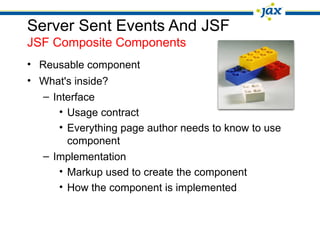
JSF Composite Components
• Reusable component
• What's inside?
   – Interface
       • Usage contract
       • Everything page author needs to know to use
         component
   – Implementation
       • Markup used to create the component
       • How the component is implemented
Server Sent Events And JSF
JSF Composite Components and JavaScript
• Together make “rich” “dynamic” components
• JSF 2.0 introduced JavaScript to promote Ajax
   – Direct JavaScript: jsf.ajax.request
   – Declarative model: <f:ajax/>
• Composite components can leverage the Server
  Sent Event JavaScript API
Server Sent Events And JSF
Client Side Possiblities
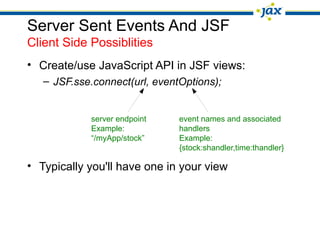
• Create/use JavaScript API in JSF views:
   – JSF.sse.connect(url, eventOptions);


            server endpoint    event names and associated
            Example:           handlers
            “/myApp/stock”     Example:
                               {stock:shandler,time:thandler}

• Typically you'll have one in your view
Server Sent Events And JSF
Client Side Possiblities
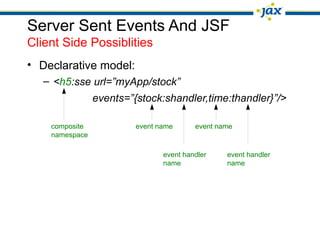
• Declarative model:
   – <h5:sse url=”myApp/stock”
                events=”{stock:shandler,time:thandler}”/>

    composite            event name      event name
    namespace

                                event handler    event handler
                                name             name
Server Sent Events And JSF
Server Side Possibilities
• Server endpoint (JavaScript, Java, php, ..)
   – “publish” response follows format rules in Server
     Sent Events specification
   – Typically will utilize other services, APIs (Yahoo stock
     quotes, RSS feeds, …)
• Possibilities for JSF:
   – Managed bean as handler
      • Publishes response
Demo
Web Sockets vs Server Sent Events
• Web Sockets
  – Richer protocol for bi-directional, full-duplex communication
  – Two-way channel more attractive for games, messaging apps, real-
    time updates in both directions

• Server Sent Events
  – Unidirectional – use when data does not need to be sent from client
  – Just need updates from server
  – Stock tickers, news feeds
  – Sent over traditional HTTP (no special protocol needed)
Summary
• Server Side Push
   – Why?
   – Strategies
• Server Sent Events
• JSF 2.0 Component Model / Composite Components
   – JavaScript
• Server Sent Events / JSF Possibilities
   – Client / server
Resources
• Server Sent Events Specification:
   – http://www.w3.org/TR/eventsource/
• JSF Implementations:
   – http://java.net/projects/javaserverfaces (Mojarra)
   – http://myfaces.apache.org/ (MyFaces)
• Interesting articles:
   – http://today.java.net/article/2010/03/31/html5-server-push-technologies-part-1

   – http://html5doctor.com/methods-of-communication/
Roger Kitain | Oracle America

roger.kitain@oracle.com
  https://twitter.com/rogerk09
http://www.java.net/blogs/rogerk

HTML5 Server Sent Events/JSF JAX 2011 Conference

  • 1.
    Roger Kitain |Oracle America Principal Member Technical Staff Exploring HTML5 Server Sent Events With Java Server Faces
  • 2.
    Agenda • Introduction • ServerSide Push • Server Sent Events • Server Sent Events And JSF
  • 3.
    Introduction • Web: Moredynamic since 1990s • HTTP – request/response model – No support for server initiated interactions • Ajax – request/response model – Does not push data to client – Emulate push with client polling • Comet – Asynchronous data push from server to client – Built on HTTP; Tricky: HTTP not designed for push
  • 4.
    Server Side Push Why? •Use Cases – Chat – Document Sharing – Streaming Data – Monitoring – Live Reporting
  • 5.
    Server Side Push Strategies •Client Polling (Simulated) – Timed requests sent to server • Long Polling – Request...wait...response Request…wait...response • HTTP Streaming Client Server request response event response event
  • 6.
    Server Sent Events HTML5“Streaming” • API allows web page to subscribe to a stream of DOM events from the server • Unidirectional : events from server to client • Sent over HTTP • Use cases: – Data does not need to be sent from client – Think stock quotes, financial data, … • Evolved from an April, 2004 proposal: – http://ln.hixie.ch/?count=1&start=1083167110 • Now in its own specification: – http://www.w3.org/TR/eventsource/
  • 7.
    Server Sent Events HTML5 “Streaming” Client (Browser) Server ticker event handler (JavaScript) events stream ticker event events.php time event time event handler (JavaScript) EventSource('events.php')
  • 8.
    Server Sent Events Client client-side end point <html> <head> <script type='text/javascript'> var source = new EventSource('serverevents'); source.onmessage = function (event) { ev = document.getElementById('events'); ev.innerHTML += "<br>[in] " + event.data;}; event source URL </script> </head> <body> <div id="events"></div> </body> </html>
  • 9.
    Server Sent Events Server:Event Stream Response Format • text/event-stream Content-Type • Basic form: data: my messagenn • Multiline: data: first linen data: second linenn Single string concatenated with newline chars passed to event handler • JSON data: data: {n data: “msg”: “hello world”,n data: “id”: 12345n data: }nn
  • 10.
    Server Sent Events Server:Event Stream Response Format • Associate id with event: id: 1234n data: GOOGn – Browsers keep track of last event fired data: 446nn – If server connection dropped, special HTTP header (Last-Event-ID) set with new request • Control reconnection timeout – Default: browser reconnects to source 3 seconds after each connection is closed. Can override with retry followed by number of milliseconds to wait before trying to reconnect retry: 10000n Sets the reconnection timeout to 10 seconds Data: hellonn
  • 11.
    Server Sent Events Server:Canceling an Event Stream • Event stream can be cancelled from the client or server var source = new – From the client: EventSource(......); ..... source.close(); – From the server: • Respond with a non “text/event-stream” Content-Type or return an HTTP status other than 200 OK (e.g. 404 Not Found)
  • 12.
    Server Sent Events Browser Support IE Firefox Safari Chrome Opera IOS Opera Opera Android Safari Mini Mobile Browser Three Versions Back 5.5 2.0 3.1 5.0 10.0- 10.1 Two Versions Back 6.0 3.0 3.2 6.0 10.5 3.2 2.1 Previous Version 7.0 3.5 4.0 7.0 10.6 4.0- 2.2 4.1 Current 8.0 3.6 5.0 8.0 11.0 4.2 5.0 10.0 2.3 Near (early 2011) 8.0 4.0 5.0 9.0 11.1 Future(mid/late 9.0 4.0 6.0 10.0 11.1 2011) Supported Partial support Not supported Support Unknown
  • 13.
    Server Sent EventsAnd JSF JSF 2.0 Component Model • Facelets is the foundation: – Optimized for JSF – XHTML and tags – Templating • Powerful tools: – Templating – Composite Components
  • 14.
    Server Sent EventsAnd JSF JSF Composite Components • Reusable component • What's inside? – Interface • Usage contract • Everything page author needs to know to use component – Implementation • Markup used to create the component • How the component is implemented
  • 15.
    Server Sent EventsAnd JSF JSF Composite Components and JavaScript • Together make “rich” “dynamic” components • JSF 2.0 introduced JavaScript to promote Ajax – Direct JavaScript: jsf.ajax.request – Declarative model: <f:ajax/> • Composite components can leverage the Server Sent Event JavaScript API
  • 16.
    Server Sent EventsAnd JSF Client Side Possiblities • Create/use JavaScript API in JSF views: – JSF.sse.connect(url, eventOptions); server endpoint event names and associated Example: handlers “/myApp/stock” Example: {stock:shandler,time:thandler} • Typically you'll have one in your view
  • 17.
    Server Sent EventsAnd JSF Client Side Possiblities • Declarative model: – <h5:sse url=”myApp/stock” events=”{stock:shandler,time:thandler}”/> composite event name event name namespace event handler event handler name name
  • 18.
    Server Sent EventsAnd JSF Server Side Possibilities • Server endpoint (JavaScript, Java, php, ..) – “publish” response follows format rules in Server Sent Events specification – Typically will utilize other services, APIs (Yahoo stock quotes, RSS feeds, …) • Possibilities for JSF: – Managed bean as handler • Publishes response
  • 19.
  • 20.
    Web Sockets vsServer Sent Events • Web Sockets – Richer protocol for bi-directional, full-duplex communication – Two-way channel more attractive for games, messaging apps, real- time updates in both directions • Server Sent Events – Unidirectional – use when data does not need to be sent from client – Just need updates from server – Stock tickers, news feeds – Sent over traditional HTTP (no special protocol needed)
  • 21.
    Summary • Server SidePush – Why? – Strategies • Server Sent Events • JSF 2.0 Component Model / Composite Components – JavaScript • Server Sent Events / JSF Possibilities – Client / server
  • 22.
    Resources • Server SentEvents Specification: – http://www.w3.org/TR/eventsource/ • JSF Implementations: – http://java.net/projects/javaserverfaces (Mojarra) – http://myfaces.apache.org/ (MyFaces) • Interesting articles: – http://today.java.net/article/2010/03/31/html5-server-push-technologies-part-1 – http://html5doctor.com/methods-of-communication/
  • 23.
    Roger Kitain |Oracle America roger.kitain@oracle.com https://twitter.com/rogerk09 http://www.java.net/blogs/rogerk