GAE- G o o g l e  App Engine
CONTENTS Introduction Traditional Approach Google App Engine Services Advantages Disadvantages Overview of App Engine Account References Runtime Environment Conclusion Example Why Google App Engine?? G
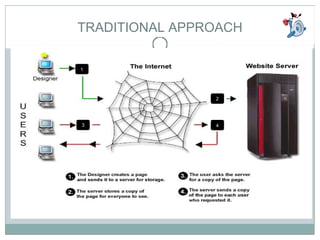
TRADITIONAL APPROACH 1 2 3 4
Google Application Engine Google App Engine is a platform for developing and  hosting web applications in Google-managed data centers It was first released as a beta version in  April 2008
Google App Engine lets you run your web applications on Google's infrastructure.  App Engine applications are   easy to build, easy to maintain, and easy to scale  as your  traffic and data storage  needs grow. With App Engine, there are   no servers to maintain  , You just upload your application, and it's ready to serve your users. Google Application Engine
GAE Application Environment dynamic web serving , with full support for common web technologies persistent storage  with queries, sorting and transactions automatic scaling and load balancing APIs  for authenticating users and sending email using Google Accounts task queues  for performing work outside of the scope of a web request scheduled tasks  for triggering events at specified times and regular intervals
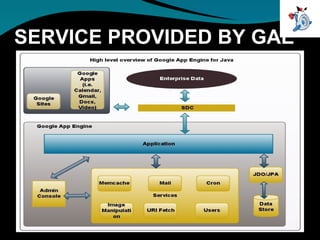
SERVICE PROVIDED BY GAE
SERVICES  The Datastore Google Accounts URL Fetch Mail Memcache Image Manipulation Scheduled Tasks and Task Queues
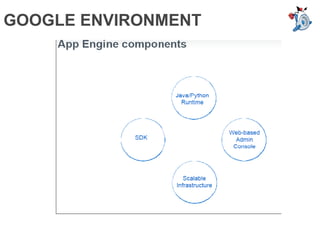
GOOGLE ENVIRONMENT
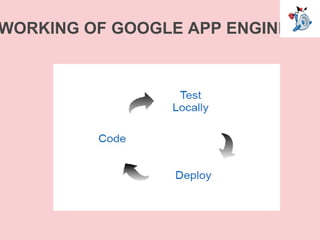
WORKING OF GOOGLE APP ENGINE
GAE ACCOUNT OVERVIEW Dashboard: The System Status Dashboard makes it easier for developers to evaluate and monitor the entire App Engine system by enabling them to measure historical uptime, error rates and latency for each of the major App Engine components.  Quotas An App Engine application can consume resources up to certain maximums, or  quotas . With quotas, App Engine ensures that your application won't exceed your budget, and that other applications running on App Engine won't impact the performance of your app.
GAE ACCOUNT OVERVIEW Cron Jobs The App Engine Cron Service allows you to configure  regularly scheduled tasks  that operate at defined times or regular intervals. These tasks are commonly known as  cron jobs . eg. file backup   These cron jobs are  automatically triggered  by the App Engine Cron Service.  For instance, you might use this to send out a report email on a daily basis, to update some cached data every 10 minutes, or to update some summary information once an hour.  A cron job will invoke a  URL at a given time of day.  A URL invoked by cron is subject to the same limits and quotas as a normal HTTP request, including the request time limit.
GAE ACCOUNT OVERVIEW Task Queue App Engine applications can perform background processing by inserting tasks (modeled as web hooks) into a queue. App Engine will detect the presence of new, ready-to-execute tasks and automatically dispatch them for execution, subject to scheduling criteria. Billing and Budgeting Resources Each App Engine application can consume a certain level of computing resources for free, controlled by a set of quotas. Developers who want to grow their applications beyond these free quotas can do so by enabling billing for their application and using Google Checkout to set a daily resource budget, which will allow for the purchasing of additional resources if and when they are needed.
GAE ACCOUNT OVERVIEW Datastore Statistics The datastore maintains statistics about the data stored for an application, such as how many entities there are of a given kind, or how much space is used by property values of a given type
ADVANTAGES EASY TO BUILD AUTOMATIC SCALABILITY RELIABILITY ,  PERFORMANCE  AND SECURITY ON GOOGLE  INFRASTRUCTURE COST EFFICIENT API’S TO DEVOLOP APPLICATIONS
DISADVANTAGES IS GOOGLE GIVES ANY GUARENTEE……???????  - beta  Google is prone to occasionally change its algorithms and mechanisms in a very opaque and downright secretive manner  do you know what Google does with your data? Do you want Google to know?  Dependent Amazon EC2
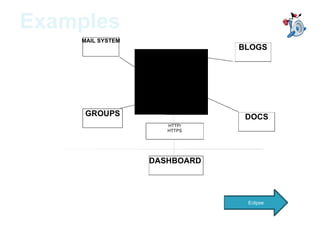
MAIL SYSTEM BLOGS GROUPS DOCS HTTP/HTTPS COMMUNICATION HTTP/ HTTPS DASHBOARD  Examples Eclipse
Why App Engine only? Google App Engine enables you to build web applications on the same scalable systems that power Google applications. App Engine applications are easy to build, easy to maintain, and easy to scale as your traffic and data storage needs grow. With App Engine, there are no servers to maintain: You just upload your application, and it's ready to serve to your users. • Easy to get Started • Automatic scalability • The reliability, performance and security of Google's infrastructure • Cost efficient hosting • Risk free trial period
App Engine is a great "engine" for building highly scalable web applications backed by a world-class infrastructure, but it's our responsibility to use the tools provided as effectively and efficiently as possible. A large part of this is designing your data model to leverage the core strengths of App Engine's underlying datastore.  CONCLUSION


Session 5 google_app_engine

  • 1.
    GAE- G oo g l e App Engine
  • 2.
    CONTENTS Introduction TraditionalApproach Google App Engine Services Advantages Disadvantages Overview of App Engine Account References Runtime Environment Conclusion Example Why Google App Engine?? G
  • 3.
  • 4.
    Google Application EngineGoogle App Engine is a platform for developing and hosting web applications in Google-managed data centers It was first released as a beta version in April 2008
  • 5.
    Google App Enginelets you run your web applications on Google's infrastructure. App Engine applications are easy to build, easy to maintain, and easy to scale as your traffic and data storage needs grow. With App Engine, there are no servers to maintain , You just upload your application, and it's ready to serve your users. Google Application Engine
  • 6.
    GAE Application Environmentdynamic web serving , with full support for common web technologies persistent storage with queries, sorting and transactions automatic scaling and load balancing APIs for authenticating users and sending email using Google Accounts task queues for performing work outside of the scope of a web request scheduled tasks for triggering events at specified times and regular intervals
  • 7.
  • 8.
    SERVICES TheDatastore Google Accounts URL Fetch Mail Memcache Image Manipulation Scheduled Tasks and Task Queues
  • 9.
  • 10.
  • 11.
    GAE ACCOUNT OVERVIEWDashboard: The System Status Dashboard makes it easier for developers to evaluate and monitor the entire App Engine system by enabling them to measure historical uptime, error rates and latency for each of the major App Engine components. Quotas An App Engine application can consume resources up to certain maximums, or quotas . With quotas, App Engine ensures that your application won't exceed your budget, and that other applications running on App Engine won't impact the performance of your app.
  • 12.
    GAE ACCOUNT OVERVIEWCron Jobs The App Engine Cron Service allows you to configure regularly scheduled tasks that operate at defined times or regular intervals. These tasks are commonly known as cron jobs . eg. file backup   These cron jobs are automatically triggered by the App Engine Cron Service.  For instance, you might use this to send out a report email on a daily basis, to update some cached data every 10 minutes, or to update some summary information once an hour.  A cron job will invoke a URL at a given time of day. A URL invoked by cron is subject to the same limits and quotas as a normal HTTP request, including the request time limit.
  • 13.
    GAE ACCOUNT OVERVIEWTask Queue App Engine applications can perform background processing by inserting tasks (modeled as web hooks) into a queue. App Engine will detect the presence of new, ready-to-execute tasks and automatically dispatch them for execution, subject to scheduling criteria. Billing and Budgeting Resources Each App Engine application can consume a certain level of computing resources for free, controlled by a set of quotas. Developers who want to grow their applications beyond these free quotas can do so by enabling billing for their application and using Google Checkout to set a daily resource budget, which will allow for the purchasing of additional resources if and when they are needed.
  • 14.
    GAE ACCOUNT OVERVIEWDatastore Statistics The datastore maintains statistics about the data stored for an application, such as how many entities there are of a given kind, or how much space is used by property values of a given type
  • 15.
    ADVANTAGES EASY TOBUILD AUTOMATIC SCALABILITY RELIABILITY , PERFORMANCE AND SECURITY ON GOOGLE INFRASTRUCTURE COST EFFICIENT API’S TO DEVOLOP APPLICATIONS
  • 16.
    DISADVANTAGES IS GOOGLEGIVES ANY GUARENTEE……??????? - beta Google is prone to occasionally change its algorithms and mechanisms in a very opaque and downright secretive manner do you know what Google does with your data? Do you want Google to know? Dependent Amazon EC2
  • 17.
    MAIL SYSTEM BLOGSGROUPS DOCS HTTP/HTTPS COMMUNICATION HTTP/ HTTPS DASHBOARD Examples Eclipse
  • 18.
    Why App Engineonly? Google App Engine enables you to build web applications on the same scalable systems that power Google applications. App Engine applications are easy to build, easy to maintain, and easy to scale as your traffic and data storage needs grow. With App Engine, there are no servers to maintain: You just upload your application, and it's ready to serve to your users. • Easy to get Started • Automatic scalability • The reliability, performance and security of Google's infrastructure • Cost efficient hosting • Risk free trial period
  • 19.
    App Engine isa great "engine" for building highly scalable web applications backed by a world-class infrastructure, but it's our responsibility to use the tools provided as effectively and efficiently as possible. A large part of this is designing your data model to leverage the core strengths of App Engine's underlying datastore. CONCLUSION
  • 20.
  • 21.