GOOGLE ANALYTICS:
          AN INTRODUCTION


Michelle Belden
Access Archivist, Penn State Special Collections
PALA 2012
WHY GOOGLE ANALY TICS?


 Free
 Sufficient for most libraries
 Easy to implement
 Fairly easy to understand
CONSIDERATIONS


 Data that won’t go through:
  Users who disable Javascript, block cookies
 No reporting is 100% accurate. Focus on trends.
 Privacy:
   Data is anonymous
   No Personally Identifiable Data
   Not shared with 3 rd parties
GETTING STARTED

 Sign up for a Google account
 http://www.google.com/analytics / to get tracking code


 Insert code into web pages
   Bottom of head section of HTML
   For large sites, put in template
DASHBOARD
WHAT DOES IT MEASURE?


Visitor characteristics
 Traffic
 Content effectiveness
A FEW TERMS TO KNOW

 Visitors – randomly assigned ID and timestamp
   New and returning
 Visits/sessions
 Page Views
   Unique page views
 Bounce Rate
VISITORS 1: OVERVIEW
VISITORS 2: MOBILE DEVICES
TRAFFIC 1: OVERVIEW
TRAFFIC 2: KEYWORDS
CONTENT 1: OVERVIEW
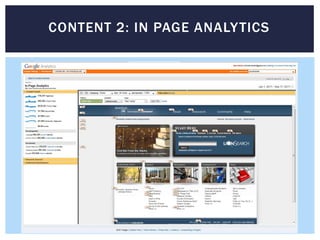
CONTENT 2: IN PAGE ANALY TICS
SO WHAT DO YOU WANT TO KNOW?


 Especially when you’re just getting started, you might be
  interested in general questions:
     Where your visitors are coming from
     What browser/resolution they are using
     Most popular content
     Pages with highest bounce rate


 As you go along, more specific questions might arise, like:
   Is this digital project getting enough use to justify further work?
VISITORS 3: SERVICE PROVIDERS
VISITORS 4: MAP OVERLAY
MORE ADVANCED USE

 What are the goals of your site?

 How will you measure those goals?
   Example: we want our users to find our “finding aids”
   “Conversion”: hit on page whose URL begins with:
    http://www.libraries.psu.edu/dam/psul/up/digital/findingaids /
   You can even assign monetary values to these “conversions”


 Can also look at time on site, pages per visit
       (Is the content sticky? Or is it just hard to find things?
                        Maybe it’s time for some user studies -)
FUNNELS


• Series of URLs you think users will/should follow
• Find out where you’re losing them
• You can also find paths you didn’t foresee
LEARN MORE!


 http://www.google.com/support/conversionuniversity/

Google Analytics

  • 1.
    GOOGLE ANALYTICS: AN INTRODUCTION Michelle Belden Access Archivist, Penn State Special Collections PALA 2012
  • 2.
    WHY GOOGLE ANALYTICS?  Free  Sufficient for most libraries  Easy to implement  Fairly easy to understand
  • 3.
    CONSIDERATIONS  Data thatwon’t go through: Users who disable Javascript, block cookies  No reporting is 100% accurate. Focus on trends.  Privacy:  Data is anonymous  No Personally Identifiable Data  Not shared with 3 rd parties
  • 4.
    GETTING STARTED  Signup for a Google account  http://www.google.com/analytics / to get tracking code  Insert code into web pages  Bottom of head section of HTML  For large sites, put in template
  • 5.
  • 6.
    WHAT DOES ITMEASURE? Visitor characteristics  Traffic  Content effectiveness
  • 7.
    A FEW TERMSTO KNOW  Visitors – randomly assigned ID and timestamp  New and returning  Visits/sessions  Page Views  Unique page views  Bounce Rate
  • 8.
  • 9.
  • 10.
  • 11.
  • 12.
  • 13.
    CONTENT 2: INPAGE ANALY TICS
  • 14.
    SO WHAT DOYOU WANT TO KNOW?  Especially when you’re just getting started, you might be interested in general questions:  Where your visitors are coming from  What browser/resolution they are using  Most popular content  Pages with highest bounce rate  As you go along, more specific questions might arise, like:  Is this digital project getting enough use to justify further work?
  • 15.
  • 16.
  • 17.
    MORE ADVANCED USE What are the goals of your site?  How will you measure those goals?  Example: we want our users to find our “finding aids”  “Conversion”: hit on page whose URL begins with: http://www.libraries.psu.edu/dam/psul/up/digital/findingaids /  You can even assign monetary values to these “conversions”  Can also look at time on site, pages per visit (Is the content sticky? Or is it just hard to find things? Maybe it’s time for some user studies -)
  • 18.
    FUNNELS • Series ofURLs you think users will/should follow • Find out where you’re losing them • You can also find paths you didn’t foresee
  • 19.