GNUPLOT
Dr. Farkhanda Ana
Assistant Professor
Dept. of ECE
SoET, Baba Ghulam Shah Badshah University
Rajouri, J&K
Basics
• Gnuplot was originally developed by Colin Kelley and Thomas Williams in 1986 to plot
functions and data files on a variety of terminals.
• GNUPLOT is a freely distributed command-line based interactive plotting program.
 installing GNUPLOT
Windows get .exe from sourceforge.net/projects/gnuplot/files
Mac get .tar.gz from sourceforge.net/projects/gnuplot/files
open shell, go to download directory, type ”configure”, ”make”,”sudo make install”
Linux use package management system
• starting GNUPLOT
Windows GUI
Linux, Mac open shell, type ”gnuplot”
• closing GNUPLOT
Windows GUI
Linux, Mac type ”exit” or ”quit”
Starting Gnuplot
• Go to a command line.
• Start gnuplot by typing gnuplot.
• Check gnuplot version and patch level .
• Check which terminals have been installed by typing set terminal. At least
terminals wxt, png, latex and tikz must be installed.
• check your current terminal by typing show terminal.
• type test, gnuplot will show the line types and point types available for current
terminal type.
• Check if ImageMagick is installed by typing !convert
Gnuplot syntax basics
• GNUPLOT can display the manuals for its commands
e.g. type help plot to get information on the plot command
• Commands can be shortened
e.g. rep instead of replot or p instead of plot
• Reset restores the defaults
• If we want to use more than one GNUPLOT command in one line, separate the
commands by ;
• GNUPLOT comments start with #
• Shell commands (e.g. vi) in GNUPLOT start with !
• File names have to be enclosed in single or double quotes
• To plot a sine curve open gnuplot and type
• f(x) = sin(x) # define a function
• plot f(x) # plot this function
• replot f(2*x) # plot another function
• GNUPLOT will open a window with plot.
• The curves will not look smooth.
• Fix this by increasing the sampling rate:
• set samples 200 # sampling rate
• set ytics 0.5; set mytics 5
• set xrange [-pi:pi] # x range
• set xtics ("-pi" -pi, "-pi/2" -pi/2, 0, "pi/2"
pi/2, "pi" pi)
Scripting
• Powerful tool of gnuplot.
• Scripts can be written in any word editor.
• Script files can be run in gnuplot by typing:
Load ‘myscript.txt’
• But proper path has to be given if script file is not in current directory.
• Data can be generated in tabular form for a function plotted in
gnuplot.
• Type set table “tablefile.txt”
Plot f(x)
Unset table
Myscript.txt
• set term wxt # s e l e c t di splay type
• set ytics 0.5 # def ine distance of labeled t i c k marks on the y−axis
• set mytics 5 # number of small t i c k marks on the y−axis
• set xrange [−p i : p i ] # set x range of the p l o t
• set xtics ( ”−p i ” −pi , ”−p i /2 ” −p i /2 ,0 , ” p i /2 ” p i /2 , ” p i ” p i )
# custom l a b e l s
• set samples 200 # increase sampling rate
• set key at −p i /8 ,0.8 i n v e r t samplen 2 # place and format key of symbols
• f ( x ) = sin ( x ) # def ine a f u n c t i o n
• plot f ( x ) t “s in ( x ) ” , f (2x ) t “ s in (2 x ) ” # p l o t two f un c t i on s
• pause −1 ” h i t ENTER to e x i t s c r i p t ” # don ’ t close gnuplot
Plotting data
• Gnuplot can read data from files
• scatter plot:
plot ’tablefile1.txt’ using 1:2 with points
• line plot:
plot ’tablefile1.txt’ using 1:2 with lines
• multiple data series:
use replot or separate by commas
• set key:
plot ’tablefile1.txt’ using 1:2 title "key“
• Parametric plot
set parametric
set trange [-pi:pi]
plot sin(t),cos(t)
unset parametric
( In the parametric mode, the variable is “t”)
Labels, arrows, keys
• place or hide key
set key top center, set nokey
• set a title
set title "the title"
• define axis labels
set xlabel "x [pc]", set ylabel "y [pc]"
• change the number format
set format x "%10.3f"
• plot an arrow
set arrow from 0.5,0 to 0.5,1
• define a label
set label "rarefaction wave" at 0.5,0
• set border style
set border lw 3
Polar plot and multiplot
• If you want to draw a rosette shaped curve you can use:
set polar
set size square
f(t)=a*sin(b*t)
a=2
b=2
plot f(t)
unset polar
• In the parametric mode, the variable is “t” (instead of x).
set multiplot
set origin 0 ,0
set size 0.5 ,0.5
plot x*x*x t ‘x ˆ3 ”
set origin 0 ,0.5
Plot x t ”x ”
set origin 0.5 ,0.5
plot x*x t ‘x ˆ2 ”
set origin 0.5 ,0
plot x*x*x*x t ”x ˆ4 ”
unset mu l t i p l o t
Fitting data
Output formats
• Set terminal png, latex, wxt..
set terminal png
set output "plot.png"
set multiplot
...
unset multiplot
set term wxt
Gnuplot and latex
• To use the most basic LATEX mode of gnuplot, the first command to
gnuplot should be:
 set terminal latex
• and the output of gnuplot should be directed to a file, for example,
 set output "plot.tex“
• The default plot size is 5 inches by 3 inches.
• It can be changed by specifying a size in either cm or inches when you
select the terminal
 set terminal latex size 7cm, 5cm
 Then (s)plot, and issue commands to close the file and switch the terminal
back to the default by
 ,
Contd.
• set output
• set terminal wxt
• Finally, the file will contain all of the plots specified (probably want one
plot per file).
set terminal latex
set output "eg4.tex"
set format y "$%g$"
set format x "$%.2f$"
set title 'This is $sin(x)$'
set xlabel "This is the $x$ axis"
set ylabel "$sin(x)$"
unset key
set xtics -pi, pi/4
plot [-pi:pi] [-1:1] sin(x)
Contd.
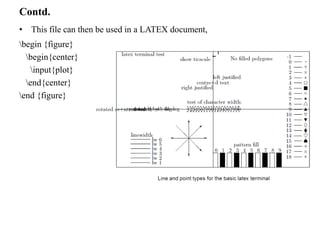
• This file can then be used in a LATEX document,
begin {figure}
begin{center}
input{plot}
end{center}
end {figure}
Use with EEPIC
• EEPIC is a macro package extending the picture environment of LATEX.
• with EPIC or EEPIC macros, one can save LATEX memory.
• With EEPIC pictures, the plot.tex file will be smaller, LATEX will run
much faster (and need much less memory),
• the dvi file will be smaller.
• The quality of the output is about the same.
• To use EEPIC, set gnuplot's terminal type to eepic instead of latex, and use
gnuplot as before.
• The line styles will change.
• Include the file plot.tex in your document as before, along with the
document style
• options [epic,eepic].
Other TEX-based terminal types in gnuplot
• emtex: Like the latex terminal, but supports emtex specials: any line slopes
contrary to a very limited set of LATEX slopes.
• epslatex: Combined LATEX and postscript parts for text and lines,
respectively, with the postscript part included by includegraphics{...}
command.
• pstex and pslatex: Combined TEX/LATEX and postscript parts for text and
lines, respectively, included by special{psfile=...} command.
• mf and mp: Produces metafont and metapost outputs.
• pslatex and epslatex: New versions of these terminals were introduced in
gnuplot 4.4.
• tikz: Much improved graphics compared to earlier LATEX terminals.
• Use of the terminal requires a lua interpreter that is called by gnuplot.
• The resulting .tex file can be processed using pdatex.
• context: Produces output for the context environment.

Gnuplot 2

  • 1.
    GNUPLOT Dr. Farkhanda Ana AssistantProfessor Dept. of ECE SoET, Baba Ghulam Shah Badshah University Rajouri, J&K
  • 2.
    Basics • Gnuplot wasoriginally developed by Colin Kelley and Thomas Williams in 1986 to plot functions and data files on a variety of terminals. • GNUPLOT is a freely distributed command-line based interactive plotting program.  installing GNUPLOT Windows get .exe from sourceforge.net/projects/gnuplot/files Mac get .tar.gz from sourceforge.net/projects/gnuplot/files open shell, go to download directory, type ”configure”, ”make”,”sudo make install” Linux use package management system • starting GNUPLOT Windows GUI Linux, Mac open shell, type ”gnuplot” • closing GNUPLOT Windows GUI Linux, Mac type ”exit” or ”quit”
  • 3.
    Starting Gnuplot • Goto a command line. • Start gnuplot by typing gnuplot. • Check gnuplot version and patch level . • Check which terminals have been installed by typing set terminal. At least terminals wxt, png, latex and tikz must be installed. • check your current terminal by typing show terminal. • type test, gnuplot will show the line types and point types available for current terminal type. • Check if ImageMagick is installed by typing !convert
  • 4.
    Gnuplot syntax basics •GNUPLOT can display the manuals for its commands e.g. type help plot to get information on the plot command • Commands can be shortened e.g. rep instead of replot or p instead of plot • Reset restores the defaults • If we want to use more than one GNUPLOT command in one line, separate the commands by ; • GNUPLOT comments start with # • Shell commands (e.g. vi) in GNUPLOT start with ! • File names have to be enclosed in single or double quotes
  • 5.
    • To plota sine curve open gnuplot and type • f(x) = sin(x) # define a function • plot f(x) # plot this function • replot f(2*x) # plot another function • GNUPLOT will open a window with plot. • The curves will not look smooth. • Fix this by increasing the sampling rate: • set samples 200 # sampling rate • set ytics 0.5; set mytics 5 • set xrange [-pi:pi] # x range • set xtics ("-pi" -pi, "-pi/2" -pi/2, 0, "pi/2" pi/2, "pi" pi)
  • 6.
    Scripting • Powerful toolof gnuplot. • Scripts can be written in any word editor. • Script files can be run in gnuplot by typing: Load ‘myscript.txt’ • But proper path has to be given if script file is not in current directory. • Data can be generated in tabular form for a function plotted in gnuplot. • Type set table “tablefile.txt” Plot f(x) Unset table
  • 7.
    Myscript.txt • set termwxt # s e l e c t di splay type • set ytics 0.5 # def ine distance of labeled t i c k marks on the y−axis • set mytics 5 # number of small t i c k marks on the y−axis • set xrange [−p i : p i ] # set x range of the p l o t • set xtics ( ”−p i ” −pi , ”−p i /2 ” −p i /2 ,0 , ” p i /2 ” p i /2 , ” p i ” p i ) # custom l a b e l s • set samples 200 # increase sampling rate • set key at −p i /8 ,0.8 i n v e r t samplen 2 # place and format key of symbols • f ( x ) = sin ( x ) # def ine a f u n c t i o n • plot f ( x ) t “s in ( x ) ” , f (2x ) t “ s in (2 x ) ” # p l o t two f un c t i on s • pause −1 ” h i t ENTER to e x i t s c r i p t ” # don ’ t close gnuplot
  • 8.
    Plotting data • Gnuplotcan read data from files • scatter plot: plot ’tablefile1.txt’ using 1:2 with points • line plot: plot ’tablefile1.txt’ using 1:2 with lines • multiple data series: use replot or separate by commas • set key: plot ’tablefile1.txt’ using 1:2 title "key“ • Parametric plot set parametric set trange [-pi:pi] plot sin(t),cos(t) unset parametric ( In the parametric mode, the variable is “t”)
  • 9.
    Labels, arrows, keys •place or hide key set key top center, set nokey • set a title set title "the title" • define axis labels set xlabel "x [pc]", set ylabel "y [pc]" • change the number format set format x "%10.3f" • plot an arrow set arrow from 0.5,0 to 0.5,1 • define a label set label "rarefaction wave" at 0.5,0 • set border style set border lw 3
  • 10.
    Polar plot andmultiplot • If you want to draw a rosette shaped curve you can use: set polar set size square f(t)=a*sin(b*t) a=2 b=2 plot f(t) unset polar • In the parametric mode, the variable is “t” (instead of x). set multiplot set origin 0 ,0 set size 0.5 ,0.5 plot x*x*x t ‘x ˆ3 ” set origin 0 ,0.5 Plot x t ”x ” set origin 0.5 ,0.5 plot x*x t ‘x ˆ2 ” set origin 0.5 ,0 plot x*x*x*x t ”x ˆ4 ” unset mu l t i p l o t
  • 11.
  • 12.
    Output formats • Setterminal png, latex, wxt.. set terminal png set output "plot.png" set multiplot ... unset multiplot set term wxt
  • 13.
    Gnuplot and latex •To use the most basic LATEX mode of gnuplot, the first command to gnuplot should be:  set terminal latex • and the output of gnuplot should be directed to a file, for example,  set output "plot.tex“ • The default plot size is 5 inches by 3 inches. • It can be changed by specifying a size in either cm or inches when you select the terminal  set terminal latex size 7cm, 5cm  Then (s)plot, and issue commands to close the file and switch the terminal back to the default by  ,
  • 14.
    Contd. • set output •set terminal wxt • Finally, the file will contain all of the plots specified (probably want one plot per file). set terminal latex set output "eg4.tex" set format y "$%g$" set format x "$%.2f$" set title 'This is $sin(x)$' set xlabel "This is the $x$ axis" set ylabel "$sin(x)$" unset key set xtics -pi, pi/4 plot [-pi:pi] [-1:1] sin(x)
  • 15.
    Contd. • This filecan then be used in a LATEX document, begin {figure} begin{center} input{plot} end{center} end {figure}
  • 16.
    Use with EEPIC •EEPIC is a macro package extending the picture environment of LATEX. • with EPIC or EEPIC macros, one can save LATEX memory. • With EEPIC pictures, the plot.tex file will be smaller, LATEX will run much faster (and need much less memory), • the dvi file will be smaller. • The quality of the output is about the same. • To use EEPIC, set gnuplot's terminal type to eepic instead of latex, and use gnuplot as before. • The line styles will change. • Include the file plot.tex in your document as before, along with the document style • options [epic,eepic].
  • 17.
    Other TEX-based terminaltypes in gnuplot • emtex: Like the latex terminal, but supports emtex specials: any line slopes contrary to a very limited set of LATEX slopes. • epslatex: Combined LATEX and postscript parts for text and lines, respectively, with the postscript part included by includegraphics{...} command. • pstex and pslatex: Combined TEX/LATEX and postscript parts for text and lines, respectively, included by special{psfile=...} command. • mf and mp: Produces metafont and metapost outputs. • pslatex and epslatex: New versions of these terminals were introduced in gnuplot 4.4.
  • 18.
    • tikz: Muchimproved graphics compared to earlier LATEX terminals. • Use of the terminal requires a lua interpreter that is called by gnuplot. • The resulting .tex file can be processed using pdatex. • context: Produces output for the context environment.