1
@globus
#globusworld
Research Automation with
Globus Flows
Ada Nikolaidis
ada@globus.org
2
Automation with Globus Flows
• Intro
– What is it?
– Key concepts
– How to use flows
• Dive Deeper
– Automating Instrument Data at Scale (tomorrow)
– Q&A
– Office Hours
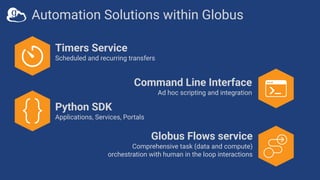
Timers Service
Scheduled and recurring transfers
Command Line Interface
Ad hoc scripting and integration
Globus Flows service
Comprehensive task (data and compute)
orchestration with human in the loop interactions
Python SDK
Applications, Services, Portals
Automation Solutions within Globus
What is Globus Flows?
Flows Service
• A platform for managed, secure, reliable task
orchestration
• Create, share, and run “flows”
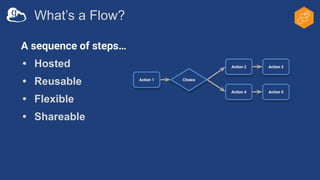
What’s a Flow?
A sequence of steps…
• Hosted
• Reusable
• Flexible
• Shareable
Action 1
Action 2
Choice
Action 4 Action 5
Action 3
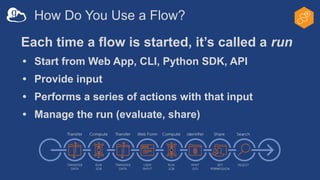
How Do You Use a Flow?
Each time a flow is started, it’s called a run
• Start from Web App, CLI, Python SDK, API
• Provide input
• Performs a series of actions with that input
• Manage the run (evaluate, share)
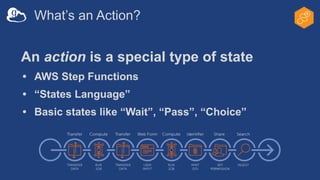
What’s an Action?
An action is a special type of state
• AWS Step Functions
• “States Language”
• Basic states like “Wait”, “Pass”, “Choice”
What’s an Action?
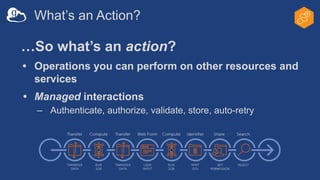
…So what’s an action?
• Operations you can perform on other resources and
services
• Managed interactions
– Authenticate, authorize, validate, store, auto-retry
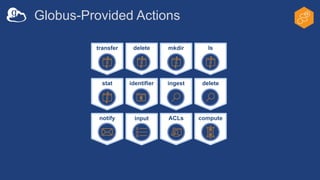
delete
identifier ingest
mkdir
delete
ls
transfer
compute
ACLs
stat
input
notify
Globus-Provided Actions
Examples of Flows
• Two Stage Globus Transfer
– Transfer to temp location, then transfer to final destination
• Move (Copy and Delete)
– Transfer to a destination and delete files on the source
• Transfer and Set Permissions (coming soon)
– Transfer to a destination and share with users and groups
Demo: Running flows
12
What happens when you
run a flow?
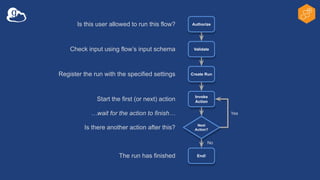
Authorize
Next
Action?
End!
Validate
Create Run
Invoke
Action
Yes
No
Is this user allowed to run this flow?
Check input using flow’s input schema
Register the run with the specified settings
Start the first (or next) action
Is there another action after this?
…wait for the action to finish…
The run has finished
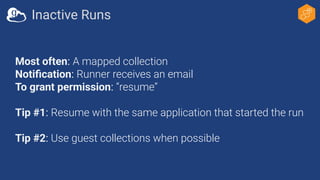
Most often: A mapped collection
Notification: Runner receives an email
To grant permission: “resume”
Tip #1: Resume with the same application that started the run
Tip #2: Use guest collections when possible
Inactive Runs
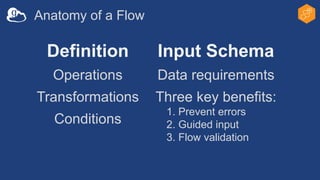
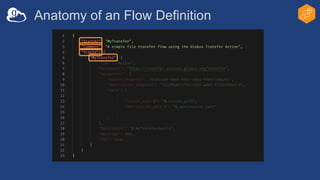
Anatomy of a Flow
Definition
Operations
Transformations
Conditions
Input Schema
Data requirements
Three key benefits:
1. Prevent errors
2. Guided input
3. Flow validation
Anatomy of an Flow Definition
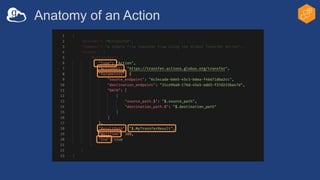
Anatomy of an Action
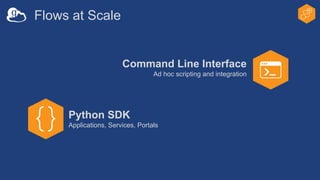
Flows at Scale
Command Line Interface
Ad hoc scripting and integration
Python SDK
Applications, Services, Portals
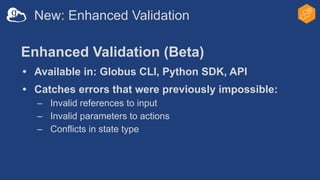
New: Enhanced Validation
Enhanced Validation (Beta)
• Available in: Globus CLI, Python SDK, API
• Catches errors that were previously impossible:
– Invalid references to input
– Invalid parameters to actions
– Conflicts in state type
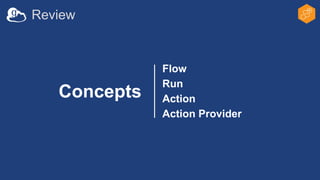
Review
Flow
Run
Action
Action Provider
Concepts
Q&A
Thank You!
Don’t Forget…
• Advanced session: tomorrow
– Automating Instrument Data at Scale
• Office Hours: today and tomorrow

Research Automation with Globus Flows.pdf

  • 1.
  • 2.
    Research Automation with GlobusFlows Ada Nikolaidis ada@globus.org 2
  • 3.
    Automation with GlobusFlows • Intro – What is it? – Key concepts – How to use flows • Dive Deeper – Automating Instrument Data at Scale (tomorrow) – Q&A – Office Hours
  • 4.
    Timers Service Scheduled andrecurring transfers Command Line Interface Ad hoc scripting and integration Globus Flows service Comprehensive task (data and compute) orchestration with human in the loop interactions Python SDK Applications, Services, Portals Automation Solutions within Globus
  • 5.
    What is GlobusFlows? Flows Service • A platform for managed, secure, reliable task orchestration • Create, share, and run “flows”
  • 6.
    What’s a Flow? Asequence of steps… • Hosted • Reusable • Flexible • Shareable Action 1 Action 2 Choice Action 4 Action 5 Action 3
  • 7.
    How Do YouUse a Flow? Each time a flow is started, it’s called a run • Start from Web App, CLI, Python SDK, API • Provide input • Performs a series of actions with that input • Manage the run (evaluate, share)
  • 8.
    What’s an Action? Anaction is a special type of state • AWS Step Functions • “States Language” • Basic states like “Wait”, “Pass”, “Choice”
  • 9.
    What’s an Action? …Sowhat’s an action? • Operations you can perform on other resources and services • Managed interactions – Authenticate, authorize, validate, store, auto-retry
  • 10.
  • 11.
    Examples of Flows •Two Stage Globus Transfer – Transfer to temp location, then transfer to final destination • Move (Copy and Delete) – Transfer to a destination and delete files on the source • Transfer and Set Permissions (coming soon) – Transfer to a destination and share with users and groups
  • 12.
  • 13.
    What happens whenyou run a flow?
  • 14.
    Authorize Next Action? End! Validate Create Run Invoke Action Yes No Is thisuser allowed to run this flow? Check input using flow’s input schema Register the run with the specified settings Start the first (or next) action Is there another action after this? …wait for the action to finish… The run has finished
  • 15.
    Most often: Amapped collection Notification: Runner receives an email To grant permission: “resume” Tip #1: Resume with the same application that started the run Tip #2: Use guest collections when possible Inactive Runs
  • 16.
    Anatomy of aFlow Definition Operations Transformations Conditions Input Schema Data requirements Three key benefits: 1. Prevent errors 2. Guided input 3. Flow validation
  • 17.
    Anatomy of anFlow Definition
  • 18.
  • 19.
    Flows at Scale CommandLine Interface Ad hoc scripting and integration Python SDK Applications, Services, Portals
  • 20.
    New: Enhanced Validation EnhancedValidation (Beta) • Available in: Globus CLI, Python SDK, API • Catches errors that were previously impossible: – Invalid references to input – Invalid parameters to actions – Conflicts in state type
  • 21.
  • 22.
  • 23.
    Thank You! Don’t Forget… •Advanced session: tomorrow – Automating Instrument Data at Scale • Office Hours: today and tomorrow