ご注意
・筆者が「こうやっていた」「こんな風にやるといいと思う」という運用
ルールですので「Git では必ずこうしなくてはならない」というもので
はありません。
・プロジェクトの要件やチーム体制に応じて、柔軟にご調整ください。
※筆者の場合
少人数、非エンジニアのメンバーが多い、静的なサイトが多い
という点があり、比較的ブランチやフローの少ないルールにしています。
ブランチ構成と各ブランチの役割
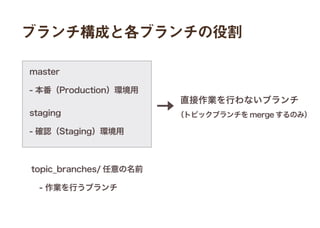
master
- 本番(Production)環境用
直接作業を行わないブランチ
(トピックブランチを merge するのみ)staging
- 確認(Staging)環境用
topic_branches/ 任意の名前
 - 作業を行うブランチ
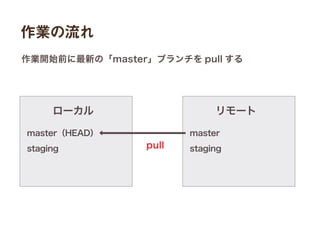
作業の流れ
master(HEAD)
staging
ローカル
master
staging
リモート
作業開始前に最新の「master」ブランチを pull する
pull
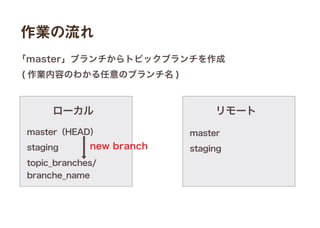
作業の流れ
master(HEAD)
staging
topic_branches/
branche_name
ローカル
master
staging
リモート
「master」ブランチからトピックブランチを作成
( 作業内容のわかる任意のブランチ名 )
new branch
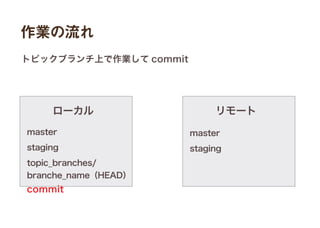
作業の流れ
master
staging
topic_branches/
branche_name(HEAD)
ローカル
master
staging
リモート
トピックブランチ上で作業して commit
commit
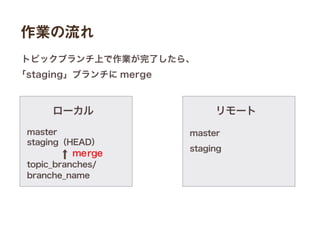
作業の流れ
master
staging(HEAD)
topic_branches/
branche_name
ローカル
master
staging
リモート
トピックブランチ上で作業が完了したら、
「staging」ブランチに merge
merge
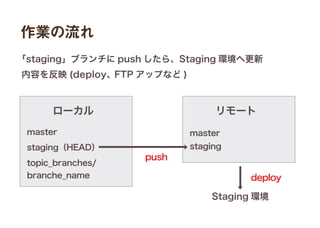
作業の流れ
ローカル
master
staging
リモート
「staging」ブランチに push したら、Staging 環境へ更新
内容を反映 (deploy、FTP アップなど )
Staging 環境
push
deploy
master
staging(HEAD)
topic_branches/
branche_name
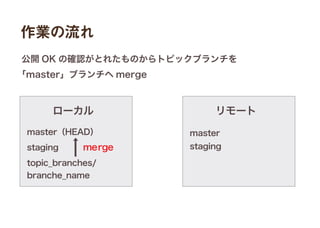
作業の流れ
ローカル
master
staging
リモート
公開 OK の確認がとれたものからトピックブランチを
「master」ブランチへ merge
master(HEAD)
staging
topic_branches/
branche_name
merge
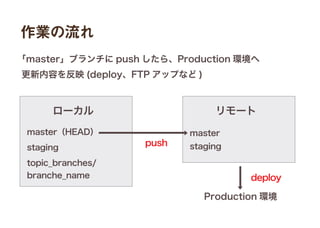
作業の流れ
ローカル
master
staging
リモート
「master」ブランチに push したら、Production 環境へ
更新内容を反映 (deploy、FTP アップなど )
Production 環境
push
deploy
master(HEAD)
staging
topic_branches/
branche_name
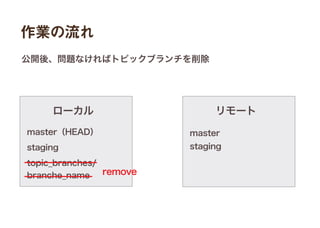
作業の流れ
ローカル
master
staging
リモート
公開後、問題なければトピックブランチを削除
remove
master(HEAD)
staging
topic_branches/
branche_name
作業の流れ
ローカル
master
staging
リモート
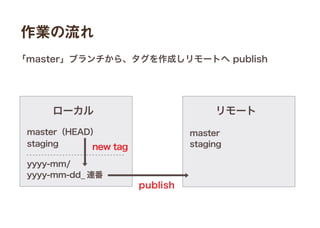
「master」ブランチから、タグを作成しリモートへ publish
master(HEAD)
staging
yyyy-mm/
yyyy-mm-dd_ 連番
new tag
publish
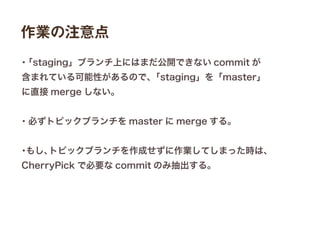
作業の注意点
・「staging」ブランチ上にはまだ公開できない commit が
含まれている可能性があるので、「staging」を「master」
に直接 merge しない。
・必ずトピックブランチを master に merge する。
・もし、トピックブランチを作成せずに作業してしまった時は、
CherryPick で必要な commit のみ抽出する。

(自分流)Gitの運用ルール