GIT & CODE
REVIEW
Cenk Gultekin
Product Lead
Co-Founder at Touchmeets
CONTENT
01. CODE REVIEW
02. GIT
03.
Interactive Git Examples &
Code Review
What is code review and why do we
need that?
CODE REVIEW
01
CODE REVIEW
● Design: Is the code well-designed and appropriate for your
system?
● Functionality: Does the code behave as the author likely
intended? Is the way the code behaves good for its users?
● Complexity: Could the code be made simpler? Would another
developer be able to easily understand and use this code when
they come across it in the future?
● Tests: Does the code have correct and well-designed automated
tests?
● Naming: Did the developer choose clear names for variables,
classes, methods, etc.?
● Comments: Are the comments clear and useful?
● Style: Does the code follow our style guides?
● Documentation: Did the developer also update relevant
documentation?
A code review is a process where someone other than
the author(s) of a piece of code examines that code
Code reviewers usually look for:
Cenk Gultekin
Product Lead
CODE REVIEW
● CL: Change List
● PR: Pull Request
● CR: Change Request
● LG2M: Looks Good to Me
● RCP : Repeated Code Pattern
● CCN : Code Comments Needed
● NTG : Name too Generic
Most Common Abbreviations
Cenk Gultekin
Product Lead
CODE REVIEW
1- You can send PR as much as u want , no limitation for maximum. Don’t worry😊
2- Better to send your PR, AT LEAST ONCE a DAY. This means even your task requires more
than 1 day, you can separate your PR and make sure it is covering these rules.
3- Better to have maximum 5 commits in 1 PR.
4- Each commit name should be clear and responsible only for its message.
5- Try not to exceed 300 lines of code in 1 PR.(This will help reviewers to feel safe )
Note: For refactoring project or similar tasks we can avoid these rules but we should make
these kind of things at the end of the actual feature development.
It’s suggested that each PR should cover maximum 8-10 classes except refactor.
My Humble Suggestions for Code Review
Cenk Gultekin
Product Lead
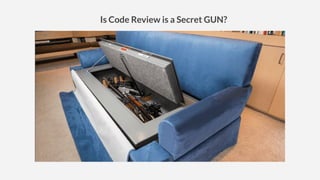
Is Code Review is a Secret GUN?
CODE REVIEW
Especially for crowd teams, here is what’s happening for my experience:
-The more senior the team have, more conflicts are highly possible if the seniors think that they
are the best:)
-After some time, people start get offended especially by junior’s reviews.
-Please keep in mind, any developer can/should review code from others regardless of
experience
-This will help juniors to grow up
-I kindly suggest, never take the reviews personally, don’t forget, those reviews are not against
your character, try to make the code review only for protecting the code quality
-Better to avoid personal conflicts/arguments on the PR
-Do not hesitate to go the reviewer and fix the argument verbally. I have not seen that long
written discussions end up in a nice way.
-What Happens in PR, Should Stay in PR :)
-If you start taking as personally, trust me, things will never will be same.
And never forget that, the communication between squad members is important as much as
the code quality. Bad moral will cause bad results
Psychology behind Code Review
Cenk Gultekin
Product Lead
What’s Git
Git is a distributed version-control system for tracking changes in source code during software
development.
It is designed for coordinating work among programmers, but it can be used to track changes in any set of
files.
Its goals include speed, data integrity, and support for distributed, non-linear workflows.
GIT
Cenk Gultekin
Product Lead
Control System: This basically means that
Git is a content tracker. So Git can be used
to store content — it is mostly used to store
code due to the other features it provides.
Version Control System: The code which is
stored in Git keeps changing as more code is
added. Also, many developers can add code in
parallel. So Version Control System helps in
handling this by maintaining a history of what
changes have happened. Also, Git provides
features like branches and merges, which I will
be covering later.
Cenk Gultekin
Product Lead
GIT
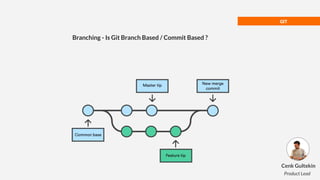
Branching - Is Git Branch Based / Commit Based ?
Cenk Gultekin
Product Lead
The Answer-> COMMIT BASED
Git is a COMMIT BASED Git version control system
Although many developers think that it’s a branch based, the answer is simply = NO
Branch is only like a milestone on your highway.
Commits are the real bricks which creates your highway, you can think in this way.
I strongly suggest you to use nice,modern visualize tool(for me it is Git Kraken)
So, you should always take care of commits very carefully. You can easily move a branch from somewhere
to somewhere, no issues, it is just a LABEL which to know the commit itself.
That is the reason, experts strongly suggest to mind your commits, keep/maintain them carefully.
GIT
Cenk Gultekin
Product Lead
GIT
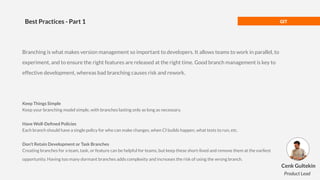
Best Practices - Part 1
Branching is what makes version management so important to developers. It allows teams to work in parallel, to
experiment, and to ensure the right features are released at the right time. Good branch management is key to
effective development, whereas bad branching causes risk and rework.
Keep Things Simple
Keep your branching model simple, with branches lasting only as long as necessary.
Have Well-Defined Policies
Each branch should have a single policy for who can make changes, when CI builds happen, what tests to run, etc.
Don’t Retain Development or Task Branches
Creating branches for a team, task, or feature can be helpful for teams, but keep these short-lived and remove them at the earliest
opportunity. Having too many dormant branches adds complexity and increases the risk of using the wrong branch.
Cenk Gultekin
Product Lead
GIT
Best Practices - Part 2
Use Branches for Releases or Milestones
With most projects, releases have to be made while development continues. Create branches to separate a release while final
testing is running or if you have multiple releases in production.
Make Streams a Key Workflow
Helix Streams – which are often called "branches with brains" – implements a robust workflow to control the behavior of
branches. Helix Streams manage development (which is usually unstable) and releases (which are stable, restricted changes).
Streams are great for simplifying and visualizing the flow of changes from development to release. They also help to prevent
merging errors, especially on larger projects.
Protect Your Mainline
A common pattern for Continuous Delivery is to have a single mainline. This ensures the mainline is always buildable and
potentially releasable. That means all commits have to be high quality. Use code reviews and pre-commit CI build and test.
Learn Version Management Best Practices
Learn how to assess and deploy high-quality, productive, and robust software version management. Download our white paper,
'Best Practices for Version Management' for more information.
Cenk Gultekin
Product Lead
GIT
Branching Strategy
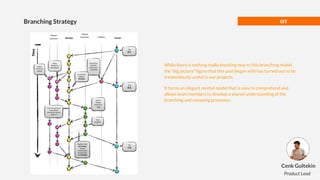
While there is nothing really shocking new to this branching model,
the “big picture” figure that this post began with has turned out to be
tremendously useful in our projects.
It forms an elegant mental model that is easy to comprehend and
allows team members to develop a shared understanding of the
branching and releasing processes.
Cenk Gultekin
Product Lead
GIT
Common Scenarios
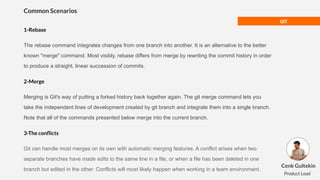
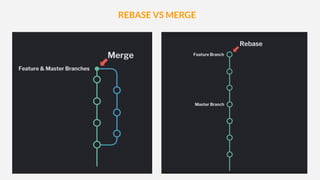
1-Rebase
The rebase command integrates changes from one branch into another. It is an alternative to the better
known "merge" command. Most visibly, rebase differs from merge by rewriting the commit history in order
to produce a straight, linear succession of commits.
2-Merge
Merging is Git's way of putting a forked history back together again. The git merge command lets you
take the independent lines of development created by git branch and integrate them into a single branch.
Note that all of the commands presented below merge into the current branch.
3-The conflicts
Git can handle most merges on its own with automatic merging features. A conflict arises when two
separate branches have made edits to the same line in a file, or when a file has been deleted in one
branch but edited in the other. Conflicts will most likely happen when working in a team environment.
Cenk Gultekin
Product Lead
REBASE VS MERGE
REBASE VS MERGE
REBASE MERGE
Preservers history
Better for conflicts
Easy to undo
Cleaner history
More readable graph
Tougher to resolve conflicts
Cenk Gultekin
Product Lead
GIT
Popular Tools
Git Kraken *
Source Tree
Gerrit
Code Climate
Git Prime
Git Metrics
SmartGit
Git GUI Cenk Gultekin
Product Lead
CREDITS: This presentation template was created by
Slidesgo, including icons by Flaticon, and infographics
& images by Freepik.
THANKS!
Cenk Gultekin
Product Lead
Co-Founder at Touchmeets
cenk@touchmeets.com
https://www.linkedin.com/in/cenk-gultekin/
https://slidesgo.com
https://google.github.io/eng-practices/review/reviewer/
https://medium.com/airbnb-engineering/engineering-culture-at-airbnb-345797c17cbe#.xv
zkgiwml
https://engineering.fb.com/developer-tools/getafix-how-facebook-tools-learn-to-fix-bugs-a
utomatically/
https://www.michaelagreiler.com/code-reviews-at-google/
https://www.michaelagreiler.com/code-reviews-at-microsoft-how-to-code-review-at-a-larg
e-software-company/
https://codeclimate.com/velocity/product-managers/
https://www.gitprime.com/platform/pull-request/
https://www.perforce.com/blog/vcs/8-tips-effective-branch-management
https://hackernoon.com/git-merge-vs-rebase-whats-the-diff-76413c117333
https://medium.com/@kasunsiyambalapitiya/creating-a-new-branch-from-any-commit-of-
a-github-repository-which-has-a-long-gone-history-53885f9a8e29
Thanks to Artem Sapegin @sapegin for making this photo available freely on Unsplash 🎁
https://unsplash.com/photos/ZMraoOybTLQ
Sources

Git & Code review

  • 1.
    GIT & CODE REVIEW CenkGultekin Product Lead Co-Founder at Touchmeets
  • 2.
    CONTENT 01. CODE REVIEW 02.GIT 03. Interactive Git Examples & Code Review
  • 3.
    What is codereview and why do we need that? CODE REVIEW 01
  • 4.
    CODE REVIEW ● Design:Is the code well-designed and appropriate for your system? ● Functionality: Does the code behave as the author likely intended? Is the way the code behaves good for its users? ● Complexity: Could the code be made simpler? Would another developer be able to easily understand and use this code when they come across it in the future? ● Tests: Does the code have correct and well-designed automated tests? ● Naming: Did the developer choose clear names for variables, classes, methods, etc.? ● Comments: Are the comments clear and useful? ● Style: Does the code follow our style guides? ● Documentation: Did the developer also update relevant documentation? A code review is a process where someone other than the author(s) of a piece of code examines that code Code reviewers usually look for: Cenk Gultekin Product Lead
  • 5.
    CODE REVIEW ● CL:Change List ● PR: Pull Request ● CR: Change Request ● LG2M: Looks Good to Me ● RCP : Repeated Code Pattern ● CCN : Code Comments Needed ● NTG : Name too Generic Most Common Abbreviations Cenk Gultekin Product Lead
  • 7.
    CODE REVIEW 1- Youcan send PR as much as u want , no limitation for maximum. Don’t worry😊 2- Better to send your PR, AT LEAST ONCE a DAY. This means even your task requires more than 1 day, you can separate your PR and make sure it is covering these rules. 3- Better to have maximum 5 commits in 1 PR. 4- Each commit name should be clear and responsible only for its message. 5- Try not to exceed 300 lines of code in 1 PR.(This will help reviewers to feel safe ) Note: For refactoring project or similar tasks we can avoid these rules but we should make these kind of things at the end of the actual feature development. It’s suggested that each PR should cover maximum 8-10 classes except refactor. My Humble Suggestions for Code Review Cenk Gultekin Product Lead
  • 8.
    Is Code Reviewis a Secret GUN?
  • 9.
    CODE REVIEW Especially forcrowd teams, here is what’s happening for my experience: -The more senior the team have, more conflicts are highly possible if the seniors think that they are the best:) -After some time, people start get offended especially by junior’s reviews. -Please keep in mind, any developer can/should review code from others regardless of experience -This will help juniors to grow up -I kindly suggest, never take the reviews personally, don’t forget, those reviews are not against your character, try to make the code review only for protecting the code quality -Better to avoid personal conflicts/arguments on the PR -Do not hesitate to go the reviewer and fix the argument verbally. I have not seen that long written discussions end up in a nice way. -What Happens in PR, Should Stay in PR :) -If you start taking as personally, trust me, things will never will be same. And never forget that, the communication between squad members is important as much as the code quality. Bad moral will cause bad results Psychology behind Code Review Cenk Gultekin Product Lead
  • 11.
    What’s Git Git isa distributed version-control system for tracking changes in source code during software development. It is designed for coordinating work among programmers, but it can be used to track changes in any set of files. Its goals include speed, data integrity, and support for distributed, non-linear workflows. GIT Cenk Gultekin Product Lead
  • 12.
    Control System: Thisbasically means that Git is a content tracker. So Git can be used to store content — it is mostly used to store code due to the other features it provides. Version Control System: The code which is stored in Git keeps changing as more code is added. Also, many developers can add code in parallel. So Version Control System helps in handling this by maintaining a history of what changes have happened. Also, Git provides features like branches and merges, which I will be covering later. Cenk Gultekin Product Lead
  • 13.
    GIT Branching - IsGit Branch Based / Commit Based ? Cenk Gultekin Product Lead
  • 14.
    The Answer-> COMMITBASED Git is a COMMIT BASED Git version control system Although many developers think that it’s a branch based, the answer is simply = NO Branch is only like a milestone on your highway. Commits are the real bricks which creates your highway, you can think in this way. I strongly suggest you to use nice,modern visualize tool(for me it is Git Kraken) So, you should always take care of commits very carefully. You can easily move a branch from somewhere to somewhere, no issues, it is just a LABEL which to know the commit itself. That is the reason, experts strongly suggest to mind your commits, keep/maintain them carefully. GIT Cenk Gultekin Product Lead
  • 15.
    GIT Best Practices -Part 1 Branching is what makes version management so important to developers. It allows teams to work in parallel, to experiment, and to ensure the right features are released at the right time. Good branch management is key to effective development, whereas bad branching causes risk and rework. Keep Things Simple Keep your branching model simple, with branches lasting only as long as necessary. Have Well-Defined Policies Each branch should have a single policy for who can make changes, when CI builds happen, what tests to run, etc. Don’t Retain Development or Task Branches Creating branches for a team, task, or feature can be helpful for teams, but keep these short-lived and remove them at the earliest opportunity. Having too many dormant branches adds complexity and increases the risk of using the wrong branch. Cenk Gultekin Product Lead
  • 16.
    GIT Best Practices -Part 2 Use Branches for Releases or Milestones With most projects, releases have to be made while development continues. Create branches to separate a release while final testing is running or if you have multiple releases in production. Make Streams a Key Workflow Helix Streams – which are often called "branches with brains" – implements a robust workflow to control the behavior of branches. Helix Streams manage development (which is usually unstable) and releases (which are stable, restricted changes). Streams are great for simplifying and visualizing the flow of changes from development to release. They also help to prevent merging errors, especially on larger projects. Protect Your Mainline A common pattern for Continuous Delivery is to have a single mainline. This ensures the mainline is always buildable and potentially releasable. That means all commits have to be high quality. Use code reviews and pre-commit CI build and test. Learn Version Management Best Practices Learn how to assess and deploy high-quality, productive, and robust software version management. Download our white paper, 'Best Practices for Version Management' for more information. Cenk Gultekin Product Lead
  • 17.
    GIT Branching Strategy While thereis nothing really shocking new to this branching model, the “big picture” figure that this post began with has turned out to be tremendously useful in our projects. It forms an elegant mental model that is easy to comprehend and allows team members to develop a shared understanding of the branching and releasing processes. Cenk Gultekin Product Lead
  • 18.
    GIT Common Scenarios 1-Rebase The rebasecommand integrates changes from one branch into another. It is an alternative to the better known "merge" command. Most visibly, rebase differs from merge by rewriting the commit history in order to produce a straight, linear succession of commits. 2-Merge Merging is Git's way of putting a forked history back together again. The git merge command lets you take the independent lines of development created by git branch and integrate them into a single branch. Note that all of the commands presented below merge into the current branch. 3-The conflicts Git can handle most merges on its own with automatic merging features. A conflict arises when two separate branches have made edits to the same line in a file, or when a file has been deleted in one branch but edited in the other. Conflicts will most likely happen when working in a team environment. Cenk Gultekin Product Lead
  • 19.
  • 20.
  • 21.
    REBASE MERGE Preservers history Betterfor conflicts Easy to undo Cleaner history More readable graph Tougher to resolve conflicts Cenk Gultekin Product Lead
  • 22.
    GIT Popular Tools Git Kraken* Source Tree Gerrit Code Climate Git Prime Git Metrics SmartGit Git GUI Cenk Gultekin Product Lead
  • 23.
    CREDITS: This presentationtemplate was created by Slidesgo, including icons by Flaticon, and infographics & images by Freepik. THANKS! Cenk Gultekin Product Lead Co-Founder at Touchmeets cenk@touchmeets.com https://www.linkedin.com/in/cenk-gultekin/
  • 24.
    https://slidesgo.com https://google.github.io/eng-practices/review/reviewer/ https://medium.com/airbnb-engineering/engineering-culture-at-airbnb-345797c17cbe#.xv zkgiwml https://engineering.fb.com/developer-tools/getafix-how-facebook-tools-learn-to-fix-bugs-a utomatically/ https://www.michaelagreiler.com/code-reviews-at-google/ https://www.michaelagreiler.com/code-reviews-at-microsoft-how-to-code-review-at-a-larg e-software-company/ https://codeclimate.com/velocity/product-managers/ https://www.gitprime.com/platform/pull-request/ https://www.perforce.com/blog/vcs/8-tips-effective-branch-management https://hackernoon.com/git-merge-vs-rebase-whats-the-diff-76413c117333 https://medium.com/@kasunsiyambalapitiya/creating-a-new-branch-from-any-commit-of- a-github-repository-which-has-a-long-gone-history-53885f9a8e29 Thanks to ArtemSapegin @sapegin for making this photo available freely on Unsplash 🎁 https://unsplash.com/photos/ZMraoOybTLQ Sources