Mr. Crab’s Git Workflow
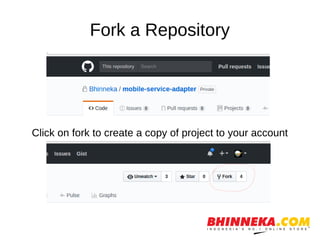
Fork a Repository
Click on fork to create a copy of project to your account
Clone the forked project
You have forked the project you want to contribute to your github
account. To get this project on your development machine we use
clone command of git.
$ git clone https://github.com/<your-account-username>/<your-forked-project>.git
Add a remote (upstream) to original
project repository
Remote means the remote location of project on
Github. By cloning, we have a remote called origin
which points to your forked repository. Now we will
add a remote to the original repository from where
we had forked.
● $ cd <your-forked-project-folder>
● $ git remote add upstream https://github.com/<my-company>/<project>.git
Easy to remember
● Remote origin is your fork: your own repo on
GitHub, clone of the original repo of GitHub.
● Remote upstream generally refers to the
original repo that you have forked.
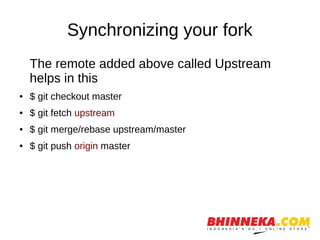
Synchronizing your fork
The remote added above called Upstream
helps in this
● $ git checkout master
● $ git fetch upstream
● $ git merge/rebase upstream/master
● $ git push origin master
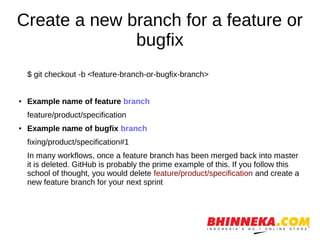
Create a new branch for a feature or
bugfix
$ git checkout -b <feature-branch-or-bugfix-branch>
● Example name of feature branch
feature/product/specification
● Example name of bugfix branch
fixing/product/specification#1
In many workflows, once a feature branch has been merged back into master
it is deleted. GitHub is probably the prime example of this. If you follow this
school of thought, you would delete feature/product/specification and create a
new feature branch for your next sprint
DEMO….

Mr.Crabs Git workflow

  • 1.
  • 2.
    Fork a Repository Clickon fork to create a copy of project to your account
  • 3.
    Clone the forkedproject You have forked the project you want to contribute to your github account. To get this project on your development machine we use clone command of git. $ git clone https://github.com/<your-account-username>/<your-forked-project>.git
  • 4.
    Add a remote(upstream) to original project repository Remote means the remote location of project on Github. By cloning, we have a remote called origin which points to your forked repository. Now we will add a remote to the original repository from where we had forked. ● $ cd <your-forked-project-folder> ● $ git remote add upstream https://github.com/<my-company>/<project>.git
  • 5.
    Easy to remember ●Remote origin is your fork: your own repo on GitHub, clone of the original repo of GitHub. ● Remote upstream generally refers to the original repo that you have forked.
  • 6.
    Synchronizing your fork Theremote added above called Upstream helps in this ● $ git checkout master ● $ git fetch upstream ● $ git merge/rebase upstream/master ● $ git push origin master
  • 7.
    Create a newbranch for a feature or bugfix $ git checkout -b <feature-branch-or-bugfix-branch> ● Example name of feature branch feature/product/specification ● Example name of bugfix branch fixing/product/specification#1 In many workflows, once a feature branch has been merged back into master it is deleted. GitHub is probably the prime example of this. If you follow this school of thought, you would delete feature/product/specification and create a new feature branch for your next sprint
  • 8.