TECNOLÓGICO NACIONAL DE MÉXICO
Instituto Tecnológico de Morelia
Departamento de Sistemas y Computación
Git Tutorial
Febraury, 2017
M.Sc. Juan Carlos Olivares Rojas
TECNOLÓGICO NACIONAL DE MÉXICO
Instituto Tecnológico de Morelia
Departamento de Sistemas y Computación
Git is a free and open source distributed
version control system designed to
handle everything from small to very
large projects with speed and efficiency.
https://git-scm.com/
Definition
TECNOLÓGICO NACIONAL DE MÉXICO
Instituto Tecnológico de Morelia
Departamento de Sistemas y Computación
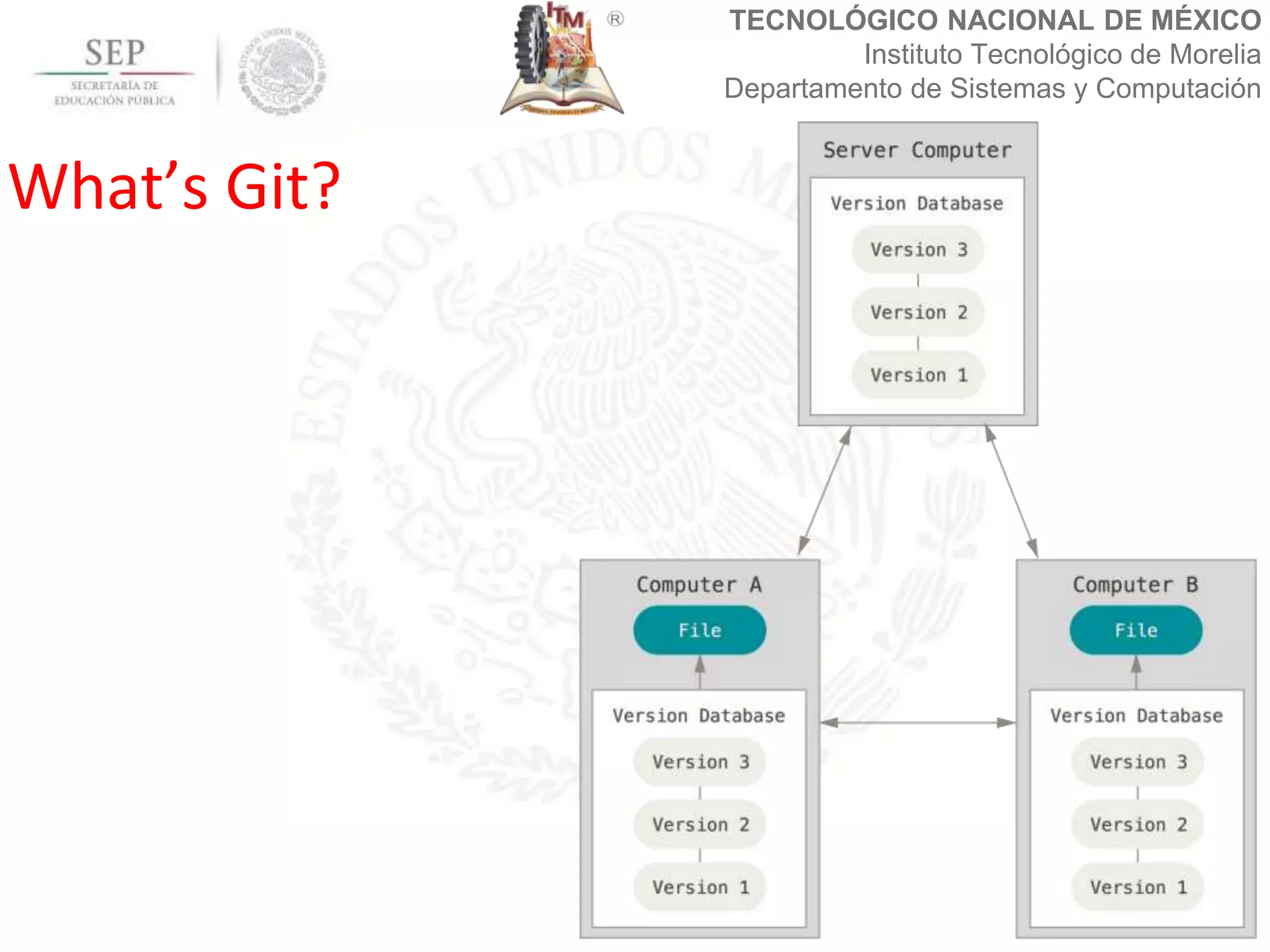
What’s Git?
TECNOLÓGICO NACIONAL DE MÉXICO
Instituto Tecnológico de Morelia
Departamento de Sistemas y Computación
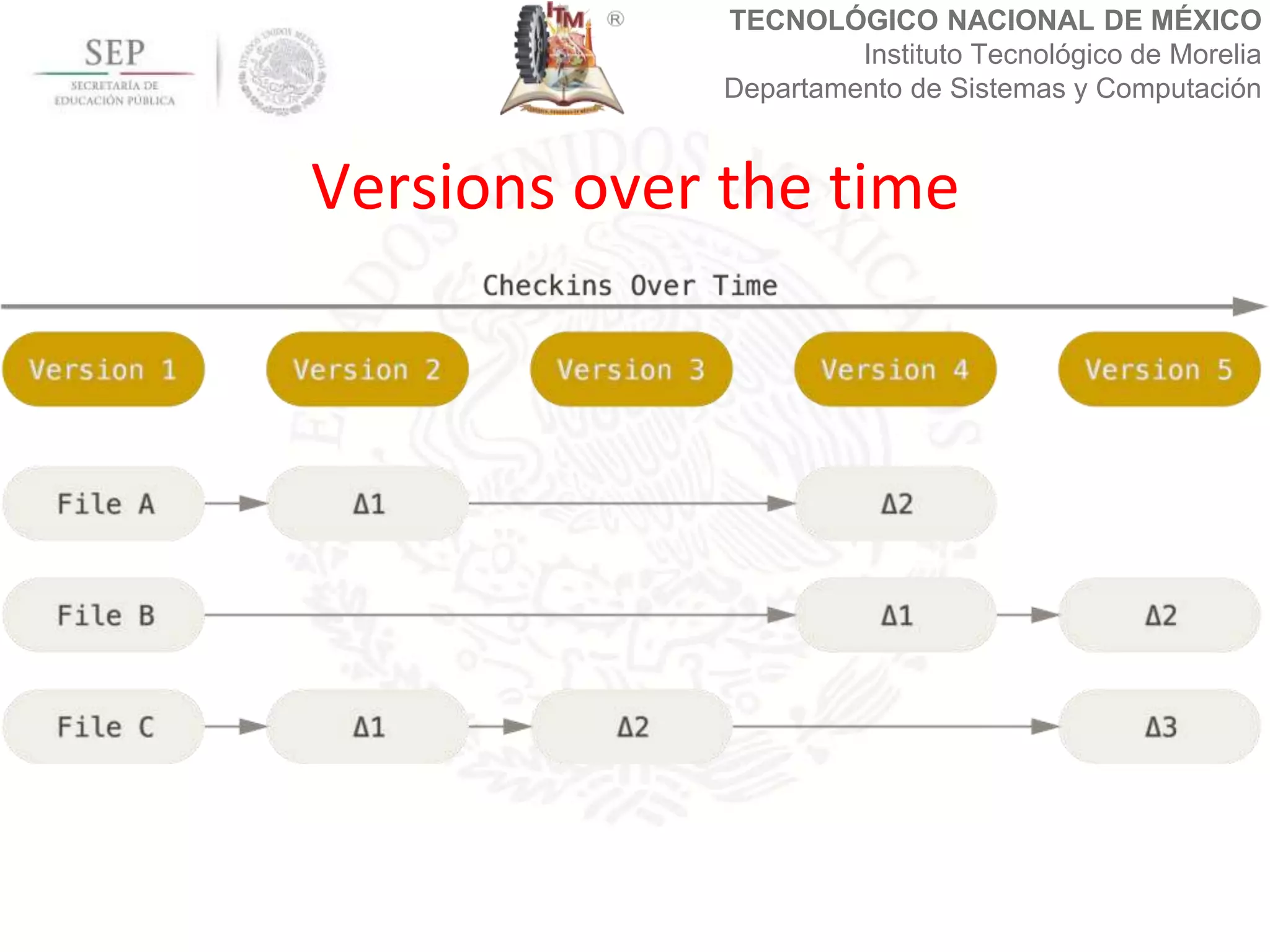
Versions over the time
TECNOLÓGICO NACIONAL DE MÉXICO
Instituto Tecnológico de Morelia
Departamento de Sistemas y Computación
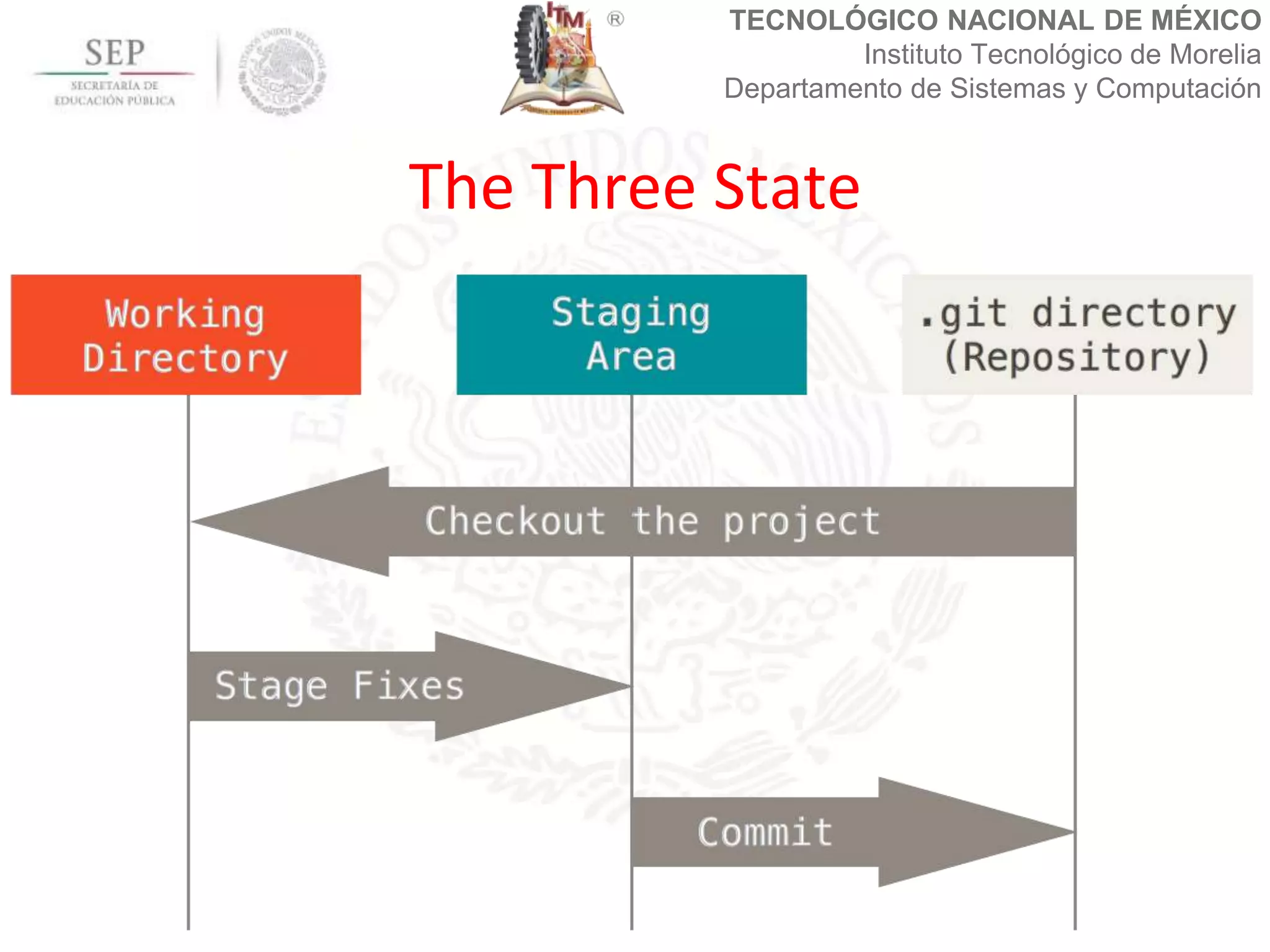
The Three State
TECNOLÓGICO NACIONAL DE MÉXICO
Instituto Tecnológico de Morelia
Departamento de Sistemas y Computación
Windows, Mac and Linux has installers
Additional in Linux you can use:
$sudo yum install git-all
$sudo apt-get install git-all
Installing Git
TECNOLÓGICO NACIONAL DE MÉXICO
Instituto Tecnológico de Morelia
Departamento de Sistemas y Computación
In Linux the main file configuration its
in: /etc/gitconfig
Personal configuration are in the home
directory of the users:
~/.gitconfig or ~/.config/git/config
Configuring Git
TECNOLÓGICO NACIONAL DE MÉXICO
Instituto Tecnológico de Morelia
Departamento de Sistemas y Computación
The first step is configuring your
personal information:
git config --global user.name "Juan
Carlos Olivares"
git config --global user.email
"jcolivares@itmorelia.edu.mx"
Configuring your identity
TECNOLÓGICO NACIONAL DE MÉXICO
Instituto Tecnológico de Morelia
Departamento de Sistemas y Computación
git config list
Shows all the configuration vars in local
and global way
git help <command>
shows the help for this command
Configuring your identity
TECNOLÓGICO NACIONAL DE MÉXICO
Instituto Tecnológico de Morelia
Departamento de Sistemas y Computación
In the shell, we neet to change to our
source directory. In this directory we
used the next command:
git init
For initializing the git repository.
Initializing a repository
TECNOLÓGICO NACIONAL DE MÉXICO
Instituto Tecnológico de Morelia
Departamento de Sistemas y Computación
If the directory has file or not, we can
check the statusof the repository with
the comand: git status
The command list if exist files which
where modified in the last review.
Iniatilizing the repository
TECNOLÓGICO NACIONAL DE MÉXICO
Instituto Tecnológico de Morelia
Departamento de Sistemas y Computación
The command: git status
Shows the files that are modified which
aren´t in the stage area.
We can adding these files with the
command: git add <filename>
Checking the status of repository
TECNOLÓGICO NACIONAL DE MÉXICO
Instituto Tecnológico de Morelia
Departamento de Sistemas y Computación
The commad: git add –A
Adds all the files in the staging area. Te
command: git diff <filename>
Shows the changes in this file.
Passing files to the stagin area
TECNOLÓGICO NACIONAL DE MÉXICO
Instituto Tecnológico de Morelia
Departamento de Sistemas y Computación
The last area is the commit of the changes,
we can do this with the following
command: git commit –m
“nameordescriptionofthechanges”
After this we obtain and ID for the commit.
This ID permits to return to the diferent
versions of the repository.
Passing to the version area
TECNOLÓGICO NACIONAL DE MÉXICO
Instituto Tecnológico de Morelia
Departamento de Sistemas y Computación
When te repository already exits we
can get from the server through a clone
process. We can apply this:
git clone <urltogitfile.git>
We need the credentials for the access
Clonning an Existing Repository
TECNOLÓGICO NACIONAL DE MÉXICO
Instituto Tecnológico de Morelia
Departamento de Sistemas y Computación
We can upload the commits to the remote
with the following commands: git push
origin master
Before this we need to configure the
remote repository with this command: git
remote add origin <urltoreposfile.git>
Upload changes in the remote repository
TECNOLÓGICO NACIONAL DE MÉXICO
Instituto Tecnológico de Morelia
Departamento de Sistemas y Computación
We can donwload to the local repositroy
the changes applied to the remote
repository with this command:
git pull origin master
This command is recomended before
working with the git repository.
Downloads changes in the repository
TECNOLÓGICO NACIONAL DE MÉXICO
Instituto Tecnológico de Morelia
Departamento de Sistemas y Computación
For doing the changes we need the
authentification. For https security you
must provide the user and password of
your git server account. For ssh we
need to generate a ssh key with the
command ssh-key.
Donwload/Upload changes
TECNOLÓGICO NACIONAL DE MÉXICO
Instituto Tecnológico de Morelia
Departamento de Sistemas y Computación
We need to put the public key in the
remote server.
Some of the most popular free git
remote repositories are github, gitlab,
bitbucket among others.
Download/Upload changes
TECNOLÓGICO NACIONAL DE MÉXICO
Instituto Tecnológico de Morelia
Departamento de Sistemas y Computación
We can discard the changes of any file
with: git checkout -- <filename>
In the file .gitignore we can add any
files or extension file that we want to
ignore.
Adittional commands
TECNOLÓGICO NACIONAL DE MÉXICO
Instituto Tecnológico de Morelia
Departamento de Sistemas y Computación
We can check the diferences bettwen
commits using: git diff
Aditional we can check the chances in
one file with: git diff <filename>
Aditional commands
TECNOLÓGICO NACIONAL DE MÉXICO
Instituto Tecnológico de Morelia
Departamento de Sistemas y Computación
We can delete file with: git rm
<filename>
We can move files with: git mv
<filename>
Adittional Commands
TECNOLÓGICO NACIONAL DE MÉXICO
Instituto Tecnológico de Morelia
Departamento de Sistemas y Computación
We can check the logs in git with the
command: git log
We can use git log --pretty=format:"%h
%s" –graph for a better support
Logs in Git
TECNOLÓGICO NACIONAL DE MÉXICO
Instituto Tecnológico de Morelia
Departamento de Sistemas y Computación
A tag is a special version in the
repository that contains some commits.
We can checks the tags with: git tag
We can add tags with: git tag -a v1.4 -m
"my version 1.4"
Tagging
TECNOLÓGICO NACIONAL DE MÉXICO
Instituto Tecnológico de Morelia
Departamento de Sistemas y Computación
We can check all the changes in the tag
with: git show <tag>
The push command doesn’t upload the
tags automatically. We can use: git
push origin <tag>
Tagging
TECNOLÓGICO NACIONAL DE MÉXICO
Instituto Tecnológico de Morelia
Departamento de Sistemas y Computación
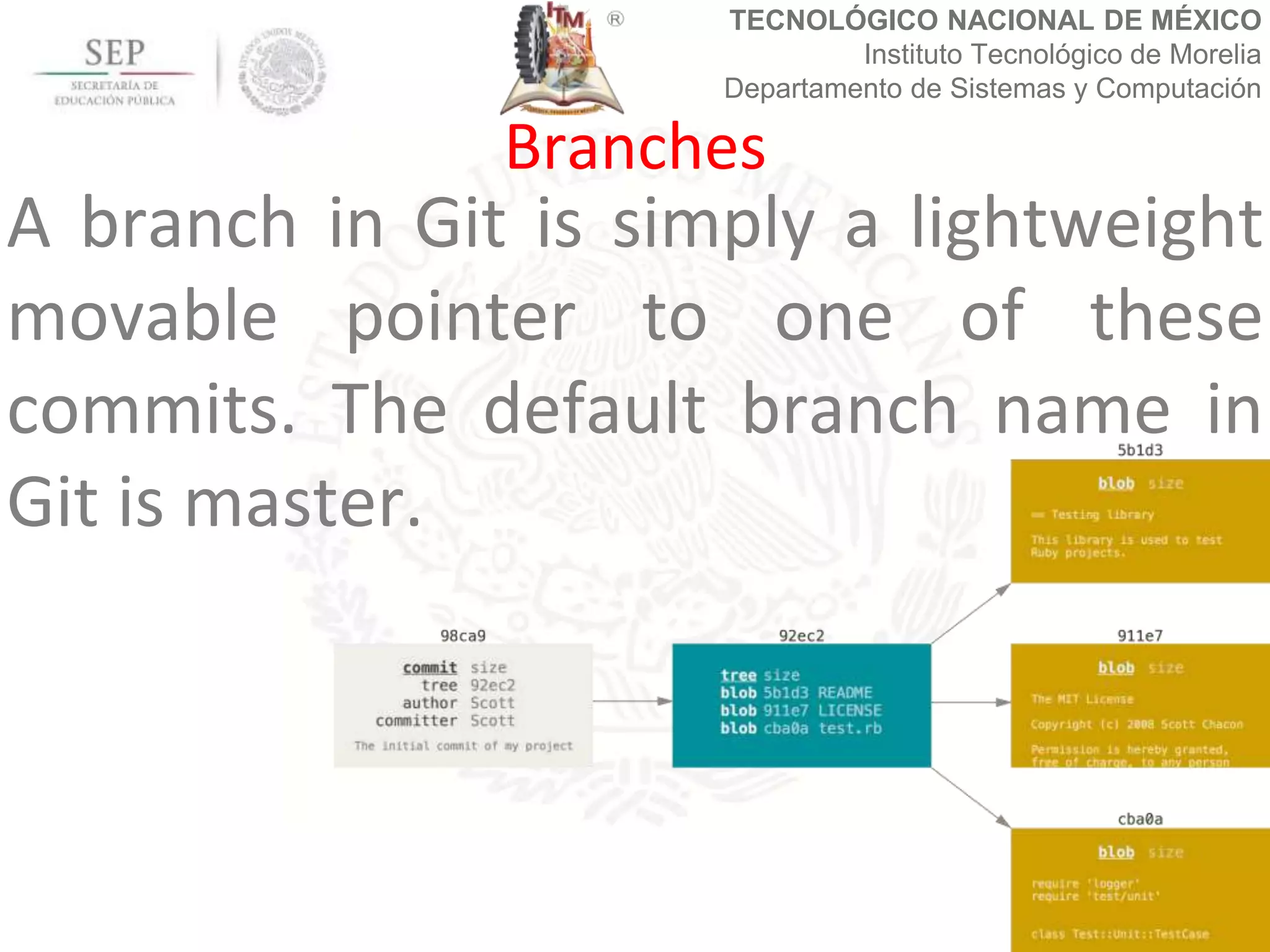
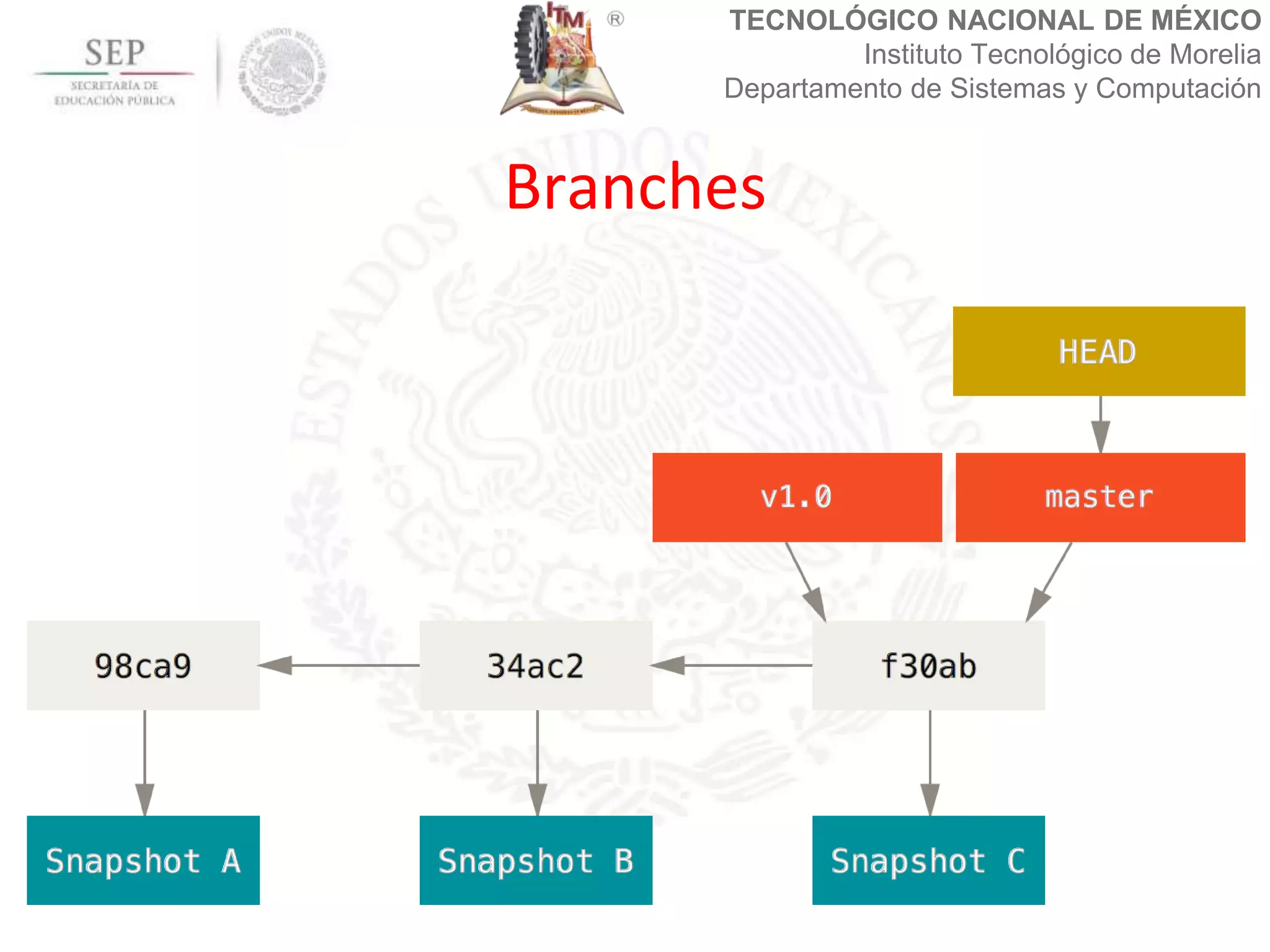
A branch in Git is simply a lightweight
movable pointer to one of these
commits. The default branch name in
Git is master.
Branches
TECNOLÓGICO NACIONAL DE MÉXICO
Instituto Tecnológico de Morelia
Departamento de Sistemas y Computación
Branches
TECNOLÓGICO NACIONAL DE MÉXICO
Instituto Tecnológico de Morelia
Departamento de Sistemas y Computación
Branches
TECNOLÓGICO NACIONAL DE MÉXICO
Instituto Tecnológico de Morelia
Departamento de Sistemas y Computación
We can add branches with: git
checkout –b <branch>
or git branch <branch>
We can change between branches
with: git checkout <branch>
Branches
TECNOLÓGICO NACIONAL DE MÉXICO
Instituto Tecnológico de Morelia
Departamento de Sistemas y Computación
We need to push the changes in the
remote repository with: git push origin
<branch>
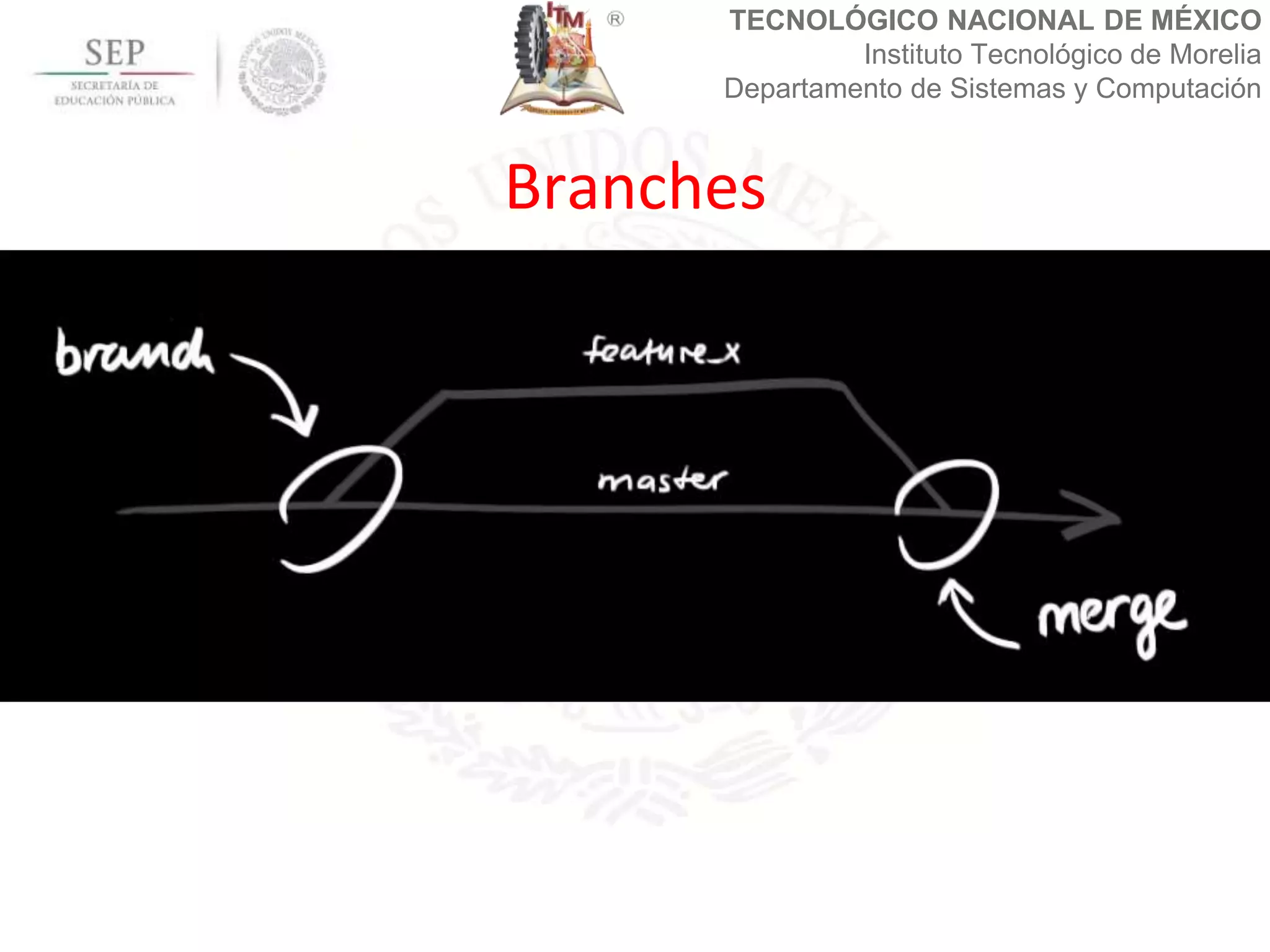
We can merge two branches in one
with: git merge <branch>
Branches
TECNOLÓGICO NACIONAL DE MÉXICO
Instituto Tecnológico de Morelia
Departamento de Sistemas y Computación
When we merge two branches, git
automatically resolve conflicts between
changes in the file. In the case when a
file is modified exactly in the sames line
we need to resolve conflict manually
though deleting the lines in conflict.
Merge branches
TECNOLÓGICO NACIONAL DE MÉXICO
Instituto Tecnológico de Morelia
Departamento de Sistemas y Computación
jcolivares@itmorelia.edu.mx
Questions?

Git

  • 1.
    TECNOLÓGICO NACIONAL DEMÉXICO Instituto Tecnológico de Morelia Departamento de Sistemas y Computación Git Tutorial Febraury, 2017 M.Sc. Juan Carlos Olivares Rojas
  • 2.
    TECNOLÓGICO NACIONAL DEMÉXICO Instituto Tecnológico de Morelia Departamento de Sistemas y Computación Git is a free and open source distributed version control system designed to handle everything from small to very large projects with speed and efficiency. https://git-scm.com/ Definition
  • 3.
    TECNOLÓGICO NACIONAL DEMÉXICO Instituto Tecnológico de Morelia Departamento de Sistemas y Computación What’s Git?
  • 4.
    TECNOLÓGICO NACIONAL DEMÉXICO Instituto Tecnológico de Morelia Departamento de Sistemas y Computación Versions over the time
  • 5.
    TECNOLÓGICO NACIONAL DEMÉXICO Instituto Tecnológico de Morelia Departamento de Sistemas y Computación The Three State
  • 6.
    TECNOLÓGICO NACIONAL DEMÉXICO Instituto Tecnológico de Morelia Departamento de Sistemas y Computación Windows, Mac and Linux has installers Additional in Linux you can use: $sudo yum install git-all $sudo apt-get install git-all Installing Git
  • 7.
    TECNOLÓGICO NACIONAL DEMÉXICO Instituto Tecnológico de Morelia Departamento de Sistemas y Computación In Linux the main file configuration its in: /etc/gitconfig Personal configuration are in the home directory of the users: ~/.gitconfig or ~/.config/git/config Configuring Git
  • 8.
    TECNOLÓGICO NACIONAL DEMÉXICO Instituto Tecnológico de Morelia Departamento de Sistemas y Computación The first step is configuring your personal information: git config --global user.name "Juan Carlos Olivares" git config --global user.email "jcolivares@itmorelia.edu.mx" Configuring your identity
  • 9.
    TECNOLÓGICO NACIONAL DEMÉXICO Instituto Tecnológico de Morelia Departamento de Sistemas y Computación git config list Shows all the configuration vars in local and global way git help <command> shows the help for this command Configuring your identity
  • 10.
    TECNOLÓGICO NACIONAL DEMÉXICO Instituto Tecnológico de Morelia Departamento de Sistemas y Computación In the shell, we neet to change to our source directory. In this directory we used the next command: git init For initializing the git repository. Initializing a repository
  • 11.
    TECNOLÓGICO NACIONAL DEMÉXICO Instituto Tecnológico de Morelia Departamento de Sistemas y Computación If the directory has file or not, we can check the statusof the repository with the comand: git status The command list if exist files which where modified in the last review. Iniatilizing the repository
  • 12.
    TECNOLÓGICO NACIONAL DEMÉXICO Instituto Tecnológico de Morelia Departamento de Sistemas y Computación The command: git status Shows the files that are modified which aren´t in the stage area. We can adding these files with the command: git add <filename> Checking the status of repository
  • 13.
    TECNOLÓGICO NACIONAL DEMÉXICO Instituto Tecnológico de Morelia Departamento de Sistemas y Computación The commad: git add –A Adds all the files in the staging area. Te command: git diff <filename> Shows the changes in this file. Passing files to the stagin area
  • 14.
    TECNOLÓGICO NACIONAL DEMÉXICO Instituto Tecnológico de Morelia Departamento de Sistemas y Computación The last area is the commit of the changes, we can do this with the following command: git commit –m “nameordescriptionofthechanges” After this we obtain and ID for the commit. This ID permits to return to the diferent versions of the repository. Passing to the version area
  • 15.
    TECNOLÓGICO NACIONAL DEMÉXICO Instituto Tecnológico de Morelia Departamento de Sistemas y Computación When te repository already exits we can get from the server through a clone process. We can apply this: git clone <urltogitfile.git> We need the credentials for the access Clonning an Existing Repository
  • 16.
    TECNOLÓGICO NACIONAL DEMÉXICO Instituto Tecnológico de Morelia Departamento de Sistemas y Computación We can upload the commits to the remote with the following commands: git push origin master Before this we need to configure the remote repository with this command: git remote add origin <urltoreposfile.git> Upload changes in the remote repository
  • 17.
    TECNOLÓGICO NACIONAL DEMÉXICO Instituto Tecnológico de Morelia Departamento de Sistemas y Computación We can donwload to the local repositroy the changes applied to the remote repository with this command: git pull origin master This command is recomended before working with the git repository. Downloads changes in the repository
  • 18.
    TECNOLÓGICO NACIONAL DEMÉXICO Instituto Tecnológico de Morelia Departamento de Sistemas y Computación For doing the changes we need the authentification. For https security you must provide the user and password of your git server account. For ssh we need to generate a ssh key with the command ssh-key. Donwload/Upload changes
  • 19.
    TECNOLÓGICO NACIONAL DEMÉXICO Instituto Tecnológico de Morelia Departamento de Sistemas y Computación We need to put the public key in the remote server. Some of the most popular free git remote repositories are github, gitlab, bitbucket among others. Download/Upload changes
  • 20.
    TECNOLÓGICO NACIONAL DEMÉXICO Instituto Tecnológico de Morelia Departamento de Sistemas y Computación We can discard the changes of any file with: git checkout -- <filename> In the file .gitignore we can add any files or extension file that we want to ignore. Adittional commands
  • 21.
    TECNOLÓGICO NACIONAL DEMÉXICO Instituto Tecnológico de Morelia Departamento de Sistemas y Computación We can check the diferences bettwen commits using: git diff Aditional we can check the chances in one file with: git diff <filename> Aditional commands
  • 22.
    TECNOLÓGICO NACIONAL DEMÉXICO Instituto Tecnológico de Morelia Departamento de Sistemas y Computación We can delete file with: git rm <filename> We can move files with: git mv <filename> Adittional Commands
  • 23.
    TECNOLÓGICO NACIONAL DEMÉXICO Instituto Tecnológico de Morelia Departamento de Sistemas y Computación We can check the logs in git with the command: git log We can use git log --pretty=format:"%h %s" –graph for a better support Logs in Git
  • 24.
    TECNOLÓGICO NACIONAL DEMÉXICO Instituto Tecnológico de Morelia Departamento de Sistemas y Computación A tag is a special version in the repository that contains some commits. We can checks the tags with: git tag We can add tags with: git tag -a v1.4 -m "my version 1.4" Tagging
  • 25.
    TECNOLÓGICO NACIONAL DEMÉXICO Instituto Tecnológico de Morelia Departamento de Sistemas y Computación We can check all the changes in the tag with: git show <tag> The push command doesn’t upload the tags automatically. We can use: git push origin <tag> Tagging
  • 26.
    TECNOLÓGICO NACIONAL DEMÉXICO Instituto Tecnológico de Morelia Departamento de Sistemas y Computación A branch in Git is simply a lightweight movable pointer to one of these commits. The default branch name in Git is master. Branches
  • 27.
    TECNOLÓGICO NACIONAL DEMÉXICO Instituto Tecnológico de Morelia Departamento de Sistemas y Computación Branches
  • 28.
    TECNOLÓGICO NACIONAL DEMÉXICO Instituto Tecnológico de Morelia Departamento de Sistemas y Computación Branches
  • 29.
    TECNOLÓGICO NACIONAL DEMÉXICO Instituto Tecnológico de Morelia Departamento de Sistemas y Computación We can add branches with: git checkout –b <branch> or git branch <branch> We can change between branches with: git checkout <branch> Branches
  • 30.
    TECNOLÓGICO NACIONAL DEMÉXICO Instituto Tecnológico de Morelia Departamento de Sistemas y Computación We need to push the changes in the remote repository with: git push origin <branch> We can merge two branches in one with: git merge <branch> Branches
  • 31.
    TECNOLÓGICO NACIONAL DEMÉXICO Instituto Tecnológico de Morelia Departamento de Sistemas y Computación When we merge two branches, git automatically resolve conflicts between changes in the file. In the case when a file is modified exactly in the sames line we need to resolve conflict manually though deleting the lines in conflict. Merge branches
  • 32.
    TECNOLÓGICO NACIONAL DEMÉXICO Instituto Tecnológico de Morelia Departamento de Sistemas y Computación jcolivares@itmorelia.edu.mx Questions?