GETTING YOUR HOTEL READY
FOR THE SHIFT TO GOOGLE ANALYTICS 4
Presented by: Lyles Armour
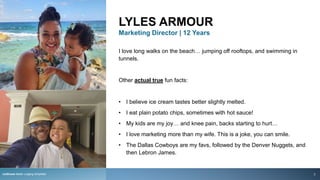
LYLES ARMOUR
Marketing Director | 12 Years
I love long walks on the beach… jumping off rooftops, and swimming in
tunnels.
Other actual true fun facts:
• I believe ice cream tastes better slightly melted.
• I eat plain potato chips, sometimes with hot sauce!
• My kids are my joy… and knee pain, backs starting to hurt…
• I love marketing more than my wife. This is a joke, you can smile.
• The Dallas Cowboys are my favs, followed by the Denver Nuggets, and
then Lebron James.
rezStream Better Lodging Simplified 2
WHAT’S ON TAP FOR TODAY
• About rezStream
• Getting Your Hotel Ready for the Shift to Google
Analytics 4
1. Why Google Analytics 4 (GA4) was created
2. Differences in Universal vs. GA4
3. Out-of-the-box reports GA4 provides
4. Custom reports that you might want to create
5. Things to do before July 2023
• Webinar Special Offer
rezStream Better Lodging Simplified
rezStream Better Lodging Simplified 3
ABOUT
rezStream Better Lodging Simplified
rezStream simplifies day-to-day operations and helps business
attract travelers with digital marketing, reservation software,
online booking engine, and web site design services
Since 2005 we’ve partnered with small to
medium-sized independent lodging properties in
the US.
Our goal is to work WITH our customers to create
easier ways for them to manage their businesses
and improve their ability to increase revenue.
A small company of 24 caring and passionate
individuals and hospitality professionals.
View ourselves as an extension of your team.
100 years of combined industry experience.
Suite of solutions focused on helping
independently-owned properties.
TEAM | CARE | KNOWLEDGE | PASSION | TRUST
4
WHY GOOGLE ANALYTICS
(GA4) WAS CREATED
The History of Google Analytics
rezStream Better Lodging Simplified
POLL QUESTION
Who is responsible for keeping your Google Analytics account up to date?
6
THE HISTORY
OF GOOGLE
ANALYTICS
1ST GENERATION
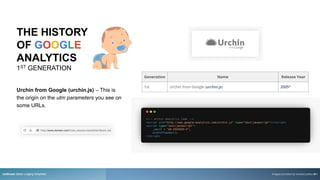
Urchin from Google (urchin.js) – This is
the origin on the utm parameters you see on
some URLs.
rezStream Better Lodging Simplified Images provided by onward.justia.com
7
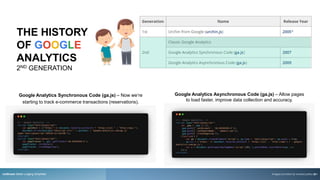
Google Analytics Synchronous Code (ga.js) – Now we’re
starting to track e-commerce transactions (reservations).
rezStream Better Lodging Simplified
Google Analytics Asynchronous Code (ga.js) – Allow pages
to load faster, improve data collection and accuracy.
Images provided by onward.justia.com
THE HISTORY
OF GOOGLE
ANALYTICS
2ND GENERATION
8
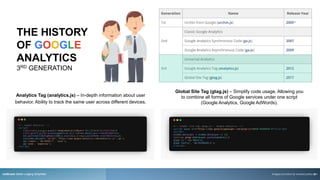
Analytics Tag (analytics.js) – In-depth information about user
behavior. Ability to track the same user across different devices.
rezStream Better Lodging Simplified
Global Site Tag (gtag.js) – Simplify code usage. Allowing you
to combine all forms of Google services under one script
(Google Analytics, Google AdWords).
Images provided by onward.justia.com
THE HISTORY
OF GOOGLE
ANALYTICS
3RD GENERATION
9
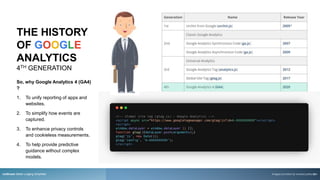
So, why Google Analytics 4 (GA4)
?
1. To unify reporting of apps and
websites.
2. To simplify how events are
captured.
3. To enhance privacy controls
and cookieless measurements.
4. To help provide predictive
guidance without complex
models.
rezStream Better Lodging Simplified Images provided by onward.justia.com
THE HISTORY
OF GOOGLE
ANALYTICS
4TH GENERATION
10
rezStream Better Lodging Simplified
POLL QUESTION
Have you made the switch to GA4?
11
DIFFERENCE BETWEEN
UNIVERSAL ANALYTICS & GA4
[UA  GA4] Universal Analytics versus Google Analytics 4 data
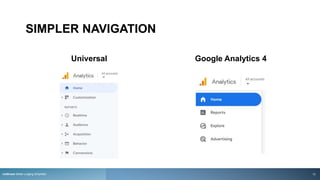
SIMPLER NAVIGATION
Universal Google Analytics 4
rezStream Better Lodging Simplified 13
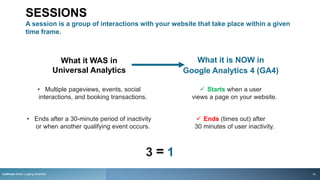
SESSIONS
A session is a group of interactions with your website that take place within a given
time frame.
rezStream Better Lodging Simplified
What it WAS in
Universal Analytics
What it is NOW in
Google Analytics 4 (GA4)
 Starts when a user
views a page on your website.
 Ends (times out) after
30 minutes of user inactivity.
1
• Multiple pageviews, events, social
interactions, and booking transactions.
• Ends after a 30-minute period of inactivity
or when another qualifying event occurs.
3 =
14
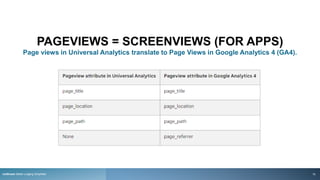
PAGEVIEWS = SCREENVIEWS (FOR APPS)
Page views in Universal Analytics translate to Page Views in Google Analytics 4 (GA4).
rezStream Better Lodging Simplified 15
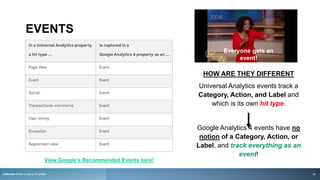
EVENTS
HOW ARE THEY DIFFERENT
Universal Analytics events track a
Category, Action, and Label and
which is its own hit type.
Google Analytics 4 events have no
notion of a Category, Action, or
Label, and track everything as an
event!
View Google’s Recommended Events here!
Everyone gets an
event!
rezStream Better Lodging Simplified 16
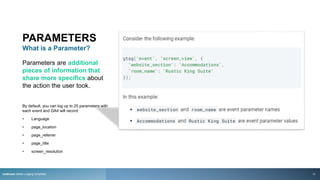
PARAMETERS
What is a Parameter?
Parameters are additional
pieces of information that
share more specifics about
the action the user took.
By default, you can log up to 25 parameters with
each event and GA4 will record:
• Language
• page_location
• page_referrer
• page_title
• screen_resolution
rezStream Better Lodging Simplified 17
rezStream Better Lodging Simplified 18
And for those
looking for their
bounce rate…
rezStream Better Lodging Simplified
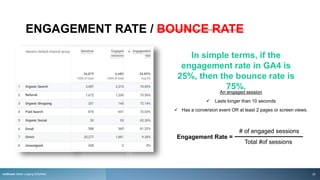
ENGAGEMENT RATE / BOUNCE RATE
An engaged session
 Lasts longer than 10 seconds
 Has a conversion event OR at least 2 pages or screen views.
Engagement Rate =
# of engaged sessions
Total #of sessions
In simple terms, if the
engagement rate in GA4 is
25%, then the bounce rate is
75%.
rezStream Better Lodging Simplified 20
CONVERSION TRACKING
rezStream Better Lodging Simplified
In GA4, a conversion is any interaction or occurrence that's valuable to your property.
For example, a traveler booking a room, submitting a form, or
subscribing to your newsletter are examples of common conversions.
21
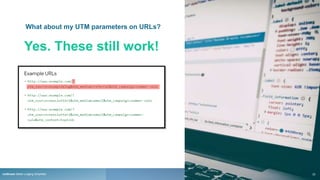
What about my UTM parameters on URLs?
Yes. These still work!
rezStream Better Lodging Simplified 22
rezStream Better Lodging Simplified
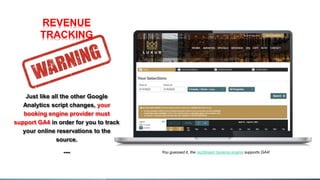
You guessed it, the rezStream booking engine supports GA4!
REVENUE
TRACKING
Just like all the other Google
Analytics script changes, your
booking engine provider must
support GA4 in order for you to track
your online reservations to the
source.
---
23
REPORTS
[GA4] Understanding Google Analytics Reports
OUT-OF-THE-BOX REPORTS
rezStream Better Lodging Simplified 25
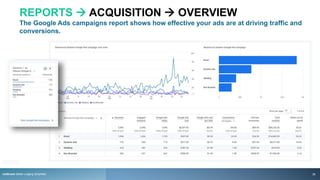
REPORTS  ACQUISITION  OVERVIEW
The Google Ads campaigns report shows how effective your ads are at driving traffic and
conversions.
rezStream Better Lodging Simplified 26
REPORTS  ACQUISITION  USER
Shows how new users find your website for the first time.
rezStream Better Lodging Simplified 27
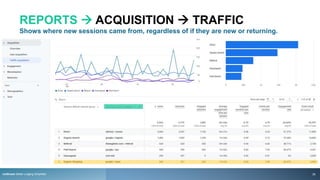
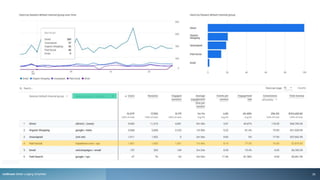
REPORTS  ACQUISITION  TRAFFIC
Shows where new sessions came from, regardless of if they are new or returning.
rezStream Better Lodging Simplified 28
rezStream Better Lodging Simplified 29
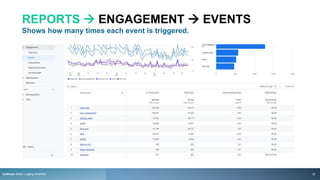
REPORTS  ENGAGEMENT  EVENTS
Shows how many times each event is triggered.
rezStream Better Lodging Simplified 30
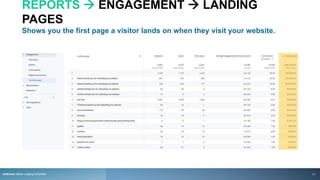
REPORTS  ENGAGEMENT  LANDING
PAGES
Shows you the first page a visitor lands on when they visit your website.
rezStream Better Lodging Simplified 31
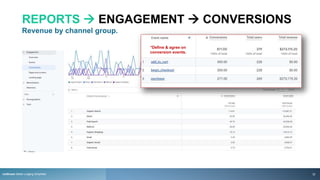
REPORTS  ENGAGEMENT  CONVERSIONS
Revenue by channel group.
*Define & agree on
conversion events.
rezStream Better Lodging Simplified 32
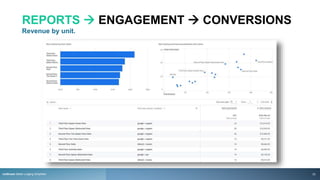
REPORTS  ENGAGEMENT  CONVERSIONS
Revenue by unit.
rezStream Better Lodging Simplified 33
rezStream Better Lodging Simplified
POLL QUESTION
Is anybody else feeling this way?
34
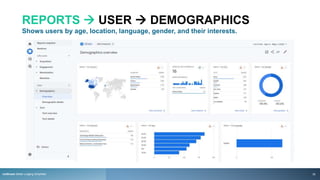
REPORTS  USER  DEMOGRAPHICS
Shows users by age, location, language, gender, and their interests.
rezStream Better Lodging Simplified 35
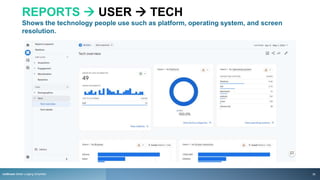
REPORTS  USER  TECH
Shows the technology people use such as platform, operating system, and screen
resolution.
rezStream Better Lodging Simplified 36
GO BEYOND
STANDARD REPORTS
rezStream Better Lodging Simplified 37
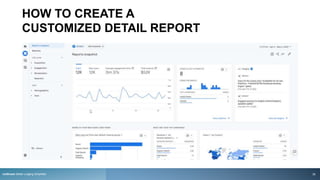
HOW TO CREATE A
CUSTOMIZED DETAIL REPORT
rezStream Better Lodging Simplified 38
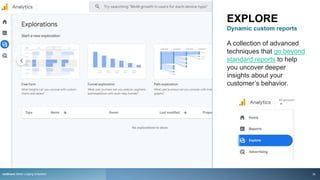
EXPLORE
Dynamic custom reports
A collection of advanced
techniques that go beyond
standard reports to help
you uncover deeper
insights about your
customer’s behavior.
rezStream Better Lodging Simplified 39
rezStream Better Lodging Simplified 40
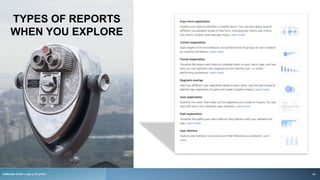
TYPES OF REPORTS
WHEN YOU EXPLORE
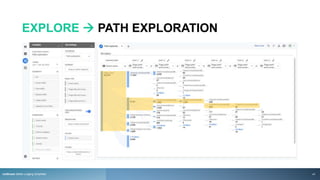
EXPLORE  PATH EXPLORATION
rezStream Better Lodging Simplified 41
EXPLORE  SEGMENT OVERLAP
rezStream Better Lodging Simplified 42
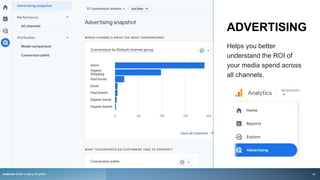
ADVERTISING
Helps you better
understand the ROI of
your media spend across
all channels.
rezStream Better Lodging Simplified 43
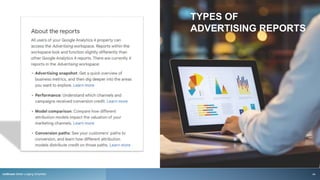
TYPES OF
ADVERTISING REPORTS
rezStream Better Lodging Simplified 44
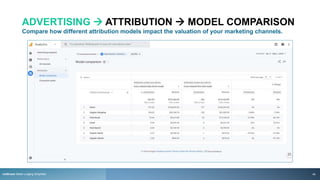
ADVERTISING  ATTRIBUTION  MODEL COMPARISON
Compare how different attribution models impact the valuation of your marketing channels.
rezStream Better Lodging Simplified 45
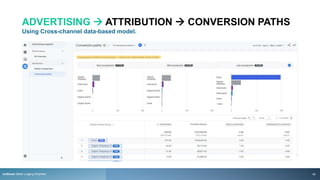
ADVERTISING  ATTRIBUTION  CONVERSION PATHS
Using Cross-channel data-based model.
rezStream Better Lodging Simplified 46
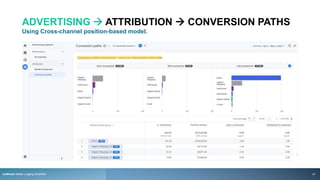
ADVERTISING  ATTRIBUTION  CONVERSION PATHS
Using Cross-channel position-based model.
rezStream Better Lodging Simplified 47
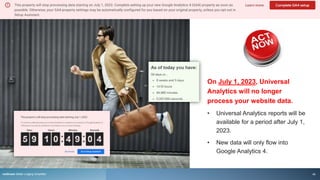
On July 1, 2023, Universal
Analytics will no longer
process your website data.
• Universal Analytics reports will be
available for a period after July 1,
2023.
• New data will only flow into
Google Analytics 4.
rezStream Better Lodging Simplified 48
OTHER THINGS TO LOOK OUT FOR…
[UA→GA4] UNIVERSAL ANALYTICS VERSUS GOOGLE ANALYTICS 4 DATA
rezStream Better Lodging Simplified
Data Changes
• In Universal Analytics, a new campaign will start a new session
regardless of activity. In Google Analytics 4, a new campaign does
not begin a new session. This may lead to lower session counts
in your Google Analytics 4 property.
• Late hits (aren't sent immediately) may also be a factor. In
Universal Analytics, hits are processed if they arrive within 4 hours
of the close of the preceding day. In Google Analytics 4, events are
processed if they arrive up to 72 hours late. Because Google
Analytics 4 events are processed across a wider time range,
you may see higher session counts in your Google Analytics 4
property.
• Logged Google Analytics 4 events are uploaded automatically
when iOS apps are backgrounded. This is not the case in Universal
Analytics. As a result, iOS-related metrics may be significantly
higher in your Google Analytics 4 reports.
Data Thresholds
49
1. Setup GA4 account alongside Universal account
• Ensure revenue tracking is in place. Again, your PMS
provider determines if this is possible.
• Link your accounts; Google Search Console and Google
Ads for additional reporting.
• Use the Setup Assistance built-in Google Analytics.
2. Export Universal data while you can
• Think about pulling from 2019 due to the crazy years
we’ve had to get as close to an apples-to-apples
comparison.
3. Review your reports regularly
• Consult with your team, review reports, and outline what
you need to build to make better decisions.
4. Know what “conversions” mean to your property
• A room being booked, gift card purchased, newsletter
signup, etc.
rezStream Better Lodging Simplified
THINGS TO DO BEFORE
JULY 1, 2023
50
CHECK OUT OUR
EDUCATION
CENTER
rezStream Better Lodging Simplified
For upcoming and past webinars, industry
blogs, and downloadable resource guides.
www.rezStream.com/education/
51
WEBINAR SPECIAL
OFFER
DIGITAL MARKETING
rezStream Better Lodging Simplified
20% off Elite Level Marketing Plans
Work with our team and build a custom robust strategy to capture more guests
by incorporating your budget, goals, timeline, tactics, and more.
Tactics to select from include:
Search Engine Optimization (SEO)
Email Marketing
Metasearch
Pay-Per-Click (PPC)
Social Media
Blogging
Booking Abandonment
Remarketing
Offer Ends: June 2023
52
Get Started with a Free Marketing Analysis
THANK YOU
Please forward all questions
regarding this webinars to:
• Sales@rezStream.com
• (303) 872-0220
rezStream Better Lodging Simplified
Schedule a Demo
53

Getting Your Hotel Ready for the Shift to Google Analytics 4.pptx

  • 1.
    GETTING YOUR HOTELREADY FOR THE SHIFT TO GOOGLE ANALYTICS 4 Presented by: Lyles Armour
  • 2.
    LYLES ARMOUR Marketing Director| 12 Years I love long walks on the beach… jumping off rooftops, and swimming in tunnels. Other actual true fun facts: • I believe ice cream tastes better slightly melted. • I eat plain potato chips, sometimes with hot sauce! • My kids are my joy… and knee pain, backs starting to hurt… • I love marketing more than my wife. This is a joke, you can smile. • The Dallas Cowboys are my favs, followed by the Denver Nuggets, and then Lebron James. rezStream Better Lodging Simplified 2
  • 3.
    WHAT’S ON TAPFOR TODAY • About rezStream • Getting Your Hotel Ready for the Shift to Google Analytics 4 1. Why Google Analytics 4 (GA4) was created 2. Differences in Universal vs. GA4 3. Out-of-the-box reports GA4 provides 4. Custom reports that you might want to create 5. Things to do before July 2023 • Webinar Special Offer rezStream Better Lodging Simplified rezStream Better Lodging Simplified 3
  • 4.
    ABOUT rezStream Better LodgingSimplified rezStream simplifies day-to-day operations and helps business attract travelers with digital marketing, reservation software, online booking engine, and web site design services Since 2005 we’ve partnered with small to medium-sized independent lodging properties in the US. Our goal is to work WITH our customers to create easier ways for them to manage their businesses and improve their ability to increase revenue. A small company of 24 caring and passionate individuals and hospitality professionals. View ourselves as an extension of your team. 100 years of combined industry experience. Suite of solutions focused on helping independently-owned properties. TEAM | CARE | KNOWLEDGE | PASSION | TRUST 4
  • 5.
    WHY GOOGLE ANALYTICS (GA4)WAS CREATED The History of Google Analytics
  • 6.
    rezStream Better LodgingSimplified POLL QUESTION Who is responsible for keeping your Google Analytics account up to date? 6
  • 7.
    THE HISTORY OF GOOGLE ANALYTICS 1STGENERATION Urchin from Google (urchin.js) – This is the origin on the utm parameters you see on some URLs. rezStream Better Lodging Simplified Images provided by onward.justia.com 7
  • 8.
    Google Analytics SynchronousCode (ga.js) – Now we’re starting to track e-commerce transactions (reservations). rezStream Better Lodging Simplified Google Analytics Asynchronous Code (ga.js) – Allow pages to load faster, improve data collection and accuracy. Images provided by onward.justia.com THE HISTORY OF GOOGLE ANALYTICS 2ND GENERATION 8
  • 9.
    Analytics Tag (analytics.js)– In-depth information about user behavior. Ability to track the same user across different devices. rezStream Better Lodging Simplified Global Site Tag (gtag.js) – Simplify code usage. Allowing you to combine all forms of Google services under one script (Google Analytics, Google AdWords). Images provided by onward.justia.com THE HISTORY OF GOOGLE ANALYTICS 3RD GENERATION 9
  • 10.
    So, why GoogleAnalytics 4 (GA4) ? 1. To unify reporting of apps and websites. 2. To simplify how events are captured. 3. To enhance privacy controls and cookieless measurements. 4. To help provide predictive guidance without complex models. rezStream Better Lodging Simplified Images provided by onward.justia.com THE HISTORY OF GOOGLE ANALYTICS 4TH GENERATION 10
  • 11.
    rezStream Better LodgingSimplified POLL QUESTION Have you made the switch to GA4? 11
  • 12.
    DIFFERENCE BETWEEN UNIVERSAL ANALYTICS& GA4 [UA  GA4] Universal Analytics versus Google Analytics 4 data
  • 13.
    SIMPLER NAVIGATION Universal GoogleAnalytics 4 rezStream Better Lodging Simplified 13
  • 14.
    SESSIONS A session isa group of interactions with your website that take place within a given time frame. rezStream Better Lodging Simplified What it WAS in Universal Analytics What it is NOW in Google Analytics 4 (GA4)  Starts when a user views a page on your website.  Ends (times out) after 30 minutes of user inactivity. 1 • Multiple pageviews, events, social interactions, and booking transactions. • Ends after a 30-minute period of inactivity or when another qualifying event occurs. 3 = 14
  • 15.
    PAGEVIEWS = SCREENVIEWS(FOR APPS) Page views in Universal Analytics translate to Page Views in Google Analytics 4 (GA4). rezStream Better Lodging Simplified 15
  • 16.
    EVENTS HOW ARE THEYDIFFERENT Universal Analytics events track a Category, Action, and Label and which is its own hit type. Google Analytics 4 events have no notion of a Category, Action, or Label, and track everything as an event! View Google’s Recommended Events here! Everyone gets an event! rezStream Better Lodging Simplified 16
  • 17.
    PARAMETERS What is aParameter? Parameters are additional pieces of information that share more specifics about the action the user took. By default, you can log up to 25 parameters with each event and GA4 will record: • Language • page_location • page_referrer • page_title • screen_resolution rezStream Better Lodging Simplified 17
  • 18.
  • 19.
    And for those lookingfor their bounce rate… rezStream Better Lodging Simplified
  • 20.
    ENGAGEMENT RATE /BOUNCE RATE An engaged session  Lasts longer than 10 seconds  Has a conversion event OR at least 2 pages or screen views. Engagement Rate = # of engaged sessions Total #of sessions In simple terms, if the engagement rate in GA4 is 25%, then the bounce rate is 75%. rezStream Better Lodging Simplified 20
  • 21.
    CONVERSION TRACKING rezStream BetterLodging Simplified In GA4, a conversion is any interaction or occurrence that's valuable to your property. For example, a traveler booking a room, submitting a form, or subscribing to your newsletter are examples of common conversions. 21
  • 22.
    What about myUTM parameters on URLs? Yes. These still work! rezStream Better Lodging Simplified 22
  • 23.
    rezStream Better LodgingSimplified You guessed it, the rezStream booking engine supports GA4! REVENUE TRACKING Just like all the other Google Analytics script changes, your booking engine provider must support GA4 in order for you to track your online reservations to the source. --- 23
  • 24.
  • 25.
  • 26.
    REPORTS  ACQUISITION OVERVIEW The Google Ads campaigns report shows how effective your ads are at driving traffic and conversions. rezStream Better Lodging Simplified 26
  • 27.
    REPORTS  ACQUISITION USER Shows how new users find your website for the first time. rezStream Better Lodging Simplified 27
  • 28.
    REPORTS  ACQUISITION TRAFFIC Shows where new sessions came from, regardless of if they are new or returning. rezStream Better Lodging Simplified 28
  • 29.
  • 30.
    REPORTS  ENGAGEMENT EVENTS Shows how many times each event is triggered. rezStream Better Lodging Simplified 30
  • 31.
    REPORTS  ENGAGEMENT LANDING PAGES Shows you the first page a visitor lands on when they visit your website. rezStream Better Lodging Simplified 31
  • 32.
    REPORTS  ENGAGEMENT CONVERSIONS Revenue by channel group. *Define & agree on conversion events. rezStream Better Lodging Simplified 32
  • 33.
    REPORTS  ENGAGEMENT CONVERSIONS Revenue by unit. rezStream Better Lodging Simplified 33
  • 34.
    rezStream Better LodgingSimplified POLL QUESTION Is anybody else feeling this way? 34
  • 35.
    REPORTS  USER DEMOGRAPHICS Shows users by age, location, language, gender, and their interests. rezStream Better Lodging Simplified 35
  • 36.
    REPORTS  USER TECH Shows the technology people use such as platform, operating system, and screen resolution. rezStream Better Lodging Simplified 36
  • 37.
    GO BEYOND STANDARD REPORTS rezStreamBetter Lodging Simplified 37
  • 38.
    HOW TO CREATEA CUSTOMIZED DETAIL REPORT rezStream Better Lodging Simplified 38
  • 39.
    EXPLORE Dynamic custom reports Acollection of advanced techniques that go beyond standard reports to help you uncover deeper insights about your customer’s behavior. rezStream Better Lodging Simplified 39
  • 40.
    rezStream Better LodgingSimplified 40 TYPES OF REPORTS WHEN YOU EXPLORE
  • 41.
    EXPLORE  PATHEXPLORATION rezStream Better Lodging Simplified 41
  • 42.
    EXPLORE  SEGMENTOVERLAP rezStream Better Lodging Simplified 42
  • 43.
    ADVERTISING Helps you better understandthe ROI of your media spend across all channels. rezStream Better Lodging Simplified 43
  • 44.
    TYPES OF ADVERTISING REPORTS rezStreamBetter Lodging Simplified 44
  • 45.
    ADVERTISING  ATTRIBUTION MODEL COMPARISON Compare how different attribution models impact the valuation of your marketing channels. rezStream Better Lodging Simplified 45
  • 46.
    ADVERTISING  ATTRIBUTION CONVERSION PATHS Using Cross-channel data-based model. rezStream Better Lodging Simplified 46
  • 47.
    ADVERTISING  ATTRIBUTION CONVERSION PATHS Using Cross-channel position-based model. rezStream Better Lodging Simplified 47
  • 48.
    On July 1,2023, Universal Analytics will no longer process your website data. • Universal Analytics reports will be available for a period after July 1, 2023. • New data will only flow into Google Analytics 4. rezStream Better Lodging Simplified 48
  • 49.
    OTHER THINGS TOLOOK OUT FOR… [UA→GA4] UNIVERSAL ANALYTICS VERSUS GOOGLE ANALYTICS 4 DATA rezStream Better Lodging Simplified Data Changes • In Universal Analytics, a new campaign will start a new session regardless of activity. In Google Analytics 4, a new campaign does not begin a new session. This may lead to lower session counts in your Google Analytics 4 property. • Late hits (aren't sent immediately) may also be a factor. In Universal Analytics, hits are processed if they arrive within 4 hours of the close of the preceding day. In Google Analytics 4, events are processed if they arrive up to 72 hours late. Because Google Analytics 4 events are processed across a wider time range, you may see higher session counts in your Google Analytics 4 property. • Logged Google Analytics 4 events are uploaded automatically when iOS apps are backgrounded. This is not the case in Universal Analytics. As a result, iOS-related metrics may be significantly higher in your Google Analytics 4 reports. Data Thresholds 49
  • 50.
    1. Setup GA4account alongside Universal account • Ensure revenue tracking is in place. Again, your PMS provider determines if this is possible. • Link your accounts; Google Search Console and Google Ads for additional reporting. • Use the Setup Assistance built-in Google Analytics. 2. Export Universal data while you can • Think about pulling from 2019 due to the crazy years we’ve had to get as close to an apples-to-apples comparison. 3. Review your reports regularly • Consult with your team, review reports, and outline what you need to build to make better decisions. 4. Know what “conversions” mean to your property • A room being booked, gift card purchased, newsletter signup, etc. rezStream Better Lodging Simplified THINGS TO DO BEFORE JULY 1, 2023 50
  • 51.
    CHECK OUT OUR EDUCATION CENTER rezStreamBetter Lodging Simplified For upcoming and past webinars, industry blogs, and downloadable resource guides. www.rezStream.com/education/ 51
  • 52.
    WEBINAR SPECIAL OFFER DIGITAL MARKETING rezStreamBetter Lodging Simplified 20% off Elite Level Marketing Plans Work with our team and build a custom robust strategy to capture more guests by incorporating your budget, goals, timeline, tactics, and more. Tactics to select from include: Search Engine Optimization (SEO) Email Marketing Metasearch Pay-Per-Click (PPC) Social Media Blogging Booking Abandonment Remarketing Offer Ends: June 2023 52 Get Started with a Free Marketing Analysis
  • 53.
    THANK YOU Please forwardall questions regarding this webinars to: • Sales@rezStream.com • (303) 872-0220 rezStream Better Lodging Simplified Schedule a Demo 53

Editor's Notes

  • #4 So today’s topic is Google Analytics 4 … yay reports… data… And, why this can be a dry topic, I’ve tried to sprinkle some moments to hopefully put a smile on your face along the way. So for today, here’s what’s on tap as I guide you through today’s session. [Read slide]
  • #5 [Read Slide]
  • #6 #1 Why Google Analytics 4 (GA4) was created
  • #7 Before the story, let’s take a quick poll… who is responsible for keeping your Google Analytics account up to date? Answers Me, that’s why I am here rezStream’s marketing team I hired an agency, not named rezStream Wait, someone, is supposed to keep it updated
  • #8 https://onward.justia.com/history-of-google-analytics/ Aweee… look at the cute baby! Urchin began under the company Quantified Systems which was founded in 1995  in 2005, rebranded to “Urchin from Google”, and became a free service. discontinued the product in 2012.
  • #9 https://onward.justia.com/history-of-google-analytics/ Baby boy is growing up... 2007, ga.js. The benefits were new tracking functionality, Track e-commerce transactions in a more readable way and offering more control over tracking services.
  • #10 https://onward.justia.com/history-of-google-analytics/ By 2012 the world has truly become data obsessed, and Universal Analytics offered new tracking codes for websites and tools that gave more in-depth information about user behavior in addition to various back-end improvements
  • #11 https://onward.justia.com/history-of-google-analytics/ Other than Google changing things just because here are the reason to get excited about GA4.
  • #12 Before we move on to the difference between UA and GA4, let’s take another poll. Who is responsible for keeping your Google Analytics account up to date? Answers Yes, just want to see if I missed anything. No, hope it isn’t too late! Not sure, how do I find out? I believe rezStream took care of this for me.
  • #13 #2 Differences in Universal vs. GA4
  • #15 Example… Say Joe, arrives on your site, in UA it starts counting from that moment. If 30 minutes pass without any kind of interaction from Joe, the session ends. However, every time Joe interacts with an element (like an event, social interaction, or a new page), UA resets the expiration time by adding an additional 30 minutes from the time of that interaction. Now in GA, its one continuous flow and regardless of what Joe does (engages with an event or goes to a new page) it all still counts as the same session. ONLY after 30-mins does this session end, and a new one could start Joe. So, if Joe comes back to your website in 29 mins and clicks back to your specials page (after being distracted with kids), it will count as the same session. Sources: https://support.google.com/analytics/answer/9964640 https://support.google.com/analytics/answer/2731565
  • #17 [Read Slide] In GA4 there are Types of events Automatically collected events are events that are collected by default when you set up Google Analytics on your website or app. Enhanced measurement events are events that are collected when you set up Google Analytics on your website or app and enhanced measurement is enabled. Enhanced events include page views, scroll, outbound link click, site search, video engagement, file download and form interactions. You must implement the following types of events in order to see them in Analytics: Recommended events are events that you implement, but that have predefined names and parameters. These events unlock existing and future reporting capabilities. Custom events are events that you define. Make sure you only create custom events when no other events work for your use case. Custom events don't show up in most standard reports so you need to set up custom reports or explorations for meaningful analysis. Sources https://support.google.com/analytics/answer/9322688
  • #18 So Events no longer track hit types, but do allow for you to send over parameters! Sources: https://developers.google.com/analytics/devguides/collection/ga4/event-parameters?client_type=gtag https://stuifbergen.com/2022/01/making-sense-of-event-parameters-in-ga4/
  • #19 So, Parameters are basically like a “Category, Action, and Label” but not …. https://developers.google.com/analytics/devguides/collection/ga4/event-parameters?client_type=gtag
  • #20 Tell your house keepers they won’t fine them under the sheets.
  • #21 The HIGHER THE ENGAGEMENT RATE the better your reach is with your target audience. What does it tell us? High engagement rate can lead to increased conversion rates, such as more sign-ups, reservations, or other desired actions (planning guide downloads). Engaged visitors find your content valuable and are interested in what you offer. In other words, how happy does your website make them? Low engagement rates provide opportunities to identify areas for improvement. Are you providing valuable information and meeting expectations? Sources https://support.google.com/analytics/answer/12195621?hl=en https://www.dataflo.io/metricbase/engagement-rate-in-google-analytics-4
  • #22 So, anytime you want to record a conversion, simply mark an event that measures the interaction as a conversion. Purchase a gift certificate Downloads an itinerary guide Submits a wedding RFP
  • #23 UTMs are for tracking data on traffic coming to your website or landing page from external sources (like your social profiles), directory listings, GMB profile, etc.…
  • #24 The reports we’ll be reviewing will show revenue numbers. It is important to note that your WEBSITE and BE/PMS must support GA4 in order for you to have the ability to track revenue.
  • #25 #3 Out-of-the-box reports GA4 provides
  • #26 Before we jump into the reports, let me remind you of a few things: Reports to monitor traffic, investigate data, and understand your users and their activity. Once Analytics starts to receive data, the data appears in the Realtime report and then in your other reports shortly after. Buckle up everyone, it’s going to be a long ride.
  • #27 Source: https://support.google.com/analytics/answer/12930957?hl=en
  • #35 Like he’s just going to keep sharing screenshots of reports…? Answers Yup, glad someone said it. Do I have to answer… No, this is great, keep going!
  • #38 What about #4 Custom reports? Let’s take a quick look…
  • #39 Graphic for creating a Custom Report in GA. Source: https://support.google.com/analytics/answer/10445879
  • #40 Go further with customer reports using the build in Workspaces GA4 has built-in to is platform. When you want to explore data in more detail, you can use explorations to: quickly perform ad hoc queries easily configure and switch between techniques sort, refactor, and drill down into the data focus on the most relevant data by using filters and segments create segments and audiences share your explorations with other users of the same Google Analytics property export the exploration data for use in other tools Source: https://support.google.com/analytics/answer/7579450
  • #42 Let’s take a look an example… In this example you can see I highlighted a path… Homepage  BE Search  BE Select  BE Confirm  BE Thank You In just this example and path alone, this property is seeing a 1402/9161 = 15% conversation rate homepage to BE, Step 1 BE Search 50/1402 = 3.56% conversion rate from, Step 1 BE Search  Step 4 BE Thank You While this is a snapshot of just one customer journey it shows you in a clear way what folks are doing on your site and how they are converting. The conversion rate for a BE should be 3%+ (once the enter they should never leave). Hopefully you’re using booking abandonment tools to recapture those folks falling out of the BE and push offers to them down the road. Source: https://hoteltechreport.com/news/we-need-to-talk-about-conversion https://www.hotel-spider.com/en/insights/optimizing_hotel_booking_engine
  • #43 Another report, showing you overlap of segments. Source: https://support.google.com/analytics/answer/9304353
  • #44 The new section known as the “Advertising” workspace, provides a deeper understanding of the “guest journey”. The Advertising snapshot report allows you to quickly check your business metrics and then dig deeper into the areas you want to explore.  Your GA4 account must be linked to Google Ads in order to access these additional reports. Source: https://support.google.com/analytics/answer/10607798
  • #45 Use these reports to answer questions like: What roles did referrals, searches, and ads play in conversions? How much time passed between a customer's initial interest and their reservation? What are the most common paths customers take leading up to completing a booking? Source: https://support.google.com/analytics/answer/10607798
  • #46 An attribution model is the rule, or set of rules, that determines how credit for sales and conversions is assigned to touchpoints in conversion paths. Learn more about the available attribution models.
  • #47 The top of the data visualization shows how much conversion credit each segment of the conversion path receives using the selected attribution model. The segments are defined as follows: Early touchpoints: The first 25% of touchpoints in the path rounded to the nearest whole number. This segment is empty if the path has only one touchpoint. Mid touchpoints: The middle 50% of touchpoints in the path. If the path has <3 touchpoints, this segment is empty. Late touchpoints: The last 25% of touchpoints in the path rounded to the nearest whole number. If the path consists of just one touchpoint, this segment gets all the conversion credit. Model Examples Data-driven: Data-driven attribution distributes credit for the conversion based on data for each conversion event. It's different from the other models because it uses your account's data to calculate the actual contribution of each click interaction. Attribution uses machine learning algorithms to evaluate both converting and non-converting paths. The resulting Data-driven model learns how different touchpoints impact conversion outcomes. The model incorporates factors such as time from conversion, device type, number of ad interactions, the order of ad exposure, and the type of creative assets.  Paid and organic channels last click: Ignores direct traffic and attributes 100% of the conversion value to the last channel that the customer clicked through (or engaged view through for YouTube) before converting. See examples below of how conversion value is allocated: Paid and organic channels first click: Gives all credit for the conversion to the first channel that a customer clicked (or engaged view through for YouTube) before converting. Paid and organic channels linear: Distributes the credit for the conversion equally across all the channels a customer clicked (or engaged view through for YouTube) before converting. Paid and organic channels position-based: Attributes 40% credit to the first and last interaction, and the remaining 20% credit is distributed evenly to the middle interactions. Paid and organic channels​​​​​​​ time decay: Gives more credit to the touchpoints that happened closer in time to the conversion. Credit is distributed using a 7-day half-life. In other words, a click 8 days before a conversion gets half as much credit as a click 1 day before a conversion. Google paid channels last click: Attributes 100% of the conversion value to the last Google Ads channel that the customer clicked through before converting. If there is no Google Ads click in the path, as in Example 6, the attribution model falls back to paid and organic channels last click.
  • #48 The top of the data visualization shows how much conversion credit each segment of the conversion path receives using the selected attribution model. The segments are defined as follows: Early touchpoints: The first 25% of touchpoints in the path rounded to the nearest whole number. This segment is empty if the path has only one touchpoint. Mid touchpoints: The middle 50% of touchpoints in the path. If the path has <3 touchpoints, this segment is empty. Late touchpoints: The last 25% of touchpoints in the path rounded to the nearest whole number. If the path consists of just one touchpoint, this segment gets all the conversion credit. Model Examples Data-driven: Data-driven attribution distributes credit for the conversion based on data for each conversion event. It's different from the other models because it uses your account's data to calculate the actual contribution of each click interaction. Attribution uses machine learning algorithms to evaluate both converting and non-converting paths. The resulting Data-driven model learns how different touchpoints impact conversion outcomes. The model incorporates factors such as time from conversion, device type, number of ad interactions, the order of ad exposure, and the type of creative assets.  Paid and organic channels last click: Ignores direct traffic and attributes 100% of the conversion value to the last channel that the customer clicked through (or engaged view through for YouTube) before converting. See examples below of how conversion value is allocated: Paid and organic channels first click: Gives all credit for the conversion to the first channel that a customer clicked (or engaged view through for YouTube) before converting. Paid and organic channels linear: Distributes the credit for the conversion equally across all the channels a customer clicked (or engaged view through for YouTube) before converting. Paid and organic channels position-based: Attributes 40% credit to the first and last interaction, and the remaining 20% credit is distributed evenly to the middle interactions. Paid and organic channels​​​​​​​ time decay: Gives more credit to the touchpoints that happened closer in time to the conversion. Credit is distributed using a 7-day half-life. In other words, a click 8 days before a conversion gets half as much credit as a click 1 day before a conversion. Google paid channels last click: Attributes 100% of the conversion value to the last Google Ads channel that the customer clicked through before converting. If there is no Google Ads click in the path, as in Example 6, the attribution model falls back to paid and organic channels last click.
  • #49 https://support.google.com/analytics/answer/10089681?hl=en https://support.google.com/analytics/answer/9964640 https://www.optimizesmart.com/understanding-event-parameters-in-google-analytics-4-ga4/
  • #50 https://support.google.com/analytics/answer/9383630
  • #53 We don’t have a GA4 exclusive offer as we believe it is a small piece of your marketing strategy pie, so today’s offer is about helping you add real value through the utilization of our marketing services.