1 | P a g e
www.bispsolutions.com
Display Contacts Using
Aura and Lightning Components.
(Apex and Visualforce)
S.No Date Modification Author Verified By
1 2019/07/29 Initial Document Shivendra Singh
Pawar
Sumit Goyal
2 | P a g e
www.bispsolutions.com
Table of Contents
Introduction ............................................................................................................................................................................... 3
Process 1: Fetch and Display Records........................................................................................................................................ 5
1. Create an Apex Controller.............................................................................................................................................. 5
2. Create a Lightning Component ...................................................................................................................................... 5
3. . Creating a Lightning Controller.................................................................................................................................... 6
4. Creating a Lightning Helper............................................................................................................................................ 6
Output:................................................................................................................................................................................... 7
Process 2: Edit and Update Records .......................................................................................................................................... 7
Apex ....................................................................................................................................................................................... 8
On a Lightning Component ................................................................................................................................................ 8
Lightning CSS...................................................................................................................................................................... 9
Lightning Controller ......................................................................................................................................................... 10
Helper.js. .......................................................................................................................................................................... 11
Output.............................................................................................................................................................................. 13
3 | P a g e
www.bispsolutions.com
Introduction
In this document, I am trying to fetch data from an apex controller and display it in the lightning
component. It consists of read operation in CRUD (Create, Read and Update).
First display record on the page followed by update records.
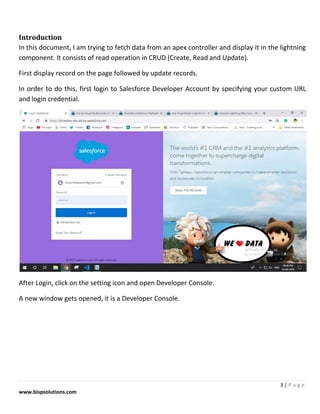
In order to do this, first login to Salesforce Developer Account by specifying your custom URL
and login credential.
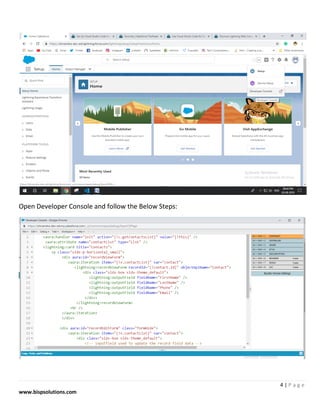
After Login, click on the setting icon and open Developer Console.
A new window gets opened, it is a Developer Console.
4 | P a g e
www.bispsolutions.com
Open Developer Console and follow the Below Steps:
5 | P a g e
www.bispsolutions.com
Process 1: Fetch and Display Records
Code a lightning component that will display all the contacts related to an account.
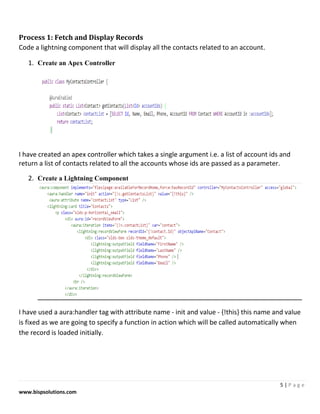
1. Create an Apex Controller
I have created an apex controller which takes a single argument i.e. a list of account ids and
return a list of contacts related to all the accounts whose ids are passed as a parameter.
2. Create a Lightning Component
I have used a aura:handler tag with attribute name - init and value - {!this} this name and value
is fixed as we are going to specify a function in action which will be called automatically when
the record is loaded initially.
6 | P a g e
www.bispsolutions.com
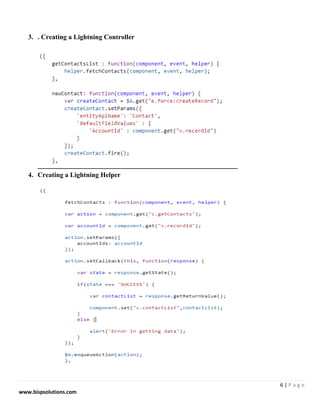
3. . Creating a Lightning Controller
4. Creating a Lightning Helper
7 | P a g e
www.bispsolutions.com
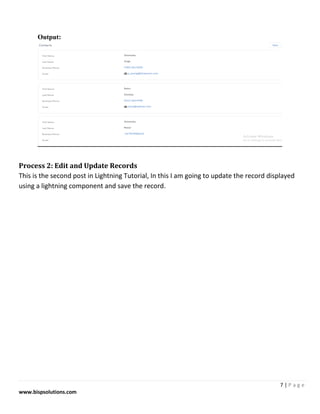
Output:
Process 2: Edit and Update Records
This is the second post in Lightning Tutorial, In this I am going to update the record displayed
using a lightning component and save the record.
8 | P a g e
www.bispsolutions.com
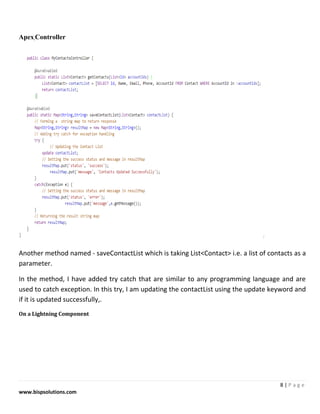
Apex Controller
Another method named - saveContactList which is taking List<Contact> i.e. a list of contacts as a
parameter.
In the method, I have added try catch that are similar to any programming language and are
used to catch exception. In this try, I am updating the contactList using the update keyword and
if it is updated successfully,.
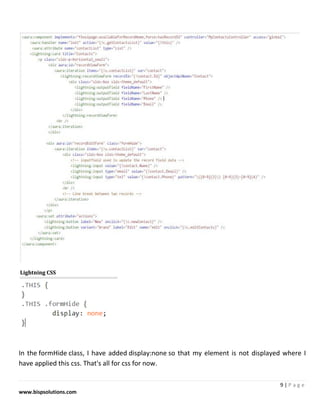
On a Lightning Component
9 | P a g e
www.bispsolutions.com
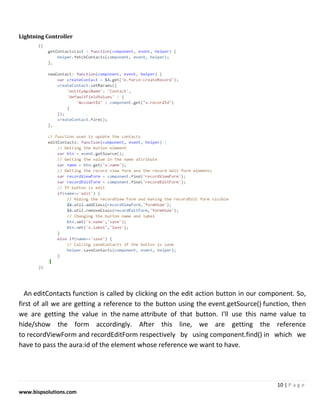
Lightning CSS
In the formHide class, I have added display:none so that my element is not displayed where I
have applied this css. That's all for css for now.
10 | P a g e
www.bispsolutions.com
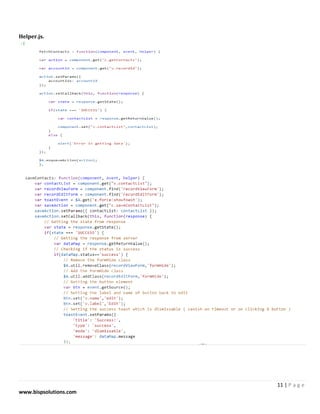
Lightning Controller
An editContacts function is called by clicking on the edit action button in our component. So,
first of all we are getting a reference to the button using the event.getSource() function, then
we are getting the value in the name attribute of that button. I'll use this name value to
hide/show the form accordingly. After this line, we are getting the reference
to recordViewForm and recordEditForm respectively by using component.find() in which we
have to pass the aura:id of the element whose reference we want to have.
11 | P a g e
www.bispsolutions.com
Helper.js.
12 | P a g e
www.bispsolutions.com
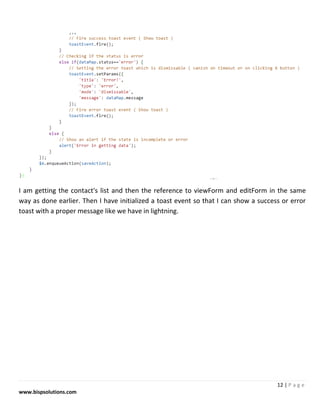
I am getting the contact's list and then the reference to viewForm and editForm in the same
way as done earlier. Then I have initialized a toast event so that I can show a success or error
toast with a proper message like we have in lightning.
13 | P a g e
www.bispsolutions.com
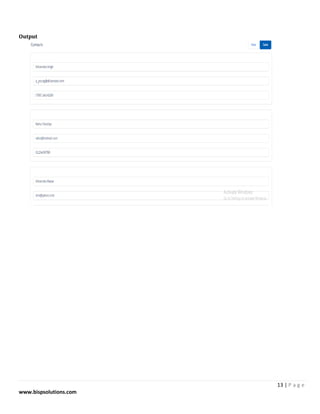
Output

Display contact using aura and Ligtning components (apex and visualforce) converted

  • 1.
    1 | Pa g e www.bispsolutions.com Display Contacts Using Aura and Lightning Components. (Apex and Visualforce) S.No Date Modification Author Verified By 1 2019/07/29 Initial Document Shivendra Singh Pawar Sumit Goyal
  • 2.
    2 | Pa g e www.bispsolutions.com Table of Contents Introduction ............................................................................................................................................................................... 3 Process 1: Fetch and Display Records........................................................................................................................................ 5 1. Create an Apex Controller.............................................................................................................................................. 5 2. Create a Lightning Component ...................................................................................................................................... 5 3. . Creating a Lightning Controller.................................................................................................................................... 6 4. Creating a Lightning Helper............................................................................................................................................ 6 Output:................................................................................................................................................................................... 7 Process 2: Edit and Update Records .......................................................................................................................................... 7 Apex ....................................................................................................................................................................................... 8 On a Lightning Component ................................................................................................................................................ 8 Lightning CSS...................................................................................................................................................................... 9 Lightning Controller ......................................................................................................................................................... 10 Helper.js. .......................................................................................................................................................................... 11 Output.............................................................................................................................................................................. 13
  • 3.
    3 | Pa g e www.bispsolutions.com Introduction In this document, I am trying to fetch data from an apex controller and display it in the lightning component. It consists of read operation in CRUD (Create, Read and Update). First display record on the page followed by update records. In order to do this, first login to Salesforce Developer Account by specifying your custom URL and login credential. After Login, click on the setting icon and open Developer Console. A new window gets opened, it is a Developer Console.
  • 4.
    4 | Pa g e www.bispsolutions.com Open Developer Console and follow the Below Steps:
  • 5.
    5 | Pa g e www.bispsolutions.com Process 1: Fetch and Display Records Code a lightning component that will display all the contacts related to an account. 1. Create an Apex Controller I have created an apex controller which takes a single argument i.e. a list of account ids and return a list of contacts related to all the accounts whose ids are passed as a parameter. 2. Create a Lightning Component I have used a aura:handler tag with attribute name - init and value - {!this} this name and value is fixed as we are going to specify a function in action which will be called automatically when the record is loaded initially.
  • 6.
    6 | Pa g e www.bispsolutions.com 3. . Creating a Lightning Controller 4. Creating a Lightning Helper
  • 7.
    7 | Pa g e www.bispsolutions.com Output: Process 2: Edit and Update Records This is the second post in Lightning Tutorial, In this I am going to update the record displayed using a lightning component and save the record.
  • 8.
    8 | Pa g e www.bispsolutions.com Apex Controller Another method named - saveContactList which is taking List<Contact> i.e. a list of contacts as a parameter. In the method, I have added try catch that are similar to any programming language and are used to catch exception. In this try, I am updating the contactList using the update keyword and if it is updated successfully,. On a Lightning Component
  • 9.
    9 | Pa g e www.bispsolutions.com Lightning CSS In the formHide class, I have added display:none so that my element is not displayed where I have applied this css. That's all for css for now.
  • 10.
    10 | Pa g e www.bispsolutions.com Lightning Controller An editContacts function is called by clicking on the edit action button in our component. So, first of all we are getting a reference to the button using the event.getSource() function, then we are getting the value in the name attribute of that button. I'll use this name value to hide/show the form accordingly. After this line, we are getting the reference to recordViewForm and recordEditForm respectively by using component.find() in which we have to pass the aura:id of the element whose reference we want to have.
  • 11.
    11 | Pa g e www.bispsolutions.com Helper.js.
  • 12.
    12 | Pa g e www.bispsolutions.com I am getting the contact's list and then the reference to viewForm and editForm in the same way as done earlier. Then I have initialized a toast event so that I can show a success or error toast with a proper message like we have in lightning.
  • 13.
    13 | Pa g e www.bispsolutions.com Output