Getting Ready for an
Audit: Everything
You Need to Know
December 3, 2019
Using ReadyTalk
Chat to ask questions
All lines are muted
If you lose your Internet connection, reconnect
using the link emailed to you.
You can find upcoming and past webinars on
the TechSoup website:
www.techsoup.org/community/events-webinars
You will receive an email with this presentation,
recording, and links
Tweet us @TechSoup and use hashtag
#tswebinars
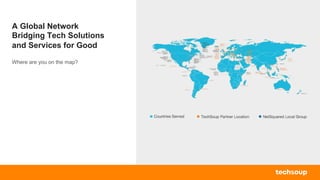
A Global Network
Bridging Tech Solutions
and Services for Good
Where are you on the map?
Acclivity
Adobe
Alpha Software
Asana
Atlas Business Solutions
Atomic Training
Autodesk
Azavea
BetterWorld
Bitdefender
Blackbaud
Bloomerang
Box
Brocade
Bytes of Learning
Caspio
CauseVox
CDI Computer Dealers
Cisco
CitySoft
CleverReach
ClickTime
Closerware
Comodo
Connect2Give
Dell
Dharma Merchant Services
Digital Wish
Dolby
DonorPerfect
Efficient Elements
FileMaker
GoDaddy
GrantStation
Guide By Cell
Headsets.com
Horizon DataSys
HR Solutions Partners
Huddle
Idealware
InFocus
Informz
InterConnection
Intuit
JourneyEd
Litmos
Little Green Light
Mailshell
Microsoft
Mobile Beacon
NetSuite
Nielsen
NonProfitEasy
NortonLifeLock
O&O Software
Quickbooks Made Easy
Reading Eggs
ReadyTalk
Red Earth Software
Sage Software
Simple Charity Registration
Skillsoft
Smart Business Savings
Society for Nonprofit Organizations
Sparrow Mobile
Tableau
TechBridge
Tech Impact
Teespring
Telosa
Tint
Ultralingua
Western Digital
Zoner
Explore our Nonprofit
Tech Marketplace
For more information, please visit
www.techsoup.org/get-product-donations
"We are an all-volunteer organization with
limited professional skills. Adobe's donated
technology is helping us present our story to
the public and to lenders in the format of a
much larger organization. With Adobe, we
are able to knock off a few of the "rough
edges" so that our story is front and center
instead of our technological limitations.
Thank you, Adobe!”
- Richard de Koster
Constitution Island Association, Inc
The Intuit Donation Program
For more information, please visit
www.techsoup.org/intuit
● QuickBooks Online Advanced, 1-Year
Subscription, 25 Users Admin Fee $160
● QuickBooks Online Plus, 1-Year

Subscription, 5 Users Admin Fee $75
● QuickBooks Premier Editions 2020, 1 User
License (Includes Nonprofit Edition) Admin
Fee $60
● QuickBooks Premier Editions 2020, 3 User
Licenses (Includes Nonprofit Edition) Admin
Fee $150
● QuickBooks for Mac 2020 Admin Fee $50
Presenters
Gregg Bossen
QuickBooks ProAdvisor & Owner, QuickBooks
Made Easy
Baily Maples
Program Manager, Strategic Partnerships
TechSoup
Assisting with chat:
Steven Davidson, TechSoup
Steven Davidson
Marketing
Associate
TechSoup
Gregg Bossen
QuickBooks
ProAdvisor & Owner,
QuickBooks Made
Easy
Baily Maples
Program Manager, Strategic
Partnerships
TechSoup
Getting Ready for an Audit:
Everything You Need to
Know
Gregg S Bossen, CPA
QuickBooks Made Easy for Nonprofits
Atlanta, GA
www.quickbooksmadeeasy.com
About Our Instructor
● Certified Advanced QuickBooks ProAdvisor®
● Specializes in Industry-Specific Training
● Author of QuickBooks® Made Easy™
● National Trainer – seminars around the country
QuickBooks Made Easy for Nonprofits
Gregg S. Bossen, CPA
Get Social Use Hashtag #QBME
Twitter: @QBMadeEasy
@GreggBossen
What We Do
q Streamable Training Products
q Nonprofit QB Tech Support
q Live Seminars/Webinars across the
country
Train & Support Nonprofits using QuickBooks
QuickBooks Made Easy for Nonprofits
POLL
WHO HAS LEARNED FROM ME BEFORE?
a) I have
b) This is my first time
QuickBooks Made Easy for Nonprofits
Agenda
● WHAT IS AN AUDIT?
● SHOULD YOU HAVE ONE?
● LIST OF THINGS YOU WILL NEED
● GETTING THE BOOKS READY
● INTERNAL CONTROLS
● QUESTIONS
QuickBooks Made Easy for Nonprofits
POLL
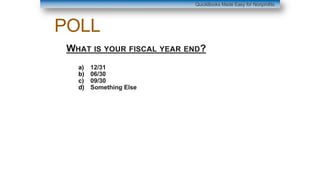
WHAT IS YOUR FISCAL YEAR END?
a) 12/31
b) 06/30
c) 09/30
d) Something Else
QuickBooks Made Easy for Nonprofits
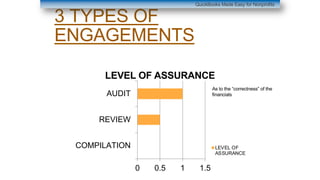
3 TYPES OF
ENGAGEMENTS
QuickBooks Made Easy for Nonprofits
0 0.5 1 1.5
COMPILATION
REVIEW
AUDIT
LEVEL OF ASSURANCE
LEVEL OF
ASSURANCE
As to the “correctness” of the
financials
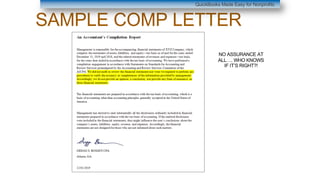
SAMPLE COMP LETTER
QuickBooks Made Easy for Nonprofits
NO ASSURANCE AT
ALL…. WHO KNOWS
IF IT’S RIGHT?!
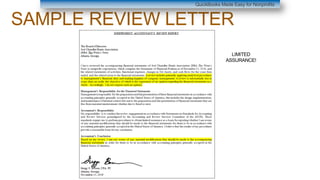
SAMPLE REVIEW LETTER
QuickBooks Made Easy for Nonprofits
LIMITED
ASSURANCE!
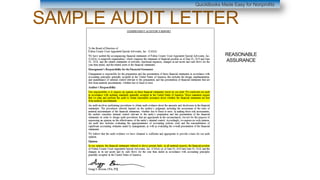
SAMPLE AUDIT LETTER
QuickBooks Made Easy for Nonprofits
REASONABLE
ASSURANCE
Get an audit if
■ Someone Requires It:

● A Grantor
● A Bank (Loans)
● Your State

https://www.councilofnonprofits.org/nonprofit-audit-
guide/state-law-audit-requirements
● A Fed Government GRANTOR
○ Spending more than $750,000 in federal $’s
○ Special type of Audit (Single Audit)
QuickBooks Made Easy for Nonprofits
Get an audit if
■ You want to go for
Grants!!!!
■ You want to grow!!!!
Note: Do one EVERY YEAR!!!!
(skipping years won’t save you as
much money as you think)
QuickBooks Made Easy for Nonprofits
PRICES
Assuming your budget is around $500,000 or less
REVIEW: $3,500 - $6,000
AUDIT: $5,500 - $9,500
NOTE: Estimate Only!!!!!
QuickBooks Made Easy for Nonprofits
Prepared by Client List
■ GENERAL STUFF
● Articles of Incorporation (for a new
auditor only)
● BY LAWS AND CHANGES IF ANY
● BOARD MINUTES FROM BEGINNING OF AUDIT
YEAR THROUGH CURRENT DAY (E.G. 1/1/2018
TO 12/3/2019)
● P/Y AUDIT OR REVIEW
● P/Y 990
● BOARD OF DIRECTORS LIST W/ ADDRESSES
AND TITLES
● PROGRAM DESCRIPTIONS FOR EACH OF YOUR
PROGRAMS
QuickBooks Made Easy for Nonprofits
Prepared by Client List
■ REVENUE STUFF
● SIGNED COPIES OF ALL GRANTS/CONTRACTS WITH
FUNDERS
● LIST OF DONORS GIVING A TOTAL OF OVER $5,000
● EXAMPLE CONTRACT FOR TUITION OR
MEMBERSHIP
● LIST OF ALL IN-KIND CONTRIBUTIONS RECEIVED
WITH BACK UP SHOWING DESCRIPTION AND
AMOUNT
● LIST OF ALL AUCTION ITEMS RECEIVED WITH FMV
AMOUNTS
● DESCRIPTION OF ALL SPECIAL EVENTS OCCURRING
DURING THE YEAR
● LIST OF ALL SPONSORS FOR THESE EVENTS WITH
SIGNED AGREEMENTS AND AMOUNTS
● OTHER REVENUE CONTRACTS
● LIST OF ALL OUTSTANDING ACCOUNTS RECEIVABLE
AT YEAR END
QuickBooks Made Easy for Nonprofits
Prepared by Client List
■ EXPENSE STUFF
● ACCESS TO RECEIPTS FOR EXPENSES PAID
○ DON’T FREAK OUT ABOUT THIS
○ WE WILL PICK A SAMPLE TO VIEW (USUALLY
60)
○ COULD BE A CREDIT CARD CHARGE, CHECK,
DEBIT CHARGE ETC…
○ WE ARE OKAY IF YOU HAVE TO FETCH FROM
THE VENDOR
● SIGNED COPY OF ALL LEASE AGREEMENTS
(SPACE, COPIER ETC…)
● LIST OF ALL OUTSTANDING ACCOUNTS PAYABLE AT
YEAR END
QuickBooks Made Easy for Nonprofits
Prepared by Client List
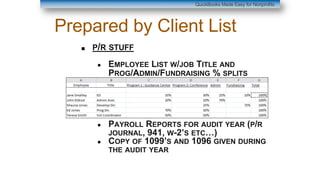
■ P/R STUFF
● EMPLOYEE LIST W/JOB TITLE AND
PROG/ADMIN/FUNDRAISING % SPLITS
● PAYROLL REPORTS FOR AUDIT YEAR (P/R
JOURNAL, 941, W-2’S ETC…)
● COPY OF 1099’S AND 1096 GIVEN DURING
THE AUDIT YEAR
QuickBooks Made Easy for Nonprofits
Prepared by Client List
■ ASSET STUFF
● COPY OF YEAR END BANK STATEMENTS (AND
ACCESS TO THE OTHERS)
● COPY OF YEAR END INVESTMENT STATEMENTS
(AND ACCESS TO THE OTHERS)
● LIST OF ALL FIXED ASSETS WITH A
DEPRECIATION JOURNAL (MAY BE IN WITH YOUR
990)
● LIST OF ALL PREPAIDS (E.G. PREPAID INS,
DEPOSITS ETC…)
QuickBooks Made Easy for Nonprofits
Prepared by Client List
■ LIABILITY STUFF
● COPY OF YEAR END CREDIT CARD STATEMENTS
(AND ACCESS TO OTHERS
● COPY OF YEAR END LOAN STATEMENTS (AND
ACCESS TO THE OTHERS)
● AMORTIZATION SCHEDULE FOR ALL LOANS
● LIST OF ALL REVENUES RECEIVED EARLY IN AN
“UNEARNED REVENUE” TYPE ACCOUNT ON THE
BALANCE SHEET (LIKE PREPAID MEMBERSHIP
DUES, TUITIONS OR TICKET SALES)
● BACK UP FOR ANY OTHER LIABILITIES ON THE
BALANCE SHEET
QuickBooks Made Easy for Nonprofits
MAKING SURE THE BOOKS ARE
READY
● RUN AN ACCRUAL BALANCE SHEET AS OF YEAR END
● MAKE SURE EQUITY ROLLS FORWARD
● MAKE SURE EACH NUMBER IS CORRECT
○ RECONCILING IT IN QUICKBOOKS
○ OR COMPARING IT TO BACK UP
● RUN AN ACCRUAL P & L FOR THE YEAR
○ MAKE SURE SALARIES TIES TO FED P/R FORMS
○ MAKE SURE ALL EXPENSES ARE ASSIGNED TO A CLASS
● RESTRICTED GRANTS: MAKE SURE U HAVE BACK UP FOR
HOW DOLLARS WERE SPENT
QuickBooks Made Easy
INTERNAL CONTROLS
DO YOU HAVE TO HAVE THEM TO PASS AN AUDIT?
NOPE
SHOULD YOU HAVE THEM?
OF COURSE!
QuickBooks Made Easy for Nonprofits
INTERNAL CONTROLS
THINGS TO KEEP IN MIND
● MAKE SURE THAT MORE THAN PERSON IS
INVOLVED IN THE ACCOUNTING FUNCTION
● HAVE SOME APPROVAL PROCESS FOR PAYING
BILLS
● KEEP BACK UP FOR EXPENSES
QuickBooks Made Easy for Nonprofits
Special Offer!
3 DAY FUNDAMENTALS WEBINAR
SERIES
§ Webinar: QuickBooks Made Easy for Nonprofits
3-Day Webinar Series for Online Users $249.00
$199.00
$50 off with coupon code
Code: WEB50OFF
December 4-6 (Wed-Friday: 2 hours per day)
2:00-4:00pm ET
QuickBooks Made Easy for Nonprofits
The Fundamentals 3-Day Webinar Series
Topics
2 hours daily
Day 1:
• Welcome to QuickBooks –
The different choices and
which version is right for you
• What’s new in version 2020
that you may need
• Getting used to the screens
and navigating around
• A lesson in accounting
QuickBooks style
• Setting up the correct
• Entering Your Programs
• Adding Your Annual Budget
• Cutting and Pasting from
Excel into QuickBooks
• Entering Your Donors,
Members or Students
Day 2:
• Entering Your Income –
Two Methods
• Entering Donations and
Grants
• Entering Membership Dues
and Tuition
• Entering Program Service
Revenue
• How to get the most out of
Items
• Entering and Paying Bills
• Spreading Costs to
Programs/Grants
• Essential Reports for the
Board/Auditor
• Attaching Scan Documents
for free
Day 3:
• Entering Credit Card
activity
• Tracking Pledges
• Tracking Restricted
Grants
• Tracking Special
Fundraising Events
• Printing personalized
Donor Thank-You Letters
directly from
QuickBooks®
• Two Ways to get year-
end donor-
Acknowledgements
• Recording In-Kind
Contributions
• Advanced method of
Auto-Allocating Expenses
to Programs/Grants
• And More!
§ The QuickBooks Essentials or Beyond the
Essentials for only $149
Code: 149DEC
§ QuickBooks Made Easy –The Set for only $298
Code: 298DEC
§ Tech Support for 1 Year $299
Code: TECHDEC
Normally: $499.00
QuickBooks Made Easy for Nonprofits
Special Offer!
Ends 12/07/2019 at 11:59PM PST
Get The Essentials or Beyond the Essentials Training!
Normally: $229.95 Each
Includes The Essentials & Beyond the Essentials Training!
Normally: $399.95
QuickBooks Made Easy for Nonprofits
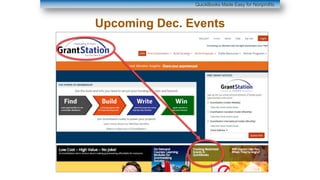
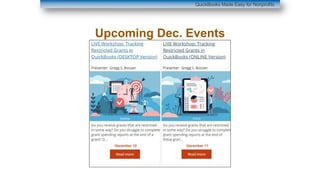
Upcoming Dec. Events
QuickBooks Made Easy for Nonprofits
Upcoming Dec. Events
THANK
YOU!!!!
Presenter: Gregg S. Bossen, CPA
Get Social Use Hashtag #QBME
Twitter: @QBMadeEasy
@GreggBossen
QuickBooks Made Easy for Nonprofits
Q&A
This is your chance! Use the chat box to ask us
any questions you have about this
presentation.
Share and Learn
Chat in one thing that you learned in today’s
webinar.
Please complete our post-event survey. Your
feedback really helps.
Follow TechSoup on social media
(FB, Instagram, Twitter, LinkedIn)
Visit the TechSoup Blog at blog.techsoup.org
Join us for our upcoming
webinars.
12/10
Social Media 101 for Nonprofits with
Adobe Spark
12/17
3 Ways Starting a Podcast Can Help
Your Nonprofit Grow
FY20WEB10 - 10% off a TechSoup Course of Your Choice
Thank you to our
webinar sponsor!
Please complete the post-event survey that will
pop up once you close this window.

Getting Ready for an Audit: Everything You Need to Know

  • 1.
    Getting Ready foran Audit: Everything You Need to Know December 3, 2019
  • 2.
    Using ReadyTalk Chat toask questions All lines are muted If you lose your Internet connection, reconnect using the link emailed to you. You can find upcoming and past webinars on the TechSoup website: www.techsoup.org/community/events-webinars You will receive an email with this presentation, recording, and links Tweet us @TechSoup and use hashtag #tswebinars
  • 3.
    A Global Network BridgingTech Solutions and Services for Good Where are you on the map?
  • 4.
    Acclivity Adobe Alpha Software Asana Atlas BusinessSolutions Atomic Training Autodesk Azavea BetterWorld Bitdefender Blackbaud Bloomerang Box Brocade Bytes of Learning Caspio CauseVox CDI Computer Dealers Cisco CitySoft CleverReach ClickTime Closerware Comodo Connect2Give Dell Dharma Merchant Services Digital Wish Dolby DonorPerfect Efficient Elements FileMaker GoDaddy GrantStation Guide By Cell Headsets.com Horizon DataSys HR Solutions Partners Huddle Idealware InFocus Informz InterConnection Intuit JourneyEd Litmos Little Green Light Mailshell Microsoft Mobile Beacon NetSuite Nielsen NonProfitEasy NortonLifeLock O&O Software Quickbooks Made Easy Reading Eggs ReadyTalk Red Earth Software Sage Software Simple Charity Registration Skillsoft Smart Business Savings Society for Nonprofit Organizations Sparrow Mobile Tableau TechBridge Tech Impact Teespring Telosa Tint Ultralingua Western Digital Zoner
  • 5.
    Explore our Nonprofit TechMarketplace For more information, please visit www.techsoup.org/get-product-donations "We are an all-volunteer organization with limited professional skills. Adobe's donated technology is helping us present our story to the public and to lenders in the format of a much larger organization. With Adobe, we are able to knock off a few of the "rough edges" so that our story is front and center instead of our technological limitations. Thank you, Adobe!” - Richard de Koster Constitution Island Association, Inc
  • 6.
    The Intuit DonationProgram For more information, please visit www.techsoup.org/intuit ● QuickBooks Online Advanced, 1-Year Subscription, 25 Users Admin Fee $160 ● QuickBooks Online Plus, 1-Year Subscription, 5 Users Admin Fee $75 ● QuickBooks Premier Editions 2020, 1 User License (Includes Nonprofit Edition) Admin Fee $60 ● QuickBooks Premier Editions 2020, 3 User Licenses (Includes Nonprofit Edition) Admin Fee $150 ● QuickBooks for Mac 2020 Admin Fee $50
  • 7.
    Presenters Gregg Bossen QuickBooks ProAdvisor& Owner, QuickBooks Made Easy Baily Maples Program Manager, Strategic Partnerships TechSoup Assisting with chat: Steven Davidson, TechSoup Steven Davidson Marketing Associate TechSoup Gregg Bossen QuickBooks ProAdvisor & Owner, QuickBooks Made Easy Baily Maples Program Manager, Strategic Partnerships TechSoup
  • 8.
    Getting Ready foran Audit: Everything You Need to Know Gregg S Bossen, CPA QuickBooks Made Easy for Nonprofits Atlanta, GA www.quickbooksmadeeasy.com
  • 9.
    About Our Instructor ●Certified Advanced QuickBooks ProAdvisor® ● Specializes in Industry-Specific Training ● Author of QuickBooks® Made Easy™ ● National Trainer – seminars around the country QuickBooks Made Easy for Nonprofits Gregg S. Bossen, CPA Get Social Use Hashtag #QBME Twitter: @QBMadeEasy @GreggBossen
  • 10.
    What We Do qStreamable Training Products q Nonprofit QB Tech Support q Live Seminars/Webinars across the country Train & Support Nonprofits using QuickBooks QuickBooks Made Easy for Nonprofits
  • 11.
    POLL WHO HAS LEARNEDFROM ME BEFORE? a) I have b) This is my first time QuickBooks Made Easy for Nonprofits
  • 12.
    Agenda ● WHAT ISAN AUDIT? ● SHOULD YOU HAVE ONE? ● LIST OF THINGS YOU WILL NEED ● GETTING THE BOOKS READY ● INTERNAL CONTROLS ● QUESTIONS QuickBooks Made Easy for Nonprofits
  • 13.
    POLL WHAT IS YOURFISCAL YEAR END? a) 12/31 b) 06/30 c) 09/30 d) Something Else QuickBooks Made Easy for Nonprofits
  • 14.
    3 TYPES OF ENGAGEMENTS QuickBooksMade Easy for Nonprofits 0 0.5 1 1.5 COMPILATION REVIEW AUDIT LEVEL OF ASSURANCE LEVEL OF ASSURANCE As to the “correctness” of the financials
  • 15.
    SAMPLE COMP LETTER QuickBooksMade Easy for Nonprofits NO ASSURANCE AT ALL…. WHO KNOWS IF IT’S RIGHT?!
  • 16.
    SAMPLE REVIEW LETTER QuickBooksMade Easy for Nonprofits LIMITED ASSURANCE!
  • 17.
    SAMPLE AUDIT LETTER QuickBooksMade Easy for Nonprofits REASONABLE ASSURANCE
  • 18.
    Get an auditif ■ Someone Requires It: ● A Grantor ● A Bank (Loans) ● Your State https://www.councilofnonprofits.org/nonprofit-audit- guide/state-law-audit-requirements ● A Fed Government GRANTOR ○ Spending more than $750,000 in federal $’s ○ Special type of Audit (Single Audit) QuickBooks Made Easy for Nonprofits
  • 19.
    Get an auditif ■ You want to go for Grants!!!! ■ You want to grow!!!! Note: Do one EVERY YEAR!!!! (skipping years won’t save you as much money as you think) QuickBooks Made Easy for Nonprofits
  • 20.
    PRICES Assuming your budgetis around $500,000 or less REVIEW: $3,500 - $6,000 AUDIT: $5,500 - $9,500 NOTE: Estimate Only!!!!! QuickBooks Made Easy for Nonprofits
  • 21.
    Prepared by ClientList ■ GENERAL STUFF ● Articles of Incorporation (for a new auditor only) ● BY LAWS AND CHANGES IF ANY ● BOARD MINUTES FROM BEGINNING OF AUDIT YEAR THROUGH CURRENT DAY (E.G. 1/1/2018 TO 12/3/2019) ● P/Y AUDIT OR REVIEW ● P/Y 990 ● BOARD OF DIRECTORS LIST W/ ADDRESSES AND TITLES ● PROGRAM DESCRIPTIONS FOR EACH OF YOUR PROGRAMS QuickBooks Made Easy for Nonprofits
  • 22.
    Prepared by ClientList ■ REVENUE STUFF ● SIGNED COPIES OF ALL GRANTS/CONTRACTS WITH FUNDERS ● LIST OF DONORS GIVING A TOTAL OF OVER $5,000 ● EXAMPLE CONTRACT FOR TUITION OR MEMBERSHIP ● LIST OF ALL IN-KIND CONTRIBUTIONS RECEIVED WITH BACK UP SHOWING DESCRIPTION AND AMOUNT ● LIST OF ALL AUCTION ITEMS RECEIVED WITH FMV AMOUNTS ● DESCRIPTION OF ALL SPECIAL EVENTS OCCURRING DURING THE YEAR ● LIST OF ALL SPONSORS FOR THESE EVENTS WITH SIGNED AGREEMENTS AND AMOUNTS ● OTHER REVENUE CONTRACTS ● LIST OF ALL OUTSTANDING ACCOUNTS RECEIVABLE AT YEAR END QuickBooks Made Easy for Nonprofits
  • 23.
    Prepared by ClientList ■ EXPENSE STUFF ● ACCESS TO RECEIPTS FOR EXPENSES PAID ○ DON’T FREAK OUT ABOUT THIS ○ WE WILL PICK A SAMPLE TO VIEW (USUALLY 60) ○ COULD BE A CREDIT CARD CHARGE, CHECK, DEBIT CHARGE ETC… ○ WE ARE OKAY IF YOU HAVE TO FETCH FROM THE VENDOR ● SIGNED COPY OF ALL LEASE AGREEMENTS (SPACE, COPIER ETC…) ● LIST OF ALL OUTSTANDING ACCOUNTS PAYABLE AT YEAR END QuickBooks Made Easy for Nonprofits
  • 24.
    Prepared by ClientList ■ P/R STUFF ● EMPLOYEE LIST W/JOB TITLE AND PROG/ADMIN/FUNDRAISING % SPLITS ● PAYROLL REPORTS FOR AUDIT YEAR (P/R JOURNAL, 941, W-2’S ETC…) ● COPY OF 1099’S AND 1096 GIVEN DURING THE AUDIT YEAR QuickBooks Made Easy for Nonprofits
  • 25.
    Prepared by ClientList ■ ASSET STUFF ● COPY OF YEAR END BANK STATEMENTS (AND ACCESS TO THE OTHERS) ● COPY OF YEAR END INVESTMENT STATEMENTS (AND ACCESS TO THE OTHERS) ● LIST OF ALL FIXED ASSETS WITH A DEPRECIATION JOURNAL (MAY BE IN WITH YOUR 990) ● LIST OF ALL PREPAIDS (E.G. PREPAID INS, DEPOSITS ETC…) QuickBooks Made Easy for Nonprofits
  • 26.
    Prepared by ClientList ■ LIABILITY STUFF ● COPY OF YEAR END CREDIT CARD STATEMENTS (AND ACCESS TO OTHERS ● COPY OF YEAR END LOAN STATEMENTS (AND ACCESS TO THE OTHERS) ● AMORTIZATION SCHEDULE FOR ALL LOANS ● LIST OF ALL REVENUES RECEIVED EARLY IN AN “UNEARNED REVENUE” TYPE ACCOUNT ON THE BALANCE SHEET (LIKE PREPAID MEMBERSHIP DUES, TUITIONS OR TICKET SALES) ● BACK UP FOR ANY OTHER LIABILITIES ON THE BALANCE SHEET QuickBooks Made Easy for Nonprofits
  • 27.
    MAKING SURE THEBOOKS ARE READY ● RUN AN ACCRUAL BALANCE SHEET AS OF YEAR END ● MAKE SURE EQUITY ROLLS FORWARD ● MAKE SURE EACH NUMBER IS CORRECT ○ RECONCILING IT IN QUICKBOOKS ○ OR COMPARING IT TO BACK UP ● RUN AN ACCRUAL P & L FOR THE YEAR ○ MAKE SURE SALARIES TIES TO FED P/R FORMS ○ MAKE SURE ALL EXPENSES ARE ASSIGNED TO A CLASS ● RESTRICTED GRANTS: MAKE SURE U HAVE BACK UP FOR HOW DOLLARS WERE SPENT QuickBooks Made Easy
  • 28.
    INTERNAL CONTROLS DO YOUHAVE TO HAVE THEM TO PASS AN AUDIT? NOPE SHOULD YOU HAVE THEM? OF COURSE! QuickBooks Made Easy for Nonprofits
  • 29.
    INTERNAL CONTROLS THINGS TOKEEP IN MIND ● MAKE SURE THAT MORE THAN PERSON IS INVOLVED IN THE ACCOUNTING FUNCTION ● HAVE SOME APPROVAL PROCESS FOR PAYING BILLS ● KEEP BACK UP FOR EXPENSES QuickBooks Made Easy for Nonprofits
  • 30.
    Special Offer! 3 DAYFUNDAMENTALS WEBINAR SERIES § Webinar: QuickBooks Made Easy for Nonprofits 3-Day Webinar Series for Online Users $249.00 $199.00 $50 off with coupon code Code: WEB50OFF December 4-6 (Wed-Friday: 2 hours per day) 2:00-4:00pm ET QuickBooks Made Easy for Nonprofits
  • 31.
    QuickBooks Made Easyfor Nonprofits The Fundamentals 3-Day Webinar Series Topics 2 hours daily Day 1: • Welcome to QuickBooks – The different choices and which version is right for you • What’s new in version 2020 that you may need • Getting used to the screens and navigating around • A lesson in accounting QuickBooks style • Setting up the correct • Entering Your Programs • Adding Your Annual Budget • Cutting and Pasting from Excel into QuickBooks • Entering Your Donors, Members or Students Day 2: • Entering Your Income – Two Methods • Entering Donations and Grants • Entering Membership Dues and Tuition • Entering Program Service Revenue • How to get the most out of Items • Entering and Paying Bills • Spreading Costs to Programs/Grants • Essential Reports for the Board/Auditor • Attaching Scan Documents for free Day 3: • Entering Credit Card activity • Tracking Pledges • Tracking Restricted Grants • Tracking Special Fundraising Events • Printing personalized Donor Thank-You Letters directly from QuickBooks® • Two Ways to get year- end donor- Acknowledgements • Recording In-Kind Contributions • Advanced method of Auto-Allocating Expenses to Programs/Grants • And More!
  • 32.
    § The QuickBooksEssentials or Beyond the Essentials for only $149 Code: 149DEC § QuickBooks Made Easy –The Set for only $298 Code: 298DEC § Tech Support for 1 Year $299 Code: TECHDEC Normally: $499.00 QuickBooks Made Easy for Nonprofits Special Offer! Ends 12/07/2019 at 11:59PM PST Get The Essentials or Beyond the Essentials Training! Normally: $229.95 Each Includes The Essentials & Beyond the Essentials Training! Normally: $399.95
  • 33.
    QuickBooks Made Easyfor Nonprofits Upcoming Dec. Events
  • 34.
    QuickBooks Made Easyfor Nonprofits Upcoming Dec. Events
  • 35.
    THANK YOU!!!! Presenter: Gregg S.Bossen, CPA Get Social Use Hashtag #QBME Twitter: @QBMadeEasy @GreggBossen QuickBooks Made Easy for Nonprofits
  • 36.
    Q&A This is yourchance! Use the chat box to ask us any questions you have about this presentation.
  • 37.
    Share and Learn Chatin one thing that you learned in today’s webinar. Please complete our post-event survey. Your feedback really helps. Follow TechSoup on social media (FB, Instagram, Twitter, LinkedIn) Visit the TechSoup Blog at blog.techsoup.org
  • 38.
    Join us forour upcoming webinars. 12/10 Social Media 101 for Nonprofits with Adobe Spark 12/17 3 Ways Starting a Podcast Can Help Your Nonprofit Grow
  • 39.
    FY20WEB10 - 10%off a TechSoup Course of Your Choice
  • 40.
    Thank you toour webinar sponsor! Please complete the post-event survey that will pop up once you close this window.