GIST making informed decisions and workflow of buying, borrowing, downloading or viewing… easier. Tim Bowersox, Cyril Oberlander, Kate Pitcher, Mark Sullivan State University of New York, Geneseo College Getting It System Toolkit Enhancing user experience and customizing a future for ILL & Acquisition RRLC GIST Workshop April 28, 2010
Goals and Objectives for Today Introduce and discuss GIST 1.11- Kate Q & A Implementation Planning GIST 1.11  Toolkit, API Keys, Web - Mark Workflow Planning – Kate & Cyril Break Implementation Demo – Mark & Tim Conclusion - Cyril
What is GIST? A system for: enhancing user’s request experience & delivery service  enabling user-initiated purchasing requests for acquisitions and interlibrary loan; enhancing coordinated collection development; merging Acquisitions and ILL request workflow using ILLiad (ILL request management software)
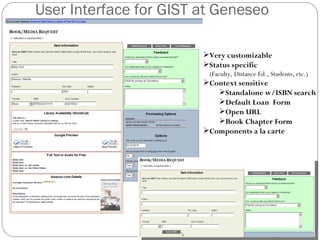
User Interface for GIST at Geneseo Very customizable Status specific   (Faculty, Distance Ed., Students, etc.) Context sensitive Standalone w/ISBN search Default Loan  Form Open URL Book Chapter Form Components a la carte
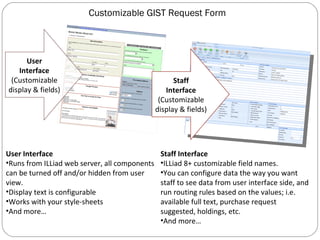
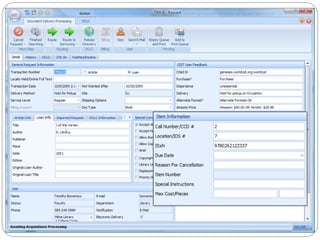
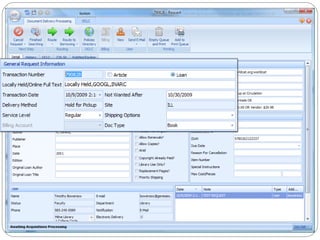
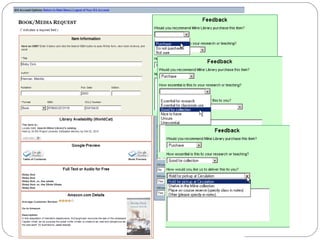
Customizable GIST Request Form User Interface (Customizable display & fields) Staff Interface (Customizable display & fields) User Interface Runs from ILLiad web server, all components can be turned off and/or hidden from user view. Display text is configurable Works with your style-sheets And more… Staff Interface ILLiad 8+ customizable field names. You can configure data the way you want staff to see data from user interface side, and run routing rules based on the values; i.e. available full text, purchase request suggested, holdings, etc. And more…
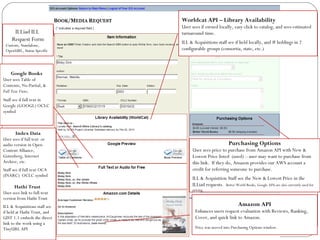
Worldcat API – Library Availability   User sees if owned locally, easy click to catalog, and sees estimated turnaround time. ILL & Acquisitions staff see if held locally, and # holdings in 2 configurable groups (consortia, state, etc.) Google Books User sees Table of Contents, No-Partial, &  Full Text Views . Staff see if full text in Google (GOOGL) OCLC symbol Index Data User sees if full text  or audio version in Open Content Alliance, Gutenberg, Internet Archive, etc. Staff see if full text OCA (INARC)  OCLC symbol Hathi Trust  User sees link to full-text version from Hathi Trust ILL & Acquisitions staff see if held at Hathi Trust, and GIST 1.1 embeds the direct link to the work using a TinyURL API Amazon API Enhances users request evaluation with Reviews, Ranking, Cover, and quick link to Amazon.  Price was moved into Purchasing Options window. Purchasing Options User sees price to purchase from Amazon API with New & Lowest Price listed  (used) – user may want to purchase from this link.  If they do, Amazon provides our AWS account a credit for referring someone to purchase. ILL & Acquisition Staff see the New & Lowest Price in the ILLiad requests.  Better World Books, Google APIs are also currently used for pricing. ILLiad ILL  Request Form Custom, Standalone, OpenURL, Status Specific
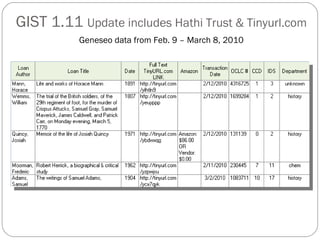
GIST 1.11  Update includes Hathi Trust & Tinyurl.com   Geneseo data from Feb. 9 – March 8, 2010
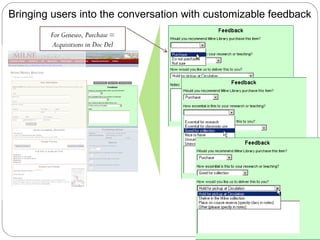
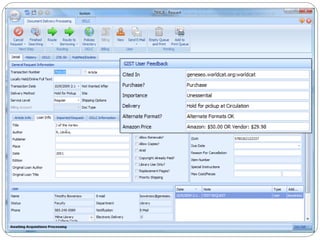
Bringing users into the conversation with customizable feedback For Geneseo, Purchase = Acquisitions in Doc Del
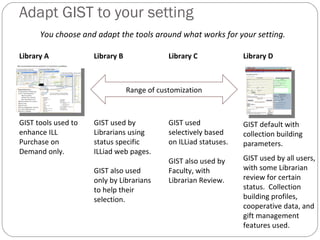
Adapt GIST to your setting Library A GIST tools used to enhance ILL Purchase on Demand only. Library B GIST used by Librarians using status specific ILLiad web pages. GIST also used only by Librarians to help their selection. Library C GIST used selectively based on ILLiad statuses. GIST also used by Faculty, with Librarian Review. Library D GIST default with collection building parameters. GIST used by all users, with some Librarian review for certain status.  Collection building profiles, cooperative data, and gift management features used. You choose and adapt the tools around what works for your setting. Range of customization
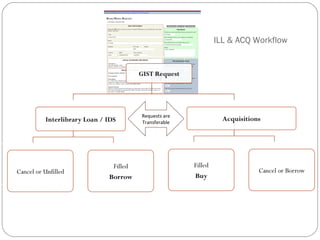
ILL & ACQ Workflow Requests are Transferable


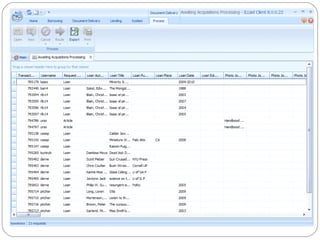
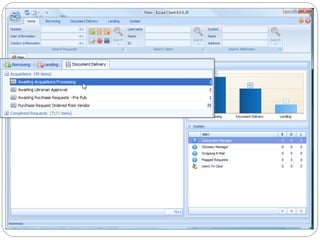
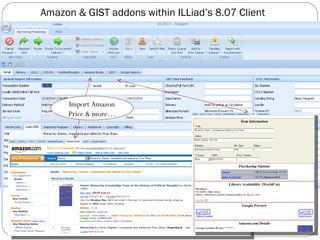
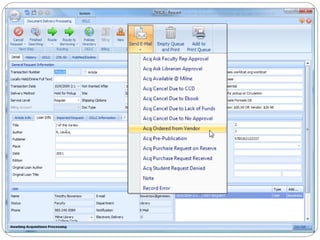
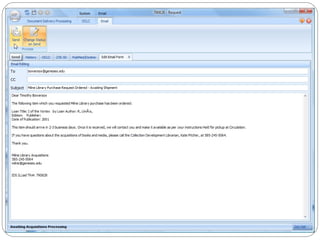
Amazon & GIST addons within ILLiad’s 8.07 Client Import Amazon Price & more…
 
 
Getting It System Toolkit for Web v1.11 Questions and Answers?
Getting It System Toolkit for Web v1.11 Installation and Configuration
Requirements ILLiad 8 client (customized client layout unavailable in 7.4, but web form and workflows can be utilized) ILLiad 8 is now available. To begin setup, OCLC recommends taking the ILLiad 8 Survery ( https://www3.oclc.org/app/illiad/survey/index.pl ) to determine your setup needs. Staff Manager access Customization Manager access Access to your ILLiad web server (written on .net framework, so GIST will work for OCLC hosted sites)
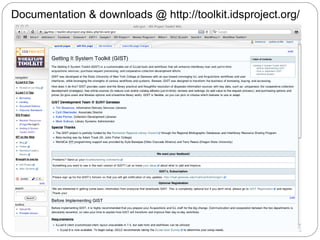
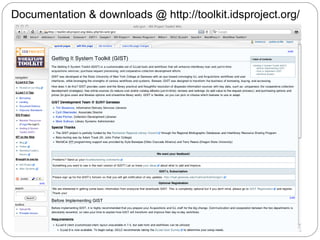
Documentation & downloads @ http://toolkit.idsproject.org/
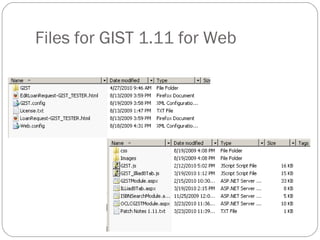
Files for GIST 1.11 for Web
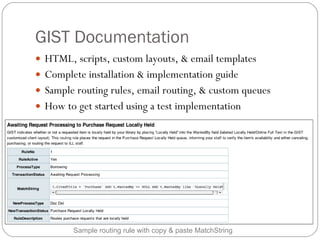
GIST Documentation HTML, scripts, custom layouts, & email templates Complete installation & implementation guide Sample routing rules, email routing, & custom queues How to get started using a test implementation Sample routing rule with copy & paste MatchString
Getting It System Toolkit for Web v1.11 Workflow Planning:  The Interactive Part
Status and Services Customizing GIST and ILLiad web pages for specific users: Who are your users?  Why should there be a difference? Service, Questions, and Workflow
 
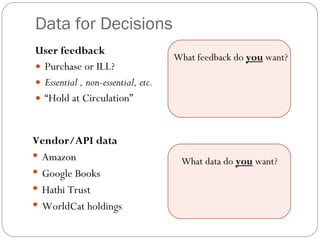
Data for Decisions User feedback Purchase or ILL? Essential , non-essential, etc. “ Hold at Circulation” What feedback do  you  want? What data do  you  want? Vendor/API data Amazon Google Books Hathi Trust WorldCat holdings
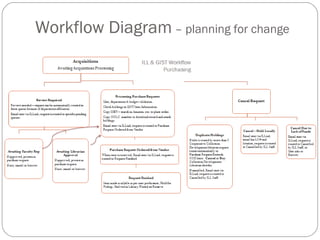
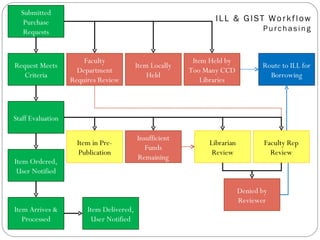
Workflow Diagram  – planning for change
Submitted Purchase Requests Faculty Department Requires Review Item Locally Held Item Held by Too Many CCD Libraries Request Meets Criteria Faculty Rep Review Librarian Review Item in Pre-Publication Item Ordered, User Notified Item Arrives & Processed Denied by Reviewer Insufficient Funds Remaining Item Delivered, User Notified Staff Evaluation Route to ILL for Borrowing
Getting It System Toolkit for Web v1.11 Break Time!!!!
Getting It System Toolkit for Web v1.11 Hands on Configuration and Installation
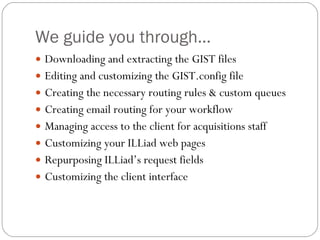
We guide you through… Downloading and extracting the GIST files Editing and customizing the GIST.config file Creating the necessary routing rules & custom queues Creating email routing for your workflow Managing access to the client for acquisitions staff Customizing your ILLiad web pages Repurposing ILLiad’s request fields Customizing the client interface
Documentation & downloads @ http://toolkit.idsproject.org/
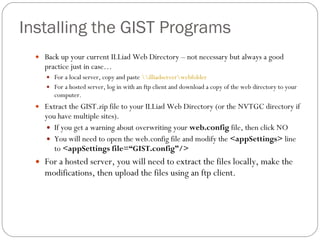
Installing the GIST Programs Back up your current ILLiad Web Directory – not necessary but always a good practice just in case… For a local server, copy and paste  \\illiadserver\webfolder   For a hosted server, log in with an ftp client and download a copy of the web directory to your computer. Extract the GIST.zip file to your ILLiad Web Directory (or the NVTGC directory if you have multiple sites). If you get a warning about overwriting your  web.config  file, then click NO You will need to open the web.config file and modify the  <appSettings>  line to  <appSettings file=“ GIST.config ” /> For a hosted server, you will need to extract the files locally, make the modifications, then upload the files using an ftp client.
Installing the GIST Programs Obtain the following: an Amazon Web Services key;  http://aws.amazon.com/ an Amazon Secret Key (same page); and a WorldCat API key.  http://www.worldcat.org/affiliate/tools?atype=wcapi Also review the Google Book Search API branding guidelines. http://code.google.com/apis/books/branding.html
Configuring GIST Open up the  GIST.config  file located in your ILLiad Web Directory or on your desktop for later upload to OCLC. Enter the keys along with your library information into the  GIST.config  file. After you make any changes to  GIST.config  you will need to update  web.config  so that it has a newer Modified Date. (just open it, add a space to a blank line and resave it.) If you are using a hosted server, make the changes to the GIST.config and web.config file prior to uploading the files.  It will save time.
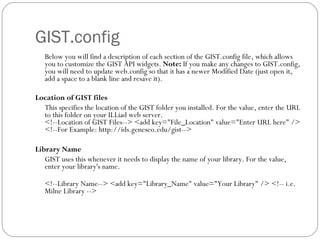
GIST.config Below you will find a description of each section of the GIST.config file, which allows you to customize the GIST API widgets.  Note:  If you make any changes to GIST.config, you will need to update web.config so that it has a newer Modified Date (just open it, add a space to a blank line and resave it).  Location of GIST files This specifies the location of the GIST folder you installed. For the value, enter the URL to this folder on your ILLiad web server.  <!--Location of GIST Files--> <add key=&quot;File_Location&quot; value=&quot;Enter URL here&quot; /> <!--For Example: http://ids.geneseo.edu/gist-->  Library Name GIST uses this whenever it needs to display the name of your library. For the value, enter your library's name.  <!--Library Name--> <add key=&quot;Library_Name&quot; value=&quot;Your Library&quot; /> <!-- i.e. Milne Library -->
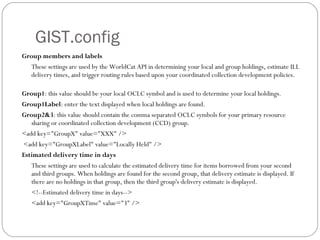
GIST.config Group members and labels These settings are used by the WorldCat API in determining your local and group holdings, estimate ILL delivery times, and trigger routing rules based upon your coordinated collection development policies.  Group1 : this value should be your local OCLC symbol and is used to determine your local holdings. Group1Label : enter the text displayed when local holdings are found.  Group2&3 : this value should contain the comma separated OCLC symbols for your primary resource sharing or coordinated collection development (CCD) group. <add key=&quot;GroupX&quot; value=&quot;XXX&quot; /> <add key=&quot;GroupXLabel&quot; value=&quot;Locally Held&quot; /> Estimated delivery time in days These settings are used to calculate the estimated delivery time for items borrowed from your second and third groups. When holdings are found for the second group, that delivery estimate is displayed. If there are no holdings in that group, then the third group's delivery estimate is displayed.  <!--Estimated delivery time in days-->  <add key=&quot;GroupXTime&quot; value=&quot;3&quot; />
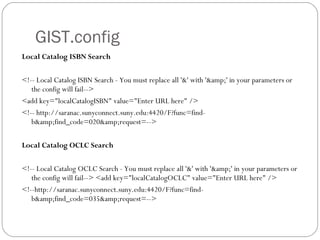
GIST.config Local Catalog ISBN Search <!-- Local Catalog ISBN Search - You must replace all '&' with '&amp;' in your parameters or the config will fail-->  <add key=&quot;localCatalogISBN&quot; value=&quot;Enter URL here&quot; />  <!-- http://saranac.sunyconnect.suny.edu:4420/F?func=find-b&amp;find_code=020&amp;request=-->  Local Catalog OCLC Search <!-- Local Catalog OCLC Search - You must replace all '&' with '&amp;' in your parameters or the config will fail--> <add key=&quot;localCatalogOCLC&quot; value=&quot;Enter URL here&quot; />  <!--http://saranac.sunyconnect.suny.edu:4420/F?func=find-b&amp;find_code=035&amp;request=-->
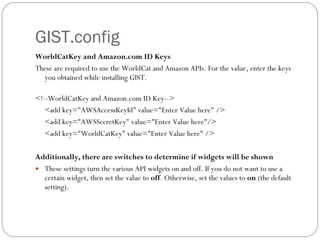
GIST.config WorldCatKey and Amazon.com ID Keys These are required to use the WorldCat and Amazon APIs. For the value, enter the keys you obtained while installing GIST.  <!--WorldCatKey and Amazon.com ID Key-->  <add key=&quot;AWSAccessKeyId&quot; value=&quot;Enter Value here&quot; />  <add key=&quot;AWSSecretKey&quot; value=&quot;Enter Value here&quot;/>  <add key=&quot;WorldCatKey&quot; value=&quot;Enter Value here&quot; />  Additionally, there are switches to determine if widgets will be shown These settings turn the various API widgets on and off. If you do not want to use a certain widget, then set the value to  off . Otherwise, set the values to  on  (the default setting).
Getting It System Toolkit for Web v1.11 Conclusion
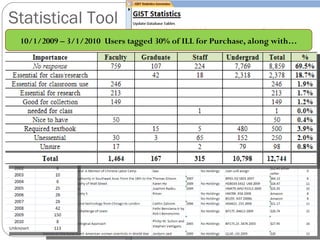
Statistical Tool 10/1/2009 – 3/1/2010  Users tagged 30% of ILL for Purchase, along with…
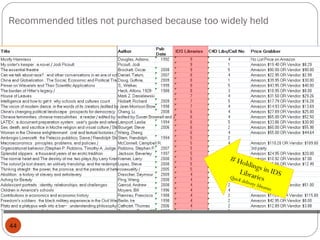
Recommended titles not purchased because too widely held # Holdings in IDS Libraries  Quick delivery libraries
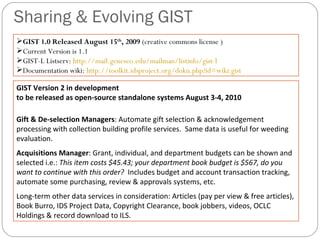
Sharing & Evolving GIST  GIST Version 2 in development  to be released as open-source standalone systems August 3-4, 2010 Gift & De-selection Managers : Automate gift selection & acknowledgement processing with collection building profile services.  Same data is useful for weeding evaluation.  Acquisitions Manager : Grant, individual, and department budgets can be shown and selected i.e.:  This item costs $45.43; your department book budget is $567, do you want to continue with this order?  Includes budget and account transaction tracking,  automate some purchasing, review & approvals systems, etc. Long-term other data services in consideration: Articles (pay per view & free articles), Book Burro, IDS Project Data, Copyright Clearance, book jobbers, videos, OCLC Holdings & record download to ILS. GIST 1.0 Released August 15 th , 2009  (creative commons license ) Current Version is 1.1 GIST-L Listserv:  http://mail.geneseo.edu/mailman/listinfo/gist-l Documentation wiki:  http://toolkit.idsproject.org/doku.php?id=wiki:gist
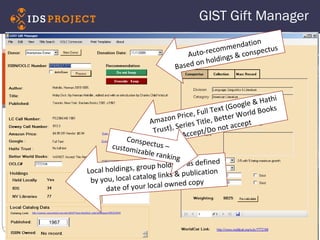
GIST Gift Manager Auto-recommendation Based on holdings & conspectus Amazon Price, Full Text (Google & Hathi Trust), Series Title, Better World Books Accept/Do not accept Local holdings, group holdings as defined by you, local catalog links & publication date of your local owned copy Conspectus – customizable ranking 1967
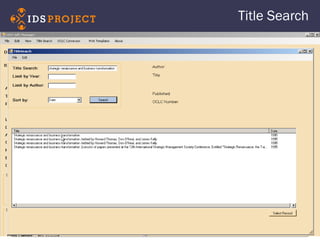
Title Search
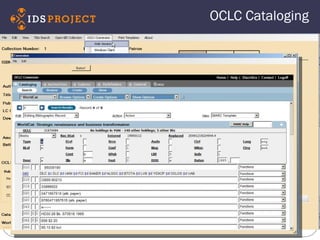
OCLC Cataloging
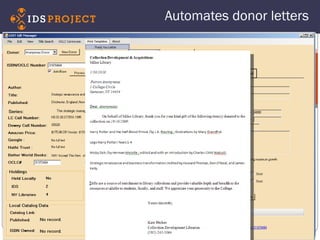
Automates donor letters
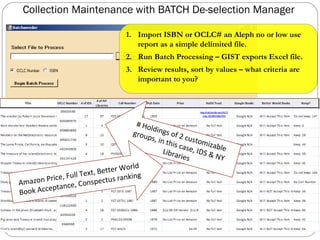
Collection Maintenance with BATCH De-selection Manager Import ISBN or OCLC# an Aleph no or low use report as a simple delimited file. Run Batch Processing – GIST exports Excel file. Review results, sort by values – what criteria are important to you? # Holdings of 2 customizable groups, in this case, IDS & NY Libraries Amazon Price, Full Text, Better World Book Acceptance, Conspectus ranking
Getting It System Toolkit (GIST) GIST Team  (SUNY Geneseo) Tim Bowersox, GIST Web Interface and ILLiad Workflow Designer Cyril Oberlander, Project Consultant Kate Pitcher, GIST Acquisition and Collection Development Designer Ed Rivenburgh, Project Sponsor Mark Sullivan, Project Manager & Geneseo Programmer GIST Grant Funding Rochester Regional Library Council – Regional Bibliographic Databases & Interlibrary Resources Sharing Grants (2009 & 2010) Worldcat API Programming Consultants Kyle Banerjee, Digital Services Program Manager at the Orbis Cascade Alliance Terry Reese, Oregon State University  http://idsproject.org/Tools/GIST.aspx
Welcome! To The Seventh Annual  Information Delivery  Services  (IDS) Summer Conference! August 3-4, 2010 Oswego, NY
IDS Conference Aug. 4 th  – Keynote If you've got everything under control, you're doing something wrong. Lessons in innovation from Better World Books Bio: F. Xavier Helgesen is the co-founder of Better World Books and an unabashed champion of innovation and creativity in the workplace. He founded two million-dollar companies before age 30, and will be spending 2011 as a Skoll Scholar in social entrepreneurship at Oxford University. Aug. 3 rd  – Keynote  Patron driven acquisitions & data-driven decision making BIO: Michael Levine-Clark, Collections Librarian, University of Denver  His extensive research & publications on… Shared purchase plan effectiveness Used book market Choice  titles “for  the humanities, there is generally greater use for the non-Choice and non-OAT titles than there is for the titles that have been reviewed .” 2007 Analysis comparing citation services of Chem. Abstracts, Web of Science, Scopus, and Google Scholar… Also… Tom Bruno, Harvard University giving us a program on International Interlibrary Loan, and more…

Getting It System Toolkit: Enhancing User Experience & Customizing a Future for ILL & Acquisition

  • 1.
    GIST making informeddecisions and workflow of buying, borrowing, downloading or viewing… easier. Tim Bowersox, Cyril Oberlander, Kate Pitcher, Mark Sullivan State University of New York, Geneseo College Getting It System Toolkit Enhancing user experience and customizing a future for ILL & Acquisition RRLC GIST Workshop April 28, 2010
  • 2.
    Goals and Objectivesfor Today Introduce and discuss GIST 1.11- Kate Q & A Implementation Planning GIST 1.11 Toolkit, API Keys, Web - Mark Workflow Planning – Kate & Cyril Break Implementation Demo – Mark & Tim Conclusion - Cyril
  • 3.
    What is GIST?A system for: enhancing user’s request experience & delivery service enabling user-initiated purchasing requests for acquisitions and interlibrary loan; enhancing coordinated collection development; merging Acquisitions and ILL request workflow using ILLiad (ILL request management software)
  • 4.
    User Interface forGIST at Geneseo Very customizable Status specific (Faculty, Distance Ed., Students, etc.) Context sensitive Standalone w/ISBN search Default Loan Form Open URL Book Chapter Form Components a la carte
  • 5.
    Customizable GIST RequestForm User Interface (Customizable display & fields) Staff Interface (Customizable display & fields) User Interface Runs from ILLiad web server, all components can be turned off and/or hidden from user view. Display text is configurable Works with your style-sheets And more… Staff Interface ILLiad 8+ customizable field names. You can configure data the way you want staff to see data from user interface side, and run routing rules based on the values; i.e. available full text, purchase request suggested, holdings, etc. And more…
  • 6.
    Worldcat API –Library Availability User sees if owned locally, easy click to catalog, and sees estimated turnaround time. ILL & Acquisitions staff see if held locally, and # holdings in 2 configurable groups (consortia, state, etc.) Google Books User sees Table of Contents, No-Partial, & Full Text Views . Staff see if full text in Google (GOOGL) OCLC symbol Index Data User sees if full text or audio version in Open Content Alliance, Gutenberg, Internet Archive, etc. Staff see if full text OCA (INARC) OCLC symbol Hathi Trust User sees link to full-text version from Hathi Trust ILL & Acquisitions staff see if held at Hathi Trust, and GIST 1.1 embeds the direct link to the work using a TinyURL API Amazon API Enhances users request evaluation with Reviews, Ranking, Cover, and quick link to Amazon. Price was moved into Purchasing Options window. Purchasing Options User sees price to purchase from Amazon API with New & Lowest Price listed (used) – user may want to purchase from this link. If they do, Amazon provides our AWS account a credit for referring someone to purchase. ILL & Acquisition Staff see the New & Lowest Price in the ILLiad requests. Better World Books, Google APIs are also currently used for pricing. ILLiad ILL Request Form Custom, Standalone, OpenURL, Status Specific
  • 7.
    GIST 1.11 Update includes Hathi Trust & Tinyurl.com Geneseo data from Feb. 9 – March 8, 2010
  • 8.
    Bringing users intothe conversation with customizable feedback For Geneseo, Purchase = Acquisitions in Doc Del
  • 9.
    Adapt GIST toyour setting Library A GIST tools used to enhance ILL Purchase on Demand only. Library B GIST used by Librarians using status specific ILLiad web pages. GIST also used only by Librarians to help their selection. Library C GIST used selectively based on ILLiad statuses. GIST also used by Faculty, with Librarian Review. Library D GIST default with collection building parameters. GIST used by all users, with some Librarian review for certain status. Collection building profiles, cooperative data, and gift management features used. You choose and adapt the tools around what works for your setting. Range of customization
  • 10.
    ILL & ACQWorkflow Requests are Transferable
  • 11.
  • 12.
  • 13.
  • 14.
  • 15.
  • 16.
    Amazon & GISTaddons within ILLiad’s 8.07 Client Import Amazon Price & more…
  • 17.
  • 18.
  • 19.
    Getting It SystemToolkit for Web v1.11 Questions and Answers?
  • 20.
    Getting It SystemToolkit for Web v1.11 Installation and Configuration
  • 21.
    Requirements ILLiad 8client (customized client layout unavailable in 7.4, but web form and workflows can be utilized) ILLiad 8 is now available. To begin setup, OCLC recommends taking the ILLiad 8 Survery ( https://www3.oclc.org/app/illiad/survey/index.pl ) to determine your setup needs. Staff Manager access Customization Manager access Access to your ILLiad web server (written on .net framework, so GIST will work for OCLC hosted sites)
  • 22.
    Documentation & downloads@ http://toolkit.idsproject.org/
  • 23.
    Files for GIST1.11 for Web
  • 24.
    GIST Documentation HTML,scripts, custom layouts, & email templates Complete installation & implementation guide Sample routing rules, email routing, & custom queues How to get started using a test implementation Sample routing rule with copy & paste MatchString
  • 25.
    Getting It SystemToolkit for Web v1.11 Workflow Planning: The Interactive Part
  • 26.
    Status and ServicesCustomizing GIST and ILLiad web pages for specific users: Who are your users? Why should there be a difference? Service, Questions, and Workflow
  • 27.
  • 28.
    Data for DecisionsUser feedback Purchase or ILL? Essential , non-essential, etc. “ Hold at Circulation” What feedback do you want? What data do you want? Vendor/API data Amazon Google Books Hathi Trust WorldCat holdings
  • 29.
    Workflow Diagram – planning for change
  • 30.
    Submitted Purchase RequestsFaculty Department Requires Review Item Locally Held Item Held by Too Many CCD Libraries Request Meets Criteria Faculty Rep Review Librarian Review Item in Pre-Publication Item Ordered, User Notified Item Arrives & Processed Denied by Reviewer Insufficient Funds Remaining Item Delivered, User Notified Staff Evaluation Route to ILL for Borrowing
  • 31.
    Getting It SystemToolkit for Web v1.11 Break Time!!!!
  • 32.
    Getting It SystemToolkit for Web v1.11 Hands on Configuration and Installation
  • 33.
    We guide youthrough… Downloading and extracting the GIST files Editing and customizing the GIST.config file Creating the necessary routing rules & custom queues Creating email routing for your workflow Managing access to the client for acquisitions staff Customizing your ILLiad web pages Repurposing ILLiad’s request fields Customizing the client interface
  • 34.
    Documentation & downloads@ http://toolkit.idsproject.org/
  • 35.
    Installing the GISTPrograms Back up your current ILLiad Web Directory – not necessary but always a good practice just in case… For a local server, copy and paste \\illiadserver\webfolder For a hosted server, log in with an ftp client and download a copy of the web directory to your computer. Extract the GIST.zip file to your ILLiad Web Directory (or the NVTGC directory if you have multiple sites). If you get a warning about overwriting your web.config file, then click NO You will need to open the web.config file and modify the <appSettings> line to <appSettings file=“ GIST.config ” /> For a hosted server, you will need to extract the files locally, make the modifications, then upload the files using an ftp client.
  • 36.
    Installing the GISTPrograms Obtain the following: an Amazon Web Services key; http://aws.amazon.com/ an Amazon Secret Key (same page); and a WorldCat API key. http://www.worldcat.org/affiliate/tools?atype=wcapi Also review the Google Book Search API branding guidelines. http://code.google.com/apis/books/branding.html
  • 37.
    Configuring GIST Openup the GIST.config file located in your ILLiad Web Directory or on your desktop for later upload to OCLC. Enter the keys along with your library information into the GIST.config file. After you make any changes to GIST.config you will need to update web.config so that it has a newer Modified Date. (just open it, add a space to a blank line and resave it.) If you are using a hosted server, make the changes to the GIST.config and web.config file prior to uploading the files. It will save time.
  • 38.
    GIST.config Below youwill find a description of each section of the GIST.config file, which allows you to customize the GIST API widgets. Note: If you make any changes to GIST.config, you will need to update web.config so that it has a newer Modified Date (just open it, add a space to a blank line and resave it). Location of GIST files This specifies the location of the GIST folder you installed. For the value, enter the URL to this folder on your ILLiad web server. <!--Location of GIST Files--> <add key=&quot;File_Location&quot; value=&quot;Enter URL here&quot; /> <!--For Example: http://ids.geneseo.edu/gist--> Library Name GIST uses this whenever it needs to display the name of your library. For the value, enter your library's name. <!--Library Name--> <add key=&quot;Library_Name&quot; value=&quot;Your Library&quot; /> <!-- i.e. Milne Library -->
  • 39.
    GIST.config Group membersand labels These settings are used by the WorldCat API in determining your local and group holdings, estimate ILL delivery times, and trigger routing rules based upon your coordinated collection development policies. Group1 : this value should be your local OCLC symbol and is used to determine your local holdings. Group1Label : enter the text displayed when local holdings are found. Group2&3 : this value should contain the comma separated OCLC symbols for your primary resource sharing or coordinated collection development (CCD) group. <add key=&quot;GroupX&quot; value=&quot;XXX&quot; /> <add key=&quot;GroupXLabel&quot; value=&quot;Locally Held&quot; /> Estimated delivery time in days These settings are used to calculate the estimated delivery time for items borrowed from your second and third groups. When holdings are found for the second group, that delivery estimate is displayed. If there are no holdings in that group, then the third group's delivery estimate is displayed. <!--Estimated delivery time in days--> <add key=&quot;GroupXTime&quot; value=&quot;3&quot; />
  • 40.
    GIST.config Local CatalogISBN Search <!-- Local Catalog ISBN Search - You must replace all '&' with '&amp;' in your parameters or the config will fail--> <add key=&quot;localCatalogISBN&quot; value=&quot;Enter URL here&quot; /> <!-- http://saranac.sunyconnect.suny.edu:4420/F?func=find-b&amp;find_code=020&amp;request=--> Local Catalog OCLC Search <!-- Local Catalog OCLC Search - You must replace all '&' with '&amp;' in your parameters or the config will fail--> <add key=&quot;localCatalogOCLC&quot; value=&quot;Enter URL here&quot; /> <!--http://saranac.sunyconnect.suny.edu:4420/F?func=find-b&amp;find_code=035&amp;request=-->
  • 41.
    GIST.config WorldCatKey andAmazon.com ID Keys These are required to use the WorldCat and Amazon APIs. For the value, enter the keys you obtained while installing GIST. <!--WorldCatKey and Amazon.com ID Key--> <add key=&quot;AWSAccessKeyId&quot; value=&quot;Enter Value here&quot; /> <add key=&quot;AWSSecretKey&quot; value=&quot;Enter Value here&quot;/> <add key=&quot;WorldCatKey&quot; value=&quot;Enter Value here&quot; /> Additionally, there are switches to determine if widgets will be shown These settings turn the various API widgets on and off. If you do not want to use a certain widget, then set the value to off . Otherwise, set the values to on (the default setting).
  • 42.
    Getting It SystemToolkit for Web v1.11 Conclusion
  • 43.
    Statistical Tool 10/1/2009– 3/1/2010 Users tagged 30% of ILL for Purchase, along with…
  • 44.
    Recommended titles notpurchased because too widely held # Holdings in IDS Libraries Quick delivery libraries
  • 45.
    Sharing & EvolvingGIST GIST Version 2 in development to be released as open-source standalone systems August 3-4, 2010 Gift & De-selection Managers : Automate gift selection & acknowledgement processing with collection building profile services. Same data is useful for weeding evaluation. Acquisitions Manager : Grant, individual, and department budgets can be shown and selected i.e.: This item costs $45.43; your department book budget is $567, do you want to continue with this order? Includes budget and account transaction tracking, automate some purchasing, review & approvals systems, etc. Long-term other data services in consideration: Articles (pay per view & free articles), Book Burro, IDS Project Data, Copyright Clearance, book jobbers, videos, OCLC Holdings & record download to ILS. GIST 1.0 Released August 15 th , 2009 (creative commons license ) Current Version is 1.1 GIST-L Listserv: http://mail.geneseo.edu/mailman/listinfo/gist-l Documentation wiki: http://toolkit.idsproject.org/doku.php?id=wiki:gist
  • 46.
    GIST Gift ManagerAuto-recommendation Based on holdings & conspectus Amazon Price, Full Text (Google & Hathi Trust), Series Title, Better World Books Accept/Do not accept Local holdings, group holdings as defined by you, local catalog links & publication date of your local owned copy Conspectus – customizable ranking 1967
  • 47.
  • 48.
  • 49.
  • 50.
    Collection Maintenance withBATCH De-selection Manager Import ISBN or OCLC# an Aleph no or low use report as a simple delimited file. Run Batch Processing – GIST exports Excel file. Review results, sort by values – what criteria are important to you? # Holdings of 2 customizable groups, in this case, IDS & NY Libraries Amazon Price, Full Text, Better World Book Acceptance, Conspectus ranking
  • 51.
    Getting It SystemToolkit (GIST) GIST Team (SUNY Geneseo) Tim Bowersox, GIST Web Interface and ILLiad Workflow Designer Cyril Oberlander, Project Consultant Kate Pitcher, GIST Acquisition and Collection Development Designer Ed Rivenburgh, Project Sponsor Mark Sullivan, Project Manager & Geneseo Programmer GIST Grant Funding Rochester Regional Library Council – Regional Bibliographic Databases & Interlibrary Resources Sharing Grants (2009 & 2010) Worldcat API Programming Consultants Kyle Banerjee, Digital Services Program Manager at the Orbis Cascade Alliance Terry Reese, Oregon State University http://idsproject.org/Tools/GIST.aspx
  • 52.
    Welcome! To TheSeventh Annual Information Delivery Services (IDS) Summer Conference! August 3-4, 2010 Oswego, NY
  • 53.
    IDS Conference Aug.4 th – Keynote If you've got everything under control, you're doing something wrong. Lessons in innovation from Better World Books Bio: F. Xavier Helgesen is the co-founder of Better World Books and an unabashed champion of innovation and creativity in the workplace. He founded two million-dollar companies before age 30, and will be spending 2011 as a Skoll Scholar in social entrepreneurship at Oxford University. Aug. 3 rd – Keynote Patron driven acquisitions & data-driven decision making BIO: Michael Levine-Clark, Collections Librarian, University of Denver His extensive research & publications on… Shared purchase plan effectiveness Used book market Choice titles “for the humanities, there is generally greater use for the non-Choice and non-OAT titles than there is for the titles that have been reviewed .” 2007 Analysis comparing citation services of Chem. Abstracts, Web of Science, Scopus, and Google Scholar… Also… Tom Bruno, Harvard University giving us a program on International Interlibrary Loan, and more…