JavaScript developer
friendly syntax
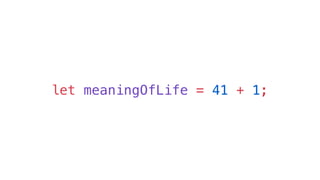
let meaningOfLife = 41 + 1;
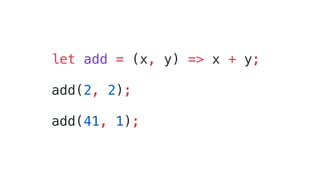
let add = (x, y) => x + y;
add(2, 2);
add(41, 1);
let fruits = ["Apple", "Orange"];
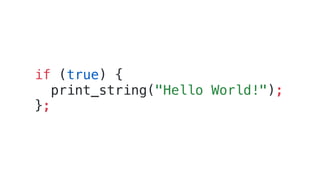
if (true) {
print_string("Hello World!");
};
OCaml semantics
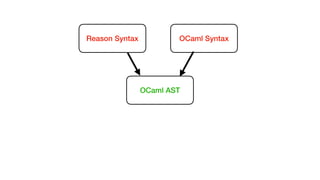
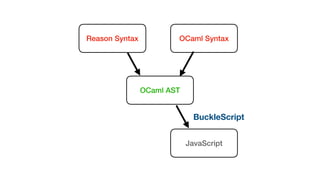
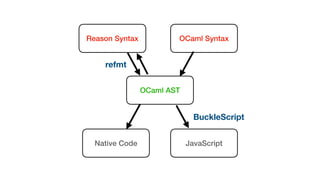
Reason Syntax OCaml Syntax
OCaml AST
Records
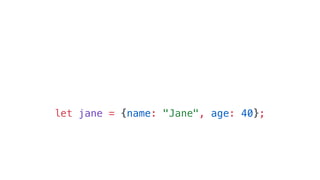
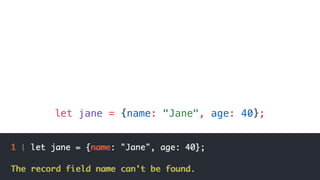
let jane = {name: "Jane", age: 40};
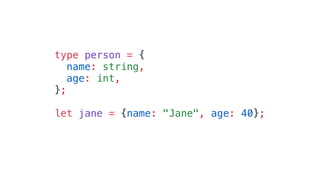
type person = {
name: string,
age: int,
};
let jane = {name: "Jane", age: 40};
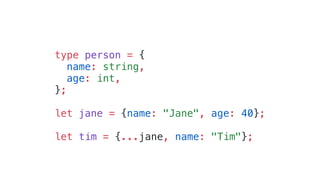
type person = {
name: string,
age: int,
};
let jane = {name: "Jane", age: 40};
let tim = {...jane, name: "Tim"};
Compiles to JavaScript
Reason Syntax OCaml Syntax
OCaml AST
JavaScript
BuckleScript
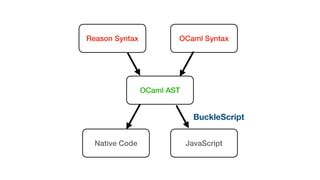
Reason Syntax OCaml Syntax
OCaml AST
Native Code JavaScript
BuckleScript
Fromatter
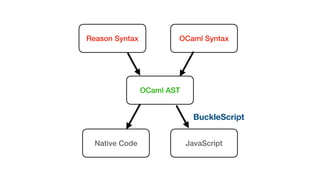
Reason Syntax OCaml Syntax
OCaml AST
Native Code JavaScript
BuckleScript
Reason Syntax OCaml Syntax
OCaml AST
Native Code JavaScript
refmt
BuckleScript
Statically Typed Language
Why yet another one?
const pieces = [
{ kind: "king", color: "black", position: [3, 4] },
{ kind: "pawn", color: "black", position: [4, 2] },
{ kind: "knight", color: "white", position: [3, 3] }
];
JavaScript
interface Piece {
kind: string;
color: string;
position: number[];
}
const pieces = [
{ kind: "king", color: "black", position: [3, 4] },
{ kind: "pawn", color: "black", position: [4, 2] },
{ kind: "knight", color: "white", position: [3, 3] }
];
const getKinds = (pieces: Piece[]) => pieces.map(piece => piece.kind);
TypeScript
interface Piece {
kind: string;
color: string;
position: number[];
}
const pieces = [
{ kind: "king", color: "black", position: [3, 4] },
{ kind: "pawn", color: "black", position: [4, 2] },
{ kind: "knight", color: "white", position: [3, 3] }
];
const getKinds = (pieces: Piece[]) => pieces.map(piece => piece.kind);
TypeScript
type piece = {
kind: string,
color: string,
position: (int, int),
};
let pieces = [
{kind: "king", color: "black", position: (3, 4)},
{kind: "pawn", color: "black", position: (4, 2)},
{kind: "knight", color: "white", position: (3, 3)},
];
let getKinds = pieces => List.map(item => item.kind, pieces);
Reason
Variants
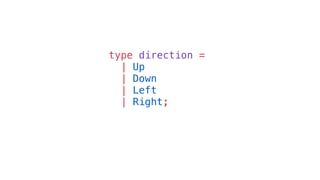
type direction =
| Up
| Down
| Left
| Right;
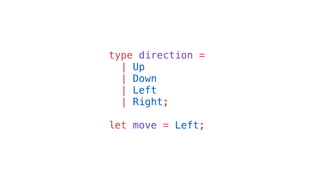
type direction =
| Up
| Down
| Left
| Right;
let move = Left;
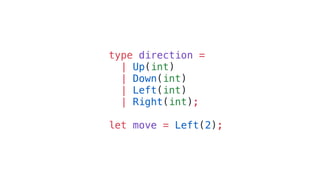
type direction =
| Up(int)
| Down(int)
| Left(int)
| Right(int);
let move = Left(2);
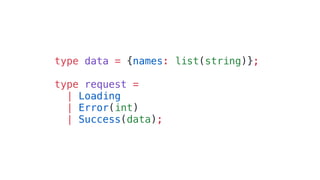
type data = {names: list(string)};
type request =
| Loading
| Error(int)
| Success(data);
type color = Black | White;
type kind = Queen | King | Rook | Bishop | Knight | Pawn;
type piece = {
color,
kind,
position: (int, int),
};
let pieces = [
{kind: King, color: Black, position: (3, 4)},
{kind: Pawn, color: Black, position: (4, 2)},
{kind: Knight, color: White, position: (3, 3)},
];
type color = Black | White;
type kind = Queen | King | Rook | Bishop | Knight | Pawn;
type piece = {
color,
kind,
position: (int, int),
};
let pieces = [
{kind: King, color: Black, position: (3, 4)},
{kind: Pawn, color: Black, position: (4, 2)},
{kind: Knight, color: White, position: (3, 3)},
];
type color = Black | White;
type kind = Queen | King | Rook | Bishop | Knight | Pawn;
type piece = {
color,
kind,
position: (int, int),
};
let pieces = [
{kind: King, color: Black, position: (3, 4)},
{kind: Pawn, color: Black, position: (4, 2)},
{kind: Knight, color: White, position: (3, 3)},
];
Pattern Matching
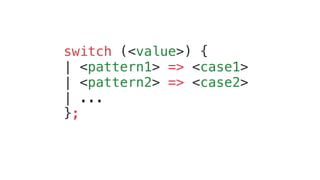
switch (<value>) {
| <pattern1> => <case1>
| <pattern2> => <case2>
| ...
};
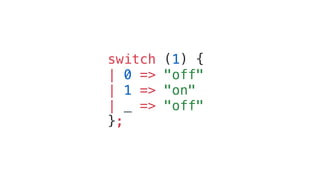
switch (1) {
| 0 => "off"
| 1 => "on"
| _ => "off"
};
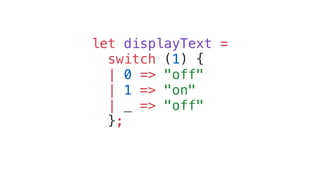
let displayText =
switch (1) {
| 0 => "off"
| 1 => "on"
| _ => "off"
};
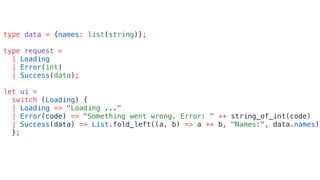
type data = {names: list(string)};
type request =
| Loading
| Error(int)
| Success(data);
let ui =
switch (Loading) {
| Loading => "Loading ..."
| Error(code) => "Something went wrong. Error: " ++ string_of_int(code)
| Success(data) => List.fold_left((a, b) => a ++ b, "Names:", data.names)
};
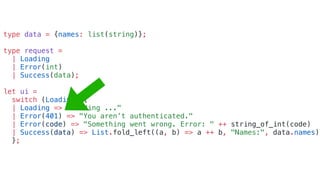
type data = {names: list(string)};
type request =
| Loading
| Error(int)
| Success(data);
let ui =
switch (Loading) {
| Loading => "Loading ..."
| Error(401) => "You aren’t authenticated."
| Error(code) => "Something went wrong. Error: " ++ string_of_int(code)
| Success(data) => List.fold_left((a, b) => a ++ b, "Names:", data.names)
};
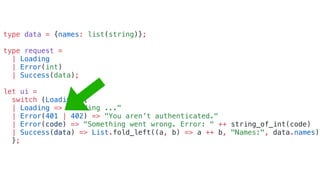
type data = {names: list(string)};
type request =
| Loading
| Error(int)
| Success(data);
let ui =
switch (Loading) {
| Loading => "Loading ..."
| Error(401 | 402) => "You aren’t authenticated."
| Error(code) => "Something went wrong. Error: " ++ string_of_int(code)
| Success(data) => List.fold_left((a, b) => a ++ b, "Names:", data.names)
};
– Tony Hoare
“I call it my billion-dollar mistake …”
Lesson I
Don’t implement anything just
because it’s easy!
Lesson II
Null is BAD!
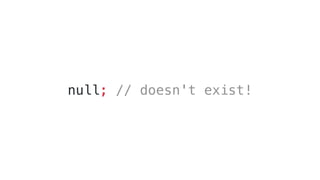
null; // doesn't exist!
Option
let foo = None;
let foo = Some(42);
let foo = Some([1, 2, 3]);
let foo = Some("Hello World!");
let foo = None;
let foo = Some(42);
let foo = Some([1, 2, 3]);
let foo = Some("Hello World!");
switch (foo) {
| None => "Sadly I don't know."
| Some(value) => "It's " ++ value
};
Functions
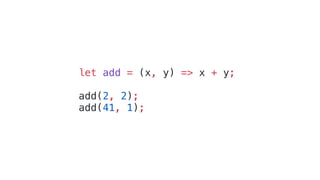
let add = (x, y) => x + y;
add(2, 2);
add(41, 1);
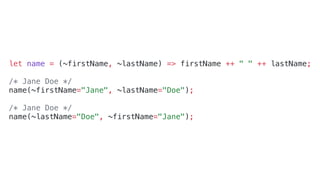
let name = (~firstName, ~lastName) => firstName ++ " " ++ lastName;
/* Jane Doe */
name(~firstName="Jane", ~lastName="Doe");
/* Jane Doe */
name(~lastName="Doe", ~firstName="Jane");
ReasonReact
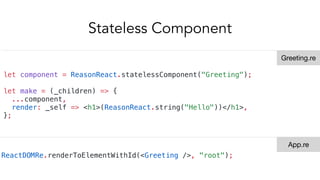
Stateless Component
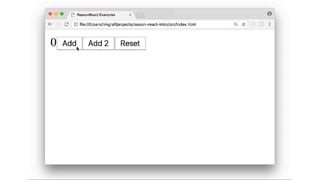
let component = ReasonReact.statelessComponent("Greeting");
let make = (_children) => {
...component,
render: _self => <h1>(ReasonReact.string("Hello"))</h1>,
};
ReactDOMRe.renderToElementWithId(<Greeting />, "root");
Greeting.re
App.re
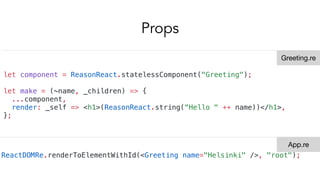
Props
let component = ReasonReact.statelessComponent("Greeting");
let make = (~name, _children) => {
...component,
render: _self => <h1>(ReasonReact.string(“Hello " ++ name))</h1>,
};
ReactDOMRe.renderToElementWithId(<Greeting name="Helsinki" />, "root");
Greeting.re
App.re
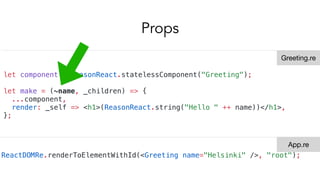
Props
let component = ReasonReact.statelessComponent("Greeting");
let make = (~name, _children) => {
...component,
render: _self => <h1>(ReasonReact.string("Hello " ++ name))</h1>,
};
ReactDOMRe.renderToElementWithId(<Greeting name="Helsinki" />, "root");
Greeting.re
App.re
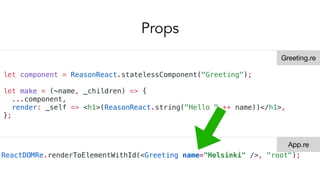
Props
let component = ReasonReact.statelessComponent("Greeting");
let make = (~name, _children) => {
...component,
render: _self => <h1>(ReasonReact.string("Hello " ++ name))</h1>,
};
ReactDOMRe.renderToElementWithId(<Greeting name="Helsinki" />, "root");
Greeting.re
App.re
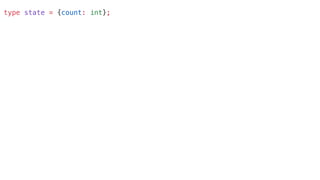
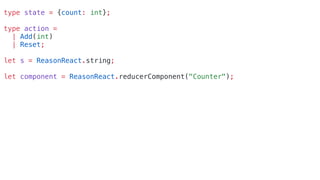
type state = {count: int};
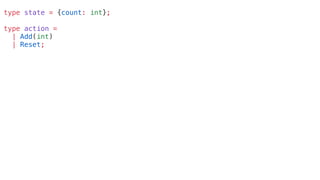
type action =
| Add(int)
| Reset;
type state = {count: int};
type action =
| Add(int)
| Reset;
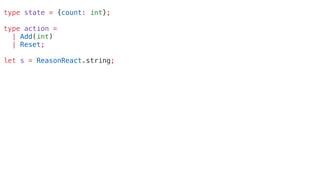
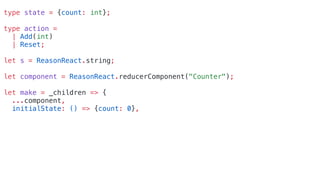
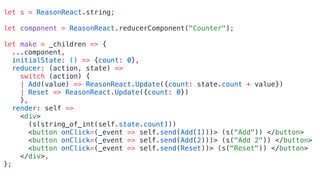
let s = ReasonReact.string;
type state = {count: int};
type action =
| Add(int)
| Reset;
let s = ReasonReact.string;
let component = ReasonReact.reducerComponent("Counter");
type state = {count: int};
type action =
| Add(int)
| Reset;
let s = ReasonReact.string;
let component = ReasonReact.reducerComponent("Counter");
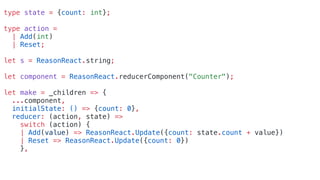
let make = _children => {
...component,
initialState: () => {count: 0},
type state = {count: int};
type action =
| Add(int)
| Reset;
let s = ReasonReact.string;
let component = ReasonReact.reducerComponent("Counter");
let make = _children => {
...component,
initialState: () => {count: 0},
reducer: (action, state) =>
switch (action) {
| Add(value) => ReasonReact.Update({count: state.count + value})
| Reset => ReasonReact.Update({count: 0})
},
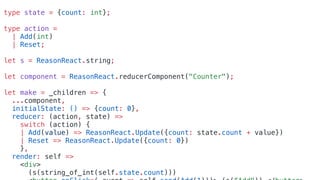
type state = {count: int};
type action =
| Add(int)
| Reset;
let s = ReasonReact.string;
let component = ReasonReact.reducerComponent("Counter");
let make = _children => {
...component,
initialState: () => {count: 0},
reducer: (action, state) =>
switch (action) {
| Add(value) => ReasonReact.Update({count: state.count + value})
| Reset => ReasonReact.Update({count: 0})
},
render: self =>
<div>
(s(string_of_int(self.state.count)))
let s = ReasonReact.string;
let component = ReasonReact.reducerComponent("Counter");
let make = _children => {
...component,
initialState: () => {count: 0},
reducer: (action, state) =>
switch (action) {
| Add(value) => ReasonReact.Update({count: state.count + value})
| Reset => ReasonReact.Update({count: 0})
},
render: self =>
<div>
(s(string_of_int(self.state.count)))
<button onClick=(_event => self.send(Add(1)))> (s(“Add")) </button>
<button onClick=(_event => self.send(Add(2)))> (s("Add 2")) </button>
<button onClick=(_event => self.send(Reset))> (s("Reset")) </button>
</div>,
};
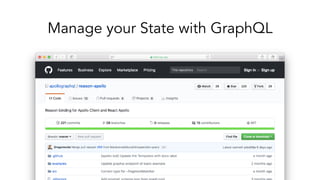
Manage your State with GraphQL
Interop with JavaScript
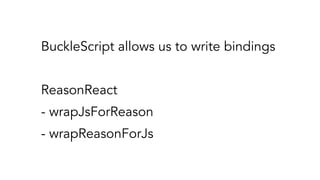
BuckleScript allows us to write bindings
ReasonReact
- wrapJsForReason
- wrapReasonForJs
[@bs.module "rebass"] external jsArrow : ReasonReact.reactClass = "Arrow";
let make = (~direction: string, children) =>
ReasonReact.wrapJsForReason(
~reactClass=jsArrow,
~props={"direction": direction},
children,
);
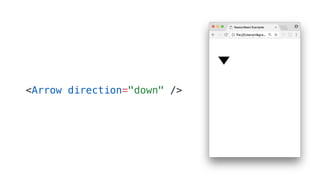
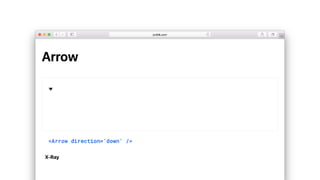
<Arrow direction="down" />
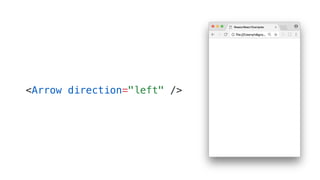
<Arrow direction="left" />
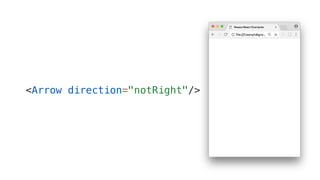
<Arrow direction="notRight"/>
Variants to the rescue!
[@bs.module "rebass"] external jsArrow : ReasonReact.reactClass = "Arrow";
type direction =
| Up
| Down;
let make = (~direction, children) => {
let directionString =
switch (direction) {
| Up => "up"
| Down => "down"
};
ReasonReact.wrapJsForReason(
~reactClass=jsArrow,
~props={"direction": directionString},
children,
);
};
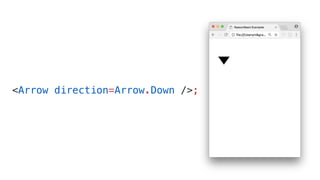
<Arrow direction=Arrow.Down />;
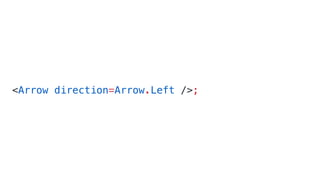
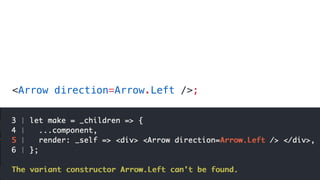
<Arrow direction=Arrow.Left />;
So what now?
Don’t be that person
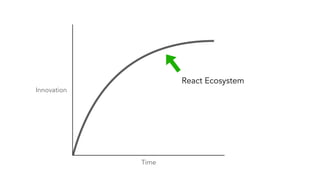
Time
Innovation
React Ecosystem
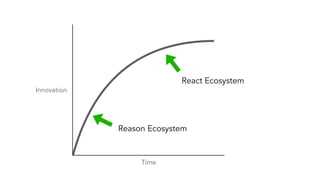
Time
Innovation
React Ecosystem
Reason Ecosystem
Day 1: Workshop
Day 2: Talks
Day 3: Hackathon
The End

Get started with Reason

  • 3.
  • 4.
  • 5.
    let add =(x, y) => x + y; add(2, 2); add(41, 1);
  • 6.
    let fruits =["Apple", "Orange"];
  • 7.
  • 8.
  • 9.
    Reason Syntax OCamlSyntax OCaml AST
  • 10.
  • 11.
    let jane ={name: "Jane", age: 40};
  • 12.
    let jane ={name: "Jane", age: 40};
  • 13.
    type person ={ name: string, age: int, }; let jane = {name: "Jane", age: 40};
  • 14.
    type person ={ name: string, age: int, }; let jane = {name: "Jane", age: 40}; let tim = {...jane, name: "Tim"};
  • 15.
  • 16.
    Reason Syntax OCamlSyntax OCaml AST JavaScript BuckleScript
  • 17.
    Reason Syntax OCamlSyntax OCaml AST Native Code JavaScript BuckleScript
  • 18.
  • 19.
    Reason Syntax OCamlSyntax OCaml AST Native Code JavaScript BuckleScript
  • 20.
    Reason Syntax OCamlSyntax OCaml AST Native Code JavaScript refmt BuckleScript
  • 21.
  • 23.
  • 25.
    const pieces =[ { kind: "king", color: "black", position: [3, 4] }, { kind: "pawn", color: "black", position: [4, 2] }, { kind: "knight", color: "white", position: [3, 3] } ]; JavaScript
  • 26.
    interface Piece { kind:string; color: string; position: number[]; } const pieces = [ { kind: "king", color: "black", position: [3, 4] }, { kind: "pawn", color: "black", position: [4, 2] }, { kind: "knight", color: "white", position: [3, 3] } ]; const getKinds = (pieces: Piece[]) => pieces.map(piece => piece.kind); TypeScript
  • 27.
    interface Piece { kind:string; color: string; position: number[]; } const pieces = [ { kind: "king", color: "black", position: [3, 4] }, { kind: "pawn", color: "black", position: [4, 2] }, { kind: "knight", color: "white", position: [3, 3] } ]; const getKinds = (pieces: Piece[]) => pieces.map(piece => piece.kind); TypeScript
  • 28.
    type piece ={ kind: string, color: string, position: (int, int), }; let pieces = [ {kind: "king", color: "black", position: (3, 4)}, {kind: "pawn", color: "black", position: (4, 2)}, {kind: "knight", color: "white", position: (3, 3)}, ]; let getKinds = pieces => List.map(item => item.kind, pieces); Reason
  • 29.
  • 30.
    type direction = |Up | Down | Left | Right;
  • 31.
    type direction = |Up | Down | Left | Right; let move = Left;
  • 32.
    type direction = |Up(int) | Down(int) | Left(int) | Right(int); let move = Left(2);
  • 33.
    type data ={names: list(string)}; type request = | Loading | Error(int) | Success(data);
  • 34.
    type color =Black | White; type kind = Queen | King | Rook | Bishop | Knight | Pawn; type piece = { color, kind, position: (int, int), }; let pieces = [ {kind: King, color: Black, position: (3, 4)}, {kind: Pawn, color: Black, position: (4, 2)}, {kind: Knight, color: White, position: (3, 3)}, ];
  • 35.
    type color =Black | White; type kind = Queen | King | Rook | Bishop | Knight | Pawn; type piece = { color, kind, position: (int, int), }; let pieces = [ {kind: King, color: Black, position: (3, 4)}, {kind: Pawn, color: Black, position: (4, 2)}, {kind: Knight, color: White, position: (3, 3)}, ];
  • 36.
    type color =Black | White; type kind = Queen | King | Rook | Bishop | Knight | Pawn; type piece = { color, kind, position: (int, int), }; let pieces = [ {kind: King, color: Black, position: (3, 4)}, {kind: Pawn, color: Black, position: (4, 2)}, {kind: Knight, color: White, position: (3, 3)}, ];
  • 37.
  • 38.
    switch (<value>) { |<pattern1> => <case1> | <pattern2> => <case2> | ... };
  • 39.
    switch (1) { |0 => "off" | 1 => "on" | _ => "off" };
  • 40.
    let displayText = switch(1) { | 0 => "off" | 1 => "on" | _ => "off" };
  • 41.
    type data ={names: list(string)}; type request = | Loading | Error(int) | Success(data); let ui = switch (Loading) { | Loading => "Loading ..." | Error(code) => "Something went wrong. Error: " ++ string_of_int(code) | Success(data) => List.fold_left((a, b) => a ++ b, "Names:", data.names) };
  • 42.
    type data ={names: list(string)}; type request = | Loading | Error(int) | Success(data); let ui = switch (Loading) { | Loading => "Loading ..." | Error(401) => "You aren’t authenticated." | Error(code) => "Something went wrong. Error: " ++ string_of_int(code) | Success(data) => List.fold_left((a, b) => a ++ b, "Names:", data.names) };
  • 43.
    type data ={names: list(string)}; type request = | Loading | Error(int) | Success(data); let ui = switch (Loading) { | Loading => "Loading ..." | Error(401 | 402) => "You aren’t authenticated." | Error(code) => "Something went wrong. Error: " ++ string_of_int(code) | Success(data) => List.fold_left((a, b) => a ++ b, "Names:", data.names) };
  • 45.
    – Tony Hoare “Icall it my billion-dollar mistake …”
  • 48.
    Lesson I Don’t implementanything just because it’s easy!
  • 49.
  • 50.
  • 51.
  • 52.
    let foo =None; let foo = Some(42); let foo = Some([1, 2, 3]); let foo = Some("Hello World!");
  • 53.
    let foo =None; let foo = Some(42); let foo = Some([1, 2, 3]); let foo = Some("Hello World!"); switch (foo) { | None => "Sadly I don't know." | Some(value) => "It's " ++ value };
  • 54.
  • 55.
    let add =(x, y) => x + y; add(2, 2); add(41, 1);
  • 56.
    let name =(~firstName, ~lastName) => firstName ++ " " ++ lastName; /* Jane Doe */ name(~firstName="Jane", ~lastName="Doe"); /* Jane Doe */ name(~lastName="Doe", ~firstName="Jane");
  • 57.
  • 58.
    Stateless Component let component= ReasonReact.statelessComponent("Greeting"); let make = (_children) => { ...component, render: _self => <h1>(ReasonReact.string("Hello"))</h1>, }; ReactDOMRe.renderToElementWithId(<Greeting />, "root"); Greeting.re App.re
  • 59.
    Props let component =ReasonReact.statelessComponent("Greeting"); let make = (~name, _children) => { ...component, render: _self => <h1>(ReasonReact.string(“Hello " ++ name))</h1>, }; ReactDOMRe.renderToElementWithId(<Greeting name="Helsinki" />, "root"); Greeting.re App.re
  • 60.
    Props let component =ReasonReact.statelessComponent("Greeting"); let make = (~name, _children) => { ...component, render: _self => <h1>(ReasonReact.string("Hello " ++ name))</h1>, }; ReactDOMRe.renderToElementWithId(<Greeting name="Helsinki" />, "root"); Greeting.re App.re
  • 61.
    Props let component =ReasonReact.statelessComponent("Greeting"); let make = (~name, _children) => { ...component, render: _self => <h1>(ReasonReact.string("Hello " ++ name))</h1>, }; ReactDOMRe.renderToElementWithId(<Greeting name="Helsinki" />, "root"); Greeting.re App.re
  • 63.
    type state ={count: int};
  • 64.
    type state ={count: int}; type action = | Add(int) | Reset;
  • 65.
    type state ={count: int}; type action = | Add(int) | Reset; let s = ReasonReact.string;
  • 66.
    type state ={count: int}; type action = | Add(int) | Reset; let s = ReasonReact.string; let component = ReasonReact.reducerComponent("Counter");
  • 67.
    type state ={count: int}; type action = | Add(int) | Reset; let s = ReasonReact.string; let component = ReasonReact.reducerComponent("Counter"); let make = _children => { ...component, initialState: () => {count: 0},
  • 68.
    type state ={count: int}; type action = | Add(int) | Reset; let s = ReasonReact.string; let component = ReasonReact.reducerComponent("Counter"); let make = _children => { ...component, initialState: () => {count: 0}, reducer: (action, state) => switch (action) { | Add(value) => ReasonReact.Update({count: state.count + value}) | Reset => ReasonReact.Update({count: 0}) },
  • 69.
    type state ={count: int}; type action = | Add(int) | Reset; let s = ReasonReact.string; let component = ReasonReact.reducerComponent("Counter"); let make = _children => { ...component, initialState: () => {count: 0}, reducer: (action, state) => switch (action) { | Add(value) => ReasonReact.Update({count: state.count + value}) | Reset => ReasonReact.Update({count: 0}) }, render: self => <div> (s(string_of_int(self.state.count)))
  • 70.
    let s =ReasonReact.string; let component = ReasonReact.reducerComponent("Counter"); let make = _children => { ...component, initialState: () => {count: 0}, reducer: (action, state) => switch (action) { | Add(value) => ReasonReact.Update({count: state.count + value}) | Reset => ReasonReact.Update({count: 0}) }, render: self => <div> (s(string_of_int(self.state.count))) <button onClick=(_event => self.send(Add(1)))> (s(“Add")) </button> <button onClick=(_event => self.send(Add(2)))> (s("Add 2")) </button> <button onClick=(_event => self.send(Reset))> (s("Reset")) </button> </div>, };
  • 72.
    Manage your Statewith GraphQL
  • 73.
  • 74.
    BuckleScript allows usto write bindings ReasonReact - wrapJsForReason - wrapReasonForJs
  • 75.
    [@bs.module "rebass"] externaljsArrow : ReasonReact.reactClass = "Arrow"; let make = (~direction: string, children) => ReasonReact.wrapJsForReason( ~reactClass=jsArrow, ~props={"direction": direction}, children, );
  • 76.
  • 77.
  • 78.
  • 80.
  • 81.
    [@bs.module "rebass"] externaljsArrow : ReasonReact.reactClass = "Arrow"; type direction = | Up | Down; let make = (~direction, children) => { let directionString = switch (direction) { | Up => "up" | Down => "down" }; ReasonReact.wrapJsForReason( ~reactClass=jsArrow, ~props={"direction": directionString}, children, ); };
  • 82.
  • 83.
  • 84.
  • 85.
  • 86.
  • 87.
  • 88.
  • 89.
    Day 1: Workshop Day2: Talks Day 3: Hackathon
  • 90.