2 December 2005
Next Generation User Interfaces
Gesture-based Interaction
Prof. Beat Signer
Department of Computer Science
Vrije Universiteit Brussel
http://www.beatsigner.com
Beat Signer - Department of Computer Science - bsigner@vub.ac.be 2November 14, 2016
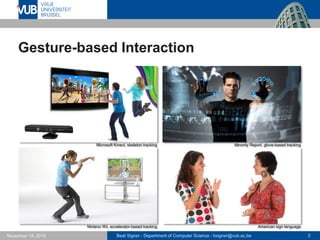
Gesture-based Interaction
Microsoft Kinect, skeleton tracking Minority Report, glove-based tracking
Ninteno Wii, accelerator-based tracking American sign language
Beat Signer - Department of Computer Science - bsigner@vub.ac.be 3November 14, 2016
What is a Gesture?
 A motion of the limbs or body to express or help to
express thought or to emphasise speech
 The act of moving the limbs or body as an expression of
thought or emphasis
 A succession of postures
Beat Signer - Department of Computer Science - bsigner@vub.ac.be 4November 14, 2016
Formal Gesture Definition
A gesture is a form of non-verbal communication or non-
vocal communication in which visible bodily actions
communicate particular messages, either in place of, or in
conjunction with, speech. Gestures include movement of
the hands, face, or other parts of the body. Gestures differ
from physical non-verbal communication that does not
communicate specific messages, such as purely
expressive displays, proxemics, or displays of joint
attention.
A. Kendon, Gesture: Visible Action as Utterance, Cambridge University Press, 2004
Beat Signer - Department of Computer Science - bsigner@vub.ac.be 5November 14, 2016
Gesture Types
 Gestures can be classified into three types of
gestures according to their function (Buxton, 2011)
 semiotic gestures
- used to communicate meaningful information (e.g. thumbs up)
 ergotic gestures
- used to manipulate the physical world and create artefacts
 epistemic gestures
- used to learn from the environment through tactile or haptic exploration
 Since we are interested in human-computer interaction,
we will focus on semiotic gestures
Beat Signer - Department of Computer Science - bsigner@vub.ac.be 6November 14, 2016
Semiotic Gestures
 Semiotic gestures can be further classified into
 symbolic gestures (emblems)
- culture-specific gestures with single meaning (e.g. "OK" gesture)
- only symbolic gestures can be interpreted without contextual information
 deictic gestures
- pointing gesture (e.g. Bolt's "put-that-there")
 iconic gestures
- used to convey information about the size, shape or orientation of
the object of discourse (e.g. "the plane flew like this")
 pantomimic gestures
- showing the use of movement of some invisible tool or object in the speaker’s
hand (e.g. "I turned the steering wheel hard to the left")
Beat Signer - Department of Computer Science - bsigner@vub.ac.be 7November 14, 2016
Taxonomy of Hand/Arm Gestures
Beat Signer - Department of Computer Science - bsigner@vub.ac.be 8November 14, 2016
Taxonomy of Hand/Arm Gestures …
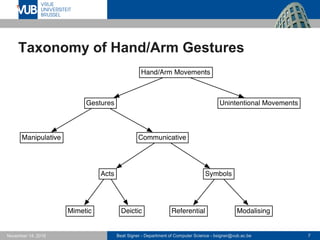
 Gestures vs. unintentional movements
 unintentional movement does not convey meaningful information
 Communicative vs. manipulative gestures
 manipulative (ergotic) gestures are used to act on objects in an
environment (e.g. move or rotate an object)
 communicative (semiotic) gestures have an inherent
communicational purpose
 Acts are gestures that are directly related to the
interpretation of the movement itself
 imitating some actions
- mimetic (pantomimic) gestures
 pointing acts ("put-that-there")
- deictic gestures
Beat Signer - Department of Computer Science - bsigner@vub.ac.be 9November 14, 2016
Taxonomy of Hand/Arm Gestures …
 Symbols are gestures that have a linguistic role
 symbolise some referential action (e.g. circular motion of the
index finger to reference to a wheel)
 used as modalisers, typically linked with speech ("Look at that
wing!" and a modalising gesture showing the wing vibrating)
Beat Signer - Department of Computer Science - bsigner@vub.ac.be 10November 14, 2016
Gesture Recognition Devices
 Wired gloves
 Accelerometers
 Camcorders and webcams
 Skeleton tracking
 Electromyography (EMG)
 Single and multi-touch surfaces
 see lecture on Interactive Tabletops and Surfaces
 Digital pens
 …
Beat Signer - Department of Computer Science - bsigner@vub.ac.be 11November 14, 2016
Wired Gloves
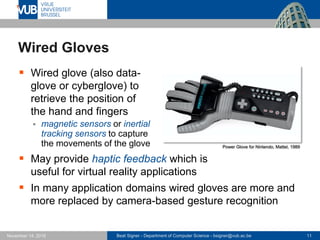
 Wired glove (also data-
glove or cyberglove) to
retrieve the position of
the hand and fingers
 magnetic sensors or inertial
tracking sensors to capture
the movements of the glove
 May provide haptic feedback which is
useful for virtual reality applications
 In many application domains wired gloves are more and
more replaced by camera-based gesture recognition
Power Glove for Nintendo, Mattel, 1989
Beat Signer - Department of Computer Science - bsigner@vub.ac.be 12November 14, 2016
Accelerometers
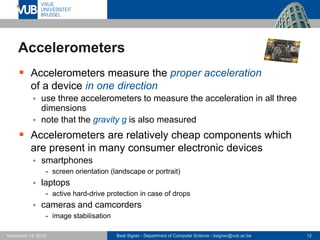
 Accelerometers measure the proper acceleration
of a device in one direction
 use three accelerometers to measure the acceleration in all three
dimensions
 note that the gravity g is also measured
 Accelerometers are relatively cheap components which
are present in many consumer electronic devices
 smartphones
- screen orientation (landscape or portrait)
 laptops
- active hard-drive protection in case of drops
 cameras and camcorders
- image stabilisation
Beat Signer - Department of Computer Science - bsigner@vub.ac.be 13November 14, 2016
Accelerometers …
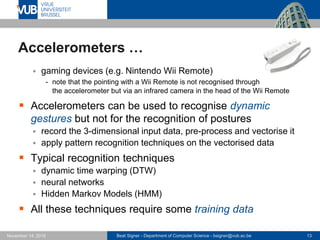
 gaming devices (e.g. Nintendo Wii Remote)
- note that the pointing with a Wii Remote is not recognised through
the accelerometer but via an infrared camera in the head of the Wii Remote
 Accelerometers can be used to recognise dynamic
gestures but not for the recognition of postures
 record the 3-dimensional input data, pre-process and vectorise it
 apply pattern recognition techniques on the vectorised data
 Typical recognition techniques
 dynamic time warping (DTW)
 neural networks
 Hidden Markov Models (HMM)
 All these techniques require some training data
Beat Signer - Department of Computer Science - bsigner@vub.ac.be 14November 14, 2016
Camcorders and Webcams
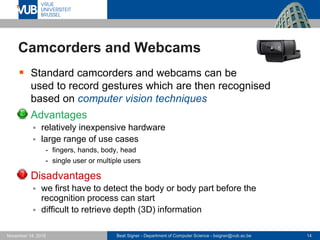
 Standard camcorders and webcams can be
used to record gestures which are then recognised
based on computer vision techniques
 Advantages
 relatively inexpensive hardware
 large range of use cases
- fingers, hands, body, head
- single user or multiple users
 Disadvantages
 we first have to detect the body or body part before the
recognition process can start
 difficult to retrieve depth (3D) information
Beat Signer - Department of Computer Science - bsigner@vub.ac.be 15November 14, 2016
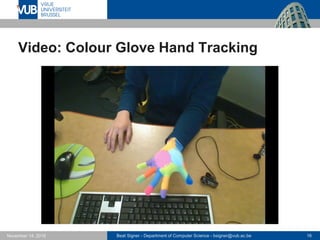
Vision-based Hand Gesture Example
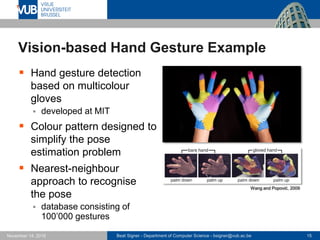
 Hand gesture detection
based on multicolour
gloves
 developed at MIT
 Colour pattern designed to
simplify the pose
estimation problem
 Nearest-neighbour
approach to recognise
the pose
 database consisting of
100’000 gestures
Wang and Popović, 2009
Beat Signer - Department of Computer Science - bsigner@vub.ac.be 16November 14, 2016
Video: Colour Glove Hand Tracking
Beat Signer - Department of Computer Science - bsigner@vub.ac.be 17November 14, 2016
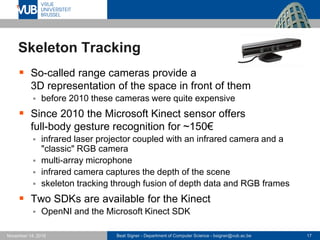
Skeleton Tracking
 So-called range cameras provide a
3D representation of the space in front of them
 before 2010 these cameras were quite expensive
 Since 2010 the Microsoft Kinect sensor offers
full-body gesture recognition for ~150€
 infrared laser projector coupled with an infrared camera and a
"classic" RGB camera
 multi-array microphone
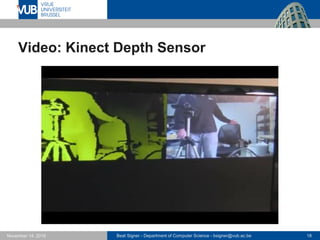
 infrared camera captures the depth of the scene
 skeleton tracking through fusion of depth data and RGB frames
 Two SDKs are available for the Kinect
 OpenNI and the Microsoft Kinect SDK
Beat Signer - Department of Computer Science - bsigner@vub.ac.be 18November 14, 2016
Video: Kinect Depth Sensor
Beat Signer - Department of Computer Science - bsigner@vub.ac.be 19November 14, 2016
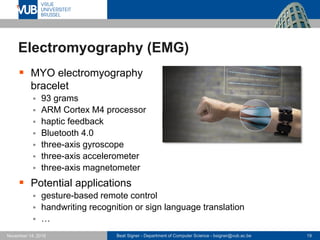
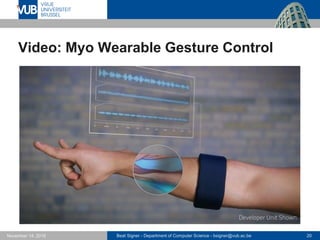
Electromyography (EMG)
 MYO electromyography
bracelet
 93 grams
 ARM Cortex M4 processor
 haptic feedback
 Bluetooth 4.0
 three-axis gyroscope
 three-axis accelerometer
 three-axis magnetometer
 Potential applications
 gesture-based remote control
 handwriting recognition or sign language translation
 …
Beat Signer - Department of Computer Science - bsigner@vub.ac.be 20November 14, 2016
Video: Myo Wearable Gesture Control
Beat Signer - Department of Computer Science - bsigner@vub.ac.be 21November 14, 2016
Gesture Recognition Algorithms
 Three broad families of algorithms
 template-based algorithms
- Rubine
- Dynamic Time Warping (DTW)
- $1 recogniser / $N recogniser
 machine learning-based algorithms
- Hidden Markov Models (HMM)
- neural networks
 rule-based approaches
- LADDER
 Some approaches mix these families to keep the
strengths of each
 e.g. Mudra
Beat Signer - Department of Computer Science - bsigner@vub.ac.be 22November 14, 2016
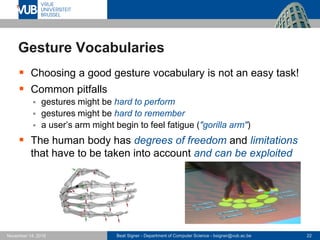
Gesture Vocabularies
 Choosing a good gesture vocabulary is not an easy task!
 Common pitfalls
 gestures might be hard to perform
 gestures might be hard to remember
 a user’s arm might begin to feel fatigue ("gorilla arm")
 The human body has degrees of freedom and limitations
that have to be taken into account and can be exploited
Beat Signer - Department of Computer Science - bsigner@vub.ac.be 23November 14, 2016
Defining the Right Gesture Vocabulary
 Use the foundations of interaction design
 Observe the users to explore gestures that make sense
 Gestures should be
 easy to perform and remember
 intuitive
 metaphorically and iconically logical towards functionality
 ergonomic and not physically stressing when used often
 Implemented gestures can be evaluated against
 semantic interpretation
 intuitivity and usability
 learning and memory rate
 stress
Beat Signer - Department of Computer Science - bsigner@vub.ac.be 24November 14, 2016
Defining the Right Gesture Vocabulary …
 From a technical point the following things might be
considered
 different gestures should not look too similar
- better recognition results
 gesture set size
- a large number of gestures is harder to recognise
 Reuse of gestures
 same semantics for different applications
 application-specific gestures
Beat Signer - Department of Computer Science - bsigner@vub.ac.be 25November 14, 2016
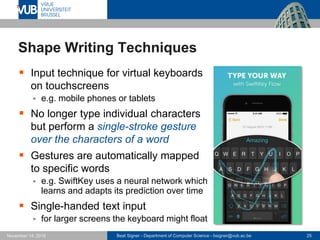
Shape Writing Techniques
 Input technique for virtual keyboards
on touchscreens
 e.g. mobile phones or tablets
 No longer type individual characters
but perform a single-stroke gesture
over the characters of a word
 Gestures are automatically mapped
to specific words
 e.g. SwiftKey uses a neural network which
learns and adapts its prediction over time
 Single-handed text input
 for larger screens the keyboard might float
Beat Signer - Department of Computer Science - bsigner@vub.ac.be 26November 14, 2016
"Fat Finger" Problem
 "Fat finger" problem is based on
two issues
 finger makes contact with a relatively
large screen area but only single
touch point is used by the system
- e.g. centre
 users cannot see the currently
computed touch point (occluded
by finger) and might therefore miss their target
 Solutions
 make elements larger or provide feedback during interaction
 adjust the touch point (based on user perception)
 use iceberg targets technique
 …
[http://podlipensky.com/2011/01/mobile-usability-sliders/]
Beat Signer - Department of Computer Science - bsigner@vub.ac.be 27November 14, 2016
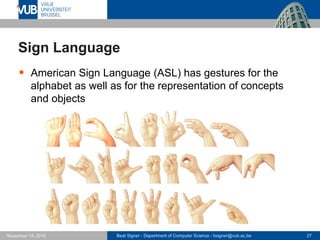
Sign Language
 American Sign Language (ASL) has gestures for the
alphabet as well as for the representation of concepts
and objects
Beat Signer - Department of Computer Science - bsigner@vub.ac.be 28November 14, 2016
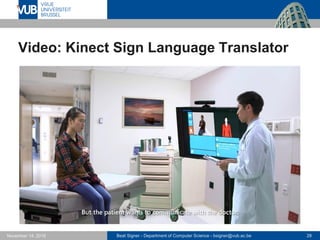
Video: Kinect Sign Language Translator
Beat Signer - Department of Computer Science - bsigner@vub.ac.be 29November 14, 2016
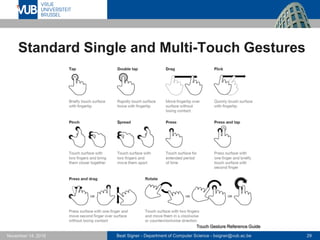
Standard Single and Multi-Touch Gestures
Touch Gesture Reference Guide
Beat Signer - Department of Computer Science - bsigner@vub.ac.be 30November 14, 2016
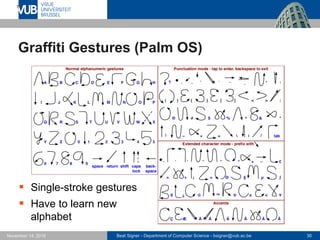
Graffiti Gestures (Palm OS)
 Single-stroke gestures
 Have to learn new
alphabet
Beat Signer - Department of Computer Science - bsigner@vub.ac.be 31November 14, 2016
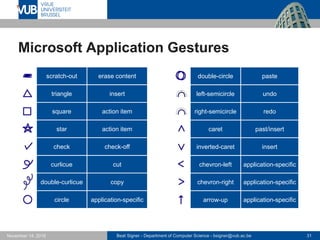
Microsoft Application Gestures
scratch-out erase content
triangle insert
square action item
star action item
check check-off
curlicue cut
double-curlicue copy
circle application-specific
double-circle paste
left-semicircle undo
right-semicircle redo
caret past/insert
inverted-caret insert
chevron-left application-specific
chevron-right application-specific
arrow-up application-specific
Beat Signer - Department of Computer Science - bsigner@vub.ac.be 32November 14, 2016
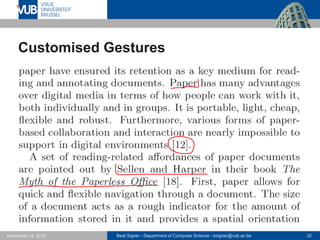
Customised Gestures
Beat Signer - Department of Computer Science - bsigner@vub.ac.be 33November 14, 2016
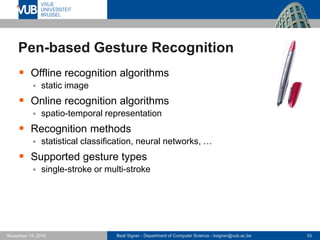
Pen-based Gesture Recognition
 Offline recognition algorithms
 static image
 Online recognition algorithms
 spatio-temporal representation
 Recognition methods
 statistical classification, neural networks, …
 Supported gesture types
 single-stroke or multi-stroke
Beat Signer - Department of Computer Science - bsigner@vub.ac.be 34November 14, 2016
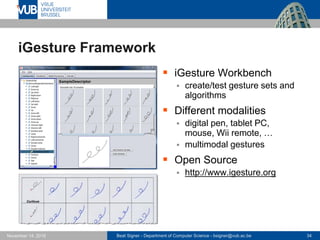
iGesture Framework
 iGesture Workbench
 create/test gesture sets and
algorithms
 Different modalities
 digital pen, tablet PC,
mouse, Wii remote, …
 multimodal gestures
 Open Source
 http://www.igesture.org
Beat Signer - Department of Computer Science - bsigner@vub.ac.be 35November 14, 2016
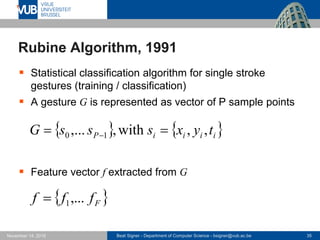
Rubine Algorithm, 1991
 Statistical classification algorithm for single stroke
gestures (training / classification)
 A gesture G is represented as vector of P sample points
 Feature vector f extracted from G
   iiiiP tyxsssG ,,with,,... 10  
 Ffff ,...1
Beat Signer - Department of Computer Science - bsigner@vub.ac.be 36November 14, 2016
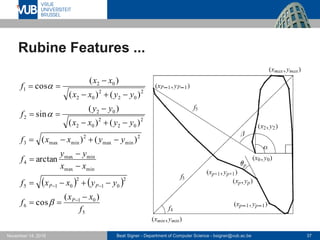
Rubine Features
 Original Rubine algorithm defines 13 features
 f1: cosine of the initial angle
 f2: sine of the initial angle
 f3: length of the bounding box diagonal
 f4: angle of the bounding box diagonal
 f5: distance between the first and last point
 f6: cosine of the angle between the first and last point
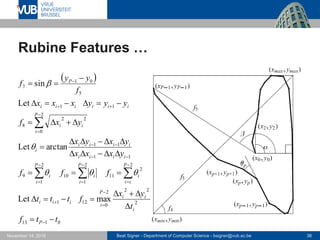
 f7: sine of the angle between the first and the last point
 f8: total gesture length
 f9: total angle traversed
 f10: the sum of the absolute angle at each gesture point
 f11: the sum of the squared value of these angles
 f12: maximum speed (squared)
 f13: duration of the gesture
Beat Signer - Department of Computer Science - bsigner@vub.ac.be 37November 14, 2016
Rubine Features ...
   
5
01
6
2
01
2
015
minmax
minmax
4
2
minmax
2
minmax3
2
02
2
02
02
2
2
02
2
02
02
1
)(
cos
arctan
)()(
)()(
)(
sin
)()(
)(
cos
f
xx
f
yyxxf
xx
yy
f
yyxxf
yyxx
yy
f
yyxx
xx
f
P
PP


















Beat Signer - Department of Computer Science - bsigner@vub.ac.be 38November 14, 2016
Rubine Features …
 
0113
2
222
0
121
2
2
11
2
1
10
2
1
9
11
11
2
0
22
8
11
5
01
7
maxLet
arctanLet
Let
sin
ttf
t
yx
fttt
fff
yxxx
yxyx
yxf
yyyxxx
f
yy
f
P
i
ii
P
i
iii
P
ii
i
P
i
i
P
i
i
iiii
iiii
i
P
i
ii
iiiiii
P

































Beat Signer - Department of Computer Science - bsigner@vub.ac.be 39November 14, 2016
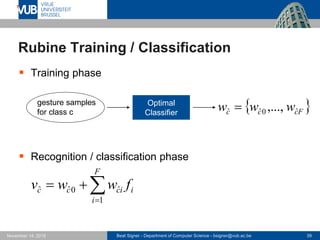
Rubine Training / Classification
 Training phase
 Recognition / classification phase
Optimal
Classifier
 Fccc www ˆ0ˆˆ ,...,gesture samples
for class c


F
i
iiccc fwwv
1
ˆ0ˆˆ
Beat Signer - Department of Computer Science - bsigner@vub.ac.be 40November 14, 2016
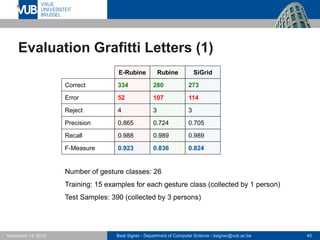
Evaluation Grafitti Letters (1)
E-Rubine Rubine SiGrid
334
52
4
0.865
0.988
0.923
280
107
3
0.724
0.989
0.836
273
114
3
0.705
0.989
0.824
Correct
F-Measure
Recall
Error
Reject
Precision
Number of gesture classes: 26
Training: 15 examples for each gesture class (collected by 1 person)
Test Samples: 390 (collected by 3 persons)
Beat Signer - Department of Computer Science - bsigner@vub.ac.be 41November 14, 2016
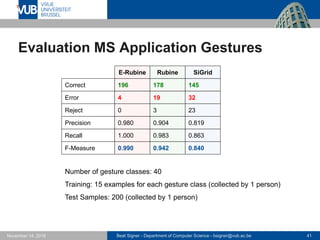
Evaluation MS Application Gestures
E-Rubine Rubine SiGrid
196
4
0
0.980
1.000
0.990
178
19
3
0.904
0.983
0.942
145
32
23
0.819
0.863
0.840
Correct
F-Measure
Recall
Error
Reject
Precision
Number of gesture classes: 40
Training: 15 examples for each gesture class (collected by 1 person)
Test Samples: 200 (collected by 1 person)
Beat Signer - Department of Computer Science - bsigner@vub.ac.be 42November 14, 2016
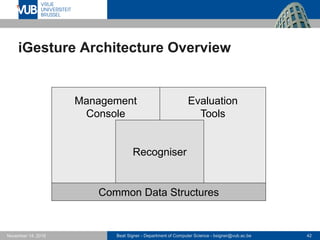
iGesture Architecture Overview
Common Data Structures
Management
Console
Evaluation
Tools
Recogniser
Beat Signer - Department of Computer Science - bsigner@vub.ac.be 43November 14, 2016
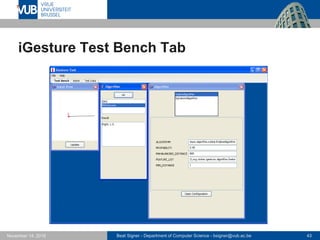
iGesture Test Bench Tab
Beat Signer - Department of Computer Science - bsigner@vub.ac.be 44November 14, 2016
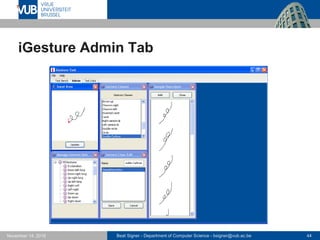
iGesture Admin Tab
Beat Signer - Department of Computer Science - bsigner@vub.ac.be 45November 14, 2016
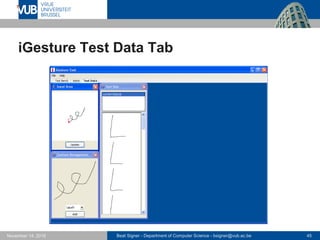
iGesture Test Data Tab
Beat Signer - Department of Computer Science - bsigner@vub.ac.be 46November 14, 2016
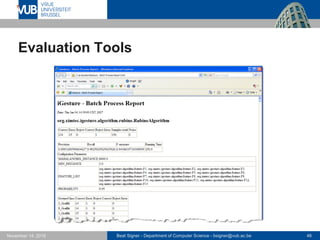
Evaluation Tools
Beat Signer - Department of Computer Science - bsigner@vub.ac.be 47November 14, 2016
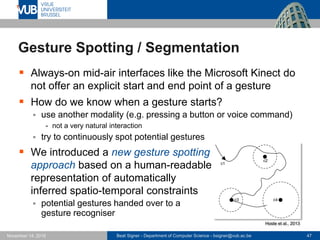
Gesture Spotting / Segmentation
 Always-on mid-air interfaces like the Microsoft Kinect do
not offer an explicit start and end point of a gesture
 How do we know when a gesture starts?
 use another modality (e.g. pressing a button or voice command)
- not a very natural interaction
 try to continuously spot potential gestures
 We introduced a new gesture spotting
approach based on a human-readable
representation of automatically
inferred spatio-temporal constraints
 potential gestures handed over to a
gesture recogniser
Hoste et al., 2013
Beat Signer - Department of Computer Science - bsigner@vub.ac.be 48November 14, 2016
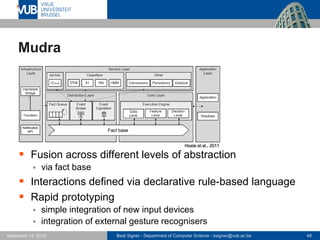
Mudra
 Fusion across different levels of abstraction
 via fact base
 Interactions defined via declarative rule-based language
 Rapid prototyping
 simple integration of new input devices
 integration of external gesture recognisers
Hoste et al., 2011
Beat Signer - Department of Computer Science - bsigner@vub.ac.be 49November 14, 2016
Challenges and Opportunities
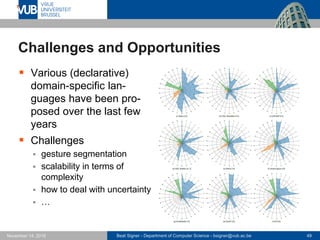
 Various (declarative)
domain-specific lan-
guages have been pro-
posed over the last few
years
 Challenges
 gesture segmentation
 scalability in terms of
complexity
 how to deal with uncertainty
 …
Beat Signer - Department of Computer Science - bsigner@vub.ac.be 50November 14, 2016
A Step Backward In Usability
 Usability tests of existing
gestural interfaces revealed a
number of problems
 lack of established guidelines for
gestural control
 misguided insistence of companies
to ignore established conventions
 developers’ ignorance of the long
history and many findings of HCI research
- unleashing untested and unproven creative efforts upon the unwitting public
 Several fundamental principles of interaction design are
disappearing from designers’ toolkits
 weird design guidelines by Apple, Google and Microsoft
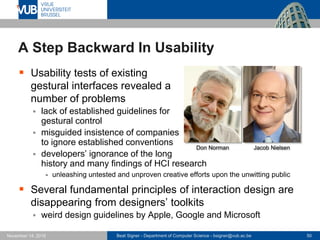
Jacob NielsenDon Norman
Beat Signer - Department of Computer Science - bsigner@vub.ac.be 51November 14, 2016
A Step Backward In Usability …
 Visibility
 non-existent signifiers
- swipe right across and unopened email (iPhone) or press and hold on an
unopened email (Android) to open a dialogue
 misleading signifiers
- some permanent standard buttons (e.g. menu) which do not work for all
applications (Android)
 Feedback
 back button does not only work within an application but moves to
the "activity stack" and might lead to "leaving" the application
without any warning
- forced application exit is not good in terms of usability
Beat Signer - Department of Computer Science - bsigner@vub.ac.be 52November 14, 2016
A Step Backward In Usability …
 Consistency and Standards
 operating system developers have their own interface guidelines
 proprietary standards make life more difficult for users
- touching an image might enlarge it, unlock it so that it can be moved, hyperlink
from it, etc.
- flipping screens up, down, left or right with different meanings
 consistency of gestures between applications on the same
operating system is often also not guaranteed
 Discoverability
 while possible actions could be explored via the GUI, this is no
longer the case for gestural commands
Beat Signer - Department of Computer Science - bsigner@vub.ac.be 53November 14, 2016
A Step Backward In Usability …
 Scalability
 gestures that work well for small screens might fail on
large ones and vice versa
 Reliability
 gestures are invisible and users might not know that there was an
accidental activation
 users might lose their sense of controlling the system and the
user experience might feel random
 Lack of undo
 often difficult to recover from accidental selections
Beat Signer - Department of Computer Science - bsigner@vub.ac.be 54November 14, 2016
Homework
 Read the following paper that is available
on PointCarré (papers/Norman 2010)
 D.A. Norman and J. Nielsen, Gestural Interfaces: A Step
Backward In Usability, interactions, 17(5), September 2010
Beat Signer - Department of Computer Science - bsigner@vub.ac.be 55November 14, 2016
References
 Brave NUI World: Designing Natural User
Interfaces for Touch and Gesture, Daniel Wigdor
and Dennis Wixon, Morgan Kaufmann (1st edition),
April 27, 2011, ISBN-13: 978-0123822314
 D.A. Norman and J. Nielsen, Gestural Interfaces: A Step
Backward In Usability, interactions, 17(5), September
2010
 http://dx.doi.org/10.1145/1836216.1836228
 A. Kendon, Gesture: Visible Action as Utterance,
Cambridge University Press, 2004
Beat Signer - Department of Computer Science - bsigner@vub.ac.be 56November 14, 2016
References …
 Power Glove Video
 https://www.youtube.com/watch?v=3g8JiGjRQNE
 R.Y. Wang and J. Popović, Real-Time Hand-
Tracking With a Color Glove, Proceedings of SIGGRAPH
2009, 36th International Conference and Exhibition of
Computer Graphics and Interactive Techniques, New
Orleans, USA, August 2009
 http://dx.doi.org/10.1145/1576246.1531369
 Real-Time Hand-Tracking With a Color Glove Video
 https://www.youtube.com/watch?v=kK0BQjItqgw
 How the Kinect Depth Sensor Works Video
 https://www.youtube.com/watch?v=uq9SEJxZiUg
Beat Signer - Department of Computer Science - bsigner@vub.ac.be 57November 14, 2016
References …
 Myo Wearable Gesture Control Video
 https://www.youtube.com/watch?v=oWu9TFJjHaM
 Kinect Sign Language Translator Video
 https://www.youtube.com/watch?v=HnkQyUo3134
 iGesture Gesture Recognition Framework
 http://www.igesture.org
 B. Signer, U. Kurmann and M.C. Norrie, iGesture: A
General Gesture Recognition Framework, Proceedings
of ICDAR 2007, 9th International Conference on
Document Analysis and Recognition, Curitiba, Brazil,
September 2007
 http://beatsigner.com/publications/signer_ICDAR2007.pdf
Beat Signer - Department of Computer Science - bsigner@vub.ac.be 58November 14, 2016
References …
 D. Rubine, Specifying Gestures by Example,
Proceedings of SIGGRAPH 1991, International
Conference on Computer Graphics and Interactive
Techniques, Las Vegas, USA, July 1991
 https://doi.org/10.1145/122718.122753
 L. Hoste, B. De Rooms and B. Signer,
Declarative Gesture Spotting Using Inferred and Refined
Control Points, Proceedings of ICPRAM 2013, Interna-
tional Conference on Pattern Recognition, Barcelona,
Spain, February 2013
 http://beatsigner.com/publications/hoste_ICPRAM2013.pdf
Beat Signer - Department of Computer Science - bsigner@vub.ac.be 59November 14, 2016
References …
 L. Hoste, B. Dumas and B. Signer, Mudra:
A Unified Multimodal Interaction Framework, Proceed-
ings of ICMI 2011, 13th International Conference on
Multimodal Interaction, Alicante, Spain, November 2011
 http://beatsigner.com/publications/hoste_ICMI2011.pdf
 L. Hoste and B. Signer, Criteria, Challenges
and Opportunities for Gesture Programming Languages,
Proceedings of EGMI 2014, 1st International Workshop
on Engineering Gestures for Multimodal Interfaces,
Rome, Italy, June, 2014
 http://beatsigner.com/publications/hoste_EGMI2014.pdf
Beat Signer - Department of Computer Science - bsigner@vub.ac.be 60November 14, 2016
References …
 B. Buxton, Gesture Based Interaction, Draft,
August 2011
 http://www.billbuxton.com/input14.Gesture.pdf
 Touch Gesture Reference Guide
 http://static.lukew.com/TouchGestureGuide.pdf
2 December 2005
Next Lecture
Tangible, Embedded and Embodied Interaction

Gesture-based Interaction - Lecture 08 - Next Generation User Interfaces (4018166FNR)

  • 1.
    2 December 2005 NextGeneration User Interfaces Gesture-based Interaction Prof. Beat Signer Department of Computer Science Vrije Universiteit Brussel http://www.beatsigner.com
  • 2.
    Beat Signer -Department of Computer Science - bsigner@vub.ac.be 2November 14, 2016 Gesture-based Interaction Microsoft Kinect, skeleton tracking Minority Report, glove-based tracking Ninteno Wii, accelerator-based tracking American sign language
  • 3.
    Beat Signer -Department of Computer Science - bsigner@vub.ac.be 3November 14, 2016 What is a Gesture?  A motion of the limbs or body to express or help to express thought or to emphasise speech  The act of moving the limbs or body as an expression of thought or emphasis  A succession of postures
  • 4.
    Beat Signer -Department of Computer Science - bsigner@vub.ac.be 4November 14, 2016 Formal Gesture Definition A gesture is a form of non-verbal communication or non- vocal communication in which visible bodily actions communicate particular messages, either in place of, or in conjunction with, speech. Gestures include movement of the hands, face, or other parts of the body. Gestures differ from physical non-verbal communication that does not communicate specific messages, such as purely expressive displays, proxemics, or displays of joint attention. A. Kendon, Gesture: Visible Action as Utterance, Cambridge University Press, 2004
  • 5.
    Beat Signer -Department of Computer Science - bsigner@vub.ac.be 5November 14, 2016 Gesture Types  Gestures can be classified into three types of gestures according to their function (Buxton, 2011)  semiotic gestures - used to communicate meaningful information (e.g. thumbs up)  ergotic gestures - used to manipulate the physical world and create artefacts  epistemic gestures - used to learn from the environment through tactile or haptic exploration  Since we are interested in human-computer interaction, we will focus on semiotic gestures
  • 6.
    Beat Signer -Department of Computer Science - bsigner@vub.ac.be 6November 14, 2016 Semiotic Gestures  Semiotic gestures can be further classified into  symbolic gestures (emblems) - culture-specific gestures with single meaning (e.g. "OK" gesture) - only symbolic gestures can be interpreted without contextual information  deictic gestures - pointing gesture (e.g. Bolt's "put-that-there")  iconic gestures - used to convey information about the size, shape or orientation of the object of discourse (e.g. "the plane flew like this")  pantomimic gestures - showing the use of movement of some invisible tool or object in the speaker’s hand (e.g. "I turned the steering wheel hard to the left")
  • 7.
    Beat Signer -Department of Computer Science - bsigner@vub.ac.be 7November 14, 2016 Taxonomy of Hand/Arm Gestures
  • 8.
    Beat Signer -Department of Computer Science - bsigner@vub.ac.be 8November 14, 2016 Taxonomy of Hand/Arm Gestures …  Gestures vs. unintentional movements  unintentional movement does not convey meaningful information  Communicative vs. manipulative gestures  manipulative (ergotic) gestures are used to act on objects in an environment (e.g. move or rotate an object)  communicative (semiotic) gestures have an inherent communicational purpose  Acts are gestures that are directly related to the interpretation of the movement itself  imitating some actions - mimetic (pantomimic) gestures  pointing acts ("put-that-there") - deictic gestures
  • 9.
    Beat Signer -Department of Computer Science - bsigner@vub.ac.be 9November 14, 2016 Taxonomy of Hand/Arm Gestures …  Symbols are gestures that have a linguistic role  symbolise some referential action (e.g. circular motion of the index finger to reference to a wheel)  used as modalisers, typically linked with speech ("Look at that wing!" and a modalising gesture showing the wing vibrating)
  • 10.
    Beat Signer -Department of Computer Science - bsigner@vub.ac.be 10November 14, 2016 Gesture Recognition Devices  Wired gloves  Accelerometers  Camcorders and webcams  Skeleton tracking  Electromyography (EMG)  Single and multi-touch surfaces  see lecture on Interactive Tabletops and Surfaces  Digital pens  …
  • 11.
    Beat Signer -Department of Computer Science - bsigner@vub.ac.be 11November 14, 2016 Wired Gloves  Wired glove (also data- glove or cyberglove) to retrieve the position of the hand and fingers  magnetic sensors or inertial tracking sensors to capture the movements of the glove  May provide haptic feedback which is useful for virtual reality applications  In many application domains wired gloves are more and more replaced by camera-based gesture recognition Power Glove for Nintendo, Mattel, 1989
  • 12.
    Beat Signer -Department of Computer Science - bsigner@vub.ac.be 12November 14, 2016 Accelerometers  Accelerometers measure the proper acceleration of a device in one direction  use three accelerometers to measure the acceleration in all three dimensions  note that the gravity g is also measured  Accelerometers are relatively cheap components which are present in many consumer electronic devices  smartphones - screen orientation (landscape or portrait)  laptops - active hard-drive protection in case of drops  cameras and camcorders - image stabilisation
  • 13.
    Beat Signer -Department of Computer Science - bsigner@vub.ac.be 13November 14, 2016 Accelerometers …  gaming devices (e.g. Nintendo Wii Remote) - note that the pointing with a Wii Remote is not recognised through the accelerometer but via an infrared camera in the head of the Wii Remote  Accelerometers can be used to recognise dynamic gestures but not for the recognition of postures  record the 3-dimensional input data, pre-process and vectorise it  apply pattern recognition techniques on the vectorised data  Typical recognition techniques  dynamic time warping (DTW)  neural networks  Hidden Markov Models (HMM)  All these techniques require some training data
  • 14.
    Beat Signer -Department of Computer Science - bsigner@vub.ac.be 14November 14, 2016 Camcorders and Webcams  Standard camcorders and webcams can be used to record gestures which are then recognised based on computer vision techniques  Advantages  relatively inexpensive hardware  large range of use cases - fingers, hands, body, head - single user or multiple users  Disadvantages  we first have to detect the body or body part before the recognition process can start  difficult to retrieve depth (3D) information
  • 15.
    Beat Signer -Department of Computer Science - bsigner@vub.ac.be 15November 14, 2016 Vision-based Hand Gesture Example  Hand gesture detection based on multicolour gloves  developed at MIT  Colour pattern designed to simplify the pose estimation problem  Nearest-neighbour approach to recognise the pose  database consisting of 100’000 gestures Wang and Popović, 2009
  • 16.
    Beat Signer -Department of Computer Science - bsigner@vub.ac.be 16November 14, 2016 Video: Colour Glove Hand Tracking
  • 17.
    Beat Signer -Department of Computer Science - bsigner@vub.ac.be 17November 14, 2016 Skeleton Tracking  So-called range cameras provide a 3D representation of the space in front of them  before 2010 these cameras were quite expensive  Since 2010 the Microsoft Kinect sensor offers full-body gesture recognition for ~150€  infrared laser projector coupled with an infrared camera and a "classic" RGB camera  multi-array microphone  infrared camera captures the depth of the scene  skeleton tracking through fusion of depth data and RGB frames  Two SDKs are available for the Kinect  OpenNI and the Microsoft Kinect SDK
  • 18.
    Beat Signer -Department of Computer Science - bsigner@vub.ac.be 18November 14, 2016 Video: Kinect Depth Sensor
  • 19.
    Beat Signer -Department of Computer Science - bsigner@vub.ac.be 19November 14, 2016 Electromyography (EMG)  MYO electromyography bracelet  93 grams  ARM Cortex M4 processor  haptic feedback  Bluetooth 4.0  three-axis gyroscope  three-axis accelerometer  three-axis magnetometer  Potential applications  gesture-based remote control  handwriting recognition or sign language translation  …
  • 20.
    Beat Signer -Department of Computer Science - bsigner@vub.ac.be 20November 14, 2016 Video: Myo Wearable Gesture Control
  • 21.
    Beat Signer -Department of Computer Science - bsigner@vub.ac.be 21November 14, 2016 Gesture Recognition Algorithms  Three broad families of algorithms  template-based algorithms - Rubine - Dynamic Time Warping (DTW) - $1 recogniser / $N recogniser  machine learning-based algorithms - Hidden Markov Models (HMM) - neural networks  rule-based approaches - LADDER  Some approaches mix these families to keep the strengths of each  e.g. Mudra
  • 22.
    Beat Signer -Department of Computer Science - bsigner@vub.ac.be 22November 14, 2016 Gesture Vocabularies  Choosing a good gesture vocabulary is not an easy task!  Common pitfalls  gestures might be hard to perform  gestures might be hard to remember  a user’s arm might begin to feel fatigue ("gorilla arm")  The human body has degrees of freedom and limitations that have to be taken into account and can be exploited
  • 23.
    Beat Signer -Department of Computer Science - bsigner@vub.ac.be 23November 14, 2016 Defining the Right Gesture Vocabulary  Use the foundations of interaction design  Observe the users to explore gestures that make sense  Gestures should be  easy to perform and remember  intuitive  metaphorically and iconically logical towards functionality  ergonomic and not physically stressing when used often  Implemented gestures can be evaluated against  semantic interpretation  intuitivity and usability  learning and memory rate  stress
  • 24.
    Beat Signer -Department of Computer Science - bsigner@vub.ac.be 24November 14, 2016 Defining the Right Gesture Vocabulary …  From a technical point the following things might be considered  different gestures should not look too similar - better recognition results  gesture set size - a large number of gestures is harder to recognise  Reuse of gestures  same semantics for different applications  application-specific gestures
  • 25.
    Beat Signer -Department of Computer Science - bsigner@vub.ac.be 25November 14, 2016 Shape Writing Techniques  Input technique for virtual keyboards on touchscreens  e.g. mobile phones or tablets  No longer type individual characters but perform a single-stroke gesture over the characters of a word  Gestures are automatically mapped to specific words  e.g. SwiftKey uses a neural network which learns and adapts its prediction over time  Single-handed text input  for larger screens the keyboard might float
  • 26.
    Beat Signer -Department of Computer Science - bsigner@vub.ac.be 26November 14, 2016 "Fat Finger" Problem  "Fat finger" problem is based on two issues  finger makes contact with a relatively large screen area but only single touch point is used by the system - e.g. centre  users cannot see the currently computed touch point (occluded by finger) and might therefore miss their target  Solutions  make elements larger or provide feedback during interaction  adjust the touch point (based on user perception)  use iceberg targets technique  … [http://podlipensky.com/2011/01/mobile-usability-sliders/]
  • 27.
    Beat Signer -Department of Computer Science - bsigner@vub.ac.be 27November 14, 2016 Sign Language  American Sign Language (ASL) has gestures for the alphabet as well as for the representation of concepts and objects
  • 28.
    Beat Signer -Department of Computer Science - bsigner@vub.ac.be 28November 14, 2016 Video: Kinect Sign Language Translator
  • 29.
    Beat Signer -Department of Computer Science - bsigner@vub.ac.be 29November 14, 2016 Standard Single and Multi-Touch Gestures Touch Gesture Reference Guide
  • 30.
    Beat Signer -Department of Computer Science - bsigner@vub.ac.be 30November 14, 2016 Graffiti Gestures (Palm OS)  Single-stroke gestures  Have to learn new alphabet
  • 31.
    Beat Signer -Department of Computer Science - bsigner@vub.ac.be 31November 14, 2016 Microsoft Application Gestures scratch-out erase content triangle insert square action item star action item check check-off curlicue cut double-curlicue copy circle application-specific double-circle paste left-semicircle undo right-semicircle redo caret past/insert inverted-caret insert chevron-left application-specific chevron-right application-specific arrow-up application-specific
  • 32.
    Beat Signer -Department of Computer Science - bsigner@vub.ac.be 32November 14, 2016 Customised Gestures
  • 33.
    Beat Signer -Department of Computer Science - bsigner@vub.ac.be 33November 14, 2016 Pen-based Gesture Recognition  Offline recognition algorithms  static image  Online recognition algorithms  spatio-temporal representation  Recognition methods  statistical classification, neural networks, …  Supported gesture types  single-stroke or multi-stroke
  • 34.
    Beat Signer -Department of Computer Science - bsigner@vub.ac.be 34November 14, 2016 iGesture Framework  iGesture Workbench  create/test gesture sets and algorithms  Different modalities  digital pen, tablet PC, mouse, Wii remote, …  multimodal gestures  Open Source  http://www.igesture.org
  • 35.
    Beat Signer -Department of Computer Science - bsigner@vub.ac.be 35November 14, 2016 Rubine Algorithm, 1991  Statistical classification algorithm for single stroke gestures (training / classification)  A gesture G is represented as vector of P sample points  Feature vector f extracted from G    iiiiP tyxsssG ,,with,,... 10    Ffff ,...1
  • 36.
    Beat Signer -Department of Computer Science - bsigner@vub.ac.be 36November 14, 2016 Rubine Features  Original Rubine algorithm defines 13 features  f1: cosine of the initial angle  f2: sine of the initial angle  f3: length of the bounding box diagonal  f4: angle of the bounding box diagonal  f5: distance between the first and last point  f6: cosine of the angle between the first and last point  f7: sine of the angle between the first and the last point  f8: total gesture length  f9: total angle traversed  f10: the sum of the absolute angle at each gesture point  f11: the sum of the squared value of these angles  f12: maximum speed (squared)  f13: duration of the gesture
  • 37.
    Beat Signer -Department of Computer Science - bsigner@vub.ac.be 37November 14, 2016 Rubine Features ...     5 01 6 2 01 2 015 minmax minmax 4 2 minmax 2 minmax3 2 02 2 02 02 2 2 02 2 02 02 1 )( cos arctan )()( )()( )( sin )()( )( cos f xx f yyxxf xx yy f yyxxf yyxx yy f yyxx xx f P PP                  
  • 38.
    Beat Signer -Department of Computer Science - bsigner@vub.ac.be 38November 14, 2016 Rubine Features …   0113 2 222 0 121 2 2 11 2 1 10 2 1 9 11 11 2 0 22 8 11 5 01 7 maxLet arctanLet Let sin ttf t yx fttt fff yxxx yxyx yxf yyyxxx f yy f P i ii P i iii P ii i P i i P i i iiii iiii i P i ii iiiiii P                                 
  • 39.
    Beat Signer -Department of Computer Science - bsigner@vub.ac.be 39November 14, 2016 Rubine Training / Classification  Training phase  Recognition / classification phase Optimal Classifier  Fccc www ˆ0ˆˆ ,...,gesture samples for class c   F i iiccc fwwv 1 ˆ0ˆˆ
  • 40.
    Beat Signer -Department of Computer Science - bsigner@vub.ac.be 40November 14, 2016 Evaluation Grafitti Letters (1) E-Rubine Rubine SiGrid 334 52 4 0.865 0.988 0.923 280 107 3 0.724 0.989 0.836 273 114 3 0.705 0.989 0.824 Correct F-Measure Recall Error Reject Precision Number of gesture classes: 26 Training: 15 examples for each gesture class (collected by 1 person) Test Samples: 390 (collected by 3 persons)
  • 41.
    Beat Signer -Department of Computer Science - bsigner@vub.ac.be 41November 14, 2016 Evaluation MS Application Gestures E-Rubine Rubine SiGrid 196 4 0 0.980 1.000 0.990 178 19 3 0.904 0.983 0.942 145 32 23 0.819 0.863 0.840 Correct F-Measure Recall Error Reject Precision Number of gesture classes: 40 Training: 15 examples for each gesture class (collected by 1 person) Test Samples: 200 (collected by 1 person)
  • 42.
    Beat Signer -Department of Computer Science - bsigner@vub.ac.be 42November 14, 2016 iGesture Architecture Overview Common Data Structures Management Console Evaluation Tools Recogniser
  • 43.
    Beat Signer -Department of Computer Science - bsigner@vub.ac.be 43November 14, 2016 iGesture Test Bench Tab
  • 44.
    Beat Signer -Department of Computer Science - bsigner@vub.ac.be 44November 14, 2016 iGesture Admin Tab
  • 45.
    Beat Signer -Department of Computer Science - bsigner@vub.ac.be 45November 14, 2016 iGesture Test Data Tab
  • 46.
    Beat Signer -Department of Computer Science - bsigner@vub.ac.be 46November 14, 2016 Evaluation Tools
  • 47.
    Beat Signer -Department of Computer Science - bsigner@vub.ac.be 47November 14, 2016 Gesture Spotting / Segmentation  Always-on mid-air interfaces like the Microsoft Kinect do not offer an explicit start and end point of a gesture  How do we know when a gesture starts?  use another modality (e.g. pressing a button or voice command) - not a very natural interaction  try to continuously spot potential gestures  We introduced a new gesture spotting approach based on a human-readable representation of automatically inferred spatio-temporal constraints  potential gestures handed over to a gesture recogniser Hoste et al., 2013
  • 48.
    Beat Signer -Department of Computer Science - bsigner@vub.ac.be 48November 14, 2016 Mudra  Fusion across different levels of abstraction  via fact base  Interactions defined via declarative rule-based language  Rapid prototyping  simple integration of new input devices  integration of external gesture recognisers Hoste et al., 2011
  • 49.
    Beat Signer -Department of Computer Science - bsigner@vub.ac.be 49November 14, 2016 Challenges and Opportunities  Various (declarative) domain-specific lan- guages have been pro- posed over the last few years  Challenges  gesture segmentation  scalability in terms of complexity  how to deal with uncertainty  …
  • 50.
    Beat Signer -Department of Computer Science - bsigner@vub.ac.be 50November 14, 2016 A Step Backward In Usability  Usability tests of existing gestural interfaces revealed a number of problems  lack of established guidelines for gestural control  misguided insistence of companies to ignore established conventions  developers’ ignorance of the long history and many findings of HCI research - unleashing untested and unproven creative efforts upon the unwitting public  Several fundamental principles of interaction design are disappearing from designers’ toolkits  weird design guidelines by Apple, Google and Microsoft Jacob NielsenDon Norman
  • 51.
    Beat Signer -Department of Computer Science - bsigner@vub.ac.be 51November 14, 2016 A Step Backward In Usability …  Visibility  non-existent signifiers - swipe right across and unopened email (iPhone) or press and hold on an unopened email (Android) to open a dialogue  misleading signifiers - some permanent standard buttons (e.g. menu) which do not work for all applications (Android)  Feedback  back button does not only work within an application but moves to the "activity stack" and might lead to "leaving" the application without any warning - forced application exit is not good in terms of usability
  • 52.
    Beat Signer -Department of Computer Science - bsigner@vub.ac.be 52November 14, 2016 A Step Backward In Usability …  Consistency and Standards  operating system developers have their own interface guidelines  proprietary standards make life more difficult for users - touching an image might enlarge it, unlock it so that it can be moved, hyperlink from it, etc. - flipping screens up, down, left or right with different meanings  consistency of gestures between applications on the same operating system is often also not guaranteed  Discoverability  while possible actions could be explored via the GUI, this is no longer the case for gestural commands
  • 53.
    Beat Signer -Department of Computer Science - bsigner@vub.ac.be 53November 14, 2016 A Step Backward In Usability …  Scalability  gestures that work well for small screens might fail on large ones and vice versa  Reliability  gestures are invisible and users might not know that there was an accidental activation  users might lose their sense of controlling the system and the user experience might feel random  Lack of undo  often difficult to recover from accidental selections
  • 54.
    Beat Signer -Department of Computer Science - bsigner@vub.ac.be 54November 14, 2016 Homework  Read the following paper that is available on PointCarré (papers/Norman 2010)  D.A. Norman and J. Nielsen, Gestural Interfaces: A Step Backward In Usability, interactions, 17(5), September 2010
  • 55.
    Beat Signer -Department of Computer Science - bsigner@vub.ac.be 55November 14, 2016 References  Brave NUI World: Designing Natural User Interfaces for Touch and Gesture, Daniel Wigdor and Dennis Wixon, Morgan Kaufmann (1st edition), April 27, 2011, ISBN-13: 978-0123822314  D.A. Norman and J. Nielsen, Gestural Interfaces: A Step Backward In Usability, interactions, 17(5), September 2010  http://dx.doi.org/10.1145/1836216.1836228  A. Kendon, Gesture: Visible Action as Utterance, Cambridge University Press, 2004
  • 56.
    Beat Signer -Department of Computer Science - bsigner@vub.ac.be 56November 14, 2016 References …  Power Glove Video  https://www.youtube.com/watch?v=3g8JiGjRQNE  R.Y. Wang and J. Popović, Real-Time Hand- Tracking With a Color Glove, Proceedings of SIGGRAPH 2009, 36th International Conference and Exhibition of Computer Graphics and Interactive Techniques, New Orleans, USA, August 2009  http://dx.doi.org/10.1145/1576246.1531369  Real-Time Hand-Tracking With a Color Glove Video  https://www.youtube.com/watch?v=kK0BQjItqgw  How the Kinect Depth Sensor Works Video  https://www.youtube.com/watch?v=uq9SEJxZiUg
  • 57.
    Beat Signer -Department of Computer Science - bsigner@vub.ac.be 57November 14, 2016 References …  Myo Wearable Gesture Control Video  https://www.youtube.com/watch?v=oWu9TFJjHaM  Kinect Sign Language Translator Video  https://www.youtube.com/watch?v=HnkQyUo3134  iGesture Gesture Recognition Framework  http://www.igesture.org  B. Signer, U. Kurmann and M.C. Norrie, iGesture: A General Gesture Recognition Framework, Proceedings of ICDAR 2007, 9th International Conference on Document Analysis and Recognition, Curitiba, Brazil, September 2007  http://beatsigner.com/publications/signer_ICDAR2007.pdf
  • 58.
    Beat Signer -Department of Computer Science - bsigner@vub.ac.be 58November 14, 2016 References …  D. Rubine, Specifying Gestures by Example, Proceedings of SIGGRAPH 1991, International Conference on Computer Graphics and Interactive Techniques, Las Vegas, USA, July 1991  https://doi.org/10.1145/122718.122753  L. Hoste, B. De Rooms and B. Signer, Declarative Gesture Spotting Using Inferred and Refined Control Points, Proceedings of ICPRAM 2013, Interna- tional Conference on Pattern Recognition, Barcelona, Spain, February 2013  http://beatsigner.com/publications/hoste_ICPRAM2013.pdf
  • 59.
    Beat Signer -Department of Computer Science - bsigner@vub.ac.be 59November 14, 2016 References …  L. Hoste, B. Dumas and B. Signer, Mudra: A Unified Multimodal Interaction Framework, Proceed- ings of ICMI 2011, 13th International Conference on Multimodal Interaction, Alicante, Spain, November 2011  http://beatsigner.com/publications/hoste_ICMI2011.pdf  L. Hoste and B. Signer, Criteria, Challenges and Opportunities for Gesture Programming Languages, Proceedings of EGMI 2014, 1st International Workshop on Engineering Gestures for Multimodal Interfaces, Rome, Italy, June, 2014  http://beatsigner.com/publications/hoste_EGMI2014.pdf
  • 60.
    Beat Signer -Department of Computer Science - bsigner@vub.ac.be 60November 14, 2016 References …  B. Buxton, Gesture Based Interaction, Draft, August 2011  http://www.billbuxton.com/input14.Gesture.pdf  Touch Gesture Reference Guide  http://static.lukew.com/TouchGestureGuide.pdf
  • 61.
    2 December 2005 NextLecture Tangible, Embedded and Embodied Interaction