FPPT.com
Microsoft Excel (Basic Math)
-provide some of Excel's most basic functionality,
allowing you to perform various operations
like sums and averages.
Transfer Goal:
Students on their own and in the
long run will be able to:
1. Quickly analyze the given problem.
2. Mastery in entering data into the MS
Excel worksheet.
3. Use the correct formula for the
given problem/s.
4. Copy and paste data properly.
Activity:
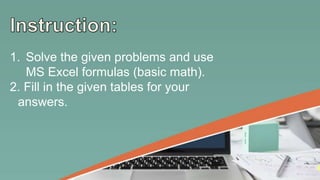
1. Solve the given problems and use
MS Excel formulas (basic math).
2. Fill in the given tables for your
answers.
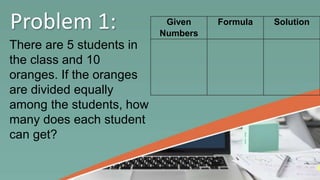
Problem 1:
There are 5 students in
the class and 10
oranges. If the oranges
are divided equally
among the students, how
many does each student
can get?
Given
Numbers
Formula Solution
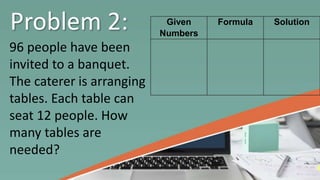
Problem 2:
96 people have been
invited to a banquet.
The caterer is arranging
tables. Each table can
seat 12 people. How
many tables are
needed?
Given
Numbers
Formula Solution
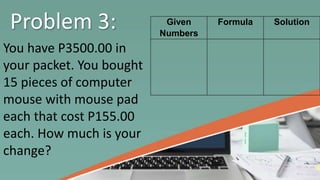
Problem 3:
You have P3500.00 in
your packet. You bought
15 pieces of computer
mouse with mouse pad
each that cost P155.00
each. How much is your
change?
Given
Numbers
Formula Solution
Answers:
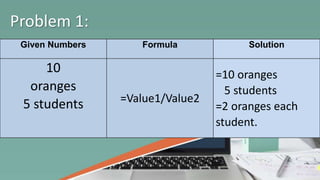
Given Numbers Formula Solution
10
oranges
5 students =Value1/Value2
=10 oranges
5 students
=2 oranges each
student.
Problem 1:
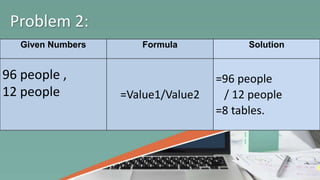
Given Numbers Formula Solution
96 people ,
12 people =Value1/Value2
=96 people
/ 12 people
=8 tables.
Problem 2:
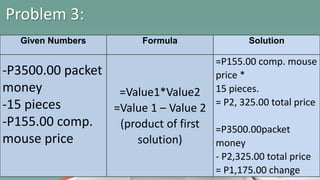
Given Numbers Formula Solution
-P3500.00 packet
money
-15 pieces
-P155.00 comp.
mouse price
=Value1*Value2
=Value 1 – Value 2
(product of first
solution)
=P155.00 comp. mouse
price *
15 pieces.
= P2, 325.00 total price
=P3500.00packet
money
- P2,325.00 total price
= P1,175.00 change
Problem 3:
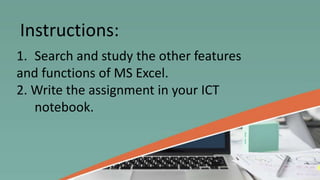
Assignment:
1. Search and study the other features
and functions of MS Excel.
2. Write the assignment in your ICT
notebook.
Instructions:
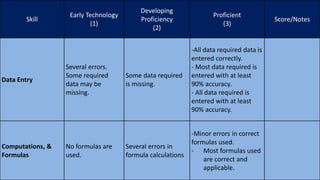
Skill
Early Technology
(1)
Developing
Proficiency
(2)
Proficient
(3)
Score/Notes
Data Entry
Several errors.
Some required
data may be
missing.
Some data required
is missing.
-All data required data is
entered correctly.
- Most data required is
entered with at least
90% accuracy.
- All data required is
entered with at least
90% accuracy.
Computations, &
Formulas
No formulas are
used.
Several errors in
formula calculations
-Minor errors in correct
formulas used.
- Most formulas used
are correct and
applicable.
G8 ppt for peac

G8 ppt for peac

  • 1.
  • 2.
    Microsoft Excel (BasicMath) -provide some of Excel's most basic functionality, allowing you to perform various operations like sums and averages.
  • 3.
    Transfer Goal: Students ontheir own and in the long run will be able to:
  • 4.
    1. Quickly analyzethe given problem. 2. Mastery in entering data into the MS Excel worksheet.
  • 5.
    3. Use thecorrect formula for the given problem/s. 4. Copy and paste data properly.
  • 6.
  • 7.
    1. Solve thegiven problems and use MS Excel formulas (basic math). 2. Fill in the given tables for your answers.
  • 8.
    Problem 1: There are5 students in the class and 10 oranges. If the oranges are divided equally among the students, how many does each student can get? Given Numbers Formula Solution
  • 9.
    Problem 2: 96 peoplehave been invited to a banquet. The caterer is arranging tables. Each table can seat 12 people. How many tables are needed? Given Numbers Formula Solution
  • 10.
    Problem 3: You haveP3500.00 in your packet. You bought 15 pieces of computer mouse with mouse pad each that cost P155.00 each. How much is your change? Given Numbers Formula Solution
  • 11.
  • 12.
    Given Numbers FormulaSolution 10 oranges 5 students =Value1/Value2 =10 oranges 5 students =2 oranges each student. Problem 1:
  • 13.
    Given Numbers FormulaSolution 96 people , 12 people =Value1/Value2 =96 people / 12 people =8 tables. Problem 2:
  • 14.
    Given Numbers FormulaSolution -P3500.00 packet money -15 pieces -P155.00 comp. mouse price =Value1*Value2 =Value 1 – Value 2 (product of first solution) =P155.00 comp. mouse price * 15 pieces. = P2, 325.00 total price =P3500.00packet money - P2,325.00 total price = P1,175.00 change Problem 3:
  • 15.
  • 16.
    1. Search andstudy the other features and functions of MS Excel. 2. Write the assignment in your ICT notebook. Instructions:
  • 18.
    Skill Early Technology (1) Developing Proficiency (2) Proficient (3) Score/Notes Data Entry Severalerrors. Some required data may be missing. Some data required is missing. -All data required data is entered correctly. - Most data required is entered with at least 90% accuracy. - All data required is entered with at least 90% accuracy. Computations, & Formulas No formulas are used. Several errors in formula calculations -Minor errors in correct formulas used. - Most formulas used are correct and applicable.