Spreadsheets
Basic Formula
Introduction
Value of the
week
“A Healthy living for a
Strong body and
mind”
Lesson objectives
✗ To be able to use arithmetic
operators in formulae including
add, subtract, multiply, divide.
3
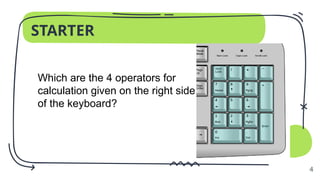
STARTER
4
Which are the 4 operators for
calculation given on the right side
of the keyboard?
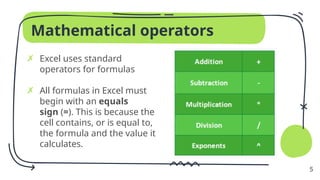
Mathematical operators
✗ Excel uses standard
operators for formulas
✗ All formulas in Excel must
begin with an equals
sign (=). This is because the
cell contains, or is equal to,
the formula and the value it
calculates.
5
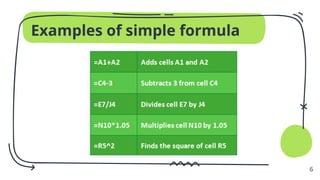
Examples of simple formula
6
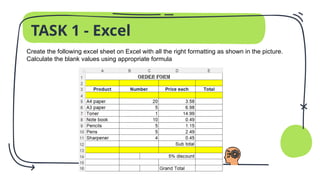
TASK 1 - Excel
Create the following excel sheet on Excel with all the right formatting as shown in the picture.
Calculate the blank values using appropriate formula
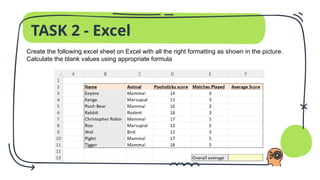
TASK 2 - Excel
Create the following excel sheet on Excel with all the right formatting as shown in the picture.
Calculate the blank values using appropriate formula
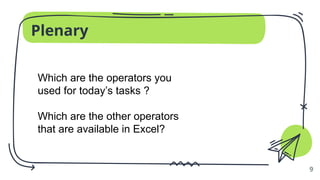
Plenary
9
Which are the operators you
used for today’s tasks ?
Which are the other operators
that are available in Excel?
Spreadsheets - Basic formula introduction.pptx

  • 1.
  • 2.
    Value of the week “AHealthy living for a Strong body and mind”
  • 3.
    Lesson objectives ✗ Tobe able to use arithmetic operators in formulae including add, subtract, multiply, divide. 3
  • 4.
    STARTER 4 Which are the4 operators for calculation given on the right side of the keyboard?
  • 5.
    Mathematical operators ✗ Exceluses standard operators for formulas ✗ All formulas in Excel must begin with an equals sign (=). This is because the cell contains, or is equal to, the formula and the value it calculates. 5
  • 6.
  • 7.
    TASK 1 -Excel Create the following excel sheet on Excel with all the right formatting as shown in the picture. Calculate the blank values using appropriate formula
  • 8.
    TASK 2 -Excel Create the following excel sheet on Excel with all the right formatting as shown in the picture. Calculate the blank values using appropriate formula
  • 9.
    Plenary 9 Which are theoperators you used for today’s tasks ? Which are the other operators that are available in Excel?