i
INSTITUTE OF INFORMATION & COMMUNICATION TECHNOLOGY
UNIVERSITY OF SINDH, JAMSHORO
Web Application Security Scanner
In partial fulfillment of the requirements for the award of the degree of
BS-SOFTWARE ENGINEERING (Morning)
Name Roll #.
Inaam Ishaque Shaikh 2K13/SWE/97
Azharuddin Bhatti 2K13/SWE/64
Yasir Ali Jalbani 2K13/SWE/92
Hassan Waris Mahar 2K13/SWE/26
SUPERVISOR
DR. DIL NAWAZ HAKRO
CO-SUPERVISOR
MS. NEELMA BHATTI
ii
WEB APPLICATION SECURITY SCANNER
Name Roll #.
Inaam Ishaque Shaikh 2K13/SWE/97
Azharuddin Bhatti 2K13/SWE/64
Yasir Ali Jalbani 2K13/SWE/92
Hassan Waris Mahar 2K13/SWE/26
APPROVED BY: Supervisor APPROVED BY: Committee,
________________________ _________________________
Dr. Dil Nawaz Hakro Final Year Projects Coordinator
_________________________
Final Year Projects Committee Head
_________________________
Director, IICT
iii
ABSTRACT
The numbers of security vulnerabilities that are being found today are much higher in
applications than in operating systems. This means that the attacks aimed at web applications are
exploiting vulnerabilities at the application level and not at the transport or network level like
common attacks in the past. At the same time, quantity and impact of security vulnerabilities in
such applications has grown as well. Many transactions are performed online with various kinds
of web applications. Almost in all of them user is authenticated before providing access to
backend database for storing all the information. A well-designed injection can provide access to
malicious or unauthorized users and mostly achieved through SQL injection and Cross-site
scripting (XSS).
In this thesis we are providing a vulnerability scanning tool of various kinds of attacks. We are
also providing API key and previous jars to registered users so they can make their Android
application or continue our work.
iv
ACKNOWLEDGEMENT
For the successful completion of our thesis titled (Web Application Security Scanner),
firstly immense amount of gratitude is to be dedicated to our parents for upbringing us to
complete and escalate to the astounding achievements concerning every aspect of our lives.
The thesis actually has been a joint effort of several individuals, first and foremost is our
project supervisor Dr. Dil Nawaz Hakro, lecturer at IICT, University of Sindh, Jamshoro. For his
kind appraisal to us, providing us with adequate resources and without him this thesis could not
have reached its completion.
We are also thankful to our vigilant co-supervisor Ms. Neelma Bhatti, teaching assistant
at IICT, University of Sindh, Jamshoro. Who took keen interest in our problems and gave us
beneficial solutions
v
Table Of Contents
Abstract...............................................................................................................................iii
Acknowledgement ..............................................................................................................iv
Chapter 1: INTRODUCTION..............................................................................................1
1.1 Introduction..............................................................................................................1
1.2 Introduction to Attacks.............................................................................................3
1.2.1 SQL Injection...........................................................................................................3
1.2.2 Cross Site Scripting..................................................................................................6
1.2.3 Buffer Overflow.......................................................................................................8
1.2.4 Session Hijacking.....................................................................................................9
1.2.5 Denial of Service......................................................................................................9
1.3 Motivation and Need..............................................................................................11
1.4 Aims of the Study ..................................................................................................13
1.5 Organization of Thesis...........................................................................................13
Chapter 2: BACKGROUND AND LITERATURE REVIEW..........................................14
2.1 Project Background................................................................................................14
2.1.1 Web Application Scanners in Academia ...............................................................14
2.1.2 Free/Open-Source Web Application Scanners ......................................................16
2.1.3 Commercial Web Application Scanners................................................................19
2.2 Literature Review...................................................................................................28
Chapter 3: TOOLS AND TECHNOLOGIES ....................................................................30
vi
3.1 Eclipse....................................................................................................................30
3.2 Phantom JS.............................................................................................................31
3.3 XAMPP/MySQL....................................................................................................31
3.4 JDK ........................................................................................................................32
3.5 Apache Tomcat Server...........................................................................................32
3.6 HTML ....................................................................................................................33
3.7 CSS.........................................................................................................................34
3.7.1 Separation of content and presentation ..................................................................34
3.7.2 Smaller webpage file sizes.....................................................................................34
3.7.3 Improved webpage download speed ......................................................................34
3.7.4 Improved rendering speed......................................................................................35
3.7.5 Streamlined maintenance .......................................................................................35
3.8 JQuery....................................................................................................................35
3.9 Bootstrap ................................................................................................................36
3.9.1 Easy to use .............................................................................................................36
3.9.2 Responsiveness ......................................................................................................36
3.9.3 The speed of the Development...............................................................................36
3.9.4 Customizable Bootstrap .........................................................................................36
3.9.5 Consistency............................................................................................................38
3.9.6 Support...................................................................................................................38
3.9.7 Packaged JavaScript Components .........................................................................38
3.9.8 Simple Integration..................................................................................................38
3.9.9 Grid ........................................................................................................................39
vii
3.9.10 Pre-styled Components ..........................................................................................39
3.10 JSP/Servlet .............................................................................................................39
3.11 Struts ......................................................................................................................40
3.12 Hibernate................................................................................................................41
3.12.1 Persistence..............................................................................................................41
3.12.2 Object Relational Mapping....................................................................................42
3.13 Selenium.................................................................................................................43
3.14 RESTfull Web Services .........................................................................................44
Chapter 4: DESIGN AND IMPLEMENTATION.............................................................46
4.1 Project Description.................................................................................................46
4.1.1 Home Page .............................................................................................................46
4.1.2 Login Page .............................................................................................................46
4.1.3 Registration Page ...................................................................................................47
4.1.4 About us Page ........................................................................................................47
4.1.5 Result Page.............................................................................................................47
4.1.6 User Account Page.................................................................................................47
4.2 Flow Chart..............................................................................................................48
4.3 Use Case Diagram..................................................................................................49
4.3.1 Use Case of User....................................................................................................51
4.3.2 Use Case of Registered User..................................................................................52
4.4 Main Page ..............................................................................................................53
4.5 Signup ....................................................................................................................54
4.5.1 For Company..........................................................................................................54
viii
4.5.2 For Individuals .......................................................................................................55
4.6 Login......................................................................................................................56
4.6.1 For Company..........................................................................................................56
4.6.2 For Individuals .......................................................................................................57
4.7 Results....................................................................................................................58
4.8 User Account and Web service Page .....................................................................64
4.9 Database.................................................................................................................65
Chapter 5: CONCLUSION & FUTURE WORK ..............................................................66
5.1 Conclusion .............................................................................................................66
5.2 Future Work ...........................................................................................................67
REFERENCES ..................................................................................................................68
1
Chapter 1
Introduction
1.1 Introduction
Web applications have become an integral part of recent industry and our lives.
Much of today’s online business, including university account management, social
networking, email, banking, and shopping, are available online with use of web
applications. Since ecommerce has grown significantly, there has been an exponential
increase in online transactions in the past few years. US online retail sales grew 12.6%
in 2010 to reach $176.2 billion. With an expected 10% compound annual growth rate
(CAGR) from 2010 to 2015, US e-commerce is expected to reach $278.9 billion in 2015
[1].
The data that web applications handle, such as credit card numbers and
shopping activity information, typically is of considerable value to the users and the
service providers. In order to be sustainable, web applications should protect the user’s
data from unauthorized access, use, disclosure, disruption, modification, perusal,
inspection, and recording or destruction. But often, it fails to satisfy these requirements.
The root cause of most security risks on the Web is based on vulnerabilities in web
applications [2], [3].
According to National Vulnerability Database (NVD) [4], the number of
vulnerabilities has lessened since 2009, which means that security measures have
2
been implemented over the last few years. As shown in Figure 1.1, in 2008 the number
of vulnerabilities reported by NVD was 5,632; in 2009 the number of vulnerabilities
increased to 5,733. But starting from 2010, NVD reported the decrease of vulnerabilities
on the Web: 4,639 in 2010 and 4,151 in 2011.
Figure 1.1: Distribution of web application vulnerabilities over years (2008-2011)
Nevertheless, the likelihood that at least one vulnerability will appear in a website
remains very high. During 2010, almost every website was exposed, daily, to at least
one highly, critically, or urgently severe vulnerability, and 64% of these were exposed to
at least one Information Leakage vulnerability [4], [5], [6].
This has led to a need for developers to increase their attention to web
application security. But, due to lack of knowledge or time constraints, developers tend
to ignore security precautions, and some vulnerabilities are discovered during the web
3
application testing stage or even after applications are deployed. To locate the possible
vulnerability in the code, Web Application Vulnerability Scanners (WAVS) are used.
WAVS are automated tools used to test web applications for common security
problems. WAVS search for web-application-specific vulnerabilities and look for
software coding errors, such as illegal input strings and buffer overflows [7], [8], [9].
WAVS have strengths but also limitations. Vulnerability detection rates may vary
depending on the architecture of WAVS, as well as implementation of crawling and
attacking modules. The other important feature is the availability of attacking vectors
responsible for different vulnerability types.
1.2 Introduction to Attacks
1.2.1 SQL Injection
This section will discuss a brief overview of different kinds of SQL injection attacks and their
defenses. [36] Describes the basic definition and fundamental information regarding SQL
injection techniques.
SQL injection occurs when malicious input is passed into a database interpreter without being
properly validated or encoded. In this type of attack the client is attacking the web server
database. The input that the attacker passes into the interpreter is crafted to be a legitimate SQL
statement, but instead of returning the data that the application’s developer intended, the
interpreter now returns the data requested by the attacker. This type of attack is severe because
not only can it expose all sensitive user and business related data, but it could even go as far as
executing operating system commands or giving an attacker complete control of a web
4
application. An example of a valid SQL query which displays information for the user ―Rami‖
is:
SELECT info FROM users WHERE username = 'Rami';
An attacker could use the malicious user name ―' OR 1=1 –‖ to cause the interpreter to display
all of the user information data in the database. The corresponding SQL query would be:
SELECT info FROM users WHERE username = '' OR 1=1 –
This is one of the simplest types of SQL injection, but works because the leading single quote
causes the query to break out of the single quote delimited data. Therefore the always true ―OR
1=1‖ is appended to the query, and thus displays all of the user information data in the database.
The double dashes ―–‖ at the end of the query cause all of the text that would follow it to be
commented out, because ―–‖ is the comment symbol in this SQL language.
Adding the comment symbol is necessary in this attack because it nullifies the rest of the syntax
that the web application would normally append to the end of database query to complete the
operation. Therefore, the only query that is being executed is the attacker’s injected sequence,
and not the web applications expected query.
Even more dangerous attacks are possible against certain SQL versions and databases as well.
An example of this would be if an attacker took advantage of a web application that implements
both regular and administrator users, and therefore normally logs in users with default roles, but
could also log in a user with administrator roles. If the administrator user has advanced
functionality and has the ability to access all of the web application’s data, then the web
application can be completely compromised if an attacker takes control of the administrator
account. An SQL injection attack could accomplish this if a web application uses email
addresses as user names and associates each user name in the database as either a regular or an
5
administrator user. In this example the attacker will exploit a generic ―Change Mailing
Address‖ field on a web page and associate an email address of their choosing to the
administrator account. The attacker would enter the following in the ―Change Mailing Address‖
field on the web page:
'; UPDATE users SET username = 'attacker@email.com' WHERE username LIKE '%admin%'; –
The semi-colon ―;‖ will end the first query and allow for the attacker’s query to be executed.
This query will cause the email address that the attacker entered to replace the email address that
matches the pattern most like ―admin‖. All that is necessary to perform this attack is for the
attacker to ―guess and check‖ until they know that the table holding the accounts is in fact
―users‖, and that the field holding the user names is in fact ―username‖. After this, the user
name most closely matching ―admin‖ will be replaced with the attacker’s email address, but
will continue to have administrative capabilities. Now that the attacker has replaced the
administrator’s email address with his own, he can click the ―Forgot
Password‖ button that most user-based web applications provide, and have the administrator’s
password sent to him in the convenient ―Password Reminder‖ email.
The previously mentioned attack is not always easy to execute because it is not trivial to find out
the name of the table and column being used in the SQL database. This challenge is overcome by
using two other types of SQL injection: blind SQL injection and error-based SQL injection.
Blind SQL injection uses a series of true and false questions to take advantage of the
predictability of the WHERE condition in SQL, since 1=1 will always return true. Therefore, if a
record is returned when using blind SQL injection, the attacker’s injected condition must have
been true. Error-based SQL injection is a specific type of SQL injection that uses SQL error
messages to determine the structure of the database. SQL injection statements are crafted by the
6
attacker in a way such that the attacker can use the error responses to systematically unveil table
names, column names, column data types, and even specific data entries [36].
1.2.2 Cross Site Scripting
Three of the main types of cross-site scripting (XSS) attacks, as well as some defensive
techniques to protect against them, will be reviewed in this section.
XSS occurs when a web application includes malicious code in a web page that is sent to a
client’s browser without proper content validation. In this type of attack the web page server is
attacking the client machine. When the web page is viewed by the client it will execute the
malicious script that the attacker embedded into the web page. XSS is the most prevalent web
application security flaw [35] due in a large part to its simplicity and resulting severity. Some of
the attacks that this type of vulnerability can result in are the hijacking of a user’s session, the
defacement of websites, the insertion of hostile content, and the redirection of users’ requests.
Reflective XSS is a type of XSS attack that can occur when a victim follows a URL which
contains malicious scripting that is executed when the web page is rendered. This is commonly
done by sending victims legitimate looking e-mail messages that contain malicious script in the
message’s URL. Once the HTTP request from the URL is processed, the HTML content is
received and displayed in the victim’s browser, thus executing the malicious script. An example
of a URL containing a reflective XSS attack that would execute some type of malicious script
included the function ―malicious()‖ would be:
http://www.targetsite.com/display.php?user=<script>malicious()</script>
Stored XSS is another type of XSS attack. This type of attack occurs when the malicious script is
uploaded into the database back end of a server without input validation, and is later retrieved by
7
the web application to be embedded into a web page. This causes every user who visits the
infected web page to execute the malicious script in his or her browser. An example of where
this vulnerability can be found is a web application that uses a comment section to allow users to
view and leave feedback about a product. If an attacker were to leave a comment which included
malicious script, the script would be stored as a comment for that product in the database, and
then executed every time a user clicks to view the page holding the comments for that product.
An example of this type of attack is a script crafted to steal a user’s cookie and save it in a
remote site for exploitation at a later time so that they can perform actions as if they were the
victim (such as bank transactions, e-mail correspondence, etc...). The following script would
execute such an attack if stored in a web application’s database and then executed in a client’s
web browser:
<script>document.write('<img src=―http://www.attackersite.com' +document.cookie+'―)
</script>
A third type of XSS attack is Document Object Model, or DOM-based, XSS. This is a different
kind of XSS attack because it occurs on the client side when the user is processing the content,
instead of on the server side when the web application is retrieving information to put in a web
page. The Document Object Model is the standard model that represents HTML and XML
content of a web page. The DOM can be modified in this type of attack to execute a malicious
script in the victim’s browser. An example of this type of attack would be to exploit a web page
that uses some embedded JavaScript in to set the default language for the client using a variable
in the URL. An example of this would be:
http://www.mysite.com/index.html#default=English
8
The malicious script that would exploit this would simply need to replace the variable ―English‖
in the URL. A URL that shows this type of DOM-based XSS attack would be:
http://www.mysite.com/index.html#default=<script>malicious()</script>
1.2.3 Buffer Overflow
Buffer Overflow [37] attacks are enabled due to sloppy programming or mismanagement of
memory by the application developers. Buffer overflow may be classified into stack overflows,
format string overflows, heap overflows and integer overflows. It may be possible that an
overflow may exist in language’s (PHP, Java, etc.) built-in functions.
To execute a buffer overflow attack, you merely dump as much data as possible into an input
field. The attack is said to be successful when it returns an application error. Perl is well suited
for conducting this type of attack.
Here’s the buffer test, calling on Perl from the command line:
$ echo –e “GET /login.php?user=
> ‘perl –e ‘print “a” x 500’ ‘nHTTP/1.0nn”|
nc –vv website 80
This sends a string of 500 “a” characters for the user value to the login.php file. Buffer overflow
can be tested by sending repeated requests to the application and recording the server’s response.
9
1.2.4 Session Hijacking
The Session Hijacking attack [38] consists of the exploitation of the web session control
mechanism, which is normally managed for a session token.
Because http communication uses many different TCP connections, the web server needs a
method to recognize every user’s connections. The most useful method depends on a token that
the Web Server sends to the client browser after a successful client authentication. A session
token is normally composed of a string of variable width and it could be used in different ways,
like in the URL, in the header of the http requisition as a cookie, in other parts of the header of
the http request, or yet in the body of the http requisition.
The Session Hijacking attack compromises the session token by stealing or predicting a valid
session token to gain unauthorized access to the Web Server.
The session token could be compromised in different ways; the most common are:
 Predictable session token;
 Session Sniffing;
 Client-side attacks (XSS, malicious JavaScript Codes, Trojans, etc);
 Man-in-the-middle attack
 Man-in-the-browser attack
1.2.5 Denial of Service
Denial-of-service (DoS) attacks [39] typically flood servers, systems or networks with traffic in order to
overwhelm the victim resources and make it difficult or impossible for legitimate users to use them.
10
While an attack that crashes a server can often be dealt with successfully by simply rebooting the
system, flooding attackscanbe more difficulttorecoverfrom.
The United States Computer Emergency Readiness Team (US-CERT) provides some guidelines for
determining when a DoS attack may be underway. US-CERT suggests the following may indicate such an
attack:
 Degradation in network performance, especially when attempting to open files stored on the
networkoraccessingwebsites;
 Inabilitytoreacha particularwebsite;
 Difficultyinaccessinganywebsite;and
 A higherthanusual volume of spamemail.
Experts recommend a number of strategies for enterprises to defend against a denial-of-service attack,
starting with preparing an incident response plan well in advance of any attack. Once there is suspicion
that a DoS attack is underway, enterprises should contact their internet service provider (ISP) to
determine whether the incident is an actual DoS attack or degradation of performance caused by some
other factor. The ISP can help mitigate the attack by rerouting or throttling malicious traffic and
using loadbalancers toreduce the effectof the attack.
Enterprises may also want to explore the possibility of using denial-of-service attack detection products;
some intrusion detection systems, intrusion prevention systems and firewalls offer DoS detection
functions. Other strategies include contracting with a backup ISP and using cloud-based anti-DoS
services.
While there have been instances where DoS attackers demand payment from victims to end the attacks,
financial profit is not usually the motive behind this type of attack. In many cases, the attackers wish to
11
cause harm to the organization or individual targeted in the attack; in other cases, the attackers are
simply attempting to sabotage the victim, causing the greatest damage or inconvenience to the greatest
number of victims. When a perpetrator of a DoS attack is identified, the reasons for an attack may also
be revealed.
Many high-profile DoS attacks are actually distributed attacks, meaning the attack traffic is directed
from multiple attack systems. While DoS attacks originating from a single source can be easier to
mitigate because defenders can block network traffic from the offending source, attacks directed from
multiple attacking systems are far more difficult to detect and defend against because it can be difficult
to differentiate legitimate traffic from malicious traffic and filter malicious packets when they are sent
fromall over the internet.
1.3 Motivation and Need
A computer system is more than hardware and software, it includes the policies,
procedures, and organization under which that hardware and software is used. Security holes can
arise from many areas or combination of these them. This leads no sense to restrict the study of
vulnerabilities to hardware and software problems. When attacker breaks into a computing
system, he takes advantage of lapses in procedures, technology, or management, permitting
unauthorized access or actions. The precise failure of the controls is termed a vulnerability or
security flaw, mistreatment that failure to violate the security policy is termed exploiting the
vulnerability. One who attempts to exploit the vulnerability is called an attacker .Another more
general definition from defines Vulnerability analysis as the act of determining which security
12
holes and vulnerabilities may be applicable to the target network. Vulnerability analysis, also
known as vulnerability assessment, is a process that defines, identifies, and classifies the security
holes (vulnerabilities) in a computer, network, or communications infrastructure. In addition,
vulnerability analysis can forecast the effectiveness of proposed countermeasures and evaluate
their actual effectiveness after they are put into use. Vulnerability is the intersection of three
elements, a system susceptibility or flaw, attacker access to the flaw, and attacker capability to
exploit the flaw . In order to exploit vulnerabilities, the attacker must have at least one applicable
tool or technique that can connect to a system weakness security hole. Integration is done by the
vulnerability assessment tools, by automating the detection, identification, measurement, and
understanding of vulnerabilities found in ICT components at various levels of a target ICT
system or infrastructure. Vulnerability is an attribute or characteristic of a component that can be
exploited by either an external or internal agent (hacker or malicious insider) to violate a security
policy of (narrow definition) or cause a deleterious result in (broad definition) either the
component itself, and/or the system or infrastructure of which it is apart. Such deleterious result
include unauthorized privilege escalations or data/resource accesses, sensitive data disclosures or
privacy violations, malicious code insertions, denials of service, etc. In order to develop reliable
and robust web applications, we have to test the security that let us monitor, analyze, and
quantify application behavior under a range of faults and attacks. In this research we will present
a scanning tool for analyzing web applications vulnerability in real time. This scanner lets us
quantify how attacks and faults impact on web application, discover attack points, and examine
how critical the web application components behave during an attack or system fault.
13
1.3 Aim of the Study
The main goal of this bachelor thesis is to present a new analyzing tool for main four web
applications vulnerabilities, which are mainly SQL Injection, Cross Site Scripting (XSS), Buffer
Overflow, Denial of Services. To achieve this goal, a dynamically generate test requests that are
applied specifically to a given web application will be applied by the analysis tool. By doing this
analysis, our scanning will be able to detect vulnerabilities of any web application regardless if
it’s for known web application or custom web application. The analysis tool will conduct four
tests, these tests will identify the common web applications vulnerabilities that are SQL
Injections, Cross Site Scripting (XSS), Buffer Overflow and Denial of Services. Three tests will
be applied on web applications input parameters so the tests will be parameter-based tests and
DOS attack will be applied on server where the website is located.
1.4 Organization of Thesis
The rest of the thesis is organized as follows: Chapter 2 presents a complete background
of the project and the Literature Review. A brief introduction of Tools and Technologies is
discussed in Chapter 3. Chapter 4 presents a formal description of our design, diagrams and
implementation of the project. Conclusion and future work are discussed in chapter 5.
14
Chapter 2
Background and Literature Review
2.1 Project Background
There are several web application vulnerability scanners that test for popular
vulnerabilities in web servers and web applications. These tools can either be academic research
projects, free/open-source applications, or commercial software products. Tools are developed in
academia by members of universities who are interested in improving and studying web
application vulnerability scanners, but are generally not available for purchase or commercial
use. The open-source/free tools are available to the public, but are generally not as up-to date and
accurate as the commercial tools. These tools do however, give users the ability to customize
their tool and gain a greater understanding of the security of their web applications. Commercial
tools usually give more comprehensive results than open-source/free tools, but can cost
anywhere from just under $100.00 to over $6000.00 [17, 18]. Specific web vulnerability
scanners from these three categories that automatically scan for and detect the most common
web application vulnerabilities will be reviewed in this section.
2.1.1 Web Application Scanners in Academia
One of the categories of web application vulnerability scanners includes those that are
developed in academia. These scanners are different from free/open source and commercial
15
scanners because the researchers who work on them are continuously evaluating them and also
discuss not only where their design succeeds, but where their design is limited and requires
future work. These scanners are not available for public use, so they cannot be used in this
analysis of web vulnerability scanner limitations, but reviewing the techniques and methods used
by these scanners will help in understanding how other web application scanners work [19].
Huang et al. developed a web application scanner called WAVES that attempts to reduce
the number of potential side effects of black-box testing [20, 21]. The auditing process of web
application scanners can cause permanent modifications, or even damage, to the state of the
application it is targeting. This is a drawback that both commercial and open-source/free web
application scanners share, and is why the authors introduced a testing methodology that would
allow for harmless auditing. Their experimental results found that WAVES was unable to detect
any new vulnerability that were not already detected by a static source code analyzer they had
developed. Also, WAVES was unable to discover all of the vulnerabilities that the static source
code analyzer had found (detected only 80% of the vulnerabilities found by the static analyzer).
The authors believe their tool failed in part because it did not have complex procedures able to
detect all data entry points, and because it was unable to observe HTML output.
Another academic black-box approach was developed by Antunes and Viera as described
in [22]. Their web vulnerability scanner was used to identify SQL injection vulnerabilities in 262
publicly available web services. The first step in their approach was to prepare for the tests by
obtaining information regarding the web service in order to generate the workload (valid web
service calls). The second step was to execute the tests. This was accomplished by using a
workload emulator that acted as a web service consumer, and by using an attack load generator
that automatically generated attacks by injecting them into the workload test calls. The final step
16
in their approach was to analyze the responses by using a set of well-defined rules which would
identify vulnerabilities and exclude potential false-positives. Their results showed that they
achieved a detection coverage rate of 81% in the scenario where they had access to the known
number of vulnerabilities, and maintained a false-positive rate of 18% in their optimistic
interpretation. These results are better than those of the commercial tools that the authors
analyzed, and suggest that it is possible to improve the effectiveness of vulnerability scanners
[19].
2.1.2 Free/Open-Source Web Application Scanners
Many open-source and free web application scanners are available for blackbox testing
and analysis. Some of these applications provide extensive functionality with the ability to be
customized and expanded to meet the needs of users. Others however do not provide a great deal
of usability and have a limited amount of functionality, and therefore can only test for a few web
application vulnerabilities. Three of the more thorough and robust free/opensource scanners,
Grendel-Scan [23], Wapiti [24], and W3AF [25], will be reviewed.
Grendel-Scan [23] is an open-source web application security testing tool which has an
automated testing module for detecting common web application vulnerabilities. It has the ability
to find simple web application vulnerabilities, but its designers state that no automated tool can
identify complicated vulnerabilities, such as logic and design flaws. Grendel-Scan tests for SQL
injection, XSS attacks, and session management vulnerabilities, as well as other vulnerabilities.
17
Figure 2.1: Grendel-Scan
Wapiti [24] is a free web application vulnerability scanner and security auditor. It
performs black-box analysis by scanning the web pages of a web application in search of scripts
and forms where data can be injected. After the list of scripts and forms is gathered, Wapiti
injects payloads to test if the scripts are vulnerable. Wapiti scans for remote file inclusion errors,
SQL and database injections, XSS injections, and other vulnerabilities.
18
Figure 2.2: Wapiti Scanner
W3AF [25] is exactly what it stands for, a Web Application Attack and Audit
Framework. The goal of the project is to create a framework which can find and exploit web
application vulnerabilities easily. The project’s long term objectives are for it to become the best
open source web application scanner, and the best open source web application exploitation
framework. Also, the designers want the project to create the biggest community of web
application hackers, combine static code analysis and black box testing into one framework, and
become the NMAP [26] of the web. W3AF incorporates a great deal of plug-ins into its
framework, and is capable of testing for SQL injection, XSS attacks, buffer overflow, malicious
file execution, and session management vulnerabilities.
19
Figure 2.3: W3AF Scanner
2.1.3 Commercial Web Application Scanners
Commercial web application scanners are generally licensed to companies or
organizations that wish to test their web applications for vulnerabilities so that they can fix
security holes before they are maliciously exploited. Since a data breach can result in the loss of
personal information of thousands of customers, and the loss of millions of dollars, companies
are willing to pay large sums of money for these applications. These commercial applications
compete against each other for market share, and therefore do not want to disclose their
scanner’s limitations or restrictions. However, an approach to analyze these limitations and
20
restrictions is proposed in this thesis. Some of the features of popular commercial web
application scanners will be discussed below.
Cenzic [27] sells a web application scanner tool called Hailstorm which utilizes stateful
testing. Stateful testing tools are designed to behave like human testers by taking what seem to
be an application’s insignificant or disparate weaknesses, and combining them together into
serious exploits. The key benefits that Hailstorm claims are the ability to identify major security
flaws in target applications, to help with internal compliance policies, to avoid vulnerabilities
that lead to downtime, and to assess applications for commonly known vulnerabilities. Cenzic
provides a 7-day free trial of Hailstorm Core which can detect vulnerabilities including SQL
injection, XSS, and session management.
Figure 2.4: HailStorm Scanner
21
Acunetix [17] Web Vulnerability Scanner is another black-box tool which claims in-
depth checking for SQL injection, XSS, and other vulnerabilities with its innovative AcuSensor
Technology. This technology is supposed to quickly find vulnerabilities with a low number of
false-positives, pinpoint where each vulnerability exists in the code, and report the debug
information as well. Acunetix also includes advanced tools to allow penetration testers to fine
tune web application security tests, and has many more features to scan websites with different
scan options and identities. The only vulnerability that the free edition of the software detects is
XSS, but a 30-day trial version of the product is available that also can detect SQL injection, file
execution, session management, and manual buffer overflow attacks.
Figure 2.5: Acunetix Scanner
22
N-Stalker [28] provides a suite of web security assessment checks to enhance the overall
security of web applications. It is founded on the technology of Component-oriented Web
Application Security Scanning, and allows users to create their own assessment policies and
requirements, enabling them to check for more than 39,000 signatures and infrastructure security
checks. Vulnerabilities checked for include SQL injection, XSS attacks, buffer overflows, and
session management attacks, but the evaluation edition only lasts for a 7-day period.
Figure 2.6: N-Stalker Scanner
23
Netsparker [29] is a web application vulnerability scanner developed by Mavituna
Security Ltd. Netsparker is focused on eliminating false-positives, and uses confirmation and
exploitation engines to ensure that false-positives are not reported. The engines also allow the
users to see the actual impact of the attacks instead of text explanations of what the attack could
do. Because of the techniques Netsparker uses, Mavituna Security claims that it developed the
first false-positive free web application scanner. Netsparker scans for all types of XSS injection,
SQL injection, malicious file execution, and session management vulnerabilities.
Figure 2.7: Netsparker Scanner
Burp [30] Scanner is a web application vulnerability scanner that is part of Burp Suite
Professional. Burp Suite Professional is the commercial version of Burp Suite, which is an
integrated platform for attacking and testing web applications. Burp Suite provides a number of
tools, including an interception web proxy, web spider, application intruder, session key
24
analyzer, and data comparer. The professional version includes Burp Scanner which can operate
in either passive or active mode, or either manual scan or live scan mode. The vulnerabilities it
searches for include SQL injection, XSS injection, and session management vulnerabilities.
Figure 2.8: Burp Suite Professional Scanner
Rational AppScan [31] is licensed by IBM for advanced web application security
scanning. The AppScan tool automates vulnerability assessments and tests for SQL injection,
XSS attacks, buffer overflows, and other common web application vulnerabilities. AppScan can
generate advanced remediation capabilities in order to ease vulnerability remediation, simplify
results with the Results Expert wizard, and test for emerging web technologies. Rational
25
AppScan provides an unlimited evaluation period for its standard edition; however, with the
evaluation license the software is only capable of testing a test web site provided by AppScan.
Figure 2.9: IBM Rational AppScan
BuyServers Ltd. [32] sells a web vulnerability scanner called Falcove which is a 2-in-1
scanning and penetration tool, meaning that it not only tries to detect vulnerabilities, but is
capable of exploiting them as well. Falcove utilizes a crawler feature that checks for web
vulnerabilities, audits dynamic content (password fields, shopping carts), and generates
penetration reports that explain the security level of the tested web site. However, BuyServers
Ltd. no longer supports the trial version of the product that detects SQL injection, XSS, and file
execution attacks.
26
Figure 2.10: Falcove Scanner
HP’s WebInspect [33] software provides web application security testing and assessment
for complex web applications. WebInspect claims fast scanning capabilities, broad security
assessment coverage, and accurate web application security scanning results. HP also believes
WebInspect identifies security vulnerabilities that are undetectable by traditional scanners by
using innovative assessment technologies such as simultaneous crawl and audit, and on current
application scanning. HP WebInspect scans for data detection and manipulation attacks, session
and authentication vulnerabilities, and server and general HTTP vulnerabilities, but does not
currently provide a working evaluation version of the product.
27
Figure 2.11: HP’s WebInspect Scanner
NT OBJECTives’ NTOSpider [34] is a web application security scanner that claims to
provide automated vulnerability assessment with unprecedented accuracy and
comprehensiveness. NTOSpider identifies application vulnerabilities and ranks threat priorities,
as well as produces graphical HTML reports. NT OBJECTives’ proprietary S3 Methodology and
Data Sleuth intelligence engine are employed for automation and accuracy, and checks
vulnerabilities on a case-by-case basis, which provides contextsensitive vulnerability checking.
NTOSpider checks for SQL injection, XSS attacks, and session management vulnerabilities, but
does not provide a trial version for evaluation.
28
Figure 2.12: NTOSpider Scanner
2.2 Literature Review
According to Curphey and Araujo (2006), there are eight categories of web application
security Assessment tools: source code analyzers, web application (black box) scanners, database
scanners, binary analysis tools, runtime analysis tools, configuration management tools, HTTP
proxies, and miscellaneous tools. The most common of these web application assessment tools
are source code analyzers and web application scanners. Source code analyzers generally achieve
good vulnerability detection rates, but are only useful if the web application’s source code is
available. On the other hand, web application vulnerability scanners are the tools which most
closely mimic web application attacks, but have been known to perform rather poorly
[10,11,12,13].
There are two main approaches to test web applications for vulnerabilities [14]:
29
White box testing: consists of the analysis of the source code of the web application. This can
be done manually or by using code analysis tools like Ounce [15] or Pixy [16]. The problem is
that exhaustive source code analysis may be difficult and cannot find all security flaws because
of the complexity of the code.
Black box testing: consists in the analyses of the execution of the application in search for
vulnerabilities. In this approach, also known as penetration testing, the scanner does not know
the internals of the web application and it uses fuzzing techniques over the web HTTP requests.
Our application is working on Blackbox testing type. As comparing of this final year project to
the background of the project, I have found some plus points which are:
The major plus point is that we provide Web Services of our applications so that A known
use of the website can use our services from any platform, like the request is coming from any
source and web app generates results and response to that request. A request of Web Service can
be from android mobile or from any other web app.
- Another plus point is that we provide the full documentations and JAR files so that A
known user can continue further work from the help of our previous work. This feature is
more than any Open Source software.
- One more plus point is that we provide Denial of Service attack, no other security
scanners provide this feature. We can convert into Distributed Denial of Service attack by
applying DOS attack on a same server at the same time from different browsers.
- Another plus point is that we are providing major attacks checking at a time of SQL
Injection, Buffer Overflow, DOS attack, DDOS attack, Session Hijacking.
30
Chapter 3
Tools and Technologies
3.1 Eclipse
Eclipse is a platform that has been designed from the ground up for building integrated
web and application development tooling. By design, the platform does not provide a great deal
of end user functionality by itself. The value of the platform is what it encourages: rapid
development of integrated features based on a plug-in model. Eclipse provides a common user
interface (UI) model for working with tools. It is designed to run on multiple operating systems
while providing robust integration with each underlying OS. Plug-ins can program to the Eclipse
portable APIs and run unchanged on any of the supported operating systems.
The Eclipse platform defines an open architecture so that each plug-in development team can
focus on their area of expertise. Let the repository experts build the back ends and the usability
experts build the end user tools. If the platform is designed well, significant new features and
levels of integration can be added without impact to other tools. The Eclipse platform uses the
model of a common workbench to integrate the tools from the end user's point of view. Tools
that you develop can plug into the workbench using well defined hooks called extension points.
The platform itself is built in layers of plug-ins, each one defining extensions to the extension
points of lower-level plug-ins, and in turn defining their own extension points for further
customization. This extension model allows plug-in developers to add a variety of functionality
31
to the basic tooling platform. The artifacts for each tool, such as files and other data, are
coordinated by a common platform resource model.
3.2 Phantom JS
PhantomJS allows developers to access the browser’s DOM API. After all, PhantomJS is
still a browser even if it hasn’t a GUI. Developers can write JavaScript code that will be
evaluated against a specified page. Although this may not seem very important, this allows us to
automate any sort of interactions with a web page without having to open a browser (operation
that will save you a tremendous amount of time). This is helpful especially when using
PhantomJS to run tests. By utilizing WebKit, PhantomJS provides the ability to render any
content on a web page and save it as an image. Therefore, it can be used to automate the process
of capturing screenshots of web pages that developers can analyse to ensure that everything
looks good. These images can be saved in several format such as PNG, JPEG, PDF, and GIF.
PhantomJS helps developers to automate the process of running tests without a need for any sort
of GUI. PhantomJS makes use of its headless browser to handle different unit tests instead, and
uses the command line to tell developers where they are running into error.
3.3 XAMPP/ MYSQL
XAMPP stands for Cross-Platform (X), Apache (A), MariaDB (M), PHP (P) and Perl (P).
It is a simple, lightweight Apache distribution that makes it extremely easy for developers to
create a local web server for testing purposes.
32
MySQL is a fast, easy-to-use RDBMS (Relational DataBase Management System) being used
for many small and big businesses. It is developed, marketed, and supported by MySQL AB,
which is a Swedish company. it is becoming so popular because of many good reasons.
MySQL is released under an open-source license. So you have nothing to pay to use it. It is a
very powerful program in its own right. It handles a large subset of the functionality of the most
expensive and powerful database packages. It uses a standard form of the well-known SQL data
language. MySQL works on many operating systems and with many languages including PHP,
PERL, C, C++, JAVA, etc. It works very quickly and works well even with large data sets. It is
very friendly to PHP, the most appreciated language for web development. It supports large
databases, up to 50 million rows or more in a table. The default file size limit for a table is 4GB,
but you can increase this (if your operating system can handle it) to a theoretical limit of 8
million terabytes (TB).
3.4 JDK
A Java Development Kit (JDK) is a program development environment for writing java
applets and applications. It consists of a runtime environment that sits on top of the operating
system layer as well as the tools and programming that developers need to compile, debug, and
run applets and applications written in the Java language.
3.5 Apache Tomcat Server
Tomcat is an application server from the Apache Software Foundation that executes
Java servlets and renders Web pages that include Java Server Page coding. Described as a
33
"reference implementation" of the Java Servlet and the Java Server Page specifications, Tomcat
is the result of an open collaboration of developers and is available from the Apache Web site in
both binary and source versions. Tomcat can be used as either a standalone product with its own
internal Web server or together with other Web servers, including Apache, Netscape Enterprise
Server, Microsoft Internet Information Server (IIS), and Microsoft Personal Web Server. Tomcat
requires a Java Runtime Enterprise Environment that conforms to JRE 1.1 or later.
3.6 HTML
HTML is a computer language devised to allow website creation. These websites can
then be viewed by anyone else connected to the Internet. HTML consists of a series of
short codes typed into a text-file by the site author and these are the tags. The text is then saved
as a html file, and viewed through a browser, like Internet Explorer or Netscape Navigator. This
browser reads the file and translates the text into a visible form, hopefully rendering the page as
the author had intended. Writing your own HTML entails using tags correctly to create your
vision. You can use anything from a rudimentary text-editor to a powerful graphical editor to
create HTML pages. The tags are what separate normal text from HTML code. HTML works
inside <angle-brackets>. They allow all the cool stuff like images and tables and stuff, just by
telling your browser what to render on the page. Different tags will perform different functions.
The tags themselves don’t appear when you view your page through a browser, but their effects
do.
34
3.7 CSS
The CSS language was created to meet the aesthetic demands placed on HTML.
The CSS language specification set out how rules can be written and should be implemented by
web browser developers. CSS rules are added to a webpage either by writing the code directly
into the <head> of the webpage HTML, or by linking to a separate file. A separate file
containing only CSS rules is commonly referred to as a ‘stylesheet’, and has the
extension .css (dot-C-S-S).
3.7.1 Separation of content and presentation
CSS rules can be provided in a file that is separate to the (content) HTML. If all pages
link to this centralized CSS file, then the look of a website can more easily be updated. For
example, the color or size of all level-one headings can be changed by updating a
single CSS rule.
3.7.2 Smaller webpage file sizes
As the code required to style content can be removed from individual webpages, the size
of each webpage file is reduced. Depending on the benchmarks, file sizes may be reduced by up
to 60%.
3.7.3 Improved webpage download speed
Once a stylesheet has been downloaded, it is typically stored on the user’s computer. For
each subsequent webpage viewed, only the HTML needs to be downloaded.
35
3.7.4 Improved rendering speed
Once a webpage has been downloaded, a browser processes the underlying code to
determine how content should be displayed. This process is referred to as ‘rendering’. The time a
webpage takes to render is affected by the complexity of the code the browser receives.
Using CSS to control the layout of a page typically simplifies the the code structure making it
‘easier’ (faster) for the browser to render.
3.7.5 Streamlined maintenance
As less code is required for each webpage, both the likelihood of coding errors and time
required to add content to a website are reduced.
3.8 JQuery
jQuery is a cross-platform JavaScript library designed to simplify the client-side scripting
of HTML. jQuery is the most popular JavaScript library in use today, with installation on 65% of
the top 10 million highest-trafficked sites on the Web. jQuery is free, open-source software
licensed under the MIT License. jQuery is a fast, small, and feature-rich JavaScript library. It
makes things like HTML document traversal and manipulation, event handling, animation, and
Ajax much simpler with an easy-to-use API that works across a multitude of browsers. With a
combination of versatility and extensibility, jQuery has changed the way that millions of people
write JavaScript.
When a browser renders a web page, it's a visual representation of what's known as the DOM (or
the document object model). This model can be conceptually modeled as a tree data structure
36
where there are certain nodes each with roots and leaves. When you're working with jQuery, you
can easily traverse the contents of the DOM in order to reach or to find the nodes, elements, or
values you're aiming to retrieve.
3.9 Bootstrap
Bootstrap initially built by a designer and developer from Twitter, Bootstrap has turned
out to be one of the trendiest front-end frameworks in the whole world. Before it became open-
source, Bootstrap was firstly identified as Twitter Blueprint. Bootstrap is responsive, mobile-
first, prevailing, and front-end framework, which is developed along with CSS, JavaScript, and
HTML. Bootstrap has many benefits from scratch for every web development project, and one
such reason is the huge number of resources accessible for Bootstrap.
3.9.1. Easy to Use
It is extremely an easy and speedy procedure to begin with Bootstrap. Bootstrap is very
adaptable too. You can utilize Bootstrap along with CSS, or LESS, or also with Sass [after you
download the Sass version].
3.9.2. Responsiveness
Every year mobile devices persist to grow hugely popular, and the requirement to have a
responsive website has become compulsory and important too. As the fluid grid layout amends
vigorously to the appropriate screen resolution, thus crafting a mobile-ready site is a smooth and
37
easy task along with Bootstrap. With the use of ready-made classes of Bootstrap, you can
recognize the number of spots in the grid system that you would like each column to engage in.
Then only you can identify at whichever point you would like your columns to load in horizontal
position, instead of vertically to exhibit accurately on mobile appliances.
3.9.3. The Speed of the Development
One of the main benefits of utilizing Bootstrap happens to be the speed of the
development. While driving out a new, fresh website or application swiftly, you should certainly
reflect upon utilizing Bootstrap. Instead of coding from scrape, Bootstrap lets you to use ready-
made coding blocks in order to assist you in setting up. You can blend that along with CSS-Less
functionality and cross-browser compatibility that can give way to saving of ample hours of
coding. You can even buy ready-made Bootstrap themes and alter them to fit your requirements,
for gaining the quickest potential route.
3.9.4. Customizable Bootstrap
The Bootstrap can be customized as per the designs of your project. The web developers
can make a choice to select the aspects which are required which can be simply complete by
utilizing Bootstrap customize page. You just have to tick off all the aspects that you do not
require, such as- Common CSS: typography, code, grid system, tables, buttons, forms, print
media styles; Components: input groups, button groups, pager, labels, navs, navbar, badges,
pagination; JavaScript components: dropdowns, popovers, modals, tooltips, carousels; Utilities:
Responsive utilities, basic utilities. Thus your custom version of Bootstrap is all set for download
process.
38
3.9.5. Consistency
Few Twitter employees firstly expanded Bootstrap as a framework for boosting the
consistency across interior tools. But later the Co-founder Mark Otto after understanding the
actual potential released in August 2011 the first open-source version of Bootstrap. He even
portrayed how the Bootstrap was enlarged with the use of one core concept- pairing of designers
along with developers. Thus Bootstrap became popular on Twitter.
3.9.6. Support
As Bootstrap holds a big support community, you can be provided with help whenever
there comes any problem. The creators always keep the Bootstrap updated. Presently Bootstrap
is hosted, expanded, and preserved on the GitHub along with more than 9,000 commits, as well
as more than 500 contributors.
3.9.7. Packaged JavaScript Components
Bootstrap approaches with a pack of JavaScript components for including the
functionality that crafts it in simple way for operating things, such as tooltips, modal windows,
alerts, etc. You can even leave out the writing scripts completely.
3.9.8. Simple Integration
Bootstrap can be simply integrated along with distinct other platforms and frameworks,
on existing sites and new ones too. You can also utilize particular elements of Bootstrap along
with your current CSS.
39
3.9.9. Grid
Bootstrap has the capability to utilize a 12-column grid that is responsive. It also upholds
offset and nested elements. The grid can be maintained in a responsive mode, or you can simply
modify it to a secured layout.
3.9.10. Pre-styled Components
Bootstrap approaches with pre-styled components for alerts, dropdowns, nav bars, etc.
Hence, being a feature-rich, Bootstrap provides numerous advantages of using it. Hope you
would have understood the above reasons so that you can easily use Bootstrap for making superb
web designs for your sites!
3.10 JSP/ Servlet
Java Server Pages (JSP) technology is used to create web application just like Servlet
technology. It can be thought of as an extension to servlet because it provides more functionality
than servlet such as expression language, jstl etc. A JSP page consists of HTML tags and JSP
tags. The jsp pages are easier to maintain than servlet because we can separate designing and
development. It provides some additional features such as Expression Language, Custom Tag
etc.
Servlet technology is used to create web application (resides at server side and generates
dynamic web page). Servlet technology is robust and scalable because of java language. Before
Servlet, CGI (Common Gateway Interface) scripting language was popular as a server-side
programming language. But there was many disadvantages of this technology. There are many
40
interfaces and classes in the servlet API such as Servlet, GenericServlet, HttpServlet,
ServletRequest, ServletResponse etc. Servlet can be described in many ways, depending on the
context. Its an API that provides many interfaces and classes including documentations. Servlet
is an interface that must be implemented for creating any servlet.
3.11 Struts
The struts framework is used to develop MVC (Model View Controller)-based web
application. The struts framework was initially created by Craig McClanahan and donated to
Apache Foundation in May, 2000 and Struts 1.0 was released in June 2001. The Struts 2 is the
combination of webwork framework of opensymphony and struts 1. The Struts 2 provides
supports to POJO based actions, Validation Support, AJAX Support, Integration support to
various frameworks such as Hibernate, Spring, Tiles etc, support to various result types such as
Freemarker, Velocity, JSP. Struts 2 provides many features that were not in struts 1.
The important features of struts 2 framework are as follows:
 Configurable MVC components
 POJO based actions
 AJAX support
 Integration support
 Various Result Types
 Various Tag support
 Theme and Template support
41
3.12 Hibernate
Hibernate framework simplifies the development of java application to interact with the
database. Hibernate is an open source, lightweight, ORM (Object Relational Mapping) tool. An
ORM tool simplifies the data creation, data manipulation and data access. It is a programming
technique that maps the object to the data stored in the database. Hibernate is a high-performance
Object/Relational persistence and query service which is licensed under the open source GNU
Lesser General Public License (LGPL) . Hibernate not only takes care of the mapping from Java
classes to database tables (and from Java data types to SQL data types), but also provides data
query and retrieval facilities.
Though Hibernate Framework is not the only persistence solution, it has become very famous
over the recent past because of its huge variety of features when compared with its competitors.
It takes much of the database related boiler-plate code from the developers, thereby asking the
developers to concentrate on the core business logic of the application and not with the error-
prone SQL syntax.
3.12.1 Persistance
The definition of persistence can be given like this, “Data that can be stored to some
permanent medium and can be seen at any point of time even after the application that created
the data has ended”. Persisting (or preserving) data is not an easy task and it is one of the basic
necessities for almost any application. The common storage mediums that we see in our day-to-
day life are hard-disk and a database. Databases are the most preferred storage medium for
persisting data because of the relatively simple way for data-access using the Structured Query
42
Language (SQL). Data within a database can be viewed in a table format, where each row in the
table represents a single record of data.
3.12.2 Object Relational Mapping
As mentioned in the introductory part, ORM software greatly simplifies the
transformation of business data between an application and a relational-database. ORM can be
viewed as a bridge between an application and the relational-database that it is depending on.
Figure 3.1 Sample model of ORM
ORM acting as a bridge between the application and the database As one infer from the
above picture, application depends on the ORM for all the database-related services like
persisting service (for saving the data), query service (for retrieving existing data from the
database) and the ORM takes care of communicating with the appropriate database. Some of the
most popular ORM project/products are iBatis Data Access Objects from Apache, NDO (.NET
Data Objects) for .NET languages, TopLink from Oracle and Power Designer.
43
3.13 Selenium
Selenium first came to life in 2004 when Jason Huggins was testing an internal
application at ThoughtWorks. Being a smart guy, he realized there were better uses of his time
than manually stepping through the same tests with every change he made. He developed a
Javascript library that could drive interactions with the page, allowing him to automatically rerun
tests against multiple browsers. That library eventually became Selenium Core, which underlies
all the functionality of Selenium Remote Control (RC) and Selenium IDE. Selenium RC was
ground-breaking because no other product allowed you to control a browser from a language of
your choice. While Selenium was a tremendous tool, it wasn’t without its drawbacks. Because of
its Javascript based automation engine and the security limitations browsers apply to Javascript,
different things became impossible to do. To make things worse, webapps became more and
more powerful over time, using all sorts of special features new browsers provide and making
these restrictions more and more painful.
In 2006 a plucky engineer at Google named Simon Stewart started work on a project he called
WebDriver. Google had long been a heavy user of Selenium, but testers had to work around the
limitations of the product. Simon wanted a testing tool that spoke directly to the browser using
the ‘native’ method for the browser and operating system, thus avoiding the restrictions of a
sandboxed Javascript environment. The WebDriver project began with the aim to solve the
Selenium’ pain-points. Jump to 2008. The Beijing Olympics mark China’s arrival as a global
power, massive mortgage default in the United States triggers the worst international recession
since the Great Depression, The Dark Knight is viewed by every human (twice), still reeling
from the untimely loss of Heath Ledger. But the most important story of that year was the
44
merging of Selenium and WebDriver. Selenium had massive community and commercial
support, but WebDriver was clearly the tool of the future. The joining of the two tools provided a
common set of features for all users and brought some of the brightest minds in test automation
under one roof. Perhaps the best explanation for why WebDriver and Selenium are merging was
detailed by Simon Stewart, the creator of WebDriver, in a joint email to the WebDriver and
Selenium community on August 6, 2009.
Selenium-WebDriver supports the following browsers along with the operating systems these
browsers are compatible with.
- Google Chrome
- Internet Explorer 7, 8, 9, 10, and 11 on appropriate combinations of Vista, Windows 7,
Windows 8, and Windows 8.1. As of April 15 2014, IE 6 is no longer supported. The
driver supports running 32-bit and 64-bit versions of the browser where applicable
- Firefox: latest ESR, previous ESR, current release, one previous release
- Safari
- Opera
- HtmlUnit
- Phantomjs
- Android (with Selendroid or appium)
- iOS (with ios-driver or appium)
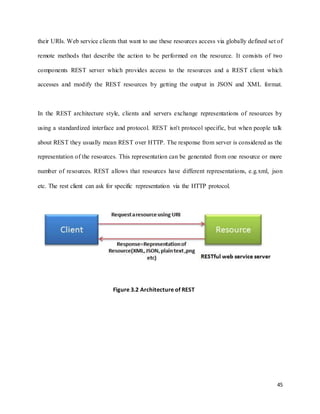
3.14 RESTfull Web Services
In the web services terms, Representational State Transfer (REST) is a stateless client-
server architecture in which the web services are viewed as resources and can be identified by
45
their URIs. Web service clients that want to use these resources access via globally defined set of
remote methods that describe the action to be performed on the resource. It consists of two
components REST server which provides access to the resources and a REST client which
accesses and modify the REST resources by getting the output in JSON and XML format.
In the REST architecture style, clients and servers exchange representations of resources by
using a standardized interface and protocol. REST isn't protocol specific, but when people talk
about REST they usually mean REST over HTTP. The response from server is considered as the
representation of the resources. This representation can be generated from one resource or more
number of resources. REST allows that resources have different representations, e.g.xml, json
etc. The rest client can ask for specific representation via the HTTP protocol.
Figure 3.2 Architecture of REST
46
Chapter 4
Design and Implementation
4.1 Project Description
The Web Application Security Scanner is a web based application developed in Java-EE
which checks vulnerabilities of other websites or web applications by getting website link in
order to apply security injections on them like SQL Injection, Cross Side Scripting (XSS), Buffer
Overflow and some other attacks as well. In this app, if a user is making his/her account, app will
give him/her an API key, with this, a user can use our web services as well as app will give
him/her a jar file of java classes which we have made developed with research documents so user
can continue further more research on this security project if he/she wants.
4.2.1 Home Page
The Home Page of website is the main page or index page which has heading of website
name, a video which tells the usage guidance of website. It has a box where a tester or user can
give its page link of a website or web application and there is a dropdown menu which has some
attacks name, so the user have to choose any of the attack which he/she wants to apply for test on
that link. After selecting the specified attack, user has to press the button of Scan Vulnerabilities.
The page will load and test’s the link and move to the Results page.
4.2.2 Login Page
The Login Page has a form where registered user can make a login by giving correct
information in the form. After pressing the button of login, Application will check the
47
authentications. If user is authenticated, the page will load and move to the User Account Page,
Otherwise it will deny to authenticate to unknown user.
4.2.3 Registration Page
The Registration Page consists of A form which helps an unknown user of the website to
become’s A known user and the benefit is that by being a known user, he/she will get the API
key which helps a known user to access the Web Services of this Web Application from any
Platform.
4.2.4 About us Page
The About us Page has A description of project startup, requirement engineering, and
developers information that why we have developed, reasons and causes.
4.2.5 Result Page
The Result Page is a hidden page from the Web Application Menu. It appears with
dynamic results when sends the request of testing the link from Home Page. This page includes
the result of that link, that the page is vulnerable for that attack or not as well as It provides the
solution of that attack if the website is vulnerable to that attack.
4.2.6 User Account Page
The User Account Page is a hidden page from the Web Application Menu. It appears when a
user becomes known user by giving correct data in to Login Page and authenticate or register
him/her self by filing the form of Registration Page. It provides the user information, Information
48
edit option, API key for Web Services, guidelines for future works, JAR files of previous work
and some other options.
4.2 Flow Chart
In this Flow Chart, User will enter URL (Uniform Resource Locator) of the website to be
scanned then choose an attack to be tested on entered URL and then click on the Scan
Vulnerability button. After checking vulnerability result page will be shown.
Figure 4.3: Flow Chart of Web Application Security Scanner
49
4.3 Use Case Diagram
To model a system the most important aspect is to capture the dynamic behavior. To
clarify a bit in details, dynamic behavior means the behavior of the system when it is running
/operating. So only static behavior is not sufficient to model a system rather dynamic behavior
is more important than static behavior. In UML there are five diagrams available to model
dynamic nature and use case diagram is one of them. Use Case diagram is dynamic in nature
there should be some internal or external factors for making the interaction. These internal and
external agents are known as actors. So use case diagrams are consists of actors, use cases and
their relationships. The diagram is used to model the system/subsystem of an application. A
single use case diagram captures a particular functionality of a system.
Use case diagrams are used to gather the requirements of a system including internal and
external influences. These requirements are mostly design requirements. So when a system is
analyzed to gather its functionalities use cases are prepared and actors are identified.
The purposes of use case diagrams can be as follows:
 Used to gather requirements of a system.
 Used to get an outside view of a system.
 Identify external and internal factors influencing the system.
 Show the interacting among the requirements are actors.
50
Use case diagrams are considered for high level requirement analysis of a system. So when the
requirements of a system are analyzed the functionalities are captured in use cases. So we can
say that use cases are nothing but the system functionalities written in an organized manner.
Now the second things which are relevant to the use cases are the actors. Actors can be defined
as something that interacts with the system. The actors can be human user, some internal
applications or may be some external applications. So in a brief when we are planning to draw
an use case diagram we should have the following items identified.
 Functionalities to be represented as an use case
 Actors
 Relationships among the use cases and actors.
Use case diagrams are drawn to capture the functional requirements of a system. So after
identifying the above items we have to follow the following guidelines to draw an efficient use
case diagram.
 The name of a use case is very important. So the name should be chosen in such a way
so that it can identify the functionalities performed.
 Give a suitable name for actors.
 Show relationships and dependencies clearly in the diagram.
 Do not try to include all types of relationships. Because the main purpose of the diagram
is to identify requirements.
 Use note when ever required to clarify some important points.
51
4.3.1 Use Case of User
User can Scan Vulnerabilities, Login if he/she has an account or can Signup if he/she
does not has account.
Figure 4.1: User Use Case
52
4.3.2 Use Case of Registered User
Registered Users can Login, Scan Vulnerabilities, use Web Services or Update their data.
Figure 4.2: Registered User Use Case
53
4.4 Main Page
User can scan vulnerabilities by entering URL in the text field and then select any
specified attack to be tested and then click on “Scan Vulnerabilities” button, then the
website/webpage (user entered) will be tested with the attack he/she chose and then result page
will appear with further information that if the website is vulnerable or it is secured. Users can
also Signup, Login or view About Us page.
Figure 4.4: Main Page
54
4.5 Signup
4.5.1 For Company
This is Signup Form for Company or Organization. Any Company or Organization can
Sign up by filling the form. After Signing up they can use Web Services also.
Figure 4.5: Signup for Company
55
4.5.2 For Individuals
This is Signup Form for Individuals. Any one can Sign up by filling the form. After
Signing up they can use Web Services also.
Figure 4.6: Signup for Individuals
56
4.6 Login
4.6.1 For Company
This is Login form for Company/Organization. After login in user can avail the features
of Web Services.
Figure 4.7: Login for Company
57
4.6.2 For Individuals
This is Login form for Individuals. After login in user can avail the features of Web
Services.
Figure 4.8: Login for Individuals
58
4.7 Result
Result page consist of two sections. One is information and second is Defense. In
information section there is the URL the user entered, attack’s name that user selected, fields’
names in that web page and result that is the website secured or it is vulnerable to that attack. In
the defense section there are ways that how can you secure your web page from the selected
attack. Defense section provide ways for securing your web site that is whether built on Java,
PHP, Dotnet or Python.
Figure 4.9: Result Page
59
We applied Session Hijacking on www.google.com and results show that it is secured to this
attack.
Figure 4.10: Session Hijacking on www.google.com
60
We applied Structured Query Language Injection on www.google.com and results show that it is
secured to this attack.
Figure 4.11: SQL Injection on www.google.com
61
We applied Cross Site Scripting on www.google.com and results show that it is secured to this
attack.
Figure 4.12: XSS on www.google.com
62
We applied Structured Query Language Injection on http://testphp.vulnweb.com/login.php and
results show that it is vulnerable to this attack.
Figure 4.13: SQL Injection on http://testphp.vulnweb.com/login.php
63
We applied Cross Site Scripting on http://testphp.vulnweb.com/login.php and results show that it
is secured to this attack.
Figure 4.14: XSS on http://testphp.vulnweb.com/login.php
64
4.8 User Account and Web service Page
This page provides user Information, Account edit option, API key for web services,
information about future work, JAR files of previous work and some more options.
Figure 4.15: User Account and Web Service page
65
4.9 Database
Database is consists of five tables. Two of company account, two for individual account
and one for the information that is shown on result page.
Figure 4.16: Database of Web Application Security Scanner
66
Chapter 5
Conclusion & Future Work
5.1 Conclusion
There are many web applications vulnerability scanners implemented for analyzing and
detecting security holes in web applications. And because security is still one of the most
important issues all across the globe in our thesis we have implemented a complete approach that
scans for the most important vulnerabilities for web applications, namely SQL Injection, Cross
Site Scripting (XSS), Session Hijacking, Buffer Overflow and Denial of Service (DOS). Since
these vulnerabilities in web applications has huge risk not only for the web applications but also
for users as well. We studied many existing approaches to detect and prevent these
vulnerabilities in an application, giving a brief note on their advantages and disadvantages. All
the approaches followed by different authors’ leads to a very interesting solution; however some
failures are associated with almost each one of them at some point. Furthermore these scanners
don’t support all web applications, many of them supports only known web applications with
known vulnerabilities.
In this thesis we are providing a vulnerability scanning and analyzing tool of various kinds of
attacks. Our approach can be used with any web application not only the known ones.We
validate the proposed vulnerability scanner by developing experiments to measure its
performance. We used some performance metrics to measure the performance of the scanner
67
which include accuracy, false positive rate, and false negative rate. We also compare the
performance results of it with performance of similar tools in the literature.
5.2 Future Work
The Project named as “Web Application Security Scanner” can be enhanced in the future.
However, the time is very short and in little time period we tried our best to make the project
perfect and used the expertise in each line of code to reach the peak of success. There are some
limitations for the current system to which solution can be provided as a future development by
Administrator.
As for future development, following work can be done.
 More attacks can be implemented in future.
 Will try to convert Denial of Service into Distributed Denial of Service.
 Web Services will be in paid features.
 Make website load faster.
68
REFERENCES
1. [1] Mulpuru, S. “US Online Retail Forecast, 2010 to 2015”. Forrester Research.
2011.
2. [2] The Open Web Application Security Project (OWASP) Foundation. “Top Ten
Web Application Security Risks”. 2011, January 18. Retrieved May 01, 2012,
from http://www.owasp.org/index.php/Category:OWASP_Top_Ten_Project
3. [3] Nahari, H. & Krutz, R. L. “Web Commerce Security: Design and
Development.” John Wiley & Sons, 2011.
4. [4] National Institute of Standards and Technology (NIST). National Vulnerability
Database. Retrieved 2012, from: http://nvd.nist.gov/.
5. [5] WhiteHat Security. “WhiteHat Website Security Statistics Report”, 2011.
6. [6] Hopkins, A. “Web Application Vulnerability Statistics 2010-2011”. London:
Context Information Security.
7. [7] Okun, V., & Fong, E. “Web Application Scanners: Definitions and Functions.
40th Annual Hawaii International Conference on System Sciences “, p. 280b.
IEEE Computer Society Washington, 2007.
8. [8] The Web Application Security Consortium (WASC). “Web Application Security
Scanner Evaluation Criteria”, 2009.
9. [9] Curphey, M. “Web application security assessment tools “. IEEE Symposium
on Security and Privacy. IEEE Computer Society Washington, 2006.
69
10.[10] E. Fong, R. Gaucher, V. Okun, P. E. Black, and E. Dalci. Building a test suite for
web application scanners. Hawaii International Conference on System Sciences, 0:479,
2008.
11.[11] G. T. Buehrer, B. W. Weide, and P. A. G. Sivilotti. Using Parse Tree Validation to
Prevent SQL Injection Attacks. In International Workshop on Software Engineering and
Middleware (SEM), 2005.
12.[12] T. Pietraszek, and C. V. Berghe, ―Defending against Injection Attacks through
Context-Sensitive String Evaluation,‖ In Proceeding of the 8th International Symposium
on Recent Advance in Intrusion Detection (RAID), September 2005.
13.[13] Y. W. Huang, C. H. Tsai, D. Lee, and S. Y. Kuo. Non-detrimental web application
security scanning. In Software Reliability Engineering, 2004. ISSRE 2004. 15th
International Symposium on, pages 219–230, Nov. 2004.
14.[14] M. Vieira, N. Antunes, and H. Madeira. Using Web Security Scanners to Detect
Vulnerabilities in Web Services Using Web Security Scanners to Detect Vulnerabilities
in Web Services. IEEE/IFIP Intl Conf. on Dependable Systems and Networks, Lisbon,
Portugal, June 2009.
15.[15] Ounce, http://www.ouncelabs.com/
16.[16] Pixy, http://pixybox.seclab.tuwien.ac.at/pixy/
17.[17] Acunetix Web Vulnerability Scanner, 2012,
http://www.acunetix.com/vulnerabilityscanner/
18.[18] CodeScan Labs. CodeScan Developer - Security at the Source. Available at:
http://www.codescan.com/, 2009.
70
19.[19] D. Shelly. Using a Web Server Test Bed to Analyze the Limitations of Web
Application Vulnerability Scanners. Virginia Polytechnic Institute and State University.
2010.
20.[20] Y. Huang and D. Lee. Web Application Security-Past, Present, and Future. Pages
183–227. 2005.
21.[21] Y. W. Huang, C. H. Tsai, D. Lee, and S. Y. Kuo. Non-detrimental web application
security scanning. In Software Reliability Engineering, 2004. ISSRE 2004. 15th
International Symposium on, pages 219–230, Nov. 2004.
22.[22] N. Antunes and M. Vieira. Detecting SQL Injection Vulnerabilities in Web Services.
In Dependable Computing, 2009. LADC ’09. Fourth Latin-American Symposium on,
pages 17–24, Sept. 2009.
23.[23] D. Byrne and E. Duprey. Grendel-Scan. Available at: http://www.grendel-scan.com/.
24.[24] N. Surribas. Wapiti. Available at: http://www.ict-romulus.eu/web/wapiti/.
25.[25] A. Riancho. W3AF-Web Application Attack and Audit Framework. Available at:
http: //w3af.sourceforge.net/.
26.[26] G. F. Lyon. NMAP.ORG. Available at: http://nmap.org/.
27.[27] Cenzic, Inc. Hailstorm Core and Hailstorm Starter. Available at:
http://www.cenzic.com, 2010.
28.[28] N-Stalker. N-Stalker The Web Security Specialists. Available at: http://nstalker.com,
2010.
29.[29] Mavituna Security Ltd. Netsparker Web Application Security Scanner. Available at:
http://www.mavitunasecurity.com, 2010.
30.[30] PortSwigger. Burp Scanner. Available at: http://portswigger.net/.
71
31.[31] IBM. Rational AppScan Standard Edition. Available at: http://www-01.ibm.com,
2010.
32.[32] BuyServers Ltd. Falcove Web Vulnerability Scanner. Available at:
http://www.buyservers.net, 2008.
33.[33] Carahsoft Technology Corp. HP WebInspect software. Available at:
http://www.carahsoft.com/hp/products/webinspect, 2009.
34.[34] NT OBJECTives. NTOSpider. Available at: http://www.ntobjectives.com, 2010.
35.[35] The OWASP Foundation. OWASP Top 10 - 2010, 2010.
36.[36] D. Shelly. Using a Web Server Test Bed to Analyze the Limitations of Web
Application Vulnerability Scanners. Virginia Polytechnic Institute and State University.
2010.
37.[37] http://insecure.in/input_validation.asp
38.[38] https://www.owasp.org/index.php/Session_hijacking_attack
39.[39] http://searchsecurity.techtarget.com/definition/denial-of-service

fyp_thesis-of-Web-Application-Security-Scanner

  • 1.
    i INSTITUTE OF INFORMATION& COMMUNICATION TECHNOLOGY UNIVERSITY OF SINDH, JAMSHORO Web Application Security Scanner In partial fulfillment of the requirements for the award of the degree of BS-SOFTWARE ENGINEERING (Morning) Name Roll #. Inaam Ishaque Shaikh 2K13/SWE/97 Azharuddin Bhatti 2K13/SWE/64 Yasir Ali Jalbani 2K13/SWE/92 Hassan Waris Mahar 2K13/SWE/26 SUPERVISOR DR. DIL NAWAZ HAKRO CO-SUPERVISOR MS. NEELMA BHATTI
  • 2.
    ii WEB APPLICATION SECURITYSCANNER Name Roll #. Inaam Ishaque Shaikh 2K13/SWE/97 Azharuddin Bhatti 2K13/SWE/64 Yasir Ali Jalbani 2K13/SWE/92 Hassan Waris Mahar 2K13/SWE/26 APPROVED BY: Supervisor APPROVED BY: Committee, ________________________ _________________________ Dr. Dil Nawaz Hakro Final Year Projects Coordinator _________________________ Final Year Projects Committee Head _________________________ Director, IICT
  • 3.
    iii ABSTRACT The numbers ofsecurity vulnerabilities that are being found today are much higher in applications than in operating systems. This means that the attacks aimed at web applications are exploiting vulnerabilities at the application level and not at the transport or network level like common attacks in the past. At the same time, quantity and impact of security vulnerabilities in such applications has grown as well. Many transactions are performed online with various kinds of web applications. Almost in all of them user is authenticated before providing access to backend database for storing all the information. A well-designed injection can provide access to malicious or unauthorized users and mostly achieved through SQL injection and Cross-site scripting (XSS). In this thesis we are providing a vulnerability scanning tool of various kinds of attacks. We are also providing API key and previous jars to registered users so they can make their Android application or continue our work.
  • 4.
    iv ACKNOWLEDGEMENT For the successfulcompletion of our thesis titled (Web Application Security Scanner), firstly immense amount of gratitude is to be dedicated to our parents for upbringing us to complete and escalate to the astounding achievements concerning every aspect of our lives. The thesis actually has been a joint effort of several individuals, first and foremost is our project supervisor Dr. Dil Nawaz Hakro, lecturer at IICT, University of Sindh, Jamshoro. For his kind appraisal to us, providing us with adequate resources and without him this thesis could not have reached its completion. We are also thankful to our vigilant co-supervisor Ms. Neelma Bhatti, teaching assistant at IICT, University of Sindh, Jamshoro. Who took keen interest in our problems and gave us beneficial solutions
  • 5.
    v Table Of Contents Abstract...............................................................................................................................iii Acknowledgement..............................................................................................................iv Chapter 1: INTRODUCTION..............................................................................................1 1.1 Introduction..............................................................................................................1 1.2 Introduction to Attacks.............................................................................................3 1.2.1 SQL Injection...........................................................................................................3 1.2.2 Cross Site Scripting..................................................................................................6 1.2.3 Buffer Overflow.......................................................................................................8 1.2.4 Session Hijacking.....................................................................................................9 1.2.5 Denial of Service......................................................................................................9 1.3 Motivation and Need..............................................................................................11 1.4 Aims of the Study ..................................................................................................13 1.5 Organization of Thesis...........................................................................................13 Chapter 2: BACKGROUND AND LITERATURE REVIEW..........................................14 2.1 Project Background................................................................................................14 2.1.1 Web Application Scanners in Academia ...............................................................14 2.1.2 Free/Open-Source Web Application Scanners ......................................................16 2.1.3 Commercial Web Application Scanners................................................................19 2.2 Literature Review...................................................................................................28 Chapter 3: TOOLS AND TECHNOLOGIES ....................................................................30
  • 6.
    vi 3.1 Eclipse....................................................................................................................30 3.2 PhantomJS.............................................................................................................31 3.3 XAMPP/MySQL....................................................................................................31 3.4 JDK ........................................................................................................................32 3.5 Apache Tomcat Server...........................................................................................32 3.6 HTML ....................................................................................................................33 3.7 CSS.........................................................................................................................34 3.7.1 Separation of content and presentation ..................................................................34 3.7.2 Smaller webpage file sizes.....................................................................................34 3.7.3 Improved webpage download speed ......................................................................34 3.7.4 Improved rendering speed......................................................................................35 3.7.5 Streamlined maintenance .......................................................................................35 3.8 JQuery....................................................................................................................35 3.9 Bootstrap ................................................................................................................36 3.9.1 Easy to use .............................................................................................................36 3.9.2 Responsiveness ......................................................................................................36 3.9.3 The speed of the Development...............................................................................36 3.9.4 Customizable Bootstrap .........................................................................................36 3.9.5 Consistency............................................................................................................38 3.9.6 Support...................................................................................................................38 3.9.7 Packaged JavaScript Components .........................................................................38 3.9.8 Simple Integration..................................................................................................38 3.9.9 Grid ........................................................................................................................39
  • 7.
    vii 3.9.10 Pre-styled Components..........................................................................................39 3.10 JSP/Servlet .............................................................................................................39 3.11 Struts ......................................................................................................................40 3.12 Hibernate................................................................................................................41 3.12.1 Persistence..............................................................................................................41 3.12.2 Object Relational Mapping....................................................................................42 3.13 Selenium.................................................................................................................43 3.14 RESTfull Web Services .........................................................................................44 Chapter 4: DESIGN AND IMPLEMENTATION.............................................................46 4.1 Project Description.................................................................................................46 4.1.1 Home Page .............................................................................................................46 4.1.2 Login Page .............................................................................................................46 4.1.3 Registration Page ...................................................................................................47 4.1.4 About us Page ........................................................................................................47 4.1.5 Result Page.............................................................................................................47 4.1.6 User Account Page.................................................................................................47 4.2 Flow Chart..............................................................................................................48 4.3 Use Case Diagram..................................................................................................49 4.3.1 Use Case of User....................................................................................................51 4.3.2 Use Case of Registered User..................................................................................52 4.4 Main Page ..............................................................................................................53 4.5 Signup ....................................................................................................................54 4.5.1 For Company..........................................................................................................54
  • 8.
    viii 4.5.2 For Individuals.......................................................................................................55 4.6 Login......................................................................................................................56 4.6.1 For Company..........................................................................................................56 4.6.2 For Individuals .......................................................................................................57 4.7 Results....................................................................................................................58 4.8 User Account and Web service Page .....................................................................64 4.9 Database.................................................................................................................65 Chapter 5: CONCLUSION & FUTURE WORK ..............................................................66 5.1 Conclusion .............................................................................................................66 5.2 Future Work ...........................................................................................................67 REFERENCES ..................................................................................................................68
  • 9.
    1 Chapter 1 Introduction 1.1 Introduction Webapplications have become an integral part of recent industry and our lives. Much of today’s online business, including university account management, social networking, email, banking, and shopping, are available online with use of web applications. Since ecommerce has grown significantly, there has been an exponential increase in online transactions in the past few years. US online retail sales grew 12.6% in 2010 to reach $176.2 billion. With an expected 10% compound annual growth rate (CAGR) from 2010 to 2015, US e-commerce is expected to reach $278.9 billion in 2015 [1]. The data that web applications handle, such as credit card numbers and shopping activity information, typically is of considerable value to the users and the service providers. In order to be sustainable, web applications should protect the user’s data from unauthorized access, use, disclosure, disruption, modification, perusal, inspection, and recording or destruction. But often, it fails to satisfy these requirements. The root cause of most security risks on the Web is based on vulnerabilities in web applications [2], [3]. According to National Vulnerability Database (NVD) [4], the number of vulnerabilities has lessened since 2009, which means that security measures have
  • 10.
    2 been implemented overthe last few years. As shown in Figure 1.1, in 2008 the number of vulnerabilities reported by NVD was 5,632; in 2009 the number of vulnerabilities increased to 5,733. But starting from 2010, NVD reported the decrease of vulnerabilities on the Web: 4,639 in 2010 and 4,151 in 2011. Figure 1.1: Distribution of web application vulnerabilities over years (2008-2011) Nevertheless, the likelihood that at least one vulnerability will appear in a website remains very high. During 2010, almost every website was exposed, daily, to at least one highly, critically, or urgently severe vulnerability, and 64% of these were exposed to at least one Information Leakage vulnerability [4], [5], [6]. This has led to a need for developers to increase their attention to web application security. But, due to lack of knowledge or time constraints, developers tend to ignore security precautions, and some vulnerabilities are discovered during the web
  • 11.
    3 application testing stageor even after applications are deployed. To locate the possible vulnerability in the code, Web Application Vulnerability Scanners (WAVS) are used. WAVS are automated tools used to test web applications for common security problems. WAVS search for web-application-specific vulnerabilities and look for software coding errors, such as illegal input strings and buffer overflows [7], [8], [9]. WAVS have strengths but also limitations. Vulnerability detection rates may vary depending on the architecture of WAVS, as well as implementation of crawling and attacking modules. The other important feature is the availability of attacking vectors responsible for different vulnerability types. 1.2 Introduction to Attacks 1.2.1 SQL Injection This section will discuss a brief overview of different kinds of SQL injection attacks and their defenses. [36] Describes the basic definition and fundamental information regarding SQL injection techniques. SQL injection occurs when malicious input is passed into a database interpreter without being properly validated or encoded. In this type of attack the client is attacking the web server database. The input that the attacker passes into the interpreter is crafted to be a legitimate SQL statement, but instead of returning the data that the application’s developer intended, the interpreter now returns the data requested by the attacker. This type of attack is severe because not only can it expose all sensitive user and business related data, but it could even go as far as executing operating system commands or giving an attacker complete control of a web
  • 12.
    4 application. An exampleof a valid SQL query which displays information for the user ―Rami‖ is: SELECT info FROM users WHERE username = 'Rami'; An attacker could use the malicious user name ―' OR 1=1 –‖ to cause the interpreter to display all of the user information data in the database. The corresponding SQL query would be: SELECT info FROM users WHERE username = '' OR 1=1 – This is one of the simplest types of SQL injection, but works because the leading single quote causes the query to break out of the single quote delimited data. Therefore the always true ―OR 1=1‖ is appended to the query, and thus displays all of the user information data in the database. The double dashes ―–‖ at the end of the query cause all of the text that would follow it to be commented out, because ―–‖ is the comment symbol in this SQL language. Adding the comment symbol is necessary in this attack because it nullifies the rest of the syntax that the web application would normally append to the end of database query to complete the operation. Therefore, the only query that is being executed is the attacker’s injected sequence, and not the web applications expected query. Even more dangerous attacks are possible against certain SQL versions and databases as well. An example of this would be if an attacker took advantage of a web application that implements both regular and administrator users, and therefore normally logs in users with default roles, but could also log in a user with administrator roles. If the administrator user has advanced functionality and has the ability to access all of the web application’s data, then the web application can be completely compromised if an attacker takes control of the administrator account. An SQL injection attack could accomplish this if a web application uses email addresses as user names and associates each user name in the database as either a regular or an
  • 13.
    5 administrator user. Inthis example the attacker will exploit a generic ―Change Mailing Address‖ field on a web page and associate an email address of their choosing to the administrator account. The attacker would enter the following in the ―Change Mailing Address‖ field on the web page: '; UPDATE users SET username = 'attacker@email.com' WHERE username LIKE '%admin%'; – The semi-colon ―;‖ will end the first query and allow for the attacker’s query to be executed. This query will cause the email address that the attacker entered to replace the email address that matches the pattern most like ―admin‖. All that is necessary to perform this attack is for the attacker to ―guess and check‖ until they know that the table holding the accounts is in fact ―users‖, and that the field holding the user names is in fact ―username‖. After this, the user name most closely matching ―admin‖ will be replaced with the attacker’s email address, but will continue to have administrative capabilities. Now that the attacker has replaced the administrator’s email address with his own, he can click the ―Forgot Password‖ button that most user-based web applications provide, and have the administrator’s password sent to him in the convenient ―Password Reminder‖ email. The previously mentioned attack is not always easy to execute because it is not trivial to find out the name of the table and column being used in the SQL database. This challenge is overcome by using two other types of SQL injection: blind SQL injection and error-based SQL injection. Blind SQL injection uses a series of true and false questions to take advantage of the predictability of the WHERE condition in SQL, since 1=1 will always return true. Therefore, if a record is returned when using blind SQL injection, the attacker’s injected condition must have been true. Error-based SQL injection is a specific type of SQL injection that uses SQL error messages to determine the structure of the database. SQL injection statements are crafted by the
  • 14.
    6 attacker in away such that the attacker can use the error responses to systematically unveil table names, column names, column data types, and even specific data entries [36]. 1.2.2 Cross Site Scripting Three of the main types of cross-site scripting (XSS) attacks, as well as some defensive techniques to protect against them, will be reviewed in this section. XSS occurs when a web application includes malicious code in a web page that is sent to a client’s browser without proper content validation. In this type of attack the web page server is attacking the client machine. When the web page is viewed by the client it will execute the malicious script that the attacker embedded into the web page. XSS is the most prevalent web application security flaw [35] due in a large part to its simplicity and resulting severity. Some of the attacks that this type of vulnerability can result in are the hijacking of a user’s session, the defacement of websites, the insertion of hostile content, and the redirection of users’ requests. Reflective XSS is a type of XSS attack that can occur when a victim follows a URL which contains malicious scripting that is executed when the web page is rendered. This is commonly done by sending victims legitimate looking e-mail messages that contain malicious script in the message’s URL. Once the HTTP request from the URL is processed, the HTML content is received and displayed in the victim’s browser, thus executing the malicious script. An example of a URL containing a reflective XSS attack that would execute some type of malicious script included the function ―malicious()‖ would be: http://www.targetsite.com/display.php?user=<script>malicious()</script> Stored XSS is another type of XSS attack. This type of attack occurs when the malicious script is uploaded into the database back end of a server without input validation, and is later retrieved by
  • 15.
    7 the web applicationto be embedded into a web page. This causes every user who visits the infected web page to execute the malicious script in his or her browser. An example of where this vulnerability can be found is a web application that uses a comment section to allow users to view and leave feedback about a product. If an attacker were to leave a comment which included malicious script, the script would be stored as a comment for that product in the database, and then executed every time a user clicks to view the page holding the comments for that product. An example of this type of attack is a script crafted to steal a user’s cookie and save it in a remote site for exploitation at a later time so that they can perform actions as if they were the victim (such as bank transactions, e-mail correspondence, etc...). The following script would execute such an attack if stored in a web application’s database and then executed in a client’s web browser: <script>document.write('<img src=―http://www.attackersite.com' +document.cookie+'―) </script> A third type of XSS attack is Document Object Model, or DOM-based, XSS. This is a different kind of XSS attack because it occurs on the client side when the user is processing the content, instead of on the server side when the web application is retrieving information to put in a web page. The Document Object Model is the standard model that represents HTML and XML content of a web page. The DOM can be modified in this type of attack to execute a malicious script in the victim’s browser. An example of this type of attack would be to exploit a web page that uses some embedded JavaScript in to set the default language for the client using a variable in the URL. An example of this would be: http://www.mysite.com/index.html#default=English
  • 16.
    8 The malicious scriptthat would exploit this would simply need to replace the variable ―English‖ in the URL. A URL that shows this type of DOM-based XSS attack would be: http://www.mysite.com/index.html#default=<script>malicious()</script> 1.2.3 Buffer Overflow Buffer Overflow [37] attacks are enabled due to sloppy programming or mismanagement of memory by the application developers. Buffer overflow may be classified into stack overflows, format string overflows, heap overflows and integer overflows. It may be possible that an overflow may exist in language’s (PHP, Java, etc.) built-in functions. To execute a buffer overflow attack, you merely dump as much data as possible into an input field. The attack is said to be successful when it returns an application error. Perl is well suited for conducting this type of attack. Here’s the buffer test, calling on Perl from the command line: $ echo –e “GET /login.php?user= > ‘perl –e ‘print “a” x 500’ ‘nHTTP/1.0nn”| nc –vv website 80 This sends a string of 500 “a” characters for the user value to the login.php file. Buffer overflow can be tested by sending repeated requests to the application and recording the server’s response.
  • 17.
    9 1.2.4 Session Hijacking TheSession Hijacking attack [38] consists of the exploitation of the web session control mechanism, which is normally managed for a session token. Because http communication uses many different TCP connections, the web server needs a method to recognize every user’s connections. The most useful method depends on a token that the Web Server sends to the client browser after a successful client authentication. A session token is normally composed of a string of variable width and it could be used in different ways, like in the URL, in the header of the http requisition as a cookie, in other parts of the header of the http request, or yet in the body of the http requisition. The Session Hijacking attack compromises the session token by stealing or predicting a valid session token to gain unauthorized access to the Web Server. The session token could be compromised in different ways; the most common are:  Predictable session token;  Session Sniffing;  Client-side attacks (XSS, malicious JavaScript Codes, Trojans, etc);  Man-in-the-middle attack  Man-in-the-browser attack 1.2.5 Denial of Service Denial-of-service (DoS) attacks [39] typically flood servers, systems or networks with traffic in order to overwhelm the victim resources and make it difficult or impossible for legitimate users to use them.
  • 18.
    10 While an attackthat crashes a server can often be dealt with successfully by simply rebooting the system, flooding attackscanbe more difficulttorecoverfrom. The United States Computer Emergency Readiness Team (US-CERT) provides some guidelines for determining when a DoS attack may be underway. US-CERT suggests the following may indicate such an attack:  Degradation in network performance, especially when attempting to open files stored on the networkoraccessingwebsites;  Inabilitytoreacha particularwebsite;  Difficultyinaccessinganywebsite;and  A higherthanusual volume of spamemail. Experts recommend a number of strategies for enterprises to defend against a denial-of-service attack, starting with preparing an incident response plan well in advance of any attack. Once there is suspicion that a DoS attack is underway, enterprises should contact their internet service provider (ISP) to determine whether the incident is an actual DoS attack or degradation of performance caused by some other factor. The ISP can help mitigate the attack by rerouting or throttling malicious traffic and using loadbalancers toreduce the effectof the attack. Enterprises may also want to explore the possibility of using denial-of-service attack detection products; some intrusion detection systems, intrusion prevention systems and firewalls offer DoS detection functions. Other strategies include contracting with a backup ISP and using cloud-based anti-DoS services. While there have been instances where DoS attackers demand payment from victims to end the attacks, financial profit is not usually the motive behind this type of attack. In many cases, the attackers wish to
  • 19.
    11 cause harm tothe organization or individual targeted in the attack; in other cases, the attackers are simply attempting to sabotage the victim, causing the greatest damage or inconvenience to the greatest number of victims. When a perpetrator of a DoS attack is identified, the reasons for an attack may also be revealed. Many high-profile DoS attacks are actually distributed attacks, meaning the attack traffic is directed from multiple attack systems. While DoS attacks originating from a single source can be easier to mitigate because defenders can block network traffic from the offending source, attacks directed from multiple attacking systems are far more difficult to detect and defend against because it can be difficult to differentiate legitimate traffic from malicious traffic and filter malicious packets when they are sent fromall over the internet. 1.3 Motivation and Need A computer system is more than hardware and software, it includes the policies, procedures, and organization under which that hardware and software is used. Security holes can arise from many areas or combination of these them. This leads no sense to restrict the study of vulnerabilities to hardware and software problems. When attacker breaks into a computing system, he takes advantage of lapses in procedures, technology, or management, permitting unauthorized access or actions. The precise failure of the controls is termed a vulnerability or security flaw, mistreatment that failure to violate the security policy is termed exploiting the vulnerability. One who attempts to exploit the vulnerability is called an attacker .Another more general definition from defines Vulnerability analysis as the act of determining which security
  • 20.
    12 holes and vulnerabilitiesmay be applicable to the target network. Vulnerability analysis, also known as vulnerability assessment, is a process that defines, identifies, and classifies the security holes (vulnerabilities) in a computer, network, or communications infrastructure. In addition, vulnerability analysis can forecast the effectiveness of proposed countermeasures and evaluate their actual effectiveness after they are put into use. Vulnerability is the intersection of three elements, a system susceptibility or flaw, attacker access to the flaw, and attacker capability to exploit the flaw . In order to exploit vulnerabilities, the attacker must have at least one applicable tool or technique that can connect to a system weakness security hole. Integration is done by the vulnerability assessment tools, by automating the detection, identification, measurement, and understanding of vulnerabilities found in ICT components at various levels of a target ICT system or infrastructure. Vulnerability is an attribute or characteristic of a component that can be exploited by either an external or internal agent (hacker or malicious insider) to violate a security policy of (narrow definition) or cause a deleterious result in (broad definition) either the component itself, and/or the system or infrastructure of which it is apart. Such deleterious result include unauthorized privilege escalations or data/resource accesses, sensitive data disclosures or privacy violations, malicious code insertions, denials of service, etc. In order to develop reliable and robust web applications, we have to test the security that let us monitor, analyze, and quantify application behavior under a range of faults and attacks. In this research we will present a scanning tool for analyzing web applications vulnerability in real time. This scanner lets us quantify how attacks and faults impact on web application, discover attack points, and examine how critical the web application components behave during an attack or system fault.
  • 21.
    13 1.3 Aim ofthe Study The main goal of this bachelor thesis is to present a new analyzing tool for main four web applications vulnerabilities, which are mainly SQL Injection, Cross Site Scripting (XSS), Buffer Overflow, Denial of Services. To achieve this goal, a dynamically generate test requests that are applied specifically to a given web application will be applied by the analysis tool. By doing this analysis, our scanning will be able to detect vulnerabilities of any web application regardless if it’s for known web application or custom web application. The analysis tool will conduct four tests, these tests will identify the common web applications vulnerabilities that are SQL Injections, Cross Site Scripting (XSS), Buffer Overflow and Denial of Services. Three tests will be applied on web applications input parameters so the tests will be parameter-based tests and DOS attack will be applied on server where the website is located. 1.4 Organization of Thesis The rest of the thesis is organized as follows: Chapter 2 presents a complete background of the project and the Literature Review. A brief introduction of Tools and Technologies is discussed in Chapter 3. Chapter 4 presents a formal description of our design, diagrams and implementation of the project. Conclusion and future work are discussed in chapter 5.
  • 22.
    14 Chapter 2 Background andLiterature Review 2.1 Project Background There are several web application vulnerability scanners that test for popular vulnerabilities in web servers and web applications. These tools can either be academic research projects, free/open-source applications, or commercial software products. Tools are developed in academia by members of universities who are interested in improving and studying web application vulnerability scanners, but are generally not available for purchase or commercial use. The open-source/free tools are available to the public, but are generally not as up-to date and accurate as the commercial tools. These tools do however, give users the ability to customize their tool and gain a greater understanding of the security of their web applications. Commercial tools usually give more comprehensive results than open-source/free tools, but can cost anywhere from just under $100.00 to over $6000.00 [17, 18]. Specific web vulnerability scanners from these three categories that automatically scan for and detect the most common web application vulnerabilities will be reviewed in this section. 2.1.1 Web Application Scanners in Academia One of the categories of web application vulnerability scanners includes those that are developed in academia. These scanners are different from free/open source and commercial
  • 23.
    15 scanners because theresearchers who work on them are continuously evaluating them and also discuss not only where their design succeeds, but where their design is limited and requires future work. These scanners are not available for public use, so they cannot be used in this analysis of web vulnerability scanner limitations, but reviewing the techniques and methods used by these scanners will help in understanding how other web application scanners work [19]. Huang et al. developed a web application scanner called WAVES that attempts to reduce the number of potential side effects of black-box testing [20, 21]. The auditing process of web application scanners can cause permanent modifications, or even damage, to the state of the application it is targeting. This is a drawback that both commercial and open-source/free web application scanners share, and is why the authors introduced a testing methodology that would allow for harmless auditing. Their experimental results found that WAVES was unable to detect any new vulnerability that were not already detected by a static source code analyzer they had developed. Also, WAVES was unable to discover all of the vulnerabilities that the static source code analyzer had found (detected only 80% of the vulnerabilities found by the static analyzer). The authors believe their tool failed in part because it did not have complex procedures able to detect all data entry points, and because it was unable to observe HTML output. Another academic black-box approach was developed by Antunes and Viera as described in [22]. Their web vulnerability scanner was used to identify SQL injection vulnerabilities in 262 publicly available web services. The first step in their approach was to prepare for the tests by obtaining information regarding the web service in order to generate the workload (valid web service calls). The second step was to execute the tests. This was accomplished by using a workload emulator that acted as a web service consumer, and by using an attack load generator that automatically generated attacks by injecting them into the workload test calls. The final step
  • 24.
    16 in their approachwas to analyze the responses by using a set of well-defined rules which would identify vulnerabilities and exclude potential false-positives. Their results showed that they achieved a detection coverage rate of 81% in the scenario where they had access to the known number of vulnerabilities, and maintained a false-positive rate of 18% in their optimistic interpretation. These results are better than those of the commercial tools that the authors analyzed, and suggest that it is possible to improve the effectiveness of vulnerability scanners [19]. 2.1.2 Free/Open-Source Web Application Scanners Many open-source and free web application scanners are available for blackbox testing and analysis. Some of these applications provide extensive functionality with the ability to be customized and expanded to meet the needs of users. Others however do not provide a great deal of usability and have a limited amount of functionality, and therefore can only test for a few web application vulnerabilities. Three of the more thorough and robust free/opensource scanners, Grendel-Scan [23], Wapiti [24], and W3AF [25], will be reviewed. Grendel-Scan [23] is an open-source web application security testing tool which has an automated testing module for detecting common web application vulnerabilities. It has the ability to find simple web application vulnerabilities, but its designers state that no automated tool can identify complicated vulnerabilities, such as logic and design flaws. Grendel-Scan tests for SQL injection, XSS attacks, and session management vulnerabilities, as well as other vulnerabilities.
  • 25.
    17 Figure 2.1: Grendel-Scan Wapiti[24] is a free web application vulnerability scanner and security auditor. It performs black-box analysis by scanning the web pages of a web application in search of scripts and forms where data can be injected. After the list of scripts and forms is gathered, Wapiti injects payloads to test if the scripts are vulnerable. Wapiti scans for remote file inclusion errors, SQL and database injections, XSS injections, and other vulnerabilities.
  • 26.
    18 Figure 2.2: WapitiScanner W3AF [25] is exactly what it stands for, a Web Application Attack and Audit Framework. The goal of the project is to create a framework which can find and exploit web application vulnerabilities easily. The project’s long term objectives are for it to become the best open source web application scanner, and the best open source web application exploitation framework. Also, the designers want the project to create the biggest community of web application hackers, combine static code analysis and black box testing into one framework, and become the NMAP [26] of the web. W3AF incorporates a great deal of plug-ins into its framework, and is capable of testing for SQL injection, XSS attacks, buffer overflow, malicious file execution, and session management vulnerabilities.
  • 27.
    19 Figure 2.3: W3AFScanner 2.1.3 Commercial Web Application Scanners Commercial web application scanners are generally licensed to companies or organizations that wish to test their web applications for vulnerabilities so that they can fix security holes before they are maliciously exploited. Since a data breach can result in the loss of personal information of thousands of customers, and the loss of millions of dollars, companies are willing to pay large sums of money for these applications. These commercial applications compete against each other for market share, and therefore do not want to disclose their scanner’s limitations or restrictions. However, an approach to analyze these limitations and
  • 28.
    20 restrictions is proposedin this thesis. Some of the features of popular commercial web application scanners will be discussed below. Cenzic [27] sells a web application scanner tool called Hailstorm which utilizes stateful testing. Stateful testing tools are designed to behave like human testers by taking what seem to be an application’s insignificant or disparate weaknesses, and combining them together into serious exploits. The key benefits that Hailstorm claims are the ability to identify major security flaws in target applications, to help with internal compliance policies, to avoid vulnerabilities that lead to downtime, and to assess applications for commonly known vulnerabilities. Cenzic provides a 7-day free trial of Hailstorm Core which can detect vulnerabilities including SQL injection, XSS, and session management. Figure 2.4: HailStorm Scanner
  • 29.
    21 Acunetix [17] WebVulnerability Scanner is another black-box tool which claims in- depth checking for SQL injection, XSS, and other vulnerabilities with its innovative AcuSensor Technology. This technology is supposed to quickly find vulnerabilities with a low number of false-positives, pinpoint where each vulnerability exists in the code, and report the debug information as well. Acunetix also includes advanced tools to allow penetration testers to fine tune web application security tests, and has many more features to scan websites with different scan options and identities. The only vulnerability that the free edition of the software detects is XSS, but a 30-day trial version of the product is available that also can detect SQL injection, file execution, session management, and manual buffer overflow attacks. Figure 2.5: Acunetix Scanner
  • 30.
    22 N-Stalker [28] providesa suite of web security assessment checks to enhance the overall security of web applications. It is founded on the technology of Component-oriented Web Application Security Scanning, and allows users to create their own assessment policies and requirements, enabling them to check for more than 39,000 signatures and infrastructure security checks. Vulnerabilities checked for include SQL injection, XSS attacks, buffer overflows, and session management attacks, but the evaluation edition only lasts for a 7-day period. Figure 2.6: N-Stalker Scanner
  • 31.
    23 Netsparker [29] isa web application vulnerability scanner developed by Mavituna Security Ltd. Netsparker is focused on eliminating false-positives, and uses confirmation and exploitation engines to ensure that false-positives are not reported. The engines also allow the users to see the actual impact of the attacks instead of text explanations of what the attack could do. Because of the techniques Netsparker uses, Mavituna Security claims that it developed the first false-positive free web application scanner. Netsparker scans for all types of XSS injection, SQL injection, malicious file execution, and session management vulnerabilities. Figure 2.7: Netsparker Scanner Burp [30] Scanner is a web application vulnerability scanner that is part of Burp Suite Professional. Burp Suite Professional is the commercial version of Burp Suite, which is an integrated platform for attacking and testing web applications. Burp Suite provides a number of tools, including an interception web proxy, web spider, application intruder, session key
  • 32.
    24 analyzer, and datacomparer. The professional version includes Burp Scanner which can operate in either passive or active mode, or either manual scan or live scan mode. The vulnerabilities it searches for include SQL injection, XSS injection, and session management vulnerabilities. Figure 2.8: Burp Suite Professional Scanner Rational AppScan [31] is licensed by IBM for advanced web application security scanning. The AppScan tool automates vulnerability assessments and tests for SQL injection, XSS attacks, buffer overflows, and other common web application vulnerabilities. AppScan can generate advanced remediation capabilities in order to ease vulnerability remediation, simplify results with the Results Expert wizard, and test for emerging web technologies. Rational
  • 33.
    25 AppScan provides anunlimited evaluation period for its standard edition; however, with the evaluation license the software is only capable of testing a test web site provided by AppScan. Figure 2.9: IBM Rational AppScan BuyServers Ltd. [32] sells a web vulnerability scanner called Falcove which is a 2-in-1 scanning and penetration tool, meaning that it not only tries to detect vulnerabilities, but is capable of exploiting them as well. Falcove utilizes a crawler feature that checks for web vulnerabilities, audits dynamic content (password fields, shopping carts), and generates penetration reports that explain the security level of the tested web site. However, BuyServers Ltd. no longer supports the trial version of the product that detects SQL injection, XSS, and file execution attacks.
  • 34.
    26 Figure 2.10: FalcoveScanner HP’s WebInspect [33] software provides web application security testing and assessment for complex web applications. WebInspect claims fast scanning capabilities, broad security assessment coverage, and accurate web application security scanning results. HP also believes WebInspect identifies security vulnerabilities that are undetectable by traditional scanners by using innovative assessment technologies such as simultaneous crawl and audit, and on current application scanning. HP WebInspect scans for data detection and manipulation attacks, session and authentication vulnerabilities, and server and general HTTP vulnerabilities, but does not currently provide a working evaluation version of the product.
  • 35.
    27 Figure 2.11: HP’sWebInspect Scanner NT OBJECTives’ NTOSpider [34] is a web application security scanner that claims to provide automated vulnerability assessment with unprecedented accuracy and comprehensiveness. NTOSpider identifies application vulnerabilities and ranks threat priorities, as well as produces graphical HTML reports. NT OBJECTives’ proprietary S3 Methodology and Data Sleuth intelligence engine are employed for automation and accuracy, and checks vulnerabilities on a case-by-case basis, which provides contextsensitive vulnerability checking. NTOSpider checks for SQL injection, XSS attacks, and session management vulnerabilities, but does not provide a trial version for evaluation.
  • 36.
    28 Figure 2.12: NTOSpiderScanner 2.2 Literature Review According to Curphey and Araujo (2006), there are eight categories of web application security Assessment tools: source code analyzers, web application (black box) scanners, database scanners, binary analysis tools, runtime analysis tools, configuration management tools, HTTP proxies, and miscellaneous tools. The most common of these web application assessment tools are source code analyzers and web application scanners. Source code analyzers generally achieve good vulnerability detection rates, but are only useful if the web application’s source code is available. On the other hand, web application vulnerability scanners are the tools which most closely mimic web application attacks, but have been known to perform rather poorly [10,11,12,13]. There are two main approaches to test web applications for vulnerabilities [14]:
  • 37.
    29 White box testing:consists of the analysis of the source code of the web application. This can be done manually or by using code analysis tools like Ounce [15] or Pixy [16]. The problem is that exhaustive source code analysis may be difficult and cannot find all security flaws because of the complexity of the code. Black box testing: consists in the analyses of the execution of the application in search for vulnerabilities. In this approach, also known as penetration testing, the scanner does not know the internals of the web application and it uses fuzzing techniques over the web HTTP requests. Our application is working on Blackbox testing type. As comparing of this final year project to the background of the project, I have found some plus points which are: The major plus point is that we provide Web Services of our applications so that A known use of the website can use our services from any platform, like the request is coming from any source and web app generates results and response to that request. A request of Web Service can be from android mobile or from any other web app. - Another plus point is that we provide the full documentations and JAR files so that A known user can continue further work from the help of our previous work. This feature is more than any Open Source software. - One more plus point is that we provide Denial of Service attack, no other security scanners provide this feature. We can convert into Distributed Denial of Service attack by applying DOS attack on a same server at the same time from different browsers. - Another plus point is that we are providing major attacks checking at a time of SQL Injection, Buffer Overflow, DOS attack, DDOS attack, Session Hijacking.
  • 38.
    30 Chapter 3 Tools andTechnologies 3.1 Eclipse Eclipse is a platform that has been designed from the ground up for building integrated web and application development tooling. By design, the platform does not provide a great deal of end user functionality by itself. The value of the platform is what it encourages: rapid development of integrated features based on a plug-in model. Eclipse provides a common user interface (UI) model for working with tools. It is designed to run on multiple operating systems while providing robust integration with each underlying OS. Plug-ins can program to the Eclipse portable APIs and run unchanged on any of the supported operating systems. The Eclipse platform defines an open architecture so that each plug-in development team can focus on their area of expertise. Let the repository experts build the back ends and the usability experts build the end user tools. If the platform is designed well, significant new features and levels of integration can be added without impact to other tools. The Eclipse platform uses the model of a common workbench to integrate the tools from the end user's point of view. Tools that you develop can plug into the workbench using well defined hooks called extension points. The platform itself is built in layers of plug-ins, each one defining extensions to the extension points of lower-level plug-ins, and in turn defining their own extension points for further customization. This extension model allows plug-in developers to add a variety of functionality
  • 39.
    31 to the basictooling platform. The artifacts for each tool, such as files and other data, are coordinated by a common platform resource model. 3.2 Phantom JS PhantomJS allows developers to access the browser’s DOM API. After all, PhantomJS is still a browser even if it hasn’t a GUI. Developers can write JavaScript code that will be evaluated against a specified page. Although this may not seem very important, this allows us to automate any sort of interactions with a web page without having to open a browser (operation that will save you a tremendous amount of time). This is helpful especially when using PhantomJS to run tests. By utilizing WebKit, PhantomJS provides the ability to render any content on a web page and save it as an image. Therefore, it can be used to automate the process of capturing screenshots of web pages that developers can analyse to ensure that everything looks good. These images can be saved in several format such as PNG, JPEG, PDF, and GIF. PhantomJS helps developers to automate the process of running tests without a need for any sort of GUI. PhantomJS makes use of its headless browser to handle different unit tests instead, and uses the command line to tell developers where they are running into error. 3.3 XAMPP/ MYSQL XAMPP stands for Cross-Platform (X), Apache (A), MariaDB (M), PHP (P) and Perl (P). It is a simple, lightweight Apache distribution that makes it extremely easy for developers to create a local web server for testing purposes.
  • 40.
    32 MySQL is afast, easy-to-use RDBMS (Relational DataBase Management System) being used for many small and big businesses. It is developed, marketed, and supported by MySQL AB, which is a Swedish company. it is becoming so popular because of many good reasons. MySQL is released under an open-source license. So you have nothing to pay to use it. It is a very powerful program in its own right. It handles a large subset of the functionality of the most expensive and powerful database packages. It uses a standard form of the well-known SQL data language. MySQL works on many operating systems and with many languages including PHP, PERL, C, C++, JAVA, etc. It works very quickly and works well even with large data sets. It is very friendly to PHP, the most appreciated language for web development. It supports large databases, up to 50 million rows or more in a table. The default file size limit for a table is 4GB, but you can increase this (if your operating system can handle it) to a theoretical limit of 8 million terabytes (TB). 3.4 JDK A Java Development Kit (JDK) is a program development environment for writing java applets and applications. It consists of a runtime environment that sits on top of the operating system layer as well as the tools and programming that developers need to compile, debug, and run applets and applications written in the Java language. 3.5 Apache Tomcat Server Tomcat is an application server from the Apache Software Foundation that executes Java servlets and renders Web pages that include Java Server Page coding. Described as a
  • 41.
    33 "reference implementation" ofthe Java Servlet and the Java Server Page specifications, Tomcat is the result of an open collaboration of developers and is available from the Apache Web site in both binary and source versions. Tomcat can be used as either a standalone product with its own internal Web server or together with other Web servers, including Apache, Netscape Enterprise Server, Microsoft Internet Information Server (IIS), and Microsoft Personal Web Server. Tomcat requires a Java Runtime Enterprise Environment that conforms to JRE 1.1 or later. 3.6 HTML HTML is a computer language devised to allow website creation. These websites can then be viewed by anyone else connected to the Internet. HTML consists of a series of short codes typed into a text-file by the site author and these are the tags. The text is then saved as a html file, and viewed through a browser, like Internet Explorer or Netscape Navigator. This browser reads the file and translates the text into a visible form, hopefully rendering the page as the author had intended. Writing your own HTML entails using tags correctly to create your vision. You can use anything from a rudimentary text-editor to a powerful graphical editor to create HTML pages. The tags are what separate normal text from HTML code. HTML works inside <angle-brackets>. They allow all the cool stuff like images and tables and stuff, just by telling your browser what to render on the page. Different tags will perform different functions. The tags themselves don’t appear when you view your page through a browser, but their effects do.
  • 42.
    34 3.7 CSS The CSSlanguage was created to meet the aesthetic demands placed on HTML. The CSS language specification set out how rules can be written and should be implemented by web browser developers. CSS rules are added to a webpage either by writing the code directly into the <head> of the webpage HTML, or by linking to a separate file. A separate file containing only CSS rules is commonly referred to as a ‘stylesheet’, and has the extension .css (dot-C-S-S). 3.7.1 Separation of content and presentation CSS rules can be provided in a file that is separate to the (content) HTML. If all pages link to this centralized CSS file, then the look of a website can more easily be updated. For example, the color or size of all level-one headings can be changed by updating a single CSS rule. 3.7.2 Smaller webpage file sizes As the code required to style content can be removed from individual webpages, the size of each webpage file is reduced. Depending on the benchmarks, file sizes may be reduced by up to 60%. 3.7.3 Improved webpage download speed Once a stylesheet has been downloaded, it is typically stored on the user’s computer. For each subsequent webpage viewed, only the HTML needs to be downloaded.
  • 43.
    35 3.7.4 Improved renderingspeed Once a webpage has been downloaded, a browser processes the underlying code to determine how content should be displayed. This process is referred to as ‘rendering’. The time a webpage takes to render is affected by the complexity of the code the browser receives. Using CSS to control the layout of a page typically simplifies the the code structure making it ‘easier’ (faster) for the browser to render. 3.7.5 Streamlined maintenance As less code is required for each webpage, both the likelihood of coding errors and time required to add content to a website are reduced. 3.8 JQuery jQuery is a cross-platform JavaScript library designed to simplify the client-side scripting of HTML. jQuery is the most popular JavaScript library in use today, with installation on 65% of the top 10 million highest-trafficked sites on the Web. jQuery is free, open-source software licensed under the MIT License. jQuery is a fast, small, and feature-rich JavaScript library. It makes things like HTML document traversal and manipulation, event handling, animation, and Ajax much simpler with an easy-to-use API that works across a multitude of browsers. With a combination of versatility and extensibility, jQuery has changed the way that millions of people write JavaScript. When a browser renders a web page, it's a visual representation of what's known as the DOM (or the document object model). This model can be conceptually modeled as a tree data structure
  • 44.
    36 where there arecertain nodes each with roots and leaves. When you're working with jQuery, you can easily traverse the contents of the DOM in order to reach or to find the nodes, elements, or values you're aiming to retrieve. 3.9 Bootstrap Bootstrap initially built by a designer and developer from Twitter, Bootstrap has turned out to be one of the trendiest front-end frameworks in the whole world. Before it became open- source, Bootstrap was firstly identified as Twitter Blueprint. Bootstrap is responsive, mobile- first, prevailing, and front-end framework, which is developed along with CSS, JavaScript, and HTML. Bootstrap has many benefits from scratch for every web development project, and one such reason is the huge number of resources accessible for Bootstrap. 3.9.1. Easy to Use It is extremely an easy and speedy procedure to begin with Bootstrap. Bootstrap is very adaptable too. You can utilize Bootstrap along with CSS, or LESS, or also with Sass [after you download the Sass version]. 3.9.2. Responsiveness Every year mobile devices persist to grow hugely popular, and the requirement to have a responsive website has become compulsory and important too. As the fluid grid layout amends vigorously to the appropriate screen resolution, thus crafting a mobile-ready site is a smooth and
  • 45.
    37 easy task alongwith Bootstrap. With the use of ready-made classes of Bootstrap, you can recognize the number of spots in the grid system that you would like each column to engage in. Then only you can identify at whichever point you would like your columns to load in horizontal position, instead of vertically to exhibit accurately on mobile appliances. 3.9.3. The Speed of the Development One of the main benefits of utilizing Bootstrap happens to be the speed of the development. While driving out a new, fresh website or application swiftly, you should certainly reflect upon utilizing Bootstrap. Instead of coding from scrape, Bootstrap lets you to use ready- made coding blocks in order to assist you in setting up. You can blend that along with CSS-Less functionality and cross-browser compatibility that can give way to saving of ample hours of coding. You can even buy ready-made Bootstrap themes and alter them to fit your requirements, for gaining the quickest potential route. 3.9.4. Customizable Bootstrap The Bootstrap can be customized as per the designs of your project. The web developers can make a choice to select the aspects which are required which can be simply complete by utilizing Bootstrap customize page. You just have to tick off all the aspects that you do not require, such as- Common CSS: typography, code, grid system, tables, buttons, forms, print media styles; Components: input groups, button groups, pager, labels, navs, navbar, badges, pagination; JavaScript components: dropdowns, popovers, modals, tooltips, carousels; Utilities: Responsive utilities, basic utilities. Thus your custom version of Bootstrap is all set for download process.
  • 46.
    38 3.9.5. Consistency Few Twitteremployees firstly expanded Bootstrap as a framework for boosting the consistency across interior tools. But later the Co-founder Mark Otto after understanding the actual potential released in August 2011 the first open-source version of Bootstrap. He even portrayed how the Bootstrap was enlarged with the use of one core concept- pairing of designers along with developers. Thus Bootstrap became popular on Twitter. 3.9.6. Support As Bootstrap holds a big support community, you can be provided with help whenever there comes any problem. The creators always keep the Bootstrap updated. Presently Bootstrap is hosted, expanded, and preserved on the GitHub along with more than 9,000 commits, as well as more than 500 contributors. 3.9.7. Packaged JavaScript Components Bootstrap approaches with a pack of JavaScript components for including the functionality that crafts it in simple way for operating things, such as tooltips, modal windows, alerts, etc. You can even leave out the writing scripts completely. 3.9.8. Simple Integration Bootstrap can be simply integrated along with distinct other platforms and frameworks, on existing sites and new ones too. You can also utilize particular elements of Bootstrap along with your current CSS.
  • 47.
    39 3.9.9. Grid Bootstrap hasthe capability to utilize a 12-column grid that is responsive. It also upholds offset and nested elements. The grid can be maintained in a responsive mode, or you can simply modify it to a secured layout. 3.9.10. Pre-styled Components Bootstrap approaches with pre-styled components for alerts, dropdowns, nav bars, etc. Hence, being a feature-rich, Bootstrap provides numerous advantages of using it. Hope you would have understood the above reasons so that you can easily use Bootstrap for making superb web designs for your sites! 3.10 JSP/ Servlet Java Server Pages (JSP) technology is used to create web application just like Servlet technology. It can be thought of as an extension to servlet because it provides more functionality than servlet such as expression language, jstl etc. A JSP page consists of HTML tags and JSP tags. The jsp pages are easier to maintain than servlet because we can separate designing and development. It provides some additional features such as Expression Language, Custom Tag etc. Servlet technology is used to create web application (resides at server side and generates dynamic web page). Servlet technology is robust and scalable because of java language. Before Servlet, CGI (Common Gateway Interface) scripting language was popular as a server-side programming language. But there was many disadvantages of this technology. There are many
  • 48.
    40 interfaces and classesin the servlet API such as Servlet, GenericServlet, HttpServlet, ServletRequest, ServletResponse etc. Servlet can be described in many ways, depending on the context. Its an API that provides many interfaces and classes including documentations. Servlet is an interface that must be implemented for creating any servlet. 3.11 Struts The struts framework is used to develop MVC (Model View Controller)-based web application. The struts framework was initially created by Craig McClanahan and donated to Apache Foundation in May, 2000 and Struts 1.0 was released in June 2001. The Struts 2 is the combination of webwork framework of opensymphony and struts 1. The Struts 2 provides supports to POJO based actions, Validation Support, AJAX Support, Integration support to various frameworks such as Hibernate, Spring, Tiles etc, support to various result types such as Freemarker, Velocity, JSP. Struts 2 provides many features that were not in struts 1. The important features of struts 2 framework are as follows:  Configurable MVC components  POJO based actions  AJAX support  Integration support  Various Result Types  Various Tag support  Theme and Template support
  • 49.
    41 3.12 Hibernate Hibernate frameworksimplifies the development of java application to interact with the database. Hibernate is an open source, lightweight, ORM (Object Relational Mapping) tool. An ORM tool simplifies the data creation, data manipulation and data access. It is a programming technique that maps the object to the data stored in the database. Hibernate is a high-performance Object/Relational persistence and query service which is licensed under the open source GNU Lesser General Public License (LGPL) . Hibernate not only takes care of the mapping from Java classes to database tables (and from Java data types to SQL data types), but also provides data query and retrieval facilities. Though Hibernate Framework is not the only persistence solution, it has become very famous over the recent past because of its huge variety of features when compared with its competitors. It takes much of the database related boiler-plate code from the developers, thereby asking the developers to concentrate on the core business logic of the application and not with the error- prone SQL syntax. 3.12.1 Persistance The definition of persistence can be given like this, “Data that can be stored to some permanent medium and can be seen at any point of time even after the application that created the data has ended”. Persisting (or preserving) data is not an easy task and it is one of the basic necessities for almost any application. The common storage mediums that we see in our day-to- day life are hard-disk and a database. Databases are the most preferred storage medium for persisting data because of the relatively simple way for data-access using the Structured Query
  • 50.
    42 Language (SQL). Datawithin a database can be viewed in a table format, where each row in the table represents a single record of data. 3.12.2 Object Relational Mapping As mentioned in the introductory part, ORM software greatly simplifies the transformation of business data between an application and a relational-database. ORM can be viewed as a bridge between an application and the relational-database that it is depending on. Figure 3.1 Sample model of ORM ORM acting as a bridge between the application and the database As one infer from the above picture, application depends on the ORM for all the database-related services like persisting service (for saving the data), query service (for retrieving existing data from the database) and the ORM takes care of communicating with the appropriate database. Some of the most popular ORM project/products are iBatis Data Access Objects from Apache, NDO (.NET Data Objects) for .NET languages, TopLink from Oracle and Power Designer.
  • 51.
    43 3.13 Selenium Selenium firstcame to life in 2004 when Jason Huggins was testing an internal application at ThoughtWorks. Being a smart guy, he realized there were better uses of his time than manually stepping through the same tests with every change he made. He developed a Javascript library that could drive interactions with the page, allowing him to automatically rerun tests against multiple browsers. That library eventually became Selenium Core, which underlies all the functionality of Selenium Remote Control (RC) and Selenium IDE. Selenium RC was ground-breaking because no other product allowed you to control a browser from a language of your choice. While Selenium was a tremendous tool, it wasn’t without its drawbacks. Because of its Javascript based automation engine and the security limitations browsers apply to Javascript, different things became impossible to do. To make things worse, webapps became more and more powerful over time, using all sorts of special features new browsers provide and making these restrictions more and more painful. In 2006 a plucky engineer at Google named Simon Stewart started work on a project he called WebDriver. Google had long been a heavy user of Selenium, but testers had to work around the limitations of the product. Simon wanted a testing tool that spoke directly to the browser using the ‘native’ method for the browser and operating system, thus avoiding the restrictions of a sandboxed Javascript environment. The WebDriver project began with the aim to solve the Selenium’ pain-points. Jump to 2008. The Beijing Olympics mark China’s arrival as a global power, massive mortgage default in the United States triggers the worst international recession since the Great Depression, The Dark Knight is viewed by every human (twice), still reeling from the untimely loss of Heath Ledger. But the most important story of that year was the
  • 52.
    44 merging of Seleniumand WebDriver. Selenium had massive community and commercial support, but WebDriver was clearly the tool of the future. The joining of the two tools provided a common set of features for all users and brought some of the brightest minds in test automation under one roof. Perhaps the best explanation for why WebDriver and Selenium are merging was detailed by Simon Stewart, the creator of WebDriver, in a joint email to the WebDriver and Selenium community on August 6, 2009. Selenium-WebDriver supports the following browsers along with the operating systems these browsers are compatible with. - Google Chrome - Internet Explorer 7, 8, 9, 10, and 11 on appropriate combinations of Vista, Windows 7, Windows 8, and Windows 8.1. As of April 15 2014, IE 6 is no longer supported. The driver supports running 32-bit and 64-bit versions of the browser where applicable - Firefox: latest ESR, previous ESR, current release, one previous release - Safari - Opera - HtmlUnit - Phantomjs - Android (with Selendroid or appium) - iOS (with ios-driver or appium) 3.14 RESTfull Web Services In the web services terms, Representational State Transfer (REST) is a stateless client- server architecture in which the web services are viewed as resources and can be identified by
  • 53.
    45 their URIs. Webservice clients that want to use these resources access via globally defined set of remote methods that describe the action to be performed on the resource. It consists of two components REST server which provides access to the resources and a REST client which accesses and modify the REST resources by getting the output in JSON and XML format. In the REST architecture style, clients and servers exchange representations of resources by using a standardized interface and protocol. REST isn't protocol specific, but when people talk about REST they usually mean REST over HTTP. The response from server is considered as the representation of the resources. This representation can be generated from one resource or more number of resources. REST allows that resources have different representations, e.g.xml, json etc. The rest client can ask for specific representation via the HTTP protocol. Figure 3.2 Architecture of REST
  • 54.
    46 Chapter 4 Design andImplementation 4.1 Project Description The Web Application Security Scanner is a web based application developed in Java-EE which checks vulnerabilities of other websites or web applications by getting website link in order to apply security injections on them like SQL Injection, Cross Side Scripting (XSS), Buffer Overflow and some other attacks as well. In this app, if a user is making his/her account, app will give him/her an API key, with this, a user can use our web services as well as app will give him/her a jar file of java classes which we have made developed with research documents so user can continue further more research on this security project if he/she wants. 4.2.1 Home Page The Home Page of website is the main page or index page which has heading of website name, a video which tells the usage guidance of website. It has a box where a tester or user can give its page link of a website or web application and there is a dropdown menu which has some attacks name, so the user have to choose any of the attack which he/she wants to apply for test on that link. After selecting the specified attack, user has to press the button of Scan Vulnerabilities. The page will load and test’s the link and move to the Results page. 4.2.2 Login Page The Login Page has a form where registered user can make a login by giving correct information in the form. After pressing the button of login, Application will check the
  • 55.
    47 authentications. If useris authenticated, the page will load and move to the User Account Page, Otherwise it will deny to authenticate to unknown user. 4.2.3 Registration Page The Registration Page consists of A form which helps an unknown user of the website to become’s A known user and the benefit is that by being a known user, he/she will get the API key which helps a known user to access the Web Services of this Web Application from any Platform. 4.2.4 About us Page The About us Page has A description of project startup, requirement engineering, and developers information that why we have developed, reasons and causes. 4.2.5 Result Page The Result Page is a hidden page from the Web Application Menu. It appears with dynamic results when sends the request of testing the link from Home Page. This page includes the result of that link, that the page is vulnerable for that attack or not as well as It provides the solution of that attack if the website is vulnerable to that attack. 4.2.6 User Account Page The User Account Page is a hidden page from the Web Application Menu. It appears when a user becomes known user by giving correct data in to Login Page and authenticate or register him/her self by filing the form of Registration Page. It provides the user information, Information
  • 56.
    48 edit option, APIkey for Web Services, guidelines for future works, JAR files of previous work and some other options. 4.2 Flow Chart In this Flow Chart, User will enter URL (Uniform Resource Locator) of the website to be scanned then choose an attack to be tested on entered URL and then click on the Scan Vulnerability button. After checking vulnerability result page will be shown. Figure 4.3: Flow Chart of Web Application Security Scanner
  • 57.
    49 4.3 Use CaseDiagram To model a system the most important aspect is to capture the dynamic behavior. To clarify a bit in details, dynamic behavior means the behavior of the system when it is running /operating. So only static behavior is not sufficient to model a system rather dynamic behavior is more important than static behavior. In UML there are five diagrams available to model dynamic nature and use case diagram is one of them. Use Case diagram is dynamic in nature there should be some internal or external factors for making the interaction. These internal and external agents are known as actors. So use case diagrams are consists of actors, use cases and their relationships. The diagram is used to model the system/subsystem of an application. A single use case diagram captures a particular functionality of a system. Use case diagrams are used to gather the requirements of a system including internal and external influences. These requirements are mostly design requirements. So when a system is analyzed to gather its functionalities use cases are prepared and actors are identified. The purposes of use case diagrams can be as follows:  Used to gather requirements of a system.  Used to get an outside view of a system.  Identify external and internal factors influencing the system.  Show the interacting among the requirements are actors.
  • 58.
    50 Use case diagramsare considered for high level requirement analysis of a system. So when the requirements of a system are analyzed the functionalities are captured in use cases. So we can say that use cases are nothing but the system functionalities written in an organized manner. Now the second things which are relevant to the use cases are the actors. Actors can be defined as something that interacts with the system. The actors can be human user, some internal applications or may be some external applications. So in a brief when we are planning to draw an use case diagram we should have the following items identified.  Functionalities to be represented as an use case  Actors  Relationships among the use cases and actors. Use case diagrams are drawn to capture the functional requirements of a system. So after identifying the above items we have to follow the following guidelines to draw an efficient use case diagram.  The name of a use case is very important. So the name should be chosen in such a way so that it can identify the functionalities performed.  Give a suitable name for actors.  Show relationships and dependencies clearly in the diagram.  Do not try to include all types of relationships. Because the main purpose of the diagram is to identify requirements.  Use note when ever required to clarify some important points.
  • 59.
    51 4.3.1 Use Caseof User User can Scan Vulnerabilities, Login if he/she has an account or can Signup if he/she does not has account. Figure 4.1: User Use Case
  • 60.
    52 4.3.2 Use Caseof Registered User Registered Users can Login, Scan Vulnerabilities, use Web Services or Update their data. Figure 4.2: Registered User Use Case
  • 61.
    53 4.4 Main Page Usercan scan vulnerabilities by entering URL in the text field and then select any specified attack to be tested and then click on “Scan Vulnerabilities” button, then the website/webpage (user entered) will be tested with the attack he/she chose and then result page will appear with further information that if the website is vulnerable or it is secured. Users can also Signup, Login or view About Us page. Figure 4.4: Main Page
  • 62.
    54 4.5 Signup 4.5.1 ForCompany This is Signup Form for Company or Organization. Any Company or Organization can Sign up by filling the form. After Signing up they can use Web Services also. Figure 4.5: Signup for Company
  • 63.
    55 4.5.2 For Individuals Thisis Signup Form for Individuals. Any one can Sign up by filling the form. After Signing up they can use Web Services also. Figure 4.6: Signup for Individuals
  • 64.
    56 4.6 Login 4.6.1 ForCompany This is Login form for Company/Organization. After login in user can avail the features of Web Services. Figure 4.7: Login for Company
  • 65.
    57 4.6.2 For Individuals Thisis Login form for Individuals. After login in user can avail the features of Web Services. Figure 4.8: Login for Individuals
  • 66.
    58 4.7 Result Result pageconsist of two sections. One is information and second is Defense. In information section there is the URL the user entered, attack’s name that user selected, fields’ names in that web page and result that is the website secured or it is vulnerable to that attack. In the defense section there are ways that how can you secure your web page from the selected attack. Defense section provide ways for securing your web site that is whether built on Java, PHP, Dotnet or Python. Figure 4.9: Result Page
  • 67.
    59 We applied SessionHijacking on www.google.com and results show that it is secured to this attack. Figure 4.10: Session Hijacking on www.google.com
  • 68.
    60 We applied StructuredQuery Language Injection on www.google.com and results show that it is secured to this attack. Figure 4.11: SQL Injection on www.google.com
  • 69.
    61 We applied CrossSite Scripting on www.google.com and results show that it is secured to this attack. Figure 4.12: XSS on www.google.com
  • 70.
    62 We applied StructuredQuery Language Injection on http://testphp.vulnweb.com/login.php and results show that it is vulnerable to this attack. Figure 4.13: SQL Injection on http://testphp.vulnweb.com/login.php
  • 71.
    63 We applied CrossSite Scripting on http://testphp.vulnweb.com/login.php and results show that it is secured to this attack. Figure 4.14: XSS on http://testphp.vulnweb.com/login.php
  • 72.
    64 4.8 User Accountand Web service Page This page provides user Information, Account edit option, API key for web services, information about future work, JAR files of previous work and some more options. Figure 4.15: User Account and Web Service page
  • 73.
    65 4.9 Database Database isconsists of five tables. Two of company account, two for individual account and one for the information that is shown on result page. Figure 4.16: Database of Web Application Security Scanner
  • 74.
    66 Chapter 5 Conclusion &Future Work 5.1 Conclusion There are many web applications vulnerability scanners implemented for analyzing and detecting security holes in web applications. And because security is still one of the most important issues all across the globe in our thesis we have implemented a complete approach that scans for the most important vulnerabilities for web applications, namely SQL Injection, Cross Site Scripting (XSS), Session Hijacking, Buffer Overflow and Denial of Service (DOS). Since these vulnerabilities in web applications has huge risk not only for the web applications but also for users as well. We studied many existing approaches to detect and prevent these vulnerabilities in an application, giving a brief note on their advantages and disadvantages. All the approaches followed by different authors’ leads to a very interesting solution; however some failures are associated with almost each one of them at some point. Furthermore these scanners don’t support all web applications, many of them supports only known web applications with known vulnerabilities. In this thesis we are providing a vulnerability scanning and analyzing tool of various kinds of attacks. Our approach can be used with any web application not only the known ones.We validate the proposed vulnerability scanner by developing experiments to measure its performance. We used some performance metrics to measure the performance of the scanner
  • 75.
    67 which include accuracy,false positive rate, and false negative rate. We also compare the performance results of it with performance of similar tools in the literature. 5.2 Future Work The Project named as “Web Application Security Scanner” can be enhanced in the future. However, the time is very short and in little time period we tried our best to make the project perfect and used the expertise in each line of code to reach the peak of success. There are some limitations for the current system to which solution can be provided as a future development by Administrator. As for future development, following work can be done.  More attacks can be implemented in future.  Will try to convert Denial of Service into Distributed Denial of Service.  Web Services will be in paid features.  Make website load faster.
  • 76.
    68 REFERENCES 1. [1] Mulpuru,S. “US Online Retail Forecast, 2010 to 2015”. Forrester Research. 2011. 2. [2] The Open Web Application Security Project (OWASP) Foundation. “Top Ten Web Application Security Risks”. 2011, January 18. Retrieved May 01, 2012, from http://www.owasp.org/index.php/Category:OWASP_Top_Ten_Project 3. [3] Nahari, H. & Krutz, R. L. “Web Commerce Security: Design and Development.” John Wiley & Sons, 2011. 4. [4] National Institute of Standards and Technology (NIST). National Vulnerability Database. Retrieved 2012, from: http://nvd.nist.gov/. 5. [5] WhiteHat Security. “WhiteHat Website Security Statistics Report”, 2011. 6. [6] Hopkins, A. “Web Application Vulnerability Statistics 2010-2011”. London: Context Information Security. 7. [7] Okun, V., & Fong, E. “Web Application Scanners: Definitions and Functions. 40th Annual Hawaii International Conference on System Sciences “, p. 280b. IEEE Computer Society Washington, 2007. 8. [8] The Web Application Security Consortium (WASC). “Web Application Security Scanner Evaluation Criteria”, 2009. 9. [9] Curphey, M. “Web application security assessment tools “. IEEE Symposium on Security and Privacy. IEEE Computer Society Washington, 2006.
  • 77.
    69 10.[10] E. Fong,R. Gaucher, V. Okun, P. E. Black, and E. Dalci. Building a test suite for web application scanners. Hawaii International Conference on System Sciences, 0:479, 2008. 11.[11] G. T. Buehrer, B. W. Weide, and P. A. G. Sivilotti. Using Parse Tree Validation to Prevent SQL Injection Attacks. In International Workshop on Software Engineering and Middleware (SEM), 2005. 12.[12] T. Pietraszek, and C. V. Berghe, ―Defending against Injection Attacks through Context-Sensitive String Evaluation,‖ In Proceeding of the 8th International Symposium on Recent Advance in Intrusion Detection (RAID), September 2005. 13.[13] Y. W. Huang, C. H. Tsai, D. Lee, and S. Y. Kuo. Non-detrimental web application security scanning. In Software Reliability Engineering, 2004. ISSRE 2004. 15th International Symposium on, pages 219–230, Nov. 2004. 14.[14] M. Vieira, N. Antunes, and H. Madeira. Using Web Security Scanners to Detect Vulnerabilities in Web Services Using Web Security Scanners to Detect Vulnerabilities in Web Services. IEEE/IFIP Intl Conf. on Dependable Systems and Networks, Lisbon, Portugal, June 2009. 15.[15] Ounce, http://www.ouncelabs.com/ 16.[16] Pixy, http://pixybox.seclab.tuwien.ac.at/pixy/ 17.[17] Acunetix Web Vulnerability Scanner, 2012, http://www.acunetix.com/vulnerabilityscanner/ 18.[18] CodeScan Labs. CodeScan Developer - Security at the Source. Available at: http://www.codescan.com/, 2009.
  • 78.
    70 19.[19] D. Shelly.Using a Web Server Test Bed to Analyze the Limitations of Web Application Vulnerability Scanners. Virginia Polytechnic Institute and State University. 2010. 20.[20] Y. Huang and D. Lee. Web Application Security-Past, Present, and Future. Pages 183–227. 2005. 21.[21] Y. W. Huang, C. H. Tsai, D. Lee, and S. Y. Kuo. Non-detrimental web application security scanning. In Software Reliability Engineering, 2004. ISSRE 2004. 15th International Symposium on, pages 219–230, Nov. 2004. 22.[22] N. Antunes and M. Vieira. Detecting SQL Injection Vulnerabilities in Web Services. In Dependable Computing, 2009. LADC ’09. Fourth Latin-American Symposium on, pages 17–24, Sept. 2009. 23.[23] D. Byrne and E. Duprey. Grendel-Scan. Available at: http://www.grendel-scan.com/. 24.[24] N. Surribas. Wapiti. Available at: http://www.ict-romulus.eu/web/wapiti/. 25.[25] A. Riancho. W3AF-Web Application Attack and Audit Framework. Available at: http: //w3af.sourceforge.net/. 26.[26] G. F. Lyon. NMAP.ORG. Available at: http://nmap.org/. 27.[27] Cenzic, Inc. Hailstorm Core and Hailstorm Starter. Available at: http://www.cenzic.com, 2010. 28.[28] N-Stalker. N-Stalker The Web Security Specialists. Available at: http://nstalker.com, 2010. 29.[29] Mavituna Security Ltd. Netsparker Web Application Security Scanner. Available at: http://www.mavitunasecurity.com, 2010. 30.[30] PortSwigger. Burp Scanner. Available at: http://portswigger.net/.
  • 79.
    71 31.[31] IBM. RationalAppScan Standard Edition. Available at: http://www-01.ibm.com, 2010. 32.[32] BuyServers Ltd. Falcove Web Vulnerability Scanner. Available at: http://www.buyservers.net, 2008. 33.[33] Carahsoft Technology Corp. HP WebInspect software. Available at: http://www.carahsoft.com/hp/products/webinspect, 2009. 34.[34] NT OBJECTives. NTOSpider. Available at: http://www.ntobjectives.com, 2010. 35.[35] The OWASP Foundation. OWASP Top 10 - 2010, 2010. 36.[36] D. Shelly. Using a Web Server Test Bed to Analyze the Limitations of Web Application Vulnerability Scanners. Virginia Polytechnic Institute and State University. 2010. 37.[37] http://insecure.in/input_validation.asp 38.[38] https://www.owasp.org/index.php/Session_hijacking_attack 39.[39] http://searchsecurity.techtarget.com/definition/denial-of-service