WHAT IS FUZZY?
• having a frizzy texture or appearance.
• difficult to perceive; indistinct or vague
• Or easily you can say “the term fuzzy refers
to things which are not clear or are vague.”
dimuthchathu101@gmail.com 1
Let’s Move
Into Fuzzy
Logic
In the real world many times we
encounter a situation when we
can’t determine whether the state
is true or false, their fuzzy logic
provides a very valuable flexibility
for reasoning. In this way, we can
consider the inaccuracies and
uncertainties of any situation.
“ Fuzzy Logic is an extension of
traditional Boolean logic, using
linguistic variables allows to express
logical values intermediate between
FALSE and TRUE, describing with
greater efficiency the uncertainty
principle in the real world.”
dimuthchathu101@gmail.com 2
Characteristics
of fuzzy logic
Flexible and easy to implement machine learning technique
Helps you to mimic the logic of human thought
Logic may have two values which represent two possible solutions
Highly suitable method for uncertain or approximate reasoning
Fuzzy logic views inference as a process of propagating elastic
constraints
Fuzzy logic allows you to build nonlinear functions of arbitrary
complexity.
Fuzzy logic should be built with the complete guidance of experts
dimuthchathu101@gmail.com 3
Architecture Of Fuzzy Logic
dimuthchathu101@gmail.com 4
Applications
Of Fuzzy Logic
Fuzzy logic can be applied in
number of fields including
Aerospace, Automotive Business
, Defense , Electronics , Finance,
Innovative , etc.
Product Company Fuzzy Logic
Kiln control Nippon Steel Mixes cement
Microwave oven
Mitsubishi
Chemical
Sets lunes power
and cooking
strategy
Palmtop computer
Hitachi, Sharp,
Sanyo, Toshiba
Recognizes
handwritten Kanji
characters
Plasma etching Mitsubishi Electric
Sets etch time and
strategy
dimuthchathu101@gmail.com 5
Implementation Of
Fuzzy Logic
• Here we use number of
steps to implement Fuzzy
logic in Arduino
• Step 01-you have to
download Arduino IDE and
install it.
Use the following link
https://www.arduino.cc/en/m
ain/software
dimuthchathu101@gmail.com 6
• Step 02-Then You Have to download eFLL
library Use the following link
https://github.com/zerokol/eFLL
dimuthchathu101@gmail.com 7
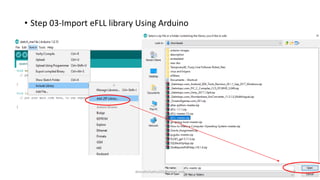
• Step 03-Import eFLL library Using Arduino
dimuthchathu101@gmail.com 8
• Step 04-Importing Library
dimuthchathu101@gmail.com 9
Code
Implementation
#include<fuzzy.h>
// Preparing a Fuzzy object
Fuzzy *fuzzy =new Fuzzy();
// here a object named fuzzy is created
// next you have to implement both void
setup() and void loop() methods.
Fuzzy OBJECT
dimuthchathu101@gmail.com 10
void setup()
{
//baud rate of uno board is 9600. therefore it is serial output
Serial.begin(9600);
// Defining a FuzzyInput Object
FuzzyInput *sens1_Value=new FuzzyInput(1);
//Defining a FuzzySet Object
FuzzySet *small_Value=new FuzzySet(20,40,40,80);
//including FuzzySet into FuzzyInput
sens1_Value->addFuzzySet(small_value);
dimuthchathu101@gmail.com
Fuzzy Input OBJECT
FuzzySet OBJECT
11
//Defining a FuzzySet Object
FuzzySet *mid_Value=new FuzzySet(80,100,100,140);
//including FuzzySet into FuzzyInput
sens1_Value->addFuzzySet(mid_value);
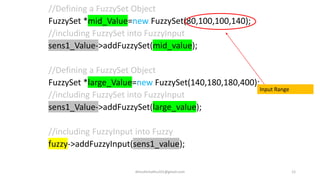
//Defining a FuzzySet Object
FuzzySet *large_Value=new FuzzySet(140,180,180,400);
//including FuzzySet into FuzzyInput
sens1_Value->addFuzzySet(large_value);
//including FuzzyInput into Fuzzy
fuzzy->addFuzzyInput(sens1_value);
dimuthchathu101@gmail.com
Input Range
12
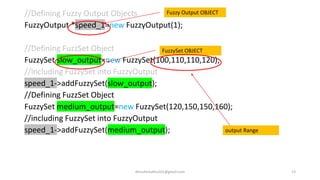
//Defining Fuzzy Output Objects
FuzzyOutput *speed_1=new FuzzyOutput(1);
//Defining FuzzSet Object
FuzzySet slow_output=new FuzzySet(100,110,110,120);
//including FuzzySet into FuzzyOutput
speed_1->addFuzzySet(slow_output);
//Defining FuzzSet Object
FuzzySet medium_output=new FuzzySet(120,150,150,160);
//including FuzzySet into FuzzyOutput
speed_1->addFuzzySet(medium_output);
dimuthchathu101@gmail.com
Fuzzy Output OBJECT
FuzzySet OBJECT
13
output Range
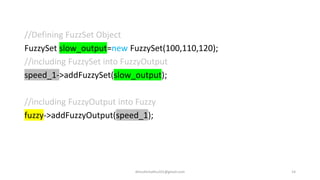
//Defining FuzzSet Object
FuzzySet slow_output=new FuzzySet(100,110,120);
//including FuzzySet into FuzzyOutput
speed_1->addFuzzySet(slow_output);
//including FuzzyOutput into Fuzzy
fuzzy->addFuzzyOutput(speed_1);
dimuthchathu101@gmail.com 14
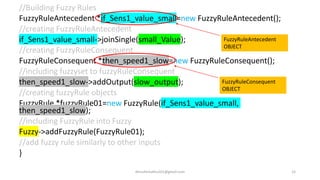
//Building Fuzzy Rules
FuzzyRuleAntecedent *if_Sens1_value_small=new FuzzyRuleAntecedent();
//creating FuzzyRuleAntecedent
if_Sens1_value_small->joinSingle(small_Value);
//creating FuzzyRuleConsequent
FuzzyRuleConsequent *then_speed1_slow=new FuzzyRuleConsequent();
//including fuzzyset to fuzzyRuleConsequent
then_speed1_slow->addOutput(slow_output);
//creating fuzzyRule objects
FuzzyRule *fuzzyRule01=new FuzzyRule(if_Sens1_value_small,
then_speed1_slow);
//including FuzzyRule into Fuzzy
Fuzzy->addFuzzyRule(FuzzyRule01);
//add fuzzy rule similarly to other inputs
}
dimuthchathu101@gmail.com 15
FuzzyRuleAntecedent
OBJECT
FuzzyRuleConsequent
OBJECT
void loop()
{
//getting input from port A1
int input1=analogRead(A1);
//setting input
fuzzy->SetInput(1,input1);
//running fuzzification
fuzzy->fuzzify();
//running the defuzzification
float output1=fuzzy->defuzzify(1);
Serial.println(input1);
Serial.println(output1);
}
dimuthchathu101@gmail.com 16
Let’s Move into a
Practical Example
17
dimuthchathu101@gmail.com
Here we need
• Arduino Uno board
• L298n motor driver
• 2dc gear motors
• TCRT5000 IR sensors
• Jumper wires
Circuit
Diagram
18
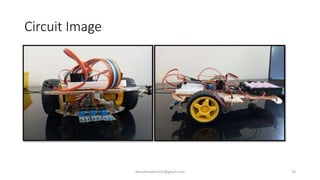
Circuit Image
dimuthchathu101@gmail.com 19
Define
Inputs And
Outputs
20
dimuthchathu101@gmail.com
/*Before void setup() you should define inputs
and outputs and you can apply fuzzy logic using
above instructions*/
int S_A=11; // speed of motor A
int M_A3=2;// motor a=+
int M_A2=3; // motor a=-
int M_B1=4; // motor b= -
int M_B2=5; // motor b=+
int S_B=10; // speed of motor B;
if(digital01==0&&digital02==0)
{
if(output1>120 && output2>120 && output3>120)
{
Stop();
}
if(output1>120 && output2>120 && output3<120)
{
turnRight();
}
if(output1>120 && output2<120 && output3>120)
{
Stop();
}
if(output1>120 && output2<120 && output3<120)
{
turnRight();
}
if(output1<120 && output2>120&& output3>120)
{
turnLeft();
}
dimuthchathu101@gmail.com 21
if(output1<120 && output2>120 && output3<120)
{
forword();
}
if(output1<120 && output2<120 && output3>120)
{
turnLeft();
}
if(output1<120 && output2<120 && output3<120)
{
forword();
}
if(digital01==0 &&digital02==1)
{
turnLeft();
}
dimuthchathu101@gmail.com 22
Code For
Motors
23
dimuthchathu101@gmail.com
void forword(){
analogWrite(S_A,70);
analogWrite(S_B,70);
digitalWrite(M_A3,HIGH);
digitalWrite(M_B2,HIGH);
Serial.println("Forward");
}
void turnRight(){
analogWrite(S_A,70);
analogWrite(S_B,70);
digitalWrite(M_A3,LOW);
digitalWrite(M_B2,HIGH);
Serial.println("TurnRight");
}
•
void turnLeft(){
analogWrite(S_A,70);
analogWrite(S_B,70);
digitalWrite(M_A3,HIGH);
digitalWrite(M_B2,LOW);
Serial.println("TurnLeft");
}
void Stop(){
digitalWrite(M_A3,LOW);
digitalWrite(M_B2,LOW);
Serial.println("Stop");
}
dimuthchathu101@gmail.com 24

Fuzzy logic with Arduino

  • 1.
    WHAT IS FUZZY? •having a frizzy texture or appearance. • difficult to perceive; indistinct or vague • Or easily you can say “the term fuzzy refers to things which are not clear or are vague.” dimuthchathu101@gmail.com 1
  • 2.
    Let’s Move Into Fuzzy Logic Inthe real world many times we encounter a situation when we can’t determine whether the state is true or false, their fuzzy logic provides a very valuable flexibility for reasoning. In this way, we can consider the inaccuracies and uncertainties of any situation. “ Fuzzy Logic is an extension of traditional Boolean logic, using linguistic variables allows to express logical values intermediate between FALSE and TRUE, describing with greater efficiency the uncertainty principle in the real world.” dimuthchathu101@gmail.com 2
  • 3.
    Characteristics of fuzzy logic Flexibleand easy to implement machine learning technique Helps you to mimic the logic of human thought Logic may have two values which represent two possible solutions Highly suitable method for uncertain or approximate reasoning Fuzzy logic views inference as a process of propagating elastic constraints Fuzzy logic allows you to build nonlinear functions of arbitrary complexity. Fuzzy logic should be built with the complete guidance of experts dimuthchathu101@gmail.com 3
  • 4.
    Architecture Of FuzzyLogic dimuthchathu101@gmail.com 4
  • 5.
    Applications Of Fuzzy Logic Fuzzylogic can be applied in number of fields including Aerospace, Automotive Business , Defense , Electronics , Finance, Innovative , etc. Product Company Fuzzy Logic Kiln control Nippon Steel Mixes cement Microwave oven Mitsubishi Chemical Sets lunes power and cooking strategy Palmtop computer Hitachi, Sharp, Sanyo, Toshiba Recognizes handwritten Kanji characters Plasma etching Mitsubishi Electric Sets etch time and strategy dimuthchathu101@gmail.com 5
  • 6.
    Implementation Of Fuzzy Logic •Here we use number of steps to implement Fuzzy logic in Arduino • Step 01-you have to download Arduino IDE and install it. Use the following link https://www.arduino.cc/en/m ain/software dimuthchathu101@gmail.com 6
  • 7.
    • Step 02-ThenYou Have to download eFLL library Use the following link https://github.com/zerokol/eFLL dimuthchathu101@gmail.com 7
  • 8.
    • Step 03-ImporteFLL library Using Arduino dimuthchathu101@gmail.com 8
  • 9.
    • Step 04-ImportingLibrary dimuthchathu101@gmail.com 9
  • 10.
    Code Implementation #include<fuzzy.h> // Preparing aFuzzy object Fuzzy *fuzzy =new Fuzzy(); // here a object named fuzzy is created // next you have to implement both void setup() and void loop() methods. Fuzzy OBJECT dimuthchathu101@gmail.com 10
  • 11.
    void setup() { //baud rateof uno board is 9600. therefore it is serial output Serial.begin(9600); // Defining a FuzzyInput Object FuzzyInput *sens1_Value=new FuzzyInput(1); //Defining a FuzzySet Object FuzzySet *small_Value=new FuzzySet(20,40,40,80); //including FuzzySet into FuzzyInput sens1_Value->addFuzzySet(small_value); dimuthchathu101@gmail.com Fuzzy Input OBJECT FuzzySet OBJECT 11
  • 12.
    //Defining a FuzzySetObject FuzzySet *mid_Value=new FuzzySet(80,100,100,140); //including FuzzySet into FuzzyInput sens1_Value->addFuzzySet(mid_value); //Defining a FuzzySet Object FuzzySet *large_Value=new FuzzySet(140,180,180,400); //including FuzzySet into FuzzyInput sens1_Value->addFuzzySet(large_value); //including FuzzyInput into Fuzzy fuzzy->addFuzzyInput(sens1_value); dimuthchathu101@gmail.com Input Range 12
  • 13.
    //Defining Fuzzy OutputObjects FuzzyOutput *speed_1=new FuzzyOutput(1); //Defining FuzzSet Object FuzzySet slow_output=new FuzzySet(100,110,110,120); //including FuzzySet into FuzzyOutput speed_1->addFuzzySet(slow_output); //Defining FuzzSet Object FuzzySet medium_output=new FuzzySet(120,150,150,160); //including FuzzySet into FuzzyOutput speed_1->addFuzzySet(medium_output); dimuthchathu101@gmail.com Fuzzy Output OBJECT FuzzySet OBJECT 13 output Range
  • 14.
    //Defining FuzzSet Object FuzzySetslow_output=new FuzzySet(100,110,120); //including FuzzySet into FuzzyOutput speed_1->addFuzzySet(slow_output); //including FuzzyOutput into Fuzzy fuzzy->addFuzzyOutput(speed_1); dimuthchathu101@gmail.com 14
  • 15.
    //Building Fuzzy Rules FuzzyRuleAntecedent*if_Sens1_value_small=new FuzzyRuleAntecedent(); //creating FuzzyRuleAntecedent if_Sens1_value_small->joinSingle(small_Value); //creating FuzzyRuleConsequent FuzzyRuleConsequent *then_speed1_slow=new FuzzyRuleConsequent(); //including fuzzyset to fuzzyRuleConsequent then_speed1_slow->addOutput(slow_output); //creating fuzzyRule objects FuzzyRule *fuzzyRule01=new FuzzyRule(if_Sens1_value_small, then_speed1_slow); //including FuzzyRule into Fuzzy Fuzzy->addFuzzyRule(FuzzyRule01); //add fuzzy rule similarly to other inputs } dimuthchathu101@gmail.com 15 FuzzyRuleAntecedent OBJECT FuzzyRuleConsequent OBJECT
  • 16.
    void loop() { //getting inputfrom port A1 int input1=analogRead(A1); //setting input fuzzy->SetInput(1,input1); //running fuzzification fuzzy->fuzzify(); //running the defuzzification float output1=fuzzy->defuzzify(1); Serial.println(input1); Serial.println(output1); } dimuthchathu101@gmail.com 16
  • 17.
    Let’s Move intoa Practical Example 17 dimuthchathu101@gmail.com Here we need • Arduino Uno board • L298n motor driver • 2dc gear motors • TCRT5000 IR sensors • Jumper wires
  • 18.
  • 19.
  • 20.
    Define Inputs And Outputs 20 dimuthchathu101@gmail.com /*Before voidsetup() you should define inputs and outputs and you can apply fuzzy logic using above instructions*/ int S_A=11; // speed of motor A int M_A3=2;// motor a=+ int M_A2=3; // motor a=- int M_B1=4; // motor b= - int M_B2=5; // motor b=+ int S_B=10; // speed of motor B;
  • 21.
    if(digital01==0&&digital02==0) { if(output1>120 && output2>120&& output3>120) { Stop(); } if(output1>120 && output2>120 && output3<120) { turnRight(); } if(output1>120 && output2<120 && output3>120) { Stop(); } if(output1>120 && output2<120 && output3<120) { turnRight(); } if(output1<120 && output2>120&& output3>120) { turnLeft(); } dimuthchathu101@gmail.com 21
  • 22.
    if(output1<120 && output2>120&& output3<120) { forword(); } if(output1<120 && output2<120 && output3>120) { turnLeft(); } if(output1<120 && output2<120 && output3<120) { forword(); } if(digital01==0 &&digital02==1) { turnLeft(); } dimuthchathu101@gmail.com 22
  • 23.
    Code For Motors 23 dimuthchathu101@gmail.com void forword(){ analogWrite(S_A,70); analogWrite(S_B,70); digitalWrite(M_A3,HIGH); digitalWrite(M_B2,HIGH); Serial.println("Forward"); } voidturnRight(){ analogWrite(S_A,70); analogWrite(S_B,70); digitalWrite(M_A3,LOW); digitalWrite(M_B2,HIGH); Serial.println("TurnRight"); } •
  • 24.