Electroteam__@hotmail.com
Interesting Education
Electro-Team
Visual Basic 2010
Functions II
This Slides Will Cover
1. The Right Function.
2. The Left Function.
3. The Trim Function.
4. The Ltrim & Rtrim Function.
5. The InStr function.
6. The Ucase and the Lcase Functions.
7. The Abs Function.
8. The Exp function..
9. The Fix Function.
10. The Int Function.
11. The Rnd( ) Function.
12. The Round Function.
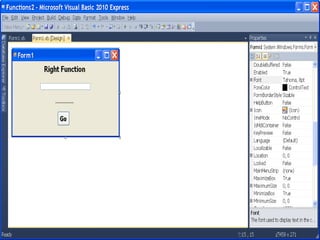
Open new project and add 2 Labels, 1 Textbox and 1 Button
1. The Right Function
The format is:-
Microsoft.Visualbasic.Right ("Phrase", n)
Example
Microsoft.Visualbasic.Right (“Hello World", 5)=World
Label1
Text = Right Function
Font = 18 , Bold
Format  Center in FormHorizontally
Label2
Text = …………
Font = 16 , Bold
Button1
Text = Go
Font = 14 , Bold
Form1
Text = Right Function Ex.
Start Position = Center Screen
Button1 Code
Private Sub Button1_Click
Label2.Text = Microsoft.VisualBasic.Right(TextBox1.Text, 5)
End Sub
2. The Left Function
The format is:-
Microsoft.Visualbasic.Left ("Phrase", n)
Modify Previous Program code ..
Private Sub Button1_Click
Label2.Text = Microsoft.VisualBasic.Left(TextBox1.Text, 5)
End Sub
Run Time
3. The Trim Function
The format is:-
Trim("Phrase")
Example:
Trim (" Visual Basic ") = Visual basic
Modify Previous Program code ..
Private Sub Button1_Click
Label2.Text = Trim(TextBox1.Text)
End Sub
Run Time
4. The Ltrim & Rtrim Function
The Ltrim Function
The format is:
Ltrim("Phrase")
Example:-
Ltrim (" Visual Basic")= Visual basic
The Rtrim Function
The format is:
Rtrim("Phrase")
Example
Rtrim ("Visual Basic ") = Visual Basic
5. The InStr function
The format is:
Instr (n, original phase, embedded phrase)
Where n is the position where the Instr function will
begin to look for the embedded phrase.
Private Sub Button1_Click
Label2.Text = InStr(1, TextBox1.Text, "Egypt")
End Sub
Run Time
Modify Button1 code
Label2.Text = InStr(1, TextBox1.Text, "t")
Modify Button1 code
Label2.Text = InStr(5, TextBox1.Text, "t")
And note the difference
6. The Ucase and the Lcase Functions
The Ucase function converts all the characters of a string
to capital letters.
The Lcase function converts all the characters of a string
to small letters.
The format is:-
Microsoft.VisualBasic.UCase(Phrase)
Microsoft.VisualBasic.LCase(Phrase)
7. The Abs Function
Return the absolute value of a given number.
The syntax is
Math. Abs (number)
The Math keyword here indicates that the Abs
function belong to the Math class.
Run Time
Private Sub Button1_Click
Label2.Text = Math.Abs(Val(TextBox1.Text))
End Sub
8. The Exp function
The Exp of a number x is the exponential value
of x………., i.e. e^x
Exp(1)=e=2.71828182
The syntax is:
Math.Exp (number)
9. The Fix Function
The Fix function truncate the decimal part of a
positive number and returns the largest integer
smaller than the number.
The syntax is:
Fix(number)
Private Sub Button1_Click
Label2.Text = Fix(Val(TextBox1.Text))
End Sub
10. The Int Function
Example:-
Int(2.4)=2, Int(6.9)=6 , Int(-5.7)=-6
(XI) The Log Function
Example:-
Log(10)=2.302585
11. The Rnd( ) Function
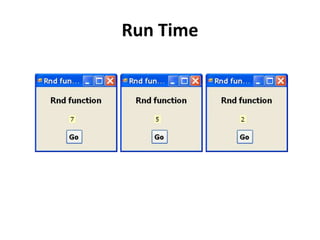
The Rnd function returns a random value
between 0 and 1.
The traditional usage of this function is to covert
its result to integer value …using the formula.
Int(Rnd() * 10)
Modify Previous Program code ..
Private Sub Button1_Click()
Label2.Text = Int(Rnd() * 10)
End Sub
Run Time
12. The Round Function
The Round function is the function that rounds
up a number to a certain number of decimal
places. The Format is Round (n, m) which means
to round a number n to m decimal places. For
Example:-
Math.Round (7.2567, 2) =7.26
Run Time
Produced by
Electro-Team
Electroteam__@hotmail.com

Function 2

  • 1.
  • 2.
    This Slides WillCover 1. The Right Function. 2. The Left Function. 3. The Trim Function. 4. The Ltrim & Rtrim Function. 5. The InStr function. 6. The Ucase and the Lcase Functions. 7. The Abs Function. 8. The Exp function.. 9. The Fix Function. 10. The Int Function. 11. The Rnd( ) Function. 12. The Round Function.
  • 3.
    Open new projectand add 2 Labels, 1 Textbox and 1 Button
  • 4.
    1. The RightFunction The format is:- Microsoft.Visualbasic.Right ("Phrase", n) Example Microsoft.Visualbasic.Right (“Hello World", 5)=World
  • 5.
    Label1 Text = RightFunction Font = 18 , Bold Format Center in FormHorizontally Label2 Text = ………… Font = 16 , Bold Button1 Text = Go Font = 14 , Bold Form1 Text = Right Function Ex. Start Position = Center Screen
  • 7.
    Button1 Code Private SubButton1_Click Label2.Text = Microsoft.VisualBasic.Right(TextBox1.Text, 5) End Sub
  • 8.
    2. The LeftFunction The format is:- Microsoft.Visualbasic.Left ("Phrase", n) Modify Previous Program code .. Private Sub Button1_Click Label2.Text = Microsoft.VisualBasic.Left(TextBox1.Text, 5) End Sub
  • 9.
  • 10.
    3. The TrimFunction The format is:- Trim("Phrase") Example: Trim (" Visual Basic ") = Visual basic Modify Previous Program code .. Private Sub Button1_Click Label2.Text = Trim(TextBox1.Text) End Sub
  • 11.
  • 12.
    4. The Ltrim& Rtrim Function The Ltrim Function The format is: Ltrim("Phrase") Example:- Ltrim (" Visual Basic")= Visual basic The Rtrim Function The format is: Rtrim("Phrase") Example Rtrim ("Visual Basic ") = Visual Basic
  • 13.
    5. The InStrfunction The format is: Instr (n, original phase, embedded phrase) Where n is the position where the Instr function will begin to look for the embedded phrase. Private Sub Button1_Click Label2.Text = InStr(1, TextBox1.Text, "Egypt") End Sub
  • 14.
  • 15.
    Modify Button1 code Label2.Text= InStr(1, TextBox1.Text, "t") Modify Button1 code Label2.Text = InStr(5, TextBox1.Text, "t") And note the difference
  • 16.
    6. The Ucaseand the Lcase Functions The Ucase function converts all the characters of a string to capital letters. The Lcase function converts all the characters of a string to small letters. The format is:- Microsoft.VisualBasic.UCase(Phrase) Microsoft.VisualBasic.LCase(Phrase)
  • 17.
    7. The AbsFunction Return the absolute value of a given number. The syntax is Math. Abs (number) The Math keyword here indicates that the Abs function belong to the Math class.
  • 18.
    Run Time Private SubButton1_Click Label2.Text = Math.Abs(Val(TextBox1.Text)) End Sub
  • 19.
    8. The Expfunction The Exp of a number x is the exponential value of x………., i.e. e^x Exp(1)=e=2.71828182 The syntax is: Math.Exp (number)
  • 20.
    9. The FixFunction The Fix function truncate the decimal part of a positive number and returns the largest integer smaller than the number. The syntax is: Fix(number)
  • 21.
    Private Sub Button1_Click Label2.Text= Fix(Val(TextBox1.Text)) End Sub
  • 22.
    10. The IntFunction Example:- Int(2.4)=2, Int(6.9)=6 , Int(-5.7)=-6 (XI) The Log Function Example:- Log(10)=2.302585
  • 23.
    11. The Rnd() Function The Rnd function returns a random value between 0 and 1. The traditional usage of this function is to covert its result to integer value …using the formula. Int(Rnd() * 10) Modify Previous Program code .. Private Sub Button1_Click() Label2.Text = Int(Rnd() * 10) End Sub
  • 24.
  • 25.
    12. The RoundFunction The Round function is the function that rounds up a number to a certain number of decimal places. The Format is Round (n, m) which means to round a number n to m decimal places. For Example:- Math.Round (7.2567, 2) =7.26
  • 26.
  • 27.