Extending Spring MVC with
                            Spring Mobile and JavaScript
                              Roy Clarkson, Spring Mobile/Android Project Lead
                                   Craig Walls, Spring Social Project Lead
                                  Twitter/Github: @royclarkson, @habuma


© 2012 SpringOne 2GX. All rights reserved. Do not distribute without permission.
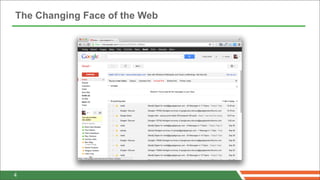
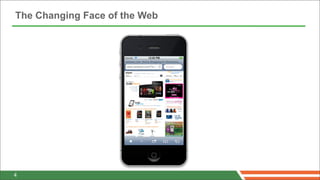
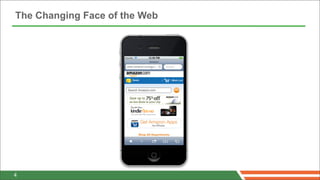
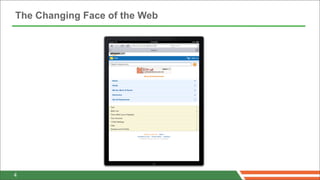
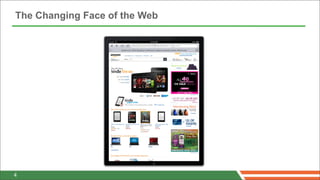
The Changing Face of the Web


4
The Changing Face of the Web


4
The Changing Face of the Web


4
The Changing Face of the Web


4
The Changing Face of the Web


4
The Changing Face of the Web


4
The Changing Face of the Web


4
The Changing Face of the Web


4
Targeting the Diverse Internet Client

        Your applications, anytime, anywhere, on any device

             Each platform has different physical capabilities

                  Same application/different experience

Experience customized to suit the capabilities/limits of the target platform


4
The Solution: Separate Web Sites per Platform


     Create a unique (aesthetically and functionally) site for...
                          Desktop browsers
      Handhelds (iPhone, various Android phones, iPod Touch)
               Tablets (iPad, various Android tablets)

                 Now you have a new problem
           Code duplication across platform-specific sites


4
Addendum to Previous Solution

                         Spring Mobile
                    Extension to Spring MVC
            Directs requests to platform-specific sites

                     Lumbar (and Thorax)
            From Walmart Labs (yes, that Walmart)
             Build tool for JavaScript client projects
           Identify collateral common to all platforms
           And collateral specific to certain platforms
                     Builds site-per-platform
           Thorax: Opinionated Backbone framework
4
Targeting the Right Platform
                                   with Spring Mobile


© 2012 SpringOne 2GX. All rights reserved. Do not distribute without permission.
Spring Mobile
• Provides support for developing mobile web applications
• Extension to Spring MVC, for server-side support
• Compliments client-side mobile frameworks


 7
Features
• Device Detection
• Site Preference Management
• Site Switcher


 8
Device Detection
• Differentiate requests from various devices
• Introspects HTTP requests to determine the device that
  originated the request
• Provides a DeviceResolver abstraction and interceptor
• LiteDeviceResolver implementation


 9
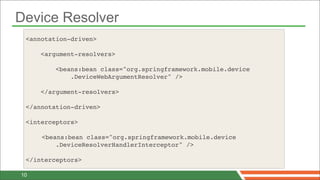
Device Resolver
 <annotation-driven>

     <argument-resolvers>

         <beans:bean class="org.springframework.mobile.device
             .DeviceWebArgumentResolver" />

     </argument-resolvers>

 </annotation-driven>

 <interceptors>

 !   <beans:bean class="org.springframework.mobile.device
         .DeviceResolverHandlerInterceptor" />
 !
 </interceptors>

10
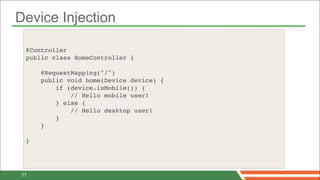
Device Injection

 @Controller
 public class HomeController {

     @RequestMapping("/")
     public void home(Device device) {
         if (device.isMobile()) {
             // Hello mobile user!
         } else {
             // Hello desktop user!
         }
     }

 }


11
Device Detection Demo


12
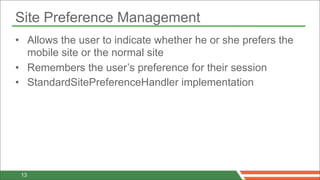
Site Preference Management
• Allows the user to indicate whether he or she prefers the
  mobile site or the normal site
• Remembers the user’s preference for their session
• StandardSitePreferenceHandler implementation


 13
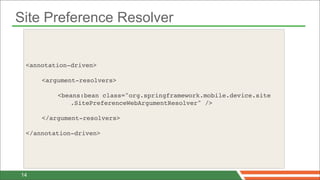
Site Preference Resolver


 <annotation-driven>

 !   <argument-resolvers>

 !   !   <beans:bean class="org.springframework.mobile.device.site
            .SitePreferenceWebArgumentResolver" />

 !   </argument-resolvers>

 </annotation-driven>


14
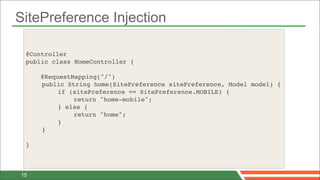
SitePreference Injection

 @Controller
 public class HomeController {

     @RequestMapping("/")
 !   public String home(SitePreference sitePreference, Model model) {
 !   !    if (sitePreference == SitePreference.MOBILE) {
 !   !    !   return "home-mobile";
 !   !    } else {
 !   !    !   return "home";
 !   !    }
 !   }

 }


15
Site Preference Demo


16
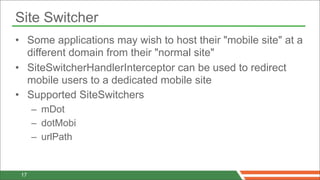
Site Switcher
• Some applications may wish to host their "mobile site" at a
  different domain from their "normal site"
• SiteSwitcherHandlerInterceptor can be used to redirect
  mobile users to a dedicated mobile site
• Supported SiteSwitchers
      – mDot
      – dotMobi
      – urlPath


 17
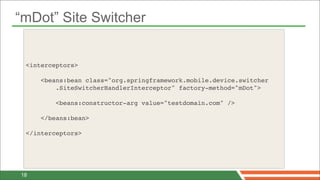
“mDot” Site Switcher


 <interceptors>
 !
     <beans:bean class="org.springframework.mobile.device.switcher
         .SiteSwitcherHandlerInterceptor" factory-method="mDot">

         <beans:constructor-arg value="testdomain.com" />

     </beans:bean>
 !   !
 </interceptors>


18
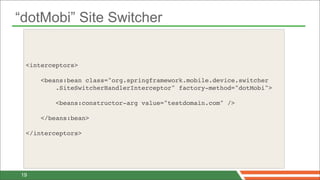
“dotMobi” Site Switcher


 <interceptors>
 !
     <beans:bean class="org.springframework.mobile.device.switcher
         .SiteSwitcherHandlerInterceptor" factory-method="dotMobi">

         <beans:constructor-arg value="testdomain.com" />

     </beans:bean>
 !   !
 </interceptors>


19
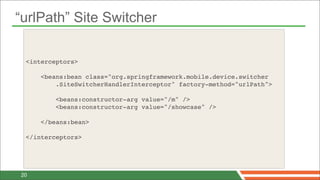
“urlPath” Site Switcher

 <interceptors>
 !
     <beans:bean class="org.springframework.mobile.device.switcher
         .SiteSwitcherHandlerInterceptor" factory-method="urlPath">

         <beans:constructor-arg value="/m" />
         <beans:constructor-arg value="/showcase" />

     </beans:bean>
 !   !
 </interceptors>


20
Site Switcher Demo


21
Building Platform-Targeted Sites
                          with Lumbar (and Thorax)


© 2012 SpringOne 2GX. All rights reserved. Do not distribute without permission.
Introducing Thorax

                Opinionated Backbone Framework
                  Project structure and scaffolding
                    On-demand module loading
                   Model/collection view binding
                 Inheritable view and DOM events
                        Data loading helpers
                   Form serialization/population
                           Form validation

Based on Backbone, Underscore, Zepto, Handlebars, Stylus, and Lumbar

4
Introducing Lumbar


                    JavaScript Build Tool
                Works from a general codebase
                    With a list of platforms
         Generates modular, platform-specific applications
                 Works best with Backbone/Thorax
                      Pluggable architecture


4
Getting and Installing Thorax and Lumbar

                        Prerequisites
                        Node and npm

                         Quick Start*
              % npm install -g lumbar thorax@1.2.1
              % thorax create MyProject
              % cd MyProject
              % lumbar build lumbar.json public
              % npm start

                                                     * Adapted from Thorax website
4
Elements of a Lumbar Build File (lumbar.json)


               Application: Defines the root module

       Platforms: Target platforms (e.g., iPhone, Android, etc)

    Packages: Macro-level definition of what goes into a platform

                Modules: Logical groupings of code

        Templates: Client-side templates (e.g. Handlebars)

          Styles: Stylesheets to be compiled (e.g. Stylus)


4
A Peek Inside lumbar.json


    {
        "application": {
           "name": "Application",
           "module": "base"
        },
        "platforms": [ "android", "iphone", "ipad", "web" ],
        "packages": { ... }
        "modules": { ... },
        "templates": { ... },
        "styles": { ... }
    }


4
A Peek Inside lumbar.json

    {
        "application": {...},
        "platforms": [ ... ],
        "packages": {
           "web": {
              "platforms": [ "web" ],
              "combine": false
           },
           "native-hello-world": {
              "platforms": [ "android", "iphone", "ipad" ],
              "modules": [ "base", "hello_world" ],
              "combine": true
           }
        },
        "modules": { ... },
        "templates": { ... },
        "styles": { ... }
    }


4
A Peek Inside lumbar.json
    { "application": {...}, "platforms": [ ... ], "packages": { ... },
      "modules": {
         "base": {
           "scripts": [
              {"src": "js/lib/zepto.js", "global": true},
              {"src": "js/lib/underscore.js", "global": true},
              ...
           ],
           "styles": [
              "styles/base.styl",
              {"src": "styles/iphone.styl", "platform": "iphone"},
              ...
           ],
           "static": [
              {"src": "static/#{platform}/index.html", "dest": "index.html"}
           ]
          }, "hello_world" : { ... }
      },
      "templates": { ... },   "styles": { ... }   }


4
A Peek Inside lumbar.json


    {
        "application": { ... },
        "platforms": [ ... ],
        "packages": { ... }
        "modules": { ... },
        "templates": {
           "js/views/hello_world/index.js": [
             "templates/hello_world/index.handlebars"
           ]
        },
        "styles": { ... }
    }


4
A Peek Inside lumbar.json

    {
        "application": { ... },
        "platforms": [ "android", "iphone", "ipad", "web" ],
        "packages": { ... }
        "modules": { ... },
        "templates": { ... },
        "styles": {
          "pixelDensity": {
             "android": [ 1, 1.5 ],
             "iphone": [ 1, 2 ],
             "ipad" : [ 1, 2 ],
             "web": [ 1, 2 ]
          },
          "includes": [
             "nib",
             "styles/include/global.styl"
          ]
        }
    }

4
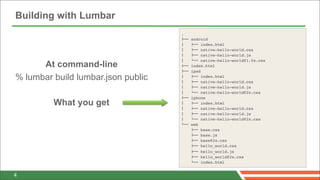
Building with Lumbar
                                    .
                                    !""   android
                                    #     !"" index.html
                                    #     !"" native-hello-world.css
                                    #     !"" native-hello-world.js
                                    #     $"" native-hello-world@1.5x.css
      At command-line               !""   index.html
                                    !""   ipad
% lumbar build lumbar.json public   #  
                                    #  
                                          !"" index.html
                                          !"" native-hello-world.css
                                    #     !"" native-hello-world.js
                                    #     $"" native-hello-world@2x.css
                                    !""   iphone
         What you get               #     !"" index.html
                                    #     !"" native-hello-world.css
                                    #     !"" native-hello-world.js
                                    #     $"" native-hello-world@2x.css
                                    $""   web
                                          !"" base.css
                                          !"" base.js
                                          !"" base@2x.css
                                          !"" hello_world.css
                                          !"" hello_world.js
                                          !"" hello_world@2x.css
                                          $"" index.html


4
Demo: Thorax Client
Conclusion


© 2012 SpringOne 2GX. All rights reserved. Do not distribute without permission.
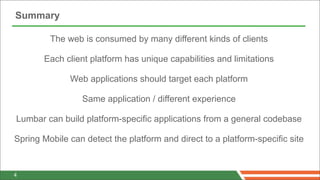
Summary

         The web is consumed by many different kinds of clients

       Each client platform has unique capabilities and limitations

              Web applications should target each platform

                 Same application / different experience

Lumbar can build platform-specific applications from a general codebase

Spring Mobile can detect the platform and direct to a platform-specific site


4
Q&A


© 2012 SpringOne 2GX. All rights reserved. Do not distribute without permission.

Extending Spring MVC with Spring Mobile and JavaScript

  • 1.
    Extending Spring MVCwith Spring Mobile and JavaScript Roy Clarkson, Spring Mobile/Android Project Lead Craig Walls, Spring Social Project Lead Twitter/Github: @royclarkson, @habuma © 2012 SpringOne 2GX. All rights reserved. Do not distribute without permission.
  • 2.
    The Changing Faceof the Web 4
  • 3.
    The Changing Faceof the Web 4
  • 4.
    The Changing Faceof the Web 4
  • 5.
    The Changing Faceof the Web 4
  • 6.
    The Changing Faceof the Web 4
  • 7.
    The Changing Faceof the Web 4
  • 8.
    The Changing Faceof the Web 4
  • 9.
    The Changing Faceof the Web 4
  • 10.
    Targeting the DiverseInternet Client Your applications, anytime, anywhere, on any device Each platform has different physical capabilities Same application/different experience Experience customized to suit the capabilities/limits of the target platform 4
  • 11.
    The Solution: SeparateWeb Sites per Platform Create a unique (aesthetically and functionally) site for... Desktop browsers Handhelds (iPhone, various Android phones, iPod Touch) Tablets (iPad, various Android tablets) Now you have a new problem Code duplication across platform-specific sites 4
  • 12.
    Addendum to PreviousSolution Spring Mobile Extension to Spring MVC Directs requests to platform-specific sites Lumbar (and Thorax) From Walmart Labs (yes, that Walmart) Build tool for JavaScript client projects Identify collateral common to all platforms And collateral specific to certain platforms Builds site-per-platform Thorax: Opinionated Backbone framework 4
  • 13.
    Targeting the RightPlatform with Spring Mobile © 2012 SpringOne 2GX. All rights reserved. Do not distribute without permission.
  • 14.
    Spring Mobile • Providessupport for developing mobile web applications • Extension to Spring MVC, for server-side support • Compliments client-side mobile frameworks 7
  • 15.
    Features • Device Detection •Site Preference Management • Site Switcher 8
  • 16.
    Device Detection • Differentiaterequests from various devices • Introspects HTTP requests to determine the device that originated the request • Provides a DeviceResolver abstraction and interceptor • LiteDeviceResolver implementation 9
  • 17.
    Device Resolver <annotation-driven> <argument-resolvers> <beans:bean class="org.springframework.mobile.device .DeviceWebArgumentResolver" /> </argument-resolvers> </annotation-driven> <interceptors> ! <beans:bean class="org.springframework.mobile.device .DeviceResolverHandlerInterceptor" /> ! </interceptors> 10
  • 18.
    Device Injection @Controller public class HomeController { @RequestMapping("/") public void home(Device device) { if (device.isMobile()) { // Hello mobile user! } else { // Hello desktop user! } } } 11
  • 19.
  • 20.
    Site Preference Management •Allows the user to indicate whether he or she prefers the mobile site or the normal site • Remembers the user’s preference for their session • StandardSitePreferenceHandler implementation 13
  • 21.
    Site Preference Resolver <annotation-driven> ! <argument-resolvers> ! ! <beans:bean class="org.springframework.mobile.device.site .SitePreferenceWebArgumentResolver" /> ! </argument-resolvers> </annotation-driven> 14
  • 22.
    SitePreference Injection @Controller public class HomeController { @RequestMapping("/") ! public String home(SitePreference sitePreference, Model model) { ! ! if (sitePreference == SitePreference.MOBILE) { ! ! ! return "home-mobile"; ! ! } else { ! ! ! return "home"; ! ! } ! } } 15
  • 23.
  • 24.
    Site Switcher • Someapplications may wish to host their "mobile site" at a different domain from their "normal site" • SiteSwitcherHandlerInterceptor can be used to redirect mobile users to a dedicated mobile site • Supported SiteSwitchers – mDot – dotMobi – urlPath 17
  • 25.
    “mDot” Site Switcher <interceptors> ! <beans:bean class="org.springframework.mobile.device.switcher .SiteSwitcherHandlerInterceptor" factory-method="mDot"> <beans:constructor-arg value="testdomain.com" /> </beans:bean> ! ! </interceptors> 18
  • 26.
    “dotMobi” Site Switcher <interceptors> ! <beans:bean class="org.springframework.mobile.device.switcher .SiteSwitcherHandlerInterceptor" factory-method="dotMobi"> <beans:constructor-arg value="testdomain.com" /> </beans:bean> ! ! </interceptors> 19
  • 27.
    “urlPath” Site Switcher <interceptors> ! <beans:bean class="org.springframework.mobile.device.switcher .SiteSwitcherHandlerInterceptor" factory-method="urlPath"> <beans:constructor-arg value="/m" /> <beans:constructor-arg value="/showcase" /> </beans:bean> ! ! </interceptors> 20
  • 28.
  • 29.
    Building Platform-Targeted Sites with Lumbar (and Thorax) © 2012 SpringOne 2GX. All rights reserved. Do not distribute without permission.
  • 30.
    Introducing Thorax Opinionated Backbone Framework Project structure and scaffolding On-demand module loading Model/collection view binding Inheritable view and DOM events Data loading helpers Form serialization/population Form validation Based on Backbone, Underscore, Zepto, Handlebars, Stylus, and Lumbar 4
  • 31.
    Introducing Lumbar JavaScript Build Tool Works from a general codebase With a list of platforms Generates modular, platform-specific applications Works best with Backbone/Thorax Pluggable architecture 4
  • 32.
    Getting and InstallingThorax and Lumbar Prerequisites Node and npm Quick Start* % npm install -g lumbar thorax@1.2.1 % thorax create MyProject % cd MyProject % lumbar build lumbar.json public % npm start * Adapted from Thorax website 4
  • 33.
    Elements of aLumbar Build File (lumbar.json) Application: Defines the root module Platforms: Target platforms (e.g., iPhone, Android, etc) Packages: Macro-level definition of what goes into a platform Modules: Logical groupings of code Templates: Client-side templates (e.g. Handlebars) Styles: Stylesheets to be compiled (e.g. Stylus) 4
  • 34.
    A Peek Insidelumbar.json { "application": { "name": "Application", "module": "base" }, "platforms": [ "android", "iphone", "ipad", "web" ], "packages": { ... } "modules": { ... }, "templates": { ... }, "styles": { ... } } 4
  • 35.
    A Peek Insidelumbar.json { "application": {...}, "platforms": [ ... ], "packages": { "web": { "platforms": [ "web" ], "combine": false }, "native-hello-world": { "platforms": [ "android", "iphone", "ipad" ], "modules": [ "base", "hello_world" ], "combine": true } }, "modules": { ... }, "templates": { ... }, "styles": { ... } } 4
  • 36.
    A Peek Insidelumbar.json { "application": {...}, "platforms": [ ... ], "packages": { ... }, "modules": { "base": { "scripts": [ {"src": "js/lib/zepto.js", "global": true}, {"src": "js/lib/underscore.js", "global": true}, ... ], "styles": [ "styles/base.styl", {"src": "styles/iphone.styl", "platform": "iphone"}, ... ], "static": [ {"src": "static/#{platform}/index.html", "dest": "index.html"} ] }, "hello_world" : { ... } }, "templates": { ... }, "styles": { ... } } 4
  • 37.
    A Peek Insidelumbar.json { "application": { ... }, "platforms": [ ... ], "packages": { ... } "modules": { ... }, "templates": { "js/views/hello_world/index.js": [ "templates/hello_world/index.handlebars" ] }, "styles": { ... } } 4
  • 38.
    A Peek Insidelumbar.json { "application": { ... }, "platforms": [ "android", "iphone", "ipad", "web" ], "packages": { ... } "modules": { ... }, "templates": { ... }, "styles": { "pixelDensity": { "android": [ 1, 1.5 ], "iphone": [ 1, 2 ], "ipad" : [ 1, 2 ], "web": [ 1, 2 ] }, "includes": [ "nib", "styles/include/global.styl" ] } } 4
  • 39.
    Building with Lumbar . !"" android #   !"" index.html #   !"" native-hello-world.css #   !"" native-hello-world.js #   $"" native-hello-world@1.5x.css At command-line !"" index.html !"" ipad % lumbar build lumbar.json public #   #   !"" index.html !"" native-hello-world.css #   !"" native-hello-world.js #   $"" native-hello-world@2x.css !"" iphone What you get #   !"" index.html #   !"" native-hello-world.css #   !"" native-hello-world.js #   $"" native-hello-world@2x.css $"" web !"" base.css !"" base.js !"" base@2x.css !"" hello_world.css !"" hello_world.js !"" hello_world@2x.css $"" index.html 4
  • 40.
  • 41.
    Conclusion © 2012 SpringOne2GX. All rights reserved. Do not distribute without permission.
  • 42.
    Summary The web is consumed by many different kinds of clients Each client platform has unique capabilities and limitations Web applications should target each platform Same application / different experience Lumbar can build platform-specific applications from a general codebase Spring Mobile can detect the platform and direct to a platform-specific site 4
  • 43.
    Q&A © 2012 SpringOne2GX. All rights reserved. Do not distribute without permission.