Last Modified: 29 May 2024
© Copyright Fortinet Inc. All rights reserved.
FortiOS 6.2
FortiGate Security
Intrusion Prevention and Denial of Service
Lesson Overview
Intrusion Prevention System
Denial of Service
Web Application Firewall
Best Practices
Troubleshooting
Objectives
• Differentiate between exploits and anomalies
• Identify the different components of an IPS package
• Manage FortiGuard IPS updates
• Select an appropriate IPS signature database
• Configure an IPS sensor
• Identify the IPS sensor inspection sequence
• Apply IPS to network traffic
Intrusion Prevention System (IPS)
4
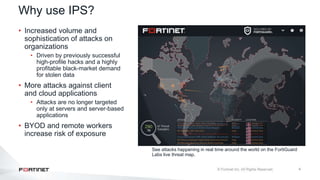
See attacks happening in real time around the world on the FortiGuard
Labs live threat map.
• Increased volume and
sophistication of attacks on
organizations
• Driven by previously successful
high-profile hacks and a highly
profitable black-market demand
for stolen data
• More attacks against client
and cloud applications
• Attacks are no longer targeted
only at servers and server-based
applications
• BYOD and remote workers
increase risk of exposure
Why use IPS?
5
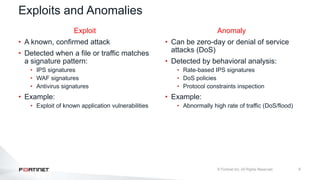
Exploits and Anomalies
Anomaly
• Can be zero-day or denial of service
attacks (DoS)
• Detected by behavioral analysis:
• Rate-based IPS signatures
• DoS policies
• Protocol constraints inspection
• Example:
• Abnormally high rate of traffic (DoS/flood)
Exploit
• A known, confirmed attack
• Detected when a file or traffic matches
a signature pattern:
• IPS signatures
• WAF signatures
• Antivirus signatures
• Example:
• Exploit of known application vulnerabilities
6
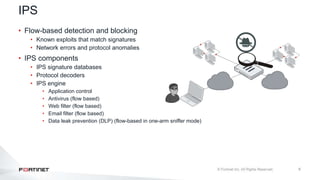
IPS
• Flow-based detection and blocking
• Known exploits that match signatures
• Network errors and protocol anomalies
• IPS components
• IPS signature databases
• Protocol decoders
• IPS engine
• Application control
• Antivirus (flow based)
• Web filter (flow based)
• Email filter (flow based)
• Data leak prevention (DLP) (flow-based in one-arm sniffer mode)
7
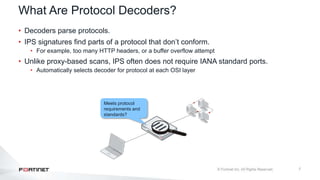
What Are Protocol Decoders?
• Decoders parse protocols.
• IPS signatures find parts of a protocol that don’t conform.
• For example, too many HTTP headers, or a buffer overflow attempt
• Unlike proxy-based scans, IPS often does not require IANA standard ports.
• Automatically selects decoder for protocol at each OSI layer
Meets protocol
requirements and
standards?
8
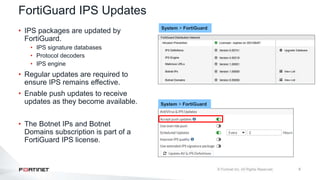
FortiGuard IPS Updates
• IPS packages are updated by
FortiGuard.
• IPS signature databases
• Protocol decoders
• IPS engine
• Regular updates are required to
ensure IPS remains effective.
• Enable push updates to receive
updates as they become available.
• The Botnet IPs and Botnet
Domains subscription is part of a
FortiGuard IPS license.
System > FortiGuard
System > FortiGuard
9
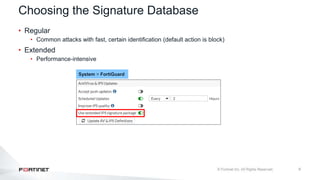
Choosing the Signature Database
• Regular
• Common attacks with fast, certain identification (default action is block)
• Extended
• Performance-intensive
System > FortiGuard
10
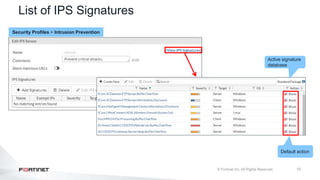
List of IPS Signatures
Active signature
database
Default action
Security Profiles > Intrusion Prevention
11
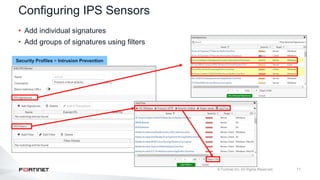
Configuring IPS Sensors
• Add individual signatures
• Add groups of signatures using filters
Security Profiles > Intrusion Prevention
12
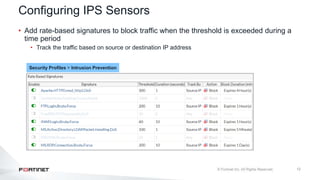
Configuring IPS Sensors
• Add rate-based signatures to block traffic when the threshold is exceeded during a
time period
• Track the traffic based on source or destination IP address
Security Profiles > Intrusion Prevention
13
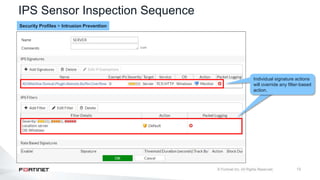
IPS Sensor Inspection Sequence
Individual signature actions
will override any filter-based
action.
Security Profiles > Intrusion Prevention
14
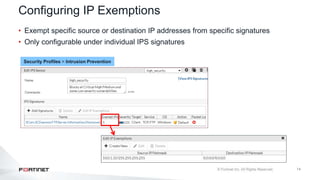
Configuring IP Exemptions
• Exempt specific source or destination IP addresses from specific signatures
• Only configurable under individual IPS signatures
Security Profiles > Intrusion Prevention
15
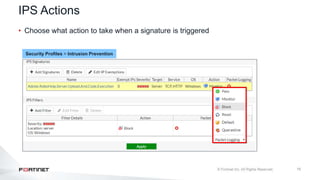
IPS Actions
• Choose what action to take when a signature is triggered
Security Profiles > Intrusion Prevention
16
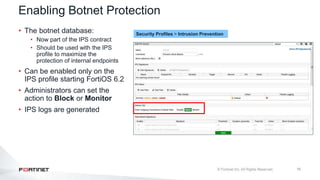
• The botnet database:
• Now part of the IPS contract
• Should be used with the IPS
profile to maximize the
protection of internal endpoints
• Can be enabled only on the
IPS profile starting FortiOS 6.2
• Administrators can set the
action to Block or Monitor
• IPS logs are generated
Enabling Botnet Protection
Security Profiles > Intrusion Prevention
17
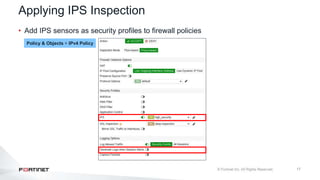
Applying IPS Inspection
• Add IPS sensors as security profiles to firewall policies
Policy & Objects > IPv4 Policy
18
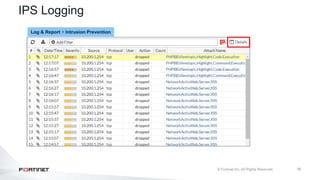
IPS Logging
Log & Report > Intrusion Prevention
19
Knowledge Check
1. Which one of the following items is evaluated first in an IPS sensor?
A. IPS filter
B. IPS signature
2. Which IPS component is updated most frequently?
A. Protocol decoders
B. IPS signature database
Lesson Progress
Intrusion Prevention System
Denial of Service
Web Application Firewall
Best Practices
Troubleshooting
Objectives
• Identify a DoS attack
• Configure a DoS policy
Denial of Service (DoS)
22
DoS Attacks
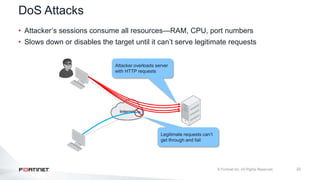
• Attacker’s sessions consume all resources—RAM, CPU, port numbers
• Slows down or disables the target until it can’t serve legitimate requests
Internet
Attacker overloads server
with HTTP requests
Legitimate requests can’t
get through and fail
23
DoS Policy
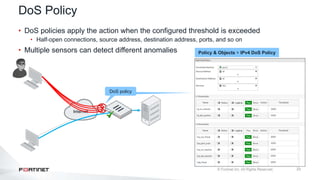
• DoS policies apply the action when the configured threshold is exceeded
• Half-open connections, source address, destination address, ports, and so on
• Multiple sensors can detect different anomalies
Internet
DoS policy
Policy & Objects > IPv4 DoS Policy
24
Types of DoS Attacks
• TCP SYN flood
• Attacker floods victim with incomplete TCP/IP connection requests
• The victim’s connection table becomes full, so legitimate clients can’t connect
• ICMP sweep
• Attackers sends ICMP traffic to find targets
• Attacker then attacks hosts that reply
• TCP port scan
• Attacker probes a victim by sending TCP/IP connection requests to varying destination ports
• Based on replies, attacker can map out which services are running on the victim system
• Attacker then targets those destination ports to exploit the system
25
Types of DoS Attacks
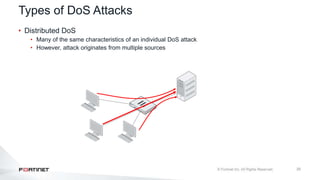
• Distributed DoS
• Many of the same characteristics of an individual DoS attack
• However, attack originates from multiple sources
26
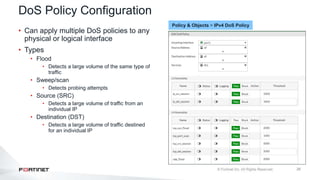
DoS Policy Configuration
• Can apply multiple DoS policies to any
physical or logical interface
• Types
• Flood
• Detects a large volume of the same type of
traffic
• Sweep/scan
• Detects probing attempts
• Source (SRC)
• Detects a large volume of traffic from an
individual IP
• Destination (DST)
• Detects a large volume of traffic destined
for an individual IP
Policy & Objects > IPv4 DoS Policy
27
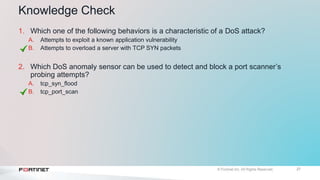
Knowledge Check
1. Which one of the following behaviors is a characteristic of a DoS attack?
A. Attempts to exploit a known application vulnerability
B. Attempts to overload a server with TCP SYN packets
2. Which DoS anomaly sensor can be used to detect and block a port scanner’s
probing attempts?
A. tcp_syn_flood
B. tcp_port_scan
Lesson Progress
Intrusion Prevention System
Denial of Service
Web Application Firewall
Best Practices
Troubleshooting
Objectives
• Identify the purpose of WAF on FortiGate
• Identify common web attacks
• Configure a WAF profile
Web Application Firewall (WAF)
30
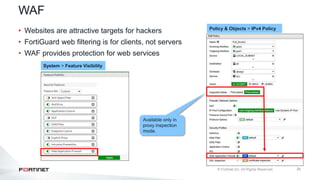
WAF
• Websites are attractive targets for hackers
• FortiGuard web filtering is for clients, not servers
• WAF provides protection for web services
Policy & Objects > IPv4 Policy
System > Feature Visibility
Available only in
proxy inspection
mode.
31
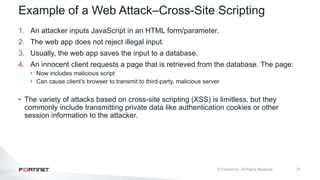
Example of a Web Attack–Cross-Site Scripting
1. An attacker inputs JavaScript in an HTML form/parameter.
2. The web app does not reject illegal input.
3. Usually, the web app saves the input to a database.
4. An innocent client requests a page that is retrieved from the database. The page:
• Now includes malicious script
• Can cause client’s browser to transmit to third-party, malicious server
• The variety of attacks based on cross-site scripting (XSS) is limitless, but they
commonly include transmitting private data like authentication cookies or other
session information to the attacker.
32
Example of a Web Attack–SQL Injection
• SQL statements are inserted into entry fields of a web application
• The web application doesn’t reject illegal input
• When the web application connects to the database to add input, it can:
• Download sensitive data from the database (select * from USERS)
• Modify database (insert/update/delete)
• Perform administrative operations (close management interface)
33
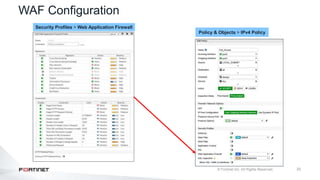
WAF Configuration
Policy & Objects > IPv4 Policy
Security Profiles > Web Application Firewall
34
FortiWeb
• Provides more specialized web server protection
• More complete protocol understanding
• HTTP state attack protection
• HTTP vulnerability scans/penetration tests
• HTTP rewriting and application delivery (basic ADC)
• Better performance for high HTTP traffic
35
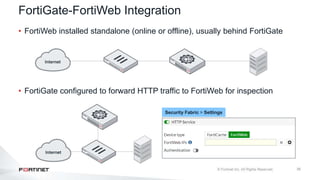
FortiGate-FortiWeb Integration
• FortiWeb installed standalone (online or offline), usually behind FortiGate
• FortiGate configured to forward HTTP traffic to FortiWeb for inspection
Security Fabric > Settings
36
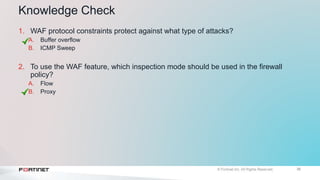
Knowledge Check
1. WAF protocol constraints protect against what type of attacks?
A. Buffer overflow
B. ICMP Sweep
2. To use the WAF feature, which inspection mode should be used in the firewall
policy?
A. Flow
B. Proxy
Lesson Progress
Intrusion Prevention System
Denial of Service
Web Application Firewall
Best Practices
Troubleshooting
Objectives
• Identify the IPS implementation methodology
• Enable full SSL inspection for IPS-inspected traffic
• Identify hardware acceleration components for IPS
Best Practices
39
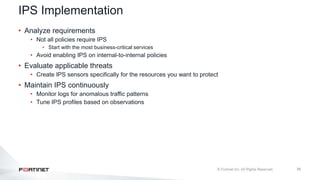
IPS Implementation
• Analyze requirements
• Not all policies require IPS
• Start with the most business-critical services
• Avoid enabling IPS on internal-to-internal policies
• Evaluate applicable threats
• Create IPS sensors specifically for the resources you want to protect
• Maintain IPS continuously
• Monitor logs for anomalous traffic patterns
• Tune IPS profiles based on observations
40
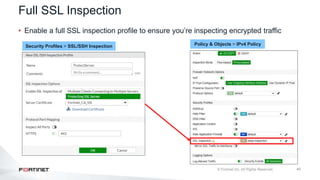
Full SSL Inspection
• Enable a full SSL inspection profile to ensure you’re inspecting encrypted traffic
Policy & Objects > IPv4 Policy
Security Profiles > SSL/SSH Inspection
41
Hardware Acceleration
• FortiGate models with NP4, NP6, and SoC3 can benefit from NTurbo acceleration
(np-accel-mode).
• FortiGate models that have a CP8 or CP9, support offloading of IPS pattern
matching to the content processor (cp-accel-mode).
fgt # get hardware status
Model name: FortiGate-300D
ASIC version: CP8
ASIC SRAM: 64M
CPU: Intel(R) Core(TM) i3-3220 CPU @ 3.30GHz
Number of CPUs: 4
RAM: 7996 MB
Compact Flash: 15331 MB /dev/sda
Hard disk: 114473 MB /dev/sdb
USB Flash: not available
Network Card chipset: Intel(R) Gigabit Ethernet
Network Driver (rev.0003)
Network Card chipset: FortiASIC NP6 Adapter (rev.)
# config ips global
# set np-accel-mode [ basic | none ]
# set cp-accel-mode [ basic | advanced | none ]
# end
np-accel-mode
o basic: offloads IPS processing to NP
cp-accel-mode
o basic: offloads basic IPS pattern matching to CP8 or
CP9
o advanced: offloads more types of IPS pattern matching
• Only available in units with two or more CP8s or one or
more CP9s
42
Knowledge Check
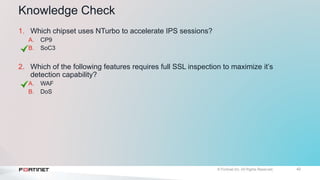
1. Which chipset uses NTurbo to accelerate IPS sessions?
A. CP9
B. SoC3
2. Which of the following features requires full SSL inspection to maximize it’s
detection capability?
A. WAF
B. DoS
Lesson Progress
Intrusion Prevention System
Denial of Service
Web Application Firewall
Best Practices
Troubleshooting
Objectives
• Troubleshoot FortiGuard IPS updates
• Troubleshoot IPS high-CPU usage
• Manage IPS fail-open events
• Investigate false-positive detection
Troubleshooting
45
FortiGuard IPS Troubleshooting
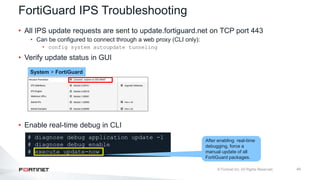
• All IPS update requests are sent to update.fortiguard.net on TCP port 443
• Can be configured to connect through a web proxy (CLI only):
• config system autoupdate tunneling
• Verify update status in GUI
• Enable real-time debug in CLI
System > FortiGuard
# diagnose debug application update -1
# diagnose debug enable
# execute update-now
After enabling real-time
debugging, force a
manual update of all
FortiGuard packages.
46
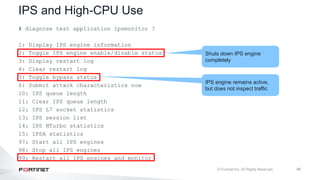
IPS and High-CPU Use
# diagnose test application ipsmonitor ?
1: Display IPS engine information
2: Toggle IPS engine enable/disable status
3: Display restart log
4: Clear restart log
5: Toggle bypass status
6: Submit attack characteristics now
10: IPS queue length
11: Clear IPS queue length
12: IPS L7 socket statistics
13: IPS session list
14: IPS NTurbo statistics
15: IPSA statistics
97: Start all IPS engines
98: Stop all IPS engines
99: Restart all IPS engines and monitor
IPS engine remains active,
but does not inspect traffic
Shuts down IPS engine
completely
47
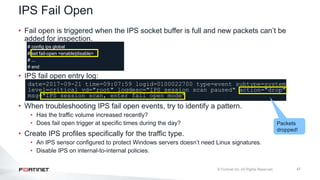
• Fail open is triggered when the IPS socket buffer is full and new packets can’t be
added for inspection.
# config ips global
# set fail-open <enable|disable>
# ...
# end
• IPS fail open entry log:
date=2017-09-21 time=09:07:59 logid=0100022700 type=event subtype=system
level=critical vd="root" logdesc="IPS session scan paused" action="drop"
msg="IPS session scan, enter fail open mode"
• When troubleshooting IPS fail open events, try to identify a pattern.
• Has the traffic volume increased recently?
• Does fail open trigger at specific times during the day?
• Create IPS profiles specifically for the traffic type.
• An IPS sensor configured to protect Windows servers doesn’t need Linux signatures.
• Disable IPS on internal-to-internal policies.
IPS Fail Open
Packets
dropped!
48
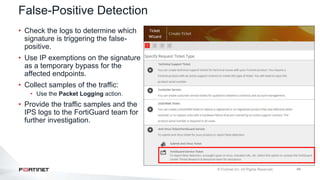
False-Positive Detection
• Check the logs to determine which
signature is triggering the false-
positive.
• Use IP exemptions on the signature
as a temporary bypass for the
affected endpoints.
• Collect samples of the traffic:
• Use the Packet Logging action.
• Provide the traffic samples and the
IPS logs to the FortiGuard team for
further investigation.
49
Knowledge Check
1. Which FQDN does FortiGate use to obtain IPS updates?
A. update.fortiguard.net
B. service.fortiguard.com
2. When IPS fail open is triggered, what is the expected behavior, if the IPS fail open
option is set to enabled?
A. New packets will pass through without inspection
B. New packets will be dropped
Lesson Progress
Intrusion Prevention System
Denial of Service
Web Application Firewall
Best Practices
Troubleshooting
Review
 Manage FortiGuard IPS updates
 Configure an IPS sensor
 Apply IPS to network traffic
 Identify a DoS attack
 Configure a DoS policy
 Identify common web attacks
 Configure a WAF profile
 Identify IPS implementation methodology
 Troubleshoot common IPS issues

FortiGate_Sec_11_Intrusion_Prevention_S.pptx

  • 1.
    Last Modified: 29May 2024 © Copyright Fortinet Inc. All rights reserved. FortiOS 6.2 FortiGate Security Intrusion Prevention and Denial of Service
  • 2.
    Lesson Overview Intrusion PreventionSystem Denial of Service Web Application Firewall Best Practices Troubleshooting
  • 3.
    Objectives • Differentiate betweenexploits and anomalies • Identify the different components of an IPS package • Manage FortiGuard IPS updates • Select an appropriate IPS signature database • Configure an IPS sensor • Identify the IPS sensor inspection sequence • Apply IPS to network traffic Intrusion Prevention System (IPS)
  • 4.
    4 See attacks happeningin real time around the world on the FortiGuard Labs live threat map. • Increased volume and sophistication of attacks on organizations • Driven by previously successful high-profile hacks and a highly profitable black-market demand for stolen data • More attacks against client and cloud applications • Attacks are no longer targeted only at servers and server-based applications • BYOD and remote workers increase risk of exposure Why use IPS?
  • 5.
    5 Exploits and Anomalies Anomaly •Can be zero-day or denial of service attacks (DoS) • Detected by behavioral analysis: • Rate-based IPS signatures • DoS policies • Protocol constraints inspection • Example: • Abnormally high rate of traffic (DoS/flood) Exploit • A known, confirmed attack • Detected when a file or traffic matches a signature pattern: • IPS signatures • WAF signatures • Antivirus signatures • Example: • Exploit of known application vulnerabilities
  • 6.
    6 IPS • Flow-based detectionand blocking • Known exploits that match signatures • Network errors and protocol anomalies • IPS components • IPS signature databases • Protocol decoders • IPS engine • Application control • Antivirus (flow based) • Web filter (flow based) • Email filter (flow based) • Data leak prevention (DLP) (flow-based in one-arm sniffer mode)
  • 7.
    7 What Are ProtocolDecoders? • Decoders parse protocols. • IPS signatures find parts of a protocol that don’t conform. • For example, too many HTTP headers, or a buffer overflow attempt • Unlike proxy-based scans, IPS often does not require IANA standard ports. • Automatically selects decoder for protocol at each OSI layer Meets protocol requirements and standards?
  • 8.
    8 FortiGuard IPS Updates •IPS packages are updated by FortiGuard. • IPS signature databases • Protocol decoders • IPS engine • Regular updates are required to ensure IPS remains effective. • Enable push updates to receive updates as they become available. • The Botnet IPs and Botnet Domains subscription is part of a FortiGuard IPS license. System > FortiGuard System > FortiGuard
  • 9.
    9 Choosing the SignatureDatabase • Regular • Common attacks with fast, certain identification (default action is block) • Extended • Performance-intensive System > FortiGuard
  • 10.
    10 List of IPSSignatures Active signature database Default action Security Profiles > Intrusion Prevention
  • 11.
    11 Configuring IPS Sensors •Add individual signatures • Add groups of signatures using filters Security Profiles > Intrusion Prevention
  • 12.
    12 Configuring IPS Sensors •Add rate-based signatures to block traffic when the threshold is exceeded during a time period • Track the traffic based on source or destination IP address Security Profiles > Intrusion Prevention
  • 13.
    13 IPS Sensor InspectionSequence Individual signature actions will override any filter-based action. Security Profiles > Intrusion Prevention
  • 14.
    14 Configuring IP Exemptions •Exempt specific source or destination IP addresses from specific signatures • Only configurable under individual IPS signatures Security Profiles > Intrusion Prevention
  • 15.
    15 IPS Actions • Choosewhat action to take when a signature is triggered Security Profiles > Intrusion Prevention
  • 16.
    16 • The botnetdatabase: • Now part of the IPS contract • Should be used with the IPS profile to maximize the protection of internal endpoints • Can be enabled only on the IPS profile starting FortiOS 6.2 • Administrators can set the action to Block or Monitor • IPS logs are generated Enabling Botnet Protection Security Profiles > Intrusion Prevention
  • 17.
    17 Applying IPS Inspection •Add IPS sensors as security profiles to firewall policies Policy & Objects > IPv4 Policy
  • 18.
    18 IPS Logging Log &Report > Intrusion Prevention
  • 19.
    19 Knowledge Check 1. Whichone of the following items is evaluated first in an IPS sensor? A. IPS filter B. IPS signature 2. Which IPS component is updated most frequently? A. Protocol decoders B. IPS signature database
  • 20.
    Lesson Progress Intrusion PreventionSystem Denial of Service Web Application Firewall Best Practices Troubleshooting
  • 21.
    Objectives • Identify aDoS attack • Configure a DoS policy Denial of Service (DoS)
  • 22.
    22 DoS Attacks • Attacker’ssessions consume all resources—RAM, CPU, port numbers • Slows down or disables the target until it can’t serve legitimate requests Internet Attacker overloads server with HTTP requests Legitimate requests can’t get through and fail
  • 23.
    23 DoS Policy • DoSpolicies apply the action when the configured threshold is exceeded • Half-open connections, source address, destination address, ports, and so on • Multiple sensors can detect different anomalies Internet DoS policy Policy & Objects > IPv4 DoS Policy
  • 24.
    24 Types of DoSAttacks • TCP SYN flood • Attacker floods victim with incomplete TCP/IP connection requests • The victim’s connection table becomes full, so legitimate clients can’t connect • ICMP sweep • Attackers sends ICMP traffic to find targets • Attacker then attacks hosts that reply • TCP port scan • Attacker probes a victim by sending TCP/IP connection requests to varying destination ports • Based on replies, attacker can map out which services are running on the victim system • Attacker then targets those destination ports to exploit the system
  • 25.
    25 Types of DoSAttacks • Distributed DoS • Many of the same characteristics of an individual DoS attack • However, attack originates from multiple sources
  • 26.
    26 DoS Policy Configuration •Can apply multiple DoS policies to any physical or logical interface • Types • Flood • Detects a large volume of the same type of traffic • Sweep/scan • Detects probing attempts • Source (SRC) • Detects a large volume of traffic from an individual IP • Destination (DST) • Detects a large volume of traffic destined for an individual IP Policy & Objects > IPv4 DoS Policy
  • 27.
    27 Knowledge Check 1. Whichone of the following behaviors is a characteristic of a DoS attack? A. Attempts to exploit a known application vulnerability B. Attempts to overload a server with TCP SYN packets 2. Which DoS anomaly sensor can be used to detect and block a port scanner’s probing attempts? A. tcp_syn_flood B. tcp_port_scan
  • 28.
    Lesson Progress Intrusion PreventionSystem Denial of Service Web Application Firewall Best Practices Troubleshooting
  • 29.
    Objectives • Identify thepurpose of WAF on FortiGate • Identify common web attacks • Configure a WAF profile Web Application Firewall (WAF)
  • 30.
    30 WAF • Websites areattractive targets for hackers • FortiGuard web filtering is for clients, not servers • WAF provides protection for web services Policy & Objects > IPv4 Policy System > Feature Visibility Available only in proxy inspection mode.
  • 31.
    31 Example of aWeb Attack–Cross-Site Scripting 1. An attacker inputs JavaScript in an HTML form/parameter. 2. The web app does not reject illegal input. 3. Usually, the web app saves the input to a database. 4. An innocent client requests a page that is retrieved from the database. The page: • Now includes malicious script • Can cause client’s browser to transmit to third-party, malicious server • The variety of attacks based on cross-site scripting (XSS) is limitless, but they commonly include transmitting private data like authentication cookies or other session information to the attacker.
  • 32.
    32 Example of aWeb Attack–SQL Injection • SQL statements are inserted into entry fields of a web application • The web application doesn’t reject illegal input • When the web application connects to the database to add input, it can: • Download sensitive data from the database (select * from USERS) • Modify database (insert/update/delete) • Perform administrative operations (close management interface)
  • 33.
    33 WAF Configuration Policy &Objects > IPv4 Policy Security Profiles > Web Application Firewall
  • 34.
    34 FortiWeb • Provides morespecialized web server protection • More complete protocol understanding • HTTP state attack protection • HTTP vulnerability scans/penetration tests • HTTP rewriting and application delivery (basic ADC) • Better performance for high HTTP traffic
  • 35.
    35 FortiGate-FortiWeb Integration • FortiWebinstalled standalone (online or offline), usually behind FortiGate • FortiGate configured to forward HTTP traffic to FortiWeb for inspection Security Fabric > Settings
  • 36.
    36 Knowledge Check 1. WAFprotocol constraints protect against what type of attacks? A. Buffer overflow B. ICMP Sweep 2. To use the WAF feature, which inspection mode should be used in the firewall policy? A. Flow B. Proxy
  • 37.
    Lesson Progress Intrusion PreventionSystem Denial of Service Web Application Firewall Best Practices Troubleshooting
  • 38.
    Objectives • Identify theIPS implementation methodology • Enable full SSL inspection for IPS-inspected traffic • Identify hardware acceleration components for IPS Best Practices
  • 39.
    39 IPS Implementation • Analyzerequirements • Not all policies require IPS • Start with the most business-critical services • Avoid enabling IPS on internal-to-internal policies • Evaluate applicable threats • Create IPS sensors specifically for the resources you want to protect • Maintain IPS continuously • Monitor logs for anomalous traffic patterns • Tune IPS profiles based on observations
  • 40.
    40 Full SSL Inspection •Enable a full SSL inspection profile to ensure you’re inspecting encrypted traffic Policy & Objects > IPv4 Policy Security Profiles > SSL/SSH Inspection
  • 41.
    41 Hardware Acceleration • FortiGatemodels with NP4, NP6, and SoC3 can benefit from NTurbo acceleration (np-accel-mode). • FortiGate models that have a CP8 or CP9, support offloading of IPS pattern matching to the content processor (cp-accel-mode). fgt # get hardware status Model name: FortiGate-300D ASIC version: CP8 ASIC SRAM: 64M CPU: Intel(R) Core(TM) i3-3220 CPU @ 3.30GHz Number of CPUs: 4 RAM: 7996 MB Compact Flash: 15331 MB /dev/sda Hard disk: 114473 MB /dev/sdb USB Flash: not available Network Card chipset: Intel(R) Gigabit Ethernet Network Driver (rev.0003) Network Card chipset: FortiASIC NP6 Adapter (rev.) # config ips global # set np-accel-mode [ basic | none ] # set cp-accel-mode [ basic | advanced | none ] # end np-accel-mode o basic: offloads IPS processing to NP cp-accel-mode o basic: offloads basic IPS pattern matching to CP8 or CP9 o advanced: offloads more types of IPS pattern matching • Only available in units with two or more CP8s or one or more CP9s
  • 42.
    42 Knowledge Check 1. Whichchipset uses NTurbo to accelerate IPS sessions? A. CP9 B. SoC3 2. Which of the following features requires full SSL inspection to maximize it’s detection capability? A. WAF B. DoS
  • 43.
    Lesson Progress Intrusion PreventionSystem Denial of Service Web Application Firewall Best Practices Troubleshooting
  • 44.
    Objectives • Troubleshoot FortiGuardIPS updates • Troubleshoot IPS high-CPU usage • Manage IPS fail-open events • Investigate false-positive detection Troubleshooting
  • 45.
    45 FortiGuard IPS Troubleshooting •All IPS update requests are sent to update.fortiguard.net on TCP port 443 • Can be configured to connect through a web proxy (CLI only): • config system autoupdate tunneling • Verify update status in GUI • Enable real-time debug in CLI System > FortiGuard # diagnose debug application update -1 # diagnose debug enable # execute update-now After enabling real-time debugging, force a manual update of all FortiGuard packages.
  • 46.
    46 IPS and High-CPUUse # diagnose test application ipsmonitor ? 1: Display IPS engine information 2: Toggle IPS engine enable/disable status 3: Display restart log 4: Clear restart log 5: Toggle bypass status 6: Submit attack characteristics now 10: IPS queue length 11: Clear IPS queue length 12: IPS L7 socket statistics 13: IPS session list 14: IPS NTurbo statistics 15: IPSA statistics 97: Start all IPS engines 98: Stop all IPS engines 99: Restart all IPS engines and monitor IPS engine remains active, but does not inspect traffic Shuts down IPS engine completely
  • 47.
    47 • Fail openis triggered when the IPS socket buffer is full and new packets can’t be added for inspection. # config ips global # set fail-open <enable|disable> # ... # end • IPS fail open entry log: date=2017-09-21 time=09:07:59 logid=0100022700 type=event subtype=system level=critical vd="root" logdesc="IPS session scan paused" action="drop" msg="IPS session scan, enter fail open mode" • When troubleshooting IPS fail open events, try to identify a pattern. • Has the traffic volume increased recently? • Does fail open trigger at specific times during the day? • Create IPS profiles specifically for the traffic type. • An IPS sensor configured to protect Windows servers doesn’t need Linux signatures. • Disable IPS on internal-to-internal policies. IPS Fail Open Packets dropped!
  • 48.
    48 False-Positive Detection • Checkthe logs to determine which signature is triggering the false- positive. • Use IP exemptions on the signature as a temporary bypass for the affected endpoints. • Collect samples of the traffic: • Use the Packet Logging action. • Provide the traffic samples and the IPS logs to the FortiGuard team for further investigation.
  • 49.
    49 Knowledge Check 1. WhichFQDN does FortiGate use to obtain IPS updates? A. update.fortiguard.net B. service.fortiguard.com 2. When IPS fail open is triggered, what is the expected behavior, if the IPS fail open option is set to enabled? A. New packets will pass through without inspection B. New packets will be dropped
  • 50.
    Lesson Progress Intrusion PreventionSystem Denial of Service Web Application Firewall Best Practices Troubleshooting
  • 51.
    Review  Manage FortiGuardIPS updates  Configure an IPS sensor  Apply IPS to network traffic  Identify a DoS attack  Configure a DoS policy  Identify common web attacks  Configure a WAF profile  Identify IPS implementation methodology  Troubleshoot common IPS issues

Editor's Notes

  • #2 In this lesson, you will learn how to use FortiGate to protect your network against intrusions and denial of service (DoS) attacks.
  • #3 In this lesson, you will learn about the topics shown on this slide.
  • #4 After completing this section, you should be able to achieve the objectives shown on this slide. By demonstrating competence in IPS, you should be able to implement an effective IPS solution to protect your network from intrusion.
  • #5 Organizations are under continuous attacks. Cybercriminals, motivated by previously successful high-profile hacks and a highly profitable black market for stolen data, continue to increase both the volume and sophistication of their attacks on organizations. Many organizations encourage BYOD and flexible working environments, which has led to the explosion of anytime, anywhere data consumption. This consumption increases the risk that sensitive data will be exposed to unauthorized access outside corporate boundaries. Today’s threat landscape requires IPS to block a wider range of threats, while minimizing false positives.
  • #6 It’s important to understand the difference between an anomaly and an exploit. It’s also important to know which FortiGate features offer protection against each of these types of threats. Exploits are known attacks, with known patterns that can be matched by IPS, WAF, or antivirus signatures. Anomalies are unusual behaviors in the network, such as higher-than-usual CPU usage or network traffic. Anomalies must be detected and monitored (and, in some cases, blocked or mitigated) because they can be the symptoms of a new, never-seen-before attack. Anomalies are usually better detected by behavioral analysis, such as rate-based IPS signatures, DoS policies, and protocol constraints inspection.
  • #7 IPS on FortiGate uses signature databases to detect known attacks. Protocol decoders can also detect network errors and protocol anomalies. The IPS engine is responsible for most of the features shown in this lesson: IPS and protocol decoders. It’s also responsible for application control, flow-based antivirus protection, web filtering, email filtering, and flow-based DLP in one-arm sniffer mode.
  • #8 How does the IPS engine determine if a packet contains an attack or anomaly? Protocol decoders parse each packet according to the protocol specifications. Some protocol decoders require a port number specification (configured in the CLI), but usually, the protocol is automatically detected. If the traffic doesn’t conform to the specification—if, for example, it sends malformed or invalid commands to your servers—then the protocol decoder detects the error.
  • #9 By default, an initial set of IPS signatures is included in each FortiGate firmware release. FortiGuard updates the IPS signature database with new signatures. That way, IPS remains effective against new exploits. Unless a protocol specification or RFC changes (which doesn’t happen very often), protocol decoders are rarely updated. The IPS engine itself changes more frequently, but still not often. Starting with FortiOS 6.2, Botnet IPs and Domains database has been moved (from Antivirus license) to IPS license contract. FortiGuard IPS service updates the IPS signatures most often. The FortiGuard research team identifies and builds new signatures, just like antivirus signatures. So, if your FortiGuard Services contract expires, you can still use IPS. However, just like antivirus scans, IPS scans will become increasingly ineffective the longer your signatures go without being updated—old signatures won’t defend against new attacks.
  • #10 The IPS signature database is divided into the regular and extended databases. The regular signature database contains signatures for common attacks whose signatures cause rare or no false positives. It's a smaller database, and its default action is to block the detected attack. The extended signature database contains additional signatures for attacks that cause a significant performance impact, or don’t support blocking because of their nature. In fact, because of its size, the extended database is not available for FortiGate models with a smaller disk or RAM. But, for high-security networks, you might be required to enable the extended signatures database.
  • #11 After FortiGate downloads a FortiGuard IPS package, new signatures appear in the signature list. When configuring FortiGate, you can change the Action setting for each sensor that uses a signature. The default action setting is often correct, except in the following cases: Your software vendor releases a security patch. Continuing to scan for exploits will waste FortiGate resources. Your network has a custom application with traffic that inadvertently triggers an IPS signature. You can disable the setting until you notify Fortinet so that the FortiGuard team can modify the signature to avoid false positives.
  • #12 There are two ways to add predefined signatures to an IPS sensor. One way is to select the signatures individually. After you select a signature in the list, the signature is added to the sensor with its default action. Then, you can right-click the signature and change the action. The second way to add a signature to a sensor is using filters. FortiGate will add all the signatures that match the filters.
  • #13 You can also add rate-based signatures to block specific traffic when the threshold is exceeded during the configured time period. You should apply rate-based signatures only to protocols you actually use. Then, configure Block Duration to block malicious clients for extended periods. This saves system resources and can discourage a repeat attack. FortiGate does not track statistics for that client while it is temporarily blocklisted.
  • #14 When the IPS engine compares traffic with the signatures in each filter, order matters. The rules are similar to firewall policy matching: the engine evaluates the filters at the top of the list first, and applies the first match. The engine skips subsequent filters. So, position the most likely matching filters, or signatures, at the top of the list. Avoid making too many filters, because this increases evaluations and CPU usage. Also, avoid making very large signature groups in each filter, which increase RAM usage. In the event of a false-positive outbreak, you can add the triggered signature as an individual signature and set the action to Monitor. This will allow you to monitor the signature events using IPS logs, while investigating the false-positive issue.
  • #15 Sometimes it is necessary to exempt specific source or destination IP addresses from specific signatures. This feature is useful during false-positive outbreaks. You can temporarily bypass affected endpoints until you investigate and correct the false-positive issue. You can configure IP exemptions on individual signatures only. Each signature can have multiple exemptions.
  • #16 After you select the filters or signatures you want to add, right-click the filter or signature, and then select the action. Select Pass to allow traffic to continue to its destination. Select Monitor to allow traffic to continue to its destination and log the activity. Select Block to silently drop traffic matching any of the signatures included in the filter. Select Reset to generate a TCP RST packet whenever the signature is triggered. Quarantine allows you to quarantine the attacker’s IP address for a set duration. You can set the quarantine duration to any number of days, hours, or minutes. If you select Packet Logging, FortiGate saves a copy of the packet that matches the signature.
  • #17 Since the botnet database is part of FortiGuard IPS contract, administrators can enable scanning of botnet connections to maximize their internal security. You enable botnet scanning on the IPS profile that you applied the firewall policy on. You can also enable scanning of botnet connections using the CLI. There are three possible actions for botnet and C&C: Disable: Do not scan connections to botnet servers Block: Block connections to botnet servers Monitor: Log connections to botnet servers
  • #18 To apply an IPS sensor, you must enable IPS and then select the sensor in a firewall policy. By default, FortiGate logs all security events. This means you can see any traffic that is being blocked by IPS. If you think some traffic should be blocked, but is passing through the policy, you should change the Log Allowed Traffic method to All Sessions. This will log all traffic processed by that firewall policy, and not just the traffic that is blocked by the security profiles. This can help you in identifying false negative events.
  • #19 If you enabled security events logging in the firewall policies that apply IPS, you can view IPS events by clicking Log & Report > Intrusion Prevention. The Intrusion Prevention log menu appears only if FortiGate has matched attack attempts with IPS signatures. You should review IPS logs frequently. The logs are an invaluable source of information about the kinds of attacks that are being targeted at your network. This will help you develop action plans and focus on specific events, for example, patching a critical vulnerability.
  • #21 Good job! You now understand the IPS on FortiGate. Now, you will learn about denial of service.
  • #22 After completing this section, you should be able to achieve the objectives shown on this slide. By demonstrating competence in DoS, you should be able to protect your network from common DoS attacks.
  • #23 So far, you’ve learned about signatures that match illegal commands and invalid protocol implementations. Those are easy to confirm as attacks. What about attacks that function by exploiting asymmetric processing or bandwidth between clients and servers? The goal of a DoS attack is to overwhelm the target—to consume resources until the target can’t respond to legitimate traffic. There are many ways to accomplish this. High-bandwidth usage is only one type of DoS attack. Many sophisticated DoS attacks, such as Slowloris, don’t require high bandwidth.
  • #24 To block DoS attacks, apply a DoS policy on a FortiGate device that is located between attackers and all the resources that you want to protect. DoS filtering is done early in the packet handling process, which is handled by the kernel.
  • #25 In TCP, the client sends a SYN packet to initiate a connection. The server must respond with a SYN/ACK packet, and save the connection information in RAM while it waits for the client to acknowledge with an ACK packet. Normal clients will ACK quickly and begin to transmit data. But malicious clients continue to send more SYN packets, half-opening more connections, until the server’s connection table becomes full. Once the server’s table is full, it can’t accept more connections and begins to ignore all new clients. ICMP is used during troubleshooting: devices respond with success or error messages. However attackers can use ICMP to probe a network for valid routes and responsive hosts. By doing an ICMP sweep, the attacker can gain information about your network before crafting more serious exploits. Attackers use port scanning to determine which ports are active on a system. The attacker sends TCP SYN requests to varying destination ports. Based on the replies, the attacker can map out which services are running on the system, and then proceed to exploit those services.
  • #26 An individual DoS attack is a flood of traffic coming from a single address. It can originate from the Internet, or even from your internal network. Typically, a single device makes many connections or sessions, and possibly uses much bandwidth to connect to a single location. A variation of this is the distributed denial of service attack or DDoS. It has many of the same characteristics as an individual DoS attack, but the main difference is that multiple devices are all attacking one destination at the same time.
  • #27 You can apply DoS protection to four protocols: TCP, UDP, ICMP, and SCTP. And, you can apply four different types of anomaly detection protocol: A flood sensor detects a high volume of that specific protocol, or signal in the protocol. A sweep/scan detects probing attempts to map which of the host’s ports respond and, therefore, might be vulnerable. Source signatures look for large volumes of traffic originating from a single IP. Destination signatures look for large volumes of traffic destined for a single IP. When you implement DoS for the first time, if you don’t have an accurate baseline for your network, be careful not to completely block network services. To prevent this from happening, configure the DoS policy initially to log, but not block. Using the logs, you can analyze and identify normal and peak levels for each protocol. Then, adjust the thresholds to allow normal peaks, while applying appropriate filtering. The threshold for flood, sweep, and scan sensors are defined as the maximum number of sessions or packets per second. The threshold for source and destination sensors are defined as concurrent sessions. Thresholds that are too high can exhaust your resources before the DoS policies trigger. Thresholds that are too low will cause FortiGate to drop normal traffic.
  • #29 Good job! You now understand how to protect your network from DoS attacks on FortiGate. Now, you will learn about web application firewall.
  • #30 After completing this section, you should be able to achieve the objectives shown on this slide. By demonstrating competence in WAF, you should be able to apply the correct WAF inspection to protect the servers in your network.
  • #31 What is a WAF and why do you need it? Some FortiGate features are meant to protect clients, not servers. For example, FortiGuard web filtering blocks requests based on the category of the server’s web pages. Antivirus prevents clients from accidentally downloading spyware and worms. Neither protects a server (which doesn’t send requests—it receives them) from malicious scripts or SQL injections. Protecting web servers requires a different approach because they are subject to other kinds of attacks. This is where WAF applies. The WAF feature is available only in proxy inspection mode.
  • #32 Let's look at some examples of attacks that target web applications specifically. One type of attack is called cross-site scripting (XSS). If a web application doesn’t sanitize its inputs and reject JavaScript, it ends up storing the XSS attack in its database. Then, when other clients request the page that reuses that data, the JavaScript is now embedded in the page. JavaScript can do many things with a page, including rewriting the whole page and making its own requests. This is the basic mechanism of asynchronous JavaScript and XML (AJAX) apps. In this case, XSS causes innocent clients to transmit to a different server that is controlled by the attacker. This could, for example, transmit credit card information or passwords from an HTTP form to the attacker.
  • #33 Another very common web attack is a SQL injection. Just like an XSS attack, the root cause of a SQL injection is that the web application doesn’t sanitize input. If the attacker enters a SQL query into an input such as an HTML form, the web app simply accepts it, and passes it along to the database engine, which accidentally runs the query. The SQL language can do anything to the data. It can, for example, download the table of users so that the attacker can run a password cracker. A query could add new entries for new administrator log in attempts, or modify log in attempts, blocking administrators from logging in.
  • #34 One component of a WAF profile is WAF signatures. WAF signatures work in the same way as IPS signatures. FortiGate can act on the traffic that matches any of them. Some WAF signatures are categorized as extended. They are more likely to cause false positives, but are sometimes required in high-security environments. HTTP constraints can monitor and control the number, type, and length of many HTTP headers, which are also inputs. This prevents unexpected inputs that a malicious client could craft to compromise your server. The limits can vary by your server’s software, but also by its hardware. If a server has limited RAM, for example, then it is potentially easier to overload or crash with an excessive number of headers, because parsing the headers and storing them in buffers requires RAM. After you configure a WAF profile, it is assigned to one or more firewall policies.
  • #35 FortiWeb is a specialized WAF device. For environments where the protection of web services is critical, you can complement a FortiGate with a FortiWeb device. FortiWeb offers a more complete HTTP protocol understanding and state attack protection. It can perform vulnerability scans and penetration tests. It can also rewrite the HTTP packets, and route traffic based on the HTTP content.
  • #36 In most cases, FortiWeb is installed as a standalone device, usually located between FortiGate and the protected web servers. FortiWeb can be installed online (web traffic crossing the device) or offline (device is connected as a one-arm sniffer). Alternatively, you can configure FortiGate to forward web traffic to an external FortiWeb, where the WAF inspection happens. This is useful, for example, when you need to protect servers located in multiple sites with one single FortiWeb. With this setup, FortiGate will forward all web traffic to the FortiWeb if the traffic matches a firewall policy configured with a WAF profile enabled for external inspection. For detailed information on FortiWeb, see the NSE 6 FortiWeb training material.
  • #38 Good job! You now understand how to protect your servers using WAF on FortiGate. Now, you will learn about IPS best practices.
  • #39 After completing this section, you should be able to achieve the objectives shown on this slide. By demonstrating competence in identifying IPS implementation best practices, you should be able to deploy an IPS solution on FortiGate that will be efficient and effective. You should also be able to apply full SSL inspection for IPS inspected traffic, as well as identify hardware acceleration components for IPS.
  • #40 Before you implement IPS, you must analyze the needs of your network. Enabling the default profiles across all policies will quickly cause issues, the least of which are false positives. Performing unnecessary inspections on all network traffic can cause high resource utilization which can hamper FortiGate’s ability to process regular traffic. You must also evaluate applicable threats. If your organization runs only Windows, there is no need to scan for Mac OS vulnerabilities. It is also important to consider the direction of the traffic. There are many IPS signatures that apply only to clients, and many signatures that apply only to servers. Create IPS sensors specific to the resources you want to protect. This will make sure that FortiGate is not scanning traffic with irrelevant signatures. Lastly, IPS is not a set-and-forget implementation. You must monitor logs regularly for anomalous traffic patterns, and adjust your IPS profile configuration based on your observations. You should also audit your internal resources regularly to identify if certain vulnerabilities are still applicable to your organization.
  • #41 Certain vulnerabilities apply only to encrypted connections. In some of these cases, FortiGate can’t identify the threat reliably if it can’t parse the payload. For this reason, you must use an SSL inspection profile if you want to get the maximum benefit from your IPS and WAF features. The example on this slide shows an SSL inspection profile configured to protect a server. This policy, when applied to inbound traffic, will be able to apply IPS and WAF inspection on encrypted traffic reliably, because FortiGate will be able to decrypt encrypted sessions and inspect all parts of the packet. It’s important to note that DoS policies do not have the ability to assign SSL inspection profiles. This is because DoS does not require SSL inspection to maximize it’s detection ability, since it does not inspect packet payload. DoS only inspects certain session types and their associated volume.
  • #42 Usually, traffic requiring inspection, such as antivirus or IPS, is handled by the CPU on FortiGate. However, there are specialized chips on specific FortiGate models that can offload these inspection tasks. This frees up CPU cycles to manage other tasks, and also accelerates sessions requiring security inspection. FortiGate models that support a feature called NTurbo can offload IPS processing to NP4, NP6, or SoC3 processors. If the command np-accel-mode is available under config system global, then the FortiGate model supports NTurbo. Some FortiGate models also support offloading IPS pattern matching to CP8 or CP9 content processors. If the command cp-accel-mode is available under config ips global, then the FortiGate model supports IPS pattern matching acceleration to its CP8 or CP9 processor.
  • #44 Good job! You now understand some best practices for IPS implementation on FortiGate. Now, you will learn about IPS troubleshooting.
  • #45 After completing this section, you should be able to achieve the objectives shown on this slide. By demonstrating competence in troubleshooting, you should be able to identify, investigate, and manage some common issues with IPS deployments on FortiGate.
  • #46 FortiGate IPS update requests are sent to update.fortiguard.net on TCP port 443. You can also configure FortiGate to connect through a web proxy for updates. You should check the last update timestamp regularly. You can verify it in the GUI. If there is any indication that the IPS definitions are not updating, you should investigate. Always make sure FortiGate has proper DNS resolution for update.fortiguard.net. If, by chance, there are any intermediary devices between the FortiGate and the Internet, make sure the correct firewall rules are in place to allow traffic on port 443. Any intermediary devices performing SSL inspection on this traffic can also causes issues with updates. Finally, you can use the FortiGuard update debug to monitor update events in real time.
  • #47 Short spikes in CPU usage by IPS processes could be caused by firewall policy or profile changes. These spikes are usually normal. Spikes might happen when FortiGate has hundreds of policies and profiles, or many virtual domains. Continuous high-CPU use by the IPS engines is not normal, and you should investigate it. The command shown here, along with displayed options can be used to troubleshoot these issues. If there are high-CPU use problems caused by the IPS, you can use the diagnose test application ipsmonitor command with option 5 to isolate where the problem might be. Option 5 enables IPS bypass mode. In this mode, the IPS engine is still running, but it is not inspecting traffic. If the CPU use decreases after that, it usually indicates that the volume of traffic being inspected is too high for that FortiGate model. If the CPU use remains high after enabling IPS bypass mode, it usually indicates a problem in the IPS engine, that you must report to Fortinet's support team. You can disable the IPS engine completely using option 2. If you wish to restore IPS inspection of traffic after you finish troubleshooting, use option 5 again. Another recommendation to keep in mind: if you need to restart the IPS, use option 99, as shown on this slide. This guarantees that all the IPS-related processes restart properly.
  • #48 IPS goes into fail open mode when there is not enough available memory in the IPS socket buffer for new packets. What happens during that state depends on the IPS configuration. If the fail-open setting is enabled, some new packets (depending on the system load) will pass through without being inspected. If it is disabled, new packets will be dropped. Frequent IPS fail open events usually indicate that the IPS is not able to keep up with the traffic demands. So, try to identify patterns. Has the traffic volume increased recently? Have throughput demands increased? Does fail open trigger at specific times during the day? Tune and optimize your IPS configuration. Create IPS profiles specific for the type of traffic being inspected, and disable IPS profiles on policies that don’t need them.
  • #49 In the event of a false-positive detection, first determine which signature is generating them. You should also verify that the traffic is hitting the correct policy and IPS sensor. After you have verified these factors, you should gather samples of the traffic. Use the Packet Logging action on the signature. Provide the traffic samples and the matching IPS logs to the FortiGuard team for further investigation.
  • #51 Congratulations! You have completed this lesson. Now you will review the objectives that you covered in this lesson.
  • #52 This slide shows the objective that you covered in this lesson. By mastering the objectives covered in this lesson, you have gained the skills and knowledge that you need to configure, maintain, and troubleshoot your FortiGate’s IPS solution.