
CONNECT. TRANSFORM. AUTOMATE.
Tor Nielsen, IHS
Spatial Export As A Service Using FME 2013
At IHS we have developed a Generalized Spatial Export
Service that allows end users to export spatial content
directly from an Esri ArcSDE database as if the Esri's
ArcGIS 10 Map Server were the data source.
Spatial Export As A Service Using FME 2013
ArcGIS 10.x map server root folder:
 INTL_BASINS
 INTL_CULTURE
 INTL_EP
 US_BASE
 Utility
Spatial Export As A Service Using FME 2013
The US_BASE map server folder:
 US_BASE/Production (MapServer)
 US_BASE/Well_Activity(MapServer)
 US_BASE/Well_Bore_Stick (MapServer)
 US_BASE/Well_Bottom_Hole (MapServer)
 US_BASE/Well_Surface (MapServer)
Spatial Export As A Service Using FME 2013
The US_BASE/Well_Activity map service:
Well Activity - Overview (0)
 Permits (Yesterday) (1)
 Permits (2 - 7 Days) (2)
 Permits (7 - 30 Days) (3)
 Permits (30 - 180 Days) (4)
 Permits - All Active (5)
 Abandoned Locations (6)
 Current Drilling (7)
 Completions - This Month (8)
 Activity - Last 6 months (9)
 Activity - All (10)
Well Activity - Detail (11)
 Permits (Yesterday) (12)
 Permits (2 - 7 Days) (13)
 Permits (7 - 30 Days) (14)
 Permits (30 - 180 Days) (15)
 Permits - All Active (16)
 Abandoned Locations (17)
 Current Drilling (18)
 Completions - This Month (19)
 Activity - Last 6 months (20)
 Activity - All (21)
Spatial Export As A Service Using FME 2013
WELL_ACTIVITY (feature class()
Spatial Export As A Service Using FME 2013
The reality:
 One ArcSDE feature class may feed one or many map services’ map
layers – all potentially different mainly as a consequence of having
different definition queries associated.
The requirements:
 Every single map layer in every single map service should be made
spatially exportable honoring its definition query e.g.
 Map layer #1: select * from <feature class> where flag = ‘red’
 Map layer #2: select * from <feature class> where flag = ‘green’
 Map layer #3: select * from <feature class> where flag = ‘blue’
 Etc.
 Not to utilize ArcGIS Sever in the solution
 Utilize FME 2013
Spatial Export As A Service Using FME 2013
IHS Spatial Export Service
Trusted Client (Enerdeq) Version
FME OUTPUT
FOLDER
FME Server
(unsecured)
IHS Browser
Applications
(secured access via AC)
Trusted client request
Email notifications
Spatial Output File(s)
IHS Spatial Data Store
SPATIAL EXPORT SERVICE
(unsecured request manager)
Request status of job
Spatial Export Request
Spatial Export
configuration
ArcGIS Server
(map service meta data)
layer definitions
including their defQrys
and application specific
attribute lists
June 11. 2013 - Tor Nielsen, IHS, Denver, CO
JOB STATUS SERVICE
FME request
GET FILE SERVICE
Spatial Export As A Service Using FME 2013
Configuration database (I):
Spatial Export As A Service Using FME 2013
Configuration database (II):
Spatial Export As A Service Using FME 2013
FME Workbench Document:
Spatial Export As A Service Using FME 2013
Spatial Export Request (REST post)
{
"RequestId":"icses-demo-0000011",
"UserName":"Tor.Nielsen@ihs.com",
"UserEmailAddress":"Tor.Nielsen@ihs.com",
"IhsApplication":"ENERDEQ",
"MapLayerId":"Enerdeq/EnerdeqLayers/MapServer/11",
"MapLayerDescription":"Well Activity",
"OutputObjectName":"WellActivity",
"ClipOption":"NO",
"OutputFormat":"GEODATABASE_FILE",
"OutputCoordinateSystemCode":"LL-WGS84",
"UserDefinitionQuery":"(act_code in ('A','B','E'))",
"EnvelopeMaxX" : "-70.0",
"EnvelopeMaxY" : "50.9",
"EnvelopeMinX" : "-140.9",
"EnvelopeMinY" : "25.1",
"SearchOrder":"ATTRIBUTE_FIRST"
}
Spatial Export As A Service Using FME 2013
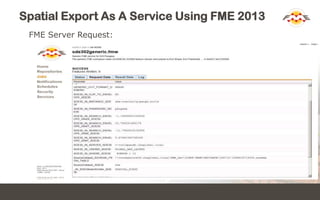
FME Server Request:
Spatial Export As A Service Using FME 2013
Get results:
 http://v-vwc2tpanap16.ihsglobal.local/icsesFmeStatus/api/status?jobId=10
 http://v-vwc2spanap18.ihsglobal.local/icsesFmeGetFile/api/getfile?jobId=10
Thank You!
 Questions?
 For more information:
 Tor.Nielsen@ihs.com
 IHS – www.ihs.com

FME 2013 Based Spatial Export As A Service

  • 1.
  • 2.
    Spatial Export AsA Service Using FME 2013 At IHS we have developed a Generalized Spatial Export Service that allows end users to export spatial content directly from an Esri ArcSDE database as if the Esri's ArcGIS 10 Map Server were the data source.
  • 3.
    Spatial Export AsA Service Using FME 2013 ArcGIS 10.x map server root folder:  INTL_BASINS  INTL_CULTURE  INTL_EP  US_BASE  Utility
  • 4.
    Spatial Export AsA Service Using FME 2013 The US_BASE map server folder:  US_BASE/Production (MapServer)  US_BASE/Well_Activity(MapServer)  US_BASE/Well_Bore_Stick (MapServer)  US_BASE/Well_Bottom_Hole (MapServer)  US_BASE/Well_Surface (MapServer)
  • 5.
    Spatial Export AsA Service Using FME 2013 The US_BASE/Well_Activity map service: Well Activity - Overview (0)  Permits (Yesterday) (1)  Permits (2 - 7 Days) (2)  Permits (7 - 30 Days) (3)  Permits (30 - 180 Days) (4)  Permits - All Active (5)  Abandoned Locations (6)  Current Drilling (7)  Completions - This Month (8)  Activity - Last 6 months (9)  Activity - All (10) Well Activity - Detail (11)  Permits (Yesterday) (12)  Permits (2 - 7 Days) (13)  Permits (7 - 30 Days) (14)  Permits (30 - 180 Days) (15)  Permits - All Active (16)  Abandoned Locations (17)  Current Drilling (18)  Completions - This Month (19)  Activity - Last 6 months (20)  Activity - All (21)
  • 6.
    Spatial Export AsA Service Using FME 2013 WELL_ACTIVITY (feature class()
  • 7.
    Spatial Export AsA Service Using FME 2013 The reality:  One ArcSDE feature class may feed one or many map services’ map layers – all potentially different mainly as a consequence of having different definition queries associated. The requirements:  Every single map layer in every single map service should be made spatially exportable honoring its definition query e.g.  Map layer #1: select * from <feature class> where flag = ‘red’  Map layer #2: select * from <feature class> where flag = ‘green’  Map layer #3: select * from <feature class> where flag = ‘blue’  Etc.  Not to utilize ArcGIS Sever in the solution  Utilize FME 2013
  • 8.
    Spatial Export AsA Service Using FME 2013 IHS Spatial Export Service Trusted Client (Enerdeq) Version FME OUTPUT FOLDER FME Server (unsecured) IHS Browser Applications (secured access via AC) Trusted client request Email notifications Spatial Output File(s) IHS Spatial Data Store SPATIAL EXPORT SERVICE (unsecured request manager) Request status of job Spatial Export Request Spatial Export configuration ArcGIS Server (map service meta data) layer definitions including their defQrys and application specific attribute lists June 11. 2013 - Tor Nielsen, IHS, Denver, CO JOB STATUS SERVICE FME request GET FILE SERVICE
  • 9.
    Spatial Export AsA Service Using FME 2013 Configuration database (I):
  • 10.
    Spatial Export AsA Service Using FME 2013 Configuration database (II):
  • 11.
    Spatial Export AsA Service Using FME 2013 FME Workbench Document:
  • 12.
    Spatial Export AsA Service Using FME 2013 Spatial Export Request (REST post) { "RequestId":"icses-demo-0000011", "UserName":"Tor.Nielsen@ihs.com", "UserEmailAddress":"Tor.Nielsen@ihs.com", "IhsApplication":"ENERDEQ", "MapLayerId":"Enerdeq/EnerdeqLayers/MapServer/11", "MapLayerDescription":"Well Activity", "OutputObjectName":"WellActivity", "ClipOption":"NO", "OutputFormat":"GEODATABASE_FILE", "OutputCoordinateSystemCode":"LL-WGS84", "UserDefinitionQuery":"(act_code in ('A','B','E'))", "EnvelopeMaxX" : "-70.0", "EnvelopeMaxY" : "50.9", "EnvelopeMinX" : "-140.9", "EnvelopeMinY" : "25.1", "SearchOrder":"ATTRIBUTE_FIRST" }
  • 13.
    Spatial Export AsA Service Using FME 2013 FME Server Request:
  • 14.
    Spatial Export AsA Service Using FME 2013 Get results:  http://v-vwc2tpanap16.ihsglobal.local/icsesFmeStatus/api/status?jobId=10  http://v-vwc2spanap18.ihsglobal.local/icsesFmeGetFile/api/getfile?jobId=10
  • 15.
    Thank You!  Questions? For more information:  Tor.Nielsen@ihs.com  IHS – www.ihs.com