Les DSL et "fluent interface" pour les tests ASP.NET avec Selenium FluentSelenium
Content Selenium and XPATH
Best practices for testing
FluentSelenium
Conclusion
Selenium introduction Selenium is a suite of tools to automate web app testing across many platforms It is developed by ThoughtWorks and is available as an open source project It includes Selenium IDE : Firefox add-on that records clicks, typing, and other actions to make a test, witch you can play back in the browser Selenium Remote Control  : Run your tests in multiple browsers and platforms. Tweak your tests in your prefered language (C#, Java, Perl, PHP, Python or Ruby) Uses XPATH as its web query language
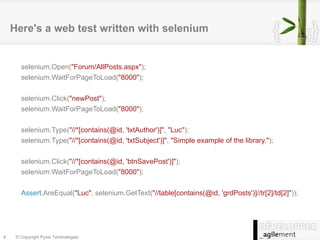
Here's a web test written with selenium selenium.Open( "Forum/AllPosts.aspx" ); selenium.WaitForPageToLoad( "8000" ); selenium.Click( "newPost" ); selenium.WaitForPageToLoad( "8000" ); selenium.Type( "//*[contains(@id, 'txtAuthor')]" ,  "Luc" ); selenium.Type( "//*[contains(@id, 'txtSubject')]" ,  "Simple example of the library." ); selenium.Click( "//*[contains(@id, 'btnSavePost')]" ); selenium.WaitForPageToLoad( "8000" ); Assert .AreEqual( "Luc" , selenium.GetText( "//table[contains(@id, 'grdPosts')]//tr[2]/td[2]" ));
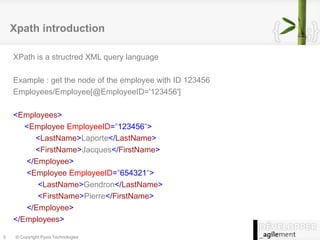
Xpath introduction XPath is a structred XML query language Example : get the node of the employee with ID 123456 Employees/Employee[@EmployeeID='123456'] < Employees > < Employee   EmployeeID = &quot; 123456 &quot; > < LastName > Laporte </ LastName > < FirstName > Jacques </ FirstName > </ Employee > < Employee   EmployeeID = &quot; 654321 &quot; > < LastName > Gendron </ LastName > < FirstName > Pierre </ FirstName > </ Employee > </ Employees >
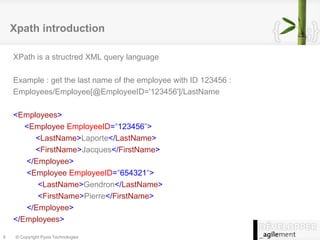
Xpath introduction XPath is a structred XML query language Example : get the last name of the employee with ID 123456 : Employees/Employee[@EmployeeID='123456']/LastName < Employees > < Employee   EmployeeID = &quot; 123456 &quot; > < LastName > Laporte </ LastName > < FirstName > Jacques </ FirstName > </ Employee > < Employee   EmployeeID = &quot; 654321 &quot; > < LastName > Gendron </ LastName > < FirstName > Pierre </ FirstName > </ Employee > </ Employees >
Selenium and XPath on HTML Because HTML is an XML derivative, XPath can be used to locate nodes in a HTML web page Example : ask selenium to click on the Save button : selenium.Click(“//input[@id='btnSubmit']”); selenium.WaitForPageToLoad(“5000”); < html > < body > < form > < div >Hello World !</ div > < input   type = &quot; submit &quot;   value = &quot; Save &quot;   id = &quot; btnSubmit &quot;  /> </ form > </ body > </ html >
Complete simple web test with selenium
Content Selenium and XPATH Best practices for testing
FluentSelenium
Conclusion
Good testing practices Test coverage
Test independance
Test clarity
Test coverage Should we aim for 100% coverage?
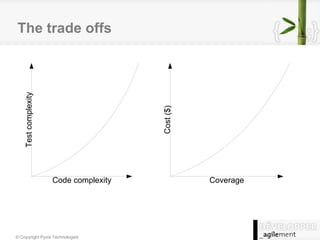
The trade offs
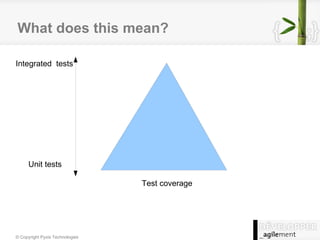
What does this mean? Integrated  tests Unit tests Test coverage
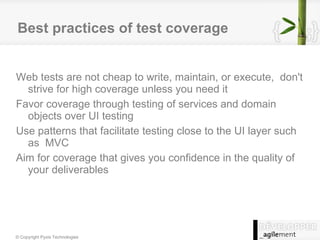
Best practices of test coverage Web tests are not cheap to write, maintain, or execute,  don't strive for high coverage unless you need it
Favor coverage through testing of services and domain objects over UI testing
Use patterns that facilitate testing close to the UI layer such as  MVC
Aim for coverage that gives you confidence in the quality of your deliverables
Test independance Keep tests independent because: They will be easier to fix
They will be easier to read
They will not be impacted by updates in other tests
Some things to consider... For better independance consider using easily rebuildable dependencies:  Web server: Cassini
Database: Sqlite For etxternal dependencies that cannot be relied on to be performant or predictable consider using a fake implementation.
Test Clarity Tests need to be easy to read because they need to be maintained.
Tests are code also. Team code quality rules should also be applied to tests.
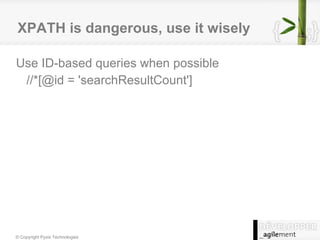
XPATH is dangerous, use it wisely Use ID-based queries when possible //*[@id = 'searchResultCount']
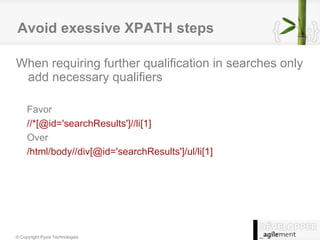
Avoid exessive XPATH steps When requiring further qualification in searches only add necessary qualifiers Favor //*[@id='searchResults']//li[1] Over /html/body//div[@id='searchResults']/ul/li[1]
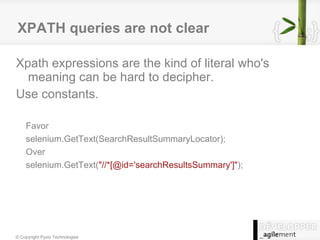
XPATH queries are not clear Xpath expressions are the kind of literal who's meaning can be hard to decipher.  Use constants. Favor selenium.GetText(SearchResultSummaryLocator); Over selenium.GetText( &quot;//*[@id='searchResultsSummary']&quot; );
Keep the test code clean Always revise the tests for clarity.
Hard to read tests are hard maintain
Tests serve as application behavior documentation
The importance of language in tests Who needs to understand your tests?
Know your target audience Developers
Users
Testers

FluentSelenium Presentation Code Camp09

  • 1.
    Les DSL et&quot;fluent interface&quot; pour les tests ASP.NET avec Selenium FluentSelenium
  • 2.
  • 3.
  • 4.
  • 5.
  • 6.
    Selenium introduction Seleniumis a suite of tools to automate web app testing across many platforms It is developed by ThoughtWorks and is available as an open source project It includes Selenium IDE : Firefox add-on that records clicks, typing, and other actions to make a test, witch you can play back in the browser Selenium Remote Control : Run your tests in multiple browsers and platforms. Tweak your tests in your prefered language (C#, Java, Perl, PHP, Python or Ruby) Uses XPATH as its web query language
  • 7.
    Here's a webtest written with selenium selenium.Open( &quot;Forum/AllPosts.aspx&quot; ); selenium.WaitForPageToLoad( &quot;8000&quot; ); selenium.Click( &quot;newPost&quot; ); selenium.WaitForPageToLoad( &quot;8000&quot; ); selenium.Type( &quot;//*[contains(@id, 'txtAuthor')]&quot; , &quot;Luc&quot; ); selenium.Type( &quot;//*[contains(@id, 'txtSubject')]&quot; , &quot;Simple example of the library.&quot; ); selenium.Click( &quot;//*[contains(@id, 'btnSavePost')]&quot; ); selenium.WaitForPageToLoad( &quot;8000&quot; ); Assert .AreEqual( &quot;Luc&quot; , selenium.GetText( &quot;//table[contains(@id, 'grdPosts')]//tr[2]/td[2]&quot; ));
  • 8.
    Xpath introduction XPathis a structred XML query language Example : get the node of the employee with ID 123456 Employees/Employee[@EmployeeID='123456'] < Employees > < Employee EmployeeID = &quot; 123456 &quot; > < LastName > Laporte </ LastName > < FirstName > Jacques </ FirstName > </ Employee > < Employee EmployeeID = &quot; 654321 &quot; > < LastName > Gendron </ LastName > < FirstName > Pierre </ FirstName > </ Employee > </ Employees >
  • 9.
    Xpath introduction XPathis a structred XML query language Example : get the last name of the employee with ID 123456 : Employees/Employee[@EmployeeID='123456']/LastName < Employees > < Employee EmployeeID = &quot; 123456 &quot; > < LastName > Laporte </ LastName > < FirstName > Jacques </ FirstName > </ Employee > < Employee EmployeeID = &quot; 654321 &quot; > < LastName > Gendron </ LastName > < FirstName > Pierre </ FirstName > </ Employee > </ Employees >
  • 10.
    Selenium and XPathon HTML Because HTML is an XML derivative, XPath can be used to locate nodes in a HTML web page Example : ask selenium to click on the Save button : selenium.Click(“//input[@id='btnSubmit']”); selenium.WaitForPageToLoad(“5000”); < html > < body > < form > < div >Hello World !</ div > < input type = &quot; submit &quot; value = &quot; Save &quot; id = &quot; btnSubmit &quot; /> </ form > </ body > </ html >
  • 11.
    Complete simple webtest with selenium
  • 12.
    Content Selenium andXPATH Best practices for testing
  • 13.
  • 14.
  • 15.
  • 16.
  • 17.
  • 18.
    Test coverage Shouldwe aim for 100% coverage?
  • 19.
  • 20.
    What does thismean? Integrated tests Unit tests Test coverage
  • 21.
    Best practices oftest coverage Web tests are not cheap to write, maintain, or execute, don't strive for high coverage unless you need it
  • 22.
    Favor coverage throughtesting of services and domain objects over UI testing
  • 23.
    Use patterns thatfacilitate testing close to the UI layer such as MVC
  • 24.
    Aim for coveragethat gives you confidence in the quality of your deliverables
  • 25.
    Test independance Keeptests independent because: They will be easier to fix
  • 26.
    They will beeasier to read
  • 27.
    They will notbe impacted by updates in other tests
  • 28.
    Some things toconsider... For better independance consider using easily rebuildable dependencies: Web server: Cassini
  • 29.
    Database: Sqlite Foretxternal dependencies that cannot be relied on to be performant or predictable consider using a fake implementation.
  • 30.
    Test Clarity Testsneed to be easy to read because they need to be maintained.
  • 31.
    Tests are codealso. Team code quality rules should also be applied to tests.
  • 32.
    XPATH is dangerous,use it wisely Use ID-based queries when possible //*[@id = 'searchResultCount']
  • 33.
    Avoid exessive XPATHsteps When requiring further qualification in searches only add necessary qualifiers Favor //*[@id='searchResults']//li[1] Over /html/body//div[@id='searchResults']/ul/li[1]
  • 34.
    XPATH queries arenot clear Xpath expressions are the kind of literal who's meaning can be hard to decipher. Use constants. Favor selenium.GetText(SearchResultSummaryLocator); Over selenium.GetText( &quot;//*[@id='searchResultsSummary']&quot; );
  • 35.
    Keep the testcode clean Always revise the tests for clarity.
  • 36.
    Hard to readtests are hard maintain
  • 37.
    Tests serve asapplication behavior documentation
  • 38.
    The importance oflanguage in tests Who needs to understand your tests?
  • 39.
    Know your targetaudience Developers
  • 40.
  • 41.