Flagger
Istio Progressive Delivery Operator
Stefan Prodan @stefanprodan
Istio London November 2018
1
What is Progressive Delivery?
Progressive Delivery is Continuous Delivery with fine-grained control over the
blast radius.
Building blocks
● User segmentation
● Traffic management
● Observability
● Automation
https://redmonk.com/jgovernor/2018/08/06/towards-progressive-delivery/
Introducing Flagger
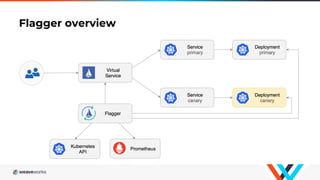
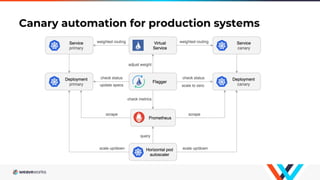
Flagger is a Kubernetes operator that automates the promotion of
canary deployments using Istio routing for traffic shifting and
Prometheus metrics for canary analysis.
Flagger implements a control loop that gradually shifts traffic to the
canary while measuring key performance indicators. Based on the
KPIs analysis a canary is promoted or aborted.
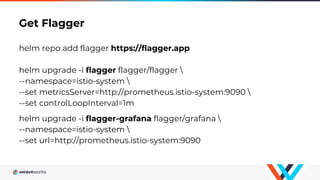
Get Flagger
helm repo add flagger https://flagger.app
helm upgrade -i flagger flagger/flagger 
--namespace=istio-system 
--set metricsServer=http://prometheus.istio-system:9090 
--set controlLoopInterval=1m
helm upgrade -i flagger-grafana flagger/grafana 
--namespace=istio-system 
--set url=http://prometheus.istio-system:9090
Flagger overview
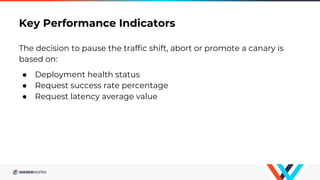
Key Performance Indicators
The decision to pause the traffic shift, abort or promote a canary is
based on:
● Deployment health status
● Request success rate percentage
● Request latency average value
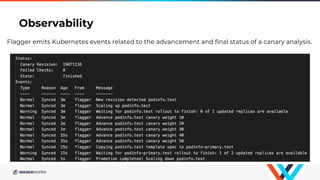
Observability
Flagger emits Kubernetes events related to the advancement and final status of a canary analysis.
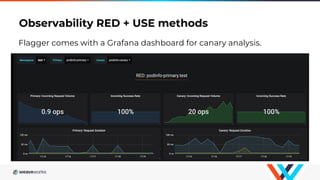
Observability RED + USE methods
Flagger comes with a Grafana dashboard for canary analysis.
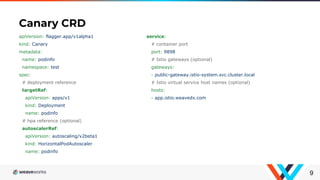
Canary CRD
9
apiVersion: flagger.app/v1alpha1
kind: Canary
metadata:
name: podinfo
namespace: test
spec:
# deployment reference
targetRef:
apiVersion: apps/v1
kind: Deployment
name: podinfo
# hpa reference (optional)
autoscalerRef:
apiVersion: autoscaling/v2beta1
kind: HorizontalPodAutoscaler
name: podinfo
service:
# container port
port: 9898
# Istio gateways (optional)
gateways:
- public-gateway.istio-system.svc.cluster.local
# Istio virtual service host names (optional)
hosts:
- app.istio.weavedx.com
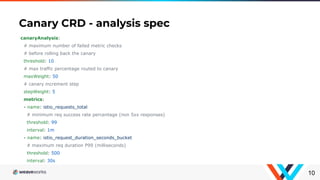
Canary CRD - analysis spec
10
canaryAnalysis:
# maximum number of failed metric checks
# before rolling back the canary
threshold: 10
# max traffic percentage routed to canary
maxWeight: 50
# canary increment step
stepWeight: 5
metrics:
- name: istio_requests_total
# minimum req success rate percentage (non 5xx responses)
threshold: 99
interval: 1m
- name: istio_request_duration_seconds_bucket
# maximum req duration P99 (milliseconds)
threshold: 500
interval: 30s
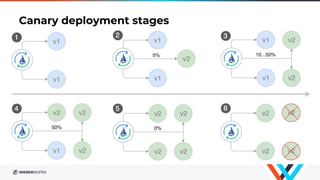
Canary deployment stages
Canary automation for production systems
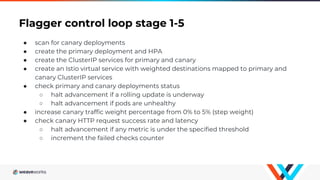
Flagger control loop stage 1-5
● scan for canary deployments
● create the primary deployment and HPA
● create the ClusterIP services for primary and canary
● create an Istio virtual service with weighted destinations mapped to primary and
canary ClusterIP services
● check primary and canary deployments status
○ halt advancement if a rolling update is underway
○ halt advancement if pods are unhealthy
● increase canary traffic weight percentage from 0% to 5% (step weight)
● check canary HTTP request success rate and latency
○ halt advancement if any metric is under the specified threshold
○ increment the failed checks counter
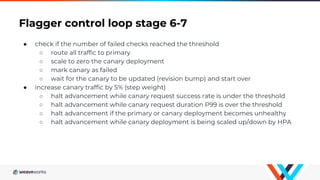
Flagger control loop stage 6-7
● check if the number of failed checks reached the threshold
○ route all traffic to primary
○ scale to zero the canary deployment
○ mark canary as failed
○ wait for the canary to be updated (revision bump) and start over
● increase canary traffic by 5% (step weight)
○ halt advancement while canary request success rate is under the threshold
○ halt advancement while canary request duration P99 is over the threshold
○ halt advancement if the primary or canary deployment becomes unhealthy
○ halt advancement while canary deployment is being scaled up/down by HPA
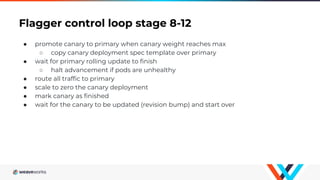
Flagger control loop stage 8-12
● promote canary to primary when canary weight reaches max
○ copy canary deployment spec template over primary
● wait for primary rolling update to finish
○ halt advancement if pods are unhealthy
● route all traffic to primary
● scale to zero the canary deployment
● mark canary as finished
● wait for the canary to be updated (revision bump) and start over
GitOps Progressive Delivery Demo
16
Links
17
Flagger
https://github.com/stefanprodan/flagger
GitOps demo repo
https://github.com/stefanprodan/gitops-progressive-delivery
Istio walkthrough
https://github.com/stefanprodan/istio-gke

Flagger: Istio Progressive Delivery Operator

  • 1.
    Flagger Istio Progressive DeliveryOperator Stefan Prodan @stefanprodan Istio London November 2018 1
  • 2.
    What is ProgressiveDelivery? Progressive Delivery is Continuous Delivery with fine-grained control over the blast radius. Building blocks ● User segmentation ● Traffic management ● Observability ● Automation https://redmonk.com/jgovernor/2018/08/06/towards-progressive-delivery/
  • 3.
    Introducing Flagger Flagger isa Kubernetes operator that automates the promotion of canary deployments using Istio routing for traffic shifting and Prometheus metrics for canary analysis. Flagger implements a control loop that gradually shifts traffic to the canary while measuring key performance indicators. Based on the KPIs analysis a canary is promoted or aborted.
  • 4.
    Get Flagger helm repoadd flagger https://flagger.app helm upgrade -i flagger flagger/flagger --namespace=istio-system --set metricsServer=http://prometheus.istio-system:9090 --set controlLoopInterval=1m helm upgrade -i flagger-grafana flagger/grafana --namespace=istio-system --set url=http://prometheus.istio-system:9090
  • 5.
  • 6.
    Key Performance Indicators Thedecision to pause the traffic shift, abort or promote a canary is based on: ● Deployment health status ● Request success rate percentage ● Request latency average value
  • 7.
    Observability Flagger emits Kubernetesevents related to the advancement and final status of a canary analysis.
  • 8.
    Observability RED +USE methods Flagger comes with a Grafana dashboard for canary analysis.
  • 9.
    Canary CRD 9 apiVersion: flagger.app/v1alpha1 kind:Canary metadata: name: podinfo namespace: test spec: # deployment reference targetRef: apiVersion: apps/v1 kind: Deployment name: podinfo # hpa reference (optional) autoscalerRef: apiVersion: autoscaling/v2beta1 kind: HorizontalPodAutoscaler name: podinfo service: # container port port: 9898 # Istio gateways (optional) gateways: - public-gateway.istio-system.svc.cluster.local # Istio virtual service host names (optional) hosts: - app.istio.weavedx.com
  • 10.
    Canary CRD -analysis spec 10 canaryAnalysis: # maximum number of failed metric checks # before rolling back the canary threshold: 10 # max traffic percentage routed to canary maxWeight: 50 # canary increment step stepWeight: 5 metrics: - name: istio_requests_total # minimum req success rate percentage (non 5xx responses) threshold: 99 interval: 1m - name: istio_request_duration_seconds_bucket # maximum req duration P99 (milliseconds) threshold: 500 interval: 30s
  • 11.
  • 12.
    Canary automation forproduction systems
  • 13.
    Flagger control loopstage 1-5 ● scan for canary deployments ● create the primary deployment and HPA ● create the ClusterIP services for primary and canary ● create an Istio virtual service with weighted destinations mapped to primary and canary ClusterIP services ● check primary and canary deployments status ○ halt advancement if a rolling update is underway ○ halt advancement if pods are unhealthy ● increase canary traffic weight percentage from 0% to 5% (step weight) ● check canary HTTP request success rate and latency ○ halt advancement if any metric is under the specified threshold ○ increment the failed checks counter
  • 14.
    Flagger control loopstage 6-7 ● check if the number of failed checks reached the threshold ○ route all traffic to primary ○ scale to zero the canary deployment ○ mark canary as failed ○ wait for the canary to be updated (revision bump) and start over ● increase canary traffic by 5% (step weight) ○ halt advancement while canary request success rate is under the threshold ○ halt advancement while canary request duration P99 is over the threshold ○ halt advancement if the primary or canary deployment becomes unhealthy ○ halt advancement while canary deployment is being scaled up/down by HPA
  • 15.
    Flagger control loopstage 8-12 ● promote canary to primary when canary weight reaches max ○ copy canary deployment spec template over primary ● wait for primary rolling update to finish ○ halt advancement if pods are unhealthy ● route all traffic to primary ● scale to zero the canary deployment ● mark canary as finished ● wait for the canary to be updated (revision bump) and start over
  • 16.
  • 17.