Adding Identity Management and Access Control to your Application
Joaquin Salvachua -Álvaro Alonso
UPM – DIT
Security Chapter. FIWARE
joaquin.salvachua@upm.es, @jsalvachua
aalonsog@dit.upm.es, @larsonalonso	
  
Identity Manager
3
Identity Manager
4
Account	
  
FIWARE Account (Identity Manager) Demo
5
OAuth 2.0
6
OAuth 2.0


  Login	
  with	
  
Oauth 2.0 Message Flow
8
Web	
  App	
   Account	
  
redirect	
  
request	
  access-­‐token	
  
access-­‐token	
  
access-­‐code	
  
OAuth	
  Library	
  
Request	
  user	
  info	
  using	
  access-­‐token	
  
Oauth 2.0 Libraries
•  http://oauth.net/2/
–  PHP, Cocoa, iOS, Java, Ruby, Javascript,
Python.
•  Example using Node.js
–  https://github.com/ging/oauth2-example-
client
9
Oauth 2.0 Demo
10
Web Applications and GEs
11


Generic	
  Enabler	
  
Account	
  
Request	
  +	
  
access-­‐token	
  
Oauth2	
  flows	
  
access-­‐token	
  
OK	
  +	
  user	
  info	
  (roles)	
  
Web	
  App	
  
OAuth	
  Library	
  
access_token	
  
Web Applications and GEs
GET https://GE_URL HTTP/1.1
Host: GE_hostname
X-Auth-Token: access_token
12
Securing your back-end
13
Back-­‐end	
  
Apps	
  
Account	
  
Request	
  +	
  
access-­‐token	
  
Web	
  App	
  
Oauth	
  Library	
  
Proxy	
  
access-­‐token	
  
OK	
  +	
  user	
  info	
  (roles)	
  
Oauth2	
  flows	
  
access_token	
  
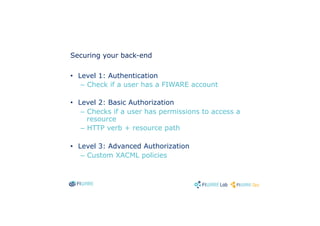
Securing your back-end
•  Level 1: Authentication
–  Check if a user has a FIWARE account
•  Level 2: Basic Authorization
–  Checks if a user has permissions to access a
resource
–  HTTP verb + resource path
•  Level 3: Advanced Authorization
–  Custom XACML policies
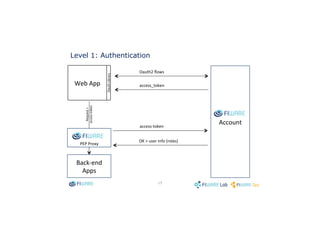
Level 1: Authentication
15
Back-­‐end	
  
Apps	
  
Account	
  
Request	
  +	
  
access-­‐token	
  
Web	
  App	
  
Oauth	
  Library	
  
PEP	
  Proxy	
  
access-­‐token	
  
OK	
  +	
  user	
  info	
  (roles)	
  
Oauth2	
  flows	
  
access_token	
  
Level 2: Basic Authorization
16
Back-­‐end	
  
Apps	
  
Account	
  
Request	
  +	
  
access-­‐token	
  
Web	
  App	
  
Oauth	
  Library	
  
PEP	
  Proxy	
  
access-­‐token	
  
OK	
  +	
  user	
  info	
  
Oauth2	
  flows	
  
access_token	
  
Auth	
  PDP	
  
GE	
  
roles	
  +	
  verb	
  +	
  path	
  
OK	
  
Level 3: Advanced Authorization
17
Back-­‐end	
  
Apps	
  
Account	
  
Request	
  +	
  
access-­‐token	
  
Web	
  App	
  
Oauth	
  Library	
  
PEP	
  Proxy	
  extension	
  
Oauth2	
  flows	
  
access_token	
  
Auth	
  PDP	
  
GE	
  
access-­‐token	
  
OK	
  +	
  user	
  info	
  
roles	
  +	
  XACML	
  <Request>	
  
OK	
  
FIWARE Proxy Demo
18
Documentation
•  FIWARE Account:
–  Source Code: https://github.com/ging/fi-
ware-idm
–  Documentation: https://github.com/ging/fi-
ware-idm/wiki
•  FIWARE Access Control
–  http://catalogue.fi-ware.org/enablers/access-
control-tha-implementation/documentation
•  FIWARE OAuth2 Demo:
–  https://github.com/ging/oauth2-example-
client
•  FIWARE Proxy:
–  https://github.com/ging/fi-ware-pep-proxy
19
Adding Identity Management and Access Control to your Application
Joaquin Salvachua -Álvaro Alonso
UPM – DIT
Security Chapter. FIWARE
joaquin.salvachua@upm.es, @jsalvachua
aalonsog@dit.upm.es, @larsonalonso

FIware Identity Manager

  • 1.
    Adding Identity Managementand Access Control to your Application Joaquin Salvachua -Álvaro Alonso UPM – DIT Security Chapter. FIWARE joaquin.salvachua@upm.es, @jsalvachua aalonsog@dit.upm.es, @larsonalonso  
  • 3.
  • 4.
  • 5.
    FIWARE Account (IdentityManager) Demo 5
  • 6.
  • 7.
    OAuth 2.0                                Login  with  
  • 8.
    Oauth 2.0 MessageFlow 8 Web  App   Account   redirect   request  access-­‐token   access-­‐token   access-­‐code   OAuth  Library   Request  user  info  using  access-­‐token  
  • 9.
    Oauth 2.0 Libraries • http://oauth.net/2/ –  PHP, Cocoa, iOS, Java, Ruby, Javascript, Python. •  Example using Node.js –  https://github.com/ging/oauth2-example- client 9
  • 10.
  • 11.
    Web Applications andGEs 11     Generic  Enabler   Account   Request  +   access-­‐token   Oauth2  flows   access-­‐token   OK  +  user  info  (roles)   Web  App   OAuth  Library   access_token  
  • 12.
    Web Applications andGEs GET https://GE_URL HTTP/1.1 Host: GE_hostname X-Auth-Token: access_token 12
  • 13.
    Securing your back-end 13 Back-­‐end   Apps   Account   Request  +   access-­‐token   Web  App   Oauth  Library   Proxy   access-­‐token   OK  +  user  info  (roles)   Oauth2  flows   access_token  
  • 14.
    Securing your back-end • Level 1: Authentication –  Check if a user has a FIWARE account •  Level 2: Basic Authorization –  Checks if a user has permissions to access a resource –  HTTP verb + resource path •  Level 3: Advanced Authorization –  Custom XACML policies
  • 15.
    Level 1: Authentication 15 Back-­‐end   Apps   Account   Request  +   access-­‐token   Web  App   Oauth  Library   PEP  Proxy   access-­‐token   OK  +  user  info  (roles)   Oauth2  flows   access_token  
  • 16.
    Level 2: BasicAuthorization 16 Back-­‐end   Apps   Account   Request  +   access-­‐token   Web  App   Oauth  Library   PEP  Proxy   access-­‐token   OK  +  user  info   Oauth2  flows   access_token   Auth  PDP   GE   roles  +  verb  +  path   OK  
  • 17.
    Level 3: AdvancedAuthorization 17 Back-­‐end   Apps   Account   Request  +   access-­‐token   Web  App   Oauth  Library   PEP  Proxy  extension   Oauth2  flows   access_token   Auth  PDP   GE   access-­‐token   OK  +  user  info   roles  +  XACML  <Request>   OK  
  • 18.
  • 19.
    Documentation •  FIWARE Account: – Source Code: https://github.com/ging/fi- ware-idm –  Documentation: https://github.com/ging/fi- ware-idm/wiki •  FIWARE Access Control –  http://catalogue.fi-ware.org/enablers/access- control-tha-implementation/documentation •  FIWARE OAuth2 Demo: –  https://github.com/ging/oauth2-example- client •  FIWARE Proxy: –  https://github.com/ging/fi-ware-pep-proxy 19
  • 20.
    Adding Identity Managementand Access Control to your Application Joaquin Salvachua -Álvaro Alonso UPM – DIT Security Chapter. FIWARE joaquin.salvachua@upm.es, @jsalvachua aalonsog@dit.upm.es, @larsonalonso