

Finding and editing images to illustrate your content


Bryony Taylor, Social Media Consultant and Trainer
Reach Further Don’t Blink briefing 26 June 2012
                                               ©Reach Further 2012
                                              www.reachfurther.com
Why?
Images are becoming everything:
- popularity of Pinterest
- Facebook edgerank algorithm
  means photos ‘float to the
  top’ of your news feed
- Even twitter profiles feature
  recently shared images
- They drive click-throughs!


                                   ©Reach Further 2012
                                  www.reachfurther.com
So?
Here are 5 tips for finding, editing and using images
in your social media


                                                ©Reach Further 2012
                                               www.reachfurther.com
1. Use a royalty free image site
to find great images

Sites we use are:
http://sxc.hu

http://flickr.com – do an
advanced search for
Creative Commons
content

 ALWAYS check the license and follow the usage guidelines
                                                   ©Reach Further 2012
                                                  www.reachfurther.com
2. Think laterally
                     For example, if your post
about what can
                     is about 'connecting
illustrate your
                     people' – do a quick
content
                     brainstorm for ideas eg.
                     A paper chain, holding
                     hands, a chain with links,
                     etc. and search for
                     images based on that
                     idea. An abstract image
                     can draw a person in to
                     read the article.
                                        ©Reach Further 2012
                                       www.reachfurther.com
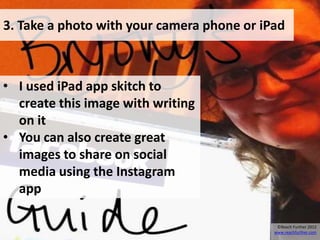
3. Take a photo with your camera phone or iPad


• I used iPad app skitch to
  create this image with writing
  on it
• You can also create great
  images to share on social
  media using the Instagram
  app

                                             ©Reach Further 2012
                                            www.reachfurther.com
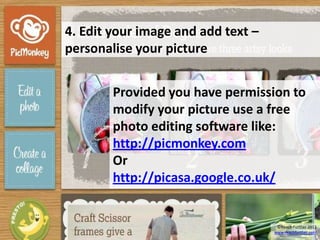
4. Edit your image and add text –
personalise your picture


        Provided you have permission to
        modify your picture use a free
        photo editing software like:
        http://picmonkey.com
        Or
        http://picasa.google.co.uk/


                                     ©Reach Further 2012
                                    www.reachfurther.com
5. SHARE your image on all your channels


Eg. write a blog post, add your image to it. Share the
image on Pinterest, Facebook and Twitter and this
will drive traffic back to your blog!
                                                ©Reach Further 2012
                                               www.reachfurther.com
Find out more, I’m happy to chat!

        0113 278 1800
   bryony@reachfurther.com
           @vahva


                                     ©Reach Further 2012
                                    www.reachfurther.com

Finding and editing images to illustrate your content

  • 1.
    Finding and editingimages to illustrate your content Bryony Taylor, Social Media Consultant and Trainer Reach Further Don’t Blink briefing 26 June 2012 ©Reach Further 2012 www.reachfurther.com
  • 2.
    Why? Images are becomingeverything: - popularity of Pinterest - Facebook edgerank algorithm means photos ‘float to the top’ of your news feed - Even twitter profiles feature recently shared images - They drive click-throughs! ©Reach Further 2012 www.reachfurther.com
  • 3.
    So? Here are 5tips for finding, editing and using images in your social media ©Reach Further 2012 www.reachfurther.com
  • 4.
    1. Use aroyalty free image site to find great images Sites we use are: http://sxc.hu http://flickr.com – do an advanced search for Creative Commons content ALWAYS check the license and follow the usage guidelines ©Reach Further 2012 www.reachfurther.com
  • 5.
    2. Think laterally For example, if your post about what can is about 'connecting illustrate your people' – do a quick content brainstorm for ideas eg. A paper chain, holding hands, a chain with links, etc. and search for images based on that idea. An abstract image can draw a person in to read the article. ©Reach Further 2012 www.reachfurther.com
  • 6.
    3. Take aphoto with your camera phone or iPad • I used iPad app skitch to create this image with writing on it • You can also create great images to share on social media using the Instagram app ©Reach Further 2012 www.reachfurther.com
  • 7.
    4. Edit yourimage and add text – personalise your picture Provided you have permission to modify your picture use a free photo editing software like: http://picmonkey.com Or http://picasa.google.co.uk/ ©Reach Further 2012 www.reachfurther.com
  • 8.
    5. SHARE yourimage on all your channels Eg. write a blog post, add your image to it. Share the image on Pinterest, Facebook and Twitter and this will drive traffic back to your blog! ©Reach Further 2012 www.reachfurther.com
  • 9.
    Find out more,I’m happy to chat! 0113 278 1800 bryony@reachfurther.com @vahva ©Reach Further 2012 www.reachfurther.com