File Handling
IN C++
What Is File?
A file is a collection on information, usually
stored on a computer's disk. Information
can be saved to files and then later reused.
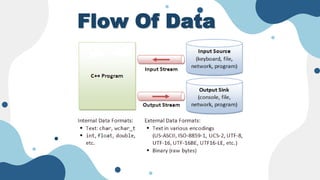
Flow Of Data
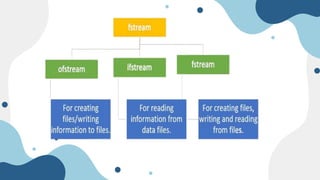
The following classes in C++
have access to file input and
output functions:
 fstream
 Ifstream
 ofstream
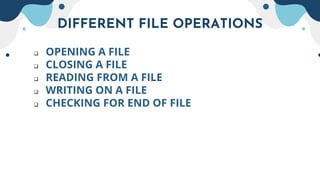
DIFFERENT FILE OPERATIONS
 OPENING A FILE
 CLOSING A FILE
 READING FROM A FILE
 WRITING ON A FILE
 CHECKING FOR END OF FILE
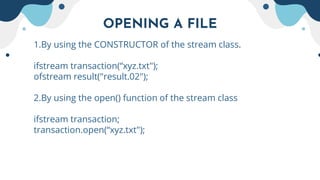
OPENING A FILE
1.By using the CONSTRUCTOR of the stream class.
ifstream transaction(“xyz.txt");
ofstream result("result.02");
2.By using the open() function of the stream class
ifstream transaction;
transaction.open(“xyz.txt");
File Mode Parameters
MODES MEANINGS
 ios::app Append to end-of file
 ios::ate Goto end of file on opening
 ios::binary Binary file
 ios::in Open existing file for reading
 ios::nocreate Open fails if file doesn't exist
 ios::noreplace Open fails if file already exists
 ios::out Open existing file for writing
 ios::trunc Deletes contents if it exists
The mode can combine two or more modes using bit wise or (l)
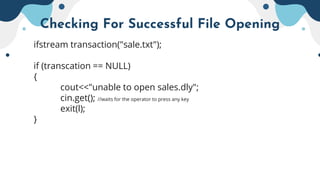
Checking For Successful File Opening
ifstream transaction("sale.txt");
if (transcation == NULL)
{
cout<<"unable to open sales.dly";
cin.get(); //waits for the operator to press any key
exit(l);
}
Closing of File
Stream name.close();
e.g., transaction.close();
Types of Files
 The two basic types of files are
1.Text File
&
2.Binary File
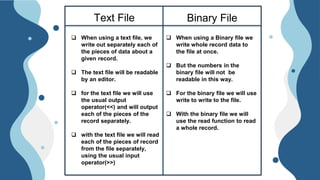
Text File Binary File
 When using a text file, we
write out separately each of
the pieces of data about a
given record.
 The text file will be readable
by an editor.
 for the text file we will use
the usual output
operator(<<) and will output
each of the pieces of the
record separately.
 with the text file we will read
each of the pieces of record
from the file separately,
using the usual input
operator(>>)
 When using a Binary file we
write whole record data to
the file at once.
 But the numbers in the
binary file will not be
readable in this way.
 For the binary file we will use
write to write to the file.
 With the binary file we will
use the read function to read
a whole record.
Prepared By:-
Jay Panchal 12202040501030
Kirtan Soni 12202040501032

File Handling in c++

  • 1.
  • 2.
    What Is File? Afile is a collection on information, usually stored on a computer's disk. Information can be saved to files and then later reused.
  • 3.
  • 4.
    The following classesin C++ have access to file input and output functions:  fstream  Ifstream  ofstream
  • 6.
    DIFFERENT FILE OPERATIONS OPENING A FILE  CLOSING A FILE  READING FROM A FILE  WRITING ON A FILE  CHECKING FOR END OF FILE
  • 7.
    OPENING A FILE 1.Byusing the CONSTRUCTOR of the stream class. ifstream transaction(“xyz.txt"); ofstream result("result.02"); 2.By using the open() function of the stream class ifstream transaction; transaction.open(“xyz.txt");
  • 8.
    File Mode Parameters MODESMEANINGS  ios::app Append to end-of file  ios::ate Goto end of file on opening  ios::binary Binary file  ios::in Open existing file for reading  ios::nocreate Open fails if file doesn't exist  ios::noreplace Open fails if file already exists  ios::out Open existing file for writing  ios::trunc Deletes contents if it exists The mode can combine two or more modes using bit wise or (l)
  • 9.
    Checking For SuccessfulFile Opening ifstream transaction("sale.txt"); if (transcation == NULL) { cout<<"unable to open sales.dly"; cin.get(); //waits for the operator to press any key exit(l); }
  • 10.
    Closing of File Streamname.close(); e.g., transaction.close();
  • 11.
    Types of Files The two basic types of files are 1.Text File & 2.Binary File
  • 12.
    Text File BinaryFile  When using a text file, we write out separately each of the pieces of data about a given record.  The text file will be readable by an editor.  for the text file we will use the usual output operator(<<) and will output each of the pieces of the record separately.  with the text file we will read each of the pieces of record from the file separately, using the usual input operator(>>)  When using a Binary file we write whole record data to the file at once.  But the numbers in the binary file will not be readable in this way.  For the binary file we will use write to write to the file.  With the binary file we will use the read function to read a whole record.
  • 13.
    Prepared By:- Jay Panchal12202040501030 Kirtan Soni 12202040501032