FILE HANDLING
Introduction
In programming, we may need a specific piece of input data to be created
multiple times. It is not always sufficient to just display data on the console.
The data to be displayed may be large, and only a limited amount of data may
be displayed on the console, as the memory is volatile, it is not efficient to
compute the same programmatically created data repeatedly. If we need to
save something, we can do so on the local file system, which is non-volatile
and accessible at any time. This necessitates the use of file management in C.
Description and Terminologies
Opening a File
Generally, the first operation performed on an object of one of these classes is to associate it
to a real file. This procedure is known to open a file.
We can open a file using any one of the following methods:
1. First is bypassing the file name in constructor at the time of object creation.
2. Second is using the open() funct
•The process of file handling refers to how we
store the available data or info in a file with the
help of a program. The C language stores all the
data available in a program into a file with the
help of file handling in C. This data can be
fetched/extracted from these files to work again in
any program.
ofstream: this strem class signifies the output file stream
and is applied to create files for writing information to
files.
ifstream:
•this stream class signifies the input file stream
and is applied for reading information from files
fstream
This stream class can be used for both read and
write from/to files.
File handling in C enables us to create, update, read, and
delete the files stored on the local file system through our C
program. The following operations can be performed on a
file.
• Creation of the new file
• Opening an existing file
• Reading from the file
• Writing to the file
• Deleting the file
Creating a new file
We use the fopen() function to create a new file as well as
open an existing file in our storage.
The syntax of fopen()- fopen("filename","mode")
When declaring a file in C, the pointer of the file type (FILE)
is used to point the file. fopen() will give the address of the
file to the file pointer which is going to create/open.
Reading on a file
Reading Data From an Existing File
To read data from an existing file we will use “r”
mode in file opening. To read the file character by
by character we use getc() and to read line by line
line we use fgets().
Writing Data to a File
While doing C++ programming, you write information
to a file from your program using the stream insertion
operator (<<) just as you use that operator to output
information to the screen. The only difference is that
you use an ofstream or fstream object instead of the
cout object.
Closing a file
When we are finished with our input and output operations
on a file we shall close it so that the operating system is
notified and its resources become available again. For that,
we call the stream's member function close. This member
function takes flushes the associated buffers and closes the
file:
Practical Application & Importance
•Allows us to preserve the information/data generated
after we run the program. Saves Time: Some programs
might require a large amount of input from their users.
In such cases, file handling allows you to easily access a
part of a code using individual commands.
• File handling provides a mechanism to store the output of a program in a file and to
perform various operations on it.
• File handling is an important aspect of programming because it allows program to read
data from write data to files, which are external storage devices. This is essential for
many programs that need to store data beyond the lifetime of a program’s.
The need for file handling in C is because -
• It saves time as we can easily access any part/outcome of the code whenever
required.
• It helps in preserving the data or information for reusability.
• There is no need to worry about storage.
• And without loss of data, we can easily transfer the contents of a file.
Syntax
Functions for file handling
There are many functions in the C library to open, read, write, search and close the file. A list
of file functions are given below:
No. Function Description
1. fopen()opens new or existing file
2. fprintf() write data into the file
3. fscanf()reads data from the file
4. fputc() writes a character into the file
5. fgetc() reads a character from file
6. fclose()closes the file
7. fseek() sets the file pointer to given position
8. fputw()writes an integer to file
9. fgetw() reads an integer from file
10. ftell() returns current position
11. rewind() sets the file pointer to the beginning of the file
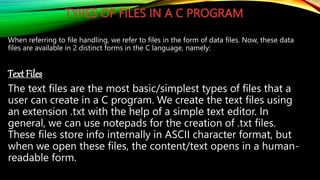
TYPES OF FILES IN A C PROGRAM
When referring to file handling, we refer to files in the form of data files. Now, these data
files are available in 2 distinct forms in the C language, namely:
Text Files
The text files are the most basic/simplest types of files that a
user can create in a C program. We create the text files using
an extension .txt with the help of a simple text editor. In
general, we can use notepads for the creation of .txt files.
These files store info internally in ASCII character format, but
when we open these files, the content/text opens in a human-
readable form.
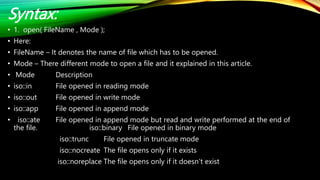
Syntax:
• 1. open( FileName , Mode );
• Here:
• FileName – It denotes the name of file which has to be opened.
• Mode – There different mode to open a file and it explained in this article.
• Mode Description
• iso::in File opened in reading mode
• iso::out File opened in write mode
• iso::app File opened in append mode
• iso::ate File opened in append mode but read and write performed at the end of
the file. iso::binary File opened in binary mode
iso::trunc File opened in truncate mode
iso::nocreate The file opens only if it exists
iso::noreplace The file opens only if it doesn’t exist
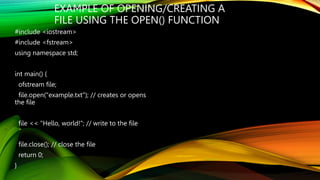
EXAMPLE OF OPENING/CREATING A
FILE USING THE OPEN() FUNCTION
#include <iostream>
#include <fstream>
using namespace std;
int main() {
ofstream file;
file.open("example.txt"); // creates or opens
the file
file << "Hello, world!"; // write to the file
file.close(); // close the file
return 0;
}
#include <iostream>
#include <fstream>
#include <string>
using namespace std;
int main() {
string line;
Ifstream my file ("example.txt");
if (myfile.is_open()) {
while (getline(file, line)) {
cout << line << endl; // output each line to the console
}
file.close();
} else {
cout << "Unable to open file" << endl;
}
return 0;
}
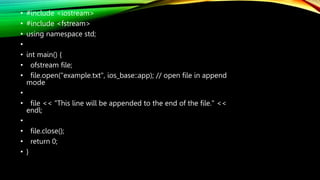
• #include <iostream>
• #include <fstream>
• using namespace std;
•
• int main() {
• ofstream file;
• file.open("example.txt", ios_base::app); // open file in append
mode
•
• file << "This line will be appended to the end of the file." <<
endl;
•
• file.close();
• return 0;
• }
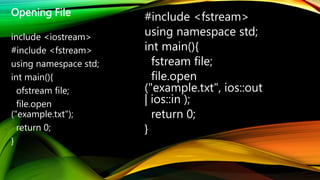
Opening File
include <iostream>
#include <fstream>
using namespace std;
int main(){
ofstream file;
file.open
("example.txt");
return 0;
}
#include <fstream>
using namespace std;
int main(){
fstream file;
file.open
("example.txt", ios::out
| ios::in );
return 0;
}
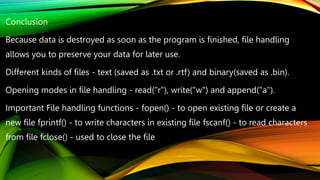
Conclusion
Because data is destroyed as soon as the program is finished, file handling
allows you to preserve your data for later use.
Different kinds of files - text (saved as .txt or .rtf) and binary(saved as .bin).
Opening modes in file handling - read("r"), write("w") and append("a").
Important File handling functions - fopen() - to open existing file or create a
new file fprintf() - to write characters in existing file fscanf() - to read characters
from file fclose() - used to close the file

File Handling

  • 1.
  • 2.
    Introduction In programming, wemay need a specific piece of input data to be created multiple times. It is not always sufficient to just display data on the console. The data to be displayed may be large, and only a limited amount of data may be displayed on the console, as the memory is volatile, it is not efficient to compute the same programmatically created data repeatedly. If we need to save something, we can do so on the local file system, which is non-volatile and accessible at any time. This necessitates the use of file management in C.
  • 3.
    Description and Terminologies Openinga File Generally, the first operation performed on an object of one of these classes is to associate it to a real file. This procedure is known to open a file. We can open a file using any one of the following methods: 1. First is bypassing the file name in constructor at the time of object creation. 2. Second is using the open() funct
  • 4.
    •The process offile handling refers to how we store the available data or info in a file with the help of a program. The C language stores all the data available in a program into a file with the help of file handling in C. This data can be fetched/extracted from these files to work again in any program.
  • 5.
    ofstream: this stremclass signifies the output file stream and is applied to create files for writing information to files. ifstream: •this stream class signifies the input file stream and is applied for reading information from files
  • 6.
    fstream This stream classcan be used for both read and write from/to files.
  • 7.
    File handling inC enables us to create, update, read, and delete the files stored on the local file system through our C program. The following operations can be performed on a file. • Creation of the new file • Opening an existing file • Reading from the file • Writing to the file • Deleting the file
  • 8.
    Creating a newfile We use the fopen() function to create a new file as well as open an existing file in our storage. The syntax of fopen()- fopen("filename","mode") When declaring a file in C, the pointer of the file type (FILE) is used to point the file. fopen() will give the address of the file to the file pointer which is going to create/open.
  • 9.
    Reading on afile Reading Data From an Existing File To read data from an existing file we will use “r” mode in file opening. To read the file character by by character we use getc() and to read line by line line we use fgets().
  • 10.
    Writing Data toa File While doing C++ programming, you write information to a file from your program using the stream insertion operator (<<) just as you use that operator to output information to the screen. The only difference is that you use an ofstream or fstream object instead of the cout object.
  • 11.
    Closing a file Whenwe are finished with our input and output operations on a file we shall close it so that the operating system is notified and its resources become available again. For that, we call the stream's member function close. This member function takes flushes the associated buffers and closes the file:
  • 12.
    Practical Application &Importance •Allows us to preserve the information/data generated after we run the program. Saves Time: Some programs might require a large amount of input from their users. In such cases, file handling allows you to easily access a part of a code using individual commands.
  • 13.
    • File handlingprovides a mechanism to store the output of a program in a file and to perform various operations on it. • File handling is an important aspect of programming because it allows program to read data from write data to files, which are external storage devices. This is essential for many programs that need to store data beyond the lifetime of a program’s.
  • 14.
    The need forfile handling in C is because - • It saves time as we can easily access any part/outcome of the code whenever required. • It helps in preserving the data or information for reusability. • There is no need to worry about storage. • And without loss of data, we can easily transfer the contents of a file.
  • 15.
    Syntax Functions for filehandling There are many functions in the C library to open, read, write, search and close the file. A list of file functions are given below: No. Function Description 1. fopen()opens new or existing file 2. fprintf() write data into the file 3. fscanf()reads data from the file 4. fputc() writes a character into the file 5. fgetc() reads a character from file 6. fclose()closes the file 7. fseek() sets the file pointer to given position 8. fputw()writes an integer to file 9. fgetw() reads an integer from file 10. ftell() returns current position 11. rewind() sets the file pointer to the beginning of the file
  • 16.
    TYPES OF FILESIN A C PROGRAM When referring to file handling, we refer to files in the form of data files. Now, these data files are available in 2 distinct forms in the C language, namely: Text Files The text files are the most basic/simplest types of files that a user can create in a C program. We create the text files using an extension .txt with the help of a simple text editor. In general, we can use notepads for the creation of .txt files. These files store info internally in ASCII character format, but when we open these files, the content/text opens in a human- readable form.
  • 17.
    Syntax: • 1. open(FileName , Mode ); • Here: • FileName – It denotes the name of file which has to be opened. • Mode – There different mode to open a file and it explained in this article. • Mode Description • iso::in File opened in reading mode • iso::out File opened in write mode • iso::app File opened in append mode • iso::ate File opened in append mode but read and write performed at the end of the file. iso::binary File opened in binary mode iso::trunc File opened in truncate mode iso::nocreate The file opens only if it exists iso::noreplace The file opens only if it doesn’t exist
  • 18.
    EXAMPLE OF OPENING/CREATINGA FILE USING THE OPEN() FUNCTION #include <iostream> #include <fstream> using namespace std; int main() { ofstream file; file.open("example.txt"); // creates or opens the file file << "Hello, world!"; // write to the file file.close(); // close the file return 0; }
  • 19.
    #include <iostream> #include <fstream> #include<string> using namespace std; int main() { string line; Ifstream my file ("example.txt"); if (myfile.is_open()) { while (getline(file, line)) { cout << line << endl; // output each line to the console } file.close(); } else { cout << "Unable to open file" << endl; } return 0; }
  • 20.
    • #include <iostream> •#include <fstream> • using namespace std; • • int main() { • ofstream file; • file.open("example.txt", ios_base::app); // open file in append mode • • file << "This line will be appended to the end of the file." << endl; • • file.close(); • return 0; • }
  • 22.
    Opening File include <iostream> #include<fstream> using namespace std; int main(){ ofstream file; file.open ("example.txt"); return 0; } #include <fstream> using namespace std; int main(){ fstream file; file.open ("example.txt", ios::out | ios::in ); return 0; }
  • 24.
    Conclusion Because data isdestroyed as soon as the program is finished, file handling allows you to preserve your data for later use. Different kinds of files - text (saved as .txt or .rtf) and binary(saved as .bin). Opening modes in file handling - read("r"), write("w") and append("a"). Important File handling functions - fopen() - to open existing file or create a new file fprintf() - to write characters in existing file fscanf() - to read characters from file fclose() - used to close the file